AllMCPs
BrowseBestCategoriesStackCompareToolsGuidesBlog Log in Submit MCP

Stay in the loop

Get new MCP servers and top picks in your inbox.

AllMCPs

The open directory for discovering and installing Model Context Protocol servers.

Explore

  • Browse servers
  • Best MCP servers
  • Categories
  • MCP clients
  • Agent prompts
  • Stack Builder
  • Compare servers
  • Tags index
  • Submit a server
  • Pricing

Learn

  • Guides hub
  • What is MCP?
  • Install guide
  • Troubleshooting
  • Security
  • Blog
  • Blog RSS

Tools

  • All tools
  • Config generator
  • Config validator
  • MCP playground
  • OpenAPI โ†’ MCP
  • Badge generator

For agents

  • API docs
  • Trust & traffic
  • llms.txt โ†— (opens in a new tab)
  • Catalog JSON โ†— (opens in a new tab)
  • Remote MCP โ†— (opens in a new tab)

Company

  • About
  • Contact
  • X (@AllMCPs) โ†— (opens in a new tab)
  • GitHub โ†— (opens in a new tab)
  • Terms
  • Privacy
AllMCPs VerifiedAllMCPs VerifiedFeatured on Nick LaunchesFeatured on Nick LaunchesLaunch Llama NewsletterLaunch Llama NewsletterVerified DR - allmcps.comVerified DR - allmcps.comFeatured on SaaSGrowFeatured on SaaSGrowFeatured on Twelve ToolsFeatured on Twelve ToolsFeatured on Saaspa.geFeatured on Saaspa.geFeatured on Findly.toolsFeatured on Findly.toolsFeatured on Startup FameFeatured on Startup FameFeatured on LaunchKiwiFeatured on LaunchKiwiFeatured on ScrollLaunchFeatured on ScrollLaunchFeatured on DailyPingsFeatured on DailyPingsFazier badgeFazier badgeFeatured on NewTool.siteFeatured on NewTool.siteFeatured on saasfame.comFeatured on saasfame.comDR Checker - Domain RatingDR Checker - Domain RatingListed on Turbo0Listed on Turbo0Launched on LaunchBoard - Product Launch PlatformLaunched on LaunchBoard - Product Launch PlatformList on SimilarlabsList on Similarlabshttps://codetrendy.comhttps://codetrendy.comListed on DevTool.ioFeatured on BuildlistFeatured on BuildlistAllMCPs VerifiedAllMCPs VerifiedFeatured on Nick LaunchesFeatured on Nick LaunchesLaunch Llama NewsletterLaunch Llama NewsletterVerified DR - allmcps.comVerified DR - allmcps.comFeatured on SaaSGrowFeatured on SaaSGrowFeatured on Twelve ToolsFeatured on Twelve ToolsFeatured on Saaspa.geFeatured on Saaspa.geFeatured on Findly.toolsFeatured on Findly.toolsFeatured on Startup FameFeatured on Startup FameFeatured on LaunchKiwiFeatured on LaunchKiwiFeatured on ScrollLaunchFeatured on ScrollLaunchFeatured on DailyPingsFeatured on DailyPingsFazier badgeFazier badgeFeatured on NewTool.siteFeatured on NewTool.siteFeatured on saasfame.comFeatured on saasfame.comDR Checker - Domain RatingDR Checker - Domain RatingListed on Turbo0Listed on Turbo0Launched on LaunchBoard - Product Launch PlatformLaunched on LaunchBoard - Product Launch PlatformList on SimilarlabsList on Similarlabshttps://codetrendy.comhttps://codetrendy.comListed on DevTool.ioFeatured on BuildlistFeatured on Buildlist
ยฉ 2026 Jackalope Digital LLC. All rights reserved.
  1. Home
  2. ๐ŸŽฎ Gaming
  3. Glade Mcp
G
Health: ActiveRecent health check succeeded.Last checked 8/11/2026, 12:00:47 AM

Glade Mcp

Enrichment pendingWe havenโ€™t run our AI enrichment pass on this listing yet, so the overview, use cases, and FAQ below may be sparse or missing. We work through the catalog over time โ€” check back soon.
View Repository189 GitHub StarsTotal stargazers on GitHub for the source repository (189 stars).

Control the Unity and Godot editors from AI clients: scenes, scripts, physics, materials.

Quick Install

Automated & IDE Setup

Copy the AI prompt to install this server into Claude Code, Cursor, or another agent โ€” or use 1-click editor setup below.

Add to CursorAdd to VS Code
Not yet automatically verified

We haven't yet run this listing's install command through our automated sandbox check. This isn't a red flag โ€” we're steadily working through the catalog.

Manual Client & Custom JSON ConfigExpand JSON โ–พ

Install Config Generator

Choose your client
claude_desktop_config.json
{
  "mcpServers": {
    "glade-mcp": {
      "command": "uvx",
      "args": [
        "gladekit-mcp"
      ]
    }
  }
}

๐Ÿ’ก Paste into ~/Library/Application Support/Claude/claude_desktop_config.json (macOS) or %APPDATA%\Claude\claude_desktop_config.json (Windows)

Install Directory Badge Claim listing Alternatives๐ŸŽฎ More in Gaming

Documentation Overview

GladeKit MCP

Connect Cursor, Claude Code, Windsurf, Claude Desktop, and other AI clients directly to your Unity or Godot editor.

Unity: 260+ tools, full Unity-aware system prompt, GLADE.md project context, script semantic search, skill calibration, free CC0 asset pipeline, cloud intelligence layer with RAG and cross-session memory.

Godot (4.3+): 105 native tools across scene/node, scripts, resources, signals, physics, 2D (sprites, tilemaps, parallax), audio, particles, animation, camera, navigation, runtime (incl. structured runtime-event observation), project introspection, Control / Window UI, and lighting & WorldEnvironment.

The MCP server auto-detects which editor is running (Unity on :8765, Godot on :8766) and exposes the matching tool set.
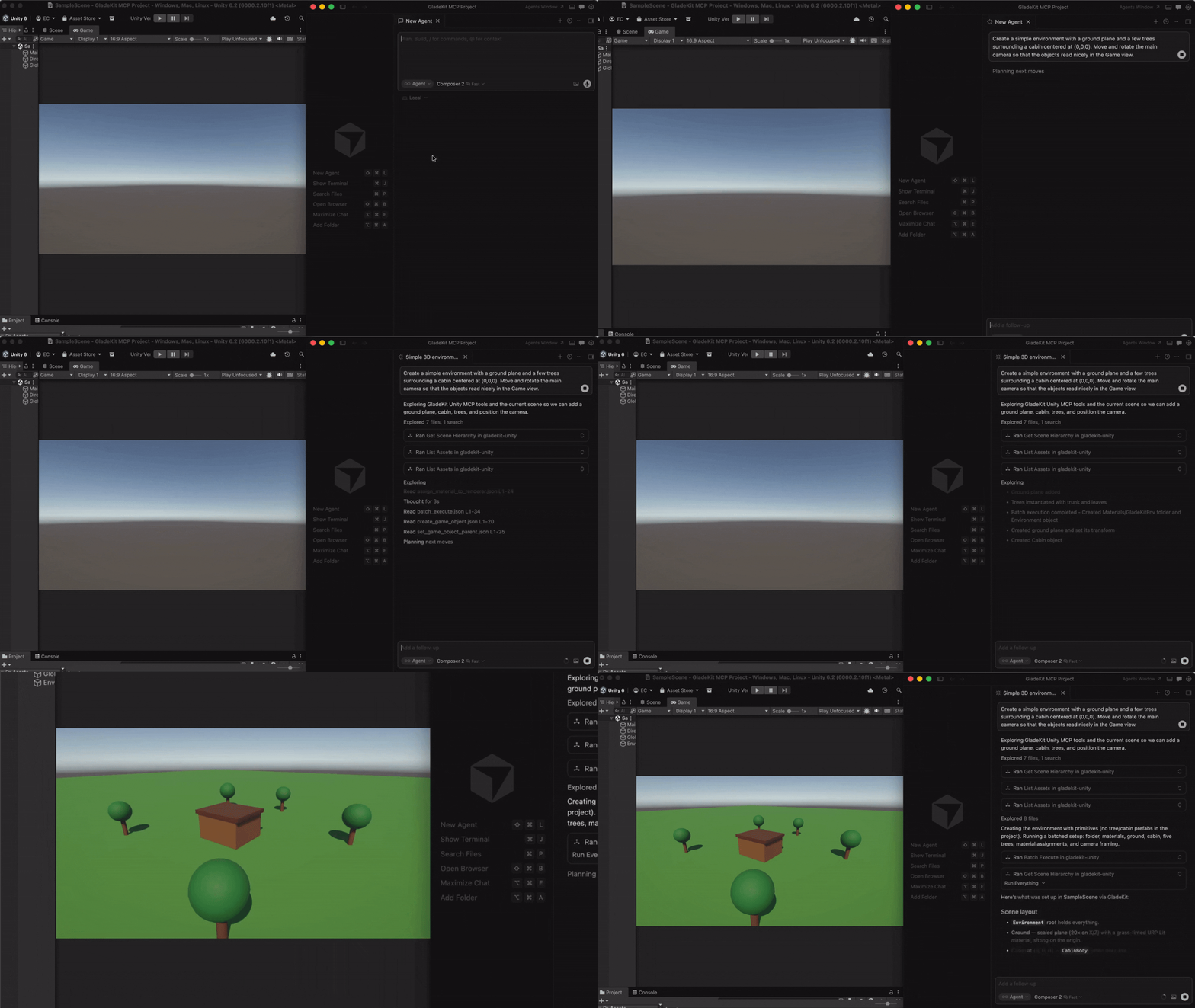
GladeKit MCP Demo


Quick Start

1. Install the editor bridge

GladeKit MCP supports both Unity and Godot. Install the bridge for your engine by following the instructions below.

Unity

In Unity, open Window > Package Manager > + > Add package from git URL...

Code
https://github.com/Glade-tool/glade-mcp.git?path=/unity-bridge

The Unity bridge starts automatically on localhost:8765.

Godot (4.3+)
  1. Download com.gladekit.mcp-bridge.zip from the latest Godot bridge release. (Grab the zip asset under Assets - not "Source code".)
  2. Extract it and you get a single com.gladekit.mcp-bridge/ folder. Move it into your project's addons/ directory, so the final path is <your-godot-project>/addons/com.gladekit.mcp-bridge/plugin.cfg.
  3. In Godot: Project โ†’ Project Settings โ†’ Plugins โ†’ enable GladeKit MCP Bridge.

The Godot bridge starts automatically on localhost:8766. You should see a confirmation line in the editor Output panel:

Code
[GladeKit MCP Bridge] listening on ws://127.0.0.1:8766  (v0.7.6, 105 tools registered, thread-polled at 200Hz)

Supported: Godot 4.3+ GDScript projects, Forward+ and Compatibility renderers, 2D and 3D. Not yet supported: Godot Mono / C# projects, web export targets, headless server builds. The bridge is editor-only; it never runs in exported games.

Engine auto-detection: the MCP server probes both ports on startup and exposes the matching tool set. Running both editors at once? Set GLADEKIT_MCP_FORCE_ENGINE=unity or =godot to pin a specific engine.

2. Connect your AI client

Install uv (one-time):

  • Mac/Linux: curl -LsSf https://astral.sh/uv/install.sh | sh
  • Windows: powershell -ExecutionPolicy ByPass -c "irm https://astral.sh/uv/install.ps1 | iex"

Then add the MCP config to your AI client. The client launches the MCP server automatically - no manual server step.

Claude Code

Option A: one-liner (recommended)

  • Mac/Linux: claude mcp add --transport stdio gladekit-mcp --scope user -- uvx gladekit-mcp
  • Windows: claude mcp add --transport stdio gladekit-mcp --scope user -- cmd /c uvx gladekit-mcp

Option B: manual config

If you cloned this repo, the .mcp.json auto-connects. Otherwise add to your Claude Code MCP settings:

config.json
{
  "mcpServers": {
    "gladekit-mcp": {
      "command": "uvx",
      "args": ["gladekit-mcp"]
    }
  }
}
Cursor

Cursor Settings > MCP > Add new MCP server:

config.json
{
  "mcpServers": {
    "gladekit-mcp": {
      "command": "uvx",
      "args": ["gladekit-mcp"]
    }
  }
}
Claude Desktop

Edit ~/Library/Application Support/Claude/claude_desktop_config.json (Mac) or %APPDATA%\Claude\claude_desktop_config.json (Windows):

config.json
{
  "mcpServers": {
    "gladekit-mcp": {
      "command": "uvx",
      "args": ["gladekit-mcp"]
    }
  }
}
Cline (VS Code extension)

Open Cline's MCP settings file (auto-created on first MCP use):

  • Mac: ~/Library/Application Support/Code/User/globalStorage/saoudrizwan.claude-dev/settings/cline_mcp_settings.json
  • Windows: %APPDATA%\Code\User\globalStorage\saoudrizwan.claude-dev\settings\cline_mcp_settings.json
  • Linux: ~/.config/Code/User/globalStorage/saoudrizwan.claude-dev/settings/cline_mcp_settings.json

Add:

config.json
{
  "mcpServers": {
    "gladekit-mcp": {
      "command": "uvx",
      "args": ["gladekit-mcp"]
    }
  }
}
Windsurf

In Windsurf, open Windsurf Settings โ†’ MCP Servers โ†’ Open MCP Registry, then click the settings (gear) icon to open mcp_config.json. Add the snippet below (or edit ~/.codeium/windsurf/mcp_config.json directly):

config.json
{
  "mcpServers": {
    "gladekit-mcp": {
      "command": "uvx",
      "args": ["gladekit-mcp"]
    }
  }
}
Unity AI Gateway (native in-editor)

Unity's built-in AI Assistant can connect to GladeKit via MCP. This gives you GladeKit's 260+ tools directly inside the Unity Editor - no external AI client needed.

Requires: Unity 6000.3+ with AI Gateway package (com.unity.ai.assistant@2.x)

  1. In Unity, go to Edit > Project Settings > AI > MCP Servers
  2. Click Open Config File and paste:
config.json
{
  "enabled": true,
  "path": "",
  "mcpServers": {
    "gladekit-mcp": {
      "type": "stdio",
      "command": "uvx",
      "args": ["gladekit-mcp"]
    }
  }
}
  1. Under Path Configuration, paste your terminal's PATH into User Path so Unity can find uvx. To get your PATH:
    • Mac/Linux: echo $PATH
    • Windows: echo %PATH%
  2. Click Refresh Config File and Reload Servers
  3. Verify the server shows StartedSuccessfully in the Servers section

Tip: If uvx isn't found, add the directory containing it to the path field in the config (e.g., "/opt/homebrew/bin" on Mac or "C:\\Users\\<you>\\.local\\bin" on Windows). Alternatively, use pip install gladekit-mcp and set "command": "python" with "args": ["-m", "gladekit_mcp"].

Troubleshooting: If the server shows FailedToStart, click Inspect for error details. The most common cause is PATH - Unity's PATH differs from your terminal's PATH. See the Troubleshooting section below.

Paid tier (GLADEKIT_API_KEY): To enable RAG knowledge base and cross-session memory on any client, add the key to the env field of your config. See Cloud intelligence below.

VS Code (GitHub Copilot)

Add to .vscode/mcp.json in your workspace:

config.json
{
  "servers": {
    "gladekit-mcp": {
      "type": "stdio",
      "command": "uvx",
      "args": ["gladekit-mcp"]
    }
  }
}

Why GladeKit Unity MCP?

FeatureGladeKit Unity MCPunity-mcp (CoplayDev)
Tools260+ granular tools across 16+ categories~40 consolidated tools
System promptFull Unity intelligence - render pipeline detection, input system routing, tool discipline rulesNone
Project contextGLADE.md - inject your game design doc into every requestNone
Script searchSemantic search via OpenAI embeddings (bring your own key)None
Skill calibrationAuto-detects beginner/expert, adapts response verbosityNone
In-session memoryremember_for_session - AI stores and recalls facts mid-conversationNone
Cloud intelligenceGLADEKIT_API_KEY - RAG knowledge base, cross-session memory, convention extractionNone
LicenseMITMIT

All core features are free and local. The cloud intelligence layer is optional and requires a GLADEKIT_API_KEY.


Features

260+ tools across 16+ categories

Scene โ€ข GameObjects โ€ข Scripts โ€ข Prefabs โ€ข Materials โ€ข Lighting โ€ข VFX & Audio โ€ข Animation โ€ข IK โ€ข Physics (3D & 2D) โ€ข Tilemaps โ€ข Camera โ€ข UI โ€ข Input System โ€ข Terrain & NavMesh โ€ข Profiler โ€ข Asset Pipeline

All 260+ tools are dispatchable. Claude Code sees ~80 curated core tools by default (Claude Code has a practical 128-tool limit; Unity AI Gateway has a cloud token budget). Use get_relevant_tools to discover extended tools for specialized work (blend trees, NavMesh, IK, Cinemachine, etc.).

5 meta-tools: get_relevant_tools (task-based tool discovery + RAG context), remember_for_session (store facts), recall_session_memories (retrieve facts), batch_execute (multi-step tool dispatch), search_project_scripts (semantic code search).

7 MCP resources: Bridge health, project context, scene hierarchy, project scripts, current selection, GLADE.md, and session memory.

GLADE.md

Create a GLADE.md file in your Unity project root. The MCP server reads it and injects it into every request. Works as a permanent context layer: your game's design intent, conventions, and constraints are always in scope.

markdown
# My Game

Genre: 3D platformer
Player: CharacterController, double jump enabled
Art style: pixel art, 16x16 sprites
Naming: PascalCase for scripts, snake_case for folders
Script semantic search

Set OPENAI_API_KEY in your MCP config's env field and the server ranks project scripts by semantic similarity to your query. Ask "how does the enemy spawn?" and the right script surfaces, even if it's not named EnemySpawner.

Everything needed ships with the package; no install flags or extras required. Get a key at platform.openai.com/api-keys (pay-as-you-go, pennies per search via text-embedding-3-small).

config.json
{
  "mcpServers": {
    "gladekit-mcp": {
      "command": "uvx",
      "args": ["gladekit-mcp"],
      "env": { "OPENAI_API_KEY": "sk-..." }
    }
  }
}

Without the key, search_project_scripts still returns scripts - just unranked. Keys are never sent anywhere except OpenAI's embedding endpoint.

Skill calibration

The server tracks vocabulary across your messages and detects whether you're a Unity beginner or expert. Beginners get plain-language explanations and encouraging framing. Experts get terse, technical responses. Calibration persists to .gladekit/skill_level.json in your project.

Asset pipeline (free CC0 imports)

Three tools for finding and importing free, commercially-usable assets directly from your AI client. All assets are CC0 (public domain, no attribution required). v1 ships Kenney.nl packs; additional providers (Freesound, Quaternius, AI generation) are on the roadmap.

ToolPurpose
find_assetSearch ranked candidates by description, asset type, style, and license. Read-only, no Unity dispatch.
import_assetDownload, extract, place under Assets/, configure import settings for the asset type, and write a .gladekit-asset.json sidecar with license metadata. Requires explicit licenseAcknowledged: true.
list_imported_assetsWalk the project's sidecars and surface a license audit (license counts, attribution-required count). Useful before a commercial release.

Example workflow (Cursor, Claude Code, Windsurf use the same pattern):

You: I'm prototyping a 2D platformer and need placeholder character + tile art. Find me something free.

The AI calls find_asset:

config.json
{
  "description": "platformer character and tiles",
  "asset_type": "sprite_2d",
  "max_results": 5
}

Result (truncated):

config.json
{
  "success": true,
  "candidates": [
    {
      "id": "kenney/platformer-pack-redux",
      "name": "Platformer Pack Redux",
      "description": "360+ side-scrolling platformer sprites: characters, enemies, tiles, items, hazards.",
      "license": "CC0-1.0",
      "license_summary": "Public domain. No attribution required for any use, including commercial.",
      "official_page": "https://kenney.nl/assets/platformer-pack-redux",
      "approx_assets": 360,
      "score": 0.92
    },
    { "id": "kenney/pixel-platformer", "score": 0.71, ... },
    { "id": "kenney/tiny-town", "score": 0.45, ... }
  ],
  "count": 3
}

You: Let's go with Platformer Pack Redux. Import it to Assets/Sprites/Platformer/. I accept the CC0 license.

The AI calls import_asset:

config.json
{
  "candidateId": "kenney/platformer-pack-redux",
  "assetType": "sprite_2d",
  "licenseAcknowledged": true,
  "targetPath": "Assets/Sprites/Platformer/"
}

The MCP server resolves the download URL locally (catalog is bundled with the server, no cloud dependency), passes it to the Unity bridge, which downloads, extracts, configures TextureImporter for each sprite (Texture Type = Sprite, Filter Mode = Point, Uncompressed) and writes the license sidecar. Result:

config.json
{
  "success": true,
  "message": "Imported 360 file(s) from kenney/platformer-pack-redux to Assets/Sprites/Platformer/",
  "downloadedBytes": 1842340,
  "importedFileCount": 360,
  "configuredImportSettings": 354,
  "license": "CC0-1.0",
  "sidecarPath": "Assets/Sprites/Platformer/.gladekit-asset.json"
}

The sprites appear in the Unity Project window, ready to drop into a scene.

You: Before I ship, audit my imported assets. Anything that needs attribution?

The AI calls list_imported_assets:

config.json
{
  "success": true,
  "count": 1,
  "licenseCounts": { "CC0-1.0": 1 },
  "attributionRequiredCount": 0,
  "entries": [
    {
      "candidate_id": "kenney/platformer-pack-redux",
      "license": "CC0-1.0",
      "asset_type": "sprite_2d",
      "imported_at": "2026-05-10T09:37:42Z",
      "target_path": "Assets/Sprites/Platformer/",
      "imported_file_count": 360,
      "sidecar_path": "Assets/Sprites/Platformer/.gladekit-asset.json"
    }
  ]
}

CC0 needs no attribution; the audit report is empty for required attributions. If you imported a CC-BY asset later, it would surface here so you remember to credit it.

Security and license discipline:

  • The LLM never sees download URLs. URL resolution happens cloud/MCP-side; the bridge tool refuses if the resolved fields are missing or LLM-injected.
  • licenseAcknowledged: true is required on every import_asset call. The bridge refuses without it. Do not set it without explicit user confirmation.
  • The bridge validates _resolvedUrl's host against a per-provider allowlist (AssetPipelineGuard.IsResolvedUrlHostAllowed) before downloading. Even a client bypassing both the cloud and MCP preprocessors cannot smuggle in an arbitrary download URL; unknown hosts fail closed. HTTPS only.
  • Every imported asset bundle gets a .gladekit-asset.json sidecar recording the candidate id, provider, license, attribution string, source URL, and timestamp. list_imported_assets reads these for the audit report.
  • Asset Pipeline tools are gated by AssetPipelineGuard on the bridge side. A misconfigured client cannot bypass it.

Disabling the pipeline (for studio / curated-asset workflows):

Set GLADEKIT_MCP_DISABLE_ASSET_PIPELINE=1 in the MCP server's environment to suppress the three tools entirely. They will not appear in the tool list and dispatch will refuse with a clear error. This is the recommended setting for projects that already have a managed asset workflow (Perforce-tracked libraries, internal asset stores) where AI-driven external downloads aren't appropriate.

config.json
{
  "mcpServers": {
    "gladekit-mcp": {
      "command": "uvx",
      "args": ["gladekit-mcp"],
      "env": { "GLADEKIT_MCP_DISABLE_ASSET_PIPELINE": "1" }
    }
  }
}

The Unity bridge enforces the same gate via EditorPrefs (GladeAI.AssetPipelineEnabled, default true). Toggle it via POST http://localhost:8765/api/settings { "assetPipelineEnabled": false }.

Cloud intelligence

Set GLADEKIT_API_KEY in your MCP config's env field to unlock cloud-powered features:

  • RAG knowledge base - get_relevant_tools queries a curated Unity knowledge base (API corrections, error patterns) and injects results alongside tool recommendations.
  • Cross-session persistent memory - facts stored with remember_for_session persist across sessions and are re-injected into the system prompt.
  • Convention extraction - coding patterns (naming, architecture, preferences) are distilled from your accumulated memories and surfaced in future sessions.

All cloud features degrade gracefully: if the key is missing or the cloud is unreachable, everything works normally.

config.json
{
  "mcpServers": {
    "gladekit-mcp": {
      "command": "uvx",
      "args": ["gladekit-mcp"],
      "env": { "GLADEKIT_API_KEY": "your-api-key" }
    }
  }
}
Transports (stdio + streamable HTTP)

GladeKit MCP supports two transports. stdio is the default and works with all MCP clients - every config above uses stdio.

Streamable HTTP is for clients that prefer URL-based config (Claude Desktop URL mode, custom clients). Launch the server manually, then point your client at the URL:

bash
# Defaults: host=127.0.0.1, port=8766, path=/mcp
gladekit-mcp --transport http

# Custom host/port/path
gladekit-mcp --transport http --host 127.0.0.1 --port 9000 --path /mcp

Endpoints:

  • POST/GET/DELETE http://127.0.0.1:8766/mcp - MCP streamable-HTTP endpoint
  • GET http://127.0.0.1:8766/health - liveness check

Security defaults:

  • Binds loopback-only (127.0.0.1). Use --host 0.0.0.0 to expose on LAN - opt-in only.
  • DNS-rebinding protection enabled for loopback binds: requests with a Host header other than 127.0.0.1:<port> or localhost:<port> are rejected with 421 Misdirected Request.
  • Non-loopback binds disable rebinding protection (you've taken responsibility for the network) and print a warning on startup.

Client config example:

config.json
{
  "mcpServers": {
    "gladekit-mcp": {
      "url": "http://127.0.0.1:8766/mcp"
    }
  }
}
Environment Variables
VariableRequiredDescription
UNITY_BRIDGE_URLNoUnity bridge URL (default: http://localhost:8765)
OPENAI_API_KEYNoEnables script semantic search via embeddings (get one)
GLADEKIT_API_KEYNoEnables RAG knowledge base, cross-session memory, convention extraction
GLADEKIT_MCP_DISABLE_ASSET_PIPELINENoSet to 1 to suppress find_asset / import_asset / list_imported_assets (curated-asset workflows)
GLADEKIT_MCP_SUPPRESS_BRIDGE_WARNINGNoSet to 1 to silence the stderr warning when the Unity bridge is older than the recommended version
Troubleshooting

Bridge not connecting

  • Open Unity and wait for it to finish importing assets - the bridge starts automatically
  • Check Window > GladeKit MCP in Unity - the Bridge and AI Client indicators show connection status
  • Verify nothing else is using port 8765: lsof -i :8765 (Mac/Linux) or netstat -ano | findstr 8765 (Windows)

AI client can't find uvx

  • Install uv: curl -LsSf https://astral.sh/uv/install.sh | sh (Mac/Linux) or pip install uv
  • Or use pip install gladekit-mcp and change the config command from "uvx" to "python" with args ["-m", "gladekit_mcp"]

Tools not appearing in Claude Code

  • Claude Code has a practical ~128-tool limit. GladeKit shows ~80 curated core tools by default - this is intentional. All 260+ are dispatchable: use get_relevant_tools to find extended tools by task description.

GLADE.md not being picked up

  • The file must be named exactly GLADE.md (case-sensitive on Mac/Linux) and placed in the Unity project root (same directory as Assets/, Packages/, ProjectSettings/)

Stderr warning: Unity bridge X.Y.Z is older than recommended

  • Unity caches UPM git packages and never refetches, so an ?path=unity-bridge install drifts behind main over time. Update via Unity โ†’ Window > Package Manager > GladeKit MCP Bridge > Update, or pin the manifest entry to a specific tag so future updates are explicit:

    json
    "com.gladekit.mcp-bridge": "https://github.com/Glade-tool/glade-mcp.git?path=unity-bridge#v0.7.12"
    
  • The same warning also appears as a one-shot prefix on the next tool response so you see it in chat. To silence both: add "GLADEKIT_MCP_SUPPRESS_BRIDGE_WARNING": "1" to the env of your MCP client config.

Unity AI Gateway - server shows FailedToStart

  • Click Inspect in the Servers section for the error message
  • Most common cause: Unity can't find uvx. Under Path Configuration, paste your terminal's full PATH into User Path, then click Refresh Config File and Reload Servers
  • On Windows: echo %PATH% in Command Prompt. On Mac/Linux: echo $PATH
  • Alternative: use pip install gladekit-mcp and set the command to "python" with args ["-m", "gladekit_mcp"] - avoids the uvx PATH dependency
  • Validate outside Unity first: run uvx gladekit-mcp in a terminal (you should see the gladekit-mcp v... banner on stderr)
Architecture
Code
[AI Client: Cursor / Claude Code / Windsurf / Claude Desktop / Unity AI Gateway]
         |
         | stdio or HTTP MCP protocol
         v
[gladekit_mcp Python process]
    bridge.py -> HTTP localhost:8765
    prompts.py -> system prompt (auto-reads render pipeline, input system, GLADE.md)
    tools/ -> 260+ tool schemas + dispatch
    cloud.py -> optional GLADEKIT_API_KEY -> api.gladekit.com
         |
         | HTTP localhost:8765
         v
[Unity Bridge -- C# Editor extension (UPM package)]
    UnityBridgeServer.cs -> HttpListener on :8765
    260+ ITool implementations
    UnityContextGatherer -> scene, scripts, packages, render pipeline
Contributing

The Unity bridge (unity-bridge/) is the source of truth for C# tools. Adding a tool requires three changes:

1. C# implementation (unity-bridge/Editor/Tools/Implementations/<Category>/MyTool.cs):

csharp
public class MyTool : ITool
{
    public string Name => "my_tool";
    public string Execute(Dictionary<string, object> args)
    {
        // ... Unity Editor API calls ...
        return ToolUtils.CreateSuccessResponse("Done", extras);
    }
}

2. C# registration (unity-bridge/Editor/Tools/Registrars/<Category>Tools.cs):

Add Register(new MyTool()); to the matching category registrar. Registration is explicit โ€” an unregistered tool compiles fine but returns "Tool was blocked from executing or null." when dispatched.

3. Python schema (mcp-server/src/gladekit_mcp/tools/<category>.py):

Add an entry to the category's tool list following the existing format (OpenAI function-calling schema).


License: MIT - see LICENSE.

The GladeKit desktop app is a separate commercial product that layers streaming, miss recovery, and a memory UI on top of this MCP server.

Related MCP Servers

View all in Gaming View all alternatives
  • Unity MCP logoUnity MCP

    โƒฃ ๐Ÿ  ๐ŸŽ ๐ŸชŸ ๐Ÿง - MCP Server for Unity Editor and for a game made with Unity

    ๐ŸŽฎ Gaming3 views
    Compare vs Unity MCP โ†’
  • F
    FunseaAI Unity MCP

    stdio bridge for the local Unity Editor MCP server from FunseaAI/unity-mcp.

    ๐ŸŽฎ Gaming0 views
    Compare vs FunseaAI Unity MCP โ†’
  • F
    Funplay Unity MCP

    stdio bridge for the local Unity Editor MCP server from FunplayAI/funplay-unity-mcp.

    ๐ŸŽฎ Gaming1 views
    Compare vs Funplay Unity MCP โ†’
  • Mcp Unity logoMcp Unity

    โƒฃ ๐Ÿ  - MCP Server for Unity3d Game Engine integration for game development

    ๐ŸŽฎ Gaming1 views
    Compare vs Mcp Unity โ†’

Frequently Asked Questions about Glade Mcp

Add the following block to your claude_desktop_config.json under mcpServers: "mcpServers": { "glade-mcp": { "command": "npx", "args": ["-y", "glade-mcp"] } }

AllMCPs Directory Badge

Full Badge Customizer

Showcase your server listing on GitHub or your project documentation. Embed this dynamic SVG badge to highlight official listing status and live engagement.

Badge Style:
Live Dynamic SVG PreviewGlade Mcp AllMCPs Directory Badge

Markdown (GitHub README)
[![AllMCPs](https://allmcps.com/api/badge/glade-mcp?style=directory)](https://allmcps.com/mcp/glade-mcp)
HTML Embed
<a href="https://allmcps.com/mcp/glade-mcp"><img src="https://allmcps.com/api/badge/glade-mcp?style=directory" alt="Glade Mcp on AllMCPs" /></a>

Technical Specs & Signals

Category๐ŸŽฎGaming
More technical detailsExpand โ–พ
TransportSTDIO
RuntimePython
Views1
Unique ViewsTotal visits recorded for this listing page on AllMCPs.
Installs0
Installs & Copy ActionsTotal times users copied install commands or configuration snippets for this server.
GitHub stars189
GitHub Star CountTotal stargazers on GitHub representing community popularity (189 stars).
Last commit2d ago
Last Repository CommitThe most recent commit or push recorded for this server's GitHub repository.Last commit on Aug 8, 2026
45Quality signal: Fair ยท 45/100How this signal is calculated โ–พ
Server availabilityNot measured

Not scored for repo-hosted servers โ€” we can't reach the running server, only its GitHub page. Hosted MCP endpoints are health-checked live.

Verified ownership10/20
Documentation & tools16/30
Adoption & activity8/15
Community engagement0/10

A guidance signal from public completeness & health data โ€” not a user rating. New listings start lower and rise as they add docs, get verified, and grow adoption. Signals we can't observe for a listing are skipped, not counted against it.

โ˜… FeaturedAllMCPs Server logo

AllMCPs Server

The official MCP server for AllMCPs.com - submit and manage tools directly from your AI. The open directory for MCP servers. Connect Claude, Cursor, Windsurf, and AI agents to databases, tools, files, and APIs. Explore 3,181+ servers. AllMCPs is the premier, open directory for discovering, evaluating, and installing Model Context Protocol (MCP) servers to equip AI agents and LLMs with real-world superpowers.

Explore Server โ†’

Own this project?

This directory is pre-filled from public sources. Claim via GitHub README, site badge, or DNS TXT to get the verified badge and attach your website.

Free dofollow backlink: after claiming, verify your product site and place a dofollow AllMCPs badge โ€” we recheck it stays live.

Claim & get free dofollow

Share & Embed

Add our SVG badge (dark/light directory styles) or embeddable widget to your site.

Explore more

More in ๐ŸŽฎ Gaming โ†’Best MCP servers for Gaming โ†’Alternatives to Glade Mcp โ†’Install in Claude DesktopInstall in CursorInstall in VS Code
