Glade MCP README
The full upstream README, mirrored here for reference. Install config, tool schemas, adoption signals, and an original overview live on the Glade MCP listing page.
Glade MCP
Connect Cursor, Claude Code, Windsurf, Claude Desktop, and other AI clients directly to your Unity or Godot editor.
Unity (2021.3+): 275 tools across 20 categories, full Unity-aware system prompt, GLADE.md project context, script semantic search, skill calibration, free CC0 asset pipeline, cloud intelligence layer with RAG and cross-session memory.
Godot (4.3+): 115 native tools across 17 categories - scene/node, scripts, resources, signals, physics and edit-time spatial queries, 2D (sprites, tilemaps, parallax), audio, particles, animation and AnimationTree, camera, navigation, UI, lighting and WorldEnvironment, runtime, export, and project introspection.
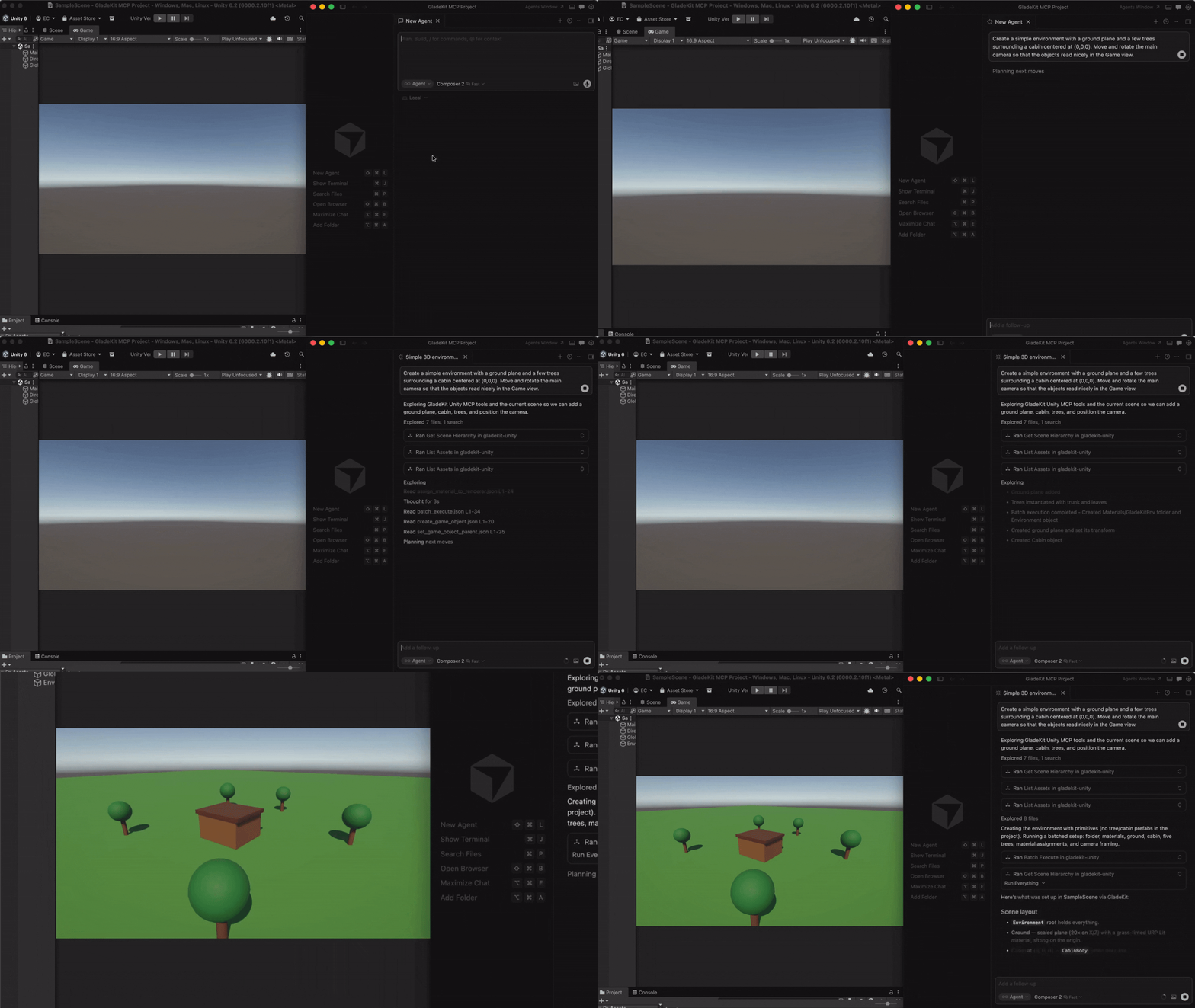
Both engines: one-call vetted gameplay scaffolders (controllers, enemies, combat, menus, save system), a verification loop (look_at_game_view screenshots, runtime-event observation, playability probes), surgical script editing with true find_references / rename_symbol, and build/export tools so the agent can ship what it built.
The MCP server auto-detects which editor is running (Unity on :8765, Godot on :8766) and exposes the matching tool set.
Quick Start
1. Install the editor bridge
Glade MCP supports both Unity and Godot. Both bridges live in this repo: unity-bridge/ is a UPM package, godot-bridge/ wraps the editor addon at godot-bridge/addons/com.gladekit.mcp-bridge/. Install the one for your engine.
Unity (2021.3+)
In Unity, open Window > Package Manager > + > Add package from git URL...
The Unity bridge starts automatically on localhost:8765. Window > GladeKit MCP shows bridge / client status and has one-click Copy MCP Config and Copy Unity AI Gateway Config buttons.
Godot (4.3+)
- Download
com.gladekit.mcp-bridge.zipfrom the latest Godot bridge release. (Grab the zip asset under Assets - not "Source code".) From source instead: copygodot-bridge/addons/com.gladekit.mcp-bridge/out of this repo. - Move the
com.gladekit.mcp-bridge/folder into your project'saddons/directory, so the final path is<your-godot-project>/addons/com.gladekit.mcp-bridge/plugin.cfg. - In Godot: Project → Project Settings → Plugins → enable GladeKit MCP Bridge.
The Godot bridge starts automatically on localhost:8766. You should see a confirmation line in the editor Output panel:
The bridge writes a per-session auth token to ~/.gladekit/godot-bridge-8766.token; the MCP server picks it up automatically, so a web page can't drive your editor through the local socket.
Supported: Godot 4.3+ GDScript projects, Forward+ and Compatibility renderers, 2D and 3D. Not yet supported: Godot Mono / C# projects. The bridge is editor-only; it never runs in exported games.
Engine auto-detection: the MCP server probes both ports on startup and exposes the matching tool set. Running both editors at once? Set GLADEKIT_MCP_FORCE_ENGINE=unity or =godot to pin a specific engine.
2. Connect your AI client
Install uv (one-time):
- Mac/Linux:
curl -LsSf https://astral.sh/uv/install.sh | sh - Windows:
powershell -ExecutionPolicy ByPass -c "irm https://astral.sh/uv/install.ps1 | iex"
Then add the MCP config to your AI client. The client launches the MCP server automatically - no manual server step.
Claude Code
Option A: one-liner (recommended)
- Mac/Linux:
claude mcp add --transport stdio gladekit-mcp --scope user -- uvx gladekit-mcp - Windows:
claude mcp add --transport stdio gladekit-mcp --scope user -- cmd /c uvx gladekit-mcp
Option B: manual config
If you cloned this repo, the .mcp.json auto-connects. Otherwise add to your Claude Code MCP settings:
Cursor
Cursor Settings > MCP > Add new MCP server:
Claude Desktop
Edit ~/Library/Application Support/Claude/claude_desktop_config.json (Mac) or %APPDATA%\Claude\claude_desktop_config.json (Windows):
Cline (VS Code extension)
Open Cline's MCP settings file (auto-created on first MCP use):
- Mac:
~/Library/Application Support/Code/User/globalStorage/saoudrizwan.claude-dev/settings/cline_mcp_settings.json - Windows:
%APPDATA%\Code\User\globalStorage\saoudrizwan.claude-dev\settings\cline_mcp_settings.json - Linux:
~/.config/Code/User/globalStorage/saoudrizwan.claude-dev/settings/cline_mcp_settings.json
Add:
Windsurf
In Windsurf, open Windsurf Settings → MCP Servers → Open MCP Registry, then click the settings (gear) icon to open mcp_config.json. Add the snippet below (or edit ~/.codeium/windsurf/mcp_config.json directly):
Unity AI Gateway (native in-editor)
Unity's built-in AI Assistant can connect to GladeKit via MCP. This gives you GladeKit's 275 tools directly inside the Unity Editor - no external AI client needed.
Requires: Unity 6000.3+ with AI Gateway package (com.unity.ai.assistant@2.x)
- In Unity, go to Edit > Project Settings > AI > MCP Servers
- Click Open Config File and paste (or use Window > GladeKit MCP > Copy Unity AI Gateway Config):
- Under Path Configuration, paste your terminal's PATH into User Path so Unity can find
uvx. To get your PATH:- Mac/Linux:
echo $PATH - Windows:
echo %PATH%
- Mac/Linux:
- Click Refresh Config File and Reload Servers
- Verify the server shows StartedSuccessfully in the Servers section
Tip: If
uvxisn't found, add the directory containing it to thepathfield in the config (e.g.,"/opt/homebrew/bin"on Mac or"C:\\Users\\<you>\\.local\\bin"on Windows). Alternatively, usepip install gladekit-mcpand set"command": "python"with"args": ["-m", "gladekit_mcp"].
Troubleshooting: If the server shows FailedToStart, click Inspect for error details. The most common cause is PATH - Unity's PATH differs from your terminal's PATH. See the Troubleshooting section below.
Paid tier (
GLADEKIT_API_KEY): To enable RAG knowledge base and cross-session memory on any client, add the key to theenvfield of your config. See Cloud intelligence below.
VS Code (GitHub Copilot)
Add to .vscode/mcp.json in your workspace:
Why GladeKit?
| Feature | GladeKit MCP | unity-mcp (CoplayDev) | godot-mcp (Coding-Solo) |
|---|---|---|---|
| Engines | Unity and Godot, auto-detected from one server | Unity | Godot |
| Tools | 275 Unity + 115 Godot, granular | 48 consolidated (action enums) | 14 |
| Editor link | Live editor session (HTTP :8765 / WebSocket :8766) | Live editor session | Spawns godot --headless per call, edits .tscn on disk |
| Gameplay scaffolders | One-call vetted templates - controllers, enemies, projectiles, health + HUD, game manager, menus, moving platforms, save system | None | None |
| Verification loop | look_at_game_view screenshots, runtime-event stream, playability probe, play-verify heal gate, compile_scripts | Screenshots, console read, test runner | run_project + raw stdout |
| Script editing | Outline / partial reads, anchor edits, true find_references / rename_symbol (lexical scanner) | Anchor / regex edits, Roslyn validation | No script tools |
| Build / export | Both engines (build_player, export_project) | Unity | None (MeshLibrary only) |
| Assets | Free CC0 pipeline with license audit | AI generation (BYO Tripo / Meshy / fal keys) | None |
| Project context | GLADE.md + live prompt (render pipeline, input system, skill level) | Static instructions | None |
| Script search | Semantic search via OpenAI embeddings (bring your own key) | Regex find_in_file | None |
| Memory | In-session (remember_for_session) + cross-session (cloud) | None | None |
| Safety | Undo-registered edits, pre-mutation backups, overwrite guards, per-session token auth, read-only mode | SHA-guarded script edits | None |
| Tests | 269 pytest + 37-case eval on 3 MCP SDK versions, schema↔bridge parity guards, Unity NUnit + Godot GUT suites | Unity CI matrix + NL suite | None |
| License | MIT | MIT | MIT |
All core features are free and local. The cloud intelligence layer is optional and requires a GLADEKIT_API_KEY.
Features
275 Unity tools + 115 Godot tools
Unity (20 categories): Scene • GameObjects • Scripts • Prefabs • Materials • Lighting • VFX & Audio • Animation • IK • Physics (3D & 2D) • Tilemaps • Camera • UI • Input System • Terrain & NavMesh • Profiler • Gameplay scaffolders • Runtime & diagnostics • Build • Asset pipeline
All 275 tools are dispatchable. Claude Code sees ~90 curated core tools by default (Claude Code has a practical 128-tool limit; Unity AI Gateway has a cloud token budget). Use get_relevant_tools to discover extended tools for specialized work (blend trees, NavMesh, IK, Cinemachine, etc.).
5 meta-tools: get_relevant_tools (task-based tool discovery + RAG context), remember_for_session (store facts), recall_session_memories (retrieve facts), batch_execute (multi-step tool dispatch), search_project_scripts (semantic code search, Unity only). The first four work on both engines.
9 MCP resources (Unity): bridge health, project context, project info, scene hierarchy, project scripts, current selection, GLADE.md, session memory, and batch-discipline telemetry.
Godot (17 categories): all 115 tools are exposed directly (no core filtering needed), plus the four engine-agnostic meta-tools. Read-only tools carry the MCP readOnlyHint annotation so clients can auto-approve them.
One-call gameplay scaffolders
Vetted, self-wiring templates that write known-good scripts verbatim and assemble the scene around them - carrying the game-feel details a from-scratch script tends to drop (coyote time, jump buffering, variable jump height, normalized diagonals). Re-running one reuses what already exists instead of duplicating it.
- Players:
create_third_person_controller(3D, both engines),create_platformer_controller/create_top_down_controller(Unity),create_2d_controller(Godot). - Combat:
create_projectile,create_health,create_health_bar,create_enemy(Unity) /create_enemy_2d+create_enemy_3d(Godot),create_hit_vfx. - Game loop:
create_game_manager(score, lives, win/lose),create_collectible,create_hazard,create_level_system,create_loot_drop,create_save_system. - Flow and feel:
create_main_menu,create_pause_menu,create_scene_transition,create_moving_platform,create_screen_shake,create_juice,create_particles_2d/_3d,create_sound_effects.
Batch layout tools (set_transform_batch, set_node_transform_batch, arrange_nodes, snap_to_ground) place dozens of objects in one call instead of one round-trip each.
Verify what you built
- See it:
look_at_game_viewreturns a screenshot of the rendered view so the model catches invisible, missing, or mispositioned objects that inspection alone cannot. - Watch it run:
start_runtime_observation/get_runtime_eventsstream a cursored, fingerprinted error feed from the play session;get_unity_console_logs/get_godot_console_logsfor the raw log. - Play-test it:
start_playability_probe(Unity) andrun_gameplay_probe(Godot) drive the player with input and report PASS/FAIL; Godot'srun_projecthas averifymode that runs, captures, and reports. - Compile and ship it:
compile_scripts(Unity);build_player+get_build_status(Unity) andcreate_export_preset+export_project(Godot, including Web). - Diagnose stalls (Godot): an editor main-thread watchdog turns "timed out" into "editor wedged for 12s - dismiss the modal dialog" with
possible_solutions.
Surgical script editing
get_script_content supports outline mode (a structural map of a large file) and line-ranged partial reads; modify_script applies anchor-based edits. find_references and rename_symbol use a lexical scanner (C# and GDScript) that matches whole identifiers only, so a rename shows its real blast radius before it happens. create_script / modify_script refuse to clobber existing project scripts unless asked.
GLADE.md
Create a GLADE.md file in your Unity project root. The MCP server reads it and injects it into every request. Works as a permanent context layer: your game's design intent, conventions, and constraints are always in scope.
Script semantic search
Set OPENAI_API_KEY in your MCP config's env field and the server ranks project scripts by semantic similarity to your query. Ask "how does the enemy spawn?" and the right script surfaces, even if it's not named EnemySpawner.
Everything needed ships with the package; no install flags or extras required. Get a key at platform.openai.com/api-keys (pay-as-you-go, pennies per search via text-embedding-3-small).
Without the key, search_project_scripts still returns scripts - just unranked. Keys are never sent anywhere except OpenAI's embedding endpoint.
Skill calibration
The server tracks vocabulary across your messages and detects whether you're a Unity beginner or expert. Beginners get plain-language explanations and encouraging framing. Experts get terse, technical responses. Calibration persists to .gladekit/skill_level.json in your project.
Asset pipeline (free CC0 imports)
Three tools for finding and importing free, commercially-usable assets directly from your AI client, on both engines. All assets are CC0 (public domain, no attribution required). v1 ships Kenney.nl packs (catalog refreshed weekly); additional providers (Freesound, Quaternius, AI generation) are on the roadmap.
| Tool | Purpose |
|---|---|
find_asset | Search ranked candidates by description, asset type, style, and license. Read-only, no editor dispatch. |
import_asset | Download, extract, place under Assets/ (or res://), configure import settings for the asset type, and write a .gladekit-asset.json sidecar with license metadata. Requires explicit licenseAcknowledged: true. |
list_imported_assets | Walk the project's sidecars and surface a license audit (license counts, attribution-required count). Useful before a commercial release. |
Example workflow (Cursor, Claude Code, Windsurf use the same pattern):
You: I'm prototyping a 2D platformer and need placeholder character + tile art. Find me something free.
The AI calls find_asset:
Result (truncated):
You: Let's go with Platformer Pack Redux. Import it to
Assets/Sprites/Platformer/. I accept the CC0 license.
The AI calls import_asset:
The MCP server resolves the download URL locally (catalog is bundled with the server, no cloud dependency), passes it to the Unity bridge, which downloads, extracts, configures TextureImporter for each sprite (Texture Type = Sprite, Filter Mode = Point, Uncompressed) and writes the license sidecar. Result:
The sprites appear in the Unity Project window, ready to drop into a scene.
You: Before I ship, audit my imported assets. Anything that needs attribution?
The AI calls list_imported_assets:
CC0 needs no attribution; the audit report is empty for required attributions. If you imported a CC-BY asset later, it would surface here so you remember to credit it.
Security and license discipline:
- The LLM never sees download URLs. URL resolution happens cloud/MCP-side; the bridge tool refuses if the resolved fields are missing or LLM-injected.
licenseAcknowledged: trueis required on everyimport_assetcall. The bridge refuses without it. Do not set it without explicit user confirmation.- The bridge validates
_resolvedUrl's host against a per-provider allowlist (AssetPipelineGuard.IsResolvedUrlHostAllowed) before downloading. Even a client bypassing both the cloud and MCP preprocessors cannot smuggle in an arbitrary download URL; unknown hosts fail closed. HTTPS only. - Every imported asset bundle gets a
.gladekit-asset.jsonsidecar recording the candidate id, provider, license, attribution string, source URL, and timestamp.list_imported_assetsreads these for the audit report. - Asset Pipeline tools are gated by
AssetPipelineGuardon the bridge side. A misconfigured client cannot bypass it.
Disabling the pipeline (for studio / curated-asset workflows):
Set GLADEKIT_MCP_DISABLE_ASSET_PIPELINE=1 in the MCP server's environment to suppress the three tools entirely. They will not appear in the tool list and dispatch will refuse with a clear error. This is the recommended setting for projects that already have a managed asset workflow (Perforce-tracked libraries, internal asset stores) where AI-driven external downloads aren't appropriate.
The Unity bridge enforces the same gate via EditorPrefs (GladeAI.AssetPipelineEnabled, default true). Toggle it via POST http://localhost:8765/api/settings { "assetPipelineEnabled": false }.
Safety and security
- Reversible: scaffolds and batch edits register with the editor's Undo stack (Unity) or take pre-mutation backups in
.gladekit-backups/with node revert (Godot).create_script/modify_scriptrefuse to overwrite real project scripts without an explicit flag. - Loopback only: both bridges bind
127.0.0.1. The Godot bridge requires a per-session token (~/.gladekit/godot-bridge-<port>.token) on every request excepthealth, closing the cross-site WebSocket drive-by. The Unity bridge enforces localhost access control and path-traversal guards on its file endpoints. - Play-mode safety: editing tools refuse to run while the editor is playing; read-only tools run in either mode.
- Read-only sessions:
GLADEKIT_GODOT_READ_ONLY=1(orgladekit/read_only_modein project settings) makes the Godot bridge refuse every mutating tool - for audits, reviews, and demos.
Cloud intelligence
Set GLADEKIT_API_KEY in your MCP config's env field to unlock cloud-powered features:
- RAG knowledge base -
get_relevant_toolsqueries a curated, engine-aware knowledge base (API corrections, error patterns) and injects results alongside tool recommendations. Godot sessions retrieve Godot docs, not Unity content. - Cross-session persistent memory - facts stored with
remember_for_sessionpersist across sessions and are re-injected into the system prompt. - Convention extraction - coding patterns (naming, architecture, preferences) are distilled from your accumulated memories and surfaced in future sessions.
All cloud features degrade gracefully: if the key is missing or the cloud is unreachable, everything works normally.
Transports (stdio + streamable HTTP)
GladeKit MCP supports two transports. stdio is the default and works with all MCP clients - every config above uses stdio. The server supports both MCP SDK 1.x and 2.x (mcp[cli]>=1.10,<3) and is tested at the floor, the newest 1.x, and the newest 2.x.
Streamable HTTP is for clients that prefer URL-based config (Claude Desktop URL mode, custom clients). Launch the server manually, then point your client at the URL:
Endpoints:
POST/GET/DELETE http://127.0.0.1:8767/mcp- MCP streamable-HTTP endpointGET http://127.0.0.1:8767/health- liveness check
Security defaults:
- Binds loopback-only (
127.0.0.1). Use--host 0.0.0.0to expose on LAN - opt-in only. - DNS-rebinding protection enabled for loopback binds: requests with a
Hostheader other than127.0.0.1:<port>orlocalhost:<port>are rejected with421 Misdirected Request. - Non-loopback binds disable rebinding protection (you've taken responsibility for the network) and print a warning on startup.
Client config example:
Environment Variables
MCP server (set in your client config's env field):
| Variable | Required | Description |
|---|---|---|
UNITY_BRIDGE_URL | No | Unity bridge URL (default: http://localhost:8765) |
GODOT_BRIDGE_URL | No | Godot bridge URL (default: ws://localhost:8766/) |
GLADEKIT_MCP_FORCE_ENGINE | No | unity or godot - skip auto-detection when both editors are open |
OPENAI_API_KEY | No | Enables script semantic search via embeddings (get one) |
GLADEKIT_API_KEY | No | Enables RAG knowledge base, cross-session memory, convention extraction |
GLADEKIT_MCP_DISABLE_ASSET_PIPELINE | No | Set to 1 to suppress find_asset / import_asset / list_imported_assets (curated-asset workflows) |
GLADEKIT_MCP_SUPPRESS_BRIDGE_WARNING | No | Set to 1 to silence the stderr warning when the Unity or Godot bridge is older than recommended |
Godot bridge (set in your shell before launching Godot):
| Variable | Description |
|---|---|
GLADEKIT_GODOT_BRIDGE_PORT | Listen port (default 8766) |
GLADEKIT_GODOT_READ_ONLY | Set to 1 to refuse every mutating tool for this editor session |
GLADEKIT_GODOT_NO_AUTH | Set to 1 to disable per-session token auth (for older clients; opt-in) |
Troubleshooting
Unity bridge not connecting
- Open Unity and wait for it to finish importing assets - the bridge starts automatically
- Check Window > GladeKit MCP in Unity - the Bridge and AI Client indicators show connection status; Restart rebinds the server and the Diagnostics panel shows recent bridge faults
- Verify nothing else is using port 8765:
lsof -i :8765(Mac/Linux) ornetstat -ano | findstr 8765(Windows)
Godot bridge not connecting
- Confirm the plugin is enabled and the Output panel shows the
listening on ws://127.0.0.1:8766line; a bind failure prints theGLADEKIT_GODOT_BRIDGE_PORToverride instructions authentication failedin tool errors: the MCP server couldn't read~/.gladekit/godot-bridge-8766.token. Restart Godot (it rewrites the token) or, for an older client, setGLADEKIT_GODOT_NO_AUTH=1before launching Godot- Tool calls time out while a dialog is open: the editor's main thread is blocked. Dismiss the dialog; the error names the stall duration
AI client can't find uvx
- Install uv:
curl -LsSf https://astral.sh/uv/install.sh | sh(Mac/Linux) orpip install uv - Or use
pip install gladekit-mcpand change the config command from"uvx"to"python"with args["-m", "gladekit_mcp"]
Tools not appearing in Claude Code
- Claude Code has a practical ~128-tool limit. GladeKit shows ~90 curated core tools by default - this is intentional. All 275 are dispatchable: use
get_relevant_toolsto find extended tools by task description.
GLADE.md not being picked up
- The file must be named exactly
GLADE.md(case-sensitive on Mac/Linux) and placed in the Unity project root (same directory asAssets/,Packages/,ProjectSettings/)
Stderr warning: Unity bridge X.Y.Z is older than recommended
-
Unity caches UPM git packages and never refetches, so an
?path=unity-bridgeinstall drifts behindmainover time. Update via Unity → Window > Package Manager > GladeKit MCP Bridge > Update, or pin the manifest entry to a specific tag so future updates are explicit: -
The same warning also appears as a one-shot prefix on the next tool response so you see it in chat. To silence both: add
"GLADEKIT_MCP_SUPPRESS_BRIDGE_WARNING": "1"to theenvof your MCP client config. For Godot, replace the addon folder with the latest release zip.
Unity AI Gateway - server shows FailedToStart
- Click Inspect in the Servers section for the error message
- Most common cause: Unity can't find
uvx. Under Path Configuration, paste your terminal's full PATH into User Path, then click Refresh Config File and Reload Servers - On Windows:
echo %PATH%in Command Prompt. On Mac/Linux:echo $PATH - Alternative: use
pip install gladekit-mcpand set the command to"python"with args["-m", "gladekit_mcp"]- avoids theuvxPATH dependency - Validate outside Unity first: run
uvx gladekit-mcpin a terminal (you should see thegladekit-mcp v...banner on stderr)
Architecture
Contributing
Each bridge is the source of truth for its tools; the Python server mirrors the schema. CI (ruff + pytest + the eval harness, on three MCP SDK versions) runs on every change to mcp-server/, unity-bridge/, or godot-bridge/, and a schema↔bridge field-parity test fails if an argument exists on one side only. Adding a tool takes three changes.
Unity
- C# implementation (
unity-bridge/Editor/Tools/Implementations/<Category>/MyTool.cs):
-
C# registration (
unity-bridge/Editor/Tools/Registrars/<Category>Tools.cs): addRegister(new MyTool());. Registration is explicit — an unregistered tool compiles fine but returns "Tool was blocked from executing or null." when dispatched. -
Python schema (
mcp-server/src/gladekit_mcp/tools/<category>.py): add an entry to the category's tool list following the existing format (OpenAI function-calling schema).
Godot
-
GDScript implementation (
godot-bridge/addons/com.gladekit.mcp-bridge/tools/implementations/<category>/my_tool.gd) extendingi_tool.gd; settool_nameandrequires_edit_modein_init()and returnToolUtils.success(...)/ToolUtils.error(...). -
Registration in
godot-bridge/addons/com.gladekit.mcp-bridge/bridge/tool_registry.gd(register_tool(MyTool.new())). -
Python schema (
mcp-server/src/gladekit_mcp/schemas/godot/<category>.py).
See godot-bridge/README.md for the wire protocol and GUT test setup, and mcp-server/CHANGELOG.md for release history.
License: MIT - see LICENSE.
The GladeKit desktop app is a separate commercial product that layers streaming, miss recovery, and a memory UI on top of this MCP server.