AllMCPs
BrowseBestCategoriesStackCompareToolsGuidesBlog Log in Submit MCP

Stay in the loop

Get new MCP servers and top picks in your inbox.

AllMCPs

The open directory for discovering and installing Model Context Protocol servers.

Explore

  • Browse servers
  • Best MCP servers
  • Categories
  • MCP clients
  • Agent prompts
  • Stack Builder
  • Compare servers
  • Tags index
  • Submit a server
  • Pricing

Learn

  • Guides hub
  • What is MCP?
  • Install guide
  • Troubleshooting
  • Security
  • Blog
  • Blog RSS

Tools

  • All tools
  • Config generator
  • Config validator
  • MCP playground
  • OpenAPI โ†’ MCP
  • Badge generator

For agents

  • API docs
  • Trust & traffic
  • llms.txt โ†— (opens in a new tab)
  • Catalog JSON โ†— (opens in a new tab)
  • Remote MCP โ†— (opens in a new tab)

Company

  • About
  • Contact
  • X (@AllMCPs) โ†— (opens in a new tab)
  • GitHub โ†— (opens in a new tab)
  • Terms
  • Privacy
AllMCPs VerifiedAllMCPs VerifiedFeatured on Nick LaunchesFeatured on Nick LaunchesLaunch Llama NewsletterLaunch Llama NewsletterVerified DR - allmcps.comVerified DR - allmcps.comFeatured on SaaSGrowFeatured on SaaSGrowFeatured on Twelve ToolsFeatured on Twelve ToolsFeatured on Saaspa.geFeatured on Saaspa.geFeatured on Findly.toolsFeatured on Findly.toolsFeatured on Startup FameFeatured on Startup FameFeatured on LaunchKiwiFeatured on LaunchKiwiFeatured on ScrollLaunchFeatured on ScrollLaunchFeatured on DailyPingsFeatured on DailyPingsFazier badgeFazier badgeFeatured on NewTool.siteFeatured on NewTool.siteFeatured on saasfame.comFeatured on saasfame.comDR Checker - Domain RatingDR Checker - Domain RatingListed on Turbo0Listed on Turbo0Launched on LaunchBoard - Product Launch PlatformLaunched on LaunchBoard - Product Launch PlatformList on SimilarlabsList on Similarlabshttps://codetrendy.comhttps://codetrendy.comListed on DevTool.ioFeatured on BuildlistFeatured on BuildlistAllMCPs VerifiedAllMCPs VerifiedFeatured on Nick LaunchesFeatured on Nick LaunchesLaunch Llama NewsletterLaunch Llama NewsletterVerified DR - allmcps.comVerified DR - allmcps.comFeatured on SaaSGrowFeatured on SaaSGrowFeatured on Twelve ToolsFeatured on Twelve ToolsFeatured on Saaspa.geFeatured on Saaspa.geFeatured on Findly.toolsFeatured on Findly.toolsFeatured on Startup FameFeatured on Startup FameFeatured on LaunchKiwiFeatured on LaunchKiwiFeatured on ScrollLaunchFeatured on ScrollLaunchFeatured on DailyPingsFeatured on DailyPingsFazier badgeFazier badgeFeatured on NewTool.siteFeatured on NewTool.siteFeatured on saasfame.comFeatured on saasfame.comDR Checker - Domain RatingDR Checker - Domain RatingListed on Turbo0Listed on Turbo0Launched on LaunchBoard - Product Launch PlatformLaunched on LaunchBoard - Product Launch PlatformList on SimilarlabsList on Similarlabshttps://codetrendy.comhttps://codetrendy.comListed on DevTool.ioFeatured on BuildlistFeatured on Buildlist
ยฉ 2026 Jackalope Digital LLC. All rights reserved.
  1. Home
  2. ๐ŸŽฎ Gaming
  3. Unreal Engine API Documentation
U
Health: ActiveRecent health check succeeded.Last checked 8/10/2026, 11:54:31 PM

Unreal Engine API Documentation

Enrichment pendingWe havenโ€™t run our AI enrichment pass on this listing yet, so the overview, use cases, and FAQ below may be sparse or missing. We work through the catalog over time โ€” check back soon.
View Repository91 GitHub StarsTotal stargazers on GitHub for the source repository (91 stars).

Accurate UE5 C++ API docs for AI agents. Prevents hallucinated signatures and includes.

Quick Install

Automated & IDE Setup

Copy the AI prompt to install this server into Claude Code, Cursor, or another agent โ€” or use 1-click editor setup below.

Add to CursorAdd to VS Code
Not yet automatically verified

We haven't yet run this listing's install command through our automated sandbox check. This isn't a red flag โ€” we're steadily working through the catalog.

Manual Client & Custom JSON ConfigExpand JSON โ–พ

Install Config Generator

Choose your client
claude_desktop_config.json
{
  "mcpServers": {
    "unreal-engine-api-documentation": {
      "command": "uvx",
      "args": [
        "unreal-api-mcp"
      ]
    }
  }
}

๐Ÿ’ก Paste into ~/Library/Application Support/Claude/claude_desktop_config.json (macOS) or %APPDATA%\Claude\claude_desktop_config.json (Windows)

Install Tool Schemas (5) Directory Badge Claim listing Alternatives๐ŸŽฎ More in Gaming

Capabilities & Tool Schemas (5) ~62 tokensApproximate context cost of this serverโ€™s tool schemas (~4 chars/token), before any tool is called. Actual usage depends on your client and model.Self-reported Self-reportedParsed from the repository README, not verified against a live server โ€” may be incomplete or out of date.

Inspect callable tools, capabilities, and parameters exposed to AI agents by Unreal Engine API Documentation.

search_unreal_api

Find APIs by keyword

get_function_signature

Exact signature with parameters and return type

get_include_path

Resolve `#include` for a type

get_class_reference

Full class reference card

get_deprecation_warnings

Check if an API is obsolete

Documentation Overview

unreal-api-mcp

PyPI Version PyPI Downloads MCP Registry GitHub Stars GitHub Last Commit Detect New UE Release License: MIT Python 3.10+

MCP server that gives AI agents accurate Unreal Engine C++ API documentation. Saves tokens, context, and time. Prevents hallucinated signatures, wrong #include paths, and deprecated API usage.

Works with Claude Code, Cursor, Windsurf, or any MCP-compatible AI tool. No Unreal Engine installation required. Check the supported versions. New versions are detected and built automatically every week.

Quick Start

Add to your MCP config (.mcp.json, mcp.json, or your tool's MCP settings), setting UNREAL_VERSION to match your project:

config.json
{
  "mcpServers": {
    "unreal-api": {
      "command": "uvx",
      "args": ["unreal-api-mcp"],
      "env": {
        "UNREAL_VERSION": "5.5"
      }
    }
  }
}

Set this to match your project's UE version. See supported versions for all available databases.

On first run the server downloads the correct database to ~/.unreal-api-mcp/. Patch versions (e.g. "5.7.3") fall back to the major.minor database (e.g. "5.7") if a patch-specific one isn't available.

How It Works

  1. Version detection. The server figures out which UE version to serve:
PrioritySourceExample
1UNREAL_VERSION env var"5.5", "5.7", "5.7.3"
2UNREAL_PROJECT_PATHReads .uproject EngineAssociation field (e.g. 5.5.1 or 5.7)

Set one of these to match your project. Without either, the server defaults to UE 5.7.

  1. Database download. If the database for that version isn't cached locally, it downloads from GitHub (one time). For patch versions, falls back to the major.minor database if needed. Also checks for updates on startup.

  2. Serve. All tool calls query the version-specific SQLite database. Exact lookups return in <1ms, searches in <5ms.

Each version has its own database with the correct signatures, deprecation warnings, and member lists for that release.

Tools

ToolPurposeExample
search_unreal_apiFind APIs by keyword"character movement", "spawn actor", "K2Node"
get_function_signatureExact signature with parameters and return typeAActor::GetActorLocation
get_include_pathResolve #include for a type"ACharacter" -> #include "GameFramework/Character.h"
get_class_referenceFull class reference card"APlayerController", "UK2Node_SpawnActorFromClass", "UEdGraphSchema_K2"
get_deprecation_warningsCheck if an API is obsolete"K2_AttachRootComponentTo" -> Use AttachToComponent() instead

Coverage

All Engine Runtime, Editor, Developer modules, plus built-in plugins (Enhanced Input, Gameplay Abilities, Common UI, Niagara, Chaos, and hundreds more).

Includes Blueprint graph internals: 158 UK2Node subclasses, UEdGraphSchema_K2, BlueprintGraph, KismetCompiler, and GraphEditor modules (1,120+ entries). If you're writing custom K2 nodes or editor tooling, it's indexed.

See the full list of supported versions and databases on the db-v1 release page. New versions are detected and built automatically every Monday via CI.

Record breakdown (UE 5.7):

TypeCountSource
Classes (UCLASS)10,075AActor, ACharacter, UGameplayStatics, ...
Structs (USTRUCT)9,014FHitResult, FVector, FTransform, ...
Enums (UENUM)3,475EMovementMode, ECollisionChannel, ...
Functions (UFUNCTION)23,414Signatures with params, return types, specifiers
Properties (UPROPERTY)66,340Types, specifiers, doc comments
Delegates2,406Dynamic multicast, delegate declarations

Does not cover third-party plugins or marketplace assets. For those, rely on project source.

Benchmarks

Measured, not promised: 14 research questions across 2 testbeds, answered by 3 agent configs, every answer judged against ground truth verified beforehand (API facts against the docs database, source facts against the UE 5.8 engine tree). The full harness lives in docs/benchmark/ and re-runs with one command.
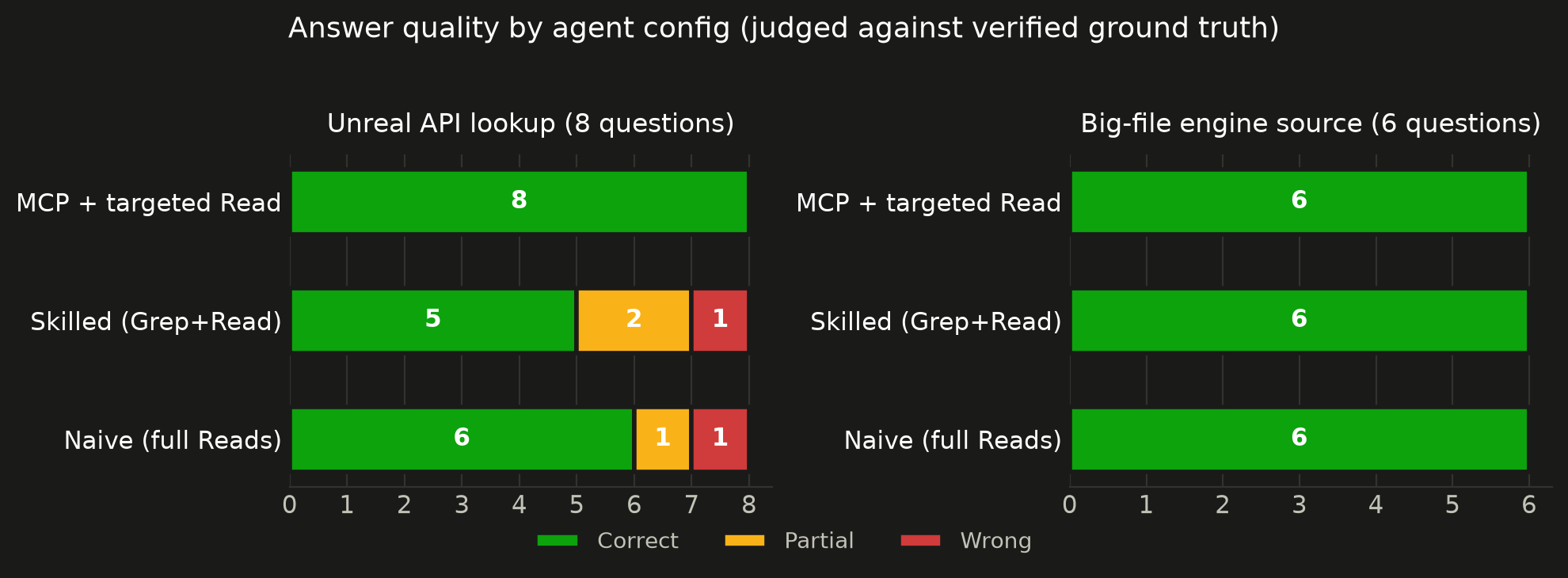
Answer quality by agent config, judged against verified ground truth
ConfigCorrectPartialWrong
MCP + targeted Read14/1400
Skilled (Grep+Read)11/1421
Naive (full Reads)12/1411

The gap is not where you would expect. On well-documented includes and signatures, and on grep-able implementation facts inside a 14,000 line engine file, all three configs tie. Modern models know the documented UE surface and search local source competently. The gap opens on recent deprecations. Asked whether UKismetSystemLibrary::IsSplitScreen is still valid in 5.8, both non-MCP agents got it wrong: one declined, one asserted it was fine. It is deprecated in favor of HasMultipleLocalPlayers. Both also mischaracterized the 5.5-era change that made direct AActor::NetUpdateFrequency access deprecated. The MCP agent answered all three deprecation questions correctly, because the deprecation flag and replacement hint are in the database.

Why correctness rather than raw output? Agentic tools search code well now. Claude Code has shipped a Grep tool from the start, so an agent can find anything that is actually in your files. The problem is the parts that are not in your files: exact signatures, #include paths, and especially fresh deprecations. Those are not reliably in a model's memory either, and getting one wrong costs you a broken build or a silently deprecated call.

Methodology
  • 2 testbeds: 8 pure Unreal API lookups (exact signatures, #include paths, deprecations) and 6 questions answered inside CharacterMovementComponent.cpp (about 14,000 lines) from the UE 5.8 engine source
  • 3 configs, same model (Sonnet) and turn limit: MCP tools + Grep/Read, Grep/Read only, Read only
  • The API sweep runs with no engine source present, the realistic case when writing UE C++ in your own project, so non-MCP configs answer from model memory. The source sweep gives every config the same files to grep
  • Ground truth verified before any runs; answers judged by a separate model session against that ground truth
  • Run it yourself: python docs/benchmark/run.py --cwd <dir> --questions <file> (results from July 2026; agent behavior moves, so re-run before quoting). Point it at your own UE project to reproduce the project-research scenario
Query latency

Measured on UE 5.7 database (114,724 records), 50 iterations per query:

QueryMedianp95
Exact FQN lookup (get_function_signature)<1ms<1ms
FTS search: specific function name<1ms<1ms
FTS search: keyword ("spawn actor")1ms1ms
Include path resolution2ms2ms
Class reference (full member list)22ms23ms
Deprecation check24ms25ms

CLAUDE.md Snippet

Add this to your project's CLAUDE.md (or equivalent instructions file). This step is important. Without it, the AI has the tools but won't know when to reach for them.

markdown
## Unreal Engine API Lookup (unreal-api MCP)

Use the `unreal-api` MCP tools to verify UE C++ API usage instead of guessing. **Do not hallucinate signatures or #include paths.**

| When | Tool | Example |
|------|------|---------|
| Unsure about a function's parameters or return type | `get_function_signature` | `get_function_signature("AActor::GetActorLocation")` |
| Need the `#include` for a type | `get_include_path` | `get_include_path("ACharacter")` |
| Want to see all members on a class | `get_class_reference` | `get_class_reference("UCharacterMovementComponent")` |
| Searching for an API by keyword | `search_unreal_api` | `search_unreal_api("spawn actor")` |
| Checking if an API is deprecated | `get_deprecation_warnings` | `get_deprecation_warnings("K2_AttachRootComponentTo")` |
| Writing custom K2 nodes or editor tools | `get_class_reference` | `get_class_reference("UK2Node_SpawnActorFromClass")`, `get_class_reference("UEdGraphSchema_K2")` |

**Rules:**
- Before writing a UE API call you haven't used in this conversation, verify the signature with `get_function_signature`
- Before adding a `#include`, verify with `get_include_path` if unsure
- Covers: all Engine Runtime/Editor modules, built-in plugins (Enhanced Input, GAS, CommonUI, Niagara, etc.), Blueprint graph internals (UK2Node subclasses, EdGraphSchema, BlueprintGraph, KismetCompiler)
- Does NOT cover: third-party plugins or marketplace assets

Setup Details

Auto-detect version from .uproject

Instead of setting UNREAL_VERSION, you can point to your Unreal project. The server reads the EngineAssociation field from your .uproject file:

config.json
{
  "mcpServers": {
    "unreal-api": {
      "command": "uvx",
      "args": ["unreal-api-mcp"],
      "env": {
        "UNREAL_PROJECT_PATH": "F:/Unreal Projects/MyProject"
      }
    }
  }
}
Alternative installation methods

Using pip install:

Terminal
pip install unreal-api-mcp
config.json
{
  "mcpServers": {
    "unreal-api": {
      "command": "unreal-api-mcp",
      "args": [],
      "env": {
        "UNREAL_VERSION": "5.5"
      }
    }
  }
}
Environment variables
VariablePurposeExample
UNREAL_VERSIONUE version to serve5.5, 5.7, 5.7.3
UNREAL_PROJECT_PATHAuto-detect version from .uprojectF:/Unreal Projects/MyProject
UNREAL_INSTALL_PATHOverride UE install path (for ingest only)H:/UE_5.6
Building databases locally

If you want to build a database from your own Unreal Engine installation instead of downloading:

bash
# Build for a specific version
python -m unreal_api_mcp.ingest --unreal-version 5.6 --unreal-install "H:/UE_5.6"
python -m unreal_api_mcp.ingest --unreal-version 5.5 --unreal-install "H:/UE_5.5"

Databases are written to ~/.unreal-api-mcp/unreal_docs_{version}.db by default.

Project structure
Code
unreal-api-mcp/
โ”œโ”€โ”€ src/unreal_api_mcp/
โ”‚   โ”œโ”€โ”€ server.py          # MCP server (5 tools)
โ”‚   โ”œโ”€โ”€ db.py              # SQLite + FTS5 database layer
โ”‚   โ”œโ”€โ”€ version.py         # Version detection + DB download
โ”‚   โ”œโ”€โ”€ header_parser.py   # Parse Unreal C++ headers (UCLASS, UFUNCTION, etc.)
โ”‚   โ”œโ”€โ”€ unreal_paths.py    # Locate UE installs + discover modules
โ”‚   โ””โ”€โ”€ ingest.py          # CLI ingestion pipeline
โ””โ”€โ”€ pyproject.toml

Databases are stored in ~/.unreal-api-mcp/ (downloaded on first run).

Troubleshooting

ProblemFix
"Could not download UE X database"Check internet connection. Or build locally: python -m unreal_api_mcp.ingest --unreal-version 5.6 --unreal-install H:/UE_5.6
Wrong API version being servedSet UNREAL_VERSION explicitly. Check stderr: unreal-api-mcp: serving UE <version>
Server won't startCheck python --version (needs 3.10+). Check path: which unreal-api-mcp or where unreal-api-mcp
Third-party plugins return no resultsMarketplace/third-party plugins are not indexed. Only built-in Engine and Plugin APIs are covered.

See Also

unity-api-mcp: Same concept for Unity (C#). Covers Unity 2022, 2023, and Unity 6.

Contact

Need a custom MCP server for your engine or framework? I build MCP tools that cut token waste and prevent hallucinations for AI-assisted game development. If you want something similar for your team's stack, reach out.

fuatcankoseoglu@gmail.com

License

MIT

Free to use, fork, modify, and share for any personal or non-commercial purpose. Commercial use requires permission.

Related MCP Servers

View all in Gaming View all alternatives
  • U
    Unity API Documentation

    Accurate Unity API docs (2022/2023/6) for AI agents. Prevents hallucinated signatures.

    ๐ŸŽฎ Gaming1 views
    Compare vs Unity API Documentation โ†’
  • Unity MCP logoUnity MCP

    โƒฃ ๐Ÿ  ๐ŸŽ ๐ŸชŸ ๐Ÿง - MCP Server for Unity Editor and for a game made with Unity

    ๐ŸŽฎ Gaming3 views
    Compare vs Unity MCP โ†’
  • Unreal Ai Connection logoUnreal Ai Connection

    Drive the Unreal Engine 5.7 editor from any MCP client over a local TCP socket โ€” 105 editor-automation tools (72 native C++ + 33 bridge-side). Native C++ plugin + thin Python bridge, 50ms round-trips. 498 tests, MIT.

    ๐ŸŽฎ Gaming4 views
    Compare vs Unreal Ai Connection โ†’
  • Mcp Unity logoMcp Unity

    โƒฃ ๐Ÿ  - MCP Server for Unity3d Game Engine integration for game development

    ๐ŸŽฎ Gaming1 views
    Compare vs Mcp Unity โ†’

Frequently Asked Questions about Unreal Engine API Documentation

Add the following block to your claude_desktop_config.json under mcpServers: "mcpServers": { "unreal-engine-api-documentation": { "command": "npx", "args": ["-y", "Unreal Engine API Documentation"] } }

AllMCPs Directory Badge

Full Badge Customizer

Showcase your server listing on GitHub or your project documentation. Embed this dynamic SVG badge to highlight official listing status and live engagement.

Badge Style:
Live Dynamic SVG PreviewUnreal Engine API Documentation AllMCPs Directory Badge

Markdown (GitHub README)
[![AllMCPs](https://allmcps.com/api/badge/unreal-engine-api-documentation?style=directory)](https://allmcps.com/mcp/unreal-engine-api-documentation)
HTML Embed
<a href="https://allmcps.com/mcp/unreal-engine-api-documentation"><img src="https://allmcps.com/api/badge/unreal-engine-api-documentation?style=directory" alt="Unreal Engine API Documentation on AllMCPs" /></a>

Technical Specs & Signals

Category๐ŸŽฎGaming
More technical detailsExpand โ–พ
TransportSTDIO
RuntimePython
5/5 checks healthy over the last 6h
Views0
Unique ViewsTotal visits recorded for this listing page on AllMCPs.
Installs0
Installs & Copy ActionsTotal times users copied install commands or configuration snippets for this server.
GitHub stars91
GitHub Star CountTotal stargazers on GitHub representing community popularity (91 stars).
Last commit22d ago
Last Repository CommitThe most recent commit or push recorded for this server's GitHub repository.Last commit on Jul 19, 2026
56Quality signal: Good ยท 56/100How this signal is calculated โ–พ
Server availabilityNot measured

Not scored for repo-hosted servers โ€” we can't reach the running server, only its GitHub page. Hosted MCP endpoints are health-checked live.

Verified ownership10/20
Documentation & tools24/30
Adoption & activity8/15
Community engagement0/10

A guidance signal from public completeness & health data โ€” not a user rating. New listings start lower and rise as they add docs, get verified, and grow adoption. Signals we can't observe for a listing are skipped, not counted against it.

โ˜… Spotlight Slot

Feature Your MCP Server

Get maximum visibility for your server across our directory, search results, and detail pages.

Spotlight Your Server

Own this project?

This directory is pre-filled from public sources. Claim via GitHub README, site badge, or DNS TXT to get the verified badge and attach your website.

Free dofollow backlink: after claiming, verify your product site and place a dofollow AllMCPs badge โ€” we recheck it stays live.

Claim & get free dofollow

Share & Embed

Add our SVG badge (dark/light directory styles) or embeddable widget to your site.

Explore more

More in ๐ŸŽฎ Gaming โ†’Best MCP servers for Gaming โ†’Alternatives to Unreal Engine API Documentation โ†’Install in Claude DesktopInstall in CursorInstall in VS Code


