Unity Editor MCP server: execute_code, screenshots, input simulation, play mode automation.
Quick Install
Automated & IDE SetupCopy the AI prompt to install this server into Claude Code, Cursor, or another agent — or use 1-click editor setup below.
One-click editor setup isn’t available for this listing yet — we don’t have a confirmed install command, and we’d rather show nothing than point your editor at the wrong package or host. Follow the project’s own setup instructions, linked above.
Manual Client & Custom JSON ConfigExpand JSON ▾
No confirmed setup config for this listing yet. We only publish a config block when the install details come from the project itself — its README, its docs, or a verified owner. We haven’t found those for KitWright Unity MCP, and we’d rather show nothing than a guess you’d paste into your client. Follow the project’s own setup instructions for the current steps.
Documentation Overview
KitWright MCP for Unity
The Most Advanced MCP Server for Unity Editor




中文 | English

💖 If you find this project useful, please consider giving it a Star. It helps more Unity developers discover it and supports ongoing development.
KitWright MCP for Unity is an MIT-licensed Unity Editor MCP server that lets AI assistants like Claude Code, Cursor, LM Studio, Windsurf, Codex, and VS Code Copilot operate directly inside your running Unity project.
Describe your game in one sentence — your AI assistant builds it in Unity through KitWright MCP for Unity's 274 built-in tools for scene creation, script generation, runtime validation, input simulation, performance analysis, and editor automation.
"Build a snake game with a 10x10 grid, food spawning, score UI, and game-over screen"
Your AI assistant handles it through KitWright MCP for Unity: creates the scene, generates all scripts, sets up the UI, and configures the game logic — all from a single prompt.
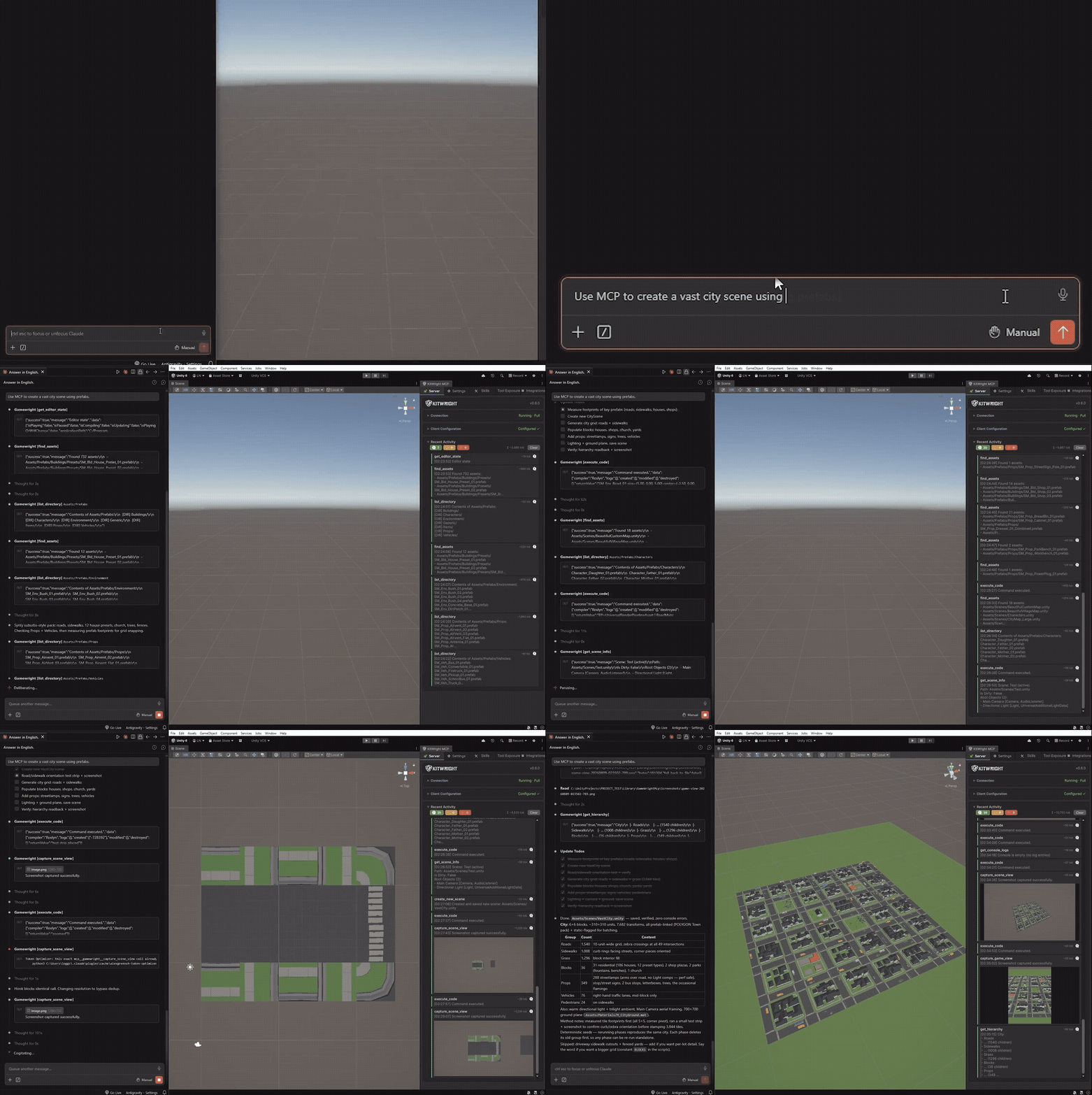
Demo — AI searches project prefabs and builds a city scene through MCP tools. Watch HD MP4.
Quick Start
If you just want to get connected fast, do these three things:
- Install the Unity package from the Git URL
- Open
Window > KitWright > MCP Windowand start the server from the Server tab - Use the built-in one-click client configuration
1. Install via UPM (Git URL)
In Unity, go to Window → Package Manager → + → Add package from git URL:
💡 Before you clone or install, a quick ⭐ on GitHub would be greatly appreciated.
Optional: Install via OpenUPM
If you want Unity Package Manager to show registry-backed package version history and allow version selection, install from OpenUPM instead of Git.
Using the OpenUPM CLI:
Or add the scoped registry manually in Packages/manifest.json:
If you installed from a Git URL before, remove the Git dependency first, then install from OpenUPM. Git-installed packages only show the resolved Git version in Unity and do not get the registry-backed Version History list.
Optional: Install from the Unity Asset Store
Importing the Asset Store package shows a This Unity Package has Package Manager dependencies dialog. Choose Install/Upgrade — the package needs com.unity.nuget.newtonsoft-json, and skipping the prompt leaves the project without it, which stops every KitWright script from compiling.
If you already chose Skip, the package offers to install the dependency for you on the next domain reload; you can also add it yourself from Window → Package Manager → + → Add package by name:
2. Start the MCP Server
Menu: Window → KitWright → MCP Window, then start the server from the Server tab.
The server starts on http://127.0.0.1:8765/ by default.
Broker Mode is the default transport. It runs a tiny local broker with Unity's bundled Mono, keeps the same 127.0.0.1 port for MCP clients, requires no client config change, and holds the connection across Unity script recompiles and Play Mode domain reloads. If the broker cannot start, the server falls back to direct in-process HTTP automatically; you can also turn broker mode off in the Server tab to use direct HTTP always.
The window has five tabs: Server, Settings, Skills, Tool Exposure, and Integrations.
Open the Tool Exposure tab if you want to edit the exact tools exposed by core or full.
Open the Settings tab if you need to adjust execute_code safety defaults or plugin debug logging.
3. Configure Your AI Client
Use the built-in One-Click MCP Configuration in the Server tab first.
Select your target client, click Configure, and the package writes the recommended MCP config entry for you.
For Claude Code, Cursor, and Codex, click Configure + Skills to also install the default project MCP workflow skill.
If you want project-specific AI guidance for the current Unity project, open the Skills tab to choose supported platforms and install the default unity-mcp-workflow skill.
If you prefer to edit config files manually, use the examples below as fallback references:
Claude Code / Claude Desktop
Cursor
LM Studio
LM Studio is not one of the one-click targets — its mcp.json location varies by version and platform. Open Program > Install > Edit mcp.json in LM Studio and paste the entry below.
VS Code
Trae
Kiro
Codex
Windsurf
Use the same JSON structure as Cursor unless your local Windsurf version requires a different MCP config format.
4. Verify the Connection
Open your AI client and try a few safe requests first:
- "Call
get_scene_infoand tell me what scene is open." - "Read
unity://project/contextand summarize the current editor state." - "Use
execute_codeto return the active scene name."
If those work, the MCP server, resources, and primary execution tool are connected correctly.
5. Start Building
Open your AI client and try: "Create a 3D platformer level with 5 floating platforms"
Before You Start
- This package is Editor-only. It does not add runtime components to your built game.
- The MCP server starts on
http://127.0.0.1:8765/by default. - Local MCP server settings are stored in
UserSettings/KitWrightMcpSettings.json. - The package defaults to the
coreMCP tool profile to reduce tool-list noise for AI clients.corecurrently exposes 43 high-signal tools centered onexecute_code, play mode control, input simulation, screenshots, performance inspection, logs, compilation checks, structured object location and component editing, editor selection / prefab-stage state, live C# API reflection, Unity documentation lookup, andexecute_menu_itemas a low-friction fallback. Switch tofullin the Server tab if you want all 274 tools exposed. execute_codesafety checks and the stricter filesystem guard are enabled by default from the Settings tab. The guard blocks obvious destructive snippets, broadSystem.IOwrites, raw file streams, and absolute/user/system/traversal paths. It catches accidents, not intent:safety_checksis a tool argument, so any client that can callexecute_codecan passsafety_checks=falseand skip both the source blocklist and the compiled-assembly guard. It is neither a sandbox nor a security boundary — see SECURITY.md.- Plugin debug logging is off by default and can also be enabled from the Settings tab. Warnings and errors are always written to the Unity Console.
- All exposed MCP tools run directly. There is no extra approval toggle.
- The window checks for updates in the background and shows an Update button in its header when a newer release exists — it can refresh Git installs in place or download and import the latest
unitypackageautomatically.
Why This Project
Related MCP Servers
Reviews
No reviews yet — be the first to share how this listing worked for you.
Frequently Asked Questions about KitWright Unity MCP
AllMCPs Directory Badge
Showcase your server listing on GitHub or your project documentation. Embed this dynamic SVG badge to highlight official listing status and live engagement.
Badge Style:
Live Dynamic SVG Preview
Markdown (GitHub README)
[](https://allmcps.com/mcp/kitwright-unity-mcp)HTML Embed
<a href="https://allmcps.com/mcp/kitwright-unity-mcp"><img src="https://allmcps.com/api/badge/kitwright-unity-mcp?style=directory" alt="KitWright Unity MCP on AllMCPs" /></a>