stdio bridge for the local Unity Editor MCP server from FunplayAI/funplay-unity-mcp.
Quick Install
Automated & IDE SetupCopy the AI prompt to install this server into Claude Code, Cursor, or another agent — or use 1-click editor setup below.
Manual Client & Custom JSON ConfigExpand JSON ▾
Client Config & Setup
Remote HTTPChoose your client or environment
Target File:
💡 Paste the JSON block into your client's configuration file under mcpServers, then restart the application.
Documentation Overview
Funplay MCP for Unity
The Most Advanced MCP Server for Unity Editor




中文 | English
💖 If you find this project useful, please consider giving it a Star. It helps more Unity developers discover it and supports ongoing development.
Funplay MCP for Unity is an MIT-licensed Unity Editor MCP server that lets AI assistants like Claude Code, Cursor, Kimi Code, LM Studio, Windsurf, Codex, and VS Code Copilot operate directly inside your running Unity project.
Describe your game in one sentence — your AI assistant builds it in Unity through Funplay MCP for Unity's built-in tools for scene creation, script generation, runtime validation, input simulation, performance analysis, and editor automation.
"Build a snake game with a 10x10 grid, food spawning, score UI, and game-over screen"
Your AI assistant handles it through Funplay MCP for Unity: creates the scene, generates all scripts, sets up the UI, and configures the game logic — all from a single prompt.
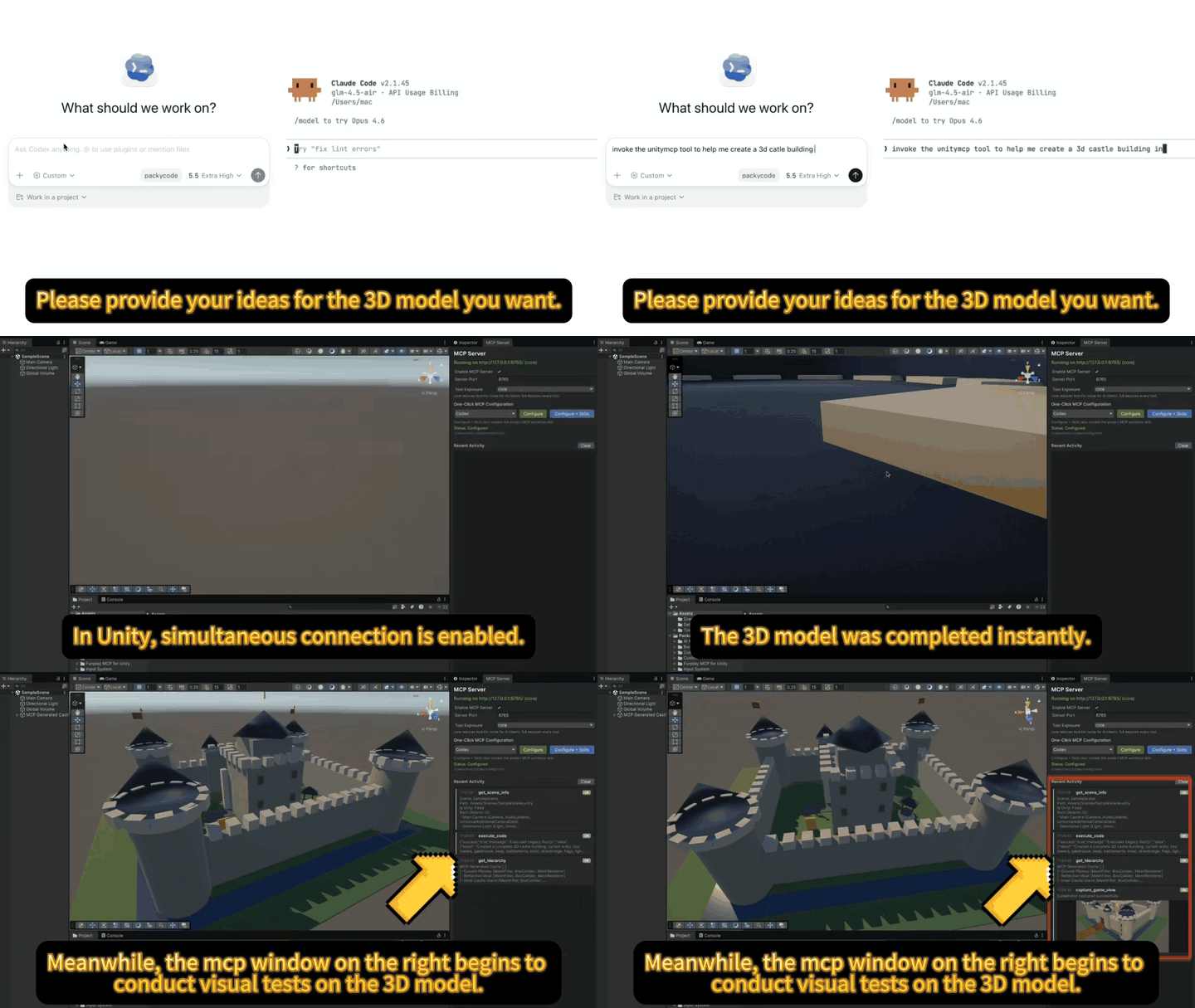
16-second demo — AI generates a 3D model and integrates it into the scene end-to-end. Watch HD MP4.
Quick Start
If you just want to get connected fast, do these three things:
- Install the Unity package from the Git URL
- Start
Funplay > MCP Server - Use the built-in one-click client configuration
1. Install via UPM (Git URL)
In Unity, go to Window → Package Manager → + → Add package from git URL:
💡 Before you clone or install, a quick ⭐ on GitHub would be greatly appreciated.
Optional: Install via OpenUPM
If you want Unity Package Manager to show registry-backed package version history and allow version selection, install from OpenUPM instead of Git.
Using the OpenUPM CLI:
Or add the scoped registry manually in Packages/manifest.json:
If you installed from a Git URL before, remove the Git dependency first, then install from OpenUPM. Git-installed packages only show the resolved Git version in Unity and do not get the registry-backed Version History list.
2. Start the MCP Server
Menu: Funplay → MCP Server to start the server.
A new project gets its own port, derived from the project path, so two editors opened on different projects never fight over one port. The MCP Server window shows the exact URL (http://127.0.0.1:<port>/); the one-click configuration writes that URL for you. Type a port in Server Port to pin a fixed one (CI, a firewall rule) and Use Per-Project Port to derive one instead.
Upgrading from an earlier version changes nothing: the project keeps the port it was already using, recorded as a pin, so existing client configs keep working. Click Use Per-Project Port when you want that project to run beside another editor. See Running Several Unity Projects at Once for the full setup guide.
If the window reports a fallback port, do not use a client entry that still targets the occupied stable port; it could reach the process that owns that port. One-click configuration stays blocked until you click Use Per-Project Port or Pin Current Port and the server finishes restarting.
Direct in-process HTTP is the default transport. If you need stronger connection continuity across Unity script recompiles or Play Mode domain reloads, enable Experimental Broker Mode in the MCP Server window. It runs a tiny local broker with Unity's bundled Mono, keeps the same 127.0.0.1 port for MCP clients, and requires no client config change.
Open Funplay → Tool Exposure if you want to edit the exact tools exposed by core or full.
Open Funplay → MCP Settings if you need to adjust execute_code safety defaults or plugin debug logging.
3. Configure Your AI Client
Use the built-in One-Click MCP Configuration in the Funplay > MCP Server window first.
Select your target client, click Configure, and the package writes the recommended MCP config entry for you.
For Claude Code, Cursor, Codex, OpenCode, and DeepSeek Harness, click Configure + Skills to also install both built-in project skills.
If you want project-specific AI guidance for the current Unity project, open Funplay → Project Skills to choose supported platforms and install the built-in unity-mcp-workflow and unity-ui-composition skills. The UI skill covers responsive portrait and landscape uGUI work.
If you prefer to edit config files manually, use the examples below as fallback references. Replace <project> with this project's entry name and <port> with its port -- the MCP Server window shows both:
Claude Code / Claude Desktop
Cursor
LM Studio
LM Studio's mcp.json location can vary by version and platform. Prefer Program > Install > Edit mcp.json in LM Studio. Funplay's one-click Configure button opens LM Studio's lmstudio://add_mcp link and only updates an existing config file if one is already present, instead of creating a guessed path.
VS Code
Trae
Kiro
Kimi / Kimi Code
Current Kimi Code releases load project-level MCP servers from .kimi-code/mcp.json (official MCP documentation). Funplay's one-click Configure target writes there so the current Unity server is only visible to Kimi sessions started in this project. If the machine only has the legacy Kimi CLI data directory, it writes the compatible user-level ~/.kimi/mcp.json instead. Start a new Kimi session from the Unity project root after configuring; on first use, review the loopback URL and trust the workspace. The generated project file contains this machine's local port, so normally keep it uncommitted unless the team deliberately shares one pinned port.
Codex
OpenCode
Written to the repository's own .opencode/opencode.json (not the global config), so only OpenCode sessions started inside this repo see this editor's tools.
DeepSeek Harness
Written as a delimited managed block into every DeepSeek Harness profile's ~/.dsh/profiles/<profile>/cordis.patch.yml, because DSH composes its plugins per launch through --profile and exposes no single active profile to target from outside. Anything outside the block is preserved on reconfigure, and deleting the block by hand uninstalls the entry.
Antigravity
Written to the workspace-local .agents/mcp_config.json with mcpServers entries using serverUrl for Funplay's Streamable HTTP endpoint. This keeps the server out of unrelated workspaces. Use a current Antigravity version supporting workspace MCP configuration, then reload its MCP servers.
Related MCP Servers
Adoption & maintenance
Factual signals from GitHub, npm, and our automated checks — not a rating.
GitHub stars
251
Stargazers on the source repository.
Last commit
8d ago
Most recent push to the default branch.
Directory activity
1 views
Config copies, upvotes, and views on AllMCPs.
Reviews
No reviews yet — be the first to share how this listing worked for you.
Frequently Asked Questions about Funplay Unity MCP
AllMCPs Directory Badge
Showcase your server listing on GitHub or your project documentation. Embed this dynamic SVG badge to highlight official listing status and live engagement.
Badge Style:
Live Dynamic SVG Preview
Markdown (GitHub README)
[](https://allmcps.com/mcp/funplay-unity-mcp)HTML Embed
<a href="https://allmcps.com/mcp/funplay-unity-mcp"><img src="https://allmcps.com/api/badge/funplay-unity-mcp?style=directory" alt="Funplay Unity MCP on AllMCPs" /></a>Technical Specs & Signals
CategoryGaming
13/13 checks healthy over the last 45d
47Quality signal: Fair · 47/100How this signal is calculated ▾
Server availabilityNot measured
Not scored for repo-hosted servers — we can't reach the running server, only its GitHub page. Hosted MCP endpoints are health-checked live.
Verified ownership10/20
Documentation & tools16/30
Adoption & activity9/15
Community engagement0/10
A guidance signal from public completeness & health data — not a user rating. New listings start lower and rise as they add docs, get verified, and grow adoption. Signals we can't observe for a listing are skipped, not counted against it.
Own this project?
This directory is pre-filled from public sources. Claim via GitHub README, site badge, or DNS TXT to unlock edit access and the Official badge — proof is checked automatically, then reviewed by our team.
Free dofollow backlink: add your website and place the AllMCPs badge on it — no claim needed. We detect it automatically and keep it verified as long as the badge stays live.
Claim & get free dofollowShare & Embed
Add our SVG badge (dark/light directory styles) or embeddable widget to your site.