MCP server for Unity: project info, build scenes, agent docs. No Unity Editor. Cursor, Claude.
Quick Install
Automated & IDE SetupCopy the AI prompt to install this server into Claude Code, Cursor, or another agent — or use 1-click editor setup below.
Manual Client & Custom JSON ConfigExpand JSON ▾
Client Config & Setup
Choose your client or environment
Target File:
💡 Paste the JSON block into your client's configuration file under mcpServers, then restart the application.
Documentation Overview
Unity MCP Server
MCP server for Unity — Gives AI assistants structured access to your Unity project from any MCP-capable IDE or app. No Unity Editor required.


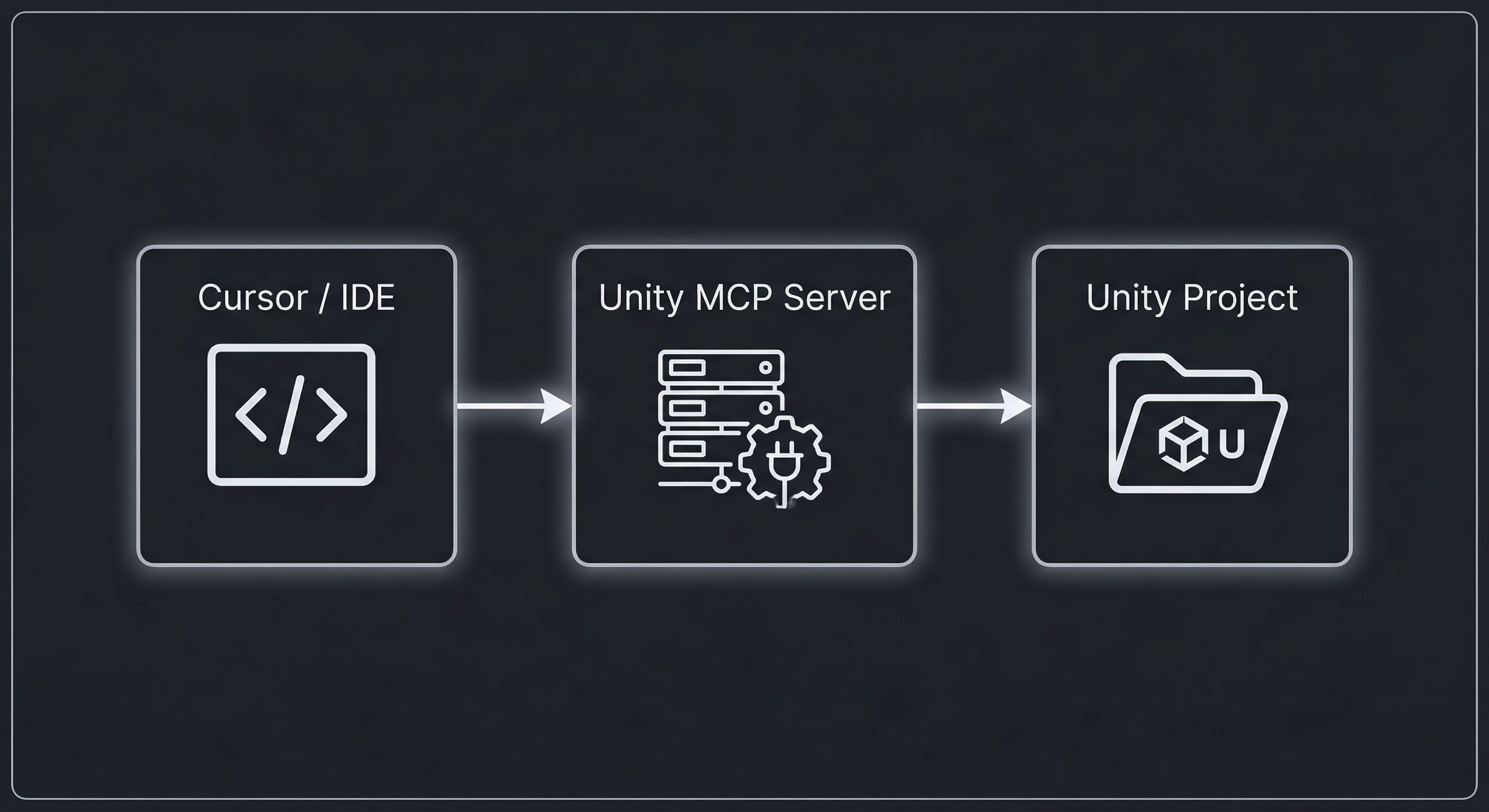
Your IDE talks to this server; the server reads your Unity project folder and answers with project info, build scenes, scripts, prefabs, and more — so the AI can help without opening the Editor.
Overview
- Editor-free — Reads only from the project filesystem.
- One server, many projects — Set
UNITY_PROJECT_PATHper project in your MCP config. - MCP-native — Works with any client that supports the Model Context Protocol (tools over stdio).
Supported IDEs and clients
This server uses the standard MCP protocol over stdio and exposes tools. Any IDE or app that can run an MCP server and pass environment variables will work. Commonly used clients include:
| Client | Notes |
|---|---|
| Cursor | Add server to MCP settings; set UNITY_PROJECT_PATH in env. |
| Claude Desktop | Add to claude_desktop_config.json; same command + env pattern. |
| Claude Code | MCP support including tools. |
| VS Code | Use an MCP extension (e.g. GenAI / Copilot MCP); configure server and UNITY_PROJECT_PATH. |
| Windsurf | Add MCP server with command and env. |
| Continue | Configure MCP server in Continue settings. |
| Cline | MCP tools and resources. |
| Other | Any client that supports MCP tools over stdio (e.g. Zed, Roo Code, LibreChat, custom agents). |
Configuration is the same everywhere: command = node, args = path to dist/index.js, env = UNITY_PROJECT_PATH = your Unity project root. See Configuration below for a Cursor example; other clients use the same structure in their own config format.
Tools
Expand a category below to see the tools it includes.
📦 Project & build
| Tool | Description | Example prompt to type |
|---|---|---|
get_project_info | Path, Unity version, build scene count, player/product name | "What's my project path and Unity version?" · "Show build scene count and player name" |
list_build_scenes | Scenes in EditorBuildSettings (build order) | "Which scenes are in the build?" · "List build scenes in order" |
get_player_settings | Product name, company, bundle ID, version | "What are the player settings?" · "Show bundle ID and company name" |
list_packages | Packages from manifest.json | "List installed Unity packages" |
get_quality_settings | Quality levels | "What are the quality settings?" |
get_scripting_defines | Global and per-assembly defines | "Show scripting defines" · "What defines are set per assembly?" |
get_physics_settings | Physics / Physics2D settings | "What are the physics settings?" |
get_graphics_settings | Graphics settings (GraphicsSettings.asset) | "Show graphics settings" |
get_time_settings | Time / fixed timestep (TimeManager.asset) | "What's the fixed timestep?" · "Show time settings" |
get_build_target_info | Active build target / platform | "What's the current build target?" |
get_feature_set_inference | Infer Unity 6 feature sets from packages (2D, ECS, AR, etc.) | "What feature sets does this project use?" |
get_project_version | Bundle version | "What's the bundle version?" |
get_changelog | CHANGELOG contents | "Show the changelog" |
get_audio_settings | AudioManager.asset (global volume, reverb, DSP buffer) | "What are the audio settings?" |
get_navigation_settings | NavMesh/agent settings from ProjectSettings | "Show NavMesh / navigation settings" |
get_xr_settings | XR/VR project settings | "What XR or VR settings are configured?" |
get_script_execution_order | Script execution order (MonoManager) | "Show script execution order" |
get_version_control_settings | Serialization mode, visible meta files | "What's the version control / serialization setup?" |
get_layer_collision_matrix | Layer collision matrix and layer names | "Show layer collision matrix" · "What layers collide?" |
get_cloud_services_config | Unity Cloud / Unity Connect config | "Is Unity Cloud configured?" |
get_package_dependency_graph | Package dependency graph (manifest + lock) | "Show package dependency graph" |
list_package_samples | Samples folders under Packages | "List package samples" |
list_unity_hub_projects | List Unity projects from Unity Hub (no project path required) | "List my Unity Hub projects" |
💻 Code & assemblies
| Tool | Description | Example prompt to type |
|---|---|---|
list_assemblies | Assembly definitions with references, platforms | "List assembly definitions" |
get_assembly_for_path | Assembly that contains a given script or folder path | "Which assembly contains Assets/Scripts/Player.cs?" |
list_scripts_by_assembly | C# script paths in a given assembly (by name or asmdef path) | "List scripts in Assembly-CSharp" · "What scripts are in MyGame.Runtime?" |
list_asmdef_references | Assembly names that reference a given assembly (reverse deps) | "Who depends on MyGame.Core?" |
list_scripts | C# scripts (optional folder filter) | "List all C# scripts" · "Show scripts in Assets/Scripts" |
find_scripts_by_content | By type/pattern (e.g. MonoBehaviour) | "Find scripts that extend MonoBehaviour" |
get_assembly_dependency_graph | Nodes and edges | "Show assembly dependency graph" |
list_editor_scripts | Scripts in Editor folders | "List editor scripts" |
list_visual_scripting_assets | Bolt / Unity Visual Scripting .asset files | "List Visual Scripting assets" |
get_script_public_api | Parse C# script: class name, base type, public methods/fields | "What's the public API of PlayerController.cs?" |
🎬 Scenes & prefabs
| Tool | Description | Example prompt to type |
|---|---|---|
list_all_scenes | All .unity files under Assets | "List all scenes" |
get_scene_summary | Root GameObjects, component count | "Summarize MainMenu.unity" · "What's in this scene?" |
get_scene_components_by_type | GameObjects in a scene with a component type (e.g. Camera, Light) | "Which GameObjects have a Camera in Game.unity?" |
get_scene_objects_by_tag | GameObjects in a scene with a given tag (e.g. Spawn) | "Find objects with tag Spawn in this scene" |
get_all_components_by_type | All Cameras/Lights/etc. across all scenes | "List all Cameras in the project" |
get_scene_hierarchy_flat | Flat list of GameObjects in a scene (name and layer) | "List all objects in Main.unity with their layers" |
get_lighting_scene_info | Lighting assets and GI workflow mode for a scene | "What lighting does Main.unity use?" |
list_prefabs | Prefabs (optional path prefix) | "List all prefabs" · "List prefabs in Assets/Prefabs" |
list_prefab_variants | Prefabs that are variants of another prefab | "List prefab variants" |
list_prefabs_with_component | Prefabs that contain a component type (e.g. Animator) | "Which prefabs have an Animator?" |
get_prefab_summary | Prefab summary: root name, component count, component types | "Summarize Hero.prefab" · "What's in this prefab?" |
get_prefab_script_guids | Script GUIDs used by a prefab | "What scripts does Hero.prefab use?" |
list_subscenes | ECS/DOTS .subscene assets | "List subscenes" |
📁 Assets & references
Related MCP Servers
Reviews
No reviews yet — be the first to share how this listing worked for you.
Frequently Asked Questions about Unity MCP Server
AllMCPs Directory Badge
Showcase your server listing on GitHub or your project documentation. Embed this dynamic SVG badge to highlight official listing status and live engagement.
Badge Style:
Live Dynamic SVG Preview
Markdown (GitHub README)
[](https://allmcps.com/mcp/unity-mcp-server)HTML Embed
<a href="https://allmcps.com/mcp/unity-mcp-server"><img src="https://allmcps.com/api/badge/unity-mcp-server?style=directory" alt="Unity MCP Server on AllMCPs" /></a>Technical Specs & Signals
CategoryGaming
27Quality signal: Emerging · 27/100How this signal is calculated ▾
Server availabilityNot measured
Not scored for repo-hosted servers — we can't reach the running server, only its GitHub page. Hosted MCP endpoints are health-checked live.
Verified ownership8/20
Documentation & tools11/30
Adoption & activity1/15
Community engagement0/10
A guidance signal from public completeness & health data — not a user rating. New listings start lower and rise as they add docs, get verified, and grow adoption. Signals we can't observe for a listing are skipped, not counted against it.
Own this project?
This directory is pre-filled from public sources. Claim via GitHub README, site badge, or DNS TXT to unlock edit access and the Official badge and attach your website — proof is checked automatically, then reviewed by our team.
Free dofollow backlink: add your website and place the AllMCPs badge on it — no claim needed. We detect it automatically and keep it verified as long as the badge stays live.
Claim & get free dofollowShare & Embed
Add our SVG badge (dark/light directory styles) or embeddable widget to your site.