Codebase understanding for AI coding agents — symbol graph, blast radius, semantic search.
Quick Install
Automated & IDE SetupCopy the AI prompt to install this server into Claude Code, Cursor, or another agent — or use 1-click editor setup below.
Manual Client & Custom JSON ConfigExpand JSON ▾
Client Config & Setup
Choose your client or environment
Target File:
💡 Paste the JSON block into your client's configuration file under mcpServers, then restart the application.
Documentation Overview





Sense ⠎⠑⠝⠎⠑
An MCP server for codebase context, built for AI coding agents.
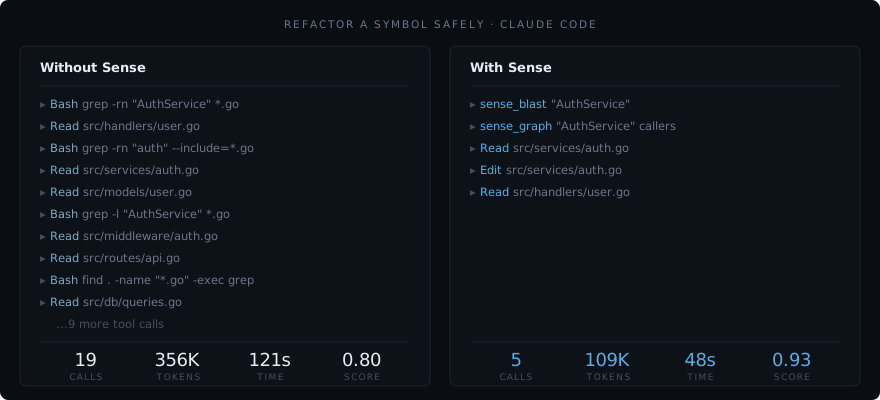
Your AI agent reads 19 files to answer "who calls this function?" because it has the text of your codebase but never the map. It re-derives structure on every task, burns tokens chasing grep chains, and hallucinates dependencies that don't exist. Sense indexes your repo once and serves a symbol graph plus semantic code search over MCP. Claude Code, Cursor, Codex CLI, and any MCP client finish the same task in 10 tool calls instead of 19, on 156K tokens instead of 228K, with the same correctness (bench/).
One binary, one local index, four tools for your AI. No SaaS account, no API key, no cloud dependency.
Sense sits on your machine, has no learning curve, and isn't for you. It's for your AI.
New here? Start with the Guide for a map to every doc, by who you are.
What Sense believes
A codebase is structure, not just text. The graph of what calls what, what breaks what, and how the team writes is real, knowable, and worth holding onto. Sense keeps it on your machine and hands it to your AI.
The rest follows from that. Local, because your code is yours. Read-only, because understanding shouldn't require permission to change things. Four tools, because your AI needs a few that work, not a hundred to pick from.
These aren't features. They're the reason Sense looks the way it does.
What Your AI Gets
Four tools for your AI. A full CLI for you. No sprawl.
| Tool | Capability |
|---|---|
sense_graph | Symbol relationships, callers, callees, inheritance, tests, dead code |
sense_search | Hybrid bi-encoder + cross-encoder semantic code search with keyword and text fallback |
sense_blast | Blast radius, affected code, affected tests, risk score |
sense_conventions | Detected project conventions from source |
Your AI stops reading 30 files to answer "who calls this?" It stops hallucinating dependencies. It stops writing code that's correct but doesn't match how your team writes code.
Convention detection
Of the four tools, convention detection is the one nobody else does well. AI tools don't just struggle with structure. They struggle with style. They write correct code that doesn't follow how YOUR codebase writes code.
Sense detects patterns from your actual source code: key types and their declarations, framework idioms (Rails associations, Go interfaces, Django models), architectural layers, and naming conventions. Your AI follows these patterns because it sees them, not because it was told about them. Convention detection isn't a feature. It's the thing that makes AI-written code feel like it belongs.
What changes
Measured across 7 real-world codebases (Discourse, Flask, Next.js, Axum, Gin, Javalin, and a private e-commerce repo).
Full methodology and raw data: bench/. Head-to-head leaderboard against Serena, Probe, GitNexus, code-search MCPs: docs/bench-leaderboard.svg.
| Metric | Claude Code (Opus 4.6) | Claude Code (Opus 4.6) + Sense | Change |
|---|---|---|---|
| Tool calls per task | 19 | 10 | -47% |
| Tokens per task | 228K | 156K | -32% |
| Cost per task | $0.42 | $0.31 | -26% |
| Session time | 91s | 73s | -19% |
| Score per 100K tokens | 0.19 | 0.30 | +64% |
| Score per minute | 0.28 | 0.38 | +37% |
Same correctness, dramatically less work. Sense doesn't make the model smarter. It gives the model structural understanding so it stops wasting effort.
Structural tasks
Tasks that require understanding code relationships, not just reading text, are where Sense pulls ahead.
| Task type | Baseline | + Sense | Why |
|---|---|---|---|
| Blast radius | 0.17 | 0.25 | Pre-computed dependency graph vs. manual grep chains |
| Find callers | 0.27 | 0.33 | Graph lookup vs. reading dozens of files |
| Dead code | 0.00 | 0.05 | Baseline can't do this at all |
| Semantic search | 0.36 | 0.38 | Two-stage retrieval (bi-encoder + cross-encoder) with text fallback |
Where Sense doesn't help
Sense is structural understanding, not a general search engine. For tasks that are fundamentally text-grep (find a log message, locate a string literal), plain grep is the right tool and Sense adds nothing. Search text fallback (ripgrep) bridges some of this gap, but it's a fallback, not a replacement.
Install
Or download the binary for your OS from the latest release, unzip, and move sense somewhere on your PATH.
Verify a release (optional)
Every release's checksums file is signed with Sigstore (keyless, bound to this repository's release workflow). With cosign installed:
Artifacts also carry build provenance attestations: gh attestation verify sense_<version>_<os>_<arch>.tar.gz --owner luuuc.
With Go (1.25+)
Index Your Codebase
Parses your code with tree-sitter, extracts symbols and relationships, embeds everything with a bundled ONNX model, and writes a local .sense/ index. Incremental on every run.
Connect Your AI
Auto-detects installed AI tools (Claude Code, Cursor, Codex CLI, and OpenCode) and writes each one's integration configs:
.mcp.json/.cursor/mcp.json/.codex/config.toml/opencode.json, the MCP server entry for the detected tool (or any MCP client)CLAUDE.md/.cursorrules/AGENTS.md, routing guidance with a tool substitution table, written from a single shared source.claude/settings.json, lifecycle hooks that nudge Claude toward Sense tools.claude/skills/and.opencode/skills/, workflow skills for exploration, impact analysis, and conventions
No manual setup. Run sense setup and your AI has structural understanding.
Sense also generates .sense/summary.md, a cold-start map of your codebase (top namespaces, hub symbols, entry points, conventions). Your AI reads it at session start and immediately knows the shape of the project. Zero tool calls to orient.
To re-configure after upgrading Sense:
Setup & forget
After sense setup, there's nothing left to do. The MCP server your editor already launches watches your working tree in the background and re-indexes changes as they land, so the index stays current whether the edit came from your AI, your own editor, a git pull, or a branch switch. No second process to start, no --watch to remember. The summary regenerates on every scan. Your AI gets faster answers and burns fewer tokens, and you just stop noticing the friction that used to be there.
How It Works
Sense parses your codebase with tree-sitter, extracts symbols (functions, classes, modules, methods) and their relationships (calls, imports, inheritance), embeds each symbol with a bundled quantized ONNX model, and stores everything in a local SQLite index at .sense/.
From that moment on, your AI can ask structural questions via MCP. These are what your AI calls. You can run them manually for verification. See CLI.md for the full reference.
The MCP server does more than answer queries: for the life of the editor session it watches the working tree with a debounced filesystem watcher and re-indexes changed files in the background, off the request path. A branch switch re-indexes once from a git diff rather than reacting to every file. If you query a file that changed microseconds ago, the server repairs just that file inline before answering, so an edit is never missed. One project indexes at a time — a single-writer lock means a second editor window or a sense scan --watch in a terminal serves reads without double-indexing. Set watch: false in .sense/config.yml to turn the background watcher off.
Performance
Sense disappears into your workflow. Queries resolve in milliseconds, so your AI reasons about structure without ever stalling.
Related MCP Servers
Reviews
No reviews yet — be the first to share how this listing worked for you.
Frequently Asked Questions about Sense
AllMCPs Directory Badge
Showcase your server listing on GitHub or your project documentation. Embed this dynamic SVG badge to highlight official listing status and live engagement.
Badge Style:
Live Dynamic SVG Preview
Markdown (GitHub README)
[](https://allmcps.com/mcp/sense)HTML Embed
<a href="https://allmcps.com/mcp/sense"><img src="https://allmcps.com/api/badge/sense?style=directory" alt="Sense on AllMCPs" /></a>