Windows-only MCP server automating Excel via COM API for live operations including Power Query, DAX, VBA, PivotTables, charts, and formatting.
Quick Install
Automated & IDE SetupCopy the AI prompt to install this server into Claude Code, Cursor, or another agent — or use 1-click editor setup below.
One-click editor setup isn’t available for this listing yet — we don’t have a confirmed install command, and we’d rather show nothing than point your editor at the wrong package or host. Follow the project’s own setup instructions, linked above.
Manual Client & Custom JSON ConfigExpand JSON ▾
No confirmed setup config for this listing yet. We only publish a config block when the install details come from the project itself — its README, its docs, or a verified owner. We haven’t found those for sbroenne/mcp-server-excel, and we’d rather show nothing than a guess you’d paste into your client. Follow the project’s own setup instructions for the current steps.
Overview
Use cases
Create and populate Excel tables with data and formulas
Generate PivotTables and charts for data analysis and visualization
Automate Power Query workflows and manage DAX measures
Run and manage VBA macros within workbooks
Apply formatting, styles, and conditional formatting to ranges
Key features
Controls live Excel application via COM API on Windows
Supports 26 specialized tools with 234 operations
Automates Power Query, DAX, VBA, PivotTables, charts, and formatting
Manages workbook elements including tables, slicers, connections, and named ranges
Captures screenshots of ranges or sheets as PNG images
Enables interactive development with real-time Excel feedback
Capabilities & Tool Schemas
Inspect callable tools, capabilities, and parameters exposed to AI agents by MCP Server Excel.
Extracted Tool Capabilities
Controls live Excel application via COM API on Windows
Supports 26 specialized tools with 234 operations
Automates Power Query, DAX, VBA, PivotTables, charts, and formatting
Manages workbook elements including tables, slicers, connections, and named ranges
Captures screenshots of ranges or sheets as PNG images
Enables interactive development with real-time Excel feedback
Documentation Overview
ExcelMcp - MCP Server for Microsoft Excel








Website · Installation · Features · Troubleshooting · 2-minute demo
Automate real Microsoft Excel with AI. Excel MCP Server lets GitHub Copilot, Claude, ChatGPT, and other agents control Excel through natural-language requests—using either MCP or a token-efficient CLI.
Unlike file-parser tools, ExcelMcp drives the actual Excel application through
its official COM API. It can refresh Power Query, recalculate formulas, evaluate
DAX, run VBA and Python =PY(), and preserve PivotTables, charts, macros, the
Data Model, and workbook formatting.
31 tools with 326 operations cover end-to-end Excel automation.
[!IMPORTANT] Requires Windows, Microsoft Excel 2016 or later, and an interactive desktop. It is not intended for Linux, macOS, or server-side batch processing.
🚀 Get Started
| Use case | Recommended path |
|---|---|
| VS Code | Install the extension |
| Claude Desktop or another MCP client | Install the MCP Server |
| Coding agents and scripts | Install the CLI |
| Not sure which to choose? | Read the installation overview |
Close open Excel workbooks before starting; ExcelMcp requires exclusive access while automating them.
What You Can Automate
- Data & analytics: Power Query, DAX, Power Pivot, Excel Tables, PivotTables, and data connections.
- Cells & workbooks: ranges, formulas, formatting, worksheets, files, calculation, and named ranges.
- Charts & visuals: charts, slicers, conditional formatting, screenshots, drawings, and sparklines.
- Automation & advanced: VBA, Python in Excel, Goal Seek, scenarios, data tables, windows, and XML Maps.
Explore the complete reference for all 326 operations.
See It in Action
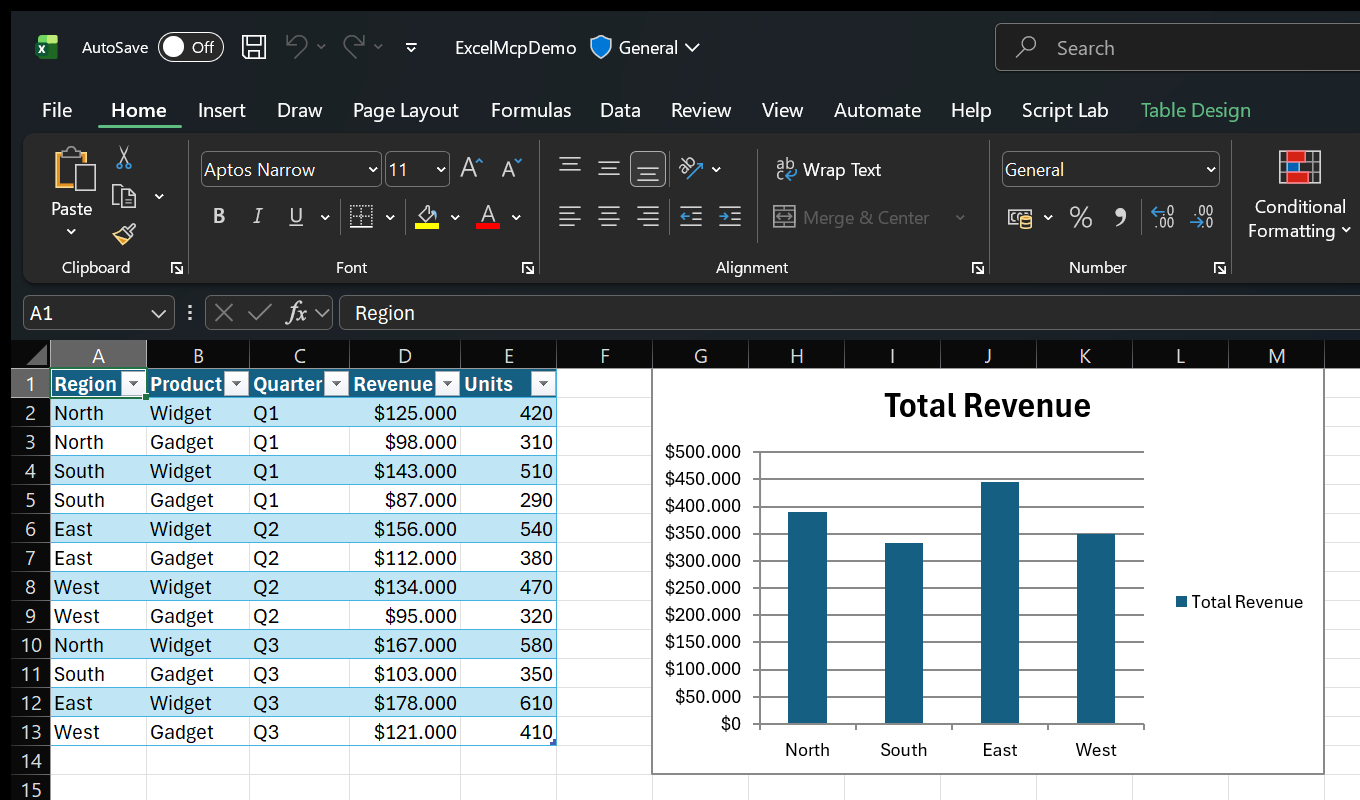
Ask in plain language:
- "Import products.csv with Power Query and load it to the Data Model."
- "Create a PivotTable showing revenue by region, then add a column chart."
- "Use Goal Seek to find the price that produces $100,000 profit."
- "Show me Excel while you work."
Because Excel performs the work, you can inspect results live and continue editing the workbook normally.
See more examples and use cases.
MCP Server or CLI?
Both entry points expose the same Core commands and behavior.
| Interface | Best for | Why |
|---|---|---|
| MCP Server | Conversational assistants and exploratory work | Rich schemas, tool discovery, and persistent sessions |
CLI (excelcli) | Coding agents, automation, and scripts | One compact tool surface and substantially lower token usage |
The MCP Server calls the ExcelMcp service in-process. The CLI uses a background daemon so workbook sessions persist across commands.
Read the architecture or browse the MCP Server and CLI guides.
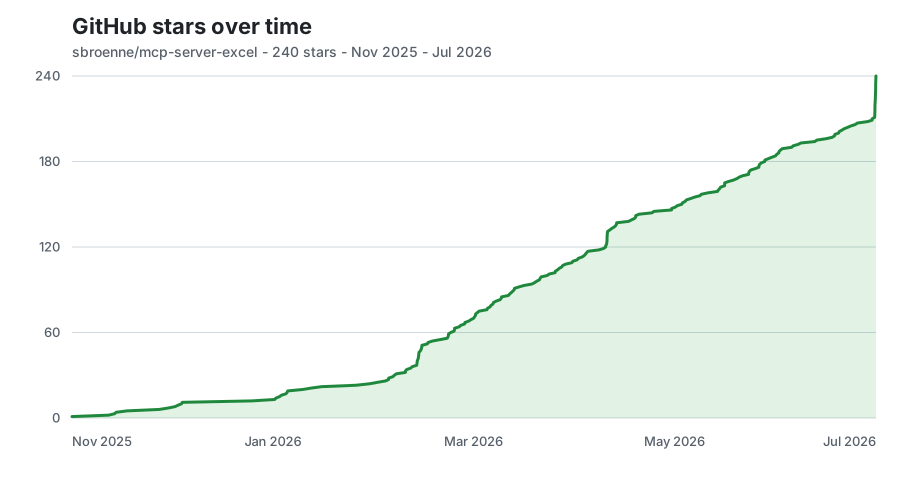
⭐ GitHub Star History
📋 Additional Information
Documentation · Changelog · Contributing · Security · Privacy
License: MIT License - see LICENSE file
Related Projects
Other projects by the author:
- PowerPoint MCP Server — AI-powered PowerPoint automation via MCP, the sister project to this one
- pytest-skill-engineering — LLM-powered testing framework for AI agents
- Windows MCP Server — AI-powered Windows automation via MCP
- OBS Studio MCP Server — AI-powered OBS Studio automation
Related MCP Servers
Adoption & maintenance
Factual signals from GitHub, npm, and our automated checks — not a rating.
GitHub stars
682
Stargazers on the source repository.
Last commit
1d ago
Most recent push to the default branch.
Directory activity
2 views
Config copies, upvotes, and views on AllMCPs.
Reviews
No reviews yet — be the first to share how this listing worked for you.
Frequently Asked Questions about MCP Server Excel
AllMCPs Directory Badge
Showcase your server listing on GitHub or your project documentation. Embed this dynamic SVG badge to highlight official listing status and live engagement.
Badge Style:
Live Dynamic SVG Preview
Markdown (GitHub README)
[](https://allmcps.com/mcp/sbroenne-mcp-server-excel)HTML Embed
<a href="https://allmcps.com/mcp/sbroenne-mcp-server-excel"><img src="https://allmcps.com/api/badge/sbroenne-mcp-server-excel?style=directory" alt="MCP Server Excel on AllMCPs" /></a>Technical Specs & Signals
CategoryWorkplace & Productivity
10/11 checks healthy over the last 33d
49Quality signal: Fair · 49/100How this signal is calculated ▾
Server availabilityNot measured
Not scored for repo-hosted servers — we can't reach the running server, only its GitHub page. Hosted MCP endpoints are health-checked live.
Verified ownership10/20
Documentation & tools18/30
Adoption & activity9/15
Community engagement0/10
A guidance signal from public completeness & health data — not a user rating. New listings start lower and rise as they add docs, get verified, and grow adoption. Signals we can't observe for a listing are skipped, not counted against it.
Own this project?
This directory is pre-filled from public sources. Claim via GitHub README, site badge, or DNS TXT to unlock edit access and the Official badge — proof is checked automatically, then reviewed by our team.
Free dofollow backlink: add your website and place the AllMCPs badge on it — no claim needed. We detect it automatically and keep it verified as long as the badge stays live.
Claim & get free dofollowShare & Embed
Add our SVG badge (dark/light directory styles) or embeddable widget to your site.