Apple Mail, Calendar, Contacts, Reminders, Notes, Messages and Safari via AppleScript or iCloud
Quick Install
Automated & IDE SetupCopy the AI prompt to install this server into Claude Code, Cursor, or another agent — or use 1-click editor setup below.
Not yet automatically verified
We haven't yet run this listing's install command through our automated sandbox check. This isn't a red flag — we're steadily working through the catalog.
Manual Client & Custom JSON ConfigExpand JSON ▾
Client Config & Setup
Choose your client or environment
Target File:
💡 Paste the JSON block into your client's configuration file under mcpServers, then restart the application.
Capabilities & Tool Schemas (38)
Inspect callable tools, capabilities, and parameters exposed to AI agents by Icloud MCP.
list-emails`folder` (string, optional), `count` (number, optional, max 50)
read-email`uid` (string), `folder` (string, optional)
send-email`to`, `subject`, `body` (strings); `cc`, `bcc` (strings, optional); `isHtml` (boolean, optional, cloud mode only)
search-emails`query`, `from`, `subject`, `folder` (strings, optional), `unreadOnly` (boolean, optional), `count` (number, optional)
mark-as-read`uid` (string), `folder` (string, optional), `isRead` (boolean, optional)
list-foldersno input
Documentation Overview


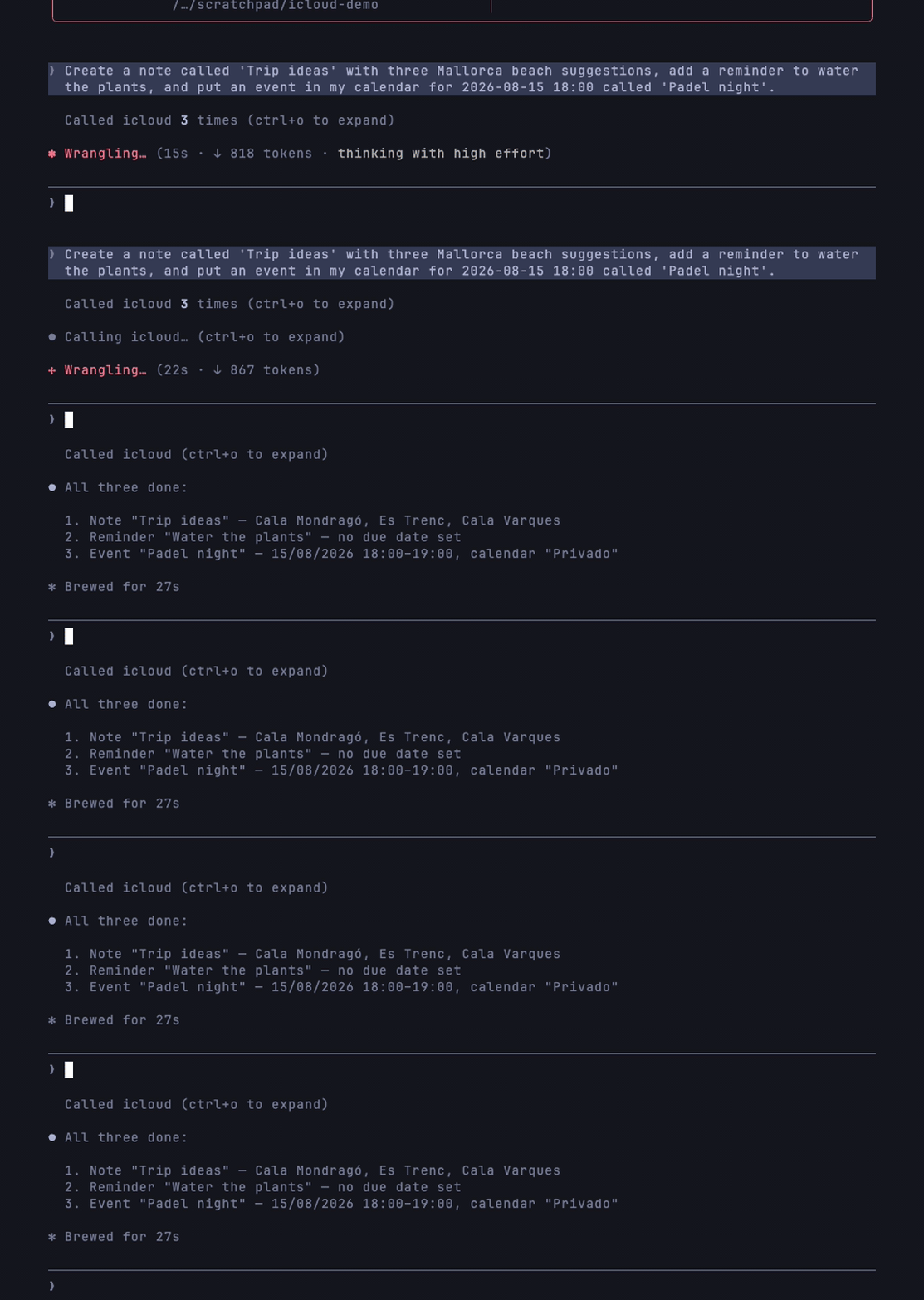
icloud-mcp covers seven Apple services with two interchangeable backends, and as far as we know it is the only MCP server that does. In local mode it drives the native macOS apps through AppleScript: no credentials, no network, and it reaches the services the iCloud protocols do not expose (Reminders, Notes, Messages, Safari). In cloud mode it speaks IMAP/SMTP, CalDAV and CardDAV instead, so it runs on any machine, not just a Mac. The set-mode tool switches between the two at runtime, without a restart.


Features
The server exposes 41 tools across Email, Calendar, Contacts, Reminders, Notes, Messages and Safari. Each tool carries a typed schema, a human title and behavioural annotations, and every list-* tool returns machine-readable structuredContent alongside its text output. Local mode needs no passwords at all; macOS Automation permissions take their place.
Access and security model
The server speaks JSON-RPC over stdin/stdout only. It opens no ports and listens on no socket.
Credentials are never logged. ICLOUD_APP_PASSWORD is read once at startup and handed only to the IMAP/SMTP/CalDAV/CardDAV clients; diagnostics print a fixed mask, never the value. Where you keep the password is up to you: a .env file beside the module for a manual install, or the .mcpb bundle's sensitive field, which the host stores in the macOS Keychain. Local mode has no password anywhere, since macOS gates access per app through its own Automation prompts, and you can revoke those at any time.
Every tool argument is validated against a zod schema before the handler runs. Arguments are also coerced at each AppleScript interpolation site, so a value that is not a number cannot reach a script template.
Privacy Policy
The server collects nothing and keeps nothing: no telemetry, no analytics, no state on disk. Your data moves only between your machine, the AI client you connect and Apple's services. The full policy, covering collection, storage, third-party sharing, retention and contact, is in PRIVACY.md.
Tools
Tools marked local only return an error in cloud mode, because the iCloud protocols do not expose those services.
Authentication
- about
- Returns information about this server, the active mode and whether credentials are configured
- No input
- check-auth-status
- Verifies credentials are usable for the active mode
- No input
- set-mode
- Switches between local and cloud without restarting
- Input:
mode(string,localorcloud)
- list-emails:
folder(string, optional),count(number, optional, max 50) - read-email:
uid(string),folder(string, optional) - send-email:
to,subject,body(strings);cc,bcc(strings, optional);isHtml(boolean, optional, cloud mode only) - search-emails:
query,from,subject,folder(strings, optional),unreadOnly(boolean, optional),count(number, optional) - mark-as-read:
uid(string),folder(string, optional),isRead(boolean, optional) - list-folders: no input
Calendar
- list-events:
count(number, optional, max 50),daysAhead(number, optional) - create-event:
summary,start,end(strings, ISO 8601);description,location(optional);calendarUrl(cloud) orcalendarName(local) - update-event:
eventUrl(string); any ofsummary,start,end,description,location. Only the fields you pass change - delete-event:
eventUrl(string) - list-calendars: no input
Contacts
- list-contacts:
count(number, optional, max 50) - search-contacts:
query(string),count(number, optional). Matches name, organisation, email and phone; phone matching ignores formatting - read-contact:
contactUrl(string) - create-contact:
displayName,firstName,lastName,email,phone,organization,title,notes(all optional) - delete-contact:
contactUrl(string) - list-contact-accounts: no input (local only)
- list-contact-groups:
accountId(string, optional) (local only)
Reminders (local only)
- list-reminder-lists: no input
- list-reminders:
listName(string, optional),includeCompleted(boolean, optional),count(number, optional) - create-reminder:
name(string);body,dueDate,listName(optional);priority(number 0-9, optional) - update-reminder:
reminderId(string); any ofname,body,dueDate,priority - complete-reminder:
reminderId(string),completed(boolean, optional) - delete-reminder:
reminderId(string) - search-reminders:
query(string),count(number, optional)
Notes (local only)
- list-note-folders: no input
- list-notes:
folderName(string, optional),count(number, optional) - read-note:
noteId(string) - create-note:
title(string),body(string, optional),folderName(string, optional) - search-notes:
query(string),count(number, optional)
Messages (local only)
Reading requires the imsg CLI and Full Disk Access.
- list-chats:
limit(number, optional) - read-messages:
chatId(number);limit(number, optional);start,end(ISO 8601, optional);attachments(boolean, optional) - send-message:
to(string),body(string),file(string, optional) - react-message:
chatId(number),type(love,like,dislike,laugh,emphasis,question)
Safari (local only)
- list-safari-tabs: no input
- get-current-safari-url: no input
- open-safari-url:
url(string),inNewWindow(boolean, optional) - close-safari-tab:
windowIndex(number, optional),tabIndex(number, optional)
Tool annotations (MCP hints)
Every tool declares its behaviour explicitly instead of relying on the spec defaults, which are deliberately pessimistic. All list-*, read-*, search-* and get-* tools, plus about and check-auth-status, are marked read-only. Nine tools carry destructiveHint: the four deletions (delete-event, delete-contact, delete-reminder, close-safari-tab), the three that reach another person irrevocably (send-email, send-message, react-message) and the two in-place updates (update-event, update-reminder). Tools that reach the network or another person carry openWorldHint: all Email and Calendar tools, send-message, react-message and open-safari-url. The read-only tools plus mark-as-read, complete-reminder, update-reminder, update-event and set-mode are marked idempotent.
Installation
Requires Node.js 20 or newer.
Let your AI install it
Paste this into Claude, Claude Code, Cursor, ChatGPT or any agent with shell or config access:
Claude Desktop
Add to claude_desktop_config.json:
For cloud mode, add credentials:
Claude Code
VS Code
Use the badge at the top of this README, or add the same command/args pair to your MCP settings.
Desktop extension (.mcpb)
Related MCP Servers
Adoption & maintenance
Factual signals from GitHub, npm, and our automated checks — not a rating.
GitHub stars
52
Stargazers on the source repository.
Last commit
1mo ago
Most recent push to the default branch.
Tools exposed
38
Callable tools this server registers over MCP.
Reviews
No reviews yet — be the first to share how this listing worked for you.
Frequently Asked Questions about Icloud MCP
AllMCPs Directory Badge
Showcase your server listing on GitHub or your project documentation. Embed this dynamic SVG badge to highlight official listing status and live engagement.
Badge Style:
Live Dynamic SVG Preview
Markdown (GitHub README)
[](https://allmcps.com/mcp/icloud-mcp)HTML Embed
<a href="https://allmcps.com/mcp/icloud-mcp"><img src="https://allmcps.com/api/badge/icloud-mcp?style=directory" alt="Icloud MCP on AllMCPs" /></a>Technical Specs & Signals
CategoryKnowledge & Memory
5/10 checks healthy over the last 46d
55Quality signal: Good · 55/100How this signal is calculated ▾
Server availabilityNot measured
Not scored for repo-hosted servers — we can't reach the running server, only its GitHub page. Hosted MCP endpoints are health-checked live.
Verified ownership10/20
Documentation & tools25/30
Adoption & activity6/15
Community engagement0/10
A guidance signal from public completeness & health data — not a user rating. New listings start lower and rise as they add docs, get verified, and grow adoption. Signals we can't observe for a listing are skipped, not counted against it.
Supply-chain signal
No high-severity advisories surfaced by our automated scan.
Critical 0High 0Medium 0Low 0
Scanned 2d ago via OSV.dev · mcp-icloud (npm)
Own this project?
This directory is pre-filled from public sources. Claim via GitHub README, site badge, or DNS TXT to unlock edit access and the Official badge — proof is checked automatically, then reviewed by our team.
Free dofollow backlink: add your website and place the AllMCPs badge on it — no claim needed. We detect it automatically and keep it verified as long as the badge stays live.
Claim & get free dofollowShare & Embed
Add our SVG badge (dark/light directory styles) or embeddable widget to your site.