AllMCPs
BrowseBestCategoriesStackCompareToolsGuidesBlog
Log in Submit MCP

Stay in the loop

Get new MCP servers and top picks in your inbox.

AllMCPs

The open directory for discovering and installing Model Context Protocol servers.

AllMCPs on GitHub (opens in a new tab)
Launched onTiny Startupstinystartups.com
Explore
  • Browse servers
  • Best MCP servers
  • Categories
  • MCP clients
  • Agent prompts
  • Stack Builder
  • Compare servers
  • Random discovery New
  • Submit a server
  • Pricing & Boost Boost
Learn
  • Guides hub
  • What is MCP?
  • Install guide
  • Build an MCP server
  • Deploy an MCP server
  • Security guide
  • Troubleshooting
  • MCP for SEO & AEO
  • Protocol versioning
  • Blog & updates
Tools
  • All developer tools
  • Config generator
  • Config validator
  • Config auditor
  • MCP playground
  • Token calculator
  • OpenAPI β†’ MCP
  • Badge generator
For agents
  • REST API docs
  • Trust & traffic Live
  • Remote MCP server SSE β†— (opens in a new tab)
  • llms.txt β†— (opens in a new tab)
  • Catalog JSON β†— (opens in a new tab)
Company
  • About
  • Advertise Sponsor
  • Contact
  • GitHub β†— (opens in a new tab)
  • Terms
  • Privacy
AllMCPs VerifiedAllMCPs VerifiedFeatured on Nick LaunchesFeatured on Nick LaunchesLaunch Llama NewsletterLaunch Llama NewsletterVerified DR - allmcps.comVerified DR - allmcps.comFeatured on SaaSGrowFeatured on SaaSGrowFeatured on Twelve ToolsFeatured on Twelve ToolsFeatured on Saaspa.geFeatured on Saaspa.geFeatured on Findly.toolsFeatured on Findly.toolsFeatured on Startup FameFeatured on Startup FameFeatured on LaunchKiwiFeatured on LaunchKiwiFeatured on ScrollLaunchFeatured on ScrollLaunchFeatured on DailyPingsFeatured on DailyPingsFazier badgeFazier badgeFeatured on NewTool.siteFeatured on NewTool.siteFeatured on saasfame.comFeatured on saasfame.comDR Checker - Domain RatingDR Checker - Domain RatingListed on Turbo0Listed on Turbo0Launched on LaunchBoard - Product Launch PlatformLaunched on LaunchBoard - Product Launch PlatformList on SimilarlabsList on Similarlabshttps://codetrendy.comhttps://codetrendy.comListed on DevTool.ioFeatured on BuildlistFeatured on BuildlistLaunched on Tiny StartupsFeatured on ShowMeBestAIFeatured on ShowMeBestAIFind us on LaunchZoneFind us on LaunchZoneAllMCPs VerifiedAllMCPs VerifiedFeatured on Nick LaunchesFeatured on Nick LaunchesLaunch Llama NewsletterLaunch Llama NewsletterVerified DR - allmcps.comVerified DR - allmcps.comFeatured on SaaSGrowFeatured on SaaSGrowFeatured on Twelve ToolsFeatured on Twelve ToolsFeatured on Saaspa.geFeatured on Saaspa.geFeatured on Findly.toolsFeatured on Findly.toolsFeatured on Startup FameFeatured on Startup FameFeatured on LaunchKiwiFeatured on LaunchKiwiFeatured on ScrollLaunchFeatured on ScrollLaunchFeatured on DailyPingsFeatured on DailyPingsFazier badgeFazier badgeFeatured on NewTool.siteFeatured on NewTool.siteFeatured on saasfame.comFeatured on saasfame.comDR Checker - Domain RatingDR Checker - Domain RatingListed on Turbo0Listed on Turbo0Launched on LaunchBoard - Product Launch PlatformLaunched on LaunchBoard - Product Launch PlatformList on SimilarlabsList on Similarlabshttps://codetrendy.comhttps://codetrendy.comListed on DevTool.ioFeatured on BuildlistFeatured on BuildlistLaunched on Tiny StartupsFeatured on ShowMeBestAIFeatured on ShowMeBestAIFind us on LaunchZoneFind us on LaunchZone
Β© 2026 Jackalope Digital LLC. All rights reserved.
  1. Home
  2. πŸ’» Developer Tools
  3. Rawmem
R
Health: Not checked yetWe have not completed a health check for this listing yet.No health check has run yet.

Rawmem

User RatingsBe the first to rate and review this MCP server! Enrichment pendingWe haven’t run our AI enrichment pass on this listing yet, so the overview, use cases, and FAQ below may be sparse or missing. We work through the catalog over time β€” check back soon.
View Repository

Read-only MCP access to a local append-only evidence ledger for AI agent sessions.

Quick Install

Automated & IDE Setup

Copy the AI prompt to install this server into Claude Code, Cursor, or another agent β€” or use 1-click editor setup below.

Add to CursorAdd to VS Code
Manual Client & Custom JSON ConfigExpand JSON β–Ύ

Client Config & Setup

Choose your client or environment
Target File:~/Library/Application Support/Claude/claude_desktop_config.json
claude_desktop_config.json
{
  "mcpServers": {
    "rawmem": {
      "command": "npx",
      "args": [
        "-y",
        "rawmem"
      ]
    }
  }
}

πŸ’‘ Paste the JSON block into your client's configuration file under mcpServers, then restart the application.

Install Directory Badge Claim listing AlternativesπŸ’» More in Developer Tools

Documentation Overview

rawmem

rawmem is a tiny local-first evidence ledger for AI and human workflows.

The idea is deliberately small:

Store now, understand later.

AI memory systems often start by summarizing. rawmem starts one layer lower: append-only raw evidence. A chat turn, a 2px UI tweak, a bug fix, a command run, a git snapshot, a browser clip, or a coding-agent completion can all become the same kind of local event.

The hard boundary is simple: capture is not recall. The ledger is a source layer. Review, filtering, MemoryDSL conversion, preference mining, and project rules can be derived later.

Why This Exists

Small facts look noisy alone. Repeated across time and projects, they become patterns:

  • "This icon is too small; make it 2px bigger."
  • "The AI forgot to update the desktop package again."
  • "This project prefers append-only bug records."
  • "The same class of boundary bug appeared in three repos."

Disk is cheap. Missing history is expensive.

Install

powershell
git clone https://github.com/Liyuan1992/rawmem.git
cd rawmem
python -m pip install --user -e .

The core runtime has no third-party dependencies. DeepSeek Harness compressed session capture and the MCP server are optional extras:

powershell
python -m pip install --user -e ".[deepseek-harness,mcp]"

To install the published v0.7.1 wheel without cloning the repository:

powershell
python -m pip install "rawmem[deepseek-harness,mcp] @ https://github.com/Liyuan1992/rawmem/releases/download/v0.7.1/rawmem-0.7.1-py3-none-any.whl"

Make sure the user Scripts directory (e.g. %APPDATA%\Python\Python312\Scripts) is on PATH so rawmem works from any directory.

One-Time Setup

powershell
rawmem setup --global --install-startup --dry-run  # inspect first; writes nothing
rawmem setup --global --yes           # global config + git hooks for all repos
rawmem setup --install-startup --yes  # run the daemon headless at every logon
rawmem setup --start-daemon           # start it right now
rawmem config --show-browser-token    # paste into the browser extension options
rawmem doctor                         # verify the complete installation

After this the daemon passively tails Claude Code, Codex, and Cursor sessions, tails PowerShell history, watches configured directories, and serves the browser-capture endpoint β€” with zero per-event action from you. Clipboard polling is available but disabled by default; enable it explicitly in config or with rawmem config --include-clipboard. The guiding principle is passive over self-report: evidence is pulled from logs other tools already write, not pushed by agents remembering to report back.

See docs/SETUP.md for the full setup matrix and the browser extension.

For DeepSeek Harness capture plus bounded read-only MCP access, see docs/DEEPSEEK_HARNESS.md.
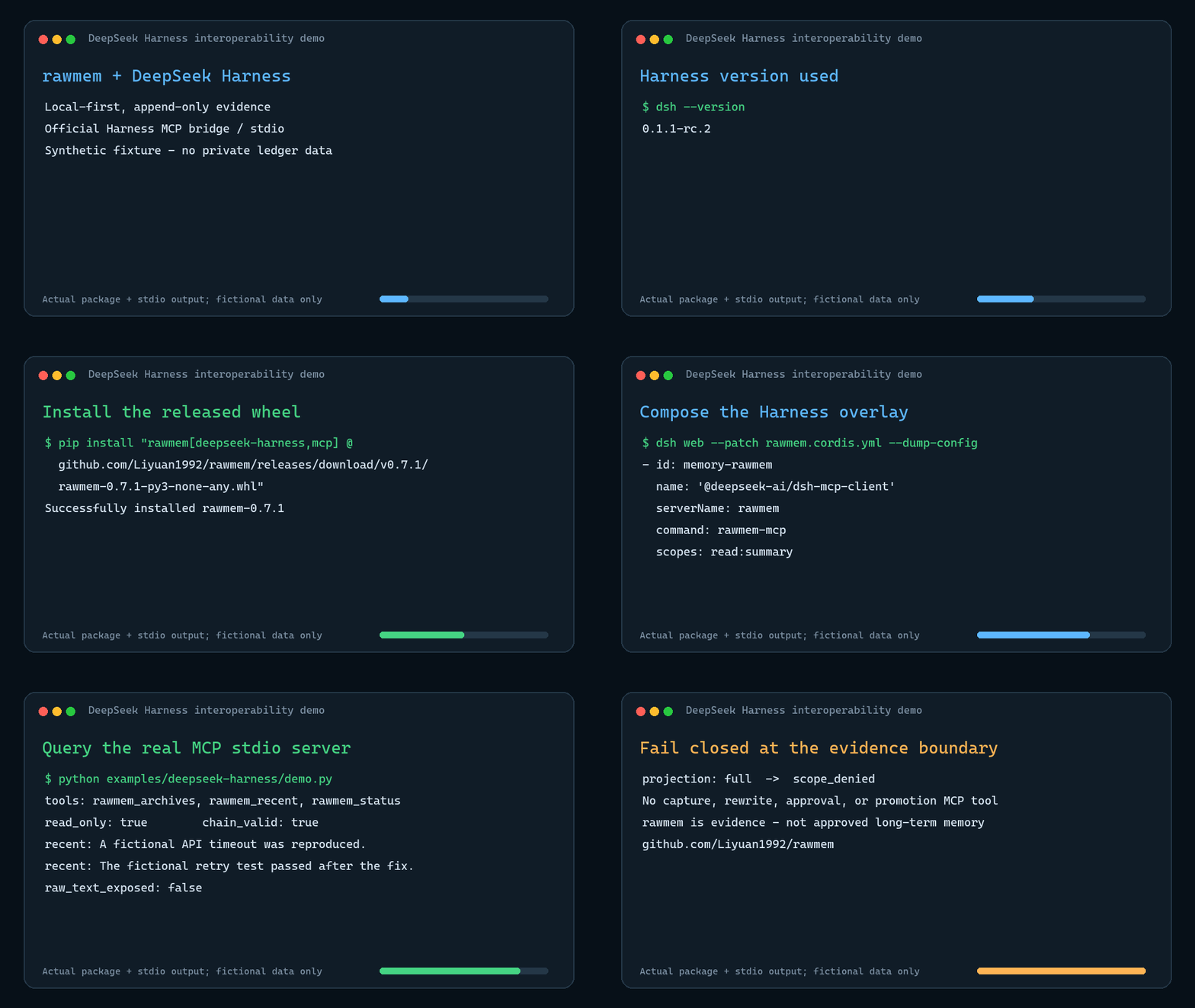
rawmem DeepSeek Harness demo

Commands

Background capture (the primary path):

powershell
rawmem daemon              # run all background surfaces in one process
rawmem daemon --status     # task counters, errors, last run times
rawmem doctor              # config, storage, daemon, token, startup, hooks, events
rawmem doctor --strict     # warnings also produce a nonzero exit code
rawmem sync                # one manual tailer pass
rawmem sync --backfill     # first run: also ingest existing history
rawmem config --disable-clipboard
rawmem config --rotate-browser-token

Preview or remove integrations:

powershell
rawmem setup --global --install-startup --dry-run
rawmem uninstall --dry-run
rawmem uninstall                    # disables integrations; keeps ~/.rawmem
rawmem uninstall --remove-home --yes  # also deletes the ledger and local state

Inspect the ledger:

server.ts
rawmem tail --limit 10
rawmem tail --source claude-code --limit 5
rawmem tail --project rawmem --type agent_user_turn --json
rawmem verify --json
rawmem export --cursor-file .rawmem\consumer-cursor.json --limit 100
rawmem seal --yes --json            # unchanged read-only archive + linked active ledger
rawmem archives --json              # metadata-only derived archive registry
rawmem export --archive .rawmem\archives\old.jsonl  # explicit; metadata-only default

rawmem export uses the stable rawmem.cursor.v1 contract and never needs to load the whole ledger. Cursors bind to a ledger identity plus a byte offset and boundary hash, so truncation, replacement, or rotation is reported explicitly instead of silently skipping or duplicating evidence. See docs/LEDGER_PROTOCOL.md.

rawmem verify is strictly read-only: it never creates or refreshes lock/state sidecars. rawmem seal keeps historical bytes unchanged, records the full verification report and every accepted previous_hash_mismatch, marks the old ledger ReadOnly on Windows, and creates a chain-complete active ledger at the same configured path. Archive reads require --archive; they hash the complete archive before returning results, default to a body-free metadata projection, and surface recorded integrity warnings.

Manual and scripted capture:

powershell
rawmem capture --source manual --type note --text "First rawmem event"
"The button should be 2px larger." | rawmem capture --source clipboard --type ui_feedback --stdin
rawmem ingest --file event.json
"Selected page text" | rawmem clip --stdin --url "https://example.com"
rawmem run --source terminal -- python --version
rawmem git-snapshot

Current Coverage

SurfaceHowWhat lands in the ledger
Claude Code sessionsdaemon tailer (zero friction)user/assistant turns, project, session, branch
Codex sessionsdaemon tailer (zero friction)user/assistant turns, project, session
Cursor agent transcriptsdaemon tailer (zero friction)user/assistant turns, workspace, session
DeepSeek Harness sessionsopt-in daemon tailer (zero friction after setup)direct user/model turns; tool name/id/status metadata only
Shell commandsdaemon tailer of PSReadLine historyevery completed command line
Clipboarddaemon poller (deduped, opt-in)clipboard text changes
Git lifecycle, all repossetup --global --yes core.hooksPath hookscommit/checkout/merge/rewrite/push snapshots
File changesdaemon watcherbatched created/modified/deleted paths
Browser pagesMV3 extension (extension/) + token-protected localhost endpointselection or page text, title, URL
Any adapter/toolingest / POST /captureJSON event payloads
Manual notescapture / clip / runraw text, tags, artifacts, command results

Storage

By default, events are written to:

text
~/.rawmem/events.jsonl

Use --local to write to the current project's private ledger:

text
.rawmem/events.jsonl

Use --ledger <path> or RAWMEM_LEDGER for an explicit ledger path.

Capture policy is configured under privacy in ~/.rawmem/config.json. Optional project/path allowlists fail closed, common secret shapes are redacted before append, and artifacts default to metadata references rather than embedded content. Daemon status and rawmem doctor expose source coverage, skipped events, redactions, and cursor health without printing captured text.

.rawmem/ is ignored by Git because raw evidence can contain private text, paths, command output, and local work context.

Event Shape

Each line is JSON:

config.json
{
  "schema": "rawmem.event.v1",
  "event_id": "evt_...",
  "ts": "2026-07-09T00:00:00Z",
  "source": "codex",
  "event_type": "task_note",
  "project": "rawmem",
  "cwd": "/workspace/fictional-rawmem",
  "summary": "User asked for a local-first raw evidence ledger.",
  "raw_text": "User asked for a local-first raw evidence ledger.",
  "tags": [],
  "artifacts": [],
  "payload": {},
  "privacy": {
    "scope": "local_only",
    "review_required": true
  },
  "previous_hash": null,
  "content_hash": "..."
}

The previous_hash / content_hash chain is a lightweight tamper-evidence mechanism. It is not a security boundary, but it makes accidental rewrites more visible.

Adapter Strategy

rawmem should not chase every AI tool with one giant integration. The stable piece is the ledger. Capture adapters can be small and optional:

  • CLI wrappers for Codex, Claude Code, shell commands, and build scripts.
  • Generic JSON ingest for tools like WorkBuddy, QWork, or custom scripts.
  • Git/file watchers for tools that ultimately change a repo.
  • Localhost browser capture, bookmarklets, and later browser extensions for web AI chats, issue pages, docs, and web clips.
  • App-specific adapters when a tool exposes logs, exports, plugins, or APIs.
  • Manual hotkey/clipboard capture as a low-friction fallback.

All adapters should emit the same event schema.

MCP is a query adapter, not a promotion path. rawmem-mcp exposes only path-free status, bounded recent events, and archive metadata. Summary access is the default; raw bodies require an explicit read:full scope.

Privacy Principles

  • Local first.
  • No upload by default.
  • No automatic memory promotion.
  • Background capture must be opt-in.
  • Clipboard polling is off by default.
  • Browser capture requires the local token created in ~/.rawmem/config.json.
  • The extension options page can test daemon connectivity and token acceptance.
  • Machine-wide Git hook setup requires --yes.
  • rawmem uninstall preserves captured data unless --remove-home --yes is explicit.
  • Store raw events separately from reviewed or derived memory.
  • Prefer allowlists for browser/app capture.

See PRIVACY.md and SECURITY.md before enabling background capture on a daily driver machine.

Development

Read the full README β†’View source on GitHub β†’

Related MCP Servers

View all in Developer Tools View all alternatives
  • The Neural Ledger Intelligence logoThe Neural Ledger Intelligence

    Read-only global event and evidence intelligence with entities, assets, and impact paths.

    πŸ’» Developer Tools0 views
    Compare vs The Neural Ledger Intelligence β†’
  • PraisonAI logoPraisonAI

    AI Agents Framework with Self Reflection and MCP support

    πŸ’» Developer Tools1 views
    Compare vs PraisonAI β†’
  • Docs logoDocs

    Search and read Empryo's documentation. Read-only, no auth, no local access.

    πŸ’» Developer Tools0 views
    Compare vs Docs β†’
  • Γ’tΓ­tọ́ logoΓ’tΓ­tọ́

    Deterministic local repository context, impact analysis, and merge-readiness evidence for AI agents.

    πŸ’» Developer Tools1 views
    Compare vs Γ’tΓ­tọ́ β†’

Reviews

No reviews yet β€” be the first to share how this listing worked for you.

Frequently Asked Questions about Rawmem

Add the following block to your claude_desktop_config.json under mcpServers: "mcpServers": { "rawmem": { "command": "npx", "args": ["-y", "rawmem"] } }

AllMCPs Directory Badge

Full Badge Customizer

Showcase your server listing on GitHub or your project documentation. Embed this dynamic SVG badge to highlight official listing status and live engagement.

Badge Style:
Live Dynamic SVG PreviewRawmem AllMCPs Directory Badge

Markdown (GitHub README)
[![AllMCPs](https://allmcps.com/api/badge/rawmem?style=directory)](https://allmcps.com/mcp/rawmem)
HTML Embed
<a href="https://allmcps.com/mcp/rawmem"><img src="https://allmcps.com/api/badge/rawmem?style=directory" alt="Rawmem on AllMCPs" /></a>

Technical Specs & Signals

CategoryπŸ’»Developer Tools
More technical detailsExpand β–Ύ
TransportSTDIO
RuntimeNode.js
Last updatedSep 7, 2026
Views0
Unique ViewsTotal visits recorded for this listing page on AllMCPs.
Installs0
Installs & Copy ActionsTotal times users copied install commands or configuration snippets for this server.
27Quality signal: Emerging Β· 27/100How this signal is calculated β–Ύ
Server availabilityNot measured

Not scored for repo-hosted servers β€” we can't reach the running server, only its GitHub page. Hosted MCP endpoints are health-checked live.

Verified ownership8/20
Documentation & tools11/30
Adoption & activity1/15
Community engagement0/10

A guidance signal from public completeness & health data β€” not a user rating. New listings start lower and rise as they add docs, get verified, and grow adoption. Signals we can't observe for a listing are skipped, not counted against it.

β˜… FeaturedAllMCPs Server logo

AllMCPs Server

The official MCP server for AllMCPs.com - submit and manage tools directly from your AI. The open directory for MCP servers. Connect Claude, Cursor, Windsurf, and AI agents to databases, tools, files, and APIs. Explore 10,000+ servers. AllMCPs is the premier, open directory for discovering, evaluating, and installing Model Context Protocol (MCP) servers to equip AI agents and LLMs with real-world superpowers.

Explore Server β†’

Own this project?

This directory is pre-filled from public sources. Claim via GitHub README, site badge, or DNS TXT to unlock edit access and the Official badge and attach your website β€” proof is checked automatically, then reviewed by our team.

Free dofollow backlink: add your website and place the AllMCPs badge on it β€” no claim needed. We detect it automatically and keep it verified as long as the badge stays live.

Claim & get free dofollow

Share & Embed

Add our SVG badge (dark/light directory styles) or embeddable widget to your site.

Explore more

More in πŸ’» Developer Tools β†’Best MCP servers for Developers β†’Alternatives to Rawmem β†’Install in Claude DesktopInstall in CursorInstall in VS Code
