Local-first, persistent memory for AI coding agents — remember, recall, forget, and list, over MCP.
Quick Install
Automated & IDE SetupCopy the AI prompt to install this server into Claude Code, Cursor, or another agent — or use 1-click editor setup below.
Manual Client & Custom JSON ConfigExpand JSON ▾
Client Config & Setup
Choose your client or environment
Target File:
💡 Paste the JSON block into your client's configuration file under mcpServers, then restart the application.
Documentation Overview

Norn
Persistent, visible memory for AI coding agents.
Live site · Releases · Quickstart · Connect your AI tool
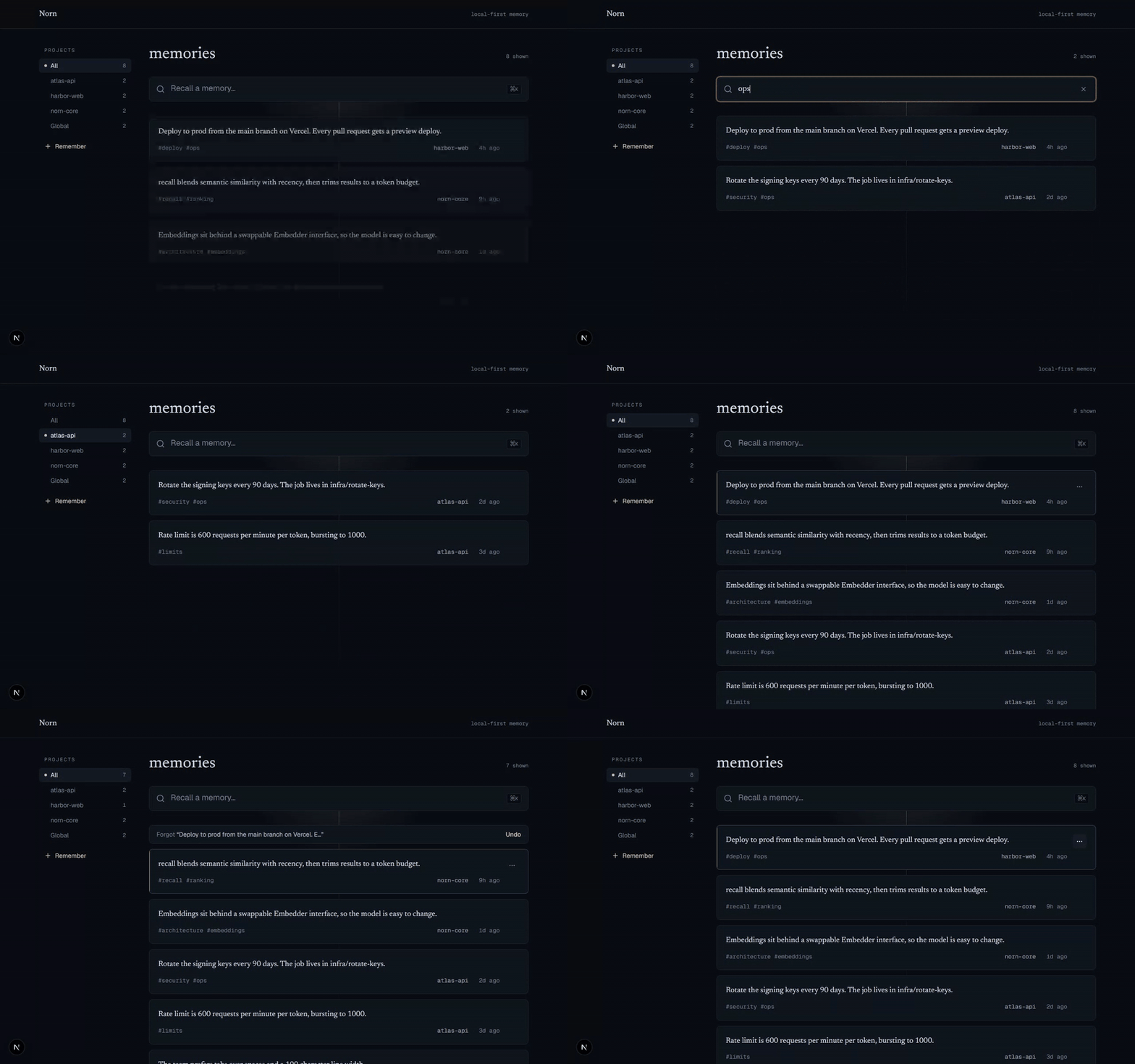
Your AI forgets you every session. Norn is a local MCP server that remembers your decisions, preferences, and project context across every session and project, for Claude Code, Cursor, and any MCP client. Unlike most memory tools it is fully local and fully inspectable: a dashboard lets you see exactly what it stored and forget anything you do not want.
Quickstart
What you need: just Node.js 20 or newer — you don't install Norn separately,
the command below fetches it automatically. Check with node --version; if it's
missing or below v20, grab the LTS from nodejs.org.
Connect to Claude Code — one command, no clone:
Or use the CLI in your terminal — run it on demand, or install the norn command:
Any other MCP client — add this to its MCP config:
Restart your tool. Norn registers four tools: remember, recall, forget, list.
Optional — flag possible conflicts: add
"env": { "NORN_DETECT_CONFLICTS": "1" }to the config above and Norn will surface memories that might disagree, for you to resolve in the dashboard. Off by default; it downloads a small extra model the first time it finds a candidate, and it never changes your store on its own.
Not sure where that config goes? The Connect Norn to your AI tool guide has exact, copy-paste setup for Claude Desktop, Cursor, Windsurf, VS Code + GitHub Copilot, and Gemini CLI — plus a beginner "what you need" and troubleshooting. (VS Code + Copilot uses a
serverskey instead ofmcpServers.)
Verify it's connected: tell your assistant "Remember that I prefer pnpm over
npm," then in a new chat ask "What package manager do I prefer?" — it should answer
pnpm by calling Norn's recall tool.
The first
rememberorrecalldownloads a local embedding model (all-MiniLM-L6-v2, ~25 MB) once, then runs fully offline.
Or run from source
See it work
Memory survives across sessions, and recall is semantic: it matches meaning, not keywords.
Session 1
You: Remember that we deploy to production from the main branch on Vercel.
Claude calls
remember("deploy to production from the main branch on Vercel", project: "acme")
Session 2, the next day, in a fresh context window
You: How do we ship to prod?
Claude calls
recall("how do we ship to prod")Norn returns "Deploy to production from the main branch on Vercel." even though the query shares no keywords with the stored note.
Using memory: it's explicit, not automatic
Norn does not record your sessions. It is a memory store, not a logger — it never
silently captures your prompts, code edits, or terminal commands. A memory exists only
when the agent calls remember(), which happens in two ways:
- You ask for it. "Remember that we deploy from
mainon Vercel." The agent callsremember(...)and the note is saved. - The agent chooses to, when it judges a fact worth keeping for next session — a decision, a preference, a constraint.
That is the point: you decide what's kept, so the store stays signal, not noise. The flip side is that if you never ask, nothing is saved — so a sparse dashboard after a long working session is expected, not a bug. The work itself lives in git; Norn is for the durable facts you want recalled later.
A few habits that make it pay off:
- End a task with "remember the key decisions from this" and the agent writes them down.
- Front-load context once — "remember my stack and conventions" — instead of re-pasting it every session.
- Ask "what do you remember about X?" to make the agent call
recall()on demand.
Everything saved this way shows up in the dashboard, and you can forget any of it.
How it works
Three local pieces share one local database:
- MCP server (
/server): exposesremember,recall,forget,listover stdio. - Store (
/core): SQLite + sqlite-vec, with embeddings from a local MiniLM model (no API key).recallblends semantic similarity with recency and trims results to a token budget;rememberdedupes near-identical notes. - Dashboard (
/web): a Next.js app to browse and manage everything.
All three resolve to the same store, so a memory written by your agent appears in the dashboard, and a memory you forget in the dashboard is gone for the agent too. The store is chosen in this order:
NORN_DB_PATH, if set — an explicit override always wins.- The nearest project-local
.norn/norn.db, walking up from the working directory (see Per-project memory). - The global
~/.norn/norn.db.
With no project store and no override, this is the original behavior: one global
~/.norn/norn.db.
Per-project memory
Give a repo its own memory that ships with it. From the project root:
This creates a .norn/ directory holding that project's norn.db. Because each project
has its own database file, memories never bleed across projects: an agent working in
one repo only sees that repo's memory.
How a project is detected
Norn finds your project the way git does — by walking up from the working directory
to the nearest ancestor that contains a .norn/ directory. Run your agent (or the CLI)
anywhere inside the repo and it resolves to the same store. The store is chosen in this
order:
NORN_DB_PATH, if set — an explicit override always wins.- The nearest project-local
.norn/norn.db, walking up from the working directory. - The global
~/.norn/norn.db— the original behavior when no project store exists.
Even without norn init, projects stay isolated in the shared global store: every memory
is stamped with the project root it was written under (a scope, derived from the nearest
.git/.norn ancestor — distinct from the freeform project label), and recall only
returns the current project's memories plus global ones. Separate db files are the primary
isolation; the scope stamp is defense in depth for the shared store.
Commit memory with the repo
norn export/norn importare available from v1.1 onward. On earlier versions, commit the binarynorn.dbdirectly (the defaultnorn initsetup).
norn.db is a binary SQLite file — it holds embedding vectors, so it has no readable git
diffs and can conflict on merge. To version your memory cleanly, commit a diffable text
export instead and let each checkout rebuild its own database:
memory.json is sorted deterministically, so re-exporting an unchanged store produces an
empty diff. Embeddings are not stored in it; they are regenerated locally on import, so
the file stays small and review-friendly. Commit it and gitignore the binary store with a
.norn/.gitignore like:
norn init(v1.1+) writes exactly this.gitignorefor you, somemory.jsonis the committed artifact out of the box. Prefer to commit the binarynorn.dbinstead — no import step on clone, at the cost of readable diffs? Just delete thenorn.dbline.
On a fresh clone, rebuild the local database from the committed file:
import upserts by id, so it is safe to re-run; it never duplicates a memory.
Try it: isolation, then commit-and-clone
A self-contained, copy-paste walkthrough (uses npx, no install; needs Node 20+ and git):
Related MCP Servers
Reviews
No reviews yet — be the first to share how this listing worked for you.
Frequently Asked Questions about Norn
AllMCPs Directory Badge
Showcase your server listing on GitHub or your project documentation. Embed this dynamic SVG badge to highlight official listing status and live engagement.
Badge Style:
Live Dynamic SVG Preview
Markdown (GitHub README)
[](https://allmcps.com/mcp/norn)HTML Embed
<a href="https://allmcps.com/mcp/norn"><img src="https://allmcps.com/api/badge/norn?style=directory" alt="Norn on AllMCPs" /></a>Technical Specs & Signals
CategoryKnowledge & Memory
28Quality signal: Emerging · 28/100How this signal is calculated ▾
Server availabilityNot measured
Not scored for repo-hosted servers — we can't reach the running server, only its GitHub page. Hosted MCP endpoints are health-checked live.
Verified ownership8/20
Documentation & tools12/30
Adoption & activity1/15
Community engagement0/10
A guidance signal from public completeness & health data — not a user rating. New listings start lower and rise as they add docs, get verified, and grow adoption. Signals we can't observe for a listing are skipped, not counted against it.
Own this project?
This directory is pre-filled from public sources. Claim via GitHub README, site badge, or DNS TXT to unlock edit access and the Official badge — proof is checked automatically, then reviewed by our team.
Free dofollow backlink: add your website and place the AllMCPs badge on it — no claim needed. We detect it automatically and keep it verified as long as the badge stays live.
Claim & get free dofollowShare & Embed
Add our SVG badge (dark/light directory styles) or embeddable widget to your site.