Convert Markdown into WhatsApp formatting: tables drawn to fit the phone's monospace width.
Quick Install
Automated & IDE SetupCopy the AI prompt to install this server into Claude Code, Cursor, or another agent — or use 1-click editor setup below.
Not yet automatically verified
We haven't yet run this listing's install command through our automated sandbox check. This isn't a red flag — we're steadily working through the catalog.
Manual Client & Custom JSON ConfigExpand JSON ▾
Client Config & Setup
Choose your client or environment
Target File:
💡 Paste the JSON block into your client's configuration file under mcpServers, then restart the application.
Documentation Overview
Markdown to WhatsApp Converter


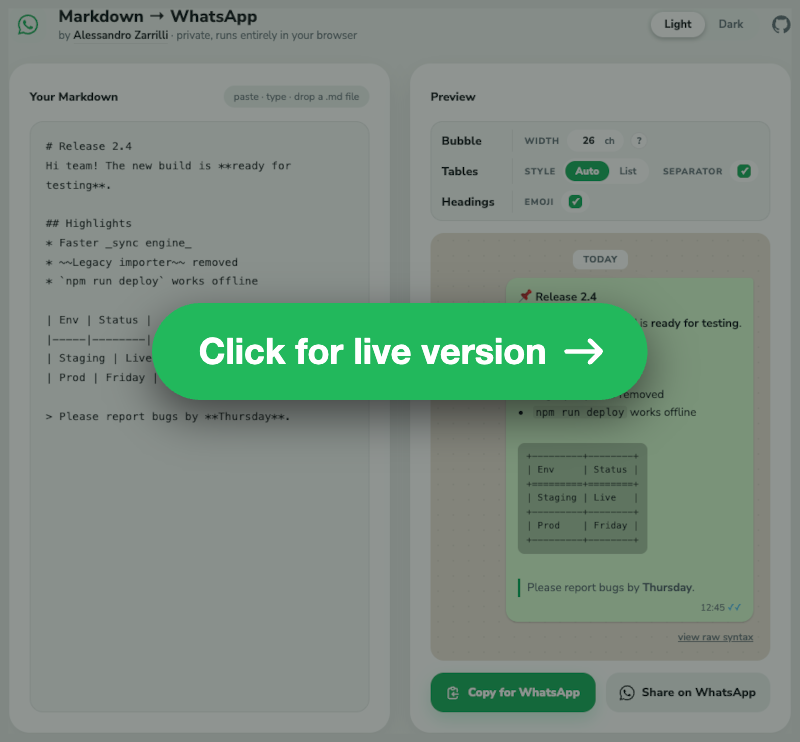
Convert standard Markdown into WhatsApp's formatting syntax — as a web page, an npm library, a command line tool or an MCP server for agents.
npm i markdown-to-whatsapp · npx markdown-to-whatsapp mcp
Purpose of this tool
WhatsApp uses a non-standard syntax for text formatting (e.g., *bold*, _italic_, ~strikethrough~). This is similar, but not identical, to standard Markdown.
This tool provides a simple way to convert text from Markdown sources (like text editors, Google Docs, etc.) into the format that WhatsApp expects, saving the need for manual correction.
The entire conversion process runs locally in your browser using JavaScript, and the parser ships with the page. No data is ever sent to a server — the only request that leaves the page is for the font.
Supported conversions
The script uses the marked library for proper AST-based parsing and handles:
Text styles
- Bold:
**text**→*text* - Italic:
*text*or_text_→_text_ - Strikethrough:
~~text~~→~text~ - Inline code:
`code`→`code` - Bold+Italic:
***text***→_*text*_(preserves both styles)
Headings
Headings are converted to bold text with level-specific emoji prefixes:
# H1→*📌 H1*## H2→*🟠 H2*### H3→*🟡 H3*- And so on...
The emoji prefix can be turned off in the UI (Headings · Emoji), leaving plain *Title*.
Lists
- Unordered lists: Uses
*prefix with◦for nested levels- Level 1:
* Item - Level 2:
* ◦ Item - Level 3:
* ◦ ◦ Item
- Level 1:
- Ordered lists: Preserves numbering, with
◦marking nested levels1. A/◦ 1. A1/◦ ◦ 1. A1a/2. B
- Task lists:
- [x]→☑,- [ ]→☐, also inside ordered lists (1. ☑ done) - Loose items: multiple paragraphs of one item are joined on a single line
- Block content in items: code blocks, blockquotes and nested lists are emitted on their own lines below the item
Bubble width
A WhatsApp bubble fits a fixed number of monospace characters on one line — about 26 on a 360 px phone, which is the default. Measure yours by sending yourself a code block and counting where it breaks, then set Width in the bar to that (the ? next to it says the same). The field accepts 10 to 80: no phone is outside that range.
The number is a property of the phone, not of any one table, so it governs everything monospace: tables degrade to stay under it, and the preview draws every code block exactly that wide, wrapping where the recipient's WhatsApp will wrap.
Tables
A table is rendered in one of two styles, chosen in the UI for the whole document or for one table at a time:
-
Auto (default): a drawn table inside a monospace block, as wide as it needs and never wider than the bubble — and the bulleted list when no box can be drawn at all.
-
List: always the bulleted list.
How the list is laid out
A list can group the cells in three ways. The converter guesses from the headers and the bold cells, and the guess can be overridden per table (Layout: Auto · Rows · Columns · Pairs):
-
Pairs — 2 columns, whatever the headers: each row is a
key: valueline. Spelling the headers out on every row reads worse thanItaly: Romein nearly every table. -
Columns — 3+ columns whose first header is empty or names a property ("Feature", "Spec", "Parameter"…), or whose first column is bold: a comparison matrix, where the things compared are the columns, so each column becomes a group.
-
Rows — everything else: one group per row, labelled by its first cell.
The property words are matched word by word ("Species" does not count as "spec") in 11 languages: English, Italian, Spanish, French, Portuguese, German, Russian, Arabic, Hindi, Bengali, and Indonesian. Pairs need exactly two columns; asked for on a wider table, it reads as Rows.
How the box degrades
The box is not drawn at any width: it degrades until it fits monoWidth, and becomes a list when nothing does. There is no way to ask for a table wider than the bubble.
- Full box, removing padding column by column (right-side first, then left-side).
- Compact borderless style, again removing padding progressively:
- Wrapped box, full borders first and then compact: each column gets at least its longest word, the remaining width is shared proportionally and cells are word-wrapped. Rows grow as tall as they need — there is no limit — and a rule is always drawn between them, since two wrapped rows without one run into each other. Cells align to the top of their row.
- Bulleted List, when not even the longest words fit (a long URL, five columns at 26 characters…).
Whether a tall wrapped box reads better than the list is a judgement the preview lets you make: that table's own panel switches it to List. A table that cannot fit any box says so in its panel and offers the list layout instead of a style that could not change anything.
Additional table behaviour
- Column widths are measured in display cells, so emoji and CJK text stay aligned (
✅,日本語count as two columns) — as far as the phone allows: those glyphs come from a fallback font too, so the alignment is best effort, unlike the ASCII borders. - Column alignment (
:---,:---:,---:) is honoured in the box and compact styles. - Header-only tables render without an empty body or a doubled border.
<br>inside a cell becomes a space, and an escaped\|becomes¦so it cannot fake an extra column.- Borders are plain ASCII (
+-|=), on purpose. WhatsApp's monospace font has no box-drawing glyphs: a phone takes─and┌from whatever fallback font it has, at whatever width that font gives them, and a rule of 26 of them wraps onto two lines while the text rows next to it do not.+-|are the only characters whose width a monospace font actually promises — which is also why the escaped pipe becomes¦, a Latin-1 character from the same font asà. - Row separator (default off) draws a rule between body rows, in every boxed and compact style; a wrapped table draws it regardless.
- The style, the row separator and the list layout can be set per table: hovering a table in the preview reveals its own controls, which start from the document default and override it for that table only, showing only the ones that still apply (the separator on a box, the layout on a list). The width is not among them — there is one bubble, and it is the same for every table. A table carrying its own settings keeps a dashed mark, since the controls at the top of the panel deliberately leave it alone — its "reset" button hands it back to them. Overrides follow the table by its header text, so adding or removing a table above does not move them. A table nested inside a list item or a blockquote always follows the document default.
Code blocks
Fenced and indented blocks reach WhatsApp verbatim: the converter never re-wraps or re-indents them, since a line break inside code is content, not layout. WhatsApp wraps long lines by itself, mid-word, and a chat bubble has no horizontal scroll — so the preview reproduces that wrap at monoWidth instead of scrolling, and shows exactly where the recipient will see the break.
Other elements
- Links:
[text](url)→text (url); autolinks,<https://x>,[url](url)and<me@x.com>render as the bare URL or address (no duplication, nomailto:leak) - HTML entities: decimal and hexadecimal references plus the common named ones — Latin-1 letters, punctuation and symbols (
café→café,©→©,A→A). Rarer references (Greek, mathematical) are left as written. - Inline HTML:
<b>/<strong>→*,<i>/<em>→_,<s>/<del>→~,<code>→`,<br>→ newline; comments and other tags are stripped - HTML blocks: tags removed, block boundaries turned into newlines, entities decoded
- Blockquotes: Preserves
>prefix, supports nesting (> > nested) - Code blocks: Preserved with triple backticks; a triple backtick inside the content is replaced with
ˋˋˋso it cannot close the block early - Horizontal rules:
---→─────────────── - Escape characters: Uses Unicode look-alikes (
∗,_,∼) so WhatsApp won't interpret them as formatting
Related MCP Servers
Reviews
No reviews yet — be the first to share how this listing worked for you.
Frequently Asked Questions about Markdown To Whatsapp
AllMCPs Directory Badge
Showcase your server listing on GitHub or your project documentation. Embed this dynamic SVG badge to highlight official listing status and live engagement.
Badge Style:
Live Dynamic SVG Preview
Markdown (GitHub README)
[](https://allmcps.com/mcp/markdown-to-whatsapp)HTML Embed
<a href="https://allmcps.com/mcp/markdown-to-whatsapp"><img src="https://allmcps.com/api/badge/markdown-to-whatsapp?style=directory" alt="Markdown To Whatsapp on AllMCPs" /></a>Technical Specs & Signals
CategoryCommunication
36Quality signal: Fair · 36/100How this signal is calculated ▾
Server availabilityNot measured
Not scored for repo-hosted servers — we can't reach the running server, only its GitHub page. Hosted MCP endpoints are health-checked live.
Verified ownership10/20
Documentation & tools16/30
Adoption & activity1/15
Community engagement0/10
A guidance signal from public completeness & health data — not a user rating. New listings start lower and rise as they add docs, get verified, and grow adoption. Signals we can't observe for a listing are skipped, not counted against it.
Own this project?
This directory is pre-filled from public sources. Claim via GitHub README, site badge, or DNS TXT to unlock edit access and the Official badge — proof is checked automatically, then reviewed by our team.
Free dofollow backlink: add your website and place the AllMCPs badge on it — no claim needed. We detect it automatically and keep it verified as long as the badge stays live.
Claim & get free dofollowShare & Embed
Add our SVG badge (dark/light directory styles) or embeddable widget to your site.