Markdown To Whatsapp README
The full upstream README, mirrored here for reference. Install config, tool schemas, adoption signals, and an original overview live on the Markdown To Whatsapp listing page.
Markdown to WhatsApp Converter


Convert standard Markdown into WhatsApp's formatting syntax — as a web page, an npm library, a command line tool or an MCP server for agents.
npm i markdown-to-whatsapp · npx markdown-to-whatsapp mcp
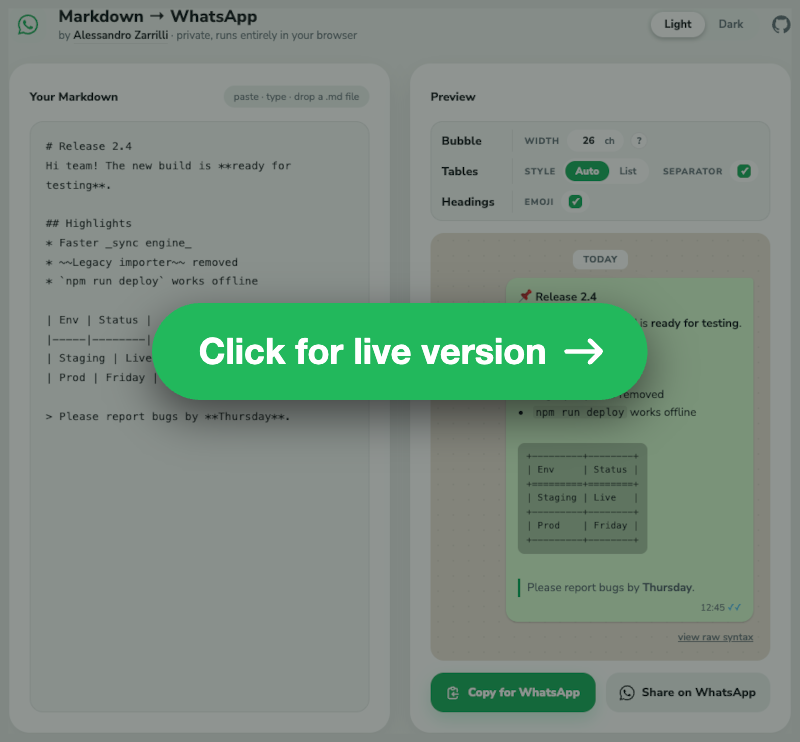
Purpose of this tool
WhatsApp uses a non-standard syntax for text formatting (e.g., *bold*, _italic_, ~strikethrough~). This is similar, but not identical, to standard Markdown.
This tool provides a simple way to convert text from Markdown sources (like text editors, Google Docs, etc.) into the format that WhatsApp expects, saving the need for manual correction.
The entire conversion process runs locally in your browser using JavaScript, and the parser ships with the page. No data is ever sent to a server — the only request that leaves the page is for the font.
Supported conversions
The script uses the marked library for proper AST-based parsing and handles:
Text styles
- Bold:
**text**→*text* - Italic:
*text*or_text_→_text_ - Strikethrough:
~~text~~→~text~ - Inline code:
`code`→`code` - Bold+Italic:
***text***→_*text*_(preserves both styles)
Headings
Headings are converted to bold text with level-specific emoji prefixes:
# H1→*📌 H1*## H2→*🟠 H2*### H3→*🟡 H3*- And so on...
The emoji prefix can be turned off in the UI (Headings · Emoji), leaving plain *Title*.
Lists
- Unordered lists: Uses
*prefix with◦for nested levels- Level 1:
* Item - Level 2:
* ◦ Item - Level 3:
* ◦ ◦ Item
- Level 1:
- Ordered lists: Preserves numbering, with
◦marking nested levels1. A/◦ 1. A1/◦ ◦ 1. A1a/2. B
- Task lists:
- [x]→☑,- [ ]→☐, also inside ordered lists (1. ☑ done) - Loose items: multiple paragraphs of one item are joined on a single line
- Block content in items: code blocks, blockquotes and nested lists are emitted on their own lines below the item
Bubble width
A WhatsApp bubble fits a fixed number of monospace characters on one line — about 26 on a 360 px phone, which is the default. Measure yours by sending yourself a code block and counting where it breaks, then set Width in the bar to that (the ? next to it says the same). The field accepts 10 to 80: no phone is outside that range.
The number is a property of the phone, not of any one table, so it governs everything monospace: tables degrade to stay under it, and the preview draws every code block exactly that wide, wrapping where the recipient's WhatsApp will wrap.
Tables
A table is rendered in one of two styles, chosen in the UI for the whole document or for one table at a time:
-
Auto (default): a drawn table inside a monospace block, as wide as it needs and never wider than the bubble — and the bulleted list when no box can be drawn at all.
-
List: always the bulleted list.
How the list is laid out
A list can group the cells in three ways. The converter guesses from the headers and the bold cells, and the guess can be overridden per table (Layout: Auto · Rows · Columns · Pairs):
-
Pairs — 2 columns, whatever the headers: each row is a
key: valueline. Spelling the headers out on every row reads worse thanItaly: Romein nearly every table. -
Columns — 3+ columns whose first header is empty or names a property ("Feature", "Spec", "Parameter"…), or whose first column is bold: a comparison matrix, where the things compared are the columns, so each column becomes a group.
-
Rows — everything else: one group per row, labelled by its first cell.
The property words are matched word by word ("Species" does not count as "spec") in 11 languages: English, Italian, Spanish, French, Portuguese, German, Russian, Arabic, Hindi, Bengali, and Indonesian. Pairs need exactly two columns; asked for on a wider table, it reads as Rows.
How the box degrades
The box is not drawn at any width: it degrades until it fits monoWidth, and becomes a list when nothing does. There is no way to ask for a table wider than the bubble.
- Full box, removing padding column by column (right-side first, then left-side).
- Compact borderless style, again removing padding progressively:
- Wrapped box, full borders first and then compact: each column gets at least its longest word, the remaining width is shared proportionally and cells are word-wrapped. Rows grow as tall as they need — there is no limit — and a rule is always drawn between them, since two wrapped rows without one run into each other. Cells align to the top of their row.
- Bulleted List, when not even the longest words fit (a long URL, five columns at 26 characters…).
Whether a tall wrapped box reads better than the list is a judgement the preview lets you make: that table's own panel switches it to List. A table that cannot fit any box says so in its panel and offers the list layout instead of a style that could not change anything.
Additional table behaviour
- Column widths are measured in display cells, so emoji and CJK text stay aligned (
✅,日本語count as two columns) — as far as the phone allows: those glyphs come from a fallback font too, so the alignment is best effort, unlike the ASCII borders. - Column alignment (
:---,:---:,---:) is honoured in the box and compact styles. - Header-only tables render without an empty body or a doubled border.
<br>inside a cell becomes a space, and an escaped\|becomes¦so it cannot fake an extra column.- Borders are plain ASCII (
+-|=), on purpose. WhatsApp's monospace font has no box-drawing glyphs: a phone takes─and┌from whatever fallback font it has, at whatever width that font gives them, and a rule of 26 of them wraps onto two lines while the text rows next to it do not.+-|are the only characters whose width a monospace font actually promises — which is also why the escaped pipe becomes¦, a Latin-1 character from the same font asà. - Row separator (default off) draws a rule between body rows, in every boxed and compact style; a wrapped table draws it regardless.
- The style, the row separator and the list layout can be set per table: hovering a table in the preview reveals its own controls, which start from the document default and override it for that table only, showing only the ones that still apply (the separator on a box, the layout on a list). The width is not among them — there is one bubble, and it is the same for every table. A table carrying its own settings keeps a dashed mark, since the controls at the top of the panel deliberately leave it alone — its "reset" button hands it back to them. Overrides follow the table by its header text, so adding or removing a table above does not move them. A table nested inside a list item or a blockquote always follows the document default.
Code blocks
Fenced and indented blocks reach WhatsApp verbatim: the converter never re-wraps or re-indents them, since a line break inside code is content, not layout. WhatsApp wraps long lines by itself, mid-word, and a chat bubble has no horizontal scroll — so the preview reproduces that wrap at monoWidth instead of scrolling, and shows exactly where the recipient will see the break.
Other elements
- Links:
[text](https://github.com/drsound/markdown-to-whatsapp/blob/HEAD/url)→text (url); autolinks,<https://x>,[url](https://github.com/drsound/markdown-to-whatsapp/blob/HEAD/url)and<me@x.com>render as the bare URL or address (no duplication, nomailto:leak) - HTML entities: decimal and hexadecimal references plus the common named ones — Latin-1 letters, punctuation and symbols (
café→café,©→©,A→A). Rarer references (Greek, mathematical) are left as written. - Inline HTML:
<b>/<strong>→*,<i>/<em>→_,<s>/<del>→~,<code>→`,<br>→ newline; comments and other tags are stripped - HTML blocks: tags removed, block boundaries turned into newlines, entities decoded
- Blockquotes: Preserves
>prefix, supports nesting (> > nested) - Code blocks: Preserved with triple backticks; a triple backtick inside the content is replaced with
ˋˋˋso it cannot close the block early - Horizontal rules:
---→─────────────── - Escape characters: Uses Unicode look-alikes (
∗,_,∼) so WhatsApp won't interpret them as formatting
WhatsApp-specific handling
- Partial-word formatting is ignored:
super**bold**ly→superboldly(WhatsApp doesn't support mid-word formatting) - Punctuation is a valid boundary:
**Name**: value→*Name*: value, and so are(**x**)and**end**.
How to use
- Open the web page: https://drsound.github.io/markdown-to-whatsapp/
- Paste, type or drop a
.mdfile into the left panel. "Try an example" fills it with a sample message. - The right panel shows the message in a WhatsApp bubble, exactly as the recipient will see it; "view raw syntax" shows the text that will be copied. The two panels scroll together — whichever is under the pointer leads — and while you type the preview follows the cursor.
- "Copy for WhatsApp", or "Share on WhatsApp" to open a chat with the message ready via
wa.me. A very long message does not fit in a link — browsers cut URLs past a few thousand characters — so Share steps aside and says to copy instead.
The interface follows the operating system's light or dark theme; the header toggle overrides it and that choice is remembered. The options bar has one section per kind of content, each shown only while the text contains it: Bubble (the width, when there is a table or a code block), Tables (style and separator) and Headings (the emoji prefix). A control that another setting makes pointless — the separator in List style, the width with nothing monospace to draw — is dimmed in place rather than removed, so the bar keeps its shape. The options are stored in localStorage along with the theme. Per-table choices are not stored: they belong to the text being converted.
Use it from code, the shell or an agent
The same converter is published on npm as markdown-to-whatsapp (Node 20 or newer). The options are the ones described above, with the same names and defaults, and are listed in full at the end of this section.
Library
Command line
--width (10–80), --tables auto|list, --layout auto|rows|columns|pairs, --separator, --no-emoji, --json, plus -h, --help and -v, --version. Output goes to stdout; a bad option says why on stderr and exits 2.
MCP server
The package runs as a Model Context Protocol server over stdio, so an agent can convert text itself — which matters for tables: counting columns against a 26-character bubble is what a model gets wrong and this tool gets right.
or, for Claude Desktop and other clients that take a JSON configuration:
It exposes one tool, convert_markdown_to_whatsapp, taking markdown plus the optional monoWidth, tableFormat, listLayout, rowSeparator and headingEmojis. The text comes back as the tool's content, and the structured result carries it as text together with tables: one entry per table with key, columns, fitsBox, asList and listLayout, so the agent can tell which tables became a box and which a list. The tool is read-only and idempotent.
Options
Options are tableFormat (auto | list), monoWidth, rowSeparator, headingEmojis, listLayout (auto | rows | columns | pairs), and tableOverrides — either an array indexed by the table's position in the document or an object keyed by the table's key (its header texts joined with |, plus #2, #3… for repeated headers), each entry overriding any of the others for that table alone. The page exposes listLayout per table only.
The older names are still accepted on input: tableThreshold for monoWidth, and ascii / always for tableFormat (ascii never drew a box wider than the bubble, so it maps to auto). When both the old and the new name are given, the new one wins and the old is dropped. borderStyle, which used to choose Unicode box drawing, is accepted and ignored.
Development
Running tests
Node 20 or newer, from the repository root:
The test suite uses file-based testing:
tests/inputs/*.md- Markdown input filestests/inputs/*.json- optional per-fixture converter options (e.g.{ "monoWidth": 40 })tests/expected/*.txt- Expected WhatsApp output
plus a few invariants: the vendored parser matches the installed one, convertToBlocks reports the right source lines, the package entry is the page script.
Tests also run in CI on every push and pull request (.github/workflows/test.yml).
Project structure
docs/converter.js- the converter itself: a pure ES module, DOM-free, options passed as a parameter. It is both the script the page imports and the entry point of the npm package (exports["."]), so there is one copy and no build step. It exposesconvertTextToWhatsapp(markdown, options),convertToBlocks(markdown, options)— the same conversion with the top-level blocks kept apart and each one tagged with the table it came from, which is what per-table options are built on — and themdContainsTable/mdContainsHeading/mdContainsCodequeries the UI uses to show an option only when it applies. Each block ofconvertToBlocksreports the sourcelineit starts on — what keeps the two panels scrolling together — and each table block also itskey,columns,fitsBox(a box is possible),asList(what was written) andlistLayout, so the interface can offer exactly the choices left.docs/ui.js- page wiring: theme, contextual options, WhatsApp preview, scroll sync between the panels, copy and sharedocs/index.html,docs/style.css- markup and hand-written stylesheet (no CSS framework)docs/vendor/- the ES build of marked, copied fromnode_modulesbynpm run vendor; the page's import map resolvesmarkedto itbin/markdown-to-whatsapp.js- the command line tool;bin/mcp.js- the MCP server it starts onmcp, loaded only then so converting a file never loads the protocol SDKscripts/vendor.js- copies the marked ES build intodocs/vendor/(npm run vendor)tests/- the fixtures and the runner
The marked dependency
The marked version is pinned to 18.0.10 in package.json, and the copy the page loads from docs/vendor/ is checked against it by the test suite, so the page, the package and the tests always parse Markdown the same way. To bump it: change the pin, npm install, npm run vendor, npm test.
Publishing
Local development
License
MIT, see the LICENSE file.