bioinformaticsgenomicssequence-analysisprotein-structurecancer-mutations
MCP server exposing gget bioinformatics tools for genomics queries, sequence analysis, and functional enrichment.
Quick Install
Automated & IDE SetupCopy the AI prompt to install this server into Claude Code, Cursor, or another agent — or use 1-click editor setup below.
Not yet automatically verified
We haven't yet run this listing's install command through our automated sandbox check. This isn't a red flag — we're steadily working through the catalog.
Manual Client & Custom JSON ConfigExpand JSON ▾
Client Config & Setup
Choose your client or environment
Target File:
💡 Paste the JSON block into your client's configuration file under mcpServers, then restart the application.
Overview
Use cases
Retrieve gene and protein sequence information
Perform BLAST and sequence alignment analyses
Predict protein structures with AlphaFold
Query cancer mutation data from COSMIC
Conduct gene set enrichment and expression analysis
Key features
Gene search and detailed info retrieval
Sequence fetching and translation
BLAST, BLAT, and multiple sequence alignment
Protein structure data from PDB and AlphaFold
Cancer mutation queries via COSMIC
Single-cell RNA-seq data access from CellxGene
Capabilities & Tool Schemas (13)
Inspect callable tools, capabilities, and parameters exposed to AI agents by Gget MCP.
gget_searchCallable MCP tool function
gget_infoCallable MCP tool function
gget_seqCallable MCP tool function
gget_refCallable MCP tool function
gget_blastCallable MCP tool function
gget_blatCallable MCP tool function
Documentation Overview
gget-mcp


MCP (Model Context Protocol) server for the gget bioinformatics library.
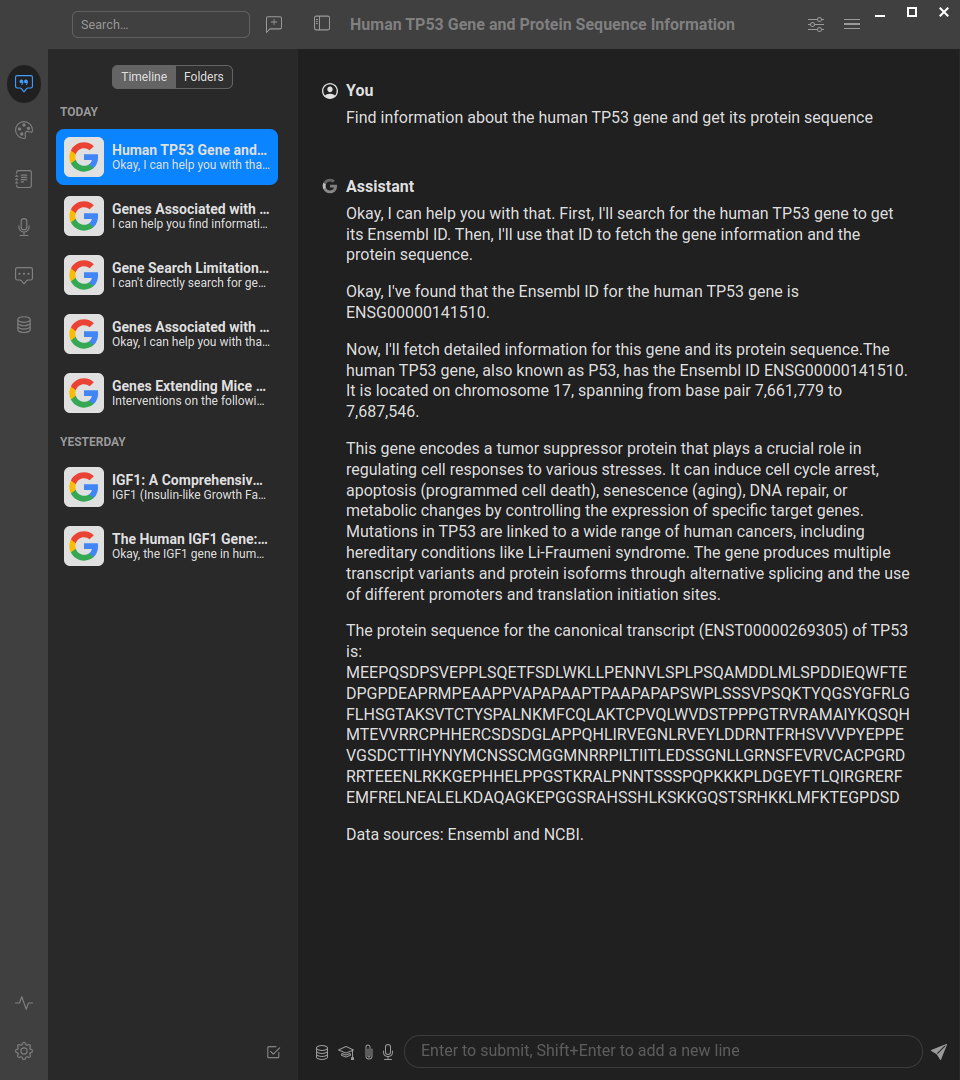
This server implements the Model Context Protocol (MCP) for gget, providing a standardized interface for accessing powerful bioinformatics tools and databases. MCP enables AI assistants and agents to perform complex genomics queries through structured interfaces.
The gget bioinformatics toolkit provides efficient querying of genomic databases and includes functions for:
- Gene and sequence information retrieval
- BLAST and sequence alignment
- Protein structure prediction
- Gene expression analysis
- Functional enrichment analysis
- And much more!
🚀 Quick Example: What Can You Do?
See how the gget MCP server works in practice with AI assistants
👤 User: "Analyze the TP53 gene - find its details and protein sequence, then check for cancer mutations"
🤖 AI Assistant: I'll help you analyze TP53 step by step:
[Uses gget_search] → Found TP53 (ENSG00000141510) on chromosome 17
[Uses gget_info] → TP53 is a protein-coding tumor suppressor gene
[Uses gget_seq with translate=True] → Retrieved 393 amino acid protein sequence
[Uses gget_cosmic] → Found hotspot mutations R175H, R248Q, R273H in multiple cancers
👤 User: "Now predict the 3D structure of this protein sequence: MSKGEELFTGVVPILVEL..."
🤖 AI Assistant: Let me analyze this sequence:
[Uses gget_blast] → Identified as Green Fluorescent Protein (GFP)
[Uses gget_alphafold] → Predicted classic beta-barrel structure with 90%+ confidence
👤 User: "Perform pathway enrichment for DNA repair genes: TP53, BRCA1, BRCA2, ATM"
🤖 AI Assistant: [Uses gget_enrichr] → Top pathways: DNA Damage Response, Homologous Recombination, Cell Cycle Checkpoints, p53 Signaling
See how powerful this is? You can now ask natural language questions about genes, sequences, mutations, and pathways - the AI does the complex bioinformatics work for you!
About MCP (Model Context Protocol)
Learn more about the Model Context Protocol
MCP is a protocol that bridges the gap between AI systems and specialized domain tools. It enables:
- Structured Access: Direct connection to powerful bioinformatics tools and databases
- Natural Language Queries: Simplified interaction with complex genomics workflows
- Type Safety: Strong typing and validation through FastMCP
- AI Integration: Seamless integration with AI assistants and agents
If you want to understand more about what the Model Context Protocol is and how to use it more efficiently, you can take the DeepLearning AI Course or search for MCP videos on YouTube.
Available Tools
Comprehensive bioinformatics functionality through gget
Gene Information & Search
gget_search: Find Ensembl IDs associated with search termsgget_info: Fetch detailed information for Ensembl IDsgget_seq: Retrieve nucleotide or amino acid sequencesgget_ref: Get reference genome information from Ensembl
Sequence Analysis
gget_blast: BLAST nucleotide or amino acid sequencesgget_blat: Find genomic locations of sequencesgget_muscle: Align multiple sequences
Expression & Functional Analysis
gget_archs4: Get gene expression data from ARCHS4gget_enrichr: Perform gene set enrichment analysis
Protein Structure & Function
gget_pdb: Fetch protein structure data from PDBgget_alphafold: Predict protein structure using AlphaFold
Cancer & Mutation Analysis
gget_cosmic: Search COSMIC database for cancer mutations
Single-cell Analysis
gget_cellxgene: Query single-cell RNA-seq data from CellxGene
Quick Start
Installing uv (optional - uvx can auto-install)
uvx is a very nice tool that can run a python package installing it if needed.
Running with uvx
You can run the gget-mcp server directly using uvx without cloning the repository:
Other uvx modes (STDIO, HTTP, SSE)
STDIO Mode (for MCP clients that require stdio)
HTTP Mode (Web Server)
SSE Mode (Server-Sent Events)
In cases when there are problems with uvx often they can be caused by cleaning uv cache:
The HTTP mode will start a web server that you can access at http://localhost:3002/mcp (with documentation at http://localhost:3002/docs). The STDIO mode is designed for MCP clients that communicate via standard input/output, while SSE mode uses Server-Sent Events for real-time communication.
Note: Currently, we do not have a Swagger/OpenAPI interface, so accessing the server directly in your browser will not show much useful information. To explore the available tools and capabilities, you should either use the MCP Inspector (see below) or connect through an MCP client to see the available tools.
Configuring your AI Client (Anthropic Claude Desktop, Cursor, Windsurf, etc.)
We provide preconfigured JSON files for different use cases. Here are the actual configuration examples:
STDIO Mode Configuration (Recommended)
Use this configuration for most AI clients. Use this mode when you want to save large output files (sequences, structures, alignments) to disk instead of returning them as text. Create or update your MCP configuration file:
HTTP Mode Configuration
For HTTP mode:
Configuration Video Tutorial
For a visual guide on how to configure MCP servers with AI clients, check out our configuration tutorial video for our sister MCP server (biothings-mcp). The configuration principles are exactly the same for the gget MCP server - just use the appropriate JSON configuration files provided above.
Inspecting gget MCP server
Using MCP Inspector to explore server capabilities
If you want to inspect the methods provided by the MCP server, use npx (you may need to install nodejs and npm):
For STDIO mode with uvx:
You can also run the inspector manually and configure it through the interface:
After that you can explore the tools and resources with MCP Inspector at which is usually at 6274 port (note, if you run inspector several times it can change port)
Integration with AI Systems
Simply point your AI client (like Cursor, Windsurf, ClaudeDesktop, VS Code with Copilot, or others) to use the appropriate configuration file from the repository.
Platform-Specific Setup Guides
Claude Desktop + gget_mcp Step-by-Step Guide (Windows)
Comprehensive Windows setup guide with Google Drive integration
Overview
This guide will walk you through setting up Claude Desktop with the gget_mcp extension and Google Drive integration on Windows. By the end, you'll be able to use Claude to fetch biological data (like gene sequences) and save them directly to your Google Drive folder with offline access.
Prerequisites
- Windows PC with administrator access
- Google account
- Stable internet connection
Step 1: Set Up Google Drive for Desktop with Offline Access
-
Download and install Google Drive for Desktop
-
Launch the application and sign in with your user account
-
Connect your project's shared Google account (if applicable)
-
Configure offline access for your working folder:
- Navigate to the folder you want to work with in Google Drive
- Right-click on the folder (e.g., "work" or your project folder)
- Select "Available offline" from the context menu
- This makes the folder accessible at a path like
C:\GDrive\holy-bio-mcp\My Disk\work
Important: This is different from just syncing - offline access ensures the files are locally available while still being part of your Google Drive structure.
Step 2: Install Claude Desktop
- Download Claude Desktop for Windows
- Run the installer and follow the setup wizard
- Sign in with your Anthropic/Claude account
- Complete the initial setup
Step 3: Install uv Package Manager
Related MCP Servers
Adoption & maintenance
Factual signals from GitHub, npm, and our automated checks — not a rating.
GitHub stars
31
Stargazers on the source repository.
npm downloads
13k
Package downloads in the last 30 days.
Last commit
10mo ago
Most recent push to the default branch.
Tools exposed
13
Callable tools this server registers over MCP.
Directory activity
2 views
Config copies, upvotes, and views on AllMCPs.
Reviews
No reviews yet — be the first to share how this listing worked for you.
Frequently Asked Questions about Gget MCP
AllMCPs Directory Badge
Showcase your server listing on GitHub or your project documentation. Embed this dynamic SVG badge to highlight official listing status and live engagement.
Badge Style:
Live Dynamic SVG Preview
Markdown (GitHub README)
[](https://allmcps.com/mcp/longevity-genie-gget-mcp)HTML Embed
<a href="https://allmcps.com/mcp/longevity-genie-gget-mcp"><img src="https://allmcps.com/api/badge/longevity-genie-gget-mcp?style=directory" alt="Gget MCP on AllMCPs" /></a>Technical Specs & Signals
PricingFree
11/11 checks healthy over the last 32d
59Quality signal: Good · 59/100How this signal is calculated ▾
Server availabilityNot measured
Not scored for repo-hosted servers — we can't reach the running server, only its GitHub page. Hosted MCP endpoints are health-checked live.
Verified ownership10/20
Documentation & tools27/30
Adoption & activity7/15
Community engagement0/10
A guidance signal from public completeness & health data — not a user rating. New listings start lower and rise as they add docs, get verified, and grow adoption. Signals we can't observe for a listing are skipped, not counted against it.
Supply-chain signal
No high-severity advisories surfaced by our automated scan.
Critical 0High 0Medium 0Low 0
Scanned 23d ago via OSV.dev · can (PyPI)
Own this project?
This directory is pre-filled from public sources. Claim via GitHub README, site badge, or DNS TXT to unlock edit access and the Official badge — proof is checked automatically, then reviewed by our team.
Free dofollow backlink: add your website and place the AllMCPs badge on it — no claim needed. We detect it automatically and keep it verified as long as the badge stays live.
Claim & get free dofollowShare & Embed
Add our SVG badge (dark/light directory styles) or embeddable widget to your site.