zenmlmlopsllmopspipelinesdeployments
MCP server for inspecting, analyzing, and triggering ZenML MLOps and LLMOps pipeline resources.
Quick Install
Automated & IDE SetupCopy the AI prompt to install this server into Claude Code, Cursor, or another agent — or use 1-click editor setup below.
Not yet automatically verified
We haven't yet run this listing's install command through our automated sandbox check. This isn't a red flag — we're steadily working through the catalog.
Manual Client & Custom JSON ConfigExpand JSON ▾
Client Config & Setup
Choose your client or environment
Target File:
💡 Paste the JSON block into your client's configuration file under mcpServers, then restart the application.
Overview
Use cases
Inspect pipeline snapshots and deployment status
Trigger pipeline runs from snapshots
Review deployment and pipeline-step logs
Analyze recent runs and stack components
Diagnose ZenML connectivity and authentication issues
Key features
Query ZenML projects, tags, builds, artifacts, models, and services
List and inspect pipeline runs, snapshots, and deployments
Trigger pipeline runs using snapshots
Retrieve bounded deployment and step logs
Analyze recent pipeline activity and stack component usage
Open interactive pipeline run dashboards and activity charts
Capabilities & Tool Schemas (23)
Inspect callable tools, capabilities, and parameters exposed to AI agents by MCP Zenml.
get_snapshotGet a frozen pipeline configuration by name/ID
list_snapshotsList snapshots with filters (runnable, deployable, deployed, tag)
get_deploymentGet a deployment's runtime status and URL
list_deploymentsList deployments with filters (status, pipeline, tag)
get_deployment_logsGet bounded logs from a deployment (tail=100 default, max 1000)
trigger_pipelineTrigger a pipeline run (prefer `snapshot_name_or_id` parameter)
Documentation Overview
MCP Server for ZenML
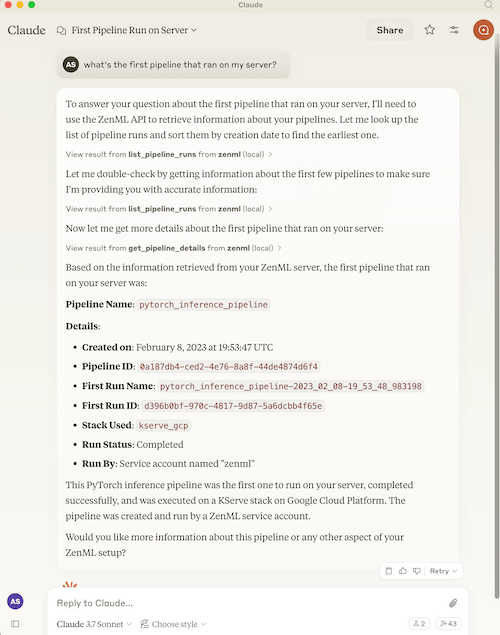
This project implements a Model Context Protocol (MCP) server for interacting with the ZenML API.
What is MCP?
The Model Context Protocol (MCP) is an open protocol that standardizes how applications provide context to Large Language Models (LLMs). It acts like a "USB-C port for AI applications" - providing a standardized way to connect AI models to different data sources and tools.
MCP follows a client-server architecture where:
- MCP Hosts: Programs like Claude Desktop or IDEs that want to access data through MCP
- MCP Clients: Protocol clients that maintain 1:1 connections with servers
- MCP Servers: Lightweight programs that expose specific capabilities through the standardized protocol
- Local Data Sources: Your computer's files, databases, and services that MCP servers can securely access
- Remote Services: External systems available over the internet that MCP servers can connect to
What is ZenML?
ZenML is an open-source platform for building and managing ML and AI pipelines. It provides a unified interface for managing data, models, and experiments.
For more information, see the ZenML website and our documentation.
Features
The server provides MCP tools to access core read functionality from the ZenML server, providing a way to get live information about:
Core Entities
- Users - user accounts and permissions
- Stacks - infrastructure configurations
- Stack Components - individual stack building blocks
- Flavors - available component types
- Service Connectors - cloud authentication
Pipeline Execution
- Pipelines - pipeline definitions
- Pipeline Runs - execution history and status
- Pipeline Steps - individual step details, code, and logs
- Schedules - automated run schedules
- Artifacts - metadata about data artifacts (not the data itself)
Deployment & Serving
- Snapshots - frozen pipeline configurations (the "what to run/serve" artifact)
- Deployments - runtime serving instances with status, URL, and logs
- Services - model serving endpoints
Organization & Discovery
- Projects - organizational containers for ZenML resources
- Tags - cross-cutting metadata labels for discovery
- Builds - pipeline build artifacts with image and code info
Models
- Models - ML model registry entries
- Model Versions - versioned model artifacts
Deprecated (migration recommended)
Pipeline run templates→ use Snapshots instead (see Migration Guide)
The server also allows you to trigger new pipeline runs using snapshots (preferred) or run templates (deprecated).
Note: We're continuously improving this integration based on user feedback. Please join our Slack community to share your experience and help us make it even better!
Available Tools
The MCP server exposes the following tools, grouped by category:
Pipeline Execution (New in v1.2)
| Tool | Description |
|---|---|
get_snapshot | Get a frozen pipeline configuration by name/ID |
list_snapshots | List snapshots with filters (runnable, deployable, deployed, tag) |
get_deployment | Get a deployment's runtime status and URL |
list_deployments | List deployments with filters (status, pipeline, tag) |
get_deployment_logs | Get bounded logs from a deployment (tail=100 default, max 1000) |
trigger_pipeline | Trigger a pipeline run (prefer snapshot_name_or_id parameter) |
Organization (New in v1.2)
| Tool | Description |
|---|---|
get_active_project | Get the currently active project |
get_project | Get project details by name/ID |
list_projects | List all projects |
get_tag | Get tag details (exclusive, colors) |
list_tags | List tags with filters (resource_type) |
get_build | Get build details (image, code embedding) |
list_builds | List builds with filters (is_local, contains_code) |
Core Entities
| Tool | Description |
|---|---|
get_user, list_users, get_active_user | User management |
get_stack, list_stacks | Stack configurations |
get_stack_component, list_stack_components | Stack components |
get_flavor, list_flavors | Component flavors |
get_service_connector, list_service_connectors | Cloud connectors |
get_pipeline_run, list_pipeline_runs | Pipeline runs |
get_run_step, list_run_steps | Step details |
get_step_logs, get_step_code | Step logs and source code |
list_pipelines, get_pipeline_details | Pipeline definitions |
get_schedule, list_schedules | Schedules |
list_artifacts | Artifact metadata |
list_secrets | Secret names (not values) |
get_service, list_services | Model services |
get_model, list_models | Model registry |
get_model_version, list_model_versions | Model versions |
Interactive Apps (Experimental)
| Tool | Description |
|---|---|
open_pipeline_run_dashboard | Open interactive pipeline runs dashboard (MCP App) |
open_run_activity_chart | Open 30-day run activity bar chart (MCP App) |
Analysis Tools
| Tool | Description |
|---|---|
stack_components_analysis | Analyze stack component usage |
recent_runs_analysis | Analyze recent pipeline runs |
most_recent_runs | Get N most recent runs |
Diagnostics
| Tool | Description |
|---|---|
diagnose_zenml_setup | Diagnose server setup (env vars, SDK, connectivity, auth). Works even when misconfigured. |
Deprecated Tools
| Tool | Replacement |
|---|---|
get_run_template | Use get_snapshot instead |
list_run_templates | Use list_snapshots instead |
trigger_pipeline(template_id=...) | Use trigger_pipeline(snapshot_name_or_id=...) |
Migration: Run Templates → Snapshots
Why the change? ZenML evolved its "runnable pipeline artifact" concept. Run Templates are now deprecated wrappers that internally just point to Snapshots. New code should use Snapshots directly.
Quick Migration Guide
| Old Pattern (Templates) | New Pattern (Snapshots) |
|---|---|
list_run_templates() | list_snapshots(runnable=True, named_only=True) |
get_run_template(name) | get_snapshot(name, include_config_schema=True) |
trigger_pipeline(template_id=...) | trigger_pipeline(snapshot_name_or_id=...) |
Example Workflow (Snapshot-First)
Note: get_deployment_logs returns bounded output (default 100 lines, max 1000, capped at 100KB) and requires the appropriate deployer integration to be installed.
Quick Setup via Dashboard (Recommended)
The easiest way to set up the ZenML MCP Server is through your ZenML dashboard's MCP Settings page.
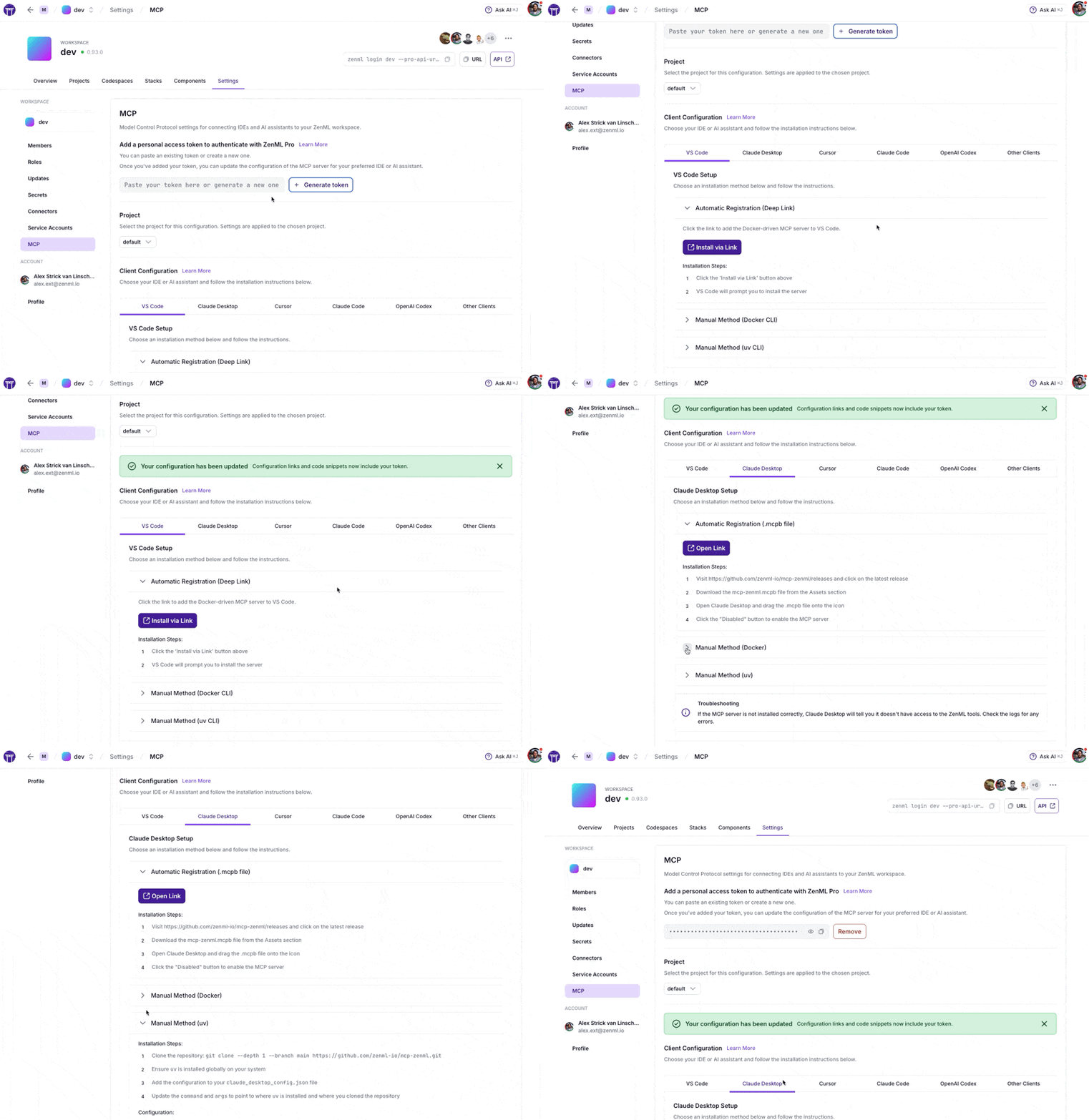
Navigate to Settings → MCP in your ZenML dashboard to get:
- Pre-configured snippets for your specific server URL and credentials
- One-click installation via deep links for supported IDEs
- Copy-paste configurations for VS Code, Claude Desktop, Cursor, Claude Code, OpenAI Codex, and more
- Docker and uv options based on your preference
ZenML Pro Users
The MCP Settings page lets you generate a Personal Access Token (PAT) with a single click. The token is automatically included in all generated configuration snippets.
ZenML OSS Users
- First create a service account token via Settings → Service Accounts
- Paste the token into the MCP Settings page
- Copy the generated configuration for your IDE
Prefer manual setup? See the detailed instructions below.
MCP Apps (Experimental)
What are MCP Apps? MCP Apps are interactive HTML UIs that MCP servers can serve directly into AI clients. They render in sandboxed iframes and can call server tools bidirectionally. See the official announcement for full details.
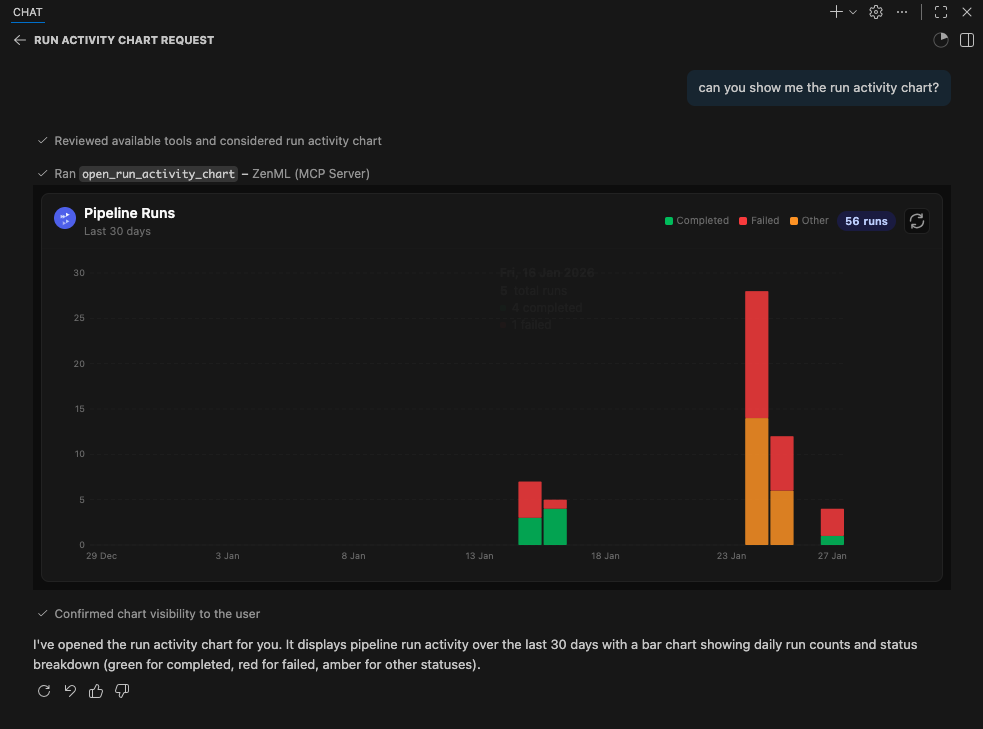
This server includes two experimental MCP Apps:
| App | Tool | Description |
|---|---|---|
| Pipeline Runs Dashboard | open_pipeline_run_dashboard | Interactive table of recent pipeline runs with status, step details, and logs |
| Run Activity Chart | open_run_activity_chart | Bar chart of pipeline run activity over the last 30 days with status breakdown |
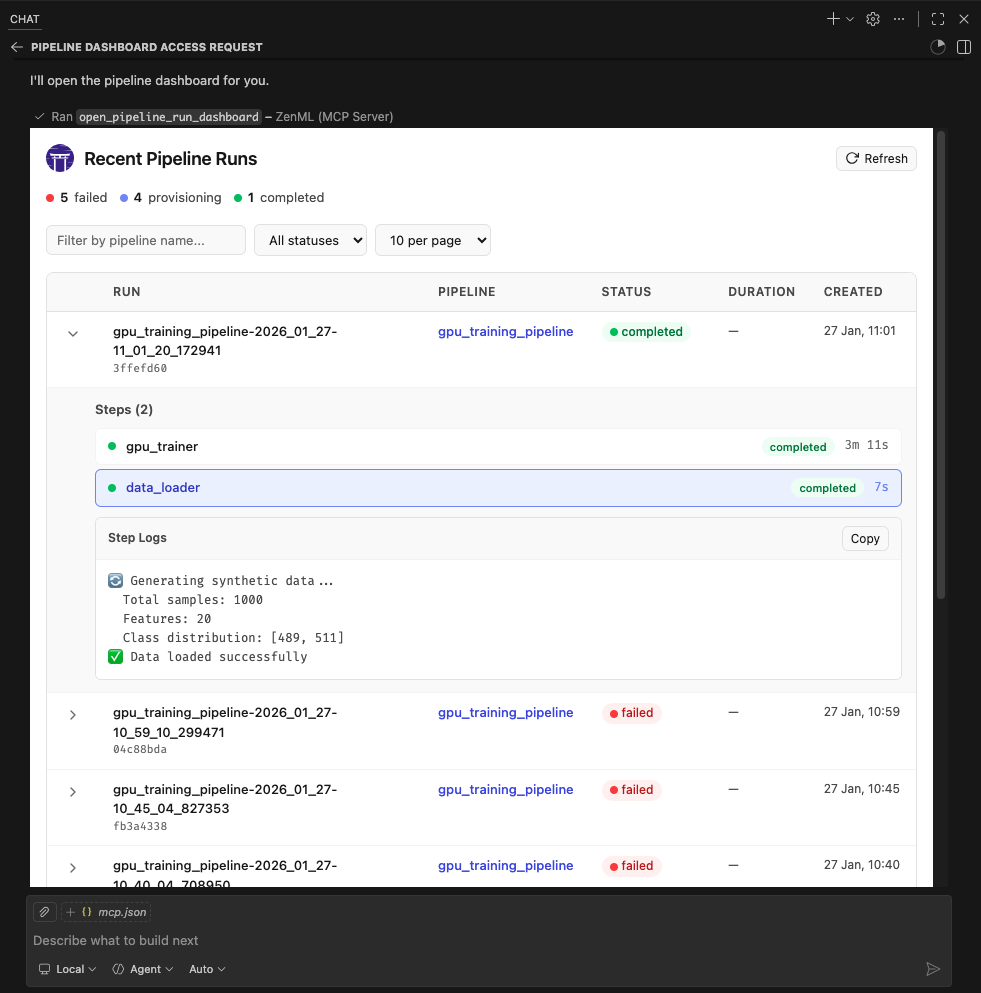
These apps are included as proof-of-concept examples. We welcome feedback and contributions for more MCP Apps. It is still early days for this new feature so we'll have to see how it evolves. We expect to support it more fully in the future.
Supported Clients
MCP Apps require Streamable HTTP transport (not stdio). The following clients currently support MCP Apps:
- ✅ VS Code (Insiders Edition)
- ✅ Goose
- ✅ ChatGPT (launching soon)
- ⚠️ Claude Desktop -- as of late January 2026, doesn't yet render Apps.
- ⚠️ Claude.ai (web) — as of late January 2026, doesn't yet render Apps.
Related MCP Servers
Adoption & maintenance
Factual signals from GitHub, npm, and our automated checks — not a rating.
GitHub stars
49
Stargazers on the source repository.
npm downloads
642k
Package downloads in the last 30 days.
Last commit
3d ago
Most recent push to the default branch.
Tools exposed
23
Callable tools this server registers over MCP.
Directory activity
1 views
Config copies, upvotes, and views on AllMCPs.
Reviews
No reviews yet — be the first to share how this listing worked for you.
Frequently Asked Questions about MCP Zenml
AllMCPs Directory Badge
Showcase your server listing on GitHub or your project documentation. Embed this dynamic SVG badge to highlight official listing status and live engagement.
Badge Style:
Live Dynamic SVG Preview
Markdown (GitHub README)
[](https://allmcps.com/mcp/zenml-io-mcp-zenml)HTML Embed
<a href="https://allmcps.com/mcp/zenml-io-mcp-zenml"><img src="https://allmcps.com/api/badge/zenml-io-mcp-zenml?style=directory" alt="MCP Zenml on AllMCPs" /></a>Technical Specs & Signals
CategoryCloud Platforms
PricingFree
10/10 checks healthy over the last 32d
63Quality signal: Good · 63/100How this signal is calculated ▾
Server availabilityNot measured
Not scored for repo-hosted servers — we can't reach the running server, only its GitHub page. Hosted MCP endpoints are health-checked live.
Verified ownership10/20
Documentation & tools26/30
Adoption & activity11/15
Community engagement0/10
A guidance signal from public completeness & health data — not a user rating. New listings start lower and rise as they add docs, get verified, and grow adoption. Signals we can't observe for a listing are skipped, not counted against it.
Supply-chain signal
No high-severity advisories surfaced by our automated scan.
Critical 0High 0Medium 0Low 0
Scanned 26d ago via OSV.dev · cloudflared (npm)
Own this project?
This directory is pre-filled from public sources. Claim via GitHub README, site badge, or DNS TXT to unlock edit access and the Official badge — proof is checked automatically, then reviewed by our team.
Free dofollow backlink: add your website and place the AllMCPs badge on it — no claim needed. We detect it automatically and keep it verified as long as the badge stays live.
Claim & get free dofollowShare & Embed
Add our SVG badge (dark/light directory styles) or embeddable widget to your site.