AllMCPs
BrowseBestCategoriesStackCompareToolsGuidesBlog
Log in Submit MCP

Stay in the loop

Get new MCP servers and top picks in your inbox.

AllMCPs

The open directory for discovering and installing Model Context Protocol servers.

AllMCPs on GitHub (opens in a new tab)
Launched onTiny Startupstinystartups.com
Explore
  • Browse servers
  • Best MCP servers
  • Categories
  • MCP clients
  • Agent prompts
  • Stack Builder
  • Compare servers
  • Random discovery New
  • Submit a server
  • Pricing & Boost Boost
Learn
  • Guides hub
  • What is MCP?
  • Install guide
  • Build an MCP server
  • Deploy an MCP server
  • Security guide
  • Troubleshooting
  • MCP for SEO & AEO
  • Protocol versioning
  • Blog & updates
Tools
  • All developer tools
  • Config generator
  • Config validator
  • Config auditor
  • MCP playground
  • Token calculator
  • OpenAPI β†’ MCP
  • Badge generator
For agents
  • REST API docs
  • Trust & traffic Live
  • Remote MCP server SSE β†— (opens in a new tab)
  • llms.txt β†— (opens in a new tab)
  • Catalog JSON β†— (opens in a new tab)
Company
  • About
  • Advertise Sponsor
  • Contact
  • GitHub β†— (opens in a new tab)
  • Terms
  • Privacy
AllMCPs VerifiedAllMCPs VerifiedFeatured on Nick LaunchesFeatured on Nick LaunchesLaunch Llama NewsletterLaunch Llama NewsletterVerified DR - allmcps.comVerified DR - allmcps.comFeatured on SaaSGrowFeatured on SaaSGrowFeatured on Twelve ToolsFeatured on Twelve ToolsFeatured on Saaspa.geFeatured on Saaspa.geFeatured on Findly.toolsFeatured on Findly.toolsFeatured on Startup FameFeatured on Startup FameFeatured on LaunchKiwiFeatured on LaunchKiwiFeatured on ScrollLaunchFeatured on ScrollLaunchFeatured on DailyPingsFeatured on DailyPingsFazier badgeFazier badgeFeatured on NewTool.siteFeatured on NewTool.siteFeatured on saasfame.comFeatured on saasfame.comDR Checker - Domain RatingDR Checker - Domain RatingListed on Turbo0Listed on Turbo0Launched on LaunchBoard - Product Launch PlatformLaunched on LaunchBoard - Product Launch PlatformList on SimilarlabsList on Similarlabshttps://codetrendy.comhttps://codetrendy.comListed on DevTool.ioFeatured on BuildlistFeatured on BuildlistLaunched on Tiny StartupsFeatured on ShowMeBestAIFeatured on ShowMeBestAIFind us on LaunchZoneFind us on LaunchZoneAllMCPs VerifiedAllMCPs VerifiedFeatured on Nick LaunchesFeatured on Nick LaunchesLaunch Llama NewsletterLaunch Llama NewsletterVerified DR - allmcps.comVerified DR - allmcps.comFeatured on SaaSGrowFeatured on SaaSGrowFeatured on Twelve ToolsFeatured on Twelve ToolsFeatured on Saaspa.geFeatured on Saaspa.geFeatured on Findly.toolsFeatured on Findly.toolsFeatured on Startup FameFeatured on Startup FameFeatured on LaunchKiwiFeatured on LaunchKiwiFeatured on ScrollLaunchFeatured on ScrollLaunchFeatured on DailyPingsFeatured on DailyPingsFazier badgeFazier badgeFeatured on NewTool.siteFeatured on NewTool.siteFeatured on saasfame.comFeatured on saasfame.comDR Checker - Domain RatingDR Checker - Domain RatingListed on Turbo0Listed on Turbo0Launched on LaunchBoard - Product Launch PlatformLaunched on LaunchBoard - Product Launch PlatformList on SimilarlabsList on Similarlabshttps://codetrendy.comhttps://codetrendy.comListed on DevTool.ioFeatured on BuildlistFeatured on BuildlistLaunched on Tiny StartupsFeatured on ShowMeBestAIFeatured on ShowMeBestAIFind us on LaunchZoneFind us on LaunchZone
Β© 2026 Jackalope Digital LLC. All rights reserved.
  1. Home
  2. πŸ’» Developer Tools
  3. Multi AI Advisor
Multi AI Advisor logo
Health: ActiveRecent health check succeeded.Last checked 9/11/2026, 5:32:34 PM

Multi AI Advisor

User RatingsBe the first to rate and review this MCP server!
View Repository86 GitHub StarsTotal stargazers on GitHub for the source repository (86 stars).
ollamamulti-modeldeveloper-toolsai-advisor

MCP server querying multiple Ollama models to combine diverse AI perspectives on a question.

Quick Install

Automated & IDE Setup

Copy the AI prompt to install this server into Claude Code, Cursor, or another agent β€” or use 1-click editor setup below.

Add to CursorAdd to VS Code
We couldn’t automatically confirm this listing starts correctly

We ran the install command below but it didn't respond within our test window β€” this can mean a slow first-time install rather than a real problem.

npx -y @smithery/cli

No response to initialize.

This is an experimental automated check and can have false negatives β€” missing environment variables, a slow cold install, etc. It doesn’t necessarily mean something’s wrong. Last checked 1mo ago.

Manual Client & Custom JSON ConfigExpand JSON β–Ύ

Client Config & Setup

Choose your client or environment
Target File:~/Library/Application Support/Claude/claude_desktop_config.json
claude_desktop_config.json
{
  "mcpServers": {
    "yuchenssr-multi-ai-advisor": {
      "command": "npx",
      "args": [
        "-y",
        "@smithery/cli"
      ]
    }
  }
}

πŸ’‘ Paste the JSON block into your client's configuration file under mcpServers, then restart the application.

Install Directory Badge Claim listing AlternativesπŸ’» More in Developer Tools

Overview

This MCP server queries multiple Ollama models simultaneously, each assigned distinct roles or personas, and combines their responses to provide a synthesized, multi-perspective answer. It is designed to be used with Claude for Desktop to enhance AI advisory capabilities by leveraging diverse viewpoints. The server supports configuration of system prompts per model and allows viewing all available Ollama models on the local system.

Use cases

β€’Query multiple Ollama models for diverse AI opinions
β€’Assign distinct personas to AI models for varied perspectives
β€’List all Ollama models installed locally
β€’Integrate multi-model responses into Claude for Desktop
β€’Customize system prompts for each AI model

Key features

β€’Queries multiple Ollama models with one question
β€’Supports assigning different roles/personas per model
β€’Lists available Ollama models on the system
β€’Customizable system prompts for each model
β€’Configurable via environment variables
β€’Integrates with Claude for Desktop

Capabilities & Tool Schemas

Inspect callable tools, capabilities, and parameters exposed to AI agents by Multi AI Advisor.

Extracted Tool Capabilities
Queries multiple Ollama models with one question
Supports assigning different roles/personas per model
Lists available Ollama models on the system
Customizable system prompts for each model
Configurable via environment variables
Integrates with Claude for Desktop

Documentation Overview

Multi-Model Advisor

(ι”΅ι”΅ε››δΊΊθ‘Œ)

smithery badge

A Model Context Protocol (MCP) server that queries multiple Ollama models and combines their responses, providing diverse AI perspectives on a single question. This creates a "council of advisors" approach where Claude can synthesize multiple viewpoints alongside its own to provide more comprehensive answers.

Multi-Model Advisor MCP server
mermaid
graph TD
    A[Start] --> B[Worker Local AI 1 Opinion]
    A --> C[Worker Local AI 2 Opinion]
    A --> D[Worker Local AI 3 Opinion]
    B --> E[Manager AI]
    C --> E
    D --> E
    E --> F[Decision Made]

Features

  • Query multiple Ollama models with a single question
  • Assign different roles/personas to each model
  • View all available Ollama models on your system
  • Customize system prompts for each model
  • Configure via environment variables
  • Integrate seamlessly with Claude for Desktop

Prerequisites

  • Node.js 16.x or higher
  • Ollama installed and running (see Ollama installation)
  • Claude for Desktop (for the complete advisory experience)

Installation

Installing via Smithery

To install multi-ai-advisor-mcp for Claude Desktop automatically via Smithery:

Terminal
npx -y @smithery/cli install @YuChenSSR/multi-ai-advisor-mcp --client claude

Manual Installation

  1. Clone this repository:

    bash
    git clone https://github.com/YuChenSSR/multi-ai-advisor-mcp.git 
    cd multi-ai-advisor-mcp
    
  2. Install dependencies:

    Terminal
    npm install
    
  3. Build the project:

    Terminal
    npm run build
    
  4. Install required Ollama models:

    bash
    ollama pull gemma3:1b
    ollama pull llama3.2:1b
    ollama pull deepseek-r1:1.5b
    

Configuration

Create a .env file in the project root with your desired configuration:

Code
# Server configuration
SERVER_NAME=multi-model-advisor
SERVER_VERSION=1.0.0
DEBUG=true

# Ollama configuration
OLLAMA_API_URL=http://localhost:11434
DEFAULT_MODELS=gemma3:1b,llama3.2:1b,deepseek-r1:1.5b

# System prompts for each model
GEMMA_SYSTEM_PROMPT=You are a creative and innovative AI assistant. Think outside the box and offer novel perspectives.
LLAMA_SYSTEM_PROMPT=You are a supportive and empathetic AI assistant focused on human well-being. Provide considerate and balanced advice.
DEEPSEEK_SYSTEM_PROMPT=You are a logical and analytical AI assistant. Think step-by-step and explain your reasoning clearly.

Connect to Claude for Desktop

  1. Locate your Claude for Desktop configuration file:

    • MacOS: ~/Library/Application Support/Claude/claude_desktop_config.json
    • Windows: %APPDATA%\Claude\claude_desktop_config.json
  2. Edit the file to add the Multi-Model Advisor MCP server:

config.json
{
  "mcpServers": {
    "multi-model-advisor": {
      "command": "node",
      "args": ["/absolute/path/to/multi-ai-advisor-mcp/build/index.js"]
    }
  }
}
  1. Replace /absolute/path/to/ with the actual path to your project directory

  2. Restart Claude for Desktop

Usage

Once connected to Claude for Desktop, you can use the Multi-Model Advisor in several ways:

List Available Models

You can see all available models on your system:

Code
Show me which Ollama models are available on my system

This will display all installed Ollama models and indicate which ones are configured as defaults.

Basic Usage

Simply ask Claude to use the multi-model advisor:

Code
what are the most important skills for success in today's job market, 
you can use gemma3:1b, llama3.2:1b, deepseek-r1:1.5b to help you 

Claude will query all default models and provide a synthesized response based on their different perspectives.
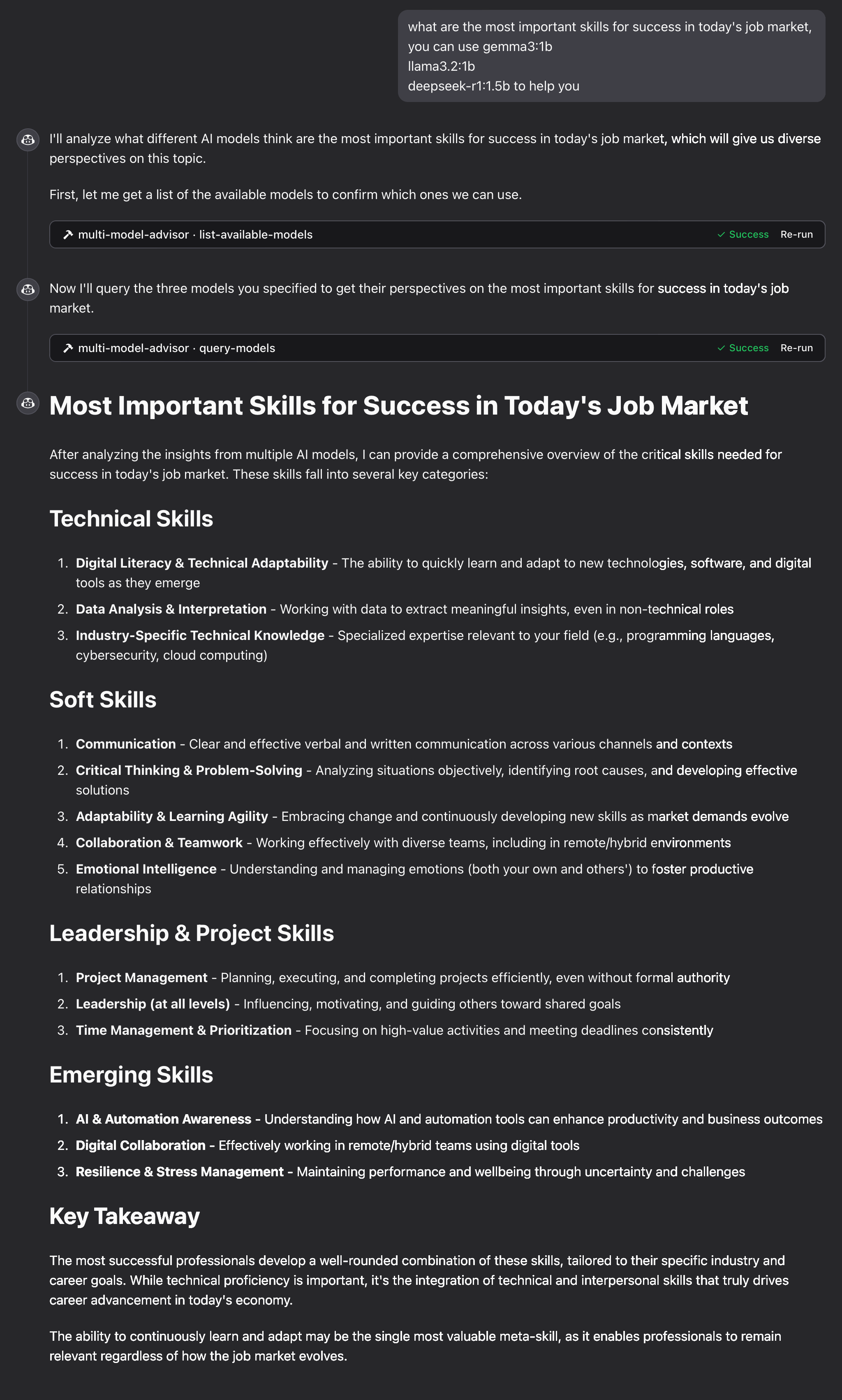
example

How It Works

  1. The MCP server exposes two tools:

    • list-available-models: Shows all Ollama models on your system
    • query-models: Queries multiple models with a question
  2. When you ask Claude a question referring to the multi-model advisor:

    • Claude decides to use the query-models tool
    • The server sends your question to multiple Ollama models
    • Each model responds with its perspective
    • Claude receives all responses and synthesizes a comprehensive answer
  3. Each model can have a different "persona" or role assigned, encouraging diverse perspectives.

Troubleshooting

Ollama Connection Issues

If the server can't connect to Ollama:

  • Ensure Ollama is running (ollama serve)
  • Check that the OLLAMA_API_URL is correct in your .env file
  • Try accessing http://localhost:11434 in your browser to verify Ollama is responding

Model Not Found

If a model is reported as unavailable:

  • Check that you've pulled the model using ollama pull <model-name>
  • Verify the exact model name using ollama list
  • Use the list-available-models tool to see all available models

Claude Not Showing MCP Tools

If the tools don't appear in Claude:

  • Ensure you've restarted Claude after updating the configuration
  • Check the absolute path in claude_desktop_config.json is correct
  • Look at Claude's logs for error messages

RAM is not enough

Some managers' AI models may have chosen larger models, but there is not enough memory to run them. You can try specifying a smaller model (see the Basic Usage) or upgrading the memory.

License

MIT License

For more details, please see the LICENSE file in this project repository

Contributing

Contributions are welcome! Please feel free to submit a Pull Request.

Read the full README β†’View source on GitHub β†’

Related MCP Servers

View all in Developer Tools View all alternatives
  • Claude Task Master logoClaude Task Master

    AI-powered task management system for AI-driven development. Features PRD parsing, task expansion, multi-provider support (Claude, OpenAI, Gemini, Perplexity, xAI), and selective tool loading for optimized context usage.

    πŸ’» Developer Tools8 views
    Compare vs Claude Task Master β†’
  • Magic MCP logoMagic MCP

    Create crafted UI components inspired by the best 21st.dev design engineers.

    πŸ’» Developer Tools16 views
    Compare vs Magic MCP β†’
  • Smithery AI Cookbook Python Quickstart logoSmithery AI Cookbook Python Quickstart

    A simple MCP server built with FastMCP and python

    πŸ’» Developer Tools3 views
    Compare vs Smithery AI Cookbook Python Quickstart β†’
  • Faf MCP logoFaf MCP

    Universal persistent project context for Cursor, Windsurf, Cline, VS Code, and all MCP-compatible platforms (including Claude Desktop). IANA-registered format (application/vnd.faf+yaml). 17 native tools, AI-readiness scoring.

    πŸ’» Developer Tools3 views
    Compare vs Faf MCP β†’

Adoption & maintenance

Factual signals from GitHub, npm, and our automated checks β€” not a rating.

GitHub stars
86
Stargazers on the source repository.
npm downloads
37k
Package downloads in the last 30 days.
Last commit
1y ago
Most recent push to the default branch.
Install check
Inconclusive
Didn't respond in our test window β€” often a slow first install.
Directory activity
1 views
Config copies, upvotes, and views on AllMCPs.

Reviews

No reviews yet β€” be the first to share how this listing worked for you.

Frequently Asked Questions about Multi AI Advisor

Node.js 16.x or higher and Ollama installed and running are required. Claude for Desktop is recommended for full integration.

AllMCPs Directory Badge

Full Badge Customizer

Showcase your server listing on GitHub or your project documentation. Embed this dynamic SVG badge to highlight official listing status and live engagement.

Badge Style:
Live Dynamic SVG PreviewMulti AI Advisor AllMCPs Directory Badge

Markdown (GitHub README)
[![AllMCPs](https://allmcps.com/api/badge/yuchenssr-multi-ai-advisor?style=directory)](https://allmcps.com/mcp/yuchenssr-multi-ai-advisor)
HTML Embed
<a href="https://allmcps.com/mcp/yuchenssr-multi-ai-advisor"><img src="https://allmcps.com/api/badge/yuchenssr-multi-ai-advisor?style=directory" alt="Multi AI Advisor on AllMCPs" /></a>

Technical Specs & Signals

CategoryπŸ’»Developer Tools
PricingFree
More technical detailsExpand β–Ύ
TransportSTDIO
RuntimeNode.js
AuthNo auth required
LicenseMIT
ClientsClaude Desktop
Last updatedAug 9, 2026
Views1
Unique ViewsTotal visits recorded for this listing page on AllMCPs.
Installs0
Installs & Copy ActionsTotal times users copied install commands or configuration snippets for this server.
GitHub stars86
GitHub Star CountTotal stargazers on GitHub representing community popularity (86 stars).
Last commit1y ago
Last Repository CommitThe most recent commit or push recorded for this server's GitHub repository.Last commit on Apr 2, 2025
npm downloads37,913/mo
Monthly npm DownloadsAverage monthly package installs recorded from npm registry statistics.
53Quality signal: Good Β· 53/100How this signal is calculated β–Ύ
Server availabilityNot measured

Not scored for repo-hosted servers β€” we can't reach the running server, only its GitHub page. Hosted MCP endpoints are health-checked live.

Verified ownership10/20
Documentation & tools23/30
Adoption & activity7/15
Community engagement0/10

A guidance signal from public completeness & health data β€” not a user rating. New listings start lower and rise as they add docs, get verified, and grow adoption. Signals we can't observe for a listing are skipped, not counted against it.

Supply-chain signal

No high-severity advisories surfaced by our automated scan.

Critical 0High 0Medium 0Low 0

Scanned 26d ago via OSV.dev Β· @smithery/cli (npm)

β˜… FeaturedMoxie Docs MCP logo

Moxie Docs MCP

MCP & Agent Skills for Automated Documentation, and codebase conventions + context

Explore Server β†’

Own this project?

This directory is pre-filled from public sources. Claim via GitHub README, site badge, or DNS TXT to unlock edit access and the Official badge and attach your website β€” proof is checked automatically, then reviewed by our team.

Free dofollow backlink: add your website and place the AllMCPs badge on it β€” no claim needed. We detect it automatically and keep it verified as long as the badge stays live.

Claim & get free dofollow

Share & Embed

Add our SVG badge (dark/light directory styles) or embeddable widget to your site.

Explore more

More in πŸ’» Developer Tools β†’Best MCP servers for Developers β†’Alternatives to Multi AI Advisor β†’Install in Claude DesktopInstall in CursorInstall in VS Code
