MCP server for Yandex Tracker API.
Copy the AI prompt to install this server into Claude Code, Cursor, or another agent β or use 1-click editor setup below.
π‘ Paste into ~/Library/Application Support/Claude/claude_desktop_config.json (macOS) or %APPDATA%\Claude\claude_desktop_config.json (Windows)
mcp-name: io.github.aikts/yandex-tracker-mcp
A comprehensive Model Context Protocol (MCP) server that enables AI assistants to interact with Yandex Tracker APIs. This server provides secure, authenticated access to Yandex Tracker issues, queues, comments, worklogs, and search functionality with optional Redis caching for improved performance.
Documentation in Russian is available here / ΠΠΎΠΊΡΠΌΠ΅Π½ΡΠ°ΡΠΈΡ Π½Π° ΡΡΡΡΠΊΠΎΠΌ ΡΠ·ΡΠΊΠ΅ Π΄ΠΎΡΡΡΠΏΠ½Π° Π·Π΄Π΅ΡΡ.
Choose one of the following based on your Yandex organization type:
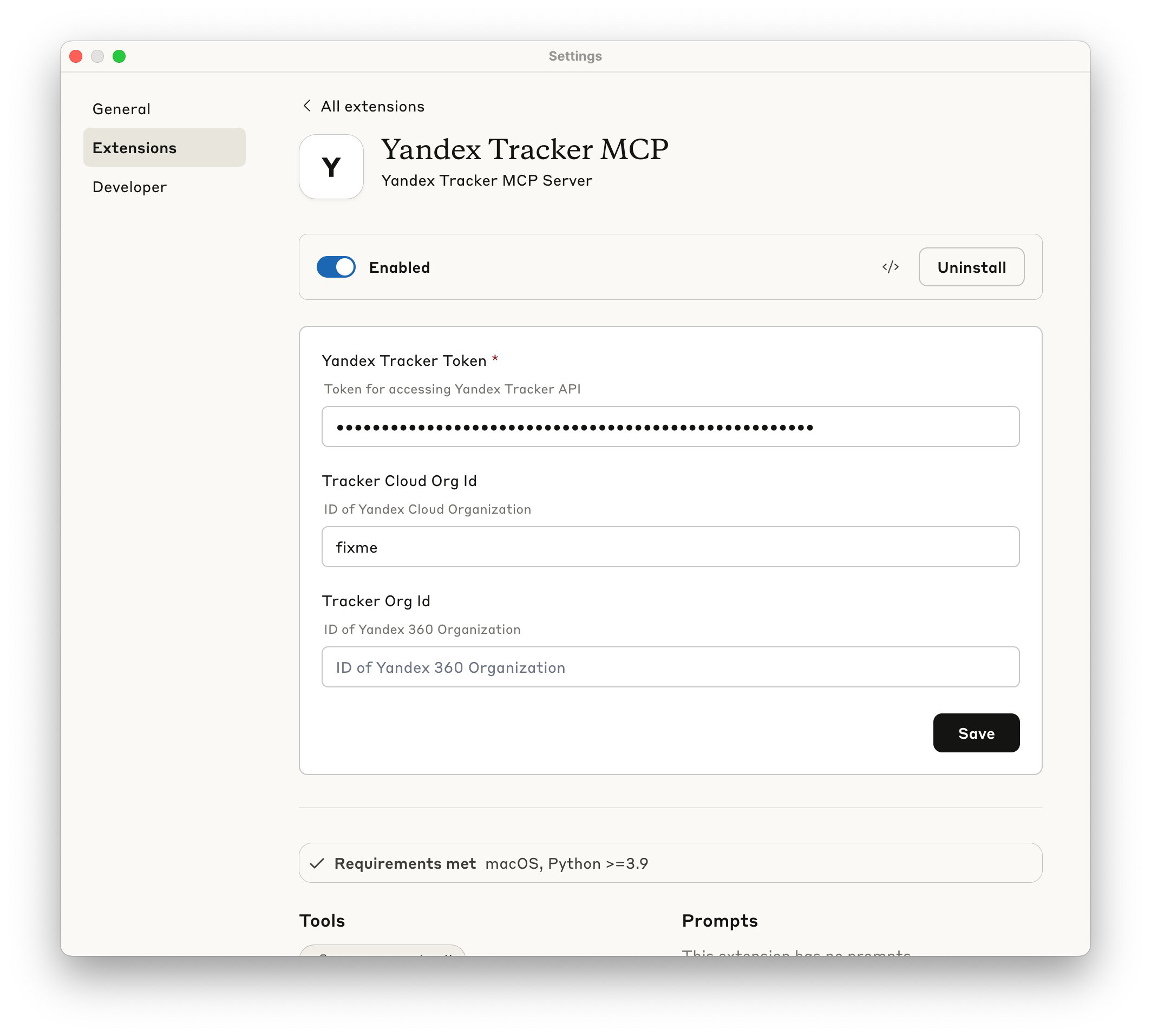
TRACKER_CLOUD_ORG_ID env var later for Yandex Cloud-managed organizationsTRACKER_ORG_ID env var later for Yandex 360 organizationsYou can find your organization ID in the Yandex Tracker URL or organization settings.
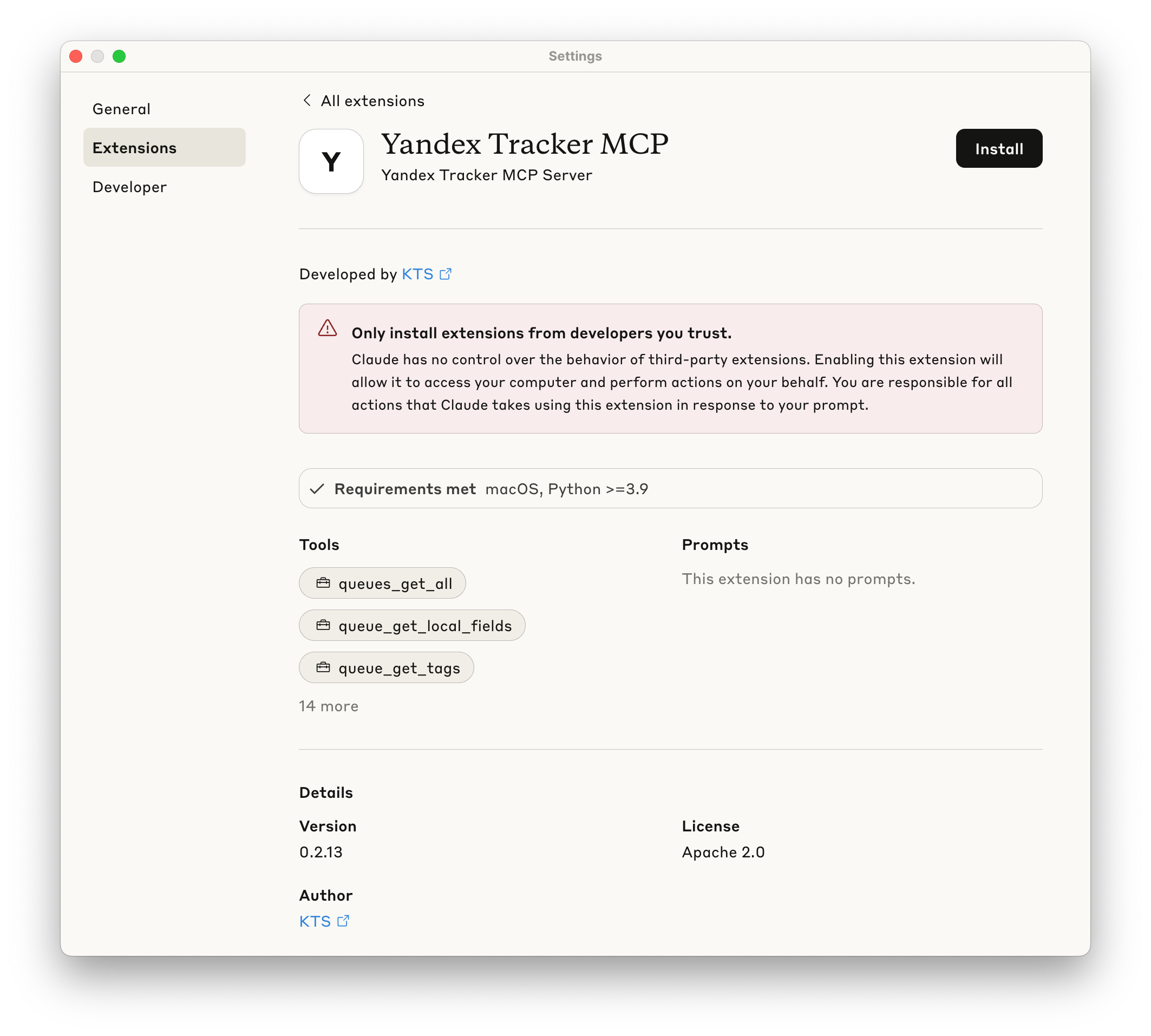
Yandex Tracker MCP Server can be one-click installed in Claude Desktop as and extension.
*.mcpb file from GitHub Releases.The following sections show how to configure the MCP server for different AI clients. You can use either uvx yandex-tracker-mcp@latest or the Docker image ghcr.io/aikts/yandex-tracker-mcp:latest. Both require these environment variables:
TRACKER_TOKEN - Your Yandex Tracker OAuth tokenTRACKER_IAM_TOKEN - Your IAM tokenTRACKER_SA_KEY_ID, TRACKER_SA_SERVICE_ACCOUNT_ID, TRACKER_SA_PRIVATE_KEY - Service account credentialsTRACKER_CLOUD_ORG_ID or TRACKER_ORG_ID - Your Yandex Cloud (or Yandex 360) organization IDConfiguration file path:
~/Library/Application Support/Claude/claude_desktop_config.json%APPDATA%\Claude\claude_desktop_config.jsonUsing uvx:
Using Docker:
Using uvx:
Using Docker:
Configuration file path:
.cursor/mcp.json in your project directory~/.cursor/mcp.jsonUsing uvx:
Using Docker:
Configuration file path:
~/.codeium/windsurf/mcp_config.jsonAccess via: Windsurf Settings β Cascade tab β Model Context Protocol (MCP) Servers β "View raw config"
Using uvx:
Using Docker:
Configuration file path:
~/.config/zed/settings.jsonAccess via: Cmd+, (macOS) or Ctrl+, (Linux/Windows) or command palette: "zed: open settings"
Note: Requires Zed Preview version for MCP support.
Using uvx:
Using Docker:
Configuration file path:
.vscode/mcp.json in your project directorysettings.jsonOption 1: Workspace Configuration (Recommended for security)
Create .vscode/mcp.json:
Using uvx:
Using Docker:
Option 2: Global Configuration
Add to VS Code settings.json:
Using uvx:
Using Docker:
For other MCP-compatible clients, use the standard MCP server configuration format:
Using uvx:
Using Docker:
Important Notes:
uvx is installed and available in your system PATHThe server exposes the following tools through the MCP protocol:
queues_get_all: List all available Yandex Tracker queues
fields (optional): Fields to include in the response (e.g., ["key", "name"]). Helps optimize context window usage by selecting only needed fields. If not specified, returns all available fields.page (optional): Page number to return. If not specified, retrieves all pages automatically.per_page (optional): Number of items per page (default: 100)TRACKER_LIMIT_QUEUES restrictionsqueue_get_tags: Get all tags for a specific queue
queue_id (string, queue key like "SOMEPROJECT")TRACKER_LIMIT_QUEUES restrictionsqueue_get_versions: Get all versions for a specific queue
queue_id (string, queue key like "SOMEPROJECT")TRACKER_LIMIT_QUEUES restrictionsqueue_create_version: Create a new version in a specific queue
queue_id (string, required): Queue key like "SOMEPROJECT"name (string, required): Version namedescription (string, optional): Version descriptionstart_date (date, optional): Version start date in YYYY-MM-DD formatdue_date (date, optional): Version due date in YYYY-MM-DD formatTRACKER_LIMIT_QUEUES restrictionsqueue_get_fields: Get fields for a specific queue
queue_id (string, required): Queue key like "SOMEPROJECT"include_local_fields (boolean, optional, default: true): Whether to include queue-specific local fieldsinclude_local_fields is trueschema.required property indicates whether a field is mandatoryissue_create toolTRACKER_LIMIT_QUEUES restrictionsqueue_get_metadata: Get detailed metadata about a specific queue
queue_id (string, required): Queue key like "SOMEPROJECT"expand (array of strings, optional): Fields to expand in the response. Available options: all, projects, components, versions, types, team, workflows, fields, issueTypesConfigexpand: ["issueTypesConfig"] to get available resolutions for each issue type (needed for issue_close tool)TRACKER_LIMIT_QUEUES restrictionsThese tools use the unified Yandex Tracker Entities API. The entity_type parameter accepts project, portfolio, or goal.
entity_get: Get an entity by id or numeric shortId; optionally request additional fields or expand attachmentsentities_search: Search entities by name substring or arbitrary field filters, with field selection, sorting, root-only filtering, and page-based paginationentity_get_events: Get entity event history with relative cursor navigation (from_id or selected)entity_create: Create an entity; fields.summary is required, and links can be created in the same requestentity_update: Update entity fields, links, and add an explanatory comment; collection fields support Tracker operators such as set, add, and removeentity_delete: Delete an entity and optionally its associated boardentities_bulk_update: Start one bulk update for multiple entities of the same typeCommon field keys include summary, description, lead, teamUsers, clients, followers, start, end, tags, parentEntity, entityStatus, and teamAccess. Dates must use the format expected by the Tracker API.
Write tools are unavailable when TRACKER_READ_ONLY=true.
boards_list: List all boards available to the current userboard_get: Get board columns and automatic filter settings by board IDboard_get_sprints: List all sprints associated with a boardsprint_get: Get one sprint with status, archive flag, and planned/actual datesThese tools are read-only. Use the returned sprint ID in issues_find to retrieve the sprint's issues.
filter_get: Get a saved issue filter by numeric IDfilter_find_issues: Execute a saved filter with page/per-page and response-field controlsfilter_create: Create a saved filter from either a Tracker query or field-value conditionsfilter_update: Update a saved filter's name, conditions, displayed fields, sorts, grouping, or folderfilter_create and filter_update are unavailable when TRACKER_READ_ONLY=true. issues_find and issues_count also accept filter_id as an alternative to query.
users_get_all: Get information about user accounts registered in the organization
per_page (optional): Number of users per page (default: 50)page (optional): Page number to return (default: 1)user_get: Get information about a specific user by login or UID
user_id (string, user login like "john.doe" or UID like "12345")user_get_current: Get information about the current authenticated user
users_search: Search user based on login, email or real name (first or last name, or both)
login_or_email_or_name (string, user login, email or real name to search for)get_global_fields: Get all global fields available in Yandex Tracker
get_statuses: Get all available issue statuses
get_issue_types: Get all available issue types
get_priorities: Get all available issue priorities
get_resolutions: Get all available issue resolutions
issue_get: Retrieve detailed issue information by ID
issue_id (string, format: "QUEUE-123")include_description (boolean, optional, default: true): Whether to include issue description in the result. Can be large, so use only when needed.issue_get_url: Generate web URL for an issue
issue_id (string)https://tracker.yandex.ru/{issue_id}issue_get_comments: Fetch all comments for an issue
issue_id (string)issue_add_comment: Add a comment to an issue
issue_id (string, required, format: "QUEUE-123")text (string, required): Comment text (markdown supported by Tracker)summonees (array of strings, optional): Users to summon (logins or IDs). This is the API way to mention/call users (notifications are triggered by this field, not by @login in text).maillist_summonees (array of strings, optional): Mailing lists to summon (emails)markup_type (string, optional): Use md for YFM (markdown)is_add_to_followers (boolean, optional, default: true): Add comment author to followersissue_update_comment: Update an existing comment in an issue
issue_id (string, required, format: "QUEUE-123")comment_id (int, required): Comment IDtext (string, required): New comment text (markdown supported by Tracker)summonees (array of strings, optional): Users to summon (logins or IDs)maillist_summonees (array of strings, optional): Mailing lists to summon (emails)markup_type (string, optional): Use md for YFM (markdown)issue_delete_comment: Delete a comment from an issue
issue_id (string, required, format: "QUEUE-123")comment_id (int, required): Comment IDnull (success)issue_add_link: Create a link between an issue and another issue
issue_id (string, required, format: "QUEUE-123"): The current issuerelationship (string, required): Link type describing how issue_id relates to the linked issue. One of: relates, is dependent by, depends on, is subtask for, is parent task for, duplicates, is duplicated by, is epic of, has epicissue (string, required): ID or key of the issue to link to (e.g. "TEST-123")issue_delete_link: Delete a link between an issue and another issue
issue_id (string, required, format: "QUEUE-123")link_id (int, required): Link ID (as returned by issue_get_links)null (success)issue_get_links: Get related issue links
issue_id (string)issue_get_worklogs: Retrieve worklog entries
issue_ids (array of strings, required)start_date_from (date, optional): Inclusive lower bound for the work start date (YYYY-MM-DD)start_date_to (date, optional): Inclusive upper bound for the work start date (YYYY-MM-DD)timezone (string, optional, default UTC): IANA time zone used when comparing start dates (for example, Europe/Moscow)start field, not by createdAtP6W is 30 working days, not 42 calendar daysissue_add_worklog: Add a worklog entry (log spent time) to an issue
issue_id (string, required, format: "QUEUE-123")duration (string, required): ISO-8601 duration (e.g. PT1H30M)comment (string, optional): Worklog commentstart (datetime, optional): Work start datetime (UTC assumed if timezone is not provided)issue_update_worklog: Update a worklog entry (spent time record) in an issue
issue_id (string, required, format: "QUEUE-123")worklog_id (int, required): Worklog entry IDduration (string, optional): ISO-8601 duration (e.g. PT1H30M)comment (string, optional): Worklog commentstart (datetime, optional): Work start datetime (UTC assumed if timezone is not provided)issue_delete_worklog: Delete a worklog entry (spent time record) from an issue
issue_id (string, required, format: "QUEUE-123")worklog_id (int, required): Worklog entry IDnull (success)issue_get_attachments: Get attachments for an issue
issue_id (string, format: "QUEUE-123")issue_download_attachment: Download an attachment as an MCP embedded binary resource
issue_id, attachment_id, and file_name returned by issue_get_attachmentsTRACKER_MAX_ATTACHMENT_BYTES transfer limitissue_upload_attachment: Upload base64-encoded content as an issue attachment
issue_id, file_name, content_base64, and optional mime_typeTRACKER_READ_ONLY=trueissue_delete_attachment: Delete an issue attachment by ID
TRACKER_READ_ONLY=trueissue_get_checklist: Get checklist items of an issue
issue_id (string, format: "QUEUE-123")issue_get_transitions: Get possible status transitions for an issue
issue_id (string, format: "QUEUE-123")issue_get_changelog: Get the change history (changelog) of an issue
issue_id (string, required, format: "QUEUE-123"): The issue keyper_page (integer, optional, default: 50): Number of entries per pagecursor (string, optional): The next_cursor value returned by the previous call; pass it to fetch the next page (cursor pagination)field (string, optional): Filter the changelog by a field key (e.g. status)type (string, optional): Filter by change type (e.g. IssueWorkflow for status transitions)entries (status transitions and field edits β including who changed what from β to and when β plus comment changes and executed triggers) and next_cursor (pass it back as cursor for the next page; null when there are no more pages)issue_execute_transition: Execute a status transition for an issue
issue_id (string, required, format: "QUEUE-123"): The issue keytransition_id (string, required): The transition ID to execute. IMPORTANT: Must be one of the IDs returned by issue_get_transitions toolcomment (string, optional): Optional comment to add when executing the transitionfields (object, optional): Dictionary of additional fields to set during the transition. Common fields include resolution (e.g., 'fixed', 'wontFix') for closing issues, assignee for reassigning, etc.issue_get_transitions to retrieve available transitions, then pass one of the returned transition IDs. Do NOT use arbitrary transition IDs.issue_close: Close an issue with a resolution (convenience tool)
issue_id (string, required, format: "QUEUE-123"): The issue keyresolution_id (string, required): The resolution ID to set when closing (e.g., 'fixed', 'wontFix', 'duplicate')comment (string, optional): Optional comment to add when closing the issueissue_get to retrieve the issue's type fieldget_queue_metadata with expand: ["issueTypesConfig"] to get available resolutionsissueTypesConfig entry matching the issue's type - each issue type has its own set of valid resolutionsissue_create: Create a new issue in a queue
queue (string, required): Queue key where to create the issue (e.g., 'MYQUEUE')summary (string, required): Issue title/summarytype (int, optional): Issue type ID (from get_issue_types tool)description (string, optional): Issue descriptionassignee (string or int, optional): Assignee login or UIDpriority (string, optional): Priority key (from get_priorities tool)fields (object, optional): Additional fields to set during issue creation. IMPORTANT: Before creating an issue, you MUST call queue_get_fields to get available fields (it returns both global and local fields by default). Fields with schema.required=true are mandatory. Use the field's id property as the key in this map (e.g., {"fieldId": "value"})TRACKER_LIMIT_QUEUES restrictionsissue_update: Update an existing issue
issue_id (string, required, format: "QUEUE-123"): The issue key to updatesummary (string, optional): New issue title/summarydescription (string, optional): New issue descriptionmarkup_type (string, optional): Markup type for description text (use 'md' for YFM markup)parent (IssueUpdateParent, optional): Parent issue reference with id (string) and/or key (string, e.g., 'QUEUE-123')sprint (array of IssueUpdateSprint, optional): Sprint assignments - array of objects with id (int) fieldtype (IssueUpdateType, optional): Issue type with id (string) and/or key (string, e.g., 'bug', 'task')priority (IssueUpdatePriority, optional): Priority with id (string) and/or key (string, e.g., 'critical', 'normal')followers (array of IssueUpdateFollower, optional): Followers - array of objects with id (string, user ID or login)project (IssueUpdateProject, optional): Project with primary (int, main project shortId) and optional secondary (array of ints)tags (array of strings, optional): Issue tagsversion (int, optional): Issue version for optimistic locking - changes only made to current versionfields (object, optional): Additional fields to update. Use queue_get_fields to discover available fields.TRACKER_LIMIT_QUEUES restrictionsissue_move: Move an issue to a different queue
issue_id (string, required, format: "QUEUE-123"): The issue key to movequeue (string, required): Target queue key (e.g., 'MYQUEUE')notify (boolean, optional, default true): Notify users referenced in the issue's fieldsnotify_author (boolean, optional, default false): Notify the issue authormove_all_fields (boolean, optional, default false): Carry over versions, components and projects when matching ones exist in the target queue; otherwise they are clearedinitial_status (boolean, optional, default false): Reset the issue status to the initial value (use when the target queue has a different workflow)TASKS-1 β NEWQUEUE-42)TRACKER_LIMIT_QUEUES restrictionsissues_find: Search issues using Yandex Tracker Query Language
query (optional): Query string using Yandex Tracker Query Language syntaxfilter_id (optional): Saved filter ID; mutually exclusive with queryinclude_description (boolean, optional, default: false): Whether to include issue description in the issues result. Can be large, so use only when needed.fields (list of strings, optional): Fields to include in the response. Helps optimize context window usage by selecting only needed fields. If not specified, returns all available fields.page (optional): Page number for pagination (default: 1)per_page (optional): Number of items per page (default: 100). May be decreased if results exceed context window.issues_count: Count issues matching a query using Yandex Tracker Query Language
query (optional): Query string using Yandex Tracker Query Language syntaxfilter_id (optional): Saved filter ID; mutually exclusive with queryThe MCP server can also be run in streamable-http mode for web-based integrations or when stdio transport is not suitable.
You may skip configuring TRACKER_CLOUD_ORG_ID or TRACKER_ORG_ID if you are using the following format when connecting to MCP Server (example for Claude Code):
or
You may also skip configuring global TRACKER_TOKEN environment variable if you choose to use OAuth 2.0 authentication (see below).
The Yandex Tracker MCP Server supports OAuth 2.0 authentication as a secure alternative to static API tokens. When configured, the server acts as an OAuth provider, facilitating authentication between your MCP client and Yandex OAuth services.
The MCP server implements a standard OAuth 2.0 authorization code flow:
To enable OAuth authentication, set the following environment variables:
{MCP_SERVER_PUBLIC_URL}/oauth/yandex/callbacktracker:read - Read permissions for Trackertracker:write - Write permissions for Tracker| Feature | OAuth | Static Token |
|---|---|---|
| Security | Dynamic tokens with expiration | Long-lived static tokens |
| User Experience | Interactive login flow | One-time configuration |
| Token Management | Automatic refresh | Manual rotation |
| Access Control | Per-user authentication | Shared token |
| Setup Complexity | Requires OAuth app setup | Simple token configuration |
When OAuth is enabled, MCP clients will need to:
Note: Not all MCP clients currently support OAuth authentication. Check your client's documentation for OAuth compatibility.
Example configuration for Claude Code:
The MCP server supports two different storage backends for OAuth data (client registrations, access tokens, refresh tokens, and authorization states):
The in-memory store keeps all OAuth data in server memory. This is the default option and requires no additional configuration.
Characteristics:
Configuration:
The Redis store provides persistent storage for OAuth data using a Redis database. This ensures OAuth sessions survive server restarts and enables multi-instance deployments.
Characteristics:
Configuration:
Storage Behavior:
oauth:* prefixes to avoid conflicts with other Redis dataWhen using Redis store, you must configure encryption to protect OAuth tokens at rest. Token values are encrypted using Fernet (AES-128) and Redis keys use SHA-256 hashes instead of raw tokens, preventing token exposure if Redis is compromised.
Generate an encryption key:
Configuration:
Key rotation allows seamless key updates: add the new key first, wait for old tokens to expire, then remove the old key.
Important Notes:
OAUTH_STORE setting only affects OAuth data storage; tools caching uses TOOLS_CACHE_ENABLEDYandex Tracker MCP Server supports multiple authentication methods with a clear priority order. The server will use the first available authentication method based on this hierarchy:
Dynamic OAuth Token (highest priority)
OAUTH_ENABLED=true, OAUTH_CLIENT_ID, OAUTH_CLIENT_SECRET, MCP_SERVER_PUBLIC_URLOAUTH_SERVER_URL=https://auth.yandex.cloud/oauth, OAUTH_TOKEN_TYPE=Bearer, OAUTH_USE_SCOPES=falsePassthrough Bearer OAuth Token
Authorization: Bearer <token> headerStatic OAuth Token
TRACKER_TOKEN (your OAuth token)Static IAM Token
TRACKER_IAM_TOKEN (your IAM token)Dynamic IAM Token (lowest priority)
TRACKER_SA_KEY_ID, TRACKER_SA_SERVICE_ACCOUNT_ID, TRACKER_SA_PRIVATE_KEYUse this mode when a trusted gateway handles user authentication, looks up the user's Yandex OAuth token, and forwards the request to the MCP server with that token in the request header:
This passthrough token is used only when MCP OAuth middleware has not provided an access token for the request. In OAuth-enabled deployments with an active MCP OAuth session, the MCP OAuth token takes priority.
This configuration enables authentication through Yandex Cloud OIDC applications, which is required for federated accounts in Yandex Cloud. Federated users authenticate through their organization's identity provider (IdP) and use this OAuth flow to access Yandex Tracker APIs.
Using pre-built image:
Building locally:
This project is licensed under the terms specified in the LICENSE file.
For issues and questions:
Showcase your server listing on GitHub or your project documentation. Embed this dynamic SVG badge to highlight official listing status and live engagement.
[](https://allmcps.com/mcp/yandex-tracker-mcp)<a href="https://allmcps.com/mcp/yandex-tracker-mcp"><img src="https://allmcps.com/api/badge/yandex-tracker-mcp?style=directory" alt="Yandex Tracker Mcp on AllMCPs" /></a>