Writ Cloud
Read, crawl and act on websites, signed in as the user, and turn any site into an API.
Install Writ Cloud
Pick your client, then add it in one click or paste the config.
~/Library/Application Support/Claude/claude_desktop_config.json{
"mcpServers": {
"writ-cloud": {
"command": "npx",
"args": [
"-y",
"writ-mcp"
]
}
}
}
Settings → Developer → Edit Config, merge this into mcpServers, then fully quit and reopen Claude Desktop.
We couldn’t confirm it starts correctly
The install command installed and started the server, which then stopped for configuration (such as an API key) that our sandbox does not have — expected for servers that connect to your account.
npx -y writ-mcpProcess exited before answering initialize.
This is an experimental automated check and can have false negatives — missing environment variables, a slow cold install, etc. It doesn’t necessarily mean something’s wrong. Last checked 20d ago.
Overview
Tools34
What Writ Cloud lets your agent do. Expand a tool for its parameters.
Security & health
What it can reach and how reliably it runs — from our own checks, not the maintainer’s claims.
Recent health check succeeded.
Supply-chain signal
No high-severity advisories surfaced by our automated scan.
Scanned 11d ago via OSV.dev · writ-mcp (npm)
Adoption & maintenance
Factual signals from GitHub, npm, and our automated checks — not a rating.
From the project README





Your saved browser workflows, as tools your assistant can call.
Quick start · Tools · Configuration · Security · Troubleshooting · Contributing
writ-mcp connects a stdio MCP client — Claude Code, Claude Desktop, Cursor, Windsurf, Codex — to Writ, so the browser workflows you already recorded become tools your assistant can call: run them, read the data they collected, search past results, schedule them, expose them as REST endpoints, and kick off site crawls.
It is a transparent stdio↔HTTP proxy and nothing else. Every tool, schema and rule lives server-side, so what you get always matches what your instance can do — and a new tool never requires upgrading this package. Zero dependencies, one file, Node core only.
Clients that speak Streamable HTTP natively don't need this at all — point them straight at the
/mcpendpoint with anAuthorization: Bearer <key>header.
Quick start
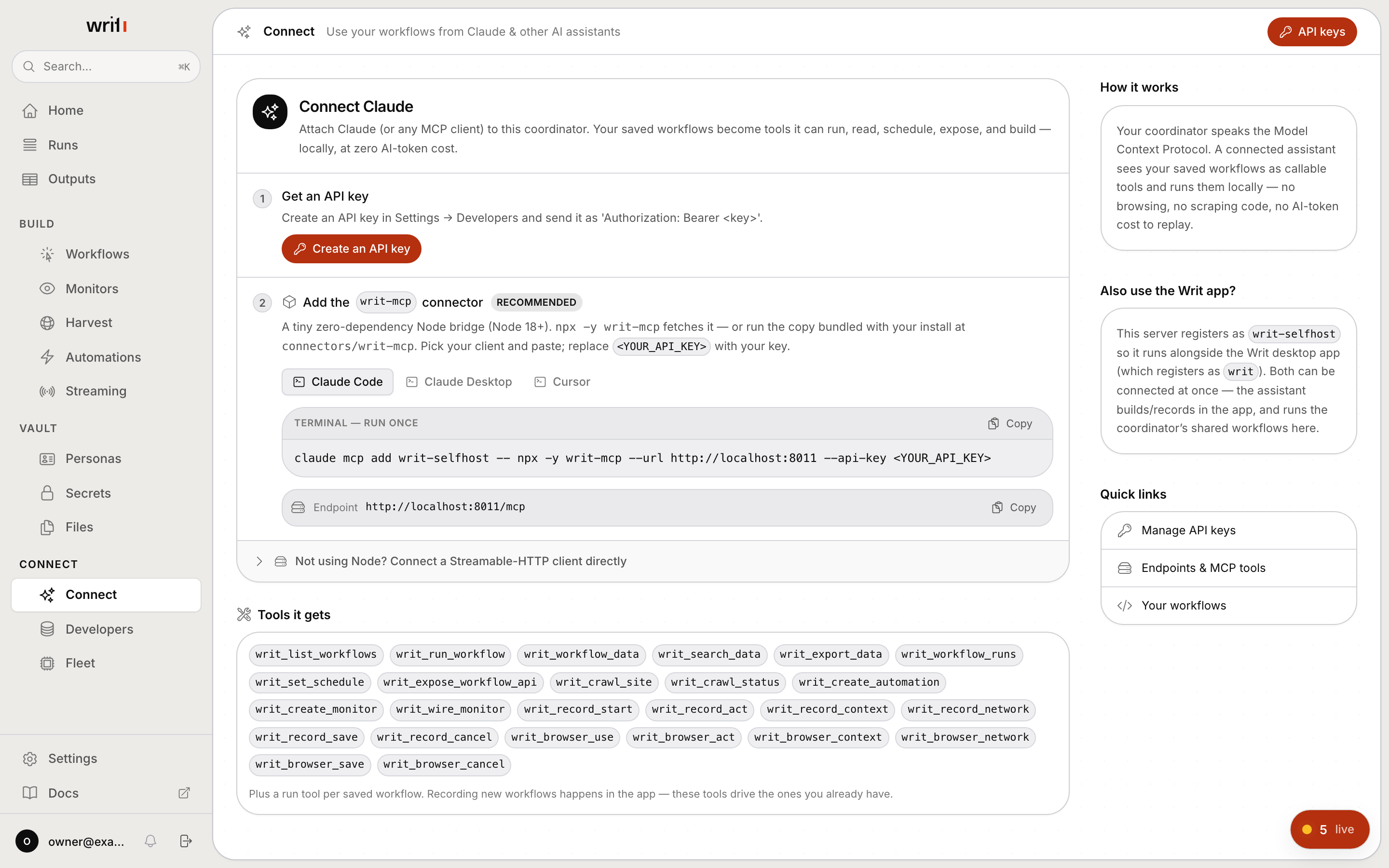
1. Get an API key. In the Writ app: Settings → Developers → API keys. Keys
look like wt_….
2. Add the server.
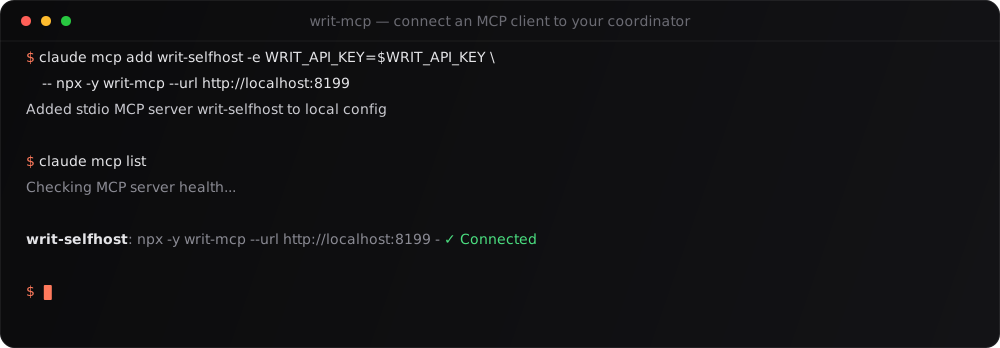
Against a self-hosted coordinator:
claude mcp add writ-selfhost -e WRIT_API_KEY=<YOUR_API_KEY> -- npx -y writ-mcp --url https://writ.example.com
Against a coordinator on this machine:
claude mcp add writ-selfhost -e WRIT_API_KEY=<YOUR_API_KEY> -- npx -y writ-mcp --url http://localhost:8000
Against a published per-workflow endpoint (an "Expose as MCP" slug URL is used verbatim — no path rewriting):
claude mcp add my-tools -e WRIT_API_KEY=<YOUR_API_KEY> -- npx -y writ-mcp --url https://mcp.example.com/mcp/my-tools
3. Check it.
claude mcp list
Writ Cloud is the default target when you pass no
--url(https://api.usewrit.app). Pass--urlto point the connector at your own coordinator instead. See Status.
Pass the key through the environment, not the command line.
--api-keyworks, but it puts your key in the process's argument list where any local process can read it viaps, and your shell records it in history. The connector prints a note when you use it.
Your running coordinator also hands out these one-liners, pre-filled, on its
Connect page and at GET /api/mcp/connect-info:
Claude Desktop / Cursor (config file)
Add to claude_desktop_config.json (Claude Desktop) or ~/.cursor/mcp.json
(Cursor). The env form is recommended — it keeps the key out of the argument
list:
{
  "mcpServers": {
    "writ-selfhost": {
      "command": "npx",
      "args": ["-y", "writ-mcp"],
      "env": {
        "WRIT_COORDINATOR_URL": "https://writ.example.com",
        "WRIT_API_KEY": "<YOUR_API_KEY>"
      }
    }
  }
}
Without npm
A self-host install bundles this connector at connectors/writ-mcp. There is no
build step, so you can run it straight from disk:
node /path/to/writ/connectors/writ-mcp/index.js --url https://writ.example.com
It coexists with the other Writ servers. Each surface registers under its own slug on purpose — the desktop app is
writ, Writ Cloud iswrit-cloud, a self-hosted coordinator iswrit-selfhost— and each identifies itself to the assistant with a distinct title. Keep any combination connected at once.
Tools you get
Served by the server you connect to, not by this package, so a new server tool reaches you without a connector update. Writ Cloud lists the 39 tools below; a self-hosted coordinator lists the ones marked in its column.
| Tool | What it does | Writ Cloud | Self-hosted |
|---|---|---|---|
writ_list_workflows | Your saved workflows (a run_<name> tool is added only for workflows you pin) | yes | yes |
writ_run_workflow | Run one and wait for the extracted data | yes | yes |
writ_pin_workflow_tool | Pin or unpin a workflow as its own run_<name> tool — off by default, capped; everything still runs via writ_run_workflow | yes | yes |
writ_update_workflow | Read a workflow's outline or edit it in place (settings, steps, functions, its agent skill) | yes | yes |
writ_diagnose_http_workflow | Show what every request of a run was answered with, and whether it ran without a browser | yes | no |
writ_create_http_extraction | Author a multi-request browserless extraction from captured requests | yes | no |
writ_workflow_data | Read a workflow's accumulated data table | yes | yes |
writ_search_data | Search across everything already collected | yes | yes |
writ_export_data | Export a workflow's data as CSV/JSON | yes | yes |
writ_workflow_runs | Run history and status | yes | yes |
writ_set_schedule | Schedule a workflow (interval / daily / weekly) | yes | yes |
writ_expose_workflow_api | Publish a workflow as a callable REST endpoint | yes | yes |
writ_scrape | Read a page, or several, as clean markdown (Cloud also reads a listing's top N) | yes | yes |
writ_crawl_site / writ_crawl_status | Start and poll a distributed site crawl | yes | yes |
writ_crawl_files | The original documents a crawl captured (PDFs, office files, images) | yes | no |
writ_saved_crawls / writ_run_saved_crawl / writ_saved_crawl_data | Saved crawls (see below) | yes | yes |
writ_update_saved_crawl | Inspect or change a saved crawl's settings | yes | no |
writ_personas | See your saved sign-in identities and get them ready (see below) | yes | yes |
writ_payment | Pay with a card the user approves; Writ places the order once they confirm | yes | no |
writ_devices | Your linked Writ desktops: list them, or point this connection at one | yes | no |
writ_create_automation | Event or clock → run a workflow, notify, or wake an agent | yes | yes |
writ_list_webhooks | Your inbound webhook URLs and the automations they fire | yes | yes |
writ_create_monitor / writ_wire_monitor | Watch a page and react to changes | yes | yes |
writ_browser_use | Open a real browser your assistant drives turn by turn | yes | yes |
writ_record_website | Record a repeatable task as a workflow | yes | yes |
writ_website_to_api | Turn a website into a callable API | yes | yes |
writ_discovery_status | Follow an API build to its result | yes | no |
writ_browser_act / _context / _network / _save / _cancel | Act in the browser, read the page and its network calls, save or close the session | yes | yes |
writ_browser_compose | Define named functions, inputs and explicit steps in a session | yes | no |
writ_browser_ask_user | Hand a CAPTCHA, a code or a decision to the user in the live browser | yes | no |
writ_browser_sessions | Open browser sessions you can resume | yes | no |
writ_record_start / _act / _context / _network / _save / _cancel | Older names of the browser loop, kept for compatibility | no | yes |
The build tools (writ_browser_use, writ_record_website, writ_website_to_api, then
writ_browser_act / _context / _network / _save / _cancel) are on both targets;
neither has a writ_build tool, so use writ_record_website. Your
assistant opens a real browser, drives it turn by turn, and saves the session as
a reusable workflow that afterwards replays with no model in the loop. Writ Cloud
runs it on Writ's fleet; a self-hosted coordinator runs it on your own fleet
agent. Either way your assistant is the
brain — no second model key is involved.
Reusing a recent result (max_age)
Running a workflow drives a real browser, so asking the same question twice in one
session costs two full runs and two waits. Every workflow tool takes an optional
max_age (seconds) meaning a recent answer is good enough:
{ "name": "run_price_check", "arguments": { "sku": "B0C123", "max_age": 300 } }
- omitted or
0— always run fresh (the default; nothing goes stale on its own). N— reuse a result younger thanNseconds, otherwise run.
A reused answer carries _cache: {hit: true, age_seconds: N} so the assistant can
tell how current it is.
Reviews
No reviews yet — be the first to share how it worked for you.
Frequently Asked Questions about Writ Cloud
Related MCP servers
Add a badge to your READMEShow it’s listed — live SVG, Markdown or HTML.
AllMCPs Directory Badge
Showcase your server listing on GitHub or your project documentation. Embed this dynamic SVG badge to highlight official listing status and live engagement.
[](https://allmcps.com/mcp/writ-cloud)<a href="https://allmcps.com/mcp/writ-cloud"><img src="https://allmcps.com/api/badge/writ-cloud?style=directory" alt="Writ Cloud on AllMCPs" /></a>