AllMCPs
BrowseBestCategoriesStackCompareToolsGuidesBlog Log in Submit MCP

Stay in the loop

Get new MCP servers and top picks in your inbox.

AllMCPs

The open directory for discovering and installing Model Context Protocol servers.

Explore

  • Browse servers
  • Best MCP servers
  • Categories
  • MCP clients
  • Agent prompts
  • Stack Builder
  • Compare servers
  • Tags index
  • Submit a server
  • Pricing

Learn

  • Guides hub
  • What is MCP?
  • Install guide
  • Troubleshooting
  • Security
  • Blog
  • Blog RSS

Tools

  • All tools
  • Config generator
  • Config validator
  • MCP playground
  • OpenAPI β†’ MCP
  • Badge generator

For agents

  • API docs
  • Trust & traffic
  • llms.txt β†— (opens in a new tab)
  • Catalog JSON β†— (opens in a new tab)
  • Remote MCP β†— (opens in a new tab)

Company

  • About
  • Contact
  • X (@AllMCPs) β†— (opens in a new tab)
  • GitHub β†— (opens in a new tab)
  • Terms
  • Privacy
AllMCPs VerifiedAllMCPs VerifiedFeatured on Nick LaunchesFeatured on Nick LaunchesLaunch Llama NewsletterLaunch Llama NewsletterVerified DR - allmcps.comVerified DR - allmcps.comFeatured on SaaSGrowFeatured on SaaSGrowFeatured on Twelve ToolsFeatured on Twelve ToolsFeatured on Saaspa.geFeatured on Saaspa.geFeatured on Findly.toolsFeatured on Findly.toolsFeatured on Startup FameFeatured on Startup FameFeatured on LaunchKiwiFeatured on LaunchKiwiFeatured on ScrollLaunchFeatured on ScrollLaunchFeatured on DailyPingsFeatured on DailyPingsFazier badgeFazier badgeFeatured on NewTool.siteFeatured on NewTool.siteFeatured on saasfame.comFeatured on saasfame.comDR Checker - Domain RatingDR Checker - Domain RatingListed on Turbo0Listed on Turbo0Launched on LaunchBoard - Product Launch PlatformLaunched on LaunchBoard - Product Launch PlatformList on SimilarlabsList on Similarlabshttps://codetrendy.comhttps://codetrendy.comListed on DevTool.ioFeatured on BuildlistFeatured on BuildlistAllMCPs VerifiedAllMCPs VerifiedFeatured on Nick LaunchesFeatured on Nick LaunchesLaunch Llama NewsletterLaunch Llama NewsletterVerified DR - allmcps.comVerified DR - allmcps.comFeatured on SaaSGrowFeatured on SaaSGrowFeatured on Twelve ToolsFeatured on Twelve ToolsFeatured on Saaspa.geFeatured on Saaspa.geFeatured on Findly.toolsFeatured on Findly.toolsFeatured on Startup FameFeatured on Startup FameFeatured on LaunchKiwiFeatured on LaunchKiwiFeatured on ScrollLaunchFeatured on ScrollLaunchFeatured on DailyPingsFeatured on DailyPingsFazier badgeFazier badgeFeatured on NewTool.siteFeatured on NewTool.siteFeatured on saasfame.comFeatured on saasfame.comDR Checker - Domain RatingDR Checker - Domain RatingListed on Turbo0Listed on Turbo0Launched on LaunchBoard - Product Launch PlatformLaunched on LaunchBoard - Product Launch PlatformList on SimilarlabsList on Similarlabshttps://codetrendy.comhttps://codetrendy.comListed on DevTool.ioFeatured on BuildlistFeatured on Buildlist
Β© 2026 Jackalope Digital LLC. All rights reserved.
  1. Home
  2. πŸ”Ž Search & Data Extraction
  3. Tavily MCP Server
T
Health: Not checked yetWe have not completed a health check for this listing yet.Last checked 8/11/2026, 12:14:04 AM

Tavily MCP Server

Enrichment pendingWe haven’t run our AI enrichment pass on this listing yet, so the overview, use cases, and FAQ below may be sparse or missing. We work through the catalog over time β€” check back soon.
View Repository

MCP server for advanced web search using Tavily API.

Quick Install

Automated & IDE Setup

Copy the AI prompt to install this server into Claude Code, Cursor, or another agent β€” or use 1-click editor setup below.

Add to CursorAdd to VS Code
Manual Client & Custom JSON ConfigExpand JSON β–Ύ

Install Config Generator

Choose your client
claude_desktop_config.json
{
  "mcpServers": {
    "tavily-mcp-server": {
      "command": "npx",
      "args": [
        "-y",
        "tavily-mcp-server"
      ]
    }
  }
}

πŸ’‘ Paste into ~/Library/Application Support/Claude/claude_desktop_config.json (macOS) or %APPDATA%\Claude\claude_desktop_config.json (Windows)

Install Directory Badge Claim listing AlternativesπŸ”Ž More in Search & Data Extraction

Documentation Overview

Tavily Crawl Beta

GitHub Repo stars npm smithery badge

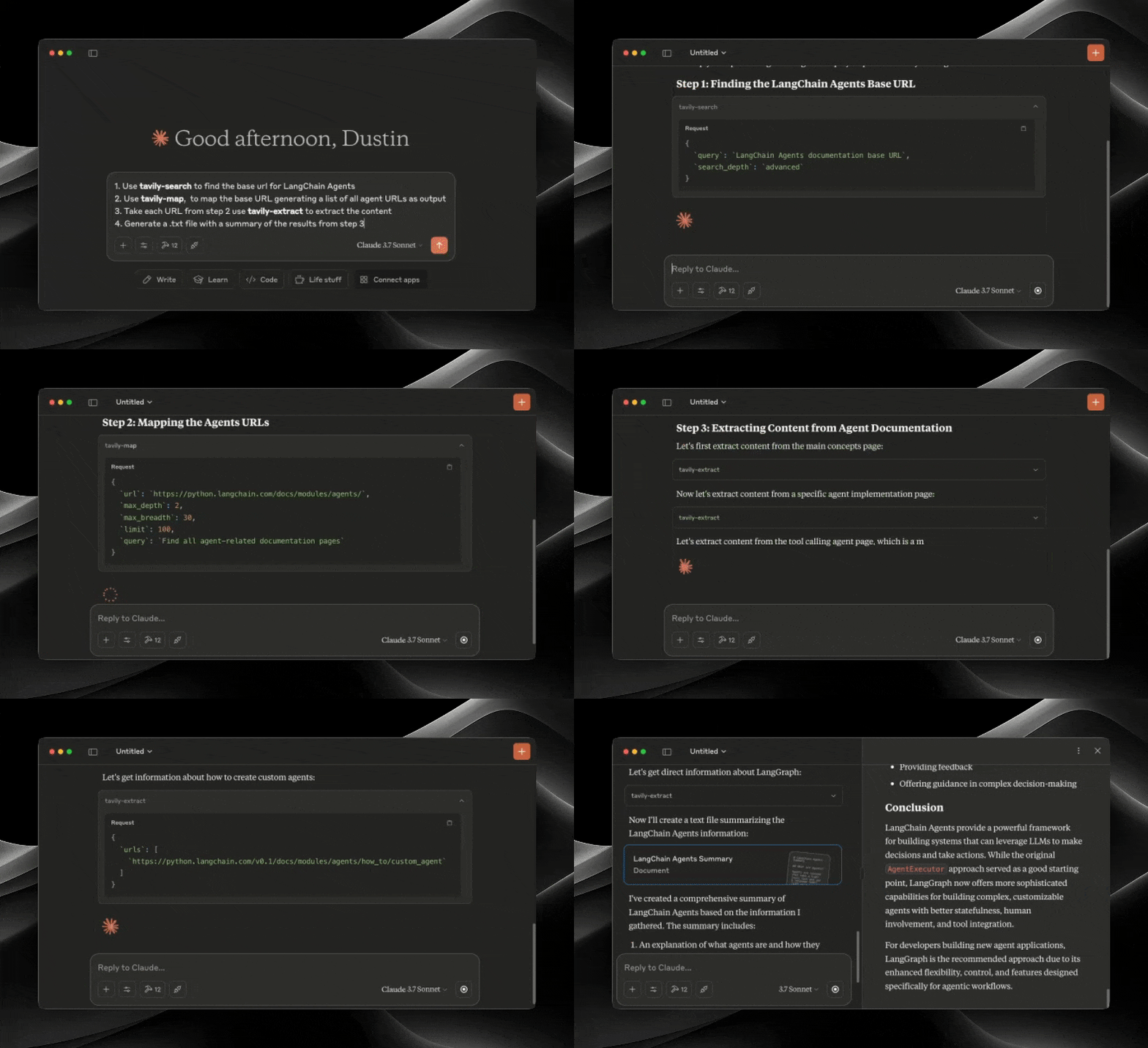
MCP demo

The Model Context Protocol (MCP) is an open standard that enables AI systems to interact seamlessly with various data sources and tools, facilitating secure, two-way connections.

Developed by Anthropic, the Model Context Protocol (MCP) enables AI assistants like Claude to seamlessly integrate with Tavily's advanced search and data extraction capabilities. This integration provides AI models with real-time access to web information, complete with sophisticated filtering options and domain-specific search features.

The Tavily MCP server provides:

  • search, extract, map, crawl tools
  • Real-time web search capabilities through the tavily-search tool
  • Intelligent data extraction from web pages via the tavily-extract tool
  • Powerful web mapping tool that creates a structured map of website
  • Web crawler that systematically explores websites

πŸ“š Helpful Resources

  • Tutorial on combining Tavily MCP with Neo4j MCP server
  • Tutorial on integrating Tavily MCP with Cline in VS Code

Prerequisites πŸ”§

Before you begin, ensure you have:

  • Tavily API key
    • If you don't have a Tavily API key, you can sign up for a free account here
  • Claude Desktop or Cursor
  • Node.js (v20 or higher)
    • You can verify your Node.js installation by running:
      • node --version
  • Git installed (only needed if using Git installation method)
    • On macOS: brew install git
    • On Linux:
      • Debian/Ubuntu: sudo apt install git
      • RedHat/CentOS: sudo yum install git
    • On Windows: Download Git for Windows

Tavily MCP server installation ⚑

Running with NPX

Terminal
npx -y tavily-mcp@latest 

Installing via Smithery

To install Tavily MCP Server for Claude Desktop automatically via Smithery:

Terminal
npx -y @smithery/cli install @tavily-ai/tavily-mcp --client claude

Although you can launch a server on its own, it's not particularly helpful in isolation. Instead, you should integrate it into an MCP client. Below is an example of how to configure the Claude Desktop app to work with the tavily-mcp server.

Configuring MCP Clients βš™οΈ

This repository will explain how to configure VS Code, Cursor and Claude Desktop to work with the tavily-mcp server.

Configuring VS Code πŸ’»

For one-click installation, click one of the install buttons below:

Install with NPX in VS Code Install with NPX in VS Code Insiders

Manual Installation

First check if there are install buttons at the top of this section that match your needs. If you prefer manual installation, follow these steps:

Add the following JSON block to your User Settings (JSON) file in VS Code. You can do this by pressing Ctrl + Shift + P (or Cmd + Shift + P on macOS) and typing Preferences: Open User Settings (JSON).

config.json
{
  "mcp": {
    "inputs": [
      {
        "type": "promptString",
        "id": "tavily_api_key",
        "description": "Tavily API Key",
        "password": true
      }
    ],
    "servers": {
      "tavily": {
        "command": "npx",
        "args": ["-y", "tavily-mcp@latest"],
        "env": {
          "TAVILY_API_KEY": "${input:tavily_api_key}"
        }
      }
    }
  }
}

Optionally, you can add it to a file called .vscode/mcp.json in your workspace:

config.json
{
  "inputs": [
    {
      "type": "promptString",
      "id": "tavily_api_key",
      "description": "Tavily API Key",
      "password": true
    }
  ],
  "servers": {
    "tavily": {
      "command": "npx",
      "args": ["-y", "tavily-mcp@latest"],
      "env": {
        "TAVILY_API_KEY": "${input:tavily_api_key}"
      }
    }
  }
}

Configuring Cline πŸ€–

The easiest way to set up the Tavily MCP server in Cline is through the marketplace with a single click:

  1. Open Cline in VS Code
  2. Click on the Cline icon in the sidebar
  3. Navigate to the "MCP Servers" tab ( 4 squares )
  4. Search "Tavily" and click "install"
  5. When prompted, enter your Tavily API key

Alternatively, you can manually set up the Tavily MCP server in Cline:

  1. Open the Cline MCP settings file:

    For macOS:

    bash
    # Using Visual Studio Code
    code ~/Library/Application\ Support/Code/User/globalStorage/saoudrizwan.claude-dev/settings/cline_mcp_settings.json
    
    # Or using TextEdit
    open -e ~/Library/Application\ Support/Code/User/globalStorage/saoudrizwan.claude-dev/settings/cline_mcp_settings.json
    

    For Windows:

    bash
    code %APPDATA%\Code\User\globalStorage\saoudrizwan.claude-dev\settings\cline_mcp_settings.json
    
  2. Add the Tavily server configuration to the file:

    Replace your-api-key-here with your actual Tavily API key.

    config.json
    {
      "mcpServers": {
        "tavily-mcp": {
          "command": "npx",
          "args": ["-y", "tavily-mcp@latest"],
          "env": {
            "TAVILY_API_KEY": "your-api-key-here"
          },
          "disabled": false,
          "autoApprove": []
        }
      }
    }
    
  3. Save the file and restart Cline if it's already running.

  4. When using Cline, you'll now have access to the Tavily MCP tools. You can ask Cline to use the tavily-search and tavily-extract tools directly in your conversations.

Configuring Cursor πŸ–₯️

Note: Requires Cursor version 0.45.6 or higher

To set up the Tavily MCP server in Cursor:

  1. Open Cursor Settings
  2. Navigate to Features > MCP Servers
  3. Click on the "+ Add New MCP Server" button
  4. Fill out the following information:
    • Name: Enter a nickname for the server (e.g., "tavily-mcp")
    • Type: Select "command" as the type
    • Command: Enter the command to run the server:
      bash
      env TAVILY_API_KEY=your-api-key npx -y tavily-mcp@latest
      

      Important: Replace your-api-key with your Tavily API key. You can get one at app.tavily.com/home

After adding the server, it should appear in the list of MCP servers. You may need to manually press the refresh button in the top right corner of the MCP server to populate the tool list.

The Composer Agent will automatically use the Tavily MCP tools when relevant to your queries. It is better to explicitly request to use the tools by describing what you want to do (e.g., "User tavily-search to search the web for the latest news on AI"). On mac press command + L to open the chat, select the composer option at the top of the screen, beside the submit button select agent and submit the query when ready.
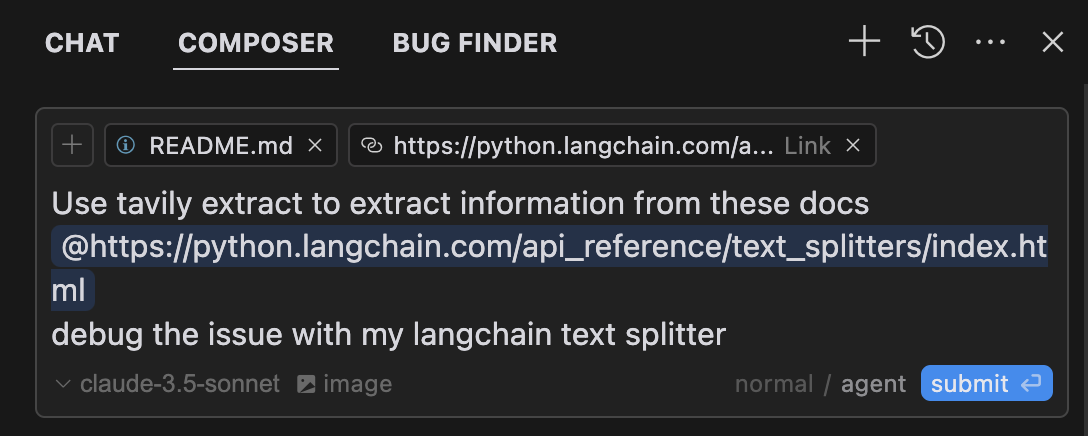
Cursor Interface Example

Configuring the Claude Desktop app πŸ–₯️

For macOS:

bash
# Create the config file if it doesn't exist
touch "$HOME/Library/Application Support/Claude/claude_desktop_config.json"

# Opens the config file in TextEdit 
open -e "$HOME/Library/Application Support/Claude/claude_desktop_config.json"

# Alternative method using Visual Studio Code (requires VS Code to be installed)
code "$HOME/Library/Application Support/Claude/claude_desktop_config.json"

For Windows:

bash
code %APPDATA%\Claude\claude_desktop_config.json

Add the Tavily server configuration:

Replace your-api-key-here with your actual Tavily API key.

config.json
{
  "mcpServers": {
    "tavily-mcp": {
      "command": "npx",
      "args": ["-y", "tavily-mcp@latest"],
      "env": {
        "TAVILY_API_KEY": "your-api-key-here"
      }
    }
  }
}

2. Git Installation

  1. Clone the repository:
bash
git clone https://github.com/tavily-ai/tavily-mcp.git
cd tavily-mcp
  1. Install dependencies:
Terminal
npm install
  1. Build the project:
Terminal
npm run build

Configuring the Claude Desktop app βš™οΈ

Follow the configuration steps outlined in the Configuring the Claude Desktop app section above, using the below JSON configuration.

Replace your-api-key-here with your actual Tavily API key and /path/to/tavily-mcp with the actual path where you cloned the repository on your system.

config.json
{
  "mcpServers": {
    "tavily": {
      "command": "npx",
      "args": ["/path/to/tavily-mcp/build/index.js"],
      "env": {
        "TAVILY_API_KEY": "your-api-key-here"
      }
    }
  }
}

Usage in Claude Desktop App 🎯

Once the installation is complete, and the Claude desktop app is configured, you must completely close and re-open the Claude desktop app to see the tavily-mcp server. You should see a hammer icon in the bottom left of the app, indicating available MCP tools, you can click on the hammer icon to see more detial on the tavily-search and tavily-extract tools.

Alt text

Now claude will have complete access to the tavily-mcp server, including the tavily-search and tavily-extract tools. If you insert the below examples into the Claude desktop app, you should see the tavily-mcp server tools in action.

Tavily Search Examples

  1. General Web Search:
Code
Can you search for recent developments in quantum computing?
  1. News Search:
Code
Search for news articles about AI startups from the last 7 days.
  1. Domain-Specific Search:
Code
Search for climate change research on nature.com and sciencedirect.com

Tavily Extract Examples

  1. Extract Article Content:
Code
Extract the main content from this article: https://example.com/article

✨ Combine Search and Extract ✨

You can also combine the tavily-search and tavily-extract tools to perform more complex tasks.

Code
Search for news articles about AI startups from the last 7 days and extract the main content from each article to generate a detailed report.

Troubleshooting πŸ› οΈ

Common Issues

  1. Server Not Found

    • Verify the npm installation by running npm --verison
    • Check Claude Desktop configuration syntax by running code ~/Library/Application\ Support/Claude/claude_desktop_config.json
    • Ensure Node.js is properly installed by running node --version
  2. NPX related issues

  • If you encounter errors related to npx, you may need to use the full path to the npx executable instead.
  • You can find this path by running which npx in your terminal, then replace the "command": "npx" line with "command": "/full/path/to/npx" in your configuration.
  1. API Key Issues
    • Confirm your Tavily API key is valid
    • Check the API key is correctly set in the config
    • Verify no spaces or quotes around the API key

Acknowledgments ✨

  • Model Context Protocol for the MCP specification
  • Anthropic for Claude Desktop

Related MCP Servers

View all in Search & Data Extraction View all alternatives
  • P
    Payx Tavily Search

    FastMCP server for Tavily search API with web search and content extraction

    πŸ”Ž Search & Data Extraction0 views
    Compare vs Payx Tavily Search β†’
  • S
    Scrapling MCP Server

    Web scraping with stealth HTTP, real browsers, and Cloudflare bypass. CSS selectors supported.

    πŸ”Ž Search & Data Extraction0 views
    Compare vs Scrapling MCP Server β†’
  • Web Search logoWeb Search

    Web search for AI agents β€” one tool across 6 engines, routed to the cheapest + cached.

    πŸ”Ž Search & Data Extraction0 views
    Compare vs Web Search β†’
  • N
    Nodebench

    260 MCP tools across 49 domains. AI Flywheel, quality gates, research, web scraping.

    πŸ”Ž Search & Data Extraction0 views
    Compare vs Nodebench β†’

Frequently Asked Questions about Tavily MCP Server

Add the following block to your claude_desktop_config.json under mcpServers: "mcpServers": { "tavily-mcp-server": { "command": "npx", "args": ["-y", "Tavily MCP Server"] } }

AllMCPs Directory Badge

Full Badge Customizer

Showcase your server listing on GitHub or your project documentation. Embed this dynamic SVG badge to highlight official listing status and live engagement.

Badge Style:
Live Dynamic SVG PreviewTavily MCP Server AllMCPs Directory Badge

Markdown (GitHub README)
[![AllMCPs](https://allmcps.com/api/badge/tavily-mcp-server?style=directory)](https://allmcps.com/mcp/tavily-mcp-server)
HTML Embed
<a href="https://allmcps.com/mcp/tavily-mcp-server"><img src="https://allmcps.com/api/badge/tavily-mcp-server?style=directory" alt="Tavily MCP Server on AllMCPs" /></a>

Technical Specs & Signals

CategoryπŸ”ŽSearch & Data Extraction
More technical detailsExpand β–Ύ
TransportSTDIO
RuntimeNode.js
0/4 checks healthy over the last 9h
Views0
Unique ViewsTotal visits recorded for this listing page on AllMCPs.
Installs0
Installs & Copy ActionsTotal times users copied install commands or configuration snippets for this server.
25Quality signal: Emerging Β· 25/100How this signal is calculated β–Ύ
Server availabilityNot measured

Not scored for repo-hosted servers β€” we can't reach the running server, only its GitHub page. Hosted MCP endpoints are health-checked live.

Verified ownership8/20
Documentation & tools10/30
Adoption & activity1/15
Community engagement0/10

A guidance signal from public completeness & health data β€” not a user rating. New listings start lower and rise as they add docs, get verified, and grow adoption. Signals we can't observe for a listing are skipped, not counted against it.

β˜… Spotlight Slot

Feature Your MCP Server

Get maximum visibility for your server across our directory, search results, and detail pages.

Spotlight Your Server

Own this project?

This directory is pre-filled from public sources. Claim via GitHub README, site badge, or DNS TXT to get the verified badge and attach your website.

Free dofollow backlink: after claiming, verify your product site and place a dofollow AllMCPs badge β€” we recheck it stays live.

Claim & get free dofollow

Share & Embed

Add our SVG badge (dark/light directory styles) or embeddable widget to your site.

Explore more

More in πŸ”Ž Search & Data Extraction β†’Best MCP servers for Web Search & Scraping β†’Alternatives to Tavily MCP Server β†’Install in Claude DesktopInstall in CursorInstall in VS Code