Pymol MCP README
The full upstream README, mirrored here for reference. Install config, tool schemas, adoption signals, and an original overview live on the Pymol MCP listing page.
pymol-mcp
Headless PyMOL as an MCP server — drive molecular visualization, GROMACS/LAMMPS trajectories, and clathrate-hydrate cage science from your LLM.
Demo · Quick Start · Highlights · Features · Tools · Cage Science · 한국어






[!NOTE] An MCP server that embeds PyMOL in-process, headless — no GUI, no socket plugin, no manual setup. It exposes 30+ typed tools, returns rendered images inline so the model can see what it draws, loads GROMACS/LAMMPS trajectories, and ships a clathrate-hydrate analysis toolkit (H-bond networks, F3/F4 order parameters) with numerically validated science.
Demo
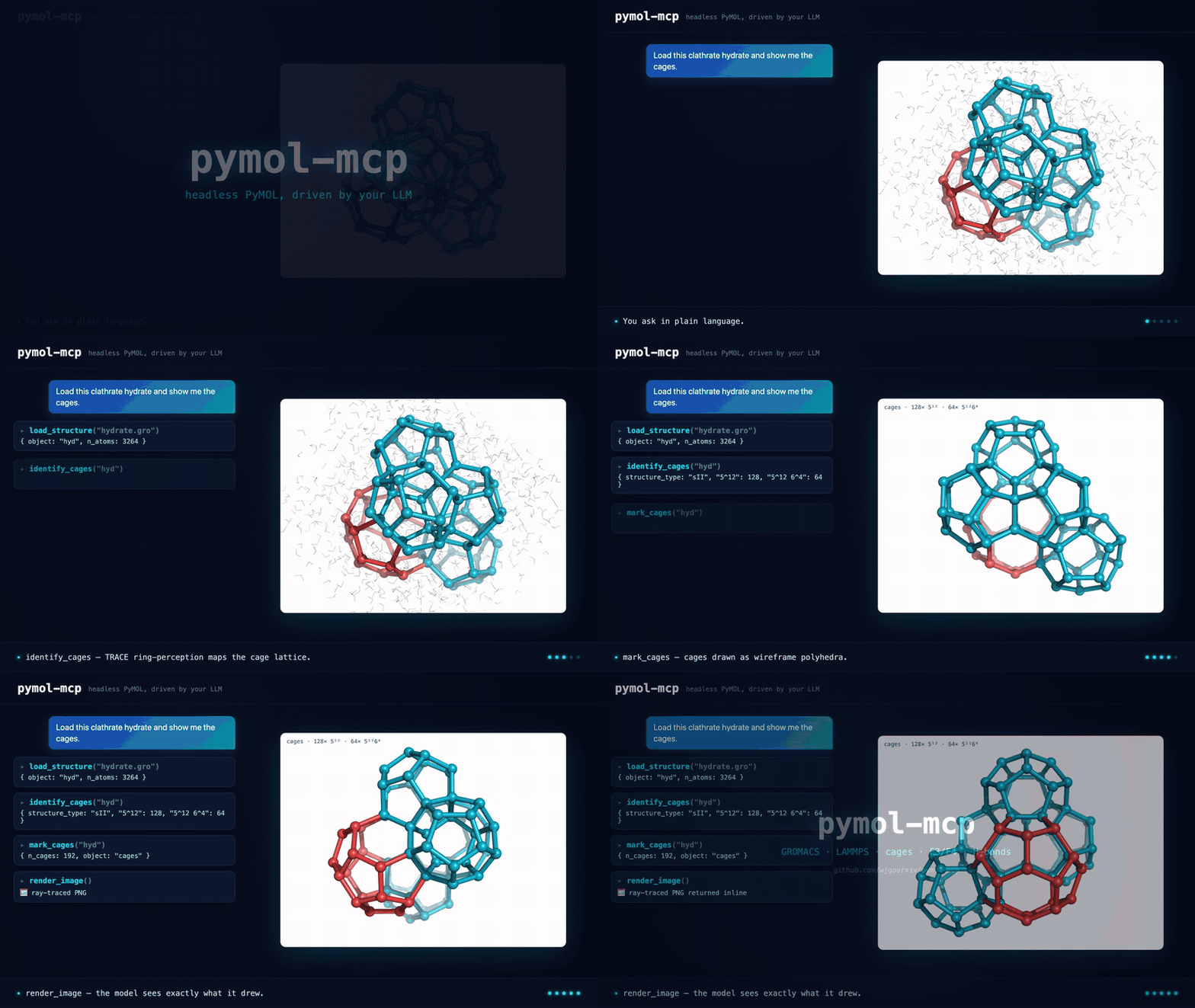
Ask in plain language → the model calls typed tools → headless PyMOL renders it. (full-quality MP4)
Highlights
| Runtime | Embedded, headless pymol2 — no GUI, no plugin, no socket |
| Tools | 30+ typed tools with real, structured return values |
| Vision | ray-traced PNG returned inline so the model sees what it draws |
| MD trajectories | GROMACS .xtc/.trr + LAMMPS dump (MDAnalysis bridge) |
| Domain science | cage perception (TRACE), occupancy, H-bonds, F3/F4 — validated |
| Robustness | worker-thread session, stdout-safe transport, pytest suite |
| Safety | arbitrary-code passthrough off by default |
| Directory | Glama (wjgoarxiv/pymol-mcp, release v0.1.0) and awesome-mcp-servers Biology (PR #9110, merged) |
Features
- Embedded & headless — one long-lived PyMOL instance on a dedicated worker thread; nothing to click, works in CI.
- The model can see —
render_imageray-traces and returns a PNG as MCP image content. Useray_style="pymolwiki_color"for the PyMOLWiki quantized-color outline profile. - MD-native — load GROMACS
.gro+.xtc, or bridge LAMMPS/NetCDF/… through MDAnalysis with in-memory coordinate injection. - Clathrate-hydrate toolkit — H-bond networks and F3/F4 order parameters ported from a validated Rust engine, all in nm with correct triclinic PBC.
- Typed, safe tools — every argument is schema-validated; the arbitrary-code passthrough is opt-in (
PYMOL_MCP_ALLOW_CODE_EXEC=1). - Protocol-hardened — PyMOL's chatty stdout is permanently redirected so it can never corrupt the JSON-RPC stream (with a subprocess test that proves it).
Quick Start
[!IMPORTANT] PyMOL open-source is a conda package, and the server must run in a Python that can
import pymol2. Install into that interpreter — do not useuvx/fastmcp install(they build isolated envs without PyMOL).
It's a standard MCP server over stdio, so it works with any MCP-capable client (Claude Code / Desktop,
Codex CLI, Gemini CLI, Cline, Continue, …). Point the command at the absolute conda interpreter so it
can import pymol2.
Most clients use an mcpServers block (Claude Code / Desktop, Gemini CLI, Cline, Continue, …):
Codex CLI — ~/.codex/config.toml
Prefer not to hardcode a path? Use "command": "conda", "args": ["run", "-n", "pymol-mcp", "python", "-m", "pymol_mcp"] instead (requires conda on the client's PATH). See llms-install.md for a full from-scratch setup.
To enable the opt-in scripting tools, add "env": {"PYMOL_MCP_ALLOW_CODE_EXEC": "1"} to the server entry.
Then ask your agent things like:
Tool Catalog
| Group | Tools |
|---|---|
| Session / IO | load_structure · fetch_pdb · list_objects · get_object_info · reset_session |
| Selection | select · get_selection_info |
| Representation | show · hide · color · spectrum · set_background |
| View / Render | orient · zoom · turn · set_projection · render_image → 🖼️ inline PNG |
| Measurement | measure_distance · measure_angle · measure_dihedral · align · save_file |
| Trajectory / MD | load_trajectory (GROMACS/DCD) · load_trajectory_mda (LAMMPS/NetCDF via MDAnalysis) |
| Clathrate domain | identify_cages (TRACE) · cage_occupancy · mark_cages · hbond_network · order_parameter (F3 / F4) · chill_plus · mark_chill_plus |
| Scripting (opt-in) | run_pml · run_python |
PyMOLWiki Ray styles
render_image accepts a fixed ray_style profile. If you omit it, the tool uses pymolwiki_outline.
Use ray_style="default" explicitly to preserve the current PyMOL settings.
| Profile | PyMOL setting | Use |
|---|---|---|
default | unchanged | Preserve the current scene style |
pymolwiki_outline | ray_trace_mode=1 | Color with black outlines |
pymolwiki_bw | ray_trace_mode=2 | Black-and-white outline mode |
pymolwiki_color | ray_trace_mode=3 | Quantized color with black outlines |
The PyMOLWiki profiles set antialiasing to 2. They use the built-in PyMOL ray tracer. They restore the previous ray settings after each render. Set a white background for the closest match to the PyMOLWiki examples.
set_projection switches the camera between orthographic (parallel cage edges, typical publication lattice) and perspective. PyMOL's default field of view is 20°; raise it (e.g. 40) to make depth obvious. save_file writes a PNG/PDB/PSE to disk and creates missing parent directories. list_objects includes CGO overlays such as cages and chill_plus.
Domain: clathrate-hydrate science
Ported from a validated Rust reference implementation and re-checked against ground truth. All analysis runs in
nanometres with a correct fractional-coordinate minimum-image convention (orthorhombic and triclinic),
a signed atan2 dihedral for F4, and a periodic-image KDTree for neighbour search.
identify_cages— full TRACE cage perception: ring finding → geometric validation → constraint-propagation assembly → Euler (SEC) validation → face-count typing (5¹², 5¹²6², 5¹²6⁴, …) and an sI/sII/sH structure call.cage_occupancy— assign guest molecules (CO₂/CH₄) to cages and report per-type occupancy (θ_S, θ_L). Guests are detected only from residue names containingCO2,CH4, orMETH(carbon atom). The bundledtests/fixtures/hydrate_sI.grois TIP4P water only, so occupancy is zero there.mark_cages— draw each cage as a wireframe polyhedron (CGO objectcages): cylinders on O–O edges and spheres at oxygen vertices, colored by type (5¹² cyan, 5¹²6² violet, 5¹²6⁴ red, 5¹²6⁸ blue, 4³5⁶6³ lime). Hide the water object, thenrender_imageorsave_file.mark_cagesgeometry defaults — use a bold 0.18 Å cage edge radius and a 0.38 Å vertex radius by default. Passedge_radiusorvertex_radiusto override them.cage_typesdraws a subset (e.g.["5^12 6^8"]). Cages that wrap the periodic box can appear as fragments; that is a drawing limit, not a miscount.order_parameter— F4 (torsional) and F3 (three-body angular). F4 ≈ 0.7–0.95 → hydrate, ≈ 0 → liquid, ≈ −0.4 → ice Ih.hbond_network— water H-bond graph (O–O ≤ 0.36 nm and a donor H–O···O angle < 35°) with coordination stats.chill_plus— classify each water as liquid, ice, or hydrate with the CHILL+ q3 bond correlation method. It returns six class counts, per-water classes, fractions, and the unique O–O network. The default cutoff is 0.35 nm. Thestateargument uses one-based PyMOL states and defaults to 1.mark_chill_plus— draw the non-liquid CHILL+ O–O network as a color-coded CGO overlay namedchill_plusforrender_image. It uses the same one-basedstateargument.- Performance —
chill_plususes a sparse cell list for orthorhombic cells, including 90° angle roundoff within a scale-aware machine-precision tolerance. It keeps the canonical MIC distance check. It uses a bounded-temporary-memory O(n²) fallback for real tilts. Adjacency and edge outputs still scale with the edge count. Large triclinic systems need a separate benchmark.
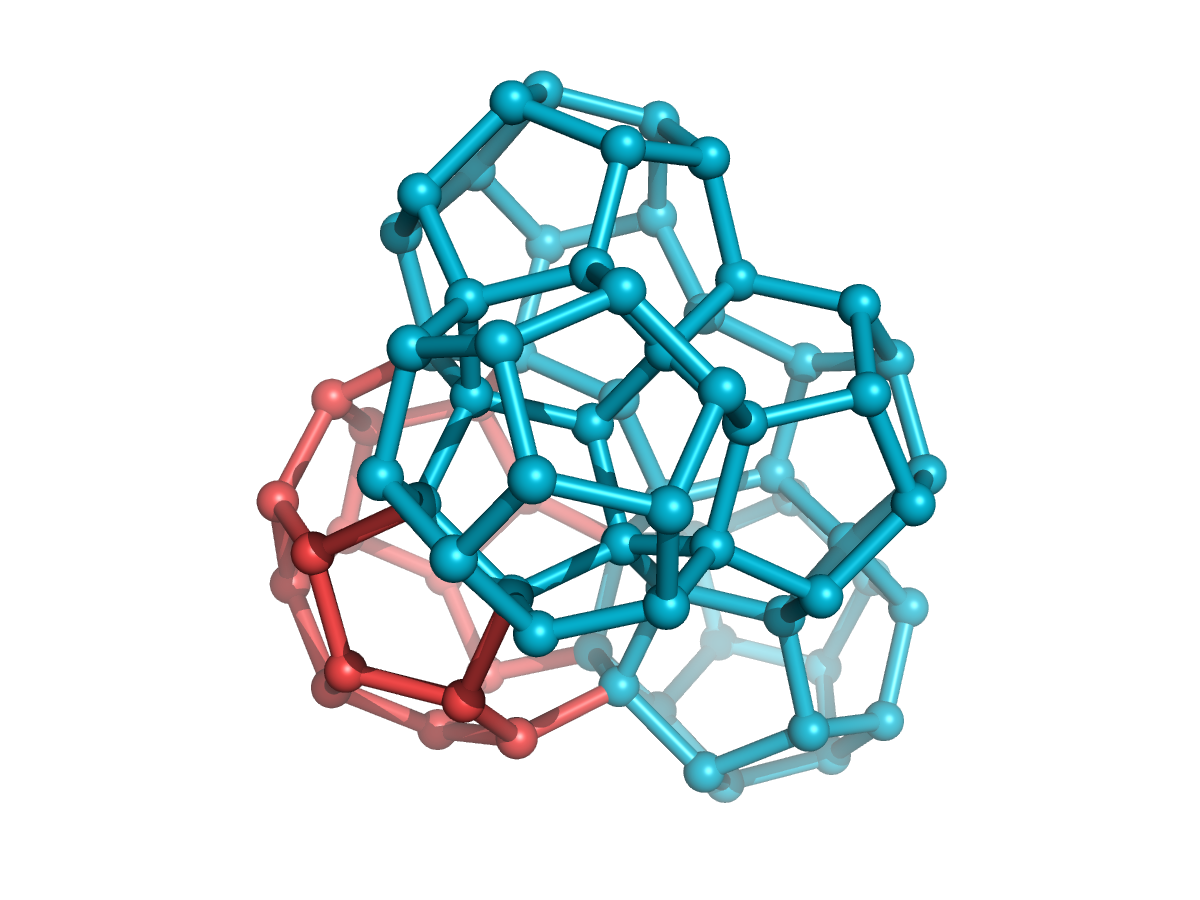
Detected sII cages drawn as wireframe polyhedra: 5¹² dodecahedra (cyan) around a 5¹²6⁴ cage (red), sharing faces.
[!TIP] Validated against ground truth: on a structure II reference,
identify_cagesfinds exactly **128 × 5¹²
- 64 × 5¹²6⁴** cages (the textbook 2:1 sII lattice), on structure I exactly 16 × 5¹² + 48 × 5¹²6², and on structure H 48 × 5¹² + 32 × 4³5⁶6³ + 16 × 5¹²6⁸ (16 unit cells); F4 over the first ten waters reproduces the reference value 0.926698 exactly, F3 = 0.0028 (hydrate-like ≤ 0.04), and the H-bond network is a perfect tetrahedral (mean coordination 4.00) framework.
A typical cage figure, exercised through the MCP tools:
How it works
Requirements
| Dependency | Required | Purpose |
|---|---|---|
| Python 3.11+ (conda) | Yes | Runtime that can import pymol2 |
pymol-open-source 3.x | Yes | The visualization engine (conda) |
fastmcp 3.x, numpy, scipy | Yes | MCP server + analysis |
MDAnalysis | No (extra md) | LAMMPS / NetCDF / xtc bridge (GPL-2.0+) |
ffmpeg | No | Movie export (future) |
Contributing
Issues and PRs welcome — see CONTRIBUTING.md.
License
MIT. The optional md extra pulls MDAnalysis (GPL-2.0-or-later), imported lazily; the core
package stays MIT.