Source-first URL clone, capture, rebuild, and fidelity verification tools.
Quick Install
Automated & IDE SetupCopy the AI prompt to install this server into Claude Code, Cursor, or another agent — or use 1-click editor setup below.
Not yet automatically verified
We haven't yet run this listing's install command through our automated sandbox check. This isn't a red flag — we're steadily working through the catalog.
Manual Client & Custom JSON ConfigExpand JSON ▾
Client Config & Setup
Choose your client or environment
Target File:
💡 Paste the JSON block into your client's configuration file under mcpServers, then restart the application.
Documentation Overview
webEmbedding
webEmbedding is a source-first website cloning engine for AI coding agents: it captures live pages with Playwright, replays network evidence from HAR artifacts, rebuilds only when direct reuse is blocked, and self-verifies the result.
It ships as a Skill + MCP server. Instead of asking a model to "clone this site" from a screenshot, it inspects the URL, chooses a reuse or rebuild route, captures DOM/runtime HTML/styles/assets/network traces, generates bounded frontend reconstruction artifacts, and checks the output with visual, DOM, computed-style, interaction, and responsive-breakpoint verification.
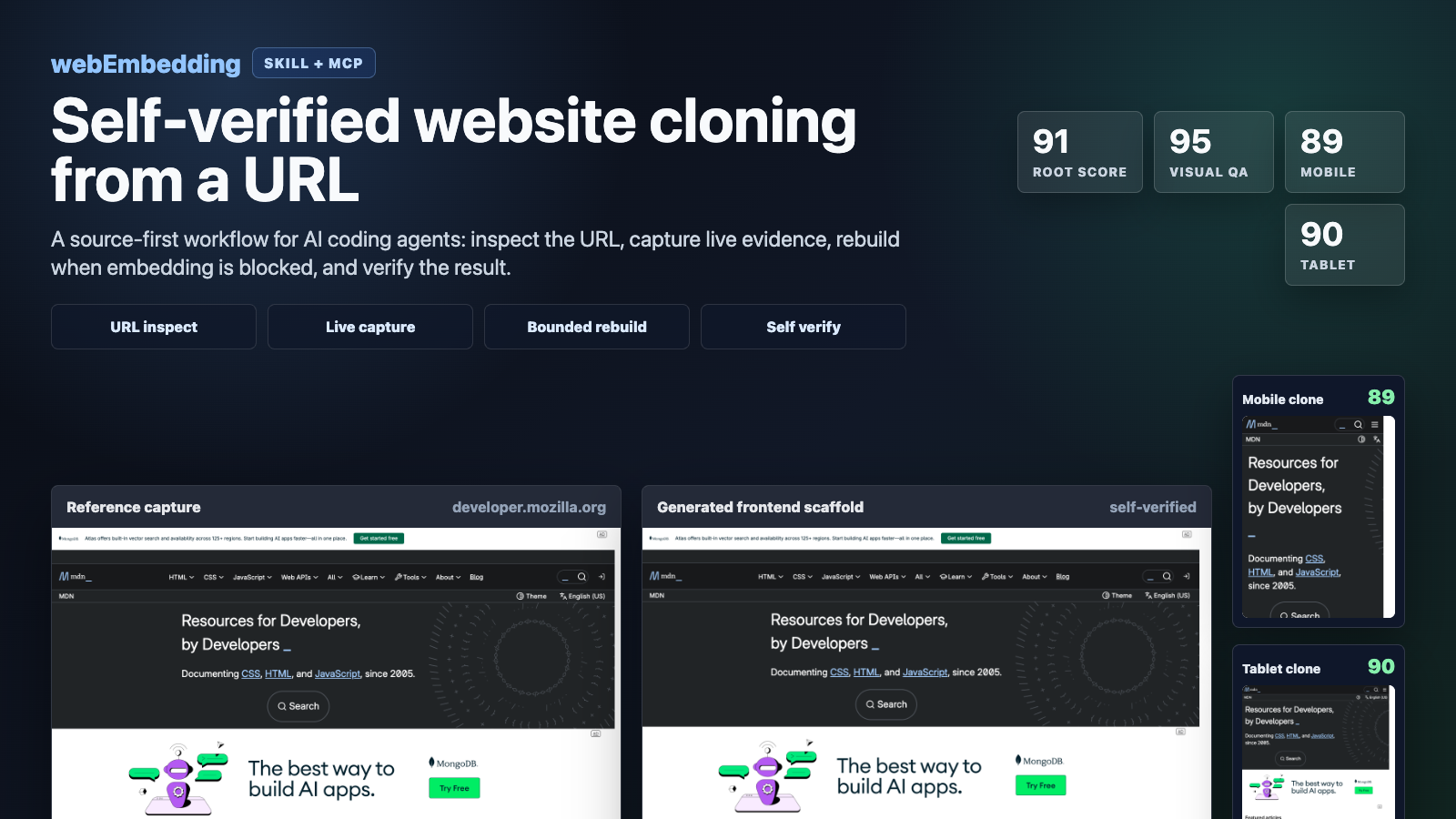
GitHub listing, social preview, and launch-copy recommendations are in docs/github-listing.md.
Current Status
The current pipeline is strongest for static and semi-static web pages:
- company, brand, marketing, and documentation pages
- public landing pages
- iframe-blocked pages that need capture-based reconstruction
- responsive page snapshots across desktop, tablet, and mobile
It is not a full backend or app-logic clone engine. Login-only screens, app-first or native-app-required services, captcha-heavy sites, maps, games, canvas/WebGL-heavy pages, real-time feeds, payments, booking flows, and private server behavior still need separate handling.
Operationally, the repo is now a production-candidate clone engine for URL-based capture and bounded reconstruction: jobs can be queued, network evidence can be replay-audited from HAR artifacts, authenticated dashboard runs can be driven from user-owned browser state, and local gates verify the route corpus, score checks, package contents, and CI wiring. The remaining hard boundary is server-side product behavior, not front-end evidence capture and reconstruction.
Measured Checkpoints
Recent local benchmark runs from this repo:
| URL | Path | Score |
|---|---|---|
https://developer.mozilla.org/en-US/ | iframe-blocked bounded rebuild | root 94, visual 95, mobile 94, tablet 94, breakpoint average 94 |
https://www.mozilla.org/ | bounded rebuild | root 94, visual 100 |
https://www.python.org | harder bounded rebuild sample | root 90, visual 100 |
https://www.example.com | exact reuse | ready yes |
These are generated by the local self-verify pipeline, not manually assigned ratings.
The reproducible commands and score thresholds are tracked in docs/benchmark-evidence.json.
Production readiness gates are tracked in docs/production-pipeline-gates.json.
Core Features
- Source-first routing:
- direct iframe or embed reuse when it is safe and frameable
- original preview, export, remix, or source routes when available
- bounded rebuild only when exact reuse is unavailable
- Live browser capture:
- DOM snapshot
- runtime HTML
- full-page screenshot
- computed style summaries
- CSS analysis
- asset inventory
- HAR-like network metadata
- interaction states and replay traces
- storage state export for session-aware flows
- Blocked-site rebuild:
- handles
X-Frame-Optionsand CSP-blocked pages by rebuilding from captured evidence - generates reusable frontend reconstruction artifacts from captured page structure
- preserves custom tags, shadow-root host structure, and semantic document structure where captured
- handles
- Evidence limitation reporting:
- separates directly captured artifacts from inferred or missing evidence in reproduction results and prompts
- marks app-gated, auth-gated, and native-app-led surfaces as bounded evidence, with recommendations for user screenshots or authenticated session capture
- Operational failure classification:
- reports typed pipeline action codes such as
network-replay-limited,auth-session-missing,public-app-gate, andcanvas-visual-fallback - exposes HAR/network
replay_readinessbefore treating captured network evidence as replay-grade
- reports typed pipeline action codes such as
- Production pipeline helpers:
- filesystem-backed async clone job queue with durable JSON records, worker locks, retry scheduling, cancellation, and manifest annotation
- deterministic HAR replay engine for standard HAR, near-HAR, and captured
network/manifest.jsonartifacts - authenticated dashboard live corpus runner that accepts user-provided
storage_state_pathoruser_data_diroutside the repo
- Self-verification:
- screenshot similarity
- DOM snapshot similarity
- computed-style similarity
- hover/focus/click interaction state parity
- interaction trace parity
- desktop/mobile/tablet breakpoint reports
- Responsive benchmark support:
- primary desktop viewport:
1440x1200 - tablet profile:
768x1024 - mobile profile:
390x844
- primary desktop viewport:
- Repair loop:
- bounded self-repair can run when the first scaffold misses the readiness threshold
Install
Requirements
- Node.js 18 or newer
- Python 3.9 or newer
- Chrome or Chromium available locally for Playwright runtime capture
The package uses playwright-core; it does not download a browser by itself.
Installing this project adds the source-first-clone plugin bundle, the exact-clone-intake skill, and the MCP server that exposes the URL inspection, capture, rebuild, and verification tools.
Install From npm
Clone a public URL after installing:
If you already have an older local plugin installed, overwrite it with:
You can also run the installer without a global install:
Use As An MCP Server
For MCP clients that can launch npm stdio servers:
For local smoke testing:
The MCP Registry identity is io.github.jongko54/web-embedding; server.json and package.json#mcpName are kept in sync for registry ownership verification.
Hosted Apps SDK Intake Endpoint
The public remote MCP intake endpoint for Apps SDK Developer Mode is:
It exposes low-risk source-first routing tools such as URL inspection, embed candidate discovery, clone-mode classification, and embed snippet generation. Full browser capture, HAR replay, queues, bounded rebuilds, and one-pass clone execution remain local-first through the stdio MCP package.
Apps SDK review pages are hosted alongside the endpoint:
https://webembedding-jongkos-mcp.vercel.app/privacy.html,
https://webembedding-jongkos-mcp.vercel.app/terms.html, and
https://webembedding-jongkos-mcp.vercel.app/submission.html.
Sandboxing And Approvals
webEmbedding has two different execution boundaries:
- Hosted Apps SDK intake: read-only URL routing and classification only. It accepts absolute
httpandhttpsURLs, does not run Playwright, does not read local files, does not use browser profiles or storage state, and does not persist capture artifacts. - Local stdio MCP and CLI: full capture, HAR replay, queues, rebuild scaffolds, and self-verify run on the user's machine under the user's local agent and filesystem permissions. Output is written only to caller-provided paths such as
output_dirorqueue_root. - Authenticated capture: session-aware runs require the caller to intentionally provide a
storage_state_pathoruser_data_dir. webEmbedding does not collect credentials, perform login bypasses, or treat a public login shell as private app evidence. - Access-controlled surfaces: paywalls, captcha flows, private dashboards, payment/checkout/account/admin flows, and native-app-led screens should be blocked, marked
needs_session, or sent to manual review unless the user has explicit authorization and supplies the needed evidence.
Local URL entrypoints reject non-HTTP schemes such as file:// so an agent cannot use clone/capture tools as a local file reader. Telemetry is disabled by default and, when enabled, excludes target URLs, local paths, captured HTML, screenshots, storage state, environment variables, API keys, and command output.
Agent Marketplaces
This repository includes marketplace metadata for the two local agent surfaces:
- Codex:
.agents/plugins/marketplace.jsonpoints to./bundle/source-first-clone. - Claude Code:
.claude-plugin/marketplace.jsonpoints to the same bundle and the bundle includes.claude-plugin/plugin.json.
Claude Code users can add the marketplace from GitHub with:
AI auto-selection expectations and golden prompts live in docs/ai-distribution.md and evals/ai-selection/webembedding-golden-prompts.json.
Install From Release
Install From This Checkout
Install Into A Temporary Home
Useful for testing without touching your real agent home:
Opt-in Telemetry
Related MCP Servers
Reviews
No reviews yet — be the first to share how this listing worked for you.
Frequently Asked Questions about WebEmbedding
AllMCPs Directory Badge
Showcase your server listing on GitHub or your project documentation. Embed this dynamic SVG badge to highlight official listing status and live engagement.
Badge Style:
Live Dynamic SVG Preview
Markdown (GitHub README)
[](https://allmcps.com/mcp/webembedding)HTML Embed
<a href="https://allmcps.com/mcp/webembedding"><img src="https://allmcps.com/api/badge/webembedding?style=directory" alt="WebEmbedding on AllMCPs" /></a>