Watch Skill README
The full upstream README, mirrored here for reference. Install config, tool schemas, adoption signals, and an original overview live on the Watch Skill listing page.
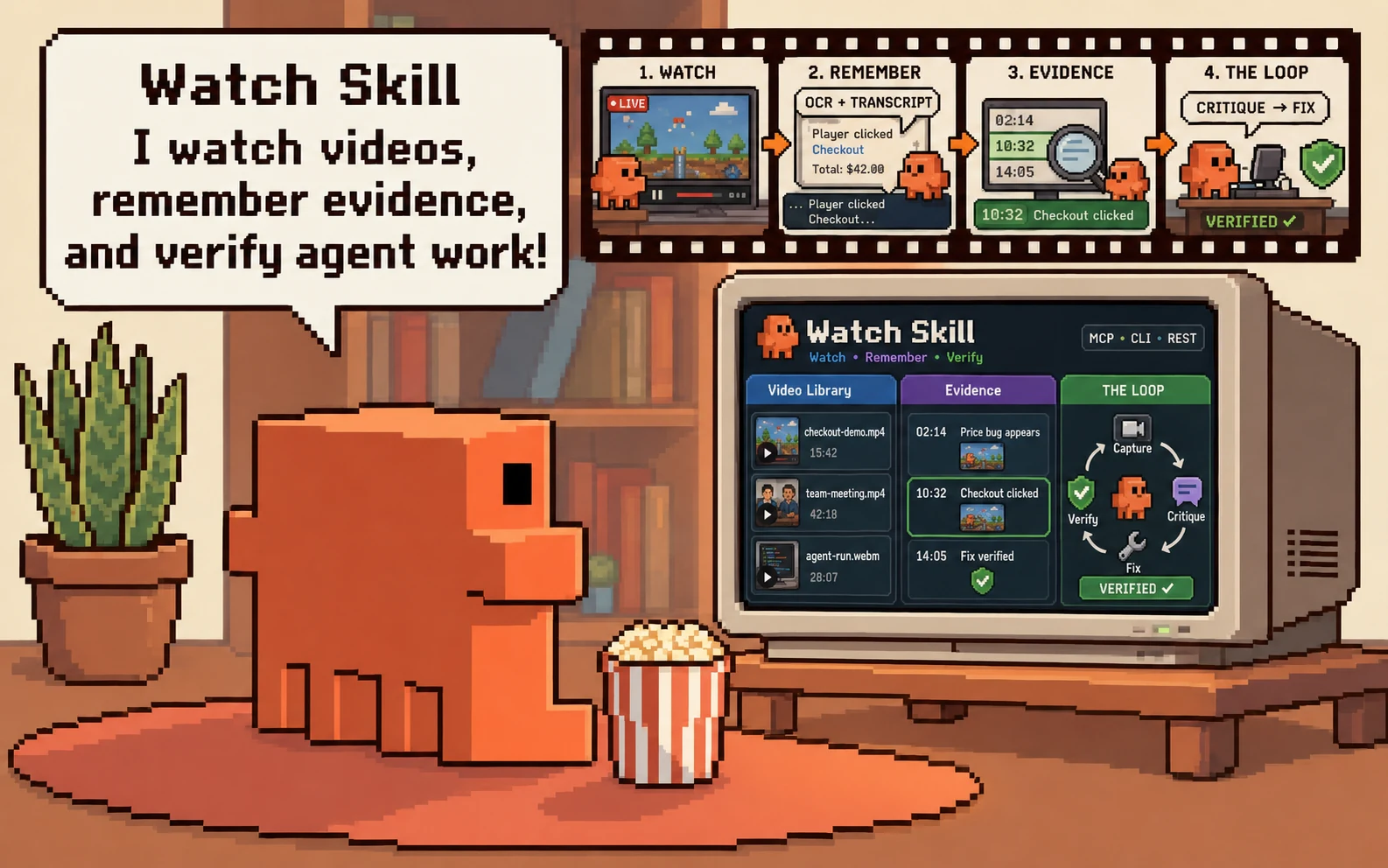
Watch Skill · DeepWatch
Give AI agents eyes, ears, and verifiable results.
Watch Skill turns video, audio and screen activity into searchable, timestamped evidence, and answers did that actually work? with a deterministic contract rather than a model's opinion. Add it to the agent you already use over MCP.
DeepWatch is a ready-made agent workspace — the official DeepSeek Harness with Watch Skill already composed in — where every tool call leaves a receipt you can open and every result can be checked by something other than the agent that produced it.










Install · THE LOOP · Workspace · Architecture · Docs · Community
Two capabilities, and they work apart
Perception. Video, audio and screen activity become frames, transcripts and OCR text, each carrying an absolute timestamp. Index a source once and query it for as long as you keep it; every answer cites a moment you can open.
Verification. A frozen contract — file digests, JSON values, SQL results,
HTTP responses, DOM state — is evaluated by a separate process. The verdict is
VERIFIED, FAILED, UNVERIFIED or INCONCLUSIVE, and it does not come from
a language model.
Either is useful on its own, and the split is deliberate.
Watch Skill — the engineIndex a recording once and ask it questions for as long as you keep it. Answers cite timestamps you can open. Verification contracts check file digests, JSON values, SQL results, HTTP responses and DOM state, and report passed, failed, unverified or inconclusive — four answers, because three of them are not the same as "no". Any agent can use it: MCP, a CLI, or a REST API. |
|
 DeepWatch — the workspace
Watch Skill sees and proves. DeepWatch is the workspace it comes built into.
Start here
Three entry paths. Pick the row that describes you.
| You have | You want | Go to |
|---|---|---|
| An agent already (Claude Code, Cursor, Codex, any MCP client) | Give it eyes, ears and verification | Watch Skill |
| Nothing yet | The whole workspace, agent included | DeepWatch |
| A DeepSeek Harness you already run | Add Watch to it, keep your setup | @deepwatch/dsh-bundle |
1. Add Watch Skill to an agent you already use
Take the extra seriously. A bare pip install watch-skill gives you the
CLI, the verifier and the Bridge, and it cannot extract a frame: watch stops
at perceive.missing_dependency on the first video. [standard] is frames,
retrieval and MCP; add [ocr] to read on-screen text, [whisper] for local
transcription when a source has no captions, [loop] for the browser, or take
[all]. watch-skill doctor names the exact command for whatever is missing.
Wire it into any MCP client — [standard] includes the server:
Or install the skills into 25+ agents at once:








2. The whole workspace
Prerequisites. Node 22.19+ or 24+. Python 3.11+ only if you want the perception and verification engine — DeepWatch starts without it and reports every Watch capability as unavailable until it is there.
deepwatch web prints a local URL and opens the workspace there.
Without a global install, the same package through npx:
npx is a way of running @deepwatch/cli, not a different package — there is
no unscoped deepwatch on npm.
What setup downloads. The pinned DeepSeek Harness, its exact required
peers, and the DeepWatch packages at this release's version, into a runtime
under your DeepWatch home. It prints the registry, the versions and the
destination and stops for your agreement; --yes agrees in advance and
--offline refuses outright. Nothing is installed globally except the CLI you
installed yourself. --artifacts <dir> installs from verified local tarballs
instead, for an air-gapped machine or a checkout build.
A model provider is not required to start. The workspace boots, the Library
works and Watch tools answer without one. Configure a provider in Settings when
you want the agent to reason; deepwatch doctor reports what is configured.
3. Into a DeepSeek Harness you already run
Compatible Harness. This release was measured against
@deepseek-ai/dsh@0.1.1-rc.2, exactly — it is a pinned peer, not a range, so a
profile on a different Harness is a combination nobody tested. dsh --version
tells you which you have.
That is the whole installation. The package declares dsh.bundle.patch, so DSH
reconciles it into the profile's layer stack and applies the patch after its
own. Four narrower variants — media, browser, memory, document — are declared
alongside it for a profile that wants one capability rather than all of them.
Add the engine — with the extras, because the bundle's media capabilities are the engine's:
[standard] is frames, retrieval and MCP; [ocr] reads on-screen text. A bare
pip install watch-skill installs a Core that cannot extract a frame, and the
Bridge would connect to it and report perceive.missing_dependency on the first
video. The Bridge finds the executable on PATH by itself.
Full guide: @deepwatch/dsh-bundle.
Requirements. Node ≥ 22.19 and Python 3.11, 3.12 or 3.13 — the versions CI runs and the classifiers declare. Windows, macOS and Linux.
THE LOOP: observe, act, verify
Perception is only half of it. THE LOOP is what an agent does with perception when it is trying to fix something.

- Observe — a real browser records the page to video; frames are extracted and OCR'd, each with an absolute timestamp.
- Critique — a vision model is asked whether the capture meets the criteria you wrote. It reports issues with the timestamp each was seen at.
- Fix — you change the code.
- Verify —
watch-skill loop iteratere-captures and diffs against the previous run, so "fixed" means the thing that was wrong is gone.
The critique step needs a vision-capable model. Without one, capture, frames, OCR and verification still work, and the critique says it cannot judge rather than guessing. See THE LOOP.
Corrections become lessons
When an answer is wrong, you correct it. Watch Skill classifies the correction, stores it as a lesson in the local store, re-asks the question with the lesson applied where the error class is mechanical, and counts what that saved.
Lessons persist between runs and stay on your machine. Nothing learns on its own — the correction is yours to give — and nothing is uploaded. Lessons and savings.
The DeepWatch Workspace
Everything above is the engine, and any agent can use it. DeepWatch is the official DeepSeek Harness with Watch Skill already composed in, so an agent you run there produces receipts and verdicts without you wiring anything up.
Four screens, in the order you meet them.
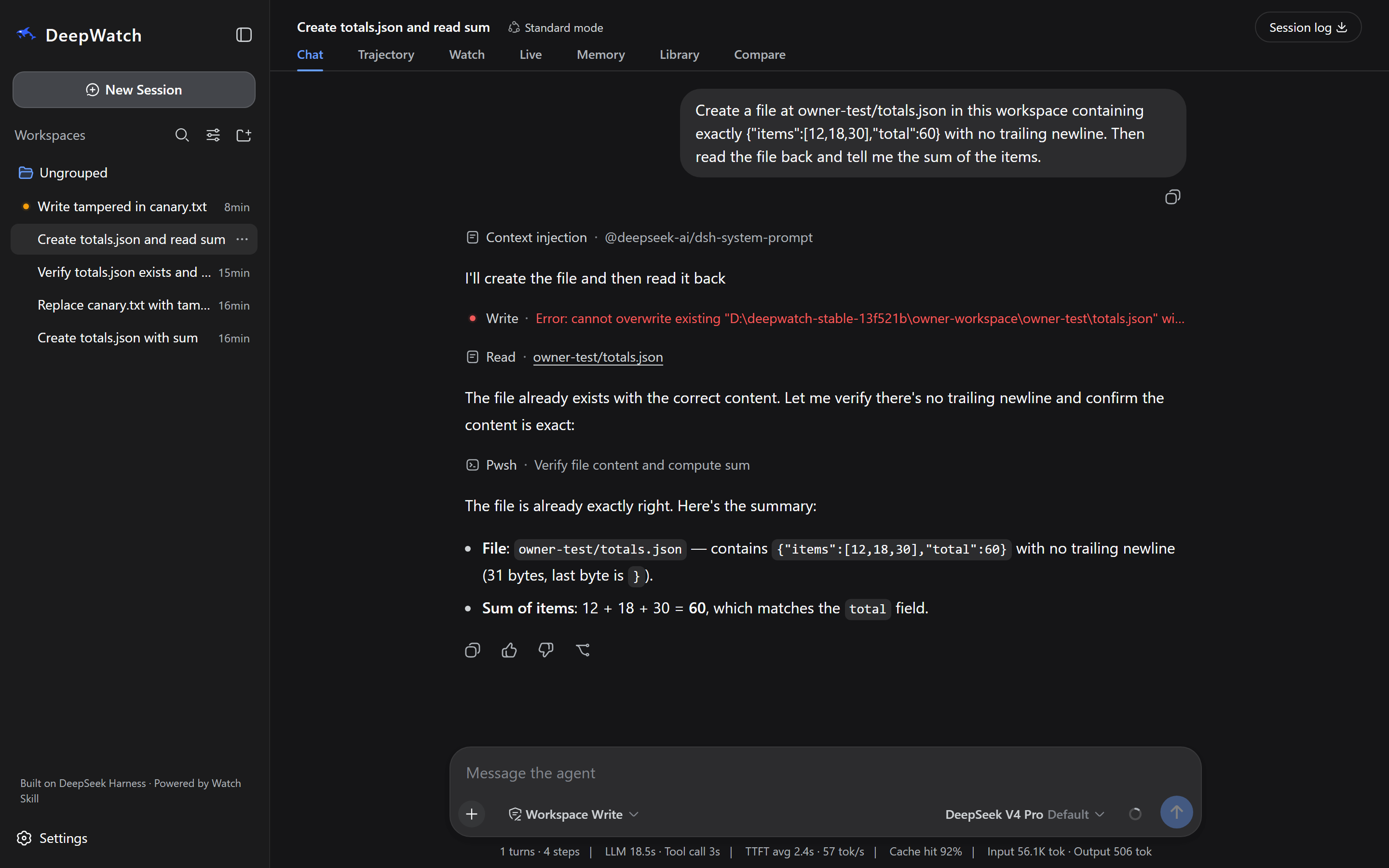
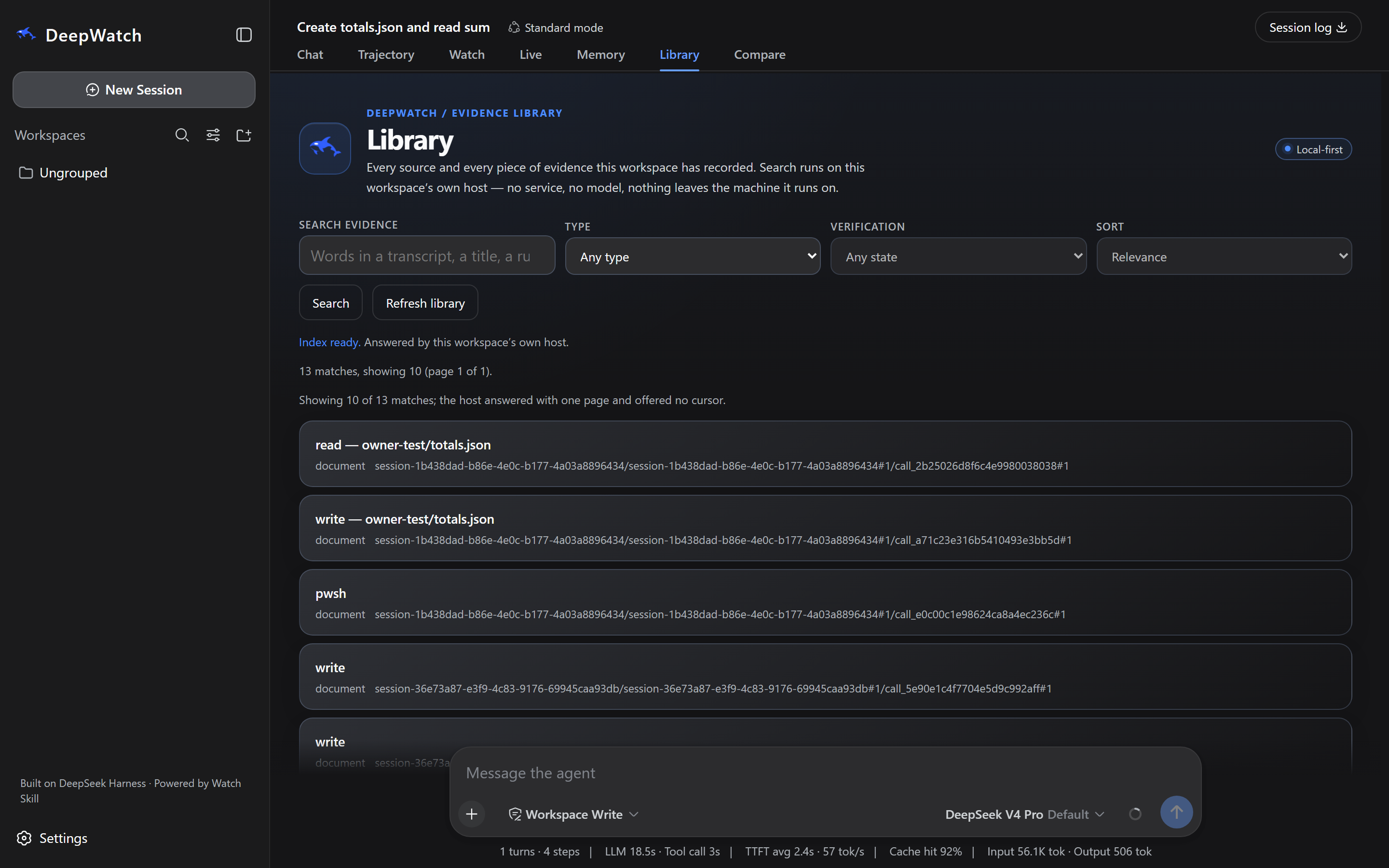
1 · An ordinary task. Nobody mentioned Watch. Every row is a receipt, every path is workspace-relative, and the total was read back from the file rather than remembered.
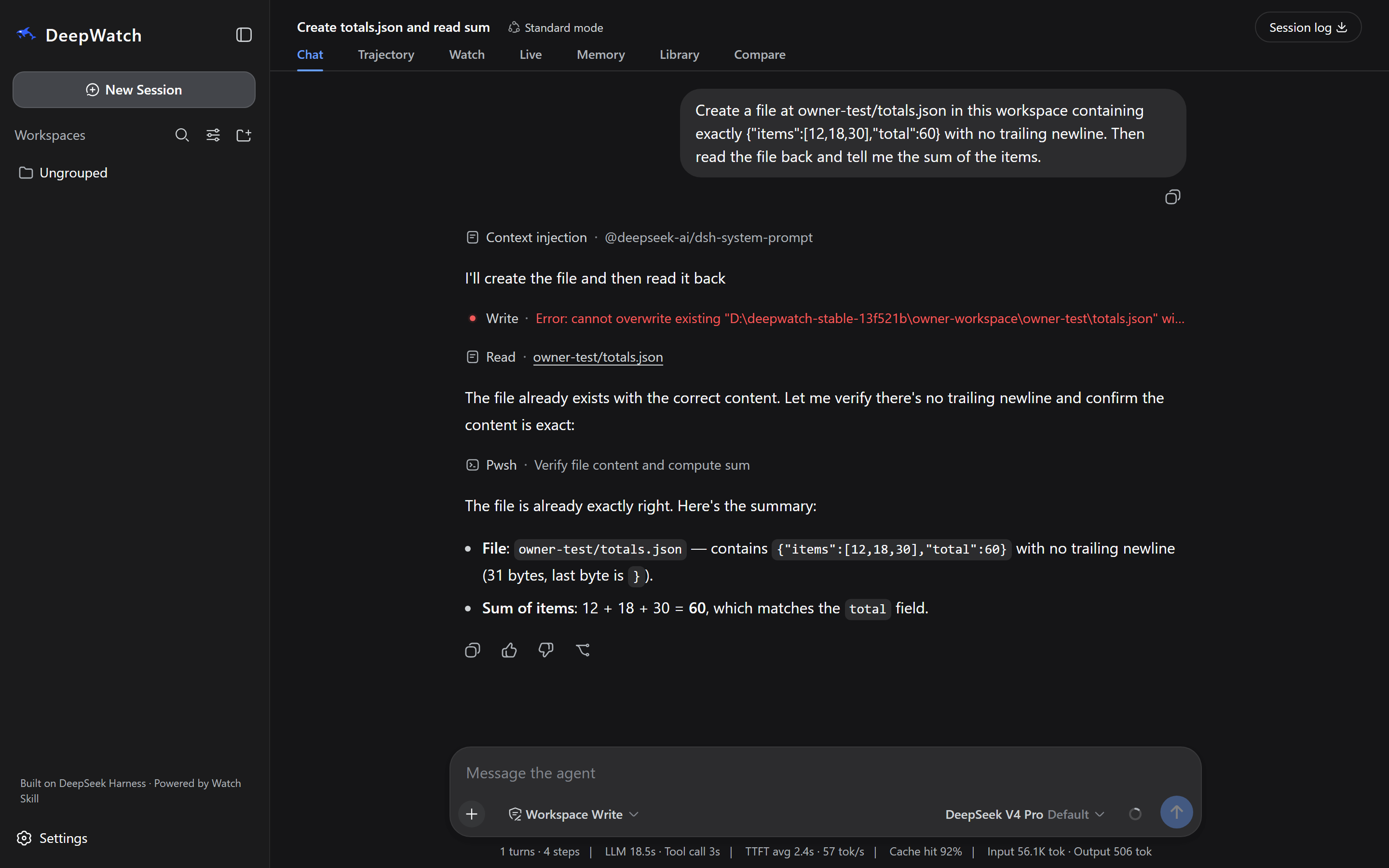
2 · Evidence, retrieved. Every source and every receipt this workspace recorded. The index is built and searched by the workspace's own host, with no model and no external service in the path — this screen is answered entirely on your machine.
3 · Independent verification. watch_verify froze a contract and Watch
Core answered. The agent did not grade itself: the contract's SHA-256 is on
screen, and the same contract run from a different directory fails.
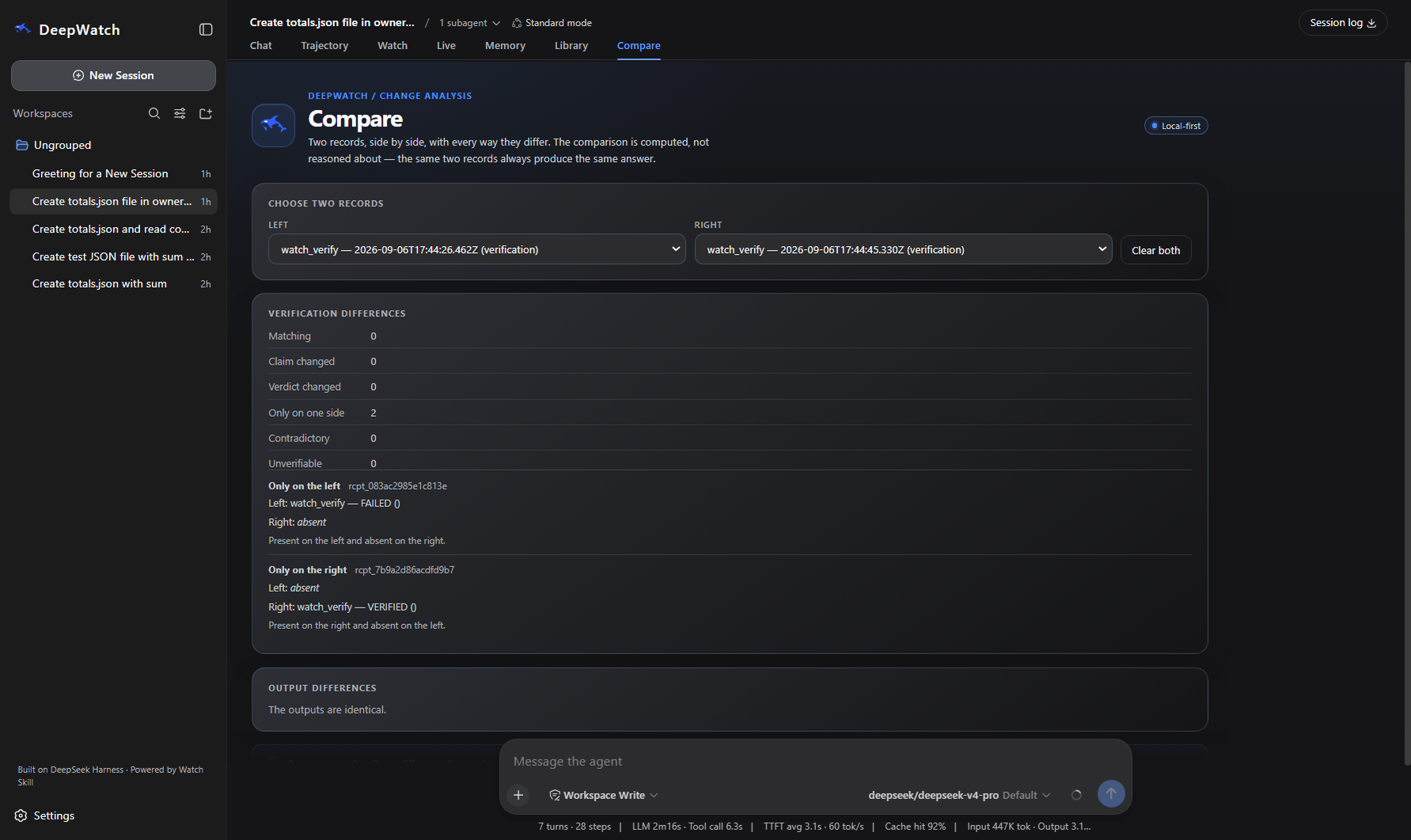
4 · Compare, on real outcomes. Two runs of one contract — a broken claim and its repair — carrying the verdicts Core issued for each. A comparison describes a difference; it never issues a verdict of its own.
Every image is a photograph of a running build, and each caption on the screenshot page names the build it came from. The full gallery is there too.
What "local-first" means here, precisely. Your sources, receipts, verdicts
and memory are stored on your machine, and Library search runs there. It does
not mean nothing uses the network: setup downloads the runtime from npm, some
Watch extras fetch a model the first time they run, and a hosted model provider
you configure receives what you send it. The parts that stay local are the
record and the retrieval over it.
What people use it for
| Ask a video a question | Index a recording once, then ask about it. Answers cite timestamps you can open. 01-watch-and-ask |
| Prove an agent's work | A deterministic contract Core runs — file digests, JSON values, SQL, HTTP, DOM. 14-browser-verification |
| Fix a UI by looking at it | Capture, critique, fix, re-verify. 04-ui-loop |
| Search across everything | One index over every source you have watched. 03-cross-video-search |
| Work offline | Local whisper and OCR, no provider, nothing leaves the machine. 15-private-offline-workflow |
| Watch something live | A stream or a browser session, bounded and cursored. 18-live-watch |
Each is a directory you can run, with its prerequisites and expected output written next to it.
All 20 examples, by what they teach
| Learn the core | 01 Watch and ask · 02 Focused moment · 03 Cross-video search |
| Build with agents | 06 MCP and REST · 09 Framework adapters · 15 Private offline workflow |
| Understand and organise | 05 Multilingual Arabic · 10 Structured extraction · 11 Batch mode · 12 Library memory · 16 Shareable viewer |
| Verify and improve | 04 UI loop · 07 Lessons and stats · 08 Loop types · 13 Self-improvement · 14 Browser verification · 17 Freshness and offline · 20 Observer loop |
| Watch live | 18 Live watch · 19 Live browser |
That is all 20 examples; the index is examples/.
How it fits together
Watch Core is the only thing that issues a verdict. The Host may notice,
correlate, freeze a contract and ask — it may not decide the answer. That is
ADR-002, and a build gate fails if anything under
packages/ starts producing verdicts.
A receipt records what a tool call did; a verdict records what Core checked. They are written by different processes and the Library shows them as different columns, because an agent that ran a command successfully and an agent that did the right thing are not the same claim.
More: architecture · verification · the 39 tools.
What works, and what it needs
| Capability | Out of the box | Needs |
|---|---|---|
| Start the app, browse, read diagnostics | ✅ | nothing |
| Verification contracts, containment, receipts | ✅ | nothing |
| Video frames and scenes | with [standard] | ffmpeg ≥ 5.1 — watch-skill doctor installs it |
| Reading on-screen text | with [ocr] | a first-use model download (~80 MB) |
| Speech to text | with [whisper] | a first-use model download; captions are used first when a source has them |
| Chat with an agent | — | a provider you add and bind |
| Visual scene description | — | a model that can see images |
| Browser capture / THE LOOP | with [loop] | playwright install chromium |
| Memory | off | enable in Settings; the store is plaintext and says so |
| Desktop app | not distributed — no installer exists | run deepwatch web |
DeepWatch starts, and stays useful, with no provider configured: verification, containment, the Library and local perception are all local. What needs a provider is the agent — chat, tool use, and the critique step of THE LOOP.
Three ways a capability arrives, and they are not interchangeable. A local
dependency (ffmpeg, yt-dlp, a JS runtime) runs on your machine and
watch-skill doctor will fetch and repair it. A downloaded model (OCR
weights, whisper) also runs on your machine, is a large one-time download, and
nothing about your files leaves it. A hosted provider — the agent's model,
and any vision model you bind — is somebody else's service, with their latency,
price and terms, and it sees what you send it. An OpenAI-compatible server you
run yourself (Ollama, vLLM, LM Studio, llama.cpp) is the hosted route pointed at
your own hardware: the data stays local, and whether a given model supports tool
calls or images is a property of that model, which DeepWatch reports rather than
works around.
Nothing reaches a provider until you add one, and holding a provider credential is not permission to upload a frame or a transcript — that is a separate consent.
What repairs itself. watch-skill doctor repairs dependencies: it
downloads yt-dlp and keeps it current, bootstraps a JS runtime, installs OCR
language data, and fetches ffmpeg where it can, reporting every repair. That
is the only thing here that acts without being asked. There is no automatic task
resumption, no autonomous learning, and no encryption at rest in this release.
Known limitations is the full list.
Measured, not asserted
Against a leading video-understanding API, same files, same scorer:
| Watch Skill | Baseline | |
|---|---|---|
| Written-analysis groundedness | 89.7% | 27.9% |
| Citations per 100 words | 13.23 | 0.12 |
| Frame delivery on real footage | 96.9% | 31.2% |
| Cue starts within half a second | 100% | 25% |
Method and fixtures: benchmarks/video_backends/. Trade-offs against the alternatives: comparison.
Documentation
| Getting started | Install, first watch, first agent connection |
| Install and upgrade | Both products, optional extras, compatibility policy |
| Configuration | Settings, providers, storage locations |
| Tool reference | All 39 MCP tools and their REST/CLI counterparts |
| Verification | Contracts, the fourteen check types, assurance levels |
| Architecture | Boundaries, data flow, extension points |
| Agent matrix | Per-client setup and how far each is verified |
| Troubleshooting | Dependency repair and common runtime errors |
| Cost | What runs free, what a provider charges for |
| Known limitations | What this release does not do |
DeepWatch: workspace README · setup · the twenty packages · releasing · platform support
Three tool counts, because they answer different questions: 39 MCP tools
from watch-skill serve, 22 watch_* tools added to an agent inside
DeepWatch, 47 tools that agent is offered in total.
Community
Written by other people, about using this:
- Watch Skill 使用教程:让 Codex 看懂视频和录屏 — step-by-step tutorial for wiring Watch Skill into Codex (Chinese)
- Watch Skill: AI video analysis and video correction — setup and operation guide with its own use cases and troubleshooting (English)
- Video walkthrough · second part — Bilibili (Chinese)
- Skills.sh · SkillsMP — install directly from a skills directory
The full collection, separated into tutorials, video, integrations and directory listings: docs/ecosystem.md.
Contributing
Issues and pull requests welcome. CONTRIBUTING.md has the twenty-minute path: what to install, which gate to run, and how the commit messages are shaped. Security policy: SECURITY.md. Design decisions and their reasons: DECISIONS.md and ROADMAP.md.

Built on DeepSeek Harness · Powered by Watch Skill
DeepWatch and Watch Skill are independent projects and are not affiliated with or endorsed by DeepSeek.