Watch video and live sessions, keep timestamped evidence, and verify an agent's own work.
Quick Install
Automated & IDE SetupCopy the AI prompt to install this server into Claude Code, Cursor, or another agent — or use 1-click editor setup below.
Manual Client & Custom JSON ConfigExpand JSON ▾
Client Config & Setup
Choose your client or environment
Target File:
💡 Paste the JSON block into your client's configuration file under mcpServers, then restart the application.
Documentation Overview
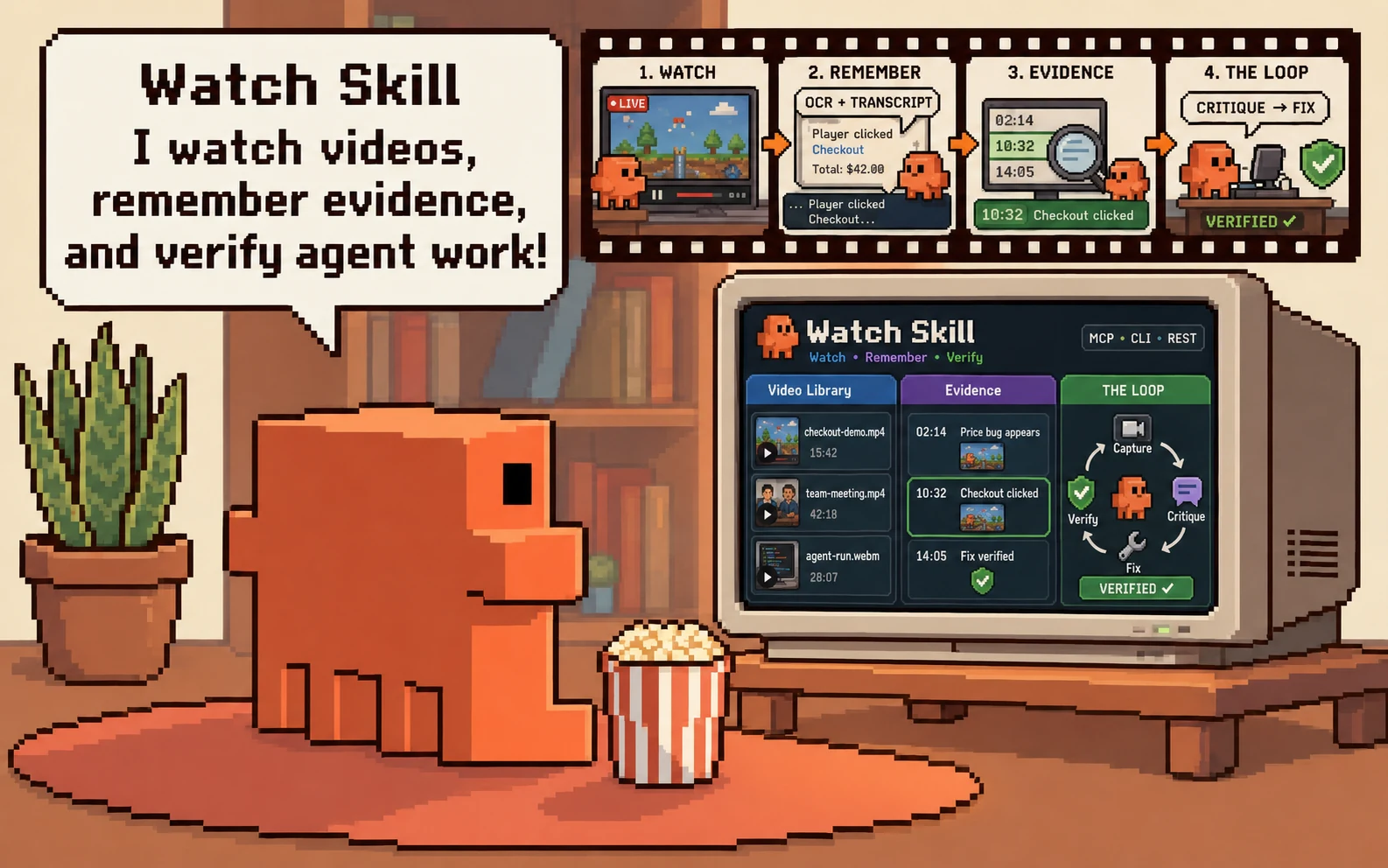
Watch Skill · DeepWatch
Give AI agents eyes, ears, and verifiable results.
Watch Skill turns video, audio and screen activity into searchable, timestamped evidence, and answers did that actually work? with a deterministic contract rather than a model's opinion. Add it to the agent you already use over MCP.
DeepWatch is a ready-made agent workspace — the official DeepSeek Harness with Watch Skill already composed in — where every tool call leaves a receipt you can open and every result can be checked by something other than the agent that produced it.










Install · THE LOOP · Workspace · Architecture · Docs · Community
Two capabilities, and they work apart
Perception. Video, audio and screen activity become frames, transcripts and OCR text, each carrying an absolute timestamp. Index a source once and query it for as long as you keep it; every answer cites a moment you can open.
Verification. A frozen contract — file digests, JSON values, SQL results,
HTTP responses, DOM state — is evaluated by a separate process. The verdict is
VERIFIED, FAILED, UNVERIFIED or INCONCLUSIVE, and it does not come from
a language model.
Either is useful on its own, and the split is deliberate.
Watch Skill — the engineIndex a recording once and ask it questions for as long as you keep it. Answers cite timestamps you can open. Verification contracts check file digests, JSON values, SQL results, HTTP responses and DOM state, and report passed, failed, unverified or inconclusive — four answers, because three of them are not the same as "no". Any agent can use it: MCP, a CLI, or a REST API. |
|
 DeepWatch — the workspace
Watch Skill sees and proves. DeepWatch is the workspace it comes built into.
Start here
Three entry paths. Pick the row that describes you.
| You have | You want | Go to |
|---|---|---|
| An agent already (Claude Code, Cursor, Codex, any MCP client) | Give it eyes, ears and verification | Watch Skill |
| Nothing yet | The whole workspace, agent included | DeepWatch |
| A DeepSeek Harness you already run | Add Watch to it, keep your setup | @deepwatch/dsh-bundle |
1. Add Watch Skill to an agent you already use
Take the extra seriously. A bare pip install watch-skill gives you the
CLI, the verifier and the Bridge, and it cannot extract a frame: watch stops
at perceive.missing_dependency on the first video. [standard] is frames,
retrieval and MCP; add [ocr] to read on-screen text, [whisper] for local
transcription when a source has no captions, [loop] for the browser, or take
[all]. watch-skill doctor names the exact command for whatever is missing.
Wire it into any MCP client — [standard] includes the server:
Or install the skills into 25+ agents at once:








2. The whole workspace
Prerequisites. Node 22.19+ or 24+. Python 3.11+ only if you want the perception and verification engine — DeepWatch starts without it and reports every Watch capability as unavailable until it is there.
deepwatch web prints a local URL and opens the workspace there.
Without a global install, the same package through npx:
npx is a way of running @deepwatch/cli, not a different package — there is
no unscoped deepwatch on npm.
What setup downloads. The pinned DeepSeek Harness, its exact required
peers, and the DeepWatch packages at this release's version, into a runtime
under your DeepWatch home. It prints the registry, the versions and the
destination and stops for your agreement; --yes agrees in advance and
--offline refuses outright. Nothing is installed globally except the CLI you
installed yourself. --artifacts <dir> installs from verified local tarballs
instead, for an air-gapped machine or a checkout build.
A model provider is not required to start. The workspace boots, the Library
works and Watch tools answer without one. Configure a provider in Settings when
you want the agent to reason; deepwatch doctor reports what is configured.
3. Into a DeepSeek Harness you already run
Compatible Harness. This release was measured against
@deepseek-ai/dsh@0.1.1-rc.2, exactly — it is a pinned peer, not a range, so a
profile on a different Harness is a combination nobody tested. dsh --version
tells you which you have.
Related MCP Servers
Reviews
No reviews yet — be the first to share how this listing worked for you.
Frequently Asked Questions about Watch Skill
AllMCPs Directory Badge
Showcase your server listing on GitHub or your project documentation. Embed this dynamic SVG badge to highlight official listing status and live engagement.
Badge Style:
Live Dynamic SVG Preview
Markdown (GitHub README)
[](https://allmcps.com/mcp/watch-skill)HTML Embed
<a href="https://allmcps.com/mcp/watch-skill"><img src="https://allmcps.com/api/badge/watch-skill?style=directory" alt="Watch Skill on AllMCPs" /></a>Technical Specs & Signals
CategoryDeveloper Tools
27Quality signal: Emerging · 27/100How this signal is calculated ▾
Server availabilityNot measured
Not scored for repo-hosted servers — we can't reach the running server, only its GitHub page. Hosted MCP endpoints are health-checked live.
Verified ownership8/20
Documentation & tools11/30
Adoption & activity1/15
Community engagement0/10
A guidance signal from public completeness & health data — not a user rating. New listings start lower and rise as they add docs, get verified, and grow adoption. Signals we can't observe for a listing are skipped, not counted against it.
Own this project?
This directory is pre-filled from public sources. Claim via GitHub README, site badge, or DNS TXT to unlock edit access and the Official badge and attach your website — proof is checked automatically, then reviewed by our team.
Free dofollow backlink: add your website and place the AllMCPs badge on it — no claim needed. We detect it automatically and keep it verified as long as the badge stays live.
Claim & get free dofollowShare & Embed
Add our SVG badge (dark/light directory styles) or embeddable widget to your site.