usb-hidautomationhardwarekeyboardmouse
MCP server enabling real USB HID keyboard and mouse control via Raspberry Pi Pico 2 hardware.
Quick Install
Automated & IDE SetupCopy the AI prompt to install this server into Claude Code, Cursor, or another agent — or use 1-click editor setup below.
We couldn’t automatically confirm this listing starts correctly
The install command below didn't complete successfully in our automated test.
uvx clawtouch-mcp/bin/bash: line 1: uvx: command not found
This is an experimental automated check and can have false negatives — missing environment variables, a slow cold install, etc. It doesn’t necessarily mean something’s wrong. Last checked 1mo ago.
Manual Client & Custom JSON ConfigExpand JSON ▾
Client Config & Setup
Choose your client or environment
Target File:
💡 Paste the JSON block into your client's configuration file under mcpServers, then restart the application.
Overview
Use cases
Drive locked-down or kiosk machines without installing software on the target
Enable AI agents to control physical mouse and keyboard input on a local or remote machine
Test software compatibility with genuine external USB HID input
Implement cross-host robotic process automation where the agent and target are separate
Provide accessibility input control via AI agents using real hardware events
Key features
Expose mouse and keyboard primitives as MCP tools (click, move, drag, type, combos, scroll)
Send real USB HID reports via Raspberry Pi Pico 2 running ClawTouch firmware
Genuine physical HID input recognized by OS without synthetic injection
Supports screenshots via optional dependencies
Mock mode for hardware-free testing
Cross-platform support for Windows, macOS, and Linux
Capabilities & Tool Schemas (18)
Inspect callable tools, capabilities, and parameters exposed to AI agents by Clawtouch MCP.
hid.clickClick at (x, y)
hid.moveMove the mouse to (x, y)
hid.hoverMove to (x, y), then idle
hid.typeType a UTF-8 string
hid.scrollWheel scroll up / down
hid.keyPress a named key or shortcut (`enter`, `ctrl+c`, …)
Documentation Overview
English | 简体中文
clawtouch-mcp
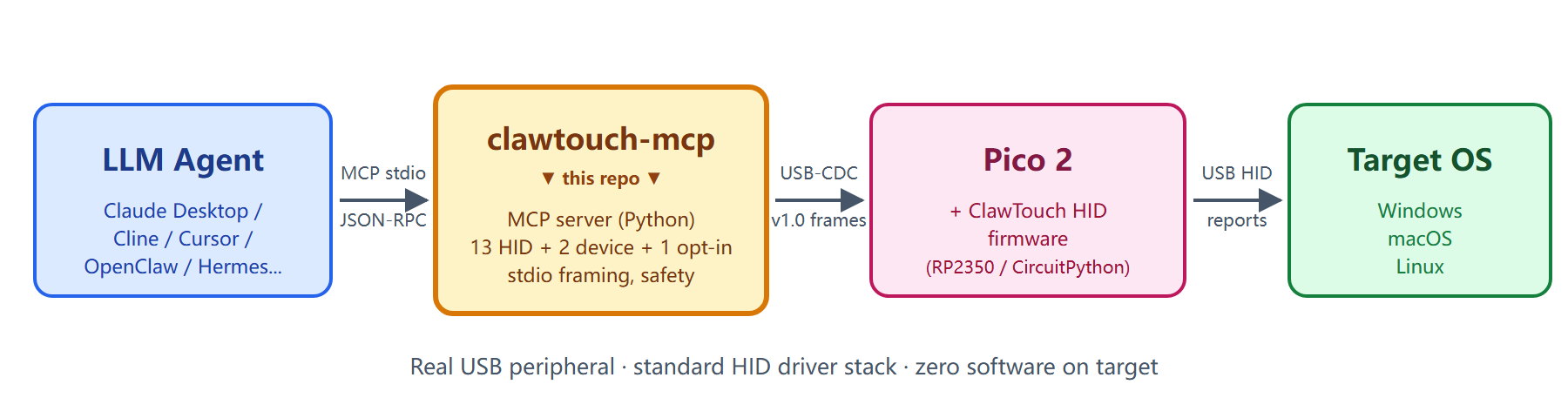
Give your AI agent real hands. An MCP server that turns any MCP-compatible client — Claude Desktop, Cline, Continue, Cursor, OpenClaw, Hermes Agent and any other — into something that can move a real mouse and press real keys through a USB HID device.




What is this?
A standalone Python process that speaks Model Context Protocol (MCP) over
stdio and exposes mouse / keyboard primitives — hid.click, hid.type,
hid.scroll, key combos, hid.screenshot — to whatever AI agent you already
use. Under the hood it talks over USB serial to a ClawTouch HID device (a
Raspberry Pi Pico 2 running the open ClawTouch HID firmware, or any
turnkey ClawTouch box) and translates each tool call into a real USB HID report.
The target OS sees a genuine physical keyboard and mouse — input arrives on
the same driver path as any plugged-in peripheral, not as a software-injected
synthetic event.
📦 MIT-licensed. No ClawTouch backend, no LLM, no agent loop on top — just the raw HID plumbing so other agent stacks can talk to real hardware.
⚠️ This gives an agent real keyboard / mouse reach over a machine — the same reach as a person at the keyboard. Read Safety first.
Why hardware HID?
Software automation (PyAutoGUI, OS-level input APIs, multimodal click-the-screen models) injects synthetic input events into a session — which requires an agent process running on the target machine, in that user session, with focus. A USB HID peripheral works the other way around: it emits real HID reports that travel the standard OS HID driver stack, exactly like a plugged-in keyboard or mouse. The OS recognizes the Pico natively as a standard USB HID class device and needs no mouse / keyboard driver and no HID agent process on the input side of the target. That difference is the whole point of this project — every other section below just builds on it.
Local mode is the common case (agent + clawtouch-mcp + Pico + the screen
all on one PC; the clawtouch-mcp process lives there because it's the agent's
host, but the input side needs no driver). Cross-host control — agent on one
machine driving a target on another over USB HID — is an additional capability
the same hardware unlocks; see Deployment modes.
Good for:
- Kiosks / locked-down machines — drive a machine you can't (or won't) install software on; nothing extra runs on the input side.
- Accessibility — let a user drive their own computer via an agent issuing HID commands, without fighting per-app synthetic-input compatibility.
- Compatibility testing — verify your software handles external HID input correctly, which can differ from injected synthetic events.
- Cross-host RPA / test rigs — an agent on your dev laptop drives an industrial PC, an offline test target, or a QA-lab phone, with no agent on the target (visual feedback needs a separate path — see Deployment modes).
Not for:
- Mass account creation / multi-account operations — a single-host tethered peripheral is structurally a poor fit; one device drives exactly one target, and to drive ten machines you buy ten devices.
- Application-specific scripted shortcuts (selectors, fixed-flow scripts for a particular site or app). Those belong in agent / RPA frameworks built on top of this primitive layer, not in this layer itself.
For standard desktop apps (browser, IDE, office suites) the software-only path is already enough — the hardware is just an extra option there, not a requirement. Its irreplaceable value is the cases above, where the target can't host an agent, must show the OS a genuine physical HID device, or has to be driven across machines. For the compliance boundary on the "not for" cases, see Acceptable use.
Quickstart
⚠️ Before you start: read Safety — a connected agent can operate this machine like a person at the keyboard.
Install
Platform-specific setup guides (recommended on first install):
- Windows —
docs/windows-setup.md: dual COM port enumeration, VS Code Claude extension.mcp.jsonconfig, full window restart required, display-scaling notes. - macOS —
docs/macos-setup.md: Keyboard Setup Assistant dialog on first plug-in, dual USB-CDC ports, Screen Recording permission, Pinyin IME punctuation gotchas.
Run
v0.2.3+ auto-detects the primary monitor's physical pixel size on startup so coordinates clamp to the actual screen rather than a hard-coded
1920x1080. Usedevice.infofrom your MCP client to see what was detected (screen.sourceis"detected"/"explicit"/"unset").
Use with Claude Desktop
Add to ~/Library/Application Support/Claude/claude_desktop_config.json
(macOS) or %APPDATA%\Claude\claude_desktop_config.json (Windows):
Restart Claude Desktop. You should see clawtouch show up in the MCP server
list with 16 tools available (14 HID + 2 device; +2 if you pass
--allow-screenshot, which enables hid.screenshot and screen.windows). Try:
Take a screenshot of my screen, find the search box, click it, and type "hello world".
(Requires --allow-screenshot to enable the hid.screenshot tool — off by
default for privacy.)
Other MCP clients
Copy-pasteable config for 7 verified clients (Claude Desktop / Code,
Cursor, OpenClaw, Hermes Agent, ChatGPT Desktop / Codex CLI,
Cherry Studio, Trae IDE) — see
examples/integrations/INTEGRATIONS.md.
PRs adding new clients welcome.
Deployment modes
Is the agent on the same machine as the screen? clawtouch-mcp covers the input side only (agent tool call → HID report → real input). The visual side (agent reads the screen to decide what to do next) is not in this repo — how you wire the two sides together depends on where the agent runs.
Local mode — the common case. agent + clawtouch-mcp + Pico + the controlled screen all on one PC. hid.screenshot captures that same screen, so the visual feedback loop closes naturally; the Pico is a standard USB HID device needing no driver. Good for accessibility, single-machine RPA, compatibility testing, in-machine kiosk self-service.
Cross-host mode — input supported, visual is your problem. agent + clawtouch-mcp on machine A; the Pico and the controlled screen on machine B. This repo fully covers the input side (A → B over USB HID), but hid.screenshot still captures A's screen, not B's — HID carries input one-way only; reverse screen capture isn't in the spec. Pick a visual path: HDMI capture card (B stays truly software-free, needs capture hardware) · VNC / RDP (open, no vendor lock-in, but B is no longer software-free) · API / log verification (check progress at checkpoints, not real-time; fixed-flow RPA only) · blind operation (pre-baked command sequence, no feedback; fully deterministic macros only). Good for industrial PCs that can't run a modern OS, strictly isolated embedded test targets, QA-lab phone farms.
Safety
Read this before connecting an autonomous agent. The runtime limits above are flood / typo guards, not a security boundary against a misbehaving agent.
Runtime safety limits
Related MCP Servers
Adoption & maintenance
Factual signals from GitHub, npm, and our automated checks — not a rating.
GitHub stars
10
Stargazers on the source repository.
Last commit
14d ago
Most recent push to the default branch.
Install check
Inconclusive
Install command did not finish in our automated test.
Tools exposed
18
Callable tools this server registers over MCP.
Directory activity
2 views
Config copies, upvotes, and views on AllMCPs.
Reviews
No reviews yet — be the first to share how this listing worked for you.
Frequently Asked Questions about Clawtouch MCP
AllMCPs Directory Badge
Showcase your server listing on GitHub or your project documentation. Embed this dynamic SVG badge to highlight official listing status and live engagement.
Badge Style:
Live Dynamic SVG Preview
Markdown (GitHub README)
[](https://allmcps.com/mcp/tinqiao-oss-clawtouch-mcp)HTML Embed
<a href="https://allmcps.com/mcp/tinqiao-oss-clawtouch-mcp"><img src="https://allmcps.com/api/badge/tinqiao-oss-clawtouch-mcp?style=directory" alt="Clawtouch MCP on AllMCPs" /></a>Technical Specs & Signals
CategoryOS Automation
PricingFree
10/11 checks healthy over the last 32d
60Quality signal: Good · 60/100How this signal is calculated ▾
Server availabilityNot measured
Not scored for repo-hosted servers — we can't reach the running server, only its GitHub page. Hosted MCP endpoints are health-checked live.
Verified ownership10/20
Documentation & tools29/30
Adoption & activity6/15
Community engagement0/10
A guidance signal from public completeness & health data — not a user rating. New listings start lower and rise as they add docs, get verified, and grow adoption. Signals we can't observe for a listing are skipped, not counted against it.
Supply-chain signal
No high-severity advisories surfaced by our automated scan.
Critical 0High 0Medium 0Low 0
Scanned 22d ago via OSV.dev · clawtouch-mcp (PyPI)
Own this project?
This directory is pre-filled from public sources. Claim via GitHub README, site badge, or DNS TXT to unlock edit access and the Official badge — proof is checked automatically, then reviewed by our team.
Free dofollow backlink: add your website and place the AllMCPs badge on it — no claim needed. We detect it automatically and keep it verified as long as the badge stays live.
Claim & get free dofollowShare & Embed
Add our SVG badge (dark/light directory styles) or embeddable widget to your site.