Open-source marketing system, designed for coding agents.
Quick Install
Automated & IDE SetupCopy the AI prompt to install this server into Claude Code, Cursor, or another agent — or use 1-click editor setup below.
One-click editor setup isn’t available for this listing yet — we don’t have a confirmed install command, and we’d rather show nothing than point your editor at the wrong package or host. Follow the project’s own setup instructions, linked above.
Manual Client & Custom JSON ConfigExpand JSON ▾
No confirmed setup config for this listing yet. We only publish a config block when the install details come from the project itself — its README, its docs, or a verified owner. We haven’t found those for Tin, and we’d rather show nothing than a guess you’d paste into your client. Follow the project’s own setup instructions for the current steps.
Documentation Overview
Tin
Open-source marketing system, designed for coding agents.
Why would you invent marketing from first principles when you can use a battle-tested marketing stack in 10 minutes?
Now with 26+ reliable workflows you can use right away.
Website · Try it in the browser
Quick Start
Connect from a coding agent
The hosted dashboard, API and MCP service use app.tin.computer. Add the MCP connection from your project directory.
Claude Code:
Then open Claude Code and use /mcp to authenticate Tin.
Codex:
Complete the browser login when prompted. For an existing connection that needs authentication, use codex mcp login tin.
Cursor, in .cursor/mcp.json:
Use Cursor's MCP controls to connect and complete authentication.
Start a new agent session if Tin's tools have not appeared. To check the connection, ask it to call list_projects. Your agent can also delete a project you created when you ask it to; it confirms the exact name first, and billing history stays. Then ask:
A whole agentic marketing system, not a bunch of skills
- Work that continues between sessions. Save a workflow with its inputs and a schedule. Tin handles its timers, retries, and waits for your approval.
- Context that carries forward. Reports, research, and a project wiki live in a git repository. Later runs don't start from scratch.
- Workflows you can inspect. The catalog covers organic growth, content, outreach, product QA, and creative work. Each definition states what it needs, what it produces, and whether it needs review.
- Review before delivery. Read an article, request changes, or approve a campaign. GitHub delivery opens a pull request for you to merge.
- One project across your tools. Your coding agent and the browser share the same files, run history, and decisions, with the same project permissions.
- Workflow evaluation, coming. Each template gets an eval set and a blind second reader, so the workflows get sharper week after week.
- Growth experiment tracking, coming. Every change becomes an experiment with a before, an after, and a verdict.
Use the agent that already knows your project
Connect Tin over MCP in Claude Code, Codex, or Cursor. Your agent can read your local repository, ask you about the business, and use Tin's onboarding workflow to prepare a plan.
It starts with practical questions: what are you trying to achieve, how much time and budget can you put into it, and what should it avoid? The plan uses that context alongside the workflows and integrations available to your project.
For example, the setup conversation might look like this:
You choose the plan and allow the connections it needs. After approval, Tin creates the selected configurations and starts the initial work it can run. It reports what was set up and what is still blocked.
From a useful prompt to work you can rely on
A good skill tells an agent how to do something. Running that skill every week adds other problems: which version should it use, where does its context come from, what happens after a failure, and who approves the result?
Tin handles those parts.
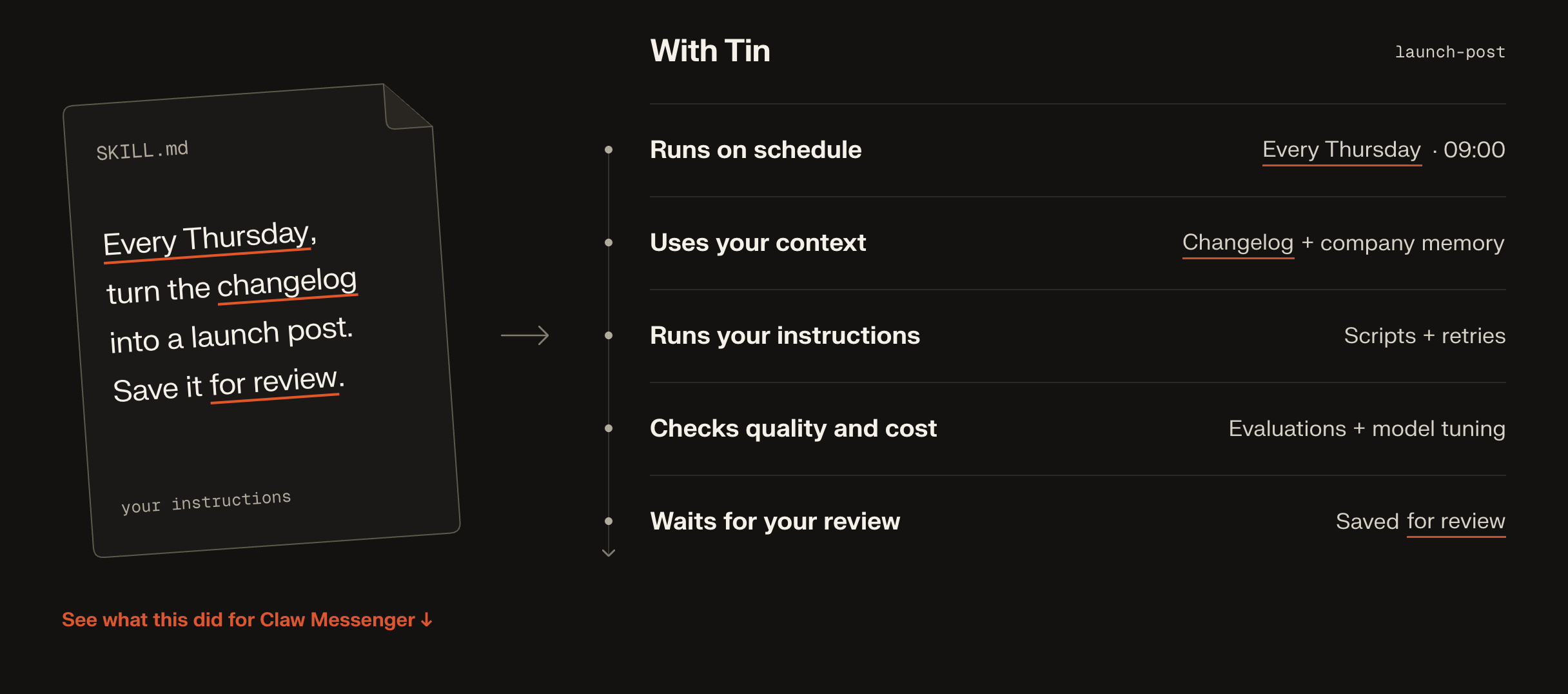
What you can run
These are the main areas covered by the current catalog. Availability depends on the workflow's inputs, connected services, and operator settings. Some workflows run on demand; others can be saved with a schedule.
| Area | Examples |
|---|---|
| Getting started | A growth plan, integration choices, and setup of the work you approve |
| Organic growth | Site and AI visibility audits, keyword research, content planning, and technical fixes as pull requests |
| Content | Writing-style capture, researched articles, planned drafts, feedback and revisions, approved article delivery to GitHub |
| Cold outreach | A shortlist from Gmail and Calendar, then an approved email campaign with paced follow-ups and reply detection |
| Product QA | Signup walkthroughs, a code map, a feature map, and an audit of the product's features |
| Creative work | Diagrams, brand characters, and product demo videos |
| Project context | A maintained wiki, research reports, and a weekly brief |
For work that does not fit a template, project.task gives you a separate Codex task with its own conversation and controls. It can ask questions, pause, and resume. Changes to project files require approval of the proposed diff.
A content plan's dates are editorial targets, not automatic publication times. You can start generation individually; the current organic traffic system can also continue from planning into the next eligible draft, review and delivery. Tin can report that an item is already covered or needs better evidence instead of forcing out another article. Approved content becomes an unmerged PR when GitHub delivery is selected; otherwise its Markdown stays in project Files. This does not schedule six months of automatic drafting or publish a website.
The live Registry is the source for each workflow's inputs and requirements. docs/architecture.md explains how the main pieces fit together.
Give it the context you would give a colleague
A repository says a lot about how a product works. It says less about why customers buy it, what they misunderstand, or how you want to sound. Add the material that fills those gaps: customer interviews, support questions, research, and examples of your own writing.
Your project can also hold SKILL.md files under .agents/skills/. Workflows load the skills they declare, such as a writing-style guide. Tin can help extract that guide from samples you select, and you can edit it directly. A skill in your local repository is not automatically available to a hosted run; your agent needs to save the relevant material to the Tin project.
Public articles and planned drafts support feedback in the reader or through MCP. Tell Tin what to change, compare the revision, and approve the version you want. Generation notes stay separate from public copy. With GitHub delivery configured, an approved article can become a pull request; approval does not merge or deploy it.
Connect the services the work needs
Connections belong to projects. A workflow uses specific operations from each integration, and Tin checks access before running them.
| Connection | What it enables | Boundary |
|---|---|---|
| Google Search Console | Read search performance for a property you select | Read-only access |
| GitHub App | Read a selected repository and open a pull request with proposed changes | No merge or push to the base branch; credentials stay on the server |
| Google Workspace | Research Gmail and Calendar history; send approved campaigns | Reads and sends go through the project's declared capabilities |
| Claude Code, Codex, Cursor | Use Tin through MCP, including files, workflows, and supported review actions | Every call checks the user's project membership |
GitHub and Google tokens stay on the switchboard, Tin's server. Sandbox tools receive the permitted data or access through a grant tied to the run. Product QA can use a separate Tin test identity to sign into the product it is testing.
For data from Google Docs and Drive, analytics providers such as GA4 and PostHog, or advertising platforms, add relevant exports to project files.
Bring your own workflows
Start with ordinary Python when you know the steps. Add managed model calls where the work needs judgment; a workflow can have several of them, with code handling the sequence, branches and validation. Use a Codex procedure when an agent needs to explore and choose the steps itself.
All three can be contributed as public workflow packages:
A procedure package uses PROMPT.md and skills/ instead of main.py. The manifest declares
typed inputs, bounded outputs, integrations and review. Maintainers review contributions and
explicitly select packages for the Registry; catalog sync publishes each selected package as
one pinned version. Existing runs and saved configurations keep their selected version.
See Adding a workflow and the deterministic and two-model-step examples. Native code and model-backed workflows can also be contributed when the bounded package runtime isn't enough.
Private workflows
The bounded private-workflow pilot uses the same Python contract: typed inputs, isolated execution, optional managed model calls, project API connections, durable reports, and eligible daily or weekly schedules. Your coding agent authors and tests the package; Tin runs it independently. Code-only bounded compute needs no model credentials or Tin credits. Hosted model calls use Tin credits; connected API usage belongs to that provider account.
Related MCP Servers
Reviews
No reviews yet — be the first to share how this listing worked for you.
Frequently Asked Questions about Tin
AllMCPs Directory Badge
Showcase your server listing on GitHub or your project documentation. Embed this dynamic SVG badge to highlight official listing status and live engagement.
Badge Style:
Live Dynamic SVG Preview
Markdown (GitHub README)
[](https://allmcps.com/mcp/tin)HTML Embed
<a href="https://allmcps.com/mcp/tin"><img src="https://allmcps.com/api/badge/tin?style=directory" alt="Tin on AllMCPs" /></a>