job-huntingllmtelegramautomationproductivity
Locally runs an AI job-hunting agent that scans 130+ careers pages nightly, scores roles against your resume, alerts via Telegram, and drafts applica…
Quick Install
Automated & IDE SetupCopy the AI prompt to install this server into Claude Code, Cursor, or another agent — or use 1-click editor setup below.
Not yet automatically verified
We haven't yet run this listing's install command through our automated sandbox check. This isn't a red flag — we're steadily working through the catalog.
Manual Client & Custom JSON ConfigExpand JSON ▾
Client Config & Setup
Choose your client or environment
Target File:
💡 Paste the JSON block into your client's configuration file under mcpServers, then restart the application.
Overview
Use cases
Scan multiple company careers pages nightly for new job openings
Score job listings against your resume using an LLM
Receive top job matches as Telegram alerts
Generate tailored cover letters and resume bullets on demand
Export job data for offline analysis
Key features
Nightly automated scanning of 130+ company careers pages
LLM-based batch scoring of job fit using full resume context
Telegram notifications for top job matches
On-demand drafting of tailored cover letters and resume bullets
Support for multiple LLM backends including free tiers
Local execution with no automatic application submission
Capabilities & Tool Schemas
Inspect callable tools, capabilities, and parameters exposed to AI agents by Autopilot Jobhunt.
Extracted Tool Capabilities
Nightly automated scanning of 130+ company careers pages
LLM-based batch scoring of job fit using full resume context
Telegram notifications for top job matches
On-demand drafting of tailored cover letters and resume bullets
Support for multiple LLM backends including free tiers
Local execution with no automatic application submission
Documentation Overview
autopilot-jobhunt
Your AI job agent. Finds, scores, and drafts applications — while you sleep.
Scans 130+ company careers pages nightly → scores every role against your resume with an LLM → sends you the top matches on Telegram → drafts a tailored resume + cover letter on demand.
🔒 Drafts only — never applies. You review every draft and submit applications yourself. See PRIVACY.md for exactly what data leaves your machine.





Seen by 90K+ people — the Instagram reel that launched it.
Published on PyPI and listed on the Official MCP Registry (io.github.tarunlnmiit/autopilot-jobhunt), Glama (Quality A), and Smithery (MCPB bundle).
📖 Full setup guide with Claude Code MCP integration → SETUP.md
⭐ Star this repo if it helps you land a job
This tool is free, open source, and runs entirely on your machine — no subscription, no credit card. The only "payment" I ask: if it surfaces a role you apply to (or land), drop a star. It takes one click, costs you nothing, and it's the single thing that pushes the project in front of the next person grinding through 130 careers pages by hand. ⭐ Star it here →
How it works
The scoring prompt uses your actual resume — not keywords. The LLM reads your full work history and the job description, then explains in one sentence why you fit or don't. No more guessing.
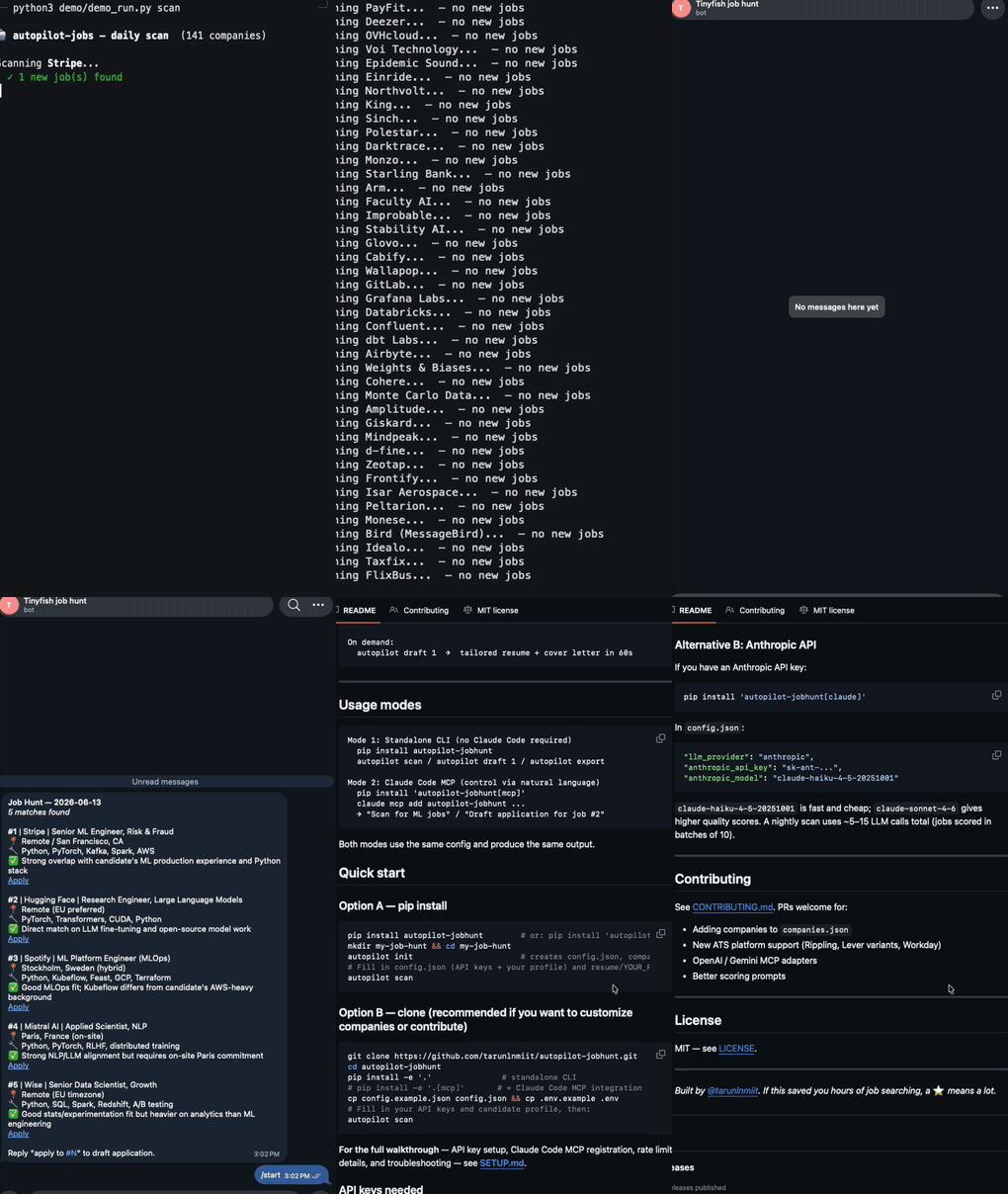
What a scan result looks like
What the Telegram notification looks like
What it does
Usage modes
Both modes use the same config and produce the same output.
Quick start
Option A — pip install
Option B — clone (recommended if you want to customize companies or contribute)
For the full walkthrough — API key setup, Claude Code MCP registration, rate limit details, and troubleshooting — see SETUP.md.
📚 Documentation
Step-by-step guides live in docs/:
| Guide | Covers |
|---|---|
| Install | pip / from source / autopilot init scaffolding |
| LLM providers | OpenRouter fallback chain, Claude CLI (keyless), Anthropic API |
| API keys | TinyFish + OpenRouter keys, where each goes |
| Companies & scanning | companies.json, discovery + scoring, scan pacing |
| Integrations | Telegram notifications |
| MCP server & Skill | Drive the hunt from Claude Code |
| Config & scoring | Candidate profile, min_score, top_n |
| Troubleshooting | Every error we've hit, and the fix |
| Testing checklist | Reproducible independent verification |
API keys needed
| Service | Cost | Required | Where to get it |
|---|---|---|---|
| TinyFish | Free — no credit card | Always | agent.tinyfish.ai |
| OpenRouter | Free — 4-model fallback chain | Unless using Claude CLI / Anthropic | openrouter.ai |
| Telegram | Free | Optional | @BotFather on Telegram |
Claude Code / MCP integration
Use autopilot-jobhunt as an MCP server inside Claude Code (CLI) or Claude Desktop.
Step 1: Install with MCP support
Step 2: Register with Claude Code
Option A — one command:
Option B — edit ~/.claude.json manually:
Note:
cwdmust point to the cloned repo — the server readsconfig.jsonandcompanies.jsonfrom there.
Step 3: Use it
In any Claude Code session:
Claude Desktop
Same JSON block — add it under mcpServers in Claude Desktop → Settings → Developer.
Customize your target companies
Edit companies.json. Each entry needs:
The repo ships with 130+ pre-configured EU, NZ, and remote-friendly tech companies. Add or remove as you like.
How scoring works
The LLM reads your full resume + the full job description and assigns a score 0–100:
| Score | Meaning |
|---|---|
| 80–100 | Near-perfect fit — apply immediately |
| 60–79 | Good fit — worth applying |
| 40–59 | Partial fit — apply if pipeline is thin |
| < 40 | Poor fit — skipped |
Set min_score in config to filter. Default: 60.
Project structure
Related MCP Servers
Adoption & maintenance
Factual signals from GitHub, npm, and our automated checks — not a rating.
GitHub stars
206
Stargazers on the source repository.
Last commit
1mo ago
Most recent push to the default branch.
Directory activity
2 views
Config copies, upvotes, and views on AllMCPs.
Reviews
No reviews yet — be the first to share how this listing worked for you.
Frequently Asked Questions about Autopilot Jobhunt
AllMCPs Directory Badge
Showcase your server listing on GitHub or your project documentation. Embed this dynamic SVG badge to highlight official listing status and live engagement.
Badge Style:
Live Dynamic SVG Preview
Markdown (GitHub README)
[](https://allmcps.com/mcp/tarunlnmiit-autopilot-jobhunt)HTML Embed
<a href="https://allmcps.com/mcp/tarunlnmiit-autopilot-jobhunt"><img src="https://allmcps.com/api/badge/tarunlnmiit-autopilot-jobhunt?style=directory" alt="Autopilot Jobhunt on AllMCPs" /></a>Technical Specs & Signals
CategoryWorkplace & Productivity
PricingBring your own API key (usage-based cost)
4/5 checks healthy over the last 33d
57Quality signal: Good · 57/100How this signal is calculated ▾
Server availabilityNot measured
Not scored for repo-hosted servers — we can't reach the running server, only its GitHub page. Hosted MCP endpoints are health-checked live.
Verified ownership10/20
Documentation & tools26/30
Adoption & activity7/15
Community engagement0/10
A guidance signal from public completeness & health data — not a user rating. New listings start lower and rise as they add docs, get verified, and grow adoption. Signals we can't observe for a listing are skipped, not counted against it.
Supply-chain signal
No high-severity advisories surfaced by our automated scan.
Critical 0High 0Medium 0Low 0
Scanned 22d ago via OSV.dev · autopilot-jobhunt (PyPI)
Own this project?
This directory is pre-filled from public sources. Claim via GitHub README, site badge, or DNS TXT to unlock edit access and the Official badge — proof is checked automatically, then reviewed by our team.
Free dofollow backlink: add your website and place the AllMCPs badge on it — no claim needed. We detect it automatically and keep it verified as long as the badge stays live.
Claim & get free dofollowShare & Embed
Add our SVG badge (dark/light directory styles) or embeddable widget to your site.