AllMCPs
BrowseBestCategoriesStackCompareToolsGuidesBlog
Log in Submit MCP

Stay in the loop

Get new MCP servers and top picks in your inbox.

AllMCPs

The open directory for discovering and installing Model Context Protocol servers.

AllMCPs on GitHub (opens in a new tab)
Launched onTiny Startupstinystartups.com
Explore
  • Browse servers
  • Best MCP servers
  • Categories
  • MCP clients
  • Agent prompts
  • Stack Builder
  • Compare servers
  • Random discovery New
  • Submit a server
  • Pricing & Boost Boost
Learn
  • Guides hub
  • What is MCP?
  • Install guide
  • Build an MCP server
  • Deploy an MCP server
  • Security guide
  • Troubleshooting
  • MCP for SEO & AEO
  • Protocol versioning
  • Transports: stdio vs HTTP
  • State of MCP (stats)
  • Blog & updates
Tools
  • All developer tools
  • Config generator
  • Config validator
  • Config auditor
  • MCP playground
  • Token calculator
  • OpenAPI → MCP
  • Badge generator
For agents
  • REST API docs
  • Trust & traffic Live
  • Remote MCP server SSE ↗ (opens in a new tab)
  • llms.txt ↗ (opens in a new tab)
  • Catalog JSON ↗ (opens in a new tab)
Company
  • About
  • Advertise Sponsor
  • Contact
  • GitHub ↗ (opens in a new tab)
  • Terms
  • Privacy
AllMCPs VerifiedAllMCPs VerifiedFeatured on Nick LaunchesFeatured on Nick LaunchesLaunch Llama NewsletterLaunch Llama NewsletterVerified DR - allmcps.comVerified DR - allmcps.comFeatured on SaaSGrowFeatured on SaaSGrowFeatured on Twelve ToolsFeatured on Twelve ToolsFeatured on Saaspa.geFeatured on Saaspa.geFeatured on Findly.toolsFeatured on Findly.toolsFeatured on Startup FameFeatured on Startup FameFeatured on LaunchKiwiFeatured on LaunchKiwiFeatured on ScrollLaunchFeatured on ScrollLaunchFeatured on DailyPingsFeatured on DailyPingsFazier badgeFazier badgeFeatured on NewTool.siteFeatured on NewTool.siteFeatured on saasfame.comFeatured on saasfame.comDR Checker - Domain RatingDR Checker - Domain RatingListed on Turbo0Listed on Turbo0Launched on LaunchBoard - Product Launch PlatformLaunched on LaunchBoard - Product Launch PlatformList on SimilarlabsList on Similarlabshttps://codetrendy.comhttps://codetrendy.comListed on DevTool.ioFeatured on BuildlistFeatured on BuildlistLaunched on Tiny StartupsFeatured on ShowMeBestAIFeatured on ShowMeBestAIFind us on LaunchZoneFind us on LaunchZoneAllMCPs VerifiedAllMCPs VerifiedFeatured on Nick LaunchesFeatured on Nick LaunchesLaunch Llama NewsletterLaunch Llama NewsletterVerified DR - allmcps.comVerified DR - allmcps.comFeatured on SaaSGrowFeatured on SaaSGrowFeatured on Twelve ToolsFeatured on Twelve ToolsFeatured on Saaspa.geFeatured on Saaspa.geFeatured on Findly.toolsFeatured on Findly.toolsFeatured on Startup FameFeatured on Startup FameFeatured on LaunchKiwiFeatured on LaunchKiwiFeatured on ScrollLaunchFeatured on ScrollLaunchFeatured on DailyPingsFeatured on DailyPingsFazier badgeFazier badgeFeatured on NewTool.siteFeatured on NewTool.siteFeatured on saasfame.comFeatured on saasfame.comDR Checker - Domain RatingDR Checker - Domain RatingListed on Turbo0Listed on Turbo0Launched on LaunchBoard - Product Launch PlatformLaunched on LaunchBoard - Product Launch PlatformList on SimilarlabsList on Similarlabshttps://codetrendy.comhttps://codetrendy.comListed on DevTool.ioFeatured on BuildlistFeatured on BuildlistLaunched on Tiny StartupsFeatured on ShowMeBestAIFeatured on ShowMeBestAIFind us on LaunchZoneFind us on LaunchZone
© 2026 Jackalope Digital LLC. All rights reserved.
  1. Home
  2. 💻 Developer Tools
  3. SYNAPSE CHANNEL
SYNAPSE CHANNEL logo
Health: ActiveRecent health check succeeded.Last checked 9/23/2026, 3:46:14 AM

SYNAPSE CHANNEL

User RatingsBe the first to rate and review this MCP server! Enrichment pendingWe haven’t run our AI enrichment pass on this listing yet, so the overview, use cases, and FAQ below may be sparse or missing. We work through the catalog over time — check back soon.
View Repository4 GitHub StarsTotal stargazers on GitHub for the source repository (4 stars).Visit Website

Local-first multi-agent coordination for messages, leases, shared plans, status, and resources.

Quick Install

Automated & IDE Setup

Copy the AI prompt to install this server into Claude Code, Cursor, or another agent — or use 1-click editor setup below.

Add to CursorAdd to VS Code
Not yet automatically verified

We haven't yet run this listing's install command through our automated sandbox check. This isn't a red flag — we're steadily working through the catalog.

Manual Client & Custom JSON ConfigExpand JSON ▾

Client Config & Setup

Choose your client or environment
Target File:~/Library/Application Support/Claude/claude_desktop_config.json
claude_desktop_config.json
{
  "mcpServers": {
    "synapse-channel": {
      "command": "uvx",
      "args": [
        "synapse-channel"
      ]
    }
  }
}

💡 Paste the JSON block into your client's configuration file under mcpServers, then restart the application.

Install Directory Badge Claim listing Alternatives💻 More in Developer Tools

Documentation Overview

SYNAPSE CHANNEL — local-first multi-agent coordination bus

The local-first coordination bus for fleets of AI agents.
One WebSocket hub is the shared source of truth for presence, file-scope claims, a shared plan, task status, and capabilities — for agents working in one repository or across a whole ecosystem of them.

Flagship example: coordinate parallel AI coding agents through declared file scopes — the hub refuses a second overlapping live claim, while covered provider hooks and the staged Git gate enforce only their documented mutation boundaries.

CI Fuzz Link check Cockpit CI CodeQL PyPI version PyPI downloads Total downloads Sponsor SYNAPSE CHANNEL on GitHub License: AGPL v3 Commercial licence available Python 3.10+ Coverage REUSE status OpenSSF Best Practices: Passing OpenSSF Scorecard Ruff DOI

English · 简体中文 · Español · Português (Brasil) · 日本語 · 한국어 · Deutsch · Français · Slovenčina

A local-first coordination bus for a fleet of AI agents working in parallel — within a single repository or spread across a whole ecosystem of them. One WebSocket hub is the shared source of truth for presence, work claims, chat, task status, and resource offers: agents address each other across projects and share one plan, while file-scope claims keep the agents in any one repository from receiving overlapping live authority. Documented provider hooks and the staged Git gate enforce that authority only on their covered mutation surfaces.

Watch the presentation

SYNAPSE CHANNEL presentation video on YouTube

Watch the SYNAPSE CHANNEL presentation on YouTube (8 minutes; starts from the beginning).

New here? Read Why SYNAPSE CHANNEL — a five-minute read on what it is, what you build on it, how it differs from the tools next to it, and why coordination becomes the bottleneck once you run more than one agent.

Project lineage: SYNAPSE CHANNEL dates back to September 2025.

The bus is transport-light (one dependency, websockets), hub-centric by design (one place owns presence, leases, and history), and runs entirely on the local machine. Model workers reply on-channel through any OpenAI-compatible endpoint, including a local Ollama server, with a deterministic rule-based fallback for offline use.

Your existing agents plug in without new code. Any Model Context Protocol host — Claude Code, Claude Desktop, Cursor — reaches the bus through the bundled synapse mcp server, which exposes send, durable inbox, status, claim, release, handoff, and task verbs as MCP tools plus the board, agents, and resources as read-only MCP resources. Agents that speak A2A connect through the Agent Card face instead. The hub itself stays protocol-agnostic and the core install keeps its single dependency — the MCP and A2A adapters are optional extras (pip install 'synapse-channel[mcp]'). See the MCP guide.

bash
python -m pip install synapse-channel && synapse demo

Get the Python package  ·  Run the first 60 seconds  ·  Read the quickstart

Coordinate. Observe. Govern.

Synapse's daily promise is three explicit loops:

  • Coordinate declared work and surface collisions: synapse git-init, synapse git-claim, synapse git-claim-check --staged, synapse task, and syn ack turn work scope, dependencies, and evidence into shared state instead of side-channel notes.
  • Observe the fleet from durable state: synapse who, synapse state, synapse dashboard, synapse event-query, and observed peer rows show who is present, what is claimed, what changed, and which peer-hub facts are advisory.
  • Govern risky actions with evidence: policy checks, approvals, release receipts, Merkle roots, ACL surfaces, federation, and encryption-key commands make operator decisions auditable. Governance surfaces report by default; operators decide what blocks a merge, release, or cross-hub action.
  • Protect the durable log at rest with optional SQLCipher page encryption for the live hub event store (plus whole-file AES-GCM envelopes for relay logs, A2A state, cursors, and archives). See SQLCipher live event store below.

What it does, surface by surface

Seven shipped coordination surfaces, each named by the command or doc that delivers it today:

  • Claim before edit. synapse git-init installs claim-aware Git hooks; synapse git-claim records an exact worktree, branch, and path scope so an overlapping claim can be refused before files diverge.

    A live Synapse claim owner and a competing overlapping claim refused before editing begins

  • Block unclaimed native file edits. Provider file-edit claim hooks adapt Claude Code Edit|Write, Codex apply_patch, Gemini CLI replace|write_file, and Kimi Edit|Write to one live-claim decision engine.

    A provider edit hook denying a native file edit because the seat holds no matching claim

  • Share the plan. synapse task and synapse board keep task state, dependencies, and ready work on the hub instead of in separate agent notes.
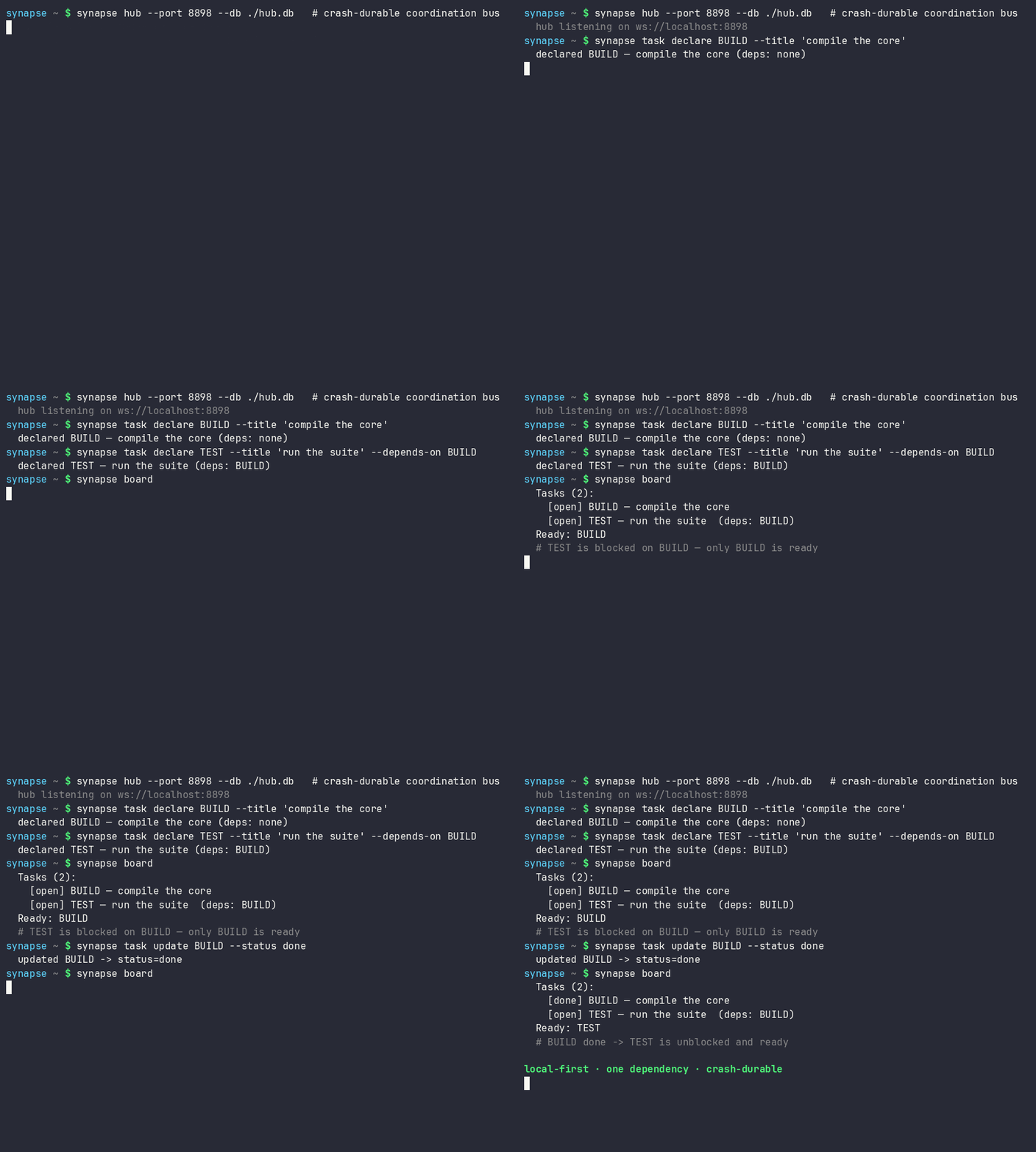
    A Synapse task board changing a dependent task from blocked to ready after its prerequisite completes

  • Hand work over without an ownership gap. Atomic handoff moves the held task, scope, status, and checkpoint to an online recipient without a release-and-reclaim window.

Read the full README →View source on GitHub →

Related MCP Servers

View all in Developer Tools View all alternatives
  • Openapi MCP Server logoOpenapi MCP Server

    Connect any HTTP/REST API server using an Open API spec (v3)

    💻 Developer Tools3 views
    Compare vs Openapi MCP Server →
  • Andrea9293 MCP logoAndrea9293 MCP

    Local-first document management and semantic search for AI coding agents

    💻 Developer Tools2 views
    Compare vs Andrea9293 MCP →
  • MCP Server Docker logoMCP Server Docker

    Integrate with Docker to manage containers, images, volumes, and networks.

    💻 Developer Tools3 views
    Compare vs MCP Server Docker →
  • Docker MCP logoDocker MCP

    Docker container management and operations through MCP

    💻 Developer Tools3 views
    Compare vs Docker MCP →

Adoption & maintenance

Factual signals from GitHub, npm, and our automated checks — not a rating.

GitHub stars
4
Stargazers on the source repository.
Last commit
2d ago
Most recent push to the default branch.

Reviews

No reviews yet — be the first to share how this listing worked for you.

Frequently Asked Questions about SYNAPSE CHANNEL

Add the following block to your claude_desktop_config.json under mcpServers: "mcpServers": { "synapse-channel": { "command": "uvx", "args": ["synapse-channel"] } }

AllMCPs Directory Badge

Full Badge Customizer

Showcase your server listing on GitHub or your project documentation. Embed this dynamic SVG badge to highlight official listing status and live engagement.

Badge Style:
Live Dynamic SVG PreviewSYNAPSE CHANNEL AllMCPs Directory Badge

Markdown (GitHub README)
[![AllMCPs](https://allmcps.com/api/badge/synapse-channel?style=directory)](https://allmcps.com/mcp/synapse-channel)
HTML Embed
<a href="https://allmcps.com/mcp/synapse-channel"><img src="https://allmcps.com/api/badge/synapse-channel?style=directory" alt="SYNAPSE CHANNEL on AllMCPs" /></a>

Technical Specs & Signals

Category💻Developer Tools
More technical detailsExpand ▾
TransportSTDIO
RuntimePython
Last updatedSep 22, 2026
11/15 checks healthy over the last 45d
Views0
Unique ViewsTotal visits recorded for this listing page on AllMCPs.
Installs0
Installs & Copy ActionsTotal times users copied install commands or configuration snippets for this server.
GitHub stars4
GitHub Star CountTotal stargazers on GitHub representing community popularity (4 stars).
Last commit2d ago
Last Repository CommitThe most recent commit or push recorded for this server's GitHub repository.Last commit on Sep 22, 2026
41Quality signal: Fair · 41/100How this signal is calculated ▾
Server availabilityNot measured

Not scored for repo-hosted servers — we can't reach the running server, only its GitHub page. Hosted MCP endpoints are health-checked live.

Verified ownership10/20
Documentation & tools16/30
Adoption & activity5/15
Community engagement0/10

A guidance signal from public completeness & health data — not a user rating. New listings start lower and rise as they add docs, get verified, and grow adoption. Signals we can't observe for a listing are skipped, not counted against it.

Supply-chain signal

No high-severity advisories surfaced by our automated scan.

Critical 0High 0Medium 0Low 0

Scanned 6d ago via OSV.dev · synapse-channel (PyPI)

★ Spotlight Slot

Feature Your MCP Server

Get maximum visibility for your server across our directory, search results, and detail pages.

Spotlight Your Server

Own this project?

This directory is pre-filled from public sources. Claim via GitHub README, site badge, or DNS TXT to unlock edit access and the Official badge — proof is checked automatically, then reviewed by our team.

Free dofollow backlink: add your website and place the AllMCPs badge on it — no claim needed. We detect it automatically and keep it verified as long as the badge stays live.

Claim & get free dofollow

Share & Embed

Add our SVG badge (dark/light directory styles) or embeddable widget to your site.

Explore more

More in 💻 Developer Tools →Best MCP servers for Developers →Alternatives to SYNAPSE CHANNEL →Install in Claude DesktopInstall in CursorInstall in VS CodeSetup guides for all 13 MCP clients