
Build and edit real websites in Swebsy Studio from your coding agent — no per-token AI fees.
Quick Install
Automated & IDE SetupCopy the AI prompt to install this server into Claude Code, Cursor, or another agent — or use 1-click editor setup below.
One-click editor setup isn’t available for this listing yet — we don’t have a confirmed install command, and we’d rather show nothing than point your editor at the wrong package or host. Follow the project’s own setup instructions, linked above.
Manual Client & Custom JSON ConfigExpand JSON ▾
No confirmed setup config for this listing yet. We only publish a config block when the install details come from the project itself — its README, its docs, or a verified owner. We haven’t found those for swebsy/MCP, and we’d rather show nothing than a guess you’d paste into your client. Follow the project’s own setup instructions for the current steps.
Documentation Overview
@swebsy/mcp — connect your coding agent to Swebsy
Build and edit real websites with the coding agent you already pay for — no per-token AI fees.


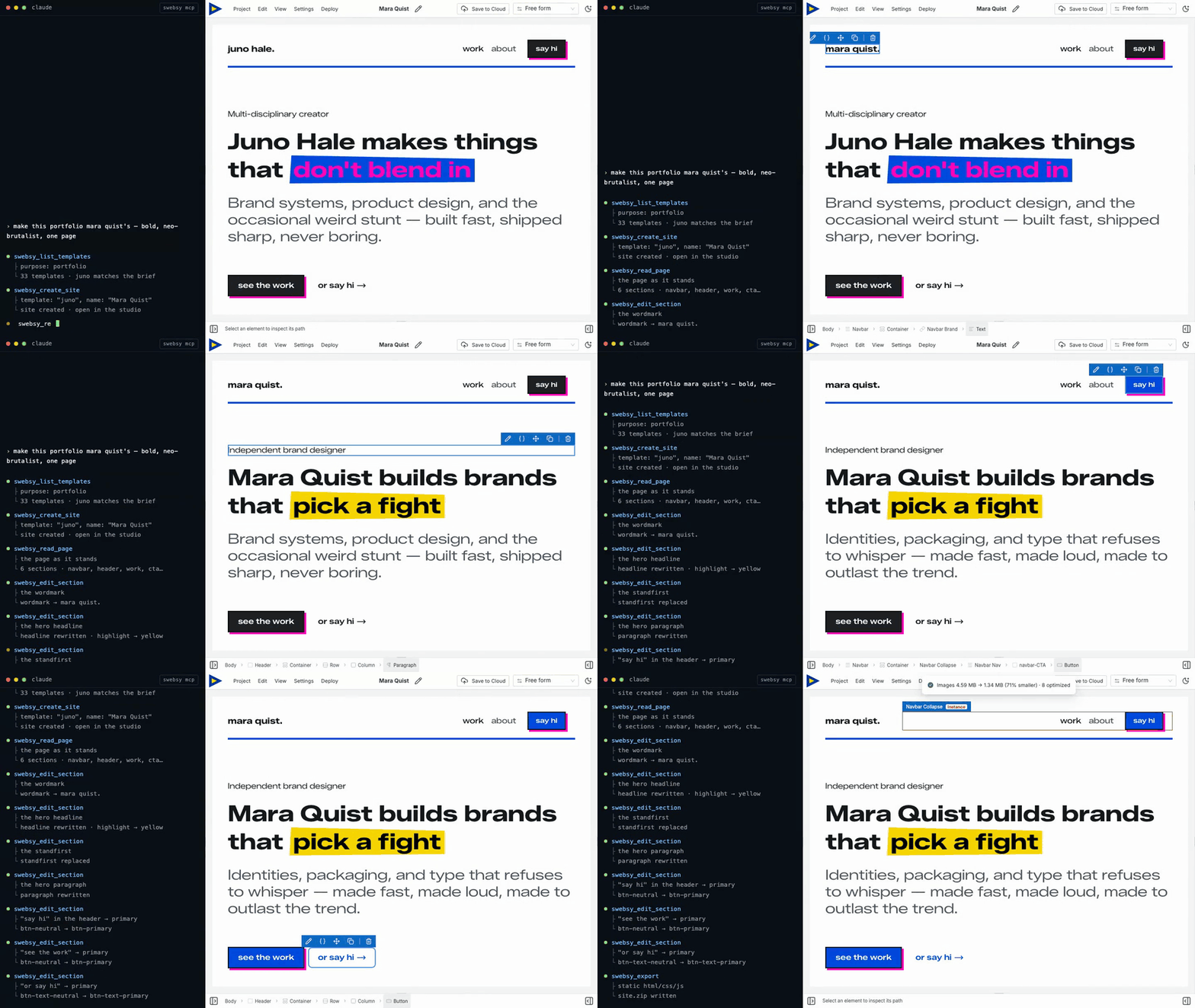
@swebsy/mcp is an MCP server that lets
Claude Code, Codex, Cursor, Windsurf, Cline, GitHub Copilot — or any agent that
speaks the Model Context Protocol — drive an open Swebsy
Studio tab. Your agent discovers templates, creates and opens sites, renames projects,
adds sections, edits content, switches pages, sets every site setting (SEO,
favicon, fonts, analytics, robots.txt, deploy target), captures screenshots, and
exports the finished site, all over a local 127.0.0.1 WebSocket relay. Nothing is proxied through our servers, and Studio redacts
secrets (API keys, deploy tokens, chat history) before anything crosses the
bridge. Your coding agent's own service and privacy policy still apply to the
non-secret content it receives.
What is Swebsy?
Swebsy is a visual website builder with a real ownership model: you build visually, export real files (HTML/CSS/JS), and publish wherever you want — no lock-in, no proprietary hosting requirement. The free plan runs fully local; no account required.
Why use an MCP instead of a built-in AI panel?
Most "AI website builders" bolt on a chat panel and bill you per token on top of the model you're already subscribed to. Swebsy takes the opposite approach — it exposes the editor as a tool your own agent can drive:
- No per-token API billing. Swebsy isn't in the loop on model costs. You use the Claude, Cursor, Codex, or Copilot plan you already pay for.
- Runs on your machine. The agent talks to your open Studio tab over a local
127.0.0.1bridge — prompts and content aren't shipped off to be metered. - Bring your own agent. Your model, your custom instructions, your workflow — not a locked-down wrapper. Any MCP-capable agent works.
- You own the output. Everything the agent builds exports as real, portable files you can host anywhere.
Setup
One command registers Swebsy with every supported agent it finds (Claude Code, Codex, Cursor, Windsurf, VS Code, Cline):
It never changes an existing swebsy entry and never rewrites a config file it
can't parse; it reports each agent's result. Or register it by hand:
Claude Code
Codex
Cursor — add to ~/.cursor/mcp.json (or a project's .cursor/mcp.json):
GitHub Copilot (VS Code)
Windsurf — add the same JSON block to ~/.codeium/windsurf/mcp_config.json.
Cline — add the same JSON block to cline_mcp_settings.json, or use the
extension's MCP Servers → Configure button, which opens it:
- macOS
~/Library/Application Support/Code/User/globalStorage/saoudrizwan.claude-dev/settings/cline_mcp_settings.json - Linux
~/.config/Code/User/globalStorage/saoudrizwan.claude-dev/settings/cline_mcp_settings.json - Windows
%APPDATA%\Code\User\globalStorage\saoudrizwan.claude-dev\settings\cline_mcp_settings.json
Cline CLI (npm i -g cline) is a separate install from the extension, with
its own config at ~/.cline/data/settings/cline_mcp_settings.json and a nested
transport block:
Or let its own CLI write it: cline mcp add swebsy --yes -- npx -y @swebsy/mcp.
Pairing
- Run
npx -y @swebsy/mcp setup - Restart your agent.
- Ask it: "Build me a landing page with Swebsy." The first request opens Studio and connects it.
You connect once per browser. Whenever no Studio tab is connected, the next tool
call opens Studio and reconnects it by itself (it waits up to 20 seconds). The
session is saved in ~/.swebsy/agent-<port>.session, so it survives the bridge
restarting.
Claude Code also lists a /swebsy:swebsy (MCP) prompt that walks the agent
through connecting and opening a site. Other agents show MCP prompts their own
way, if at all.
To pair by hand (the browser didn't open, Swebsy runs in a different browser,
or SWEBSY_NO_OPEN=1 is set):
- Ask your agent to run the
swebsy_start_pairingtool. It opens the pairing link in your default browser automatically, and also returns the link, raw code, and relay port. - Swebsy connects automatically and strips the code from the address bar after
it is used. (Set
SWEBSY_NO_OPEN=1to skip the auto-open and just get the link back.) - If the browser didn't open — or Swebsy is running in a different browser —
open the returned link there yourself, or use the fallback fields under
Global settings → Coding agents → Didn't connect? Pair by hand: paste the raw code, leave the port at 37373
unless you changed
SWEBSY_AGENT_PORT, and click Connect. - Prompt your agent as usual — it drives the tab through the
swebsy_*tools.
Keep the Studio tab open. If the browser puts it to sleep, tools return
tab_unresponsive until you click the tab. Pinning it may help, or add Studio
under Chrome's Settings → Performance → "Always keep these sites active".
Full guide: https://docs.swebsy.com/settings/ai-coding-agent/
Multiple agents
Several coding agents can share one paired Studio tab. Register
@swebsy/mcp in each agent and use the same SWEBSY_AGENT_PORT (default
37373) for every server. The first MCP process starts the local broker; later
processes join it automatically, so Studio only needs to be paired once.
Studio shows the connected-agent roster and activity. The broker serializes commands across agents so the editor handles one command at a time, and routes each result, screenshot, and export back to the agent that requested it. One Studio tab can be paired to a broker at a time; pairing another tab revokes the previous tab.
What your agent can do
Once paired, your agent can work from Home or Studio. It can refresh and list installed templates, create the standard blank site or import a template unchanged, list saved-site metadata, open sites by ID, and rename their internal Swebsy names. Duplicate names are allowed; IDs are authoritative.
After swebsy_create_site or swebsy_open_site, poll swebsy_status until the
expected siteId appears and editorReady is true. The agent can then read
the page tree, add and edit sections, create and link pages, insert blocks,
manage reusable symbols — including repeating one with different content per
instance while its styling stays in sync — capture screenshots at any viewport,
and export the project.
swebsy_list_sites returns metadata only — never page content, thumbnails,
assets, revisions, or settings. Agent-driven create/rename analytics contain
only source/template/site IDs, never internal names or site content.
Configuration
| Env var | Default | Purpose |
|---|---|---|
SWEBSY_AGENT_PORT | 37373 | Port the local relay listens on |
SWEBSY_AGENT_DIR | workspace .swebsy-agent | Where screenshots/exports land |
SWEBSY_APP_URL | https://studio.swebsy.com | Studio origin for the swebsy_start_pairing link (set for local/self-host) |
SWEBSY_NO_OPEN | (unset) | Set to skip auto-opening the pairing link in the browser |
Build from source
The published package is all you need to use this; the source is here to read, audit, or hack on.
Point an agent at your local build instead of npm:
This repo is a generated mirror, snapshotted from the
mcp/directory of Swebsy's main repository on every release. Every file here is overwritten on the next sync, so a pull request against it would be erased rather than merged — please open an issue instead and we'll apply the change upstream.
Links
- Website: https://swebsy.com
- Setup guide: https://docs.swebsy.com/settings/ai-coding-agent/
- npm: https://www.npmjs.com/package/@swebsy/mcp
- Source: https://github.com/swebsy/MCP
License
MIT
Related MCP Servers
Reviews
No reviews yet — be the first to share how this listing worked for you.
Frequently Asked Questions about Swebsy MCP
AllMCPs Directory Badge
Showcase your server listing on GitHub or your project documentation. Embed this dynamic SVG badge to highlight official listing status and live engagement.
Badge Style:
Live Dynamic SVG Preview
Markdown (GitHub README)
[](https://allmcps.com/mcp/swebsy-mcp)HTML Embed
<a href="https://allmcps.com/mcp/swebsy-mcp"><img src="https://allmcps.com/api/badge/swebsy-mcp?style=directory" alt="Swebsy MCP on AllMCPs" /></a>