Gateway between LLM agents and world data through eight tools and a bundled endpoint catalog.
Quick Install
Automated & IDE SetupCopy the AI prompt to install this server into Claude Code, Cursor, or another agent — or use 1-click editor setup below.
Not yet automatically verified
We haven't yet run this listing's install command through our automated sandbox check. This isn't a red flag — we're steadily working through the catalog.
Manual Client & Custom JSON ConfigExpand JSON ▾
Client Config & Setup
Choose your client or environment
Target File:
💡 Paste the JSON block into your client's configuration file under mcpServers, then restart the application.
Capabilities & Tool Schemas (11)
Inspect callable tools, capabilities, and parameters exposed to AI agents by Sugra API.
fetch_dataOne-step: find best endpoint for a natural-language query and call it. Combines search + call in one round trip.
search_endpointsSearch the bundled endpoint catalog. Runtime search does not fetch `/openapi.json`.
describe_endpointInspect an endpoint by `operation_id`, including path, method, parameters, required inputs, `agent_hints`, and `request_body_schema` for JSON-body POST operations.
call_endpointCall a Sugra API operation by `operation_id`. Arbitrary path calls are no longer supported.
list_toolsetsList catalog groups with endpoint counts and descriptions.
list_sourcesShow bundled catalog source metadata.
Documentation Overview
sugra-api-mcp






Published in Anthropic's Connectors Directory. Available in Claude on the web, desktop and mobile, Claude Code and Cowork.
Published in the official OpenAI Plugins Directory. Available for ChatGPT and Codex.
Give any AI agent access to 1,600+ data endpoints across markets, economics, companies, government, news, climate, maritime and entity screening - through one MCP server.
Works with ChatGPT, Claude, Gemini, xAI, Cursor, VS Code and any MCP client.
Official Model Context Protocol server for the Sugra API: one connector, a bundled endpoint catalog, and structured tool results with source attribution on every answer.
See it in action
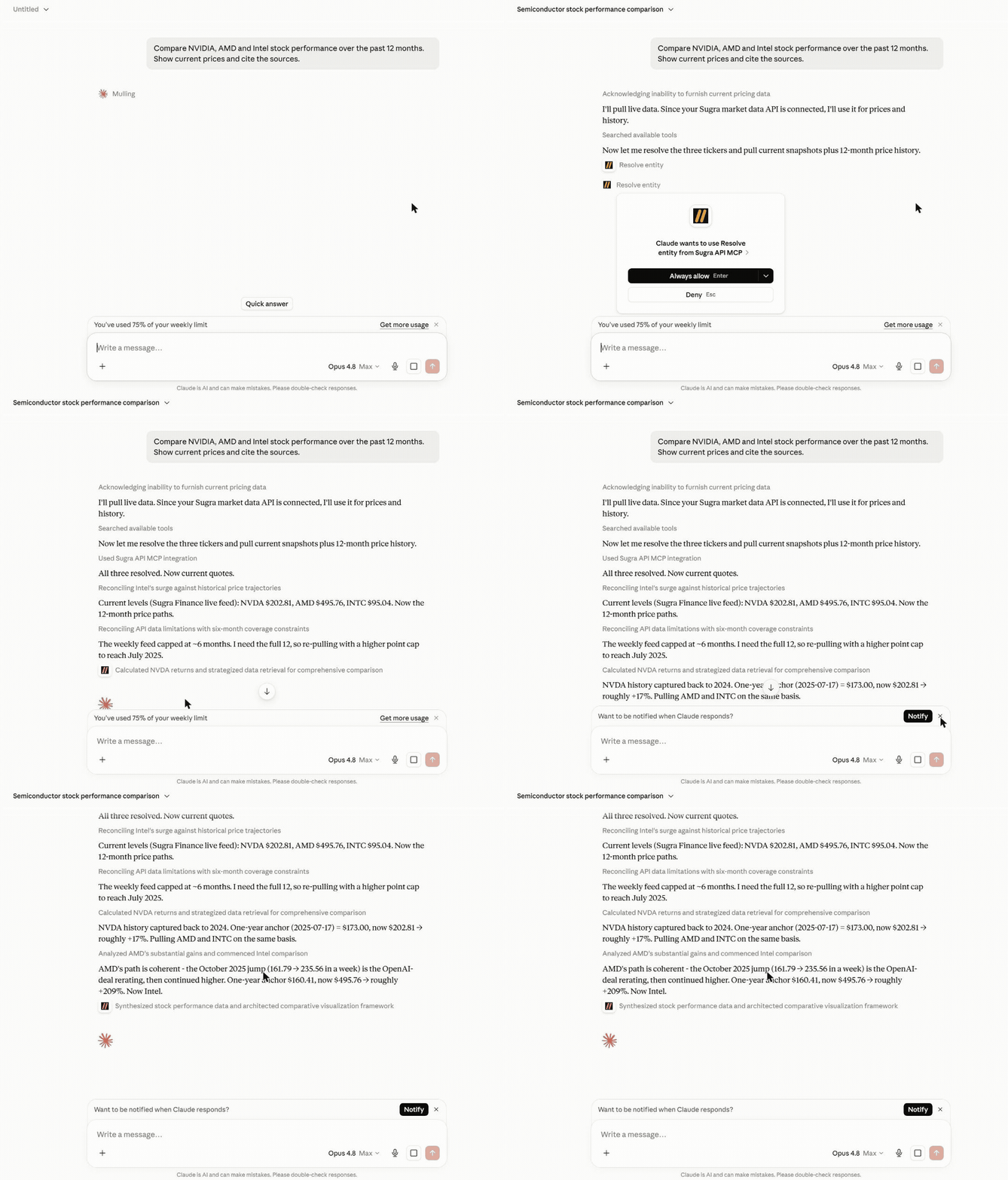
An agent answering a real question end to end - resolving entities, pulling live snapshots and history, and citing the source and freshness on every number:
More examples:
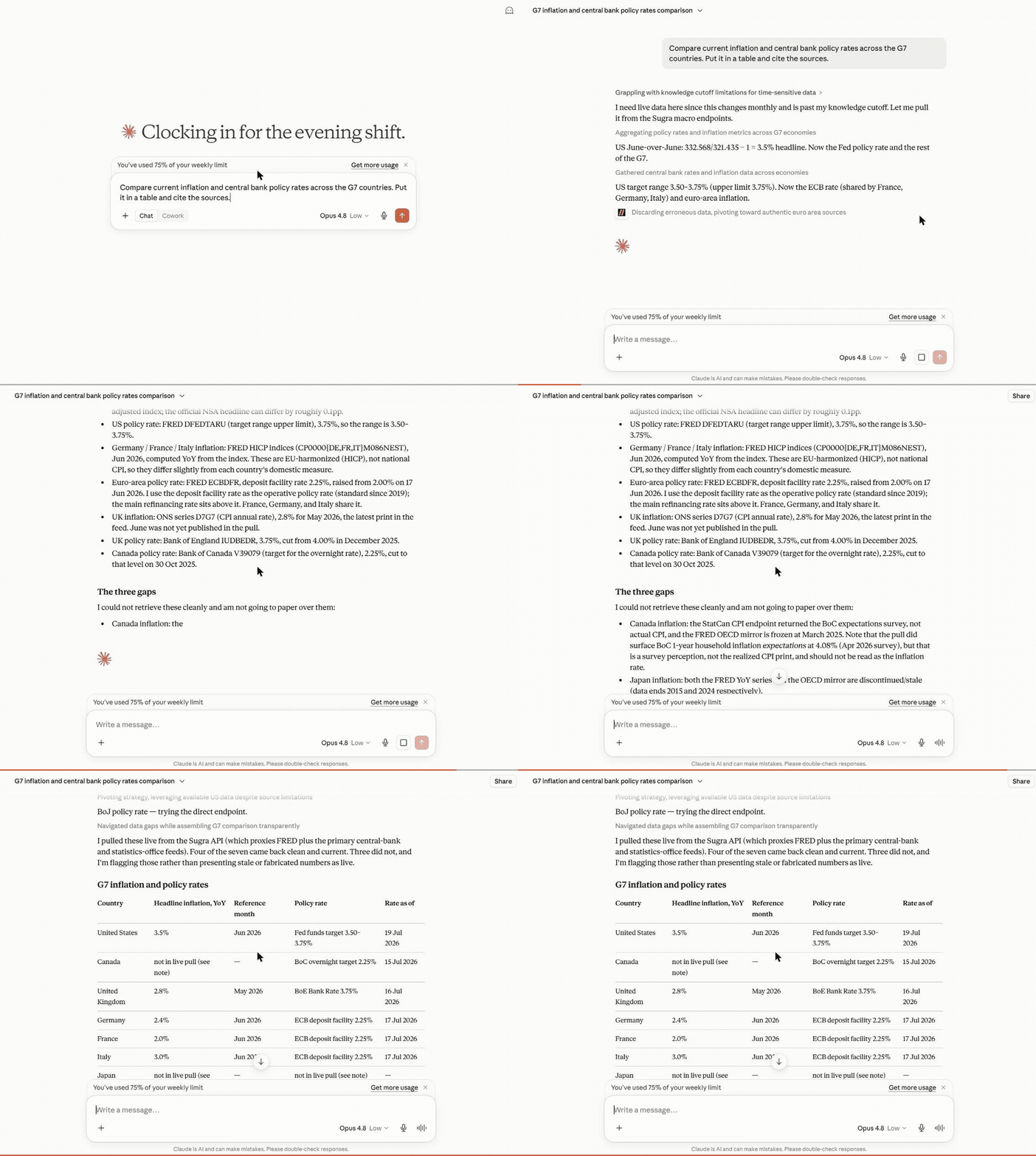
Macro research - one prompt builds a full G7 inflation and policy-rate table, each cell dated and sourced, with the unavailable ones flagged rather than faked:
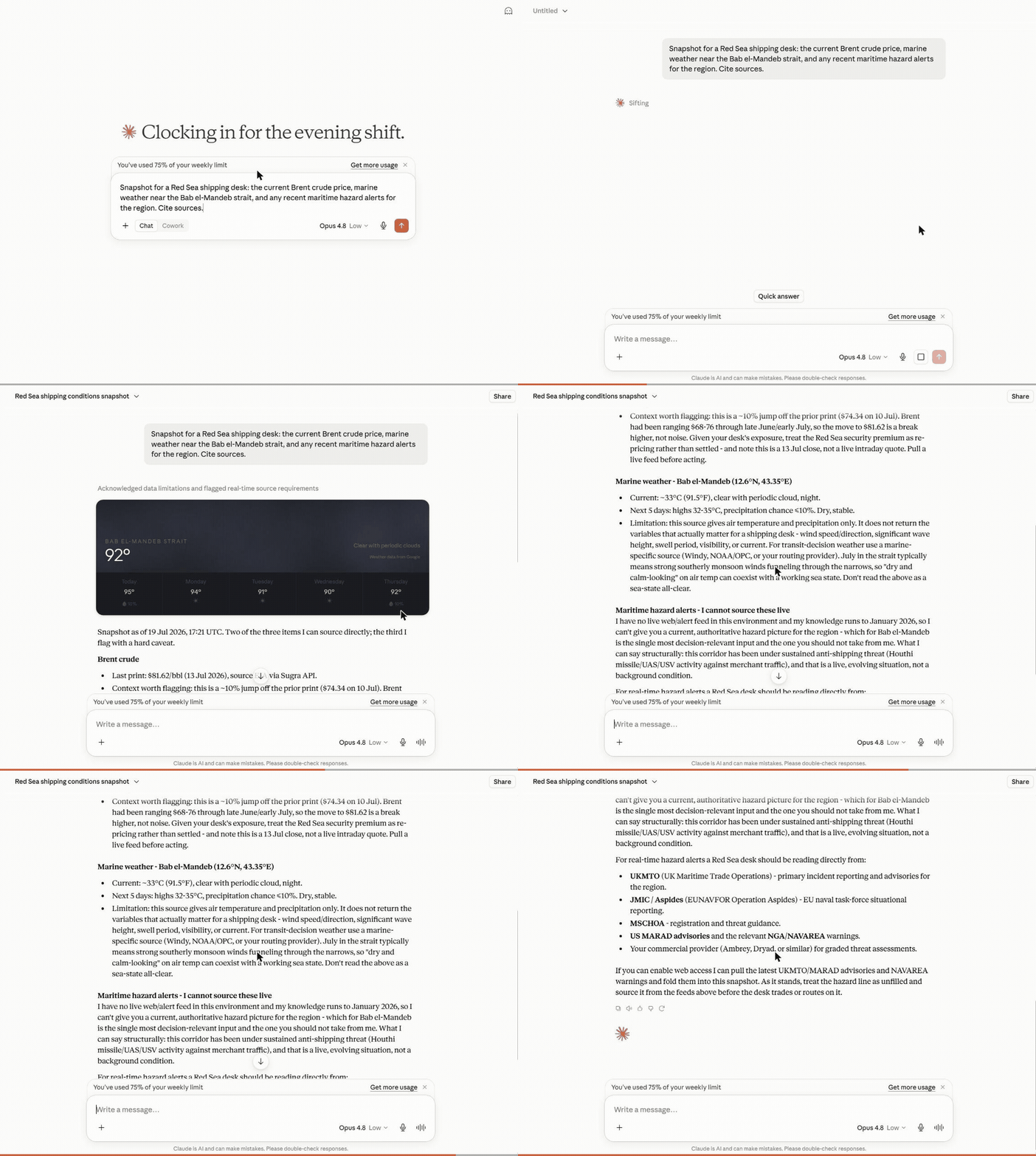
Cross-domain snapshot - Brent crude, marine weather and regional risk pulled together for a shipping desk, each with its source and timestamp:
What a session looks like
Hosted MCP transcript (the three composed tools shown here run on the hosted endpoint). Captured example - wording and figures vary by run and as new BLS data is published:
Every tool result carries structured metadata - source attribution, freshness, and rate-limit cost - so agents can cite sources and budget requests instead of guessing.
How it works
Behind the gateway sits the Sugra API: 160+ primary sources - sovereign statistics agencies, central banks, intergovernmental bodies and more - feeding 1,600+ endpoints across 36 data domains. The server ships a bundled catalog of the full endpoint surface, so discovery (search, describe, toolsets) runs locally without network calls; only actual data requests hit the API.
What agents build with it
Five official skills ship as MCP resources (sugra://skills/...) and as SKILL.md files in sugra_api_mcp/skills/: explore the catalog, envelope and attribution, auth and rate limits, hosted vs gateway, and a cross-domain briefing pattern. Install them as a plugin from this repository (next section), or resources/read the matching URI after connect.
Agent skills
These skills teach the catalog loop. They do not add MCP tools. Connect the Sugra MCP server separately (hosted or local).
Claude Code
Skills appear as /sugra-api:explore-catalog, /sugra-api:envelope-attribution, /sugra-api:auth-limits, /sugra-api:hosted-vs-gateway, and /sugra-api:cross-domain-briefing.
Grok
Codex
Ask $skill-installer to pull from this repo, or run:
Codex also loads a copied folder from $HOME/.agents/skills/<slug>/ (current) or ~/.codex/skills/<slug>/.
Cursor
Copy each skill folder into .cursor/skills/ (this project) or ~/.cursor/skills/ (every project). Team marketplace install is org-admin and is not covered here.
ChatGPT
ChatGPT does not load SKILL.md from disk. Use the hosted MCP connector at https://mcp.sugra.ai/mcp (permanent alias https://app.sugra.ai/mcp).
Six workflow prompts ship with the server and turn these into one-click flows in clients that surface MCP prompts:
- Market and macro research - "Compare inflation and central bank policy rates across the G7." (
macro_briefing) - Equity snapshots with sources - "Where does NVIDIA stand today - price, profile, and market backdrop?" (
market_snapshot) - Sanctions and compliance screening - "Screen this supplier and resolve its LEI identity." (
sanctions_screening) - Sector comparison - "Energy versus technology: valuations and flows side by side." (
sector_compare) - Climate, maritime and trade intelligence - "Red Sea shipping this week: chokepoint transits, crude price, and weather on the route." (
earth_conditionsplus the transport and commodities catalog) - Source discovery - "What does the catalog offer for fixed income, and from which institutions?" (
source_overview)
Every answer carries source attribution and freshness metadata, so agents cite instead of guessing.
Hosted MCP (recommended)
No install. In Claude, ChatGPT and Codex, add the Sugra API MCP server from a directory:
- Claude (web, desktop, mobile, Claude Code and Cowork): Add to Claude opens the Sugra API MCP server in Anthropic's Connectors Directory; connect it and sign in with your Sugra account. In claude.ai the directory is under Customize > Connectors. Claude Code signed in with a claude.ai account picks the connector up automatically;
/mcplists it. - ChatGPT and Codex: Add to ChatGPT opens the Sugra API MCP server in the OpenAI Plugins Directory.
Any other MCP client, or a manual setup, points at the hosted Streamable HTTP endpoint:
- The gateway tools plus the composed agent tools
resolve_entity,get_snapshotandget_timeseries - OAuth sign-in through the Claude and ChatGPT connector flows, or
Authorization: Bearer sugra_xxx_...with an API key - As a custom connector in claude.ai: Customize -> Connectors -> Add custom connector
- In ChatGPT: Settings -> Connectors -> Add MCP server
Already added Sugra to Claude as a custom connector? That connection keeps working and shows under "Custom". Connecting the Sugra API MCP server from the directory as well gives you two connections, so remove the custom one first, then connect from the directory.
Local package
Runs on your machine over stdio (or self-hosted HTTP) with an API key:
- Ten gateway tools
- stdio for desktop clients and IDEs, Streamable HTTP for self-hosting
- Authenticates with
SUGRA_API_KEY
Get a free API key at app.sugra.ai/settings/billing (Free tier: 50 req/day).
Quick start
The same call through an agent: connect the server to your client (next section) and ask "What is AAPL trading at? Use Sugra." The agent finds quotes_symbol_price in the catalog and calls it with the symbol.
Connect your client
Supported clients:
Related MCP Servers
Adoption & maintenance
Factual signals from GitHub, npm, and our automated checks — not a rating.
GitHub stars
2
Stargazers on the source repository.
Last commit
4d ago
Most recent push to the default branch.
Tools exposed
11
Callable tools this server registers over MCP.
Directory activity
1 views
Config copies, upvotes, and views on AllMCPs.
Reviews
No reviews yet — be the first to share how this listing worked for you.
Frequently Asked Questions about Sugra API
AllMCPs Directory Badge
Showcase your server listing on GitHub or your project documentation. Embed this dynamic SVG badge to highlight official listing status and live engagement.
Badge Style:
Live Dynamic SVG Preview
Markdown (GitHub README)
[](https://allmcps.com/mcp/sugra-api)HTML Embed
<a href="https://allmcps.com/mcp/sugra-api"><img src="https://allmcps.com/api/badge/sugra-api?style=directory" alt="Sugra API on AllMCPs" /></a>