User story map + kanban with a live browser UI; AI agents and humans plan the same backlog via MCP.
Quick Install
Automated & IDE SetupCopy the AI prompt to install this server into Claude Code, Cursor, or another agent — or use 1-click editor setup below.
One-click editor setup isn’t available for this listing yet — we don’t have a confirmed install command, and we’d rather show nothing than point your editor at the wrong package or host. Follow the project’s own setup instructions, linked above.
Manual Client & Custom JSON ConfigExpand JSON ▾
No confirmed setup config for this listing yet. We only publish a config block when the install details come from the project itself — its README, its docs, or a verified owner. We haven’t found those for Story Mapper, and we’d rather show nothing than a guess you’d paste into your client. Follow the project’s own setup instructions for the current steps.
Documentation Overview
Storymapper
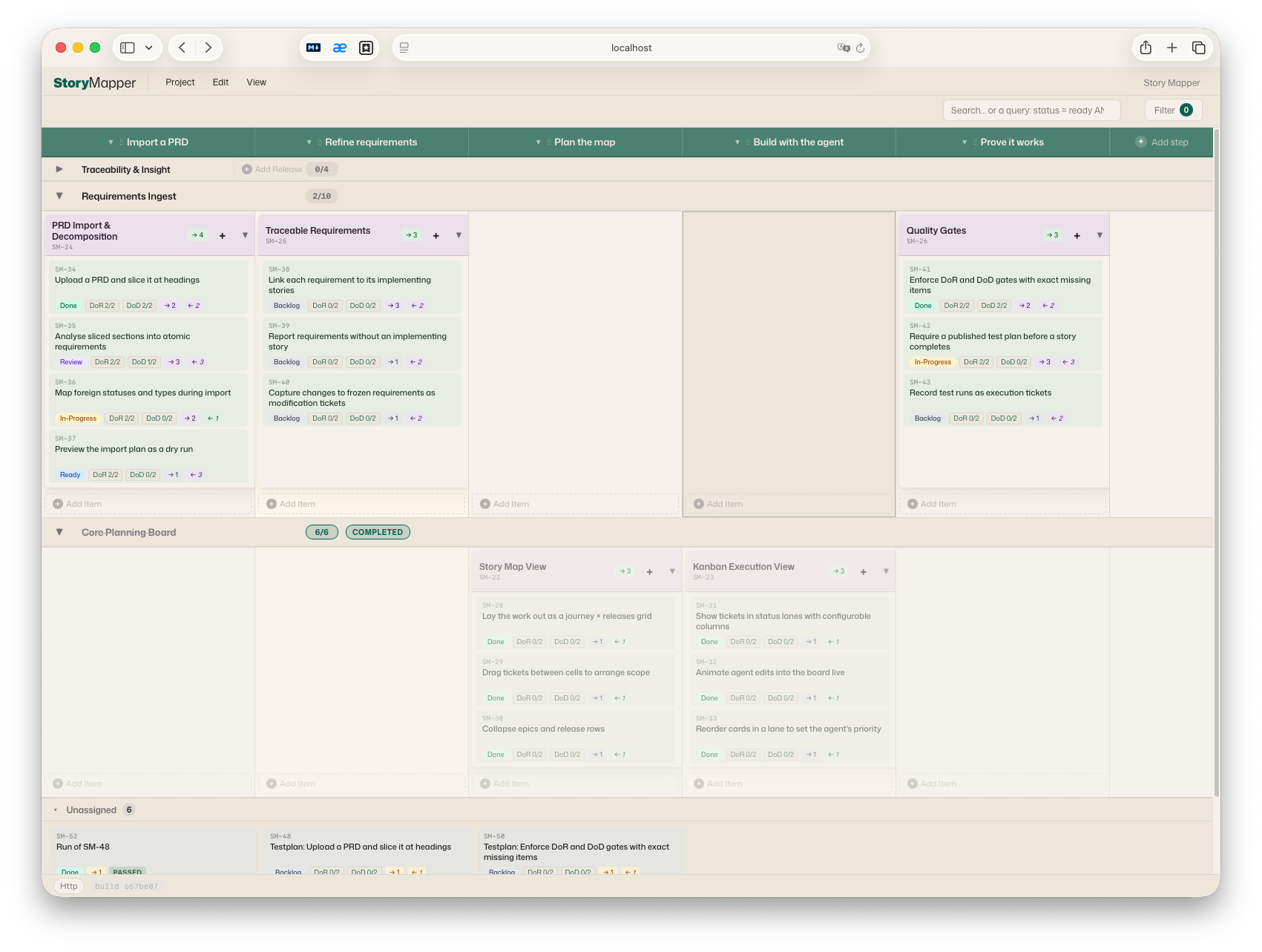
A User Story Map + Kanban board that a product owner and an AI coding agent plan together — the same backlog, live, from a browser and from an MCP client — with the quality method built in.
Storymapper is one Node.js package that ships three things:
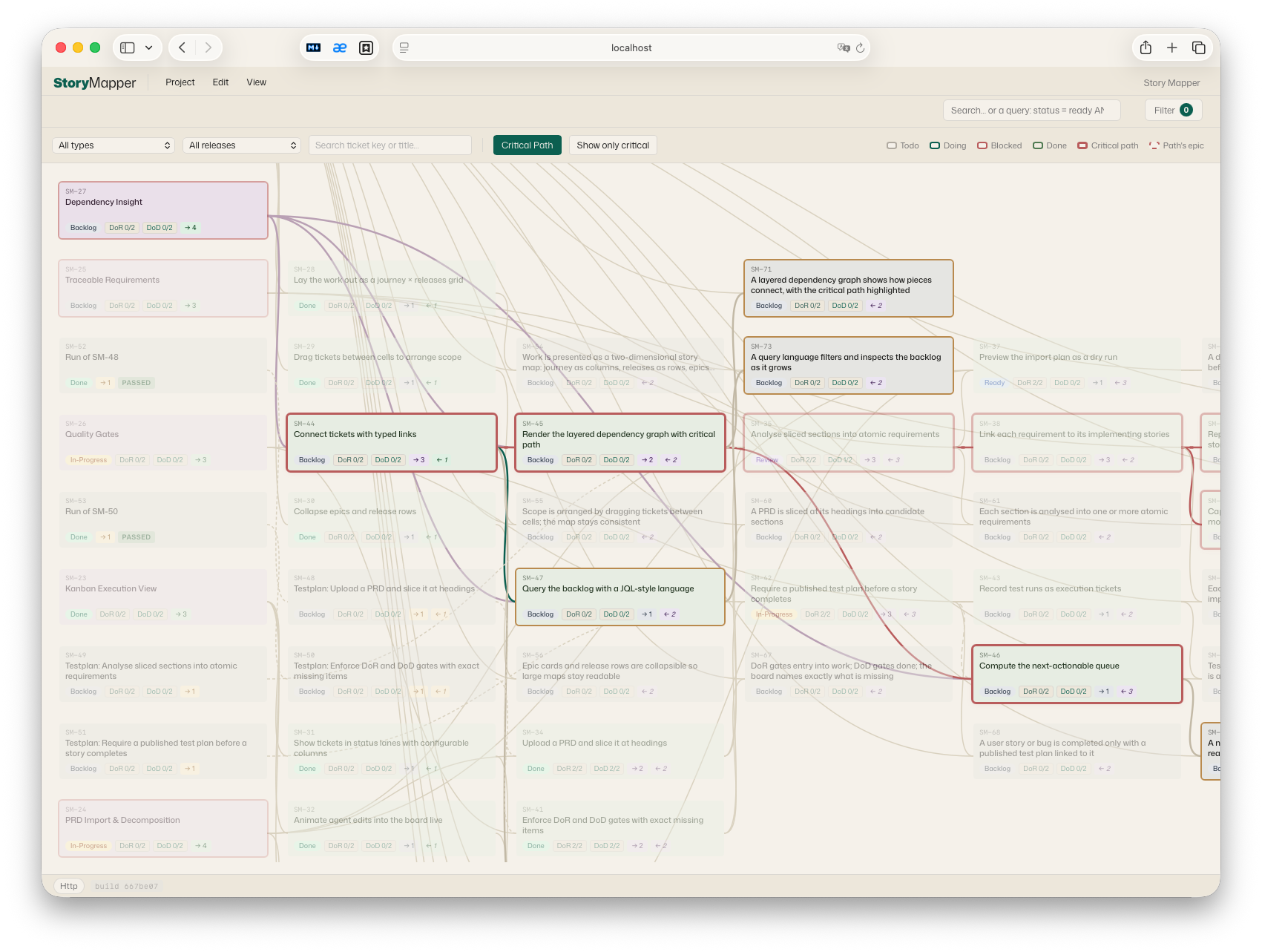
- A browser UI — a User Story Map (process steps × releases, with epics and stories in the cells), a Kanban board, plus table, dependency-graph, requirements and settings views. Plain HTML + modular JavaScript, no build step.
- An HTTP + WebSocket server — persists every project in SQLite with a full per-project revision history, and pushes changes to connected browsers within ~100 ms.
- An MCP server (stdio) plus a pass-through CLI — the same ~70 tools, for Claude Desktop / Claude Code via MCP and for scripts or other harnesses as one-shot commands. Anything the agent does appears live in the product owner's browser with a highlight-and-move animation; anything edited by hand flows back to the agent on its next read.
The result is a shared planning surface: the agent isn't writing to a database the human can't see — the two work the same board in real time.
Why it exists
Planning AI-assisted development breaks down when the plan lives in one place and the work in another. Storymapper makes the plan a live, bidirectional artifact:
- You bring the product idea and a rough shape of what to build; the agent lays it out on the board — epics, stories, releases, dependencies — and you watch it appear and rearrange it by hand.
- You reprioritize, split, annotate — and the agent picks it up on its next read and continues from the current state of the board.
- Every change is a revision you can inspect and restore.
Quality steering at the product level
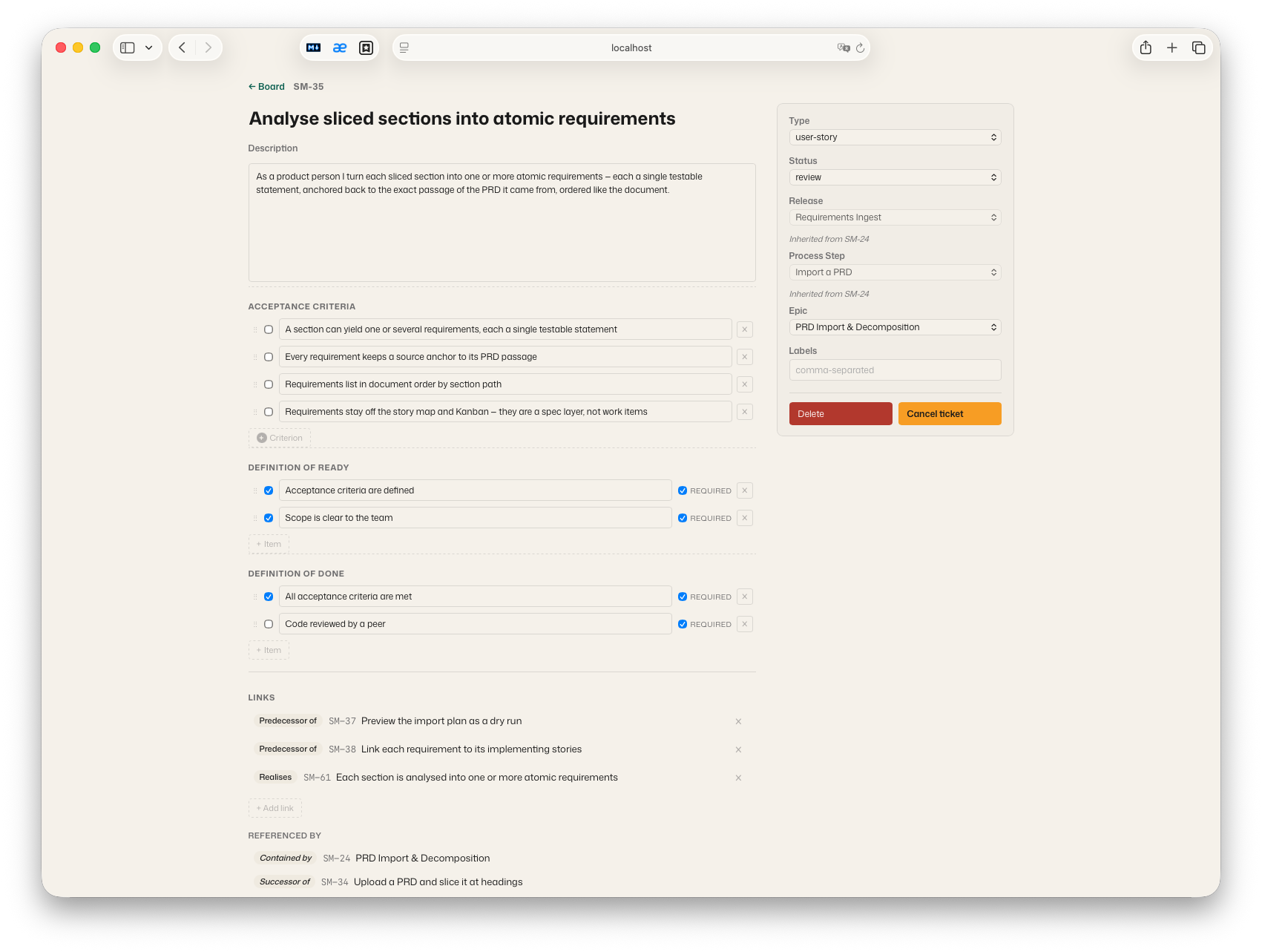
When an agent does the building, the human contribution moves up a level: you describe the product, review its behavior, and steer the work through the process. That process is Storymapper's real substance — a complete quality method the engine enforces as tool-level rules: a ticket is specified before it is built (Definition of Ready) and proven before it counts as done (Definition of Done plus a published test plan with recorded runs), and your requirements stay traceably linked to the stories that implement them and the tests that verify them. An agent that tries to skip a step gets a structured error naming exactly what is missing — and fixes it. This puts professional-grade quality assurance into the hands of everyone who thinks in products — founders, domain experts, product owners: the method speaks the language of the product and lets you hold an agent's work to a standard you can verify. The workflow itself (statuses, transitions, gates, board columns) is configurable per project, and the companion skill teaches the agent the discipline, not just the tools.
Design principles
- Zero build. No bundler, no transpiler, no TypeScript. The browser loads
classical
<script src>modules; the server runs the same files under Node via a UMD wrapper. Clone and run. - One source of truth for pure logic. All domain logic (normalization,
operations, the workflow/governance engines, graph algorithms) lives in
shared/core.jsand is symlinked into the frontend and re-exported by the server — the same code runs in the browser, the HTTP server and the MCP server, with no mirror step to drift. - Raw HTTP, no framework.
http.createServer+ manual routing. Small, readable, dependency-light. - Synchronous SQLite via
better-sqlite3, atomic per-save transactions, a per-project mutex, and count-bounded revision retention. - Single-user, local-first. One human plus their agent on one machine. See the security model below.
For the full picture — layering, data model, live-sync mechanism, testing approach and deliberate non-goals — see ARCHITECTURE.md.
Requirements
- Node.js ≥ 20 (developed and tested on 20 and 22; Node 18 is end-of-life).
better-sqlite3is a native module. Prebuilt binaries cover mainstream platforms (macOS / Linux / Windows on x64 + arm64 for supported Node versions), sonpm installusually just works. On an unsupported platform/Node combination it compiles from source and needs a C/C++ toolchain (Xcode Command Line Tools,build-essential, or the Windows build tools).
Install
Run the browser UI
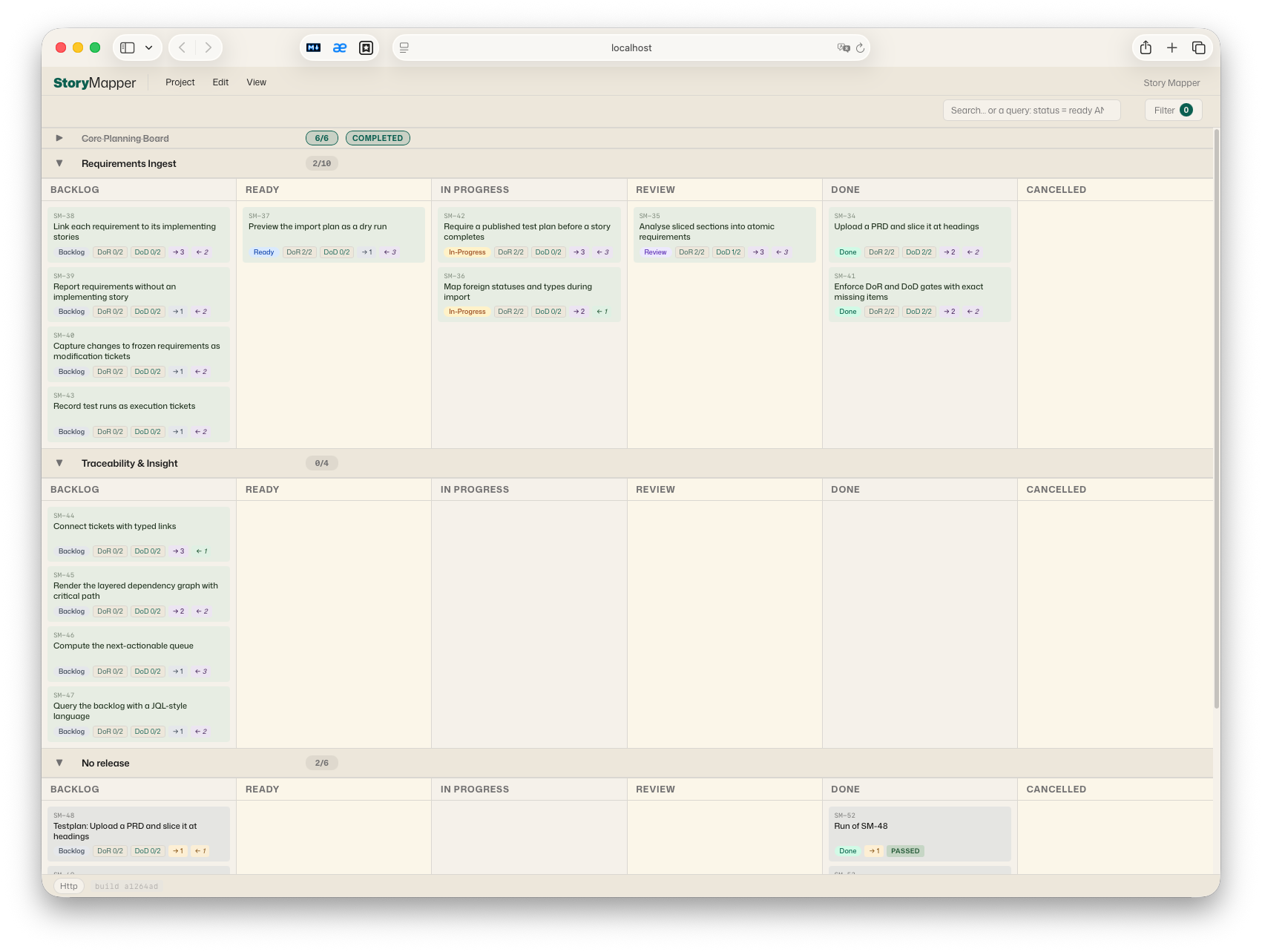
Open http://localhost:8770/ — that's all. The page connects to the server it was loaded from and stores every project there (SQLite, with full revision history).
Hosting the page somewhere else? Served from a different origin, the UI runs on browser
localStorageinstead; point it at a running server with?api=<url>. The page must be loaded fromlocalhost/127.0.0.1— opening the HTML directly as afile://page is not supported (see the security model).
Connect it to your Claude (one command per surface)
Storymapper reaches an agent through two parts: the MCP server (the tools) and the companion skill (the working method — the DoR/DoD contract, the workflow discipline, when to read the board and when to write to it). Installing one does not install the other, so the setup commands below always install both:
| Surface | Command | What remains |
|---|---|---|
| Claude Code (CLI) | npm run install-code | restart your Claude Code session |
| Claude Desktop | npm run install-desktop | upload dist/storymap-skill.zip under Settings → Capabilities → Skills, then fully restart the app — and use a Chat (see below) |
| claude.ai in the browser | — | works with remote connectors only; it cannot reach a local server. Use Claude Code or Claude Desktop. |
npm run install-code copies the skill to ~/.claude/skills/storymap and
registers the MCP server via claude mcp add (user scope). If the claude
CLI is unavailable it prints the ready-made command instead.
npm run install-desktop writes the server entry into the platform's
claude_desktop_config.json (existing entries survive, a .bak backup is
kept) and builds the skill zip. The skill store in Claude Desktop is managed
by the app, so the one upload in the UI is the single step no script can do
for you.
Chat, not Cowork. Claude Desktop reaches local MCP servers from Chat conversations only — in Cowork mode the Storymapper tools are not available. If Cowork is your default surface, switch to a Chat; when the tools don't show up, this is the first thing to check.
Both commands are idempotent — re-run them after pulling a new Storymapper
version. --data-dir=DIR overrides the data directory (default:
<repo>/.storymap-data).
Manual setup (other MCP clients, other harnesses)
Any stdio MCP client can run the server with this shape:
The skill package (npm run package-skill → dist/storymap-skill.zip) is
plain Markdown — storymap/SKILL.md plus its reference/ files. For
harnesses like Codex, unpack it wherever instructions live and point the
harness at it, e.g. from an AGENTS.md:
Point --data-dir at the same directory the HTTP server uses. Both processes
can run concurrently against one SQLite file (WAL mode + a busy-timeout);
the HTTP server relays every MCP write to connected browsers over WebSocket.
Scripting without MCP: the CLI
Every tool is also a one-shot CLI command running over the same tool core:
The result JSON goes to stdout (exit codes: 0 ok, 1 tool error, 2 unknown
tool / bad arguments); arguments come from the positional JSON string,
--json=<json>, or piped stdin. This opens the full tool surface to shell
scripts, CI jobs and harnesses that don't speak MCP.
Only one
storymapper servermay run per data directory (a PID lock refuses a second;--forcetakes over a stale lock after a crash). The MCP process is exempt and may always share the data dir.
Security model (single-user, local)
Storymapper is a local single-user tool — one human plus their agent on one machine. There is deliberately no authentication layer:
Related MCP Servers
Adoption & maintenance
Factual signals from GitHub, npm, and our automated checks — not a rating.
GitHub stars
1
Stargazers on the source repository.
Last commit
2mo ago
Most recent push to the default branch.
Reviews
No reviews yet — be the first to share how this listing worked for you.
Frequently Asked Questions about Story Mapper
AllMCPs Directory Badge
Showcase your server listing on GitHub or your project documentation. Embed this dynamic SVG badge to highlight official listing status and live engagement.
Badge Style:
Live Dynamic SVG Preview
Markdown (GitHub README)
[](https://allmcps.com/mcp/story-mapper)HTML Embed
<a href="https://allmcps.com/mcp/story-mapper"><img src="https://allmcps.com/api/badge/story-mapper?style=directory" alt="Story Mapper on AllMCPs" /></a>