Spool README
The full upstream README, mirrored here for reference. Install config, tool schemas, adoption signals, and an original overview live on the Spool listing page.
Spool
思簿 — a context hub for long-running projects. Logo: a spool viewed from above, its thread pulling free — watch it assemble.
spoolapp.org ·
Download for macOS ·
Download for Windows
The site walks the whole loop in an interactive demo (English / 中文) — no install needed.
macOS: a signed, Apple-notarized .dmg. Windows: an x64 installer, not code-signed yet.
Free, offline, no account.
At the moment you naturally produce a fragment of information — a good answer from an AI, a decision buried in an email, a link to a document, a half-formed thought — Spool lets you capture that fragment effortlessly, files fragments under a two-tier Workspace → Project structure, and packs any project into a paste-ready briefing on demand — so you can re-enter a project, or re-brief an AI, instantly.
Why it exists
LLMs do not remember your project. Every new conversation, you re-explain the context. Across multiple AIs, multiple tabs, multiple emails, spanning many days, a project's context gets shredded — and reassembling it falls on your memory.
Spool compresses "re-explaining" into "a single paste."
The core loop
- Capture — double-tap a modifier key (⌥ on macOS, Ctrl on Windows) and whatever is on your clipboard is written into the current project. Rides existing ⌘C / Ctrl+C muscle memory. No decisions at capture time. The confirmation overlay opens with the cursor already in a note box — type the thought that made you save this and press Enter, or click anywhere to skip. Your own note outlives the excerpt, and connected AIs treat it as the highest-signal line. The main window never has to come forward.
- Project — an append-only timeline of fragments. Two tiers only: Workspace (big topic) → Project (one piece of work). No infinite nesting. On open the feed lands at the newest blocks — they ARE "where you left off," no manual status note to maintain.
- Pack — one click assembles a paste-ready Markdown briefing of the project. Pure string assembly, no AI in the hot path, fully deterministic.
Status
v0.5.0 — feature-complete and shipping on macOS and Windows. The two builds run the same library, the same pack, and the same capture gesture: a double-tap of one modifier key, ⌥ on macOS and Ctrl on Windows. What did not cross over is the macOS-specific work around focus handling and browser tab-title capture, so a Windows capture records the source application rather than the page. Linux is not implemented.
- Distribution — macOS: Developer ID–signed, Apple-notarized
.dmg, straight from Releases. Not on the Mac App Store — sandboxing conflicts structurally with the global capture trigger. - Distribution — Windows: an x64 NSIS installer built by CI, not code-signed in this first release, so SmartScreen warns once before it will install.
- Website: spoolapp.org, with an interactive walkthrough of capture → pack → re-brief → MCP in English and Chinese.
- No auto-update channel yet: direct distribution means new versions are a manual download.
New in v0.5.0
- Windows. NSIS installer, tray icon that stays legible on a dark taskbar, closing the window goes to the tray and says so the first time, and the same MCP hookup as macOS. Capture is a double-tap of Ctrl, read through Raw Input rather than a keyboard hook — which is what lets it work while antivirus software is watching for hook-based keyloggers. Neither platform binds a key combination out of the box; add one in Settings → Shortcuts if you want it.
- Undo covers your own writes. A block you wrote can be undone, and in an empty composer ⌘Z / Ctrl+Z means "undo my last action" rather than nothing.
- Follow-up is a list of lines. Each line is either standing (watch this indefinitely) or one-off (close it once answered). An AI on MCP can propose a line and close one it answered; proposals wait on the review screen, and a standing line refuses to be closed — without that distinction one answer would silently switch off a long-running watch.
- Workspaces nest, projects sort alphabetically, the left rail supports multi-select, and a whole workspace can be packed into a real folder (
INDEX.mdplus one.mdper project, sub-workspaces as sub-directories) that an AI opens a piece at a time. Nothing is summarized away to fit a budget. - Moving to another machine. Settings → Advanced → Moving to another machine exports the whole library and imports it elsewhere. Import merges; it does not replace.
- Provenance on a block: source URL, retrieved-on date, review-by date, with reminders two months, one month and a week ahead. Corrections got a proper interface, and a corrected block keeps its original wording.
- Capture fixes: typing goes straight into the note box again, and the overlay is placed by the screen's usable area so the menu bar no longer eats its top edge.
New in v0.4.0
The optional external-AI routes below add no keys or accounts to Spool: they drive a CLI you installed and logged into yourself. (Spool's own API engine, added in v0.6.2, is the one route that does hold a key — see The API engine.)
- A CLI engine slot. If you already have Claude Code, the Codex CLI, or the Gemini CLI installed and logged in, Spool can run it as a local subprocess to follow up on things you asked it to watch, write a cross-project weekly review, or help draft the lines worth following. The network request happens inside that CLI, on your own account's quota — for this route Spool stores no API key, and its own process makes no HTTP request. Gemini does not run Follow Up.
- Visible runs and honest records. Follow Up runs in the right-hand rail; Weekly Review has its own screen, and completed runs for those two actions leave a record. A follow-up-goal draft stays only in its editor until you save or discard it. Intermediate progress appears when the CLI exposes it, and nothing that would change your existing notes is applied silently.
- Follow up. You write a few plain lines describing what to watch for; the engine searches the web against exactly those lines and files what it finds for your review. It stays quiet when there is no news — the one action that deliberately reaches the open web, and the only one whose web tools are switched on.
- Retirement and correction, instead of overwriting. You can mark a block as no longer valid, or point at the one sentence in an older block that a newer one corrects. Retired blocks leave the pack but stay in the library and stay searchable, and the pack says out loud that they were left out. An append-only log must never silently overwrite a fact.
- Annotations say who wrote them. A note an AI wrote through MCP renders as
ai note:in a pack and can never be read as your own judgement — that distinction is the whole point of the authority header. - A review queue for AI writes. An AI splitting one passage across several projects, or proposing a correction, lands in a queue you approve; it does not land in your timeline.
- Packs are context, full stop. The three "what should the AI do" task types are gone — a pack now carries your context and the reading instructions, and you state the task yourself in whatever chat you paste it into.
All twelve phases of the original implementation roadmap were landed in v0.3.0:
| Phase | Surface |
|---|---|
| 1 | Data layer (SQLite + workspaces / projects / blocks / attachments + FTS5) |
| 2 | UI skeleton + project view |
| 3 | Global shortcut capture |
| 4 | Context packer (the crown feature) — pure function, paste-ready Markdown |
| 5 | Capture hardening: always-on-top overlay window, double-tap ⌥ trigger, editable source badge, browser tab-title auto-detection |
| 6 | Block workbench: file / folder / URL attachments, inline edit, annotations, smart truncation, drag-to-attach |
| 7 | Full-text search: FTS5 trigram tokenizer (Chinese-correct) + short-query LIKE fallback, contextual three-line snippets |
| 8 | Deadlines, active / parked / done status, three-section sidebar (summary + cross-workspace focus + workspace tree), drag-between-workspaces, shortcut configuration UI |
| 9 | Project completion + digest view (conclusion · pinned blocks · files & links) |
| 10 | @-mention references between projects in the same workspace |
| 11 | |
| 12 | Settings panel (shortcuts, language, MCP hookup, autostart, clear data), unified toast surface, tail-window for long projects, packaging |
Design principles (non-negotiable)
- Capture must be zero-friction — one keypress, no decisions.
- Local-first, private by default — Spool's own process makes no network request, and its CSP forbids one structurally. Content reaches another program only through a hand-off you choose: paste a Pack, enable an MCP client, run a CLI action, or switch on the API engine. Every one of those is off until you turn it on; MCP's write side is a separate switch again. When the API engine is on, the request is made by a local subprocess Spool starts (
spool-ai), with your own key and quota — the boundary is the process, not a promise. - A project is a log, not a chat — append-only, time-ordered, quiet.
- Retrieval is deterministic — pack and search never call AI or the network.
- AI is a librarian, not an author — anything an AI files through MCP is attributed, append-only, and can never overwrite what you wrote by hand.
- Exactly two tiers of structure — no infinite nesting.
The full product constitution, rejected ideas, and the feature filter are in PLAN_EN.md §2.
Stack
- Tauri 2 desktop shell, with a second non-activating overlay window for capture confirmations
- React 18 + TypeScript (strict mode) on Vite (multi-page build)
- Tailwind CSS for layout; design tokens in CSS variables
- Zustand for state
- SQLite via
tauri-plugin-sql, FTS5 with the trigram tokenizer - MCP server (
spool --mcp, stdio, default OFF): the AI surface — 19 tools, 12 read (list/search/dedup/pack) plus 7 consented, attributed write tools - CLI engine slot:
claude,codex, orgeminiruns as a local subprocess for Follow Up, Weekly Review, and follow-up-goal drafting — detected on disk, never bundled, never given a key
Building from source
Requirements: Node 20+, Rust toolchain (stable), Tauri 2 system dependencies (see the Tauri docs for your OS).
On macOS, the double-tap-⌥ capture trigger requires Input Monitoring permission (System Settings → Privacy & Security). Spool checks its status at launch and shows a setup banner while it is missing; using that banner's capture setup action triggers the macOS request, and the grant takes effect after restarting Spool. Accessibility is optional and does two things. First, it makes a consumed double-tap exclusive: when Spool captures, it deletes the second ⌥ press from the event stream, so other apps bound to the same gesture (Claude Desktop's quick entry, for one) do not also fire. Second, it is what hands the capture toast the keyboard, so the note box can be typed into straight away — macOS delivers keystrokes only to the active app, and AXFrontmost is the one route to activation that is honoured immediately rather than deferred. Without Accessibility, capture still works, but those apps may fire alongside it and the note box has to be clicked before it will take typing. A bare double-tap with nothing freshly copied is still passed through to them untouched. A user-bound capture shortcut (Settings → Shortcuts) works without either permission. On first capture from a browser, macOS will prompt once for Automation permission against that browser — granting it lets Spool tag captures with the active tab title instead of just the app name.
On Windows there is nothing to grant. The double-tap of Ctrl is read through Raw Input, which asks for no permission and is not a keyboard hook. There is no tab-title equivalent: a capture records the application you copied from.
AI via MCP (optional, no keys, no accounts)
This route ships no built-in AI — nothing to configure, and no key: your client brings its own. (Spool does have one route of its own that takes a key, and it is off until you turn it on — see The API engine.) Spool speaks the Model Context Protocol: your own AI client (Claude Desktop, Codex — including a Codex conversation inside the ChatGPT desktop app — Cursor, or another MCP-capable tool) connects to spool --mcp over stdio and works with your projects directly. An ordinary ChatGPT conversation runs remotely and cannot reach a local stdio server.
You do not need any of this to use Spool with an AI. ⌘⇧P (Ctrl+Shift+P) packs a project into Markdown you paste into a browser tab — nothing to install, nothing to connect, and no feature is withheld from you for skipping it. MCP buys exactly one thing: your AI fetches the context itself instead of waiting for you to paste it, and can file conclusions back with its name on them.
- One-click hookup: Settings → MCP → Connect writes the client's config for you (with a backup). Restart the client so it can load the setting; Spool separately shows whether that client has actually connected.
- Read tools (12): list projects (with one-line summaries and read-budget hints), a cross-project digest of recent activity, full-text search, near-duplicate detection, block paging (including blocks you have retired), the same deterministic pack the GUI produces, a read-only library hygiene checkup, one call that answers "how is this project doing" in a single round-trip, a read of what a project is currently watching for, plus three that hand back a briefing and the job to do with it — distill one project, report one project's health, review the week across all of them.
- Write tools (7, behind a second and separate consent): create a project, append a block (optionally citing the block it builds on, or proposing that one point in it was corrected), refresh a project's one-line summary, queue a batch of blocks for your review, propose a new line for a project to follow up on, and close a follow-up line it has answered — a standing line refuses to be closed. One of the seven stores nothing at all: ask to read a file already in a project puts the request in front of you and waits. Every AI write carries an enforced source label (e.g.
Claude · MCP) and shows a distinct badge in the GUI; an AI can never overwrite a summary you wrote by hand, never retire one of your blocks, and never write a note that reads as if you wrote it. - What an AI can and cannot do to history: it may append, and it may propose that one point in an older block was corrected — which you approve or discard. Marking a block as no longer valid stays yours alone.
What to say once connected
You talk to your AI in plain language — no tool names, no menus, and nothing to paste to set it
up. The server states its own rules and the phrasings you are likely to use in the initialize
instructions it sends every client, so a freshly connected AI opens by naming what it can do with
your actual projects. That copy arrives whether or not anyone remembered to hand it over.
Maintenance by your own CLI (v0.4.0, optional, no keys)
Reading through a chat client is one half. The other half is checking what changed while you were
away — and for that Spool can drive a coding CLI you already own. If claude (Claude Code),
codex (Codex CLI), or gemini (Gemini CLI) is on your machine and logged in, Spool detects it
and offers these actions:
| Action | What it does | Reaches the web |
|---|---|---|
| Follow up | Search for news against lines you wrote describing what to watch; findings queue for your review | yes |
| Weekly review | One review across every project, kept in the dedicated Weekly Review screen | no |
| Draft follow-up goals | Suggest the lines worth watching for one project; you decide what to keep | no |
Three things make this safe to leave switched on, and all three are deliberate:
- Spool's own process never becomes a network client. It spawns the CLI as a local subprocess; the request leaves from there, under your own login and quota. On this route no API key is stored, entered, or needed.
- You can see where it ran. Follow Up lives in the right-hand rail; Weekly Review has a dedicated screen, and completed runs for those two actions stay recorded. A goal draft stays only in its editor until you save or discard it; progress appears when the selected CLI exposes it. Anything that would change your existing notes arrives as a proposal to approve, not as an edit.
- Only Follow Up gets web tools, and only against the lines you wrote. Weekly Review and goal drafting run without web-search tools. They still hand the project content they need to the CLI, so that content may reach its provider.
The actions require the MCP service and AI-write permission, at least one supported CLI installed and logged in, and a per-run time limit you set. If several CLIs are available, you can choose between them. Codex has one honest limitation Spool states in the UI rather than hiding: its built-in shell tool cannot be removed the way Claude Code's can, so Spool runs it read-only sandboxed instead. Gemini can run Weekly Review and draft goals, but not Follow Up.
The API engine (optional, off by default)
The two routes above borrow someone else's connection — your MCP client's, or a CLI you logged into. The API engine is the one route where Spool holds the key itself. It is off until you switch it on in Settings → Engine, and with it off nothing here runs and nothing is stored.
| Action | What it does |
|---|---|
| Compress | Rewrites a project's pack shorter, and shows you a side-by-side check of what changed before anything is saved |
| Out-of-date check | Looks for older blocks a newer block has replaced, and asks you what to do about each one — merge, let the new one stand, or nothing |
What is worth knowing before you turn it on:
-
Your own key, your own bill. You paste a key for an OpenAI-compatible endpoint (DeepSeek by default; any HTTPS endpoint works). Every run spends your money, including a run you cancel partway — the provider still charges for what it already produced.
-
The request comes from a subprocess, not from Spool. Spool's own process still has no HTTP client in it, and you can check that rather than take our word for it:
The network call is made by a small bundled binary,
spool-ai, which Spool starts, talks to over stdin/stdout, and which exits when the run ends. It refuses plainhttp://, and the key reaches it only through stdin — never through the command line, where any process on the machine could read it. -
Where the key lives. macOS: the system Keychain. Windows: a
0600file in Spool's own data directory. It is never written tosettings.json, and never printed to a log or an error message. -
Nothing is written to your library without you. Compression shows the check screen first; the out-of-date check hands you one decision per pair. A block's pre-compression wording stays in the library and can be read back at any time.
Keyboard shortcuts
Spool spells these with the modifier your platform actually prints: ⌘ on macOS, Ctrl on Windows.
| macOS | Windows | Action |
|---|---|---|
| Double-tap ⌥ | Double-tap Ctrl | Capture clipboard, then just type to leave a note (system-global) |
| ⌘⇧F | Ctrl+Shift+F | Global search |
| ⌘⇧P | Ctrl+Shift+P | Pack the active project |
| ⌘N | Ctrl+N | New project in the current workspace |
| ⌘, | Ctrl+, | Settings |
| ⌘Z | Ctrl+Z | Undo the last action (in an empty composer) |
| @ | @ | Mention another project inside the composer |
| Enter / Shift+Enter | Enter / Shift+Enter | Send / newline in the composer |
| Esc | Esc | Dismiss any overlay, modal, or inline edit |
The global search shortcut is user-rebindable under Settings → Shortcuts; an optional capture shortcut (unbound by default) can be recorded there too.
Project structure
PLAN_EN.md defines what Spool is, what it isn't, the phase-by-phase roadmap, and the explicit non-goals. Read §2 (Product Constitution) before opening a PR or proposing a feature.
Screenshots
Taken with a library built purely for demonstration — the projects and notes in them are invented, so nothing personal appears.
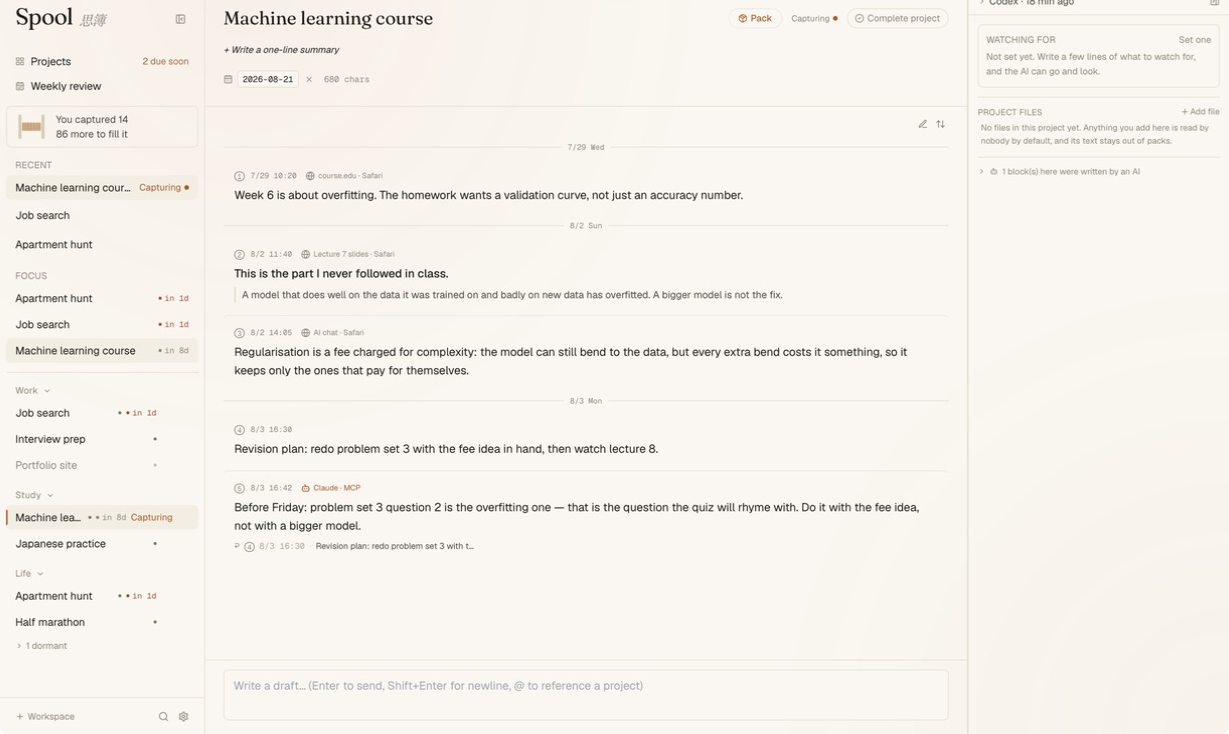
One project, five fragments. A course reference, a note used as the next block's title, an AI-chat explanation, your revision plan, and a conclusion filed by an AI — each keeping its number, time, source, and author. The fixed project rail stays on the left; the AI activity rail stays on the right.
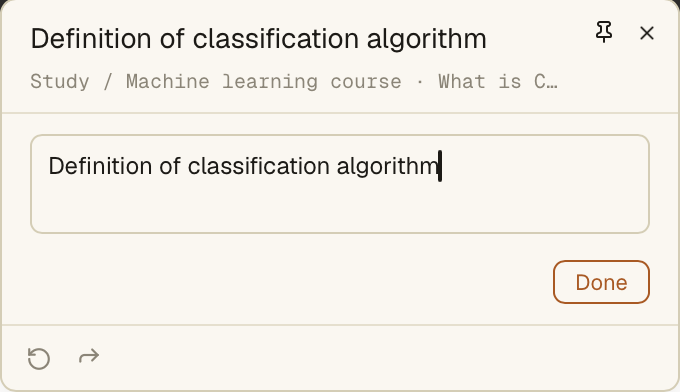
The capture confirmation keeps the saved text, its Study / Machine learning course destination, the detected source, an active note box, and undo/redo in one compact overlay. The main window never has to come forward.
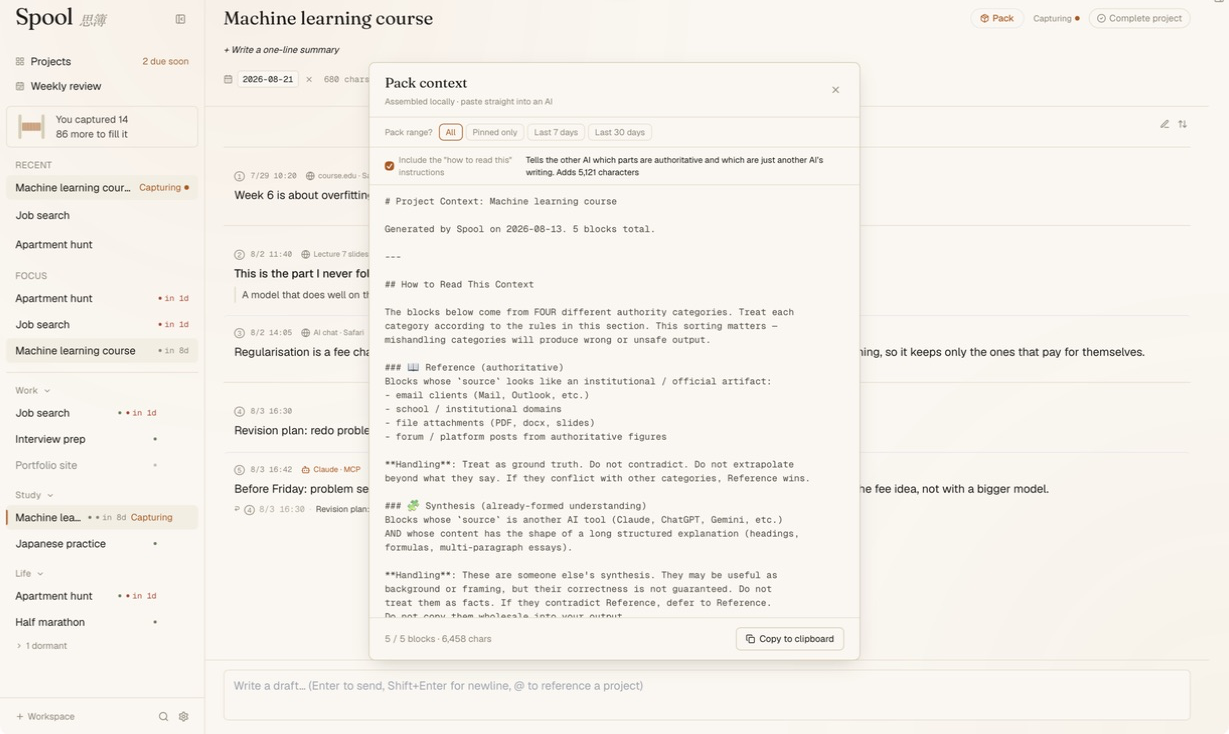
Pack turns those five blocks into paste-ready Markdown: scope controls stay visible, the authority instructions explain how to read each source, and anything an AI wrote remains marked.
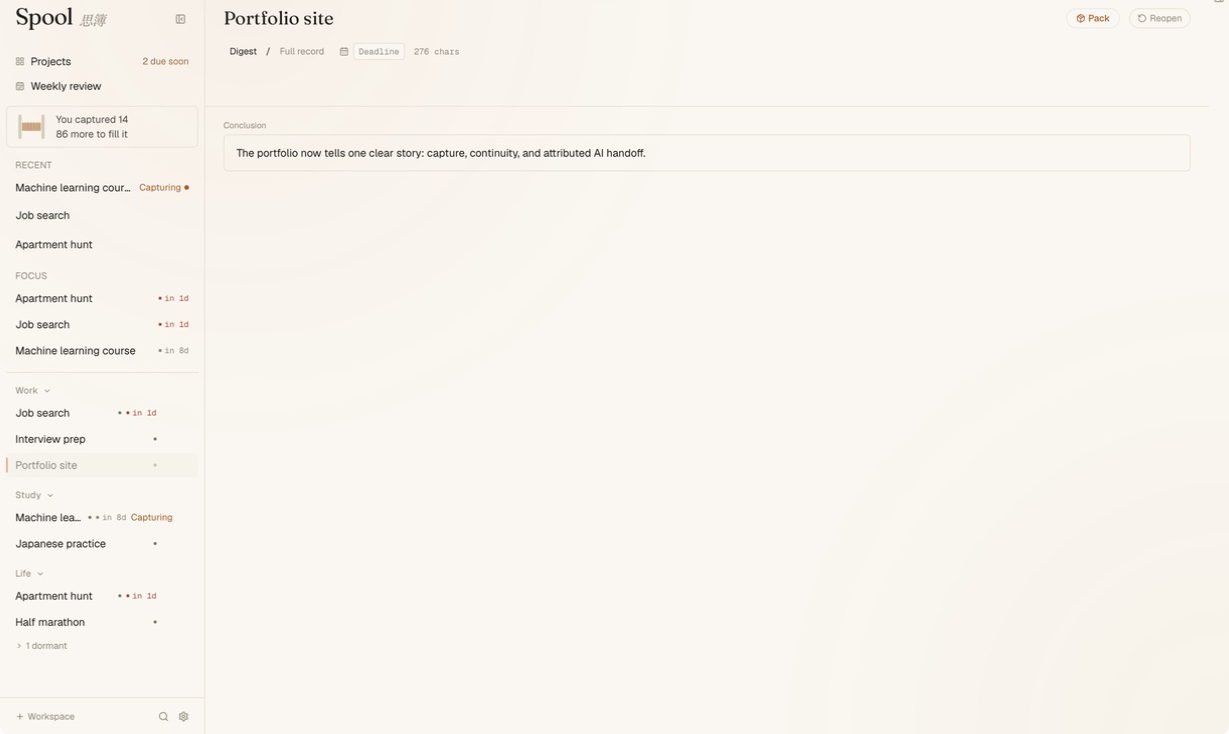
A finished project, condensed to the conclusion you chose, with a one-click path to reopen it.
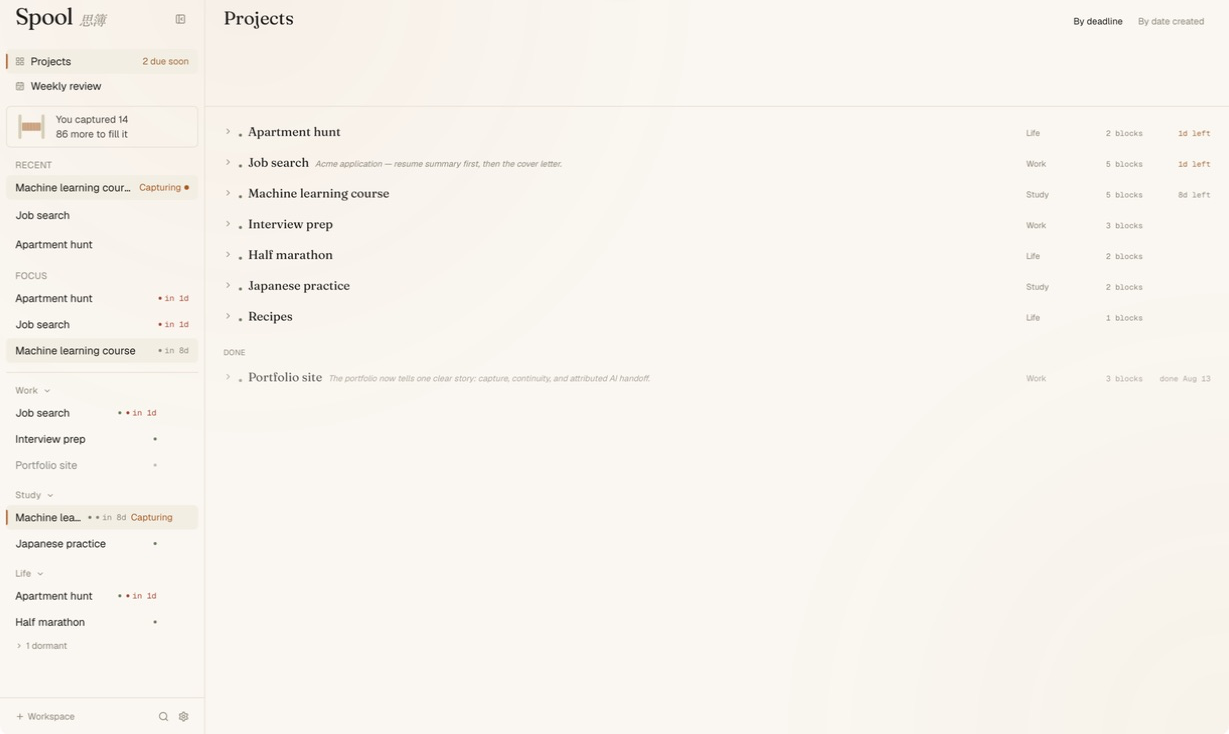
Project management stays a list, not another tree. Active work is ordered by deadline or creation date, workspace and block count stay scannable, and completed work keeps its conclusion.
Through MCP, your own AI reads the library directly — this read-only Codex CLI run queried the isolated demo server and reported its current totals without a pack or a paste.

And when it files something back, it signs its name. Block 5 is appended below the user's block 4 — never over it — labelled Claude · MCP, with a ↩ line pointing at the exact fragment it answers.

License
Not licensed yet — all rights reserved until a license is chosen.
Author
Ocean Jin · @KIM-ocean-HZ