The data a web page declares, with where each value came from. No model, no API key.
Quick Install
Automated & IDE SetupCopy the AI prompt to install this server into Claude Code, Cursor, or another agent — or use 1-click editor setup below.
One-click editor setup isn’t available for this listing yet — we don’t have a confirmed install command, and we’d rather show nothing than point your editor at the wrong package or host. Follow the project’s own setup instructions, linked above.
Manual Client & Custom JSON ConfigExpand JSON ▾
No confirmed setup config for this listing yet. We only publish a config block when the install details come from the project itself — its README, its docs, or a verified owner. We haven’t found those for Sluicer, and we’d rather show nothing than a guess you’d paste into your client. Follow the project’s own setup instructions for the current steps.
Documentation Overview

Web scrapers that fail loudly when a site's layout changes,
instead of quietly returning empty values.
No model, no API key, no bill.





Documentation · Getting started · In your agent · Scoreboards · FAQ · Changelog
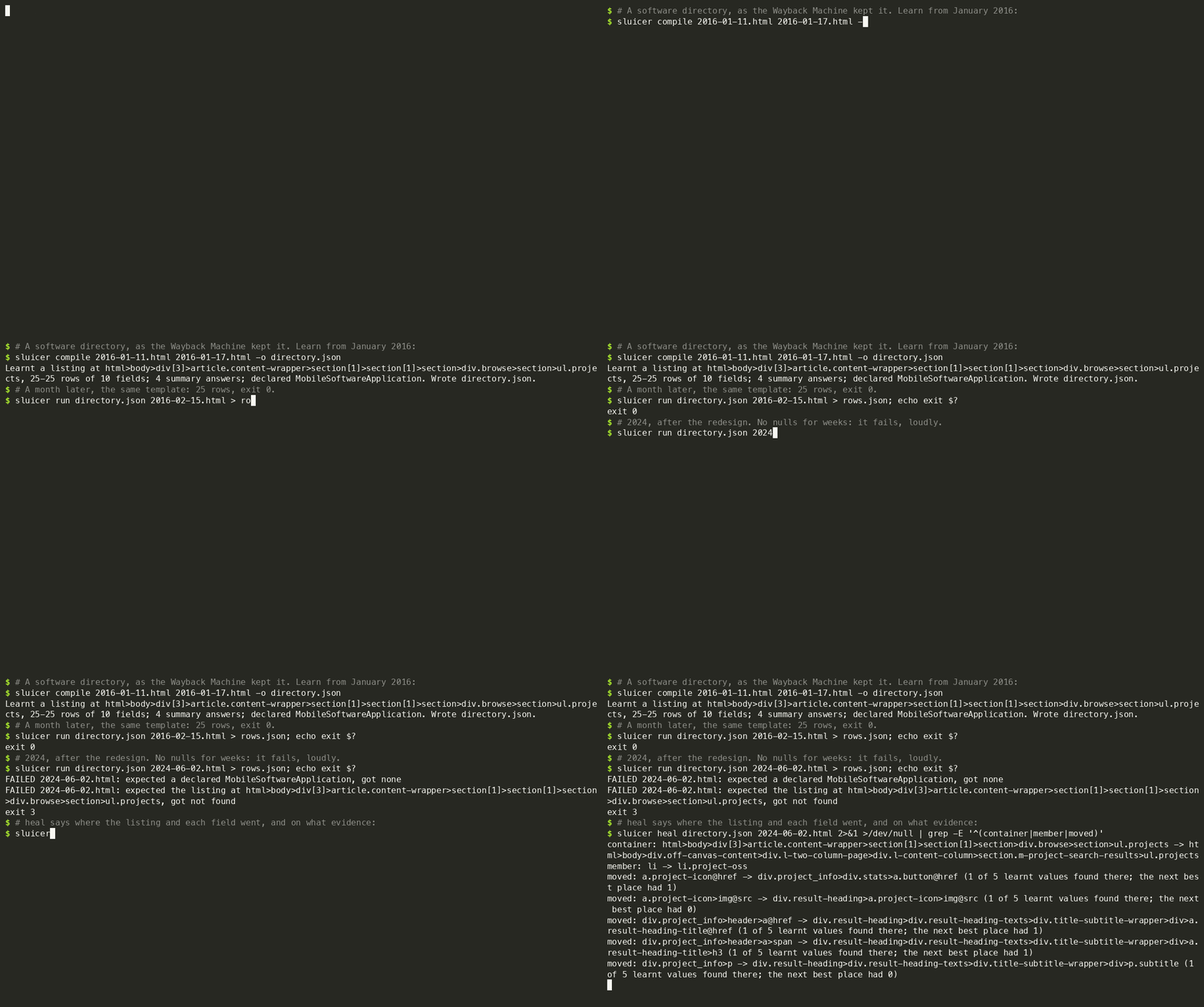
A real site, as the Wayback Machine kept it. The extractor learnt in January
2016 still fits in February. After the 2024 redesign it stops with exit code
3. heal then proposes new places for the listing and five of its
ten fields, each move resting on one of five learnt values: moves to check,
not a repair.
Most scrapers break without a sound. The site changes its markup, and the scraper keeps running and returns nulls, or the wrong column, for weeks before anyone notices.
Sluicer works the other way round. Show it a value on a few pages of a site
(a price, a title, a date) and it learns where that value lives. On every
page it reads after that, it checks the page against what it learnt. If the
layout has changed, the run fails with exit code 3 and names the check that
broke. sluicer heal then proposes where each field went, when the new page
still shows values the extractor was learnt from.
It also reads everything a page already declares about itself: JSON-LD, microdata, RDFa, OpenGraph and four more vocabularies, merged into one record per thing, with every value pointing to the exact place on the page it came from. No model reads any page, so the same page always gives the same answer.
Quick start
books.toscrape.com and quotes.toscrape.com are public sandboxes made for
trying scrapers on. The last command prints FAILED https://quotes.toscrape.com/: expected the listing at html>body>…>ol.row, got not found, its path shortened
here, and exits 3.
After a redesign, sluicer heal looks on the new page for the values the
extractor was learnt from, and proposes a new place for each field it finds
them in. In a clone of this repository, examples/shop/ holds a made-up shop
before and after a redesign that renamed every class:
Each move says how many of the field's learnt values were found in its new
place, and how many the next best place held. heal proposes; it does not
repair. It can only move a field whose old values the new page still shows, so
run it on a page you learnt from, or one listing the same items. On the
drift benchmark's
21 real redesigns, 18 of the new pages shared no item with the old ones, and
heal was fully right on none and partly right on 2. When a field or the listing
is lost, it exits 3 and writes nothing unless given --force.
Exit codes follow grep: 0 found -- a record or a summary answer, a <title>
alone included -- 1 found nothing, 2 could not read the page, and 3 when a page
broke its extractor's checks, a heal lost a field or left a move undecided, or
an audit found a documented rule broken. diff exits 1 when something changed.
The checks are about structure, not truth: a run fails when a field is no longer where it was learnt, no longer reads the way it did, or no longer has its shape. A change that keeps all three, such as a different number in the price's place, passes. On SWDE, the checks flagged 18% of the extractors' wrong answers; the other 82% passed.
Reading what a page declares needs no example at all. The product page read
here is
examples/brake-pads.html,
in a clone of this repository; without one, fetch it first with
mkdir -p examples && curl -o examples/brake-pads.html https://raw.githubusercontent.com/Gi0tto/sluicer/main/examples/brake-pads.html.
The library is imported from the Python you ran pip install sluicer in:
The page states one price in its JSON-LD and another in its OpenGraph tags;
Sluicer reports the conflict instead of picking one in silence. sluicer inspect page.html shows the same reading laid out for a person.
Install
That is the whole install for every command but one kind of page: it reads
HTML you have, fetches and crawls over plain HTTP, audits, learns extractors
and turns a page into markdown. For the sluicer command in an environment of
its own, uv tool install sluicer or pipx install sluicer; to run it once,
installing nothing, uvx sluicer --version; in a uv project, uv add sluicer.
A page a script draws, which plain HTTP brings back as an empty shell, needs a
browser: add the browser extra, then let Sluicer download Playwright's
Chromium once.
sluicer doctor says what is installed, what each missing piece is for, and
the command that adds it for the way you installed Sluicer (pip, uv tool, pipx
or uvx); a command that needs a missing extra names the same command.
What each extra adds
| extra | adds |
|---|---|
browser | a browser, Playwright's Chromium, for a page plain HTTP brings back as an empty shell; download Chromium with sluicer install browser |
mcp | the MCP server; add browser for pages that need one |
api | the HTTP API, with mcp |
microformats | microformats2, which is off by default |
all | every extra above |
stealth | the stealth rung, by scrapling: one page, only when asked with --stealth, never in a crawl; never in all |
markdown | nothing more since 0.10, when trafilatura joined the base install; kept so an older install line still works |
fetch | deprecated since 0.8: browser and stealth together, what it installed before |
The base install is lxml, click, cssselect (CSS selectors), protego
(robots.txt) and trafilatura (markdown), and tomli on Python 3.10 to read a
configuration file: the
HTTP client is Python's own.
What you can give it
Related MCP Servers
Reviews
No reviews yet — be the first to share how this listing worked for you.
Frequently Asked Questions about Sluicer
AllMCPs Directory Badge
Showcase your server listing on GitHub or your project documentation. Embed this dynamic SVG badge to highlight official listing status and live engagement.
Badge Style:
Live Dynamic SVG Preview
Markdown (GitHub README)
[](https://allmcps.com/mcp/sluicer)HTML Embed
<a href="https://allmcps.com/mcp/sluicer"><img src="https://allmcps.com/api/badge/sluicer?style=directory" alt="Sluicer on AllMCPs" /></a>