Every Agent Skill installed for any coding agent, plus GitHub skill repos, as MCP tools/resources.
Quick Install
Automated & IDE SetupCopy the AI prompt to install this server into Claude Code, Cursor, or another agent — or use 1-click editor setup below.
One-click editor setup isn’t available for this listing yet — we don’t have a confirmed install command, and we’d rather show nothing than point your editor at the wrong package or host. Follow the project’s own setup instructions, linked above.
Manual Client & Custom JSON ConfigExpand JSON ▾
No confirmed setup config for this listing yet. We only publish a config block when the install details come from the project itself — its README, its docs, or a verified owner. We haven’t found those for Skills Anywhere, and we’d rather show nothing than a guess you’d paste into your client. Follow the project’s own setup instructions for the current steps.
Documentation Overview
dsh-skills-anywhere
Discover and load skills across your tools. Collect Agent Skills
from local directories and configured Git sources into one catalog, available
through a live DeepSeek Harness
(dsh) provider or a local stdio MCP server.
English | 中文


Check a skill before moving it
Find missing supporting files in the installed folder, then review bundle changes before loading it through MCP. Browser folder check · Three pinned public examples.
Add --fail-on-resource-issues to gate CI. This checks local Markdown link targets;
it does not inspect prose dependencies or execute the skill. Scope and tutorial.
First review, no clone required — Find one missing skill reference, restore it, and verify the CI gate.

Start with your workflow
| Need | Workflow |
|---|---|
| Reuse skills across agent tools | Collect local and Git sources, then load on demand through dsh or local MCP |
| Review changes before loading | Compare instructions and directory manifests; require the reviewed content hash |
| Check which instructions reached an agent | Save MCP load receipts alongside tool calls and task evaluations |
Quick start
Requires Node.js 22.19+ or 24+. The CLI and local MCP server work independently; Git sources also require Git.
Inspect discovered skills:
For an MCP client, use the local server configuration. For DeepSeek Harness, install into your chosen profile:
Start dsh and load with its skill tool or /skill-name. To add a Git source,
run npx dsh-skills-anywhere add anthropics/skills.
Installation details cover release
archives, source checkouts and dsh version requirements.
Check skills in CI. Any repository that keeps SKILL.md files can add the
GitHub Action (0.14.0 and later). Rejected files, repairs and hidden
characters appear as pull request annotations, with a job summary and a JSON
report:
Inputs, outputs and scope. No model key or DeepSeek Harness installation is needed.
Try it in your browser
The homepage opens with an authored resource check. Choose a skill folder to check your own links, then Save result image for a shareable summary of counts and scope. Images omit file names; the JSON report retains the paths needed for review.
Try the interactive Hugging Face playground — explore an example workspace, resolve name clashes, and search beyond the catalog budget. No installation or model API needed. How it works.
Inspect skill instructions, compare directory manifests and share catalog views. Keyboard navigation preserves the selected row and catalog settings. Files opened for local review stay in the browser.
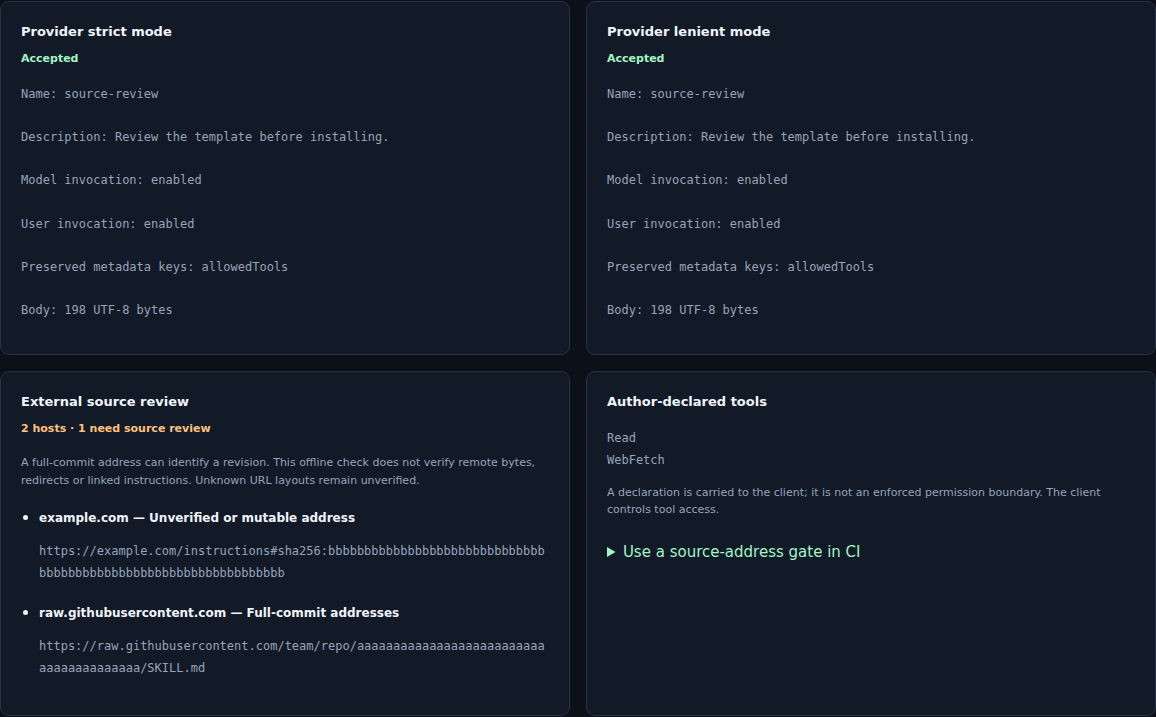
Bring your own SKILL.md. Compare the provider's strict and lenient parsing
locally: inspect repairs, invocation settings and a downloadable check report.
Your file stays in the browser. The same checks are available in the
command line and CI, with file hashes and actionable exit codes.
Reports enumerate recognized source URLs, full-commit address forms and
author-declared tools. Referenced content, script behavior and client
compatibility require separate verification.
How the catalog works
Clients can use different project, user and plugin directories for SKILL.md
files. Skills Anywhere discovers configured sources in place and makes the
resulting catalog available through dsh or an MCP client configured to connect
to its local server. Directory definitions describe discovery paths; the
compatibility matrix records tested protocol
connections separately.
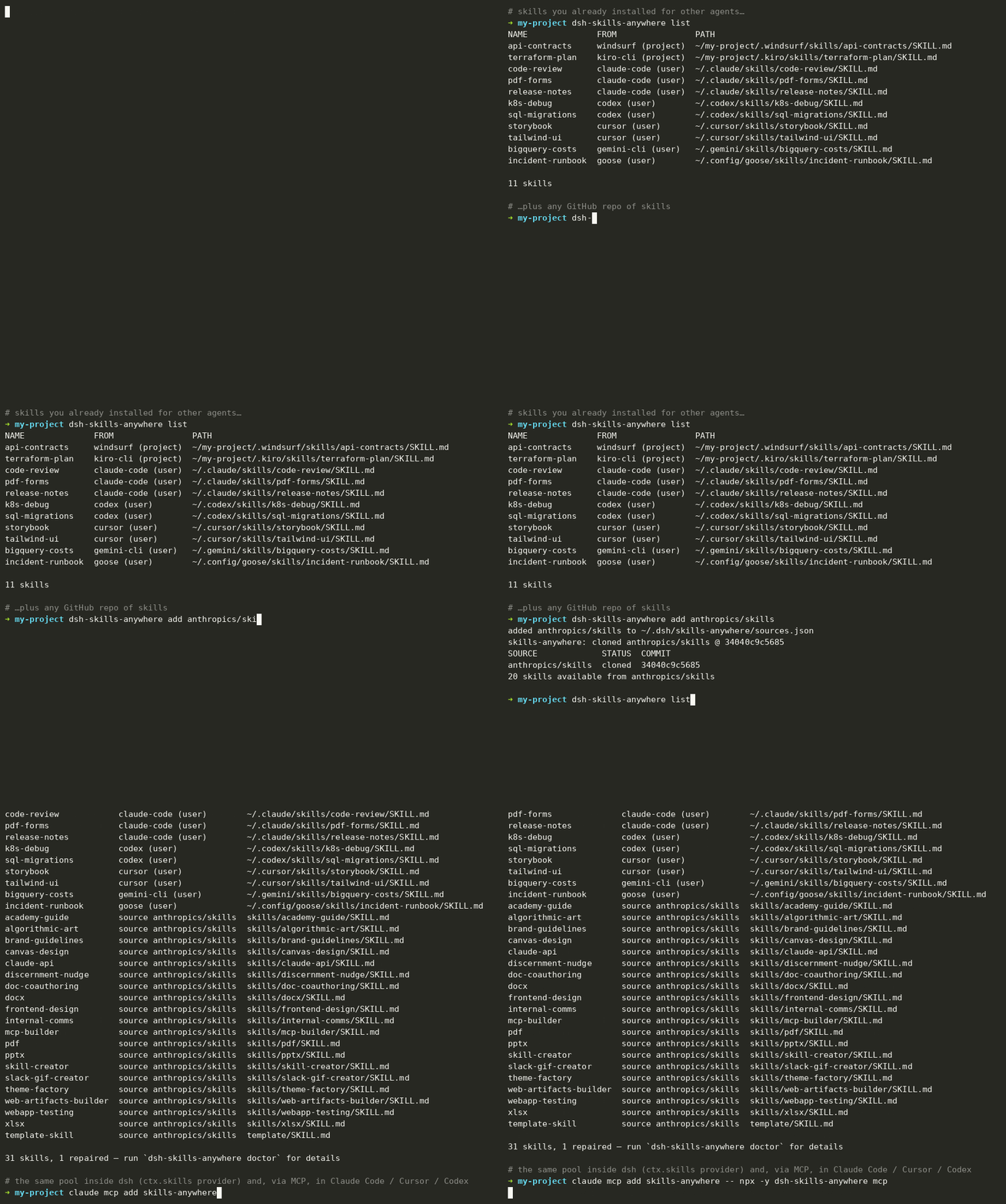
Inside dsh, it registers one extra provider on the built-in ctx.skills registry, so the model's normal skill tool and /name invocation simply see more skills:
- Predefined agent directories. Project and user paths for Claude Code, Codex, Cursor, Gemini CLI, GitHub Copilot, Windsurf, Kiro, Goose, Cline, Kimi CLI, Letta Code and other entries in the directory registry. Over MCP this includes the shared
.agents/skillsconvention, so a client that does not read it itself (Claude Code, for example) still sees skills installed there. - Claude Code plugin marketplaces. The skills nested inside
~/.claude/plugins/marketplaces/*/plugins/*/skills/*, including the official Anthropic marketplace. - Configured Git sources. Select a skill repository, subdirectory, branch, tag or commit. The provider maintains a local checkout and records its resolved commit in a lock file.
- Local files read in place. Existing skills are re-read when loaded, without copying them into each client's directory. Git sources use the managed cache described below.
The catalog budget controls how many skill summaries enter the model's
session catalog: up to 50 by default. Other eligible skills remain searchable
through find_skills and can be loaded on demand. /name invocation is unchanged.
The same pool is available outside dsh through dsh-skills-anywhere mcp.
Configured MCP clients can discover and open
skills through tools and skill:// resources. Client support for tool calls,
resources and the skill's own instructions determines the available workflow.
The provider deduplicates symlinked and byte-identical entries, supports
documented frontmatter repairs, and renames conflicting names such as
discord/configure and telegram/configure. The CLI reports the published
catalog, skipped entries and the reason for each change.
Inspect skill delivery
Successful MCP open_skill calls return a receipt identifying the delivered
instruction body, original SKILL.md and optional bundle. Attach it to a tool
span to review delivered versions alongside task results. The receipt records
delivery; instruction following and permission enforcement are separate checks.
Receipt contract ·
EvalArc Trace Workbench.
Example: review robot evidence
Load a Microduck frame-review skill through MCP, then have your agent verify its recorded joint facts with Robot Reel before writing a review. Interactive skill example (select 04 Review robot evidence) · Local walkthrough · Reusable skill. The browser shows the instructions; your agent's own execution tool runs the read-only verifier. No new simulation or GPU is needed.
Review once, load the same file
MCP open_skill returns the original file's SHA-256. Supply
expected_sha256 from check --json or an earlier open to reject a changed
SKILL.md before its instructions are returned. Fresh author opt-outs apply
immediately, even while discovery is cached. Exact-file workflow.
MCP protocol support: the local stdio command negotiates legacy initialization and the 2026-07-28 protocol opening. Four SDK configurations and the installed npm archive are checked over real subprocess connections. Compatibility matrix and embedding migration.
Related MCP Servers
Reviews
No reviews yet — be the first to share how this listing worked for you.
Frequently Asked Questions about Skills Anywhere
AllMCPs Directory Badge
Showcase your server listing on GitHub or your project documentation. Embed this dynamic SVG badge to highlight official listing status and live engagement.
Badge Style:
Live Dynamic SVG Preview
Markdown (GitHub README)
[](https://allmcps.com/mcp/skills-anywhere)HTML Embed
<a href="https://allmcps.com/mcp/skills-anywhere"><img src="https://allmcps.com/api/badge/skills-anywhere?style=directory" alt="Skills Anywhere on AllMCPs" /></a>