Detect hardcoded secrets in source and config. Reports masked previews, never the values.
Quick Install
Automated & IDE SetupCopy the AI prompt to install this server into Claude Code, Cursor, or another agent — or use 1-click editor setup below.
Manual Client & Custom JSON ConfigExpand JSON ▾
Client Config & Setup
Choose your client or environment
Target File:
💡 Paste the JSON block into your client's configuration file under mcpServers, then restart the application.
Documentation Overview

Secrets-LE: Zero Hassle Secret Detection
Find hardcoded credentials across your workspace, then redact them in place
API keys, tokens, passwords, private keys — 100% local, nothing leaves your machine




Useful? A star or rating is how other developers find it — ★ GitHub · ★ Open VSX · ★ Marketplace
What it does
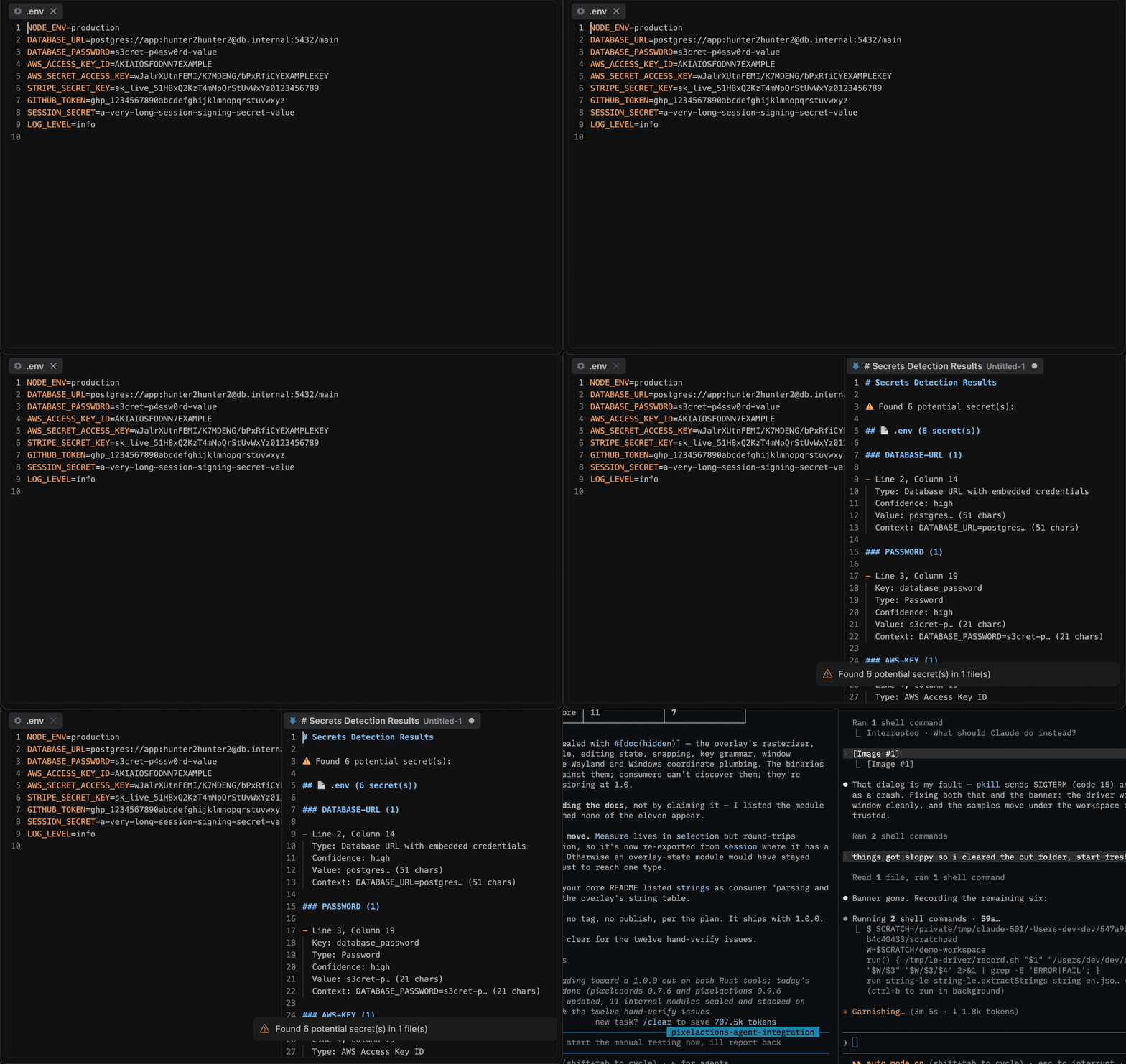
Open a workspace, press Ctrl+Alt+S (Cmd+Alt+S on Mac), and every detected secret lands in a results document — grouped by file, with line/column positions pointing at the value itself. Run Secrets-LE: Sanitize Secrets to replace the secrets in the active file with a placeholder. Works in VS Code and in VS Code–based editors like Cursor and VSCodium (installable from Open VSX).
Detection is regex-based over the full text of each file, so it works on any text format — code, configs, .env files, YAML, JSON, logs. It is a pre-commit safety net, not a guarantee: a scanner built on patterns can miss secrets and can flag non-secrets. Review the results.
Install
| Where | What you get | Install |
|---|---|---|
| VS Code | Detection and in-place sanitising, in your editor | Marketplace |
| Cursor, VSCodium, Windsurf | The same extension | Open VSX |
| A terminal or a CI step | The same run over a whole tree, with exit codes | cargo install secrets-le · crates.io |
| Any MCP agent, via Node | detect_secrets over stdio | npx secrets-le-mcp · npm |
| Zed | The MCP server as a context server | add it by hand (no listing yet) |
Use it from an AI agent
The same engine runs as an MCP server, so an agent can call it directly instead of you running a command.
| Editor | How |
|---|---|
| VS Code 1.101+ | Nothing to install — the extension registers detect_secrets with agent mode |
| Zed | No listing yet — add the MCP server by hand |
| Claude Code | claude mcp add secrets-le -- npx -y secrets-le-mcp |
| Cursor, Windsurf, anything else | point it at npx secrets-le-mcp |
Reports each finding by type, confidence, key name and 1-based position. Values are never returned — previews are truncated and length-annotated, and the context line has the secret masked out, so a finding can be located without the credential leaving the machine it was found on.
The server takes content and returns data — it reads no files and makes no network requests of its own. Published as secrets-le-mcp on npm and as io.github.nolindnaidoo/secrets-le in the MCP registry.
Configuring it by hand — any host with an MCP config file
Most hosts read a JSON config. Add one entry:
-y skips the install prompt on first run. Pin a version if you would rather not track releases — secrets-le-mcp@2.3.1.
Prefer not to go through npx on every launch? Install it once and point at the binary instead:
It speaks MCP over stdio and needs no environment variables, no API key and no configuration of its own. To check it before wiring it into anything:
That prints the tool list and exits — if you see detect_secrets, the server works.
The CLI
The same detection runs from a terminal or a CI step: a Rust CLI in
crate/, sharing one pattern table with the extension
— crate/signatures/patterns.toml —
so the two can never disagree about what counts as a credential.
The exit code is the answer: 0 nothing found · 1 findings · 2 the
question was malformed — so secrets-le . is a CI step as it stands.
It never prints a credential. A scanner's output goes into a CI log, which is archived, often world-readable, and outlives the secret; a scanner that printed what it found would disclose it more widely than the commit would have. Previews are capped at eight characters and at half the value's length, context lines are masked, and there is no flag that changes either. The extension is the half that can fix what it finds; the binary only reports.
What gets detected
Thirty-four patterns, in crate/signatures/patterns.toml — the one table
both frontends load.
| Category | Types |
|---|---|
| Named issuers | Anthropic sk-ant-, OpenAI sk-/sk-proj-, GitHub ghp_/github_pat_, GitLab, Slack xox?-, Stripe sk_live_/sk_test_, Google AIza…, SendGrid, Mailgun, Sentry, npm, PyPI, Docker Hub, HashiCorp Vault, Terraform Cloud, Supabase, Shopify, Square, Azure SAS |
| Cloud credentials | AWS Access Key IDs (AKIA…, no key name needed), AWS Secret Access Keys, Azure account keys, GCP/Google Cloud keys |
| Tokens | Generic tokens, bearer tokens, access/refresh tokens, OAuth tokens, JWTs (key-based or bare eyJ… form) |
| Passwords | password/passwd/pwd values, including compound keys (DATABASE_PASSWORD) |
| Private keys | Multi-line PEM blocks — RSA/EC, OpenSSH, PGP |
| Connection data | Database URLs with embedded user:pass@ credentials, connection strings, session IDs, cookies |
Key-based patterns accept quoted and unquoted keys, so JSON ("apiKey": "…"), YAML (api_key: …), env (API_KEY=…), and code (apiKey = '…') all match.
Intentional non-detections: template placeholders (${VAR}, {{var}}, <your-key>, xxxxxxxx), version numbers and hostnames that merely look dotted (1.2.3 is not a JWT), GCP project ids (identifiers, not credentials), and database URLs without embedded credentials.
Known limitations: detection is pattern-based — obfuscated, split, or unconventionally named secrets are missed; JWTs whose header isn't standard base64 JSON (eyJ…) are missed; a high-entropy string without a recognizable key name or prefix is not reported.
Commands
| Command | Description |
|---|---|
Secrets-LE: Detect Secrets (Ctrl+Alt+S / Cmd+Alt+S) | Scan the workspace and open a results document |
Secrets-LE: Sanitize Secrets | Replace detected secrets in the active file (asks for confirmation first) |
Secrets-LE: Open Settings | Open Secrets-LE settings |
Secrets-LE: Help | Built-in documentation |
Settings
Related MCP Servers
Reviews
No reviews yet — be the first to share how this listing worked for you.
Frequently Asked Questions about Secrets Le
AllMCPs Directory Badge
Showcase your server listing on GitHub or your project documentation. Embed this dynamic SVG badge to highlight official listing status and live engagement.
Badge Style:
Live Dynamic SVG Preview
Markdown (GitHub README)
[](https://allmcps.com/mcp/secrets-le)HTML Embed
<a href="https://allmcps.com/mcp/secrets-le"><img src="https://allmcps.com/api/badge/secrets-le?style=directory" alt="Secrets Le on AllMCPs" /></a>Technical Specs & Signals
CategorySecurity
27Quality signal: Emerging · 27/100How this signal is calculated ▾
Server availabilityNot measured
Not scored for repo-hosted servers — we can't reach the running server, only its GitHub page. Hosted MCP endpoints are health-checked live.
Verified ownership8/20
Documentation & tools11/30
Adoption & activity1/15
Community engagement0/10
A guidance signal from public completeness & health data — not a user rating. New listings start lower and rise as they add docs, get verified, and grow adoption. Signals we can't observe for a listing are skipped, not counted against it.
Own this project?
This directory is pre-filled from public sources. Claim via GitHub README, site badge, or DNS TXT to unlock edit access and the Official badge and attach your website — proof is checked automatically, then reviewed by our team.
Free dofollow backlink: add your website and place the AllMCPs badge on it — no claim needed. We detect it automatically and keep it verified as long as the badge stays live.
Claim & get free dofollowShare & Embed
Add our SVG badge (dark/light directory styles) or embeddable widget to your site.