AllMCPs
BrowseBestCategoriesStackCompareToolsGuidesBlog Log in Submit MCP

Stay in the loop

Get new MCP servers and top picks in your inbox.

AllMCPs

The open directory for discovering and installing Model Context Protocol servers.

Explore

  • Browse servers
  • Best MCP servers
  • Categories
  • MCP clients
  • Agent prompts
  • Stack Builder
  • Compare servers
  • Tags index
  • Submit a server
  • Pricing

Learn

  • Guides hub
  • What is MCP?
  • Install guide
  • Troubleshooting
  • Security
  • Blog
  • Blog RSS

Tools

  • All tools
  • Config generator
  • Config validator
  • MCP playground
  • OpenAPI β†’ MCP
  • Badge generator

For agents

  • API docs
  • Trust & traffic
  • llms.txt β†— (opens in a new tab)
  • Catalog JSON β†— (opens in a new tab)
  • Remote MCP β†— (opens in a new tab)

Company

  • About
  • Contact
  • X (@AllMCPs) β†— (opens in a new tab)
  • GitHub β†— (opens in a new tab)
  • Terms
  • Privacy
AllMCPs VerifiedAllMCPs VerifiedFeatured on Nick LaunchesFeatured on Nick LaunchesLaunch Llama NewsletterLaunch Llama NewsletterVerified DR - allmcps.comVerified DR - allmcps.comFeatured on SaaSGrowFeatured on SaaSGrowFeatured on Twelve ToolsFeatured on Twelve ToolsFeatured on Saaspa.geFeatured on Saaspa.geFeatured on Findly.toolsFeatured on Findly.toolsFeatured on Startup FameFeatured on Startup FameFeatured on LaunchKiwiFeatured on LaunchKiwiFeatured on ScrollLaunchFeatured on ScrollLaunchFeatured on DailyPingsFeatured on DailyPingsFazier badgeFazier badgeFeatured on NewTool.siteFeatured on NewTool.siteFeatured on saasfame.comFeatured on saasfame.comDR Checker - Domain RatingDR Checker - Domain RatingListed on Turbo0Listed on Turbo0Launched on LaunchBoard - Product Launch PlatformLaunched on LaunchBoard - Product Launch PlatformList on SimilarlabsList on Similarlabshttps://codetrendy.comhttps://codetrendy.comListed on DevTool.ioFeatured on BuildlistFeatured on BuildlistAllMCPs VerifiedAllMCPs VerifiedFeatured on Nick LaunchesFeatured on Nick LaunchesLaunch Llama NewsletterLaunch Llama NewsletterVerified DR - allmcps.comVerified DR - allmcps.comFeatured on SaaSGrowFeatured on SaaSGrowFeatured on Twelve ToolsFeatured on Twelve ToolsFeatured on Saaspa.geFeatured on Saaspa.geFeatured on Findly.toolsFeatured on Findly.toolsFeatured on Startup FameFeatured on Startup FameFeatured on LaunchKiwiFeatured on LaunchKiwiFeatured on ScrollLaunchFeatured on ScrollLaunchFeatured on DailyPingsFeatured on DailyPingsFazier badgeFazier badgeFeatured on NewTool.siteFeatured on NewTool.siteFeatured on saasfame.comFeatured on saasfame.comDR Checker - Domain RatingDR Checker - Domain RatingListed on Turbo0Listed on Turbo0Launched on LaunchBoard - Product Launch PlatformLaunched on LaunchBoard - Product Launch PlatformList on SimilarlabsList on Similarlabshttps://codetrendy.comhttps://codetrendy.comListed on DevTool.ioFeatured on BuildlistFeatured on Buildlist
Β© 2026 Jackalope Digital LLC. All rights reserved.
  1. Home
  2. πŸ”Ž Search & Data Extraction
  3. ScrapeGraphAI Scrapegraph Mcp
ScrapeGraphAI Scrapegraph Mcp logo
Health: ActiveRecent health check succeeded.Last checked 8/10/2026, 11:02:49 PM

ScrapeGraphAI Scrapegraph Mcp

Enrichment pendingWe haven’t run our AI enrichment pass on this listing yet, so the overview, use cases, and FAQ below may be sparse or missing. We work through the catalog over time β€” check back soon.
View Repository93 GitHub StarsTotal stargazers on GitHub for the source repository (93 stars).Visit Website

Enable language models to perform advanced AI-powered web scraping with enterprise-grade reliabili…

Quick Install

Automated & IDE Setup

Copy the AI prompt to install this server into Claude Code, Cursor, or another agent β€” or use 1-click editor setup below.

Add to CursorAdd to VS Code
Not yet automatically verified

We haven't yet run this listing's install command through our automated sandbox check. This isn't a red flag β€” we're steadily working through the catalog.

Manual Client & Custom JSON ConfigExpand JSON β–Ύ

Install Config Generator

Choose your client
claude_desktop_config.json
{
  "mcpServers": {
    "scrapegraphai-scrapegraph-mcp": {
      "command": "npx",
      "args": [
        "-y",
        "@smithery/cli"
      ]
    }
  }
}

πŸ’‘ Paste into ~/Library/Application Support/Claude/claude_desktop_config.json (macOS) or %APPDATA%\Claude\claude_desktop_config.json (Windows)

Install Tool Schemas (9) Directory Badge Claim listing AlternativesπŸ”Ž More in Search & Data Extraction

Capabilities & Tool Schemas (9) ~180 tokensApproximate context cost of this server’s tool schemas (~4 chars/token), before any tool is called. Actual usage depends on your client and model.Self-reported Self-reportedParsed from the repository README, not verified against a live server β€” may be incomplete or out of date.

Inspect callable tools, capabilities, and parameters exposed to AI agents by ScrapeGraphAI Scrapegraph Mcp.

scrape

POST /scrape (`output_format`: markdown, html, screenshot, branding, links, images, summary)

extract

POST /extract (requires `website_url` + `user_prompt`; optional `output_schema`)

search

POST /search (`num_results` 1–20; supports `country_search`, `time_range`, `output_schema`)

crawl_start

POST /crawl β€” `extraction_mode` markdown / html / links / images / summary / branding / screenshot

crawl_get_status

GET /crawl/:id (poll until `status: completed`)

schema

POST /schema (generate or augment a JSON Schema from a prompt)

Documentation Overview

ScrapeGraph MCP Server

ScrapegraphAI Logo

License: MIT Python 3.13+ smithery badge

A production-ready Model Context Protocol (MCP) server that provides seamless integration with the ScrapeGraph AI API. This server enables language models to leverage advanced AI-powered web scraping capabilities with enterprise-grade reliability.

Table of Contents

  • Key Features
  • Quick Start
  • Available Tools
  • Setup Instructions
  • Remote Server Usage
  • Local Usage
  • Google ADK Integration
  • Example Use Cases
  • Error Handling
  • Common Issues
  • Development
  • Contributing
  • Documentation
  • Technology Stack
  • License

API v2

This MCP server targets ScrapeGraph API v2 (https://v2-api.scrapegraphai.com/api), aligned 1:1 with scrapegraph-py PR #84. Auth uses the SGAI-APIKEY header. Environment variables mirror the Python SDK:

  • SGAI_API_URL β€” override the base URL (default https://v2-api.scrapegraphai.com/api)
  • SGAI_TIMEOUT β€” request timeout in seconds (default 120)
  • SGAI_API_KEY β€” API key (can also be passed via MCP scrapegraphApiKey or X-API-Key header)

Legacy aliases (still honored): SCRAPEGRAPH_API_BASE_URL for SGAI_API_URL, SGAI_TIMEOUT_S for SGAI_TIMEOUT.

Key Features

  • Scrape & extract: scrape (POST /scrape, multi-format), extract (POST /extract, URL + prompt)
  • Search: search (POST /search; num_results clamped 3–20)
  • Crawl: Async multi-page crawl with crawl_start / crawl_get_status / crawl_stop / crawl_resume
  • Schema: schema (POST /schema) β€” generate or augment a JSON Schema from a prompt
  • Monitors: Scheduled jobs via monitor_create, monitor_list, monitor_get, pause/resume/delete, monitor_activity (paginated tick history)
  • Account: credits, history
  • Easy integration: Claude Desktop, Cursor, Smithery, HTTP transport
  • Developer docs: .agent/ folder

Migration: v2 β†’ v3

v3 renames every MCP tool that diverged from the v2 API docs. Hard rename, no aliases.

v2 (old)v3 (new)
smartscraperextract
searchscrapersearch
smartcrawler_initiatecrawl_start
smartcrawler_fetch_resultscrawl_get_status
sgai_historyhistory
generate_schemaschema
markdownifyremoved β€” use scrape with output_format="markdown"

Quick Start

1. Get Your API Key

Sign up and get your API key from the ScrapeGraph Dashboard

2. Install with Smithery (Recommended)

Terminal
npx -y @smithery/cli install @ScrapeGraphAI/scrapegraph-mcp --client claude

3. Start Using

Ask Claude or Cursor:

  • "Convert https://scrapegraphai.com to markdown"
  • "Extract all product prices from this e-commerce page"
  • "Research the latest AI developments and summarize findings"

That's it! The server is now available to your AI assistant.

Available Tools

ToolRole
scrapePOST /scrape (output_format: markdown, html, screenshot, branding, links, images, summary)
extractPOST /extract (requires website_url + user_prompt; optional output_schema)
searchPOST /search (num_results 1–20; supports country_search, time_range, output_schema)
crawl_startPOST /crawl β€” extraction_mode markdown / html / links / images / summary / branding / screenshot
crawl_get_statusGET /crawl/:id (poll until status: completed)
crawl_stop, crawl_resumePOST /crawl/:id/stop | resume
schemaPOST /schema (generate or augment a JSON Schema from a prompt)
creditsGET /credits
historyGET /history (paginated, service filter)
monitor_create, monitor_list, monitor_get, monitor_pause, monitor_resume, monitor_delete/monitor API
monitor_activityGET /monitor/:id/activity (paginated tick history: id, createdAt, status, changed, elapsedMs, diffs)

Removed: sitemap, agentic_scrapper, async-status polling, and (in v3) markdownify β€” use scrape with output_format="markdown".

Setup Instructions

To utilize this server, you'll need a ScrapeGraph API key. Follow these steps to obtain one:

  1. Navigate to the ScrapeGraph Dashboard
  2. Create an account and generate your API key

Automated Installation via Smithery

For automated installation of the ScrapeGraph API Integration Server using Smithery:

Terminal
npx -y @smithery/cli install @ScrapeGraphAI/scrapegraph-mcp --client claude

Claude Desktop Configuration

Update your Claude Desktop configuration file with the following settings (located on the top rigth of the Cursor page):

(remember to add your API key inside the config)

config.json
{
    "mcpServers": {
        "@ScrapeGraphAI-scrapegraph-mcp": {
            "command": "npx",
            "args": [
                "-y",
                "@smithery/cli@latest",
                "run",
                "@ScrapeGraphAI/scrapegraph-mcp",
                "--config",
                "\"{\\\"scrapegraphApiKey\\\":\\\"YOUR-SGAI-API-KEY\\\"}\""
            ]
        }
    }
}

The configuration file is located at:

  • Windows: %APPDATA%/Claude/claude_desktop_config.json
  • macOS: ~/Library/Application\ Support/Claude/claude_desktop_config.json

Cursor Integration

Add the ScrapeGraphAI MCP server on the settings:
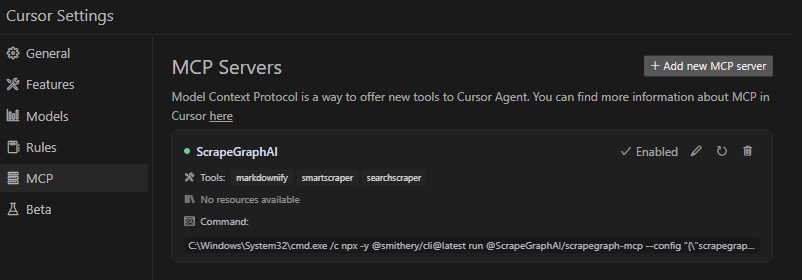
Cursor MCP Integration

Remote Server Usage

Connect to our hosted MCP server - no local installation required!

[!WARNING] The legacy MCP endpoint at https://mcp.scrapegraphai.com/mcp will be deprecated soon. New integrations should use the replacement MCP endpoint: https://sgai-mcp-main.onrender.com.

Claude Desktop Configuration (Remote)

Add this to your Claude Desktop config (~/Library/Application Support/Claude/claude_desktop_config.json on macOS):

config.json
{
  "mcpServers": {
    "scrapegraph-mcp": {
      "command": "npx",
      "args": [
        "mcp-remote@0.1.25",
        "https://sgai-mcp-main.onrender.com",
        "--header",
        "X-API-Key:YOUR_API_KEY"
      ]
    }
  }
}

Cursor Configuration (Remote)

Cursor supports native HTTP MCP connections. Add to your Cursor MCP settings (~/.cursor/mcp.json):

config.json
{
  "mcpServers": {
    "scrapegraph-mcp": {
      "url": "https://sgai-mcp-main.onrender.com",
      "headers": {
        "X-API-Key": "YOUR_API_KEY"
      }
    }
  }
}

Benefits of Remote Server

  • No local setup - Just configure and start using
  • Always up-to-date - Automatically receives latest updates
  • Cross-platform - Works on any OS with Node.js

Local Usage

To run the MCP server locally for development or testing, follow these steps:

Prerequisites

  • Python 3.13 or higher
  • pip or uv package manager
  • ScrapeGraph API key

Installation

  1. Clone the repository (if you haven't already):
bash
git clone https://github.com/ScrapeGraphAI/scrapegraph-mcp
cd scrapegraph-mcp
  1. Install the package:
bash
# Using pip
pip install -e .

# Or using uv (faster)
uv pip install -e .
  1. Set your API key:
server.ts
# macOS/Linux
export SGAI_API_KEY=your-api-key-here

# Windows (PowerShell)
$env:SGAI_API_KEY="your-api-key-here"

# Windows (CMD)
set SGAI_API_KEY=your-api-key-here

Running the Server Locally

You can run the server directly:

bash
# Using the installed command
scrapegraph-mcp

# Or using Python module
python -m scrapegraph_mcp.server

The server will start and communicate via stdio (standard input/output), which is the standard MCP transport method.

Testing with MCP Inspector

Test your local server using the MCP Inspector tool:

Terminal
npx @modelcontextprotocol/inspector python -m scrapegraph_mcp.server

This provides a web interface to test all available tools interactively.

Configuring Claude Desktop for Local Server

To use your locally running server with Claude Desktop, update your configuration file:

macOS/Linux (~/Library/Application Support/Claude/claude_desktop_config.json):

config.json
{
    "mcpServers": {
        "scrapegraph-mcp-local": {
            "command": "python",
            "args": [
                "-m",
                "scrapegraph_mcp.server"
            ],
            "env": {
                "SGAI_API_KEY": "your-api-key-here"
            }
        }
    }
}

Windows (%APPDATA%\Claude\claude_desktop_config.json):

config.json
{
    "mcpServers": {
        "scrapegraph-mcp-local": {
            "command": "python",
            "args": [
                "-m",
                "scrapegraph_mcp.server"
            ],
            "env": {
                "SGAI_API_KEY": "your-api-key-here"
            }
        }
    }
}

Note: Make sure Python is in your PATH. You can verify by running python --version in your terminal.

Configuring Cursor for Local Server

In Cursor's MCP settings, add a new server with:

  • Command: python
  • Args: ["-m", "scrapegraph_mcp.server"]
  • Environment Variables: {"SGAI_API_KEY": "your-api-key-here"}

Troubleshooting Local Setup

Server not starting:

  • Verify Python is installed: python --version
  • Check that the package is installed: pip list | grep scrapegraph-mcp
  • Ensure API key is set: echo $SGAI_API_KEY (macOS/Linux) or echo %SGAI_API_KEY% (Windows)

Tools not appearing:

  • Check Claude Desktop logs:
    • macOS: ~/Library/Logs/Claude/
    • Windows: %APPDATA%\Claude\Logs\
  • Verify the server starts without errors when run directly
  • Check that the configuration JSON is valid

Import errors:

  • Reinstall the package: pip install -e . --force-reinstall
  • Verify dependencies: pip install -r requirements.txt (if available)

Google ADK Integration

The ScrapeGraph MCP server can be integrated with Google ADK (Agent Development Kit) to create AI agents with web scraping capabilities.

Prerequisites

  • Python 3.13 or higher
  • Google ADK installed
  • ScrapeGraph API key

Installation

  1. Install Google ADK (if not already installed):
Terminal
pip install google-adk
  1. Set your API key:
server.ts
export SGAI_API_KEY=your-api-key-here

Basic Integration Example

Create an agent file (e.g., agent.py) with the following configuration:

server.ts
import os
from google.adk.agents import LlmAgent
from google.adk.tools.mcp_tool.mcp_toolset import MCPToolset
from google.adk.tools.mcp_tool.mcp_session_manager import StdioConnectionParams
from mcp import StdioServerParameters

# Path to the scrapegraph-mcp server directory
SCRAPEGRAPH_MCP_PATH = "/path/to/scrapegraph-mcp"

# Path to the server.py file
SERVER_SCRIPT_PATH = os.path.join(
    SCRAPEGRAPH_MCP_PATH, 
    "src", 
    "scrapegraph_mcp", 
    "server.py"
)

root_agent = LlmAgent(
    model='gemini-2.0-flash',
    name='scrapegraph_assistant_agent',
    instruction='Help the user with web scraping and data extraction using ScrapeGraph AI. '
                'You can convert webpages to markdown, extract structured data using AI, '
                'perform web searches, crawl multiple pages, and automate complex scraping workflows.',
    tools=[
        MCPToolset(
            connection_params=StdioConnectionParams(
                server_params=StdioServerParameters(
                    command='python3',
                    args=[
                        SERVER_SCRIPT_PATH,
                    ],
                    env={
                        'SGAI_API_KEY': os.getenv('SGAI_API_KEY'),
                    },
                ),
                timeout=300.0,)
            ),
            # Optional: Filter which tools from the MCP server are exposed
            # tool_filter=['scrape', 'extract', 'search']
        )
    ],
)

Configuration Options

Timeout Settings:

  • Default timeout is 5 seconds, which may be too short for web scraping operations
  • Recommended: Set `timeout=300.0
  • Adjust based on your use case (crawling operations may need even longer timeouts)

Tool Filtering:

  • By default, all registered MCP tools are exposed to the agent (see Available Tools)
  • Use tool_filter to limit which tools are available:
    python
    tool_filter=['scrape', 'extract', 'search']
    

API Key Configuration:

  • Set via environment variable: export SGAI_API_KEY=your-key
  • Or pass directly in env dict: 'SGAI_API_KEY': 'your-key-here'
  • Environment variable approach is recommended for security

Usage Example

Once configured, your agent can use natural language to interact with web scraping tools:

python
# The agent can now handle queries like:
# - "Convert https://example.com to markdown"
# - "Extract all product prices from this e-commerce page"
# - "Search for recent AI research papers and summarize them"
# - "Crawl this documentation site and extract all API endpoints"

For more information about Google ADK, visit the official documentation.

Example Use Cases

The server enables sophisticated queries across various scraping scenarios:

Single Page Scraping

  • Markdownify: "Convert the ScrapeGraph documentation page to markdown"
  • Extract: "Extract all product names, prices, and ratings from this e-commerce page"
  • Extract with scrolling: "Scrape this infinite scroll page with 5 scrolls and extract all items"
  • Basic Scrape: "Fetch the HTML content of this JavaScript-heavy page with full rendering"

Search and Research

  • Search: "Research and summarize recent developments in AI-powered web scraping"
  • Search: "Search for the top 5 articles about machine learning frameworks and extract key insights"
  • Search: "Find recent news about GPT-4 and provide a structured summary"
  • Search: v2 does not apply time_range; phrase queries to bias recency in natural language instead

Website analysis

  • Use crawl_start plus crawl_get_status to map and capture multi-page content; there is no separate sitemap tool on v2.

Multi-page crawling

  • Crawl: "Crawl the blog in markdown mode and poll until complete"
  • For structured fields per page, run extract on individual URLs (or monitor_create on a schedule)

Monitors and account

  • Monitor: "Run this extract prompt on https://example.com every day at 9am" (monitor_create with interval)
  • Credits / history: credits, history
  • Agentic Scraper: "Execute a complex workflow: login, navigate to reports, download data, and extract summary statistics"

Error Handling

The server implements robust error handling with detailed, actionable error messages for:

  • API authentication issues
  • Malformed URL structures
  • Network connectivity failures
  • Rate limiting and quota management

Common Issues

Windows-Specific Connection

When running on Windows systems, you may need to use the following command to connect to the MCP server:

bash
C:\Windows\System32\cmd.exe /c npx -y @smithery/cli@latest run @ScrapeGraphAI/scrapegraph-mcp --config "{\"scrapegraphApiKey\":\"YOUR-SGAI-API-KEY\"}"

This ensures proper execution in the Windows environment.

Other Common Issues

"ScrapeGraph client not initialized"

  • Cause: Missing API key
  • Solution: Set SGAI_API_KEY environment variable or provide via --config

"Error 401: Unauthorized"

  • Cause: Invalid API key
  • Solution: Verify your API key at the ScrapeGraph Dashboard

"Error 402: Payment Required"

  • Cause: Insufficient credits
  • Solution: Add credits to your ScrapeGraph account

Crawl not returning results

  • Cause: Still processing (asynchronous operation)
  • Solution: Keep polling crawl_get_status() until status is "completed"

Tools not appearing in Claude Desktop

  • Cause: Server not starting or configuration error
  • Solution: Check Claude logs at ~/Library/Logs/Claude/ (macOS) or %APPDATA%\Claude\Logs\ (Windows)

For detailed troubleshooting, see the .agent documentation.

Development

Prerequisites

  • Python 3.13 or higher
  • pip or uv package manager
  • ScrapeGraph API key

Installation from Source

server.ts
# Clone the repository
git clone https://github.com/ScrapeGraphAI/scrapegraph-mcp
cd scrapegraph-mcp

# Install dependencies
pip install -e ".[dev]"

# Set your API key
export SGAI_API_KEY=your-api-key

# Run the server
scrapegraph-mcp
# or
python -m scrapegraph_mcp.server

Testing with MCP Inspector

Test your server locally using the MCP Inspector tool:

Terminal
npx @modelcontextprotocol/inspector scrapegraph-mcp

This provides a web interface to test all available tools.

Code Quality

Linting:

bash
ruff check src/

Type Checking:

bash
mypy src/

Format Checking:

bash
ruff format --check src/

Project Structure

Code
scrapegraph-mcp/
β”œβ”€β”€ src/
β”‚   └── scrapegraph_mcp/
β”‚       β”œβ”€β”€ __init__.py      # Package initialization
β”‚       └── server.py        # Main MCP server (all code in one file)
β”œβ”€β”€ .agent/                  # Developer documentation
β”‚   β”œβ”€β”€ README.md           # Documentation index
β”‚   └── system/             # System architecture docs
β”œβ”€β”€ assets/                  # Images and badges
β”œβ”€β”€ pyproject.toml          # Project metadata & dependencies
β”œβ”€β”€ smithery.yaml           # Smithery deployment config
└── README.md               # This file

Contributing

We welcome contributions! Here's how you can help:

Adding a New Tool

  1. Add method to ScapeGraphClient class in server.py:
python
def new_tool(self, param: str) -> Dict[str, Any]:
    """Tool description."""
    url = f"{self.BASE_URL}/new-endpoint"
    data = {"param": param}
    response = self.client.post(url, headers=self.headers, json=data)
    if response.status_code != 200:
        raise Exception(f"Error {response.status_code}: {response.text}")
    return response.json()
  1. Add MCP tool decorator:
python
@mcp.tool()
def new_tool(param: str) -> Dict[str, Any]:
    """
    Tool description for AI assistants.

    Args:
        param: Parameter description

    Returns:
        Dictionary containing results
    """
    if scrapegraph_client is None:
        return {"error": "ScrapeGraph client not initialized. Please provide an API key."}

    try:
        return scrapegraph_client.new_tool(param)
    except Exception as e:
        return {"error": str(e)}
  1. Test with MCP Inspector:
Terminal
npx @modelcontextprotocol/inspector scrapegraph-mcp
  1. Update documentation:

    • Add tool to this README
    • Update .agent documentation
  2. Submit a pull request

Development Workflow

  1. Fork the repository
  2. Create a feature branch (git checkout -b feature/amazing-feature)
  3. Make your changes
  4. Run linting and type checking
  5. Test with MCP Inspector and Claude Desktop
  6. Update documentation
  7. Commit your changes (git commit -m 'Add amazing feature')
  8. Push to the branch (git push origin feature/amazing-feature)
  9. Open a Pull Request

Code Style

  • Line length: 100 characters
  • Type hints: Required for all functions
  • Docstrings: Google-style docstrings
  • Error handling: Return error dicts, don't raise exceptions in tools
  • Python version: Target 3.13+

For detailed development guidelines, see the .agent documentation.

Documentation

For comprehensive developer documentation, see:

  • .agent/README.md - Complete developer documentation index
  • .agent/system/project_architecture.md - System architecture and design
  • .agent/system/mcp_protocol.md - MCP protocol integration details

Technology Stack

Core Framework

  • Python 3.13+ - Modern Python with type hints
  • FastMCP - Lightweight MCP server framework
  • httpx 0.24.0+ - Modern async HTTP client

Development Tools

  • Ruff - Fast Python linter and formatter
  • mypy - Static type checker
  • Hatchling - Modern build backend

Deployment

  • Smithery - Automated MCP server deployment
  • Docker - Container support with Alpine Linux
  • stdio transport - Standard MCP communication

API Integration

  • ScrapeGraph AI API - Enterprise web scraping service
  • Base URL: https://v2-api.scrapegraphai.com/api
  • Authentication: API key-based

License

This project is distributed under the MIT License. For detailed terms and conditions, please refer to the LICENSE file.

Acknowledgments

Special thanks to tomekkorbak for his implementation of oura-mcp-server, which served as starting point for this repo.

Resources

Official Links

  • ScrapeGraph AI Homepage
  • ScrapeGraph Dashboard - Get your API key
  • ScrapeGraph API Documentation
  • GitHub Repository

MCP Resources

  • Model Context Protocol - Official MCP specification
  • FastMCP Framework - Framework used by this server
  • MCP Inspector - Testing tool
  • Smithery - MCP server distribution
  • mcp-name: io.github.ScrapeGraphAI/scrapegraph-mcp

AI Assistant Integration

  • Claude Desktop - Desktop app with MCP support
  • Cursor - AI-powered code editor

Support

  • GitHub Issues - Report bugs or request features
  • Developer Documentation - Comprehensive dev docs

Made with ❀️ by ScrapeGraphAI Team

Related MCP Servers

View all in Search & Data Extraction View all alternatives
  • Anybrowse logoAnybrowse

    Convert any URL to LLM-ready Markdown via real Chrome browsers. 3 tools: scrape, crawl, search. Free via MCP, pay-per-use via x402. Remote MCP endpoint: https://anybrowse.dev/mcp

    πŸ”Ž Search & Data Extraction0 views
    Compare vs Anybrowse β†’
  • Nexus logoNexus

    AI-powered web search server using Perplexity Sonar models with source citations. Zero-install setup via NPX.

    πŸ”Ž Search & Data Extraction2 views
    Compare vs Nexus β†’
  • Wigolo logoWigolo

    Local-first, keyless web intelligence in one server: search, fetch, crawl, extract, cache, find-similar, and research. Multi-engine search with local ML reranking and a persistent SQLite cache, renders JS-heavy pages, and keeps everything on your machine. Install via npx wigolo init --non-interactive --agents=.

    πŸ”Ž Search & Data Extraction2 views
    Compare vs Wigolo β†’
  • Activitypub Mcp logoActivitypub Mcp

    A comprehensive MCP server that enables LLMs to explore and interact with the Fediverse through ActivityPub protocol. Features WebFinger discovery, timeline fetching, instance exploration, and cross-platform support for Mastodon, Pleroma, Misskey, and other ActivityPub servers.

    πŸ”Ž Search & Data Extraction2 views
    Compare vs Activitypub Mcp β†’

Frequently Asked Questions about ScrapeGraphAI Scrapegraph Mcp

Add the following block to your claude_desktop_config.json under mcpServers: "mcpServers": { "scrapegraphai-scrapegraph-mcp": { "command": "npx", "args": ["-y", "ScrapeGraphAI-scrapegraph-mcp"] } }

AllMCPs Directory Badge

Full Badge Customizer

Showcase your server listing on GitHub or your project documentation. Embed this dynamic SVG badge to highlight official listing status and live engagement.

Badge Style:
Live Dynamic SVG PreviewScrapeGraphAI Scrapegraph Mcp AllMCPs Directory Badge

Markdown (GitHub README)
[![AllMCPs](https://allmcps.com/api/badge/scrapegraphai-scrapegraph-mcp?style=directory)](https://allmcps.com/mcp/scrapegraphai-scrapegraph-mcp)
HTML Embed
<a href="https://allmcps.com/mcp/scrapegraphai-scrapegraph-mcp"><img src="https://allmcps.com/api/badge/scrapegraphai-scrapegraph-mcp?style=directory" alt="ScrapeGraphAI Scrapegraph Mcp on AllMCPs" /></a>

Technical Specs & Signals

CategoryπŸ”ŽSearch & Data Extraction
More technical detailsExpand β–Ύ
TransportSTDIO
RuntimeNode.js
Views0
Unique ViewsTotal visits recorded for this listing page on AllMCPs.
Installs0
Installs & Copy ActionsTotal times users copied install commands or configuration snippets for this server.
GitHub stars93
GitHub Star CountTotal stargazers on GitHub representing community popularity (93 stars).
Last commit24d ago
Last Repository CommitThe most recent commit or push recorded for this server's GitHub repository.Last commit on Jul 17, 2026
57Quality signal: Good Β· 57/100How this signal is calculated β–Ύ
Server availabilityNot measured

Not scored for repo-hosted servers β€” we can't reach the running server, only its GitHub page. Hosted MCP endpoints are health-checked live.

Verified ownership10/20
Documentation & tools25/30
Adoption & activity8/15
Community engagement0/10

A guidance signal from public completeness & health data β€” not a user rating. New listings start lower and rise as they add docs, get verified, and grow adoption. Signals we can't observe for a listing are skipped, not counted against it.

β˜… FeaturedAllMCPs Server logo

AllMCPs Server

The official MCP server for AllMCPs.com - submit and manage tools directly from your AI. The open directory for MCP servers. Connect Claude, Cursor, Windsurf, and AI agents to databases, tools, files, and APIs. Explore 3,181+ servers. AllMCPs is the premier, open directory for discovering, evaluating, and installing Model Context Protocol (MCP) servers to equip AI agents and LLMs with real-world superpowers.

Explore Server β†’

Own this project?

This directory is pre-filled from public sources. Claim via GitHub README, site badge, or DNS TXT to get the verified badge.

Free dofollow backlink: after claiming, verify your product site and place a dofollow AllMCPs badge β€” we recheck it stays live.

Claim & get free dofollow

Share & Embed

Add our SVG badge (dark/light directory styles) or embeddable widget to your site.

Explore more

More in πŸ”Ž Search & Data Extraction β†’Best MCP servers for Web Search & Scraping β†’Alternatives to ScrapeGraphAI Scrapegraph Mcp β†’Install in Claude DesktopInstall in CursorInstall in VS Code
