Rpgmaker Mz MCP README
The full upstream README, mirrored here for reference. Install config, tool schemas, adoption signals, and an original overview live on the Rpgmaker Mz MCP listing page.
RPG Maker MZ MCP Server


128 tools that let an AI assistant read and write an RPG Maker MZ project directly — actors, classes, skills, items, equipment, states, enemies, troops, common events, maps, tiles, tilesets, events, and system settings — instead of hand-editing everything in the editor.
"Add a town under the world map, paint it with grass, and drop in a shopkeeper who sells potions" → done, in-project, no editor clicks.
Quick start
Claude Code (recommended) — installs the server and the authoring skills as one plugin:
You'll be prompted for your RPG Maker MZ project directory (optional — you can also just ask Claude to set_project later).
Any other MCP client — the server is on npm; no clone or build needed:
Claude Desktop — either the JSON config above, or download the one-click rpgmaker-mz-mcp.mcpb bundle from Releases and open it with Claude Desktop.
New here? Read SETUP.md for the full walkthrough and EXAMPLES.md for end-to-end recipes.
Contents
- Quick start
- Capabilities
- How it fits together
- Installation
- Configuration
- Usage
- Available tools
- Input validation
- Event validation (throw-by-default)
- Reference linting
- Dry-run preview
- Custom-tileset catalog skill
- Example prompts
- Development
- Project structure
- Safety and best practices
- Limitations
Capabilities
- Database CRUD — actors, classes (with learnings & param curves), skills (full-control + simplified damage/heal/buff/state helpers), items, weapons, armors, states, enemies, and troops. Only a
nameis required to create; everything else falls back to the editor's true "New X" template. - Maps & the map tree — create/delete maps, batch-reparent/reorder/rename with a cycle guard, and edit map properties. New maps register in
MapInfos.jsonexactly as the editor expects. - Tile painting (with automatic autotiling) —
paint_tiles/fill_areaset tiles on any of the six map layers and recompute autotile shapes (and their neighbours') from same-kind adjacency, so a filled region borders itself correctly.paint_blueprintpaints a whole area from ASCII rows + a legend in one call (multi-layer cells, catalog names, A4 wall faces derived automatically) and returns a passability overview.place_objectstamps multi-tile B/C objects (houses, trees) and reports their passability footprint. - Semantic tile catalog —
find_tile "grass"→ a paintable tile id. Built-in catalogs for every default tileset (Overworld, Outside, Inside, Dungeon, SF), sourced from RPG Maker's own English name sidecars. A bundled vision-bootstrap skill catalogs custom tilesets. - Passability & terrain — read a tile's flags or a map cell's layered passability (
get_tile_flags/check_passability), and edit passability/terrain-tag/behaviour flags (set_tile_flags). - Event-command builders — high-level, read-only builders that emit the exact
EventCommandsequences the editor writes (including tricky recursive branch blocks and continuation rows), landed on a page viainsert_event_commands. Covers dialogue & flow, game-state changes, presentation/transitions, and scene processing. - Event & NPC ergonomics —
create_npcplaces a complete talking NPC in one call;set_event_pagemerges a page's graphic + behavior in place. - Asset awareness —
list_assetsenumerates valid character/face/tileset/audio names so events never reference a missing file. - See and play the build —
render_mapscreenshots a map exactly as the engine draws it (whole map or a game-screen view) andrun_playtestdrives a scripted headless session (load a state, trigger events, read dialogue, pick choices, walk, auto-battle, screenshot), both reporting console errors and missing assets. Validators prove structure; these show what the player sees. - Correctness layer — Zod-validated inputs, throw-by-default event validation (a structurally invalid write is refused, not saved-and-warned-about), a cross-file reference linter (
validate_references), and a dry-run/diff preview on every write.
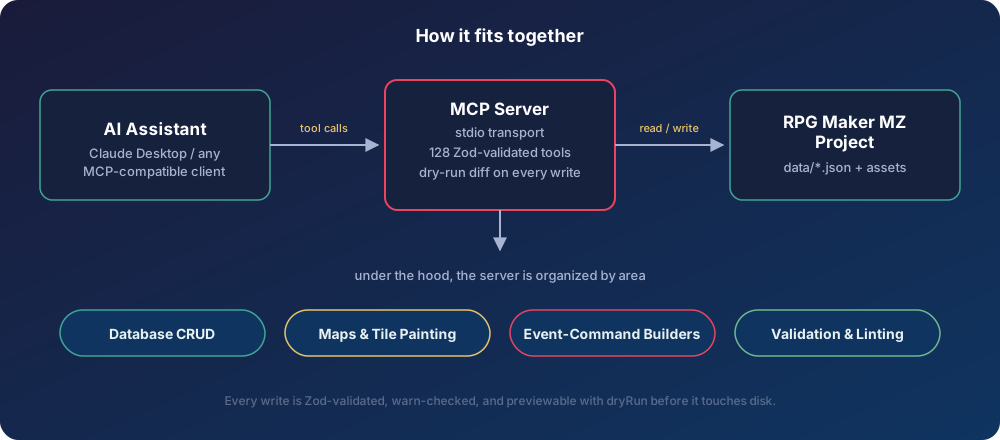
How it fits together
Installation
Pick one:
- Claude Code plugin (recommended) —
claude plugin marketplace add Redseb/rpgmaker-mz-mcp, thenclaude plugin install rpgmaker-mz@rpgmaker-mz-mcp. This bundles the MCP server (run via npx from the npm package) together with the two authoring skills (rpgmaker-authoring,tileset-catalog) — the skills carry the judgment the tools don't enforce, so this is the full experience. - npm package — configure your MCP client to run
npx -y rpgmaker-mz-mcp@latest(see Quick start). Tools only, no skills. - MCPB bundle (Claude Desktop) — download
rpgmaker-mz-mcp.mcpbfrom Releases, open it with Claude Desktop, and pick your project folder in the install dialog. - From source (development):
Configuration
Set the RPG Maker MZ project path as an environment variable:
The path must point to a directory containing game.rmmzproject and a data/ directory with System.json.
The environment variable is only the startup default: the set_project tool can retarget a running server at a different project (and get_project reports the current one), so switching games doesn't require editing config or restarting.
Usage
Running the server
Configuring in Claude Desktop
The easiest path is the .mcpb bundle from Releases — open it with Claude Desktop and pick your project folder. To configure by hand instead, add to your Claude Desktop configuration file (%APPDATA%\Claude\claude_desktop_config.json on Windows, ~/Library/Application Support/Claude/claude_desktop_config.json on macOS):
(For a from-source checkout, use "command": "node" with "args": ["/path/to/rpgmaker-mz-mcp/dist/index.js"] instead.)
Available tools
All 128 tools, grouped by area. Tools that write to the project accept an optional dryRun argument (see Dry-run preview); those that can refuse a structurally invalid write also accept force (see Event validation).
Expand the full tool reference
Project targeting
get_project— the project the server is operating on: path, validity, game titleset_project— retarget the server at another project directory for the rest of the session (no restart; overridesRPGMAKER_PROJECT_PATH)
Actors
create_actor,update_actor,search_actors
Classes
create_class,update_classadd_class_learning— attach a skill learned at a level (validates the skill, keeps learnings level-sorted)set_class_param_curve— replace one of the 8 parameter growth rows
Skills
create_skill(full control — every Skills.json field incl.occasion,hitType,speed,repeats,successRate,tpGain, required weapon types,message2,note;hitTypedefaults to magical for Magic skills, physical for other damage, certain for heals/ally scopes),update_skill,search_skillscreate_damage_skill,create_healing_skill,create_buff_skill,create_state_skill— natural-language-friendly helpers for common skill types
Items & equipment
create_item,update_item,search_itemscreate_weapon,update_weaponcreate_armor,update_armor
States
create_state,update_state
Enemies & troops
create_enemy,update_enemy,search_enemiescreate_troop,update_troop,search_troops—create_troopvalidates that every member references an existing enemybuild_troop_page— build a battle-event page{ conditions, list, span }from a compact trigger (when:turn [a, b],enemyHpBelow [slot, pct],actorHpBelow [actorId, pct],switch,turnEnd— ANDed) and aspan(battle/turn/moment), no hand-built 12-field conditions object. Read-onlyadd_troop_page— append (or insert atposition) one page to a troop without re-sending the others; warns on an HP condition pointing past the troop's members
Common events
create_common_event,update_common_eventcall_common_event— builds the code-117 call command and validates the target exists
Maps & the map tree
get_map(passincludeData: falseto omit the tile array on a big map),get_map_infos,get_map_dimensions,update_mapget_map_region— read a window of tile ids (x, y, width, height, layer) instead of the whole mapcreate_map— allocates the next id, writes a blank map, and registers it in the treedelete_map— removes a map and reparents its children onto its parentupdate_map_tree— batch reparent/reorder/rename/expand with an up-front existence check and cycle guard
Map events
get_map_events,get_map_event,search_map_eventscreate_map_event,update_map_event,delete_map_eventadd_event_command— append a single command to an event pageset_map_tile— set a single raw tile id at (x, y) on a z-layer (no autotiling)
Event & NPC ergonomics
create_npc— one-shot "talking NPC": graphic + trigger + a talk list fromtext(optionally auto word-wrapped withwrap) or explicitcommandscreate_chest— one-shot treasure chest: the two-page self-switch idiom (give item/weapon/armor/gold, then never again)create_transfer— one-shot map transfer, in either working idiom: face a solid landmark (action_button) or step on a doormat (player_touch)set_event_page— merge a page's graphic + behavior (sprite, trigger, priority, movement, flags) in place
Event-command builders
Read-only builders that return editor-faithful EventCommand sequences; land them on a command list with insert_event_commands.
- Dialogue & flow:
build_show_text(101/401),build_show_choices(102/402–404),build_conditional_branch(111/411/412),build_flow_command(wait/exit/label/jump) - Game state:
build_control_switch(121/123),build_control_variable(122),build_change_gold(125),build_change_items(126–128),build_change_party_member(129) - Presentation & transitions:
build_transfer_player(201),build_play_audio(BGM/BGS/ME/SE),build_screen_effect(fade/tint/flash/shake),build_picture(show/erase),build_character_effect(animation/balloon) - Scenes:
build_battle_processing(301),build_shop_processing(302/605),build_name_input(303),build_change_actor(HP/MP/state/recover/EXP/level, 311–316) - Battle (troop pages):
build_battle_command— enemy appear (335, reveal a hidden member), change enemy state (333, one slot or the whole troop), abort battle (340) - Insertion:
insert_event_commands— splice a built sequence into a map event page (the defaulttarget), a common event body, or a troop battle-event page, then validate
Move routes
create_move_route— build aMoveRoutefrom a named pattern (patrol/approach/flee/wander/custom)set_movement_route— insert a forced Set Movement Route (code 205 + 505 continuation rows)
Plugin commands
scan_plugins— discover the plugin commands this project actually has, by parsingjs/plugins/*.jsannotations (+ enabled state fromjs/plugins.js)list_plugin_commands— view the known plugin commands (the project scan merged over a built-in allowlist)create_plugin_command— build a code-357 plugin command with normalized args
Tiles, catalog & painting
describe_tile— decode a raw tile id (sheet, autotile kind/shape, geometry)get_tile_catalog,find_tile— resolve human names ↔ paintable tile ids (find_tilecan widen the search to a custom sheet's catalog descriptions withsearchDescriptions)paint_tiles,fill_area— paint with automatic autotilingpaint_blueprint— paint a whole area from an ASCII blueprint + legend in one write:[layer, tile]pairs per glyph, catalog names instead of ids,{ wall: { top } }entries whose vertical runs get their bottom cell turned into the wall-side (face) kind (top + 8 kinds), stale upper layers cleared; returns per-layer counts and a#/.passability mapplace_object— stamp a multi-tile B/C object and report its passability footprint
Tileset flags (passability / terrain)
get_tile_flags— decode a tile's passability/star/ladder/bush/counter/damage/terrain-tagcheck_passability— the map-aware, layered answer for a cellset_tile_flags— edit a tile's flags (non-destructive merge; auto-applies to all 48 shape slots of an autotile kind)
Assets
list_assets— enumerate available asset basenames (characters, faces, tilesets, pictures, audio, …)
Web export
export_web— build a pruned HTML5 deployment for itch.io or any static host:index.html,js/,css/,fonts/,icon/anddata/*.json, plus only theimg//audio//movies/files something references (every string in the data files, string literals in the core engine scripts and plugins, plugin@defaults;img/system/is always kept, and every.ogg/.m4avariant of a kept track). Effekseer effects are pruned the same way: aneffects/*.efkefcis kept only if its name is a real effect reference (an animation'seffectName, a Plugin Command argument in an event, or a plugin parameter/string — not other data strings, so a state or animation namedPoisondoesn't pull inPoison.efkefc), together with the textures/models it lists inside the file; if a kept effect can't be parsed, all ofeffects/' textures and models are kept. When nothing references an effect, noeffects/folder is exported. Writes the folder tooutDirand, withzip(default),<outDir>.zipwithindex.htmlat the archive root. Returns file/byte counts, kept/dropped asset counts and paths (effects included), the screen size fromSystem.advanced(use it as the itch embed size), and warnings past itch's 1000-file / 200 MB-per-file limits.prune: falsecopies every asset — use it if a plugin builds asset names at runtime. Writes nothing inside the project;outDircan't be the project or sit inside a folder it copies, and an existing non-emptyoutDiris only replaced if it's a previousexport_weboutput.
Headless render & playtest
Boots the project's own index.html in a headless Chromium to check what validators can't: how a map looks and how it plays. Read-only — nothing is written into the project; PNGs go to <os tmpdir>/rpgmaker-mz-mcp/renders/ unless you pass out. Pass inline: true to also get the PNG(s) back as image content in the tool response.
-
render_map— screenshot one map. By default it renders the whole map in one image (the canvas is resized towidth×height×48px, the player is hidden, autorun/parallel events are frozen so a cutscene can't cover the map, and the map-name banner is off). Passx+yto get a normal 816×624 game-screen view centred on that tile instead (the player is shown).showEvents: falsedraws bare tiles;switchesturns switches on first to see a later story state;runEvents: truelets events run. Returns the PNG path andproblems: console errors, page errors, and HTTP 404s (a missing image is drawn blank and listed there instead of stopping the engine on its load-error screen). Maps over 4800 px on a side need thex/yview. -
run_playtest— run a script of steps in one browser session. Each step returnsokplus details, and the run stops at the first failing step:load{mapId, x, y, direction?, party?, level?, gold?, switches?, variables?, selfSwitches?, items?, equip?, encounters?}starts a new game at that spot with that state. Random encounters stay off unlessencounters: true.startEvent{eventId}triggers a map event and lets it run until it shows text or goes idle. If the event transfers the player, the step waits for the new map and reports it astransferredTo{mapId, x, y}.advanceText{maxMs?}presses OK until the event goes idle. It stops early at an open choice list or a battle, and returns the message lines shown (with speaker names) and any open choices. Text shown during a battle comes back separately asbattleLines, so it isn't mixed into the map event's dialogue.choose{index}picks a 0-based choice.walk{direction, steps?}walks tile by tile and reports the tile it ended on (to). If a tile refused entry, it reports both the player's tile (stoppedAt) and the tile that refused (blockedTile), which is how you find invisible walls. It stops early when a touch event fires; if that event is a door, it waits for the transfer to finish, sotoandtransferredToare on the new map.eventRunning/messageOpensay the event is still going (follow up withadvanceText).press{button, times?}andwait{ms}.autoBattle{troopId?, canEscape?, canLose?, maxMs?}fights a battle that has already started, or startstroopId, on auto AI, giving up aftermaxMs(default 60 s). It reportsvictory/defeat/escaped, the final HP of both sides, and the battle's messagelines(troop battle events, victory text). Battles are fast-forwarded: the engine runs 20 frames for every frame it draws, so the fight plays out exactly as it would (same logic, same odds), only faster. A 10-turn boss fight takes about 5 s instead of 80 s. Passrealtime: trueon the run to watch battles at normal speed, and raisemaxMsto match. Only battles are sped up; the map, walking and dialogue run at normal speed.screenshot{name?}saves a PNG.eval{script}returns the value of a JS expression evaluated in the game page, such as"$gameSwitches.value(3)".
Reported text (
lines,battleLines,choices, speaker names) reads the way the message window shows it.\V[n],\N[n],\P[n]and\Gare filled in from the game state at the time, and control codes such as\C[n],\I[n],\{,\.and\|are removed, so victory text comes back as92 EXP received!.The response ends with
finalState(scene, map, position, gold, party) andproblems.startEventandautoBattlerefuse to start while an event or message is still running (for example, a map's autorun cutscene right afterload) and tell you toadvanceTextfirst.
Requirements. Both tools need playwright-core. It's an optional dependency, so a failed install never breaks the other tools; these two just return an error that tells you how to fix it. They also need a Chromium. No browser is downloaded: the server uses the newest chrome-headless-shell (or full Chromium) in the Playwright cache (~/Library/Caches/ms-playwright, ~/.cache/ms-playwright, %LOCALAPPDATA%\ms-playwright, or PLAYWRIGHT_BROWSERS_PATH). If you don't have one, run npx playwright install chromium-headless-shell, or set RPGMAKER_MCP_CHROMIUM to any Chrome/Chromium executable. Each call takes about 1–2 s to boot, plus however long the script runs.
Long runs. A run_playtest script with long cutscenes or realtime battles can take a minute or more, which is longer than many MCP clients wait by default (the TypeScript SDK gives up after 60 s with -32001 Request timed out). If the client sends a progressToken, the server sends a progress notification for each step and every 5 s during long ones, so a client using resetTimeoutOnProgress (or a longer timeout) keeps waiting. If your client can do neither, split the script into several shorter runs.
System & vocabulary
get_system,get_game_title,update_game_titleget_title_screen,update_title_screen— background layers, BGM, and the "draw game title" toggleget_variables,set_variable_name,get_switches,set_switch_nameget_starting_position,update_starting_positionget_party,set_party— the starting party (set_partyvalidates every actor id)get_terms,set_term— menu vocabularyget_types,set_type_name— element/skill/weapon/armor/equip type-name listsset_currency_unit
Batch creation
batch_create— create many records of one type (actors, items, weapons, armors, skills, enemies, states, classes) in a single call and a single file write; ids allocate sequentially, so a record can reference a sibling made earlier in the same batch; record fields the matchingcreate_*tool doesn't accept come back as warnings instead of vanishing silently
Deleting records
delete_record— delete one database record (actor, class, skill, item, weapon, armor, enemy, troop, state, common event) by nulling its slot, so no other id shifts; reports every reference the deletion would leave dangling and refuses when there are any unlessforce: truereset_table— clear a whole table except the ids inkeep(e.g.reset_table('skill', { keep: [1, 2] })wipes the RTP skills but keeps Attack/Guard); kept records stay at their own id, trailing empty slots are trimmed, and it refuses on dangling references the same way
Index & validation
list_names— cheap{ id, name }index for a table (actors, items, skills, maps, enemies, …)get_database— full records from one table (actors, classes, items, weapons, armors, skills, enemies, troops, states, common_events), or a single record byidvalidate_event,validate_project— event-command-shape validation (read-only)validate_references— cross-file id-integrity audit (party→actor, transfer→map, effect→state/skill/common-event, drops→item, Change Items/Shop/Battle Processing→item/troop, encounters→troop, map-tree cycles, …)
ID allocation
list_allocated_ids— which switch / variable / common-event IDs are already spoken for, derived from the project's own JSON; withid, every place that one is referencednext_free_id— reserve the next unallocated ID(s) instead of picking one by hand
Input validation
Every tool declares its arguments as a Zod schema. The server (built on the MCP SDK's high-level McpServer) validates incoming arguments against that schema before a handler runs, so malformed calls are rejected with a clear Input validation error naming the offending field instead of writing garbage to disk.
Event validation (throw-by-default)
Event command lists are checked against a table of known RPG Maker MZ command codes (101 Show Text, 201 Transfer Player, 122 Control Variables, …), and against the block structure those commands form. Findings come in two tiers, and the tier decides what happens to the write:
- Structural — a wrong parameter count for a known command (including the counts that depend on a Conditional Branch's condition type or a Control Variables operand type), a list not terminated by the code-
0end marker, a non-arrayparameters, a broken block (a Show Choices/Conditional Branch/Loop that is never closed, a branch or closer row orphaned or written at the wrong indent, a choice with noWhenbranch), or an action-button event stranded on an impassable tile. These are almost always bugs, so the event-writing tools validate the would-be result before committing and refuse the write: the tool errors and nothing reaches disk. Passforce: trueto write anyway (the argument is advertised on exactly the tools that can refuse). - Advisory — an unrecognized command code (which may simply be a plugin command), an over-long text line, an unknown asset filename, a choice block whose Cancel routing and
When Cancelbranch disagree (dead code, not corruption). These are legitimately possible, so they never block; they ride along aswarningson the normal response.
Because the check runs before the commit, a dryRun of a write that would be refused fails too, rather than previewing a write that could never happen.
validate_event / validate_project remain read-only audits: they report both tiers (each finding carries a severity) without changing anything.
Text width: teaching it your font
The over-long-text-line warning is measured in characters by default — 55 per line, 38 when a face graphic is shown — which suits the stock RTP font and needs no setup. If your project ships a different font, that estimate goes wrong in one of two directions: a narrower font makes it warn on lines that fit comfortably, and a wider or larger one makes it stay quiet on lines that really are cut off (38 characters of a 24px glyph is 912px in a 616px window). No single character limit fixes both, because glyph widths in a proportional font span a wide range — a full stop can be a third the width of a capital.
Drop a .rpgmaker-mcp.json in the project root to replace the estimate with a real measurement:
lineBudget— the message window's usable width, without and with a face graphic. In pixels if you givecharWidths, otherwise in characters (a barelineBudgetis just a character-limit override).charWidths— per-character advance;_defaultcovers anything unlisted. Get these from the engine itself:Window_Base.textWidth(c.repeat(40)) / 40in a running game is exact.nameBudgetChars— how wide to assume\N[3]/\P[1]renders. A name is typed by the player at runtime, so budget the Name InputmaxLength(usually 8) rather than the default name, or a long name overflows a line that fitted while you were testing. Defaults to0, which ignores name escapes as before.
Everything fails soft: no file, bad JSON, or a malformed text section leaves the built-in estimate in place, so a broken config is never worse than no config. The file is re-read when its mtime changes, and warnings then report real widths (Show Text line is 650px but the message window fits 616px with a face shown).
Auto-wrap. Rather than fixing overflowing lines by hand, pass wrap: true to build_show_text or create_npc and write whole paragraphs: the text is word-wrapped to exactly the width the warning checks (the default estimate or your .rpgmaker-mcp.json metrics; escape codes like \C[n] never count or get split) and split into as many 4-line message boxes as needed, each with the same face/speaker. wrap: true (or "soft") reflows every entry as one paragraph; "hard" keeps each entry and \n as a forced line break and only wraps lines that are too long.
Reference linting
validate_references performs a cross-file id-integrity audit — orthogonal to the command-shape check above. It walks the whole database and flags references that point at something that doesn't exist: a starting party member with no matching actor, a Transfer Player targeting a missing map, a skill effect that adds a non-existent state, an enemy dropping an unknown item, a cyclic map-tree parent, and more. Every check is warn-by-default and guarded against false positives on partially-loaded projects.
Deleting records and resetting tables
A new MZ project ships RTP-flavoured database rows whose icons, animations and battlers point at RTP art. When you replace the art wholesale, the natural workflow is "clear the database, then author my own" — reset_table is that first step, and delete_record removes a single row.
Database arrays are index = id, so both tools null the slot rather than splice: nothing is renumbered, and no surviving reference silently starts pointing at a different record. reset_table keeps each keep id at its own index and trims trailing empty slots (a table with nothing kept becomes [null]); new records from create_* / batch_create then allocate from the highest live id.
Before writing, both tools work out which references the removal would leave dangling, by running the validate_references audit with and without the removed rows and keeping only the findings the removal introduces (references that were already broken aren't blamed on it). Removing skill 1 (Attack), skill 2 (Guard) or state 1 (Knockout) is always reported too, since the engine hard-codes those ids. If anything would dangle, the write is refused and nothing reaches disk — pass force: true to go ahead anyway, or dryRun: true to preview what disappears and what would break (a dry-run reports requiresForce instead of throwing). The scan covers what validate_references covers and says so in a coverage field: traits, actor starting equipment, event page conditions, Conditional Branch operands, and Script/plugin commands are not scanned.
ID allocation
Switches, variables and common-event IDs are one global namespace, and nothing in RPG Maker stops a later edit from claiming an ID an earlier one already used. The failure is silent — no crash, no validator hit, just a door that is inexplicably already open hours into a playtest.
list_allocated_ids answers "what's taken?" from the project files themselves — never a hand-maintained list, which would drift the moment someone edited in the RPG Maker editor. An ID counts as allocated if it is declared (a System.json label, a CommonEvents row) or referenced anywhere: event page conditions and command lists, common events, troop pages, and Common Event skill/item effects. Both halves matter — a named-but-unused switch is a claim someone staked, and a used-but-unnamed one is a claim nobody wrote down. Pass id to ask the narrower question: where is switch 23 actually used, before I touch it?
next_free_id hands back the next unallocated ID(s), strictly above everything already taken. Holes below the highest ID are left alone by default (a hole is often an ID claimed in notes but not yet written); reuseGaps: true fills them when you're compacting deliberately. It's read-only — it suggests IDs, it doesn't write them, so name what you take with set_switch_name / set_variable_name to make the claim visible to whoever edits next. Those two grow the System.json name list when the ID is past the end, so an ID from next_free_id can always be labelled without opening the editor.
Like the command validator, the usage scan is curated, not exhaustive: it covers the commands that carry switch/variable IDs (Control Switches/Variables, Conditional Branch, the "designation by variable" forms of Transfer Player, Change Gold/Items, Change HP/MP/EXP/Level, …), and every report states the command codes it scanned. An ID used only from a Script (355) or a plugin command (357) will read as free.
Dry-run preview
Every tool that writes to the project accepts an optional dryRun argument. When dryRun: true, the tool computes what it would write and returns a diff instead of touching any files:
wouldReturn carries the response the tool would have produced, so a dry-run also previews the validation warnings a write would have reported — not just the diff.
All writes go through a single choke point that skips no-op writes and keeps the on-disk JSON in the editor's compact single-line format. File deletions (e.g. delete_map) share the same dry-run machinery.
Quiet write echoes
A write tool that echoes the whole record back costs the one caller that always pays for it — an AI assistant, whose context is the scarce resource. So the tools that would otherwise replay a command list or a map's events return a summary by default:
| tool | echoes |
|---|---|
update_map, resize_map | the map without its tile data or its events, plus dataTileCount / eventCount |
update_map_event, set_event_page, add_event_command | event identity + per-page trigger / priorityType / moveType / graphic / listLength |
insert_event_commands | listLength + listCodes — the resulting command codes, without the parameters |
create_common_event, update_common_event | identity, trigger wiring, listLength + listCodes |
create_troop, update_troop, add_troop_page | identity, members, per-page listLength |
The rule: keep what you would assert on, drop what you would only re-read. Command codes stay, because they are how you verify a splice landed where you asked (is the 302 still after the two 101s); command parameters go, because they are what you just wrote.
Pass verbose: true on any of those calls for the old full record, or read it back with get_map / get_map_event / get_database. warnings always survive summarization, and a dry-run's wouldReturn is summarized the same way so a preview and the real call report the same shape.
Measured on six calls from one real authoring session: 115,080 → 3,672 characters (-97%). A single update_map that set a map's BGM was echoing 46,846 characters of dialogue back at the caller.
Custom-tileset catalog skill
The default tilesets are cataloged out of the box. A non-default sheet that ships an RPG Maker .txt name sidecar next to it (img/tilesets/<Sheet>.txt, one Name|日本語名 line per tile — commercial DLC packs include these) is cataloged automatically too: its names come back with source: 'sidecar', no catalog files needed. Precedence per tile: a human-verified (manual) data/tilecatalog/ entry > the sidecar > a vision draft. For a custom (non-RTP) tileset with no sidecar, a bundled Claude skill under .claude/skills/tileset-catalog/ slices each sheet into labelled samples, has Claude vision-name them, and writes a versioned, project-scoped catalog to data/tilecatalog/ — after which find_tile/get_tile_catalog resolve names for that sheet too. Those drafts also record what each tile looks like, so find_tile with searchDescriptions: true can match that text when a machine-drafted name is too terse to search by. The skill ships a dependency-free PNG codec and engine-exact tile geometry, so it runs anywhere Node does.
Example prompts
Once configured, drive your project in natural language:
- "Create a fire skill 'Fireball' costing 15 MP that deals
a.mat * 4 - b.mdf * 2to one enemy." - "Add a new town map under the world map, 30×25, using the Outside tileset."
- "Paint grass in a 10×8 rectangle at (4, 4) on map 3 and let it auto-border."
- "Place a talking NPC named 'Guard' at (8, 5) on map 2 who says 'Halt! Who goes there?'"
- "Make the water tiles on tileset 1 impassable and tag them terrain 1."
- "Check my project for broken references before I ship."
Development
During development you can skip the build entirely by running the server from source with tsx: point your MCP client's command at node_modules/.bin/tsx with src/index.ts as the argument. Since tsx doesn't type-check, run npm run typecheck alongside lint and tests before committing.
CI runs lint, format check, tool-count sync check, tests, and build on every push and pull request (see .github/workflows/ci.yml).
Keeping the tool count in sync
The advertised tool count lives in a few human-facing spots — the README prose and badge, and the two SVGs in assets/. npm run sync:tools counts the real tools from src/tools/ and re-stamps all of them, so bumping the number after adding a tool is one command. npm run sync:tools:check (run in CI) fails if any spot is stale.
Releasing
package.json is the source of truth for the version; npm run sync:version stamps it into the plugin manifest (.claude-plugin/plugin.json), the MCP-registry metadata (server.json), and the MCPB manifest (mcpb/manifest.json). CI and prepublishOnly fail if they drift. A release is:
The Claude Code plugin needs no separate publish — users' installs update from this repo (the plugin runs the npm package via npx rpgmaker-mz-mcp@latest, so bumping npm is what ships new tools).
Tag last, and never amend a tagged commit. npm version on its own commits and tags before sync:version has stamped the other manifests, so the old recipe amended afterwards — which left the tag pointing at the pre-amend commit, with stale manifests and off the branch entirely. --no-git-tag-version avoids the whole problem: one commit, then the tag. Push the tag by name (--follow-tags is easy to get wrong here), and don't skip gh release create — nothing before it creates the GitHub release.
Project structure
Safety and best practices
- Close the RPG Maker MZ editor while using this server — it writes JSON files directly, and the editor can overwrite changes on save.
- Use version control for your project. Combined with dry-run previews and validation, git is the safety net (the server does not make automatic backups).
- Preview destructive edits with
dryRun: truebefore committing them. - Test in-engine after significant changes.
Limitations
- Writes JSON files directly; the editor must be closed to avoid conflicts.
- Plugin commands are validated against the plugins your project actually ships (
scan_pluginsparses their@command/@argannotations), falling back to a small built-in allowlist. Since RPG Maker MZ has no "required argument" annotation, scanned args are checked for unknown names only, never for missing ones; a plugin with no annotation block passes through unchecked. - Animations (
Animations.json, Effekseer-based) are not edited by this server.
Acknowledgements
This project started life as a fork of k4zuki0539/-rpgmaker-mz-mcp (MIT), which provided the original CRUD scaffolding. It has since grown well beyond that starting point — into full vanilla level-design and game-logic authoring (see Capabilities) — and is now maintained as its own project. Thanks to the original author for the foundation.