AllMCPs
BrowseBestCategoriesStackCompareToolsGuidesBlog
Log in Submit MCP

Stay in the loop

Get new MCP servers and top picks in your inbox.

AllMCPs

The open directory for discovering and installing Model Context Protocol servers.

AllMCPs on GitHub (opens in a new tab)
Launched onTiny Startupstinystartups.com
Explore
  • Browse servers
  • Best MCP servers
  • Categories
  • MCP clients
  • Agent prompts
  • Stack Builder
  • Compare servers
  • Random discovery New
  • Submit a server
  • Pricing & Boost Boost
Learn
  • Guides hub
  • What is MCP?
  • Install guide
  • Build an MCP server
  • Deploy an MCP server
  • Security guide
  • Troubleshooting
  • MCP for SEO & AEO
  • Protocol versioning
  • Transports: stdio vs HTTP
  • State of MCP (stats)
  • Blog & updates
Tools
  • All developer tools
  • Config generator
  • Config validator
  • Config auditor
  • MCP playground
  • Token calculator
  • OpenAPI → MCP
  • Badge generator
For agents
  • REST API docs
  • Trust & traffic Live
  • Remote MCP server SSE ↗ (opens in a new tab)
  • llms.txt ↗ (opens in a new tab)
  • Catalog JSON ↗ (opens in a new tab)
Company
  • About
  • Advertise Sponsor
  • Contact
  • GitHub ↗ (opens in a new tab)
  • Terms
  • Privacy
AllMCPs VerifiedAllMCPs VerifiedFeatured on Nick LaunchesFeatured on Nick LaunchesLaunch Llama NewsletterLaunch Llama NewsletterVerified DR - allmcps.comVerified DR - allmcps.comFeatured on SaaSGrowFeatured on SaaSGrowFeatured on Twelve ToolsFeatured on Twelve ToolsFeatured on Saaspa.geFeatured on Saaspa.geFeatured on Findly.toolsFeatured on Findly.toolsFeatured on Startup FameFeatured on Startup FameFeatured on LaunchKiwiFeatured on LaunchKiwiFeatured on ScrollLaunchFeatured on ScrollLaunchFeatured on DailyPingsFeatured on DailyPingsFazier badgeFazier badgeFeatured on NewTool.siteFeatured on NewTool.siteFeatured on saasfame.comFeatured on saasfame.comDR Checker - Domain RatingDR Checker - Domain RatingListed on Turbo0Listed on Turbo0Launched on LaunchBoard - Product Launch PlatformLaunched on LaunchBoard - Product Launch PlatformList on SimilarlabsList on Similarlabshttps://codetrendy.comhttps://codetrendy.comListed on DevTool.ioFeatured on BuildlistFeatured on BuildlistLaunched on Tiny StartupsFeatured on ShowMeBestAIFeatured on ShowMeBestAIFind us on LaunchZoneFind us on LaunchZoneAllMCPs VerifiedAllMCPs VerifiedFeatured on Nick LaunchesFeatured on Nick LaunchesLaunch Llama NewsletterLaunch Llama NewsletterVerified DR - allmcps.comVerified DR - allmcps.comFeatured on SaaSGrowFeatured on SaaSGrowFeatured on Twelve ToolsFeatured on Twelve ToolsFeatured on Saaspa.geFeatured on Saaspa.geFeatured on Findly.toolsFeatured on Findly.toolsFeatured on Startup FameFeatured on Startup FameFeatured on LaunchKiwiFeatured on LaunchKiwiFeatured on ScrollLaunchFeatured on ScrollLaunchFeatured on DailyPingsFeatured on DailyPingsFazier badgeFazier badgeFeatured on NewTool.siteFeatured on NewTool.siteFeatured on saasfame.comFeatured on saasfame.comDR Checker - Domain RatingDR Checker - Domain RatingListed on Turbo0Listed on Turbo0Launched on LaunchBoard - Product Launch PlatformLaunched on LaunchBoard - Product Launch PlatformList on SimilarlabsList on Similarlabshttps://codetrendy.comhttps://codetrendy.comListed on DevTool.ioFeatured on BuildlistFeatured on BuildlistLaunched on Tiny StartupsFeatured on ShowMeBestAIFeatured on ShowMeBestAIFind us on LaunchZoneFind us on LaunchZone
© 2026 Jackalope Digital LLC. All rights reserved.
  1. Home
  2. 💻 Developer Tools
  3. Repomap
R
Health: Not checked yetWe have not completed a health check for this listing yet.No health check has run yet.

Repomap

User RatingsBe the first to rate and review this MCP server! Enrichment pendingWe haven’t run our AI enrichment pass on this listing yet, so the overview, use cases, and FAQ below may be sparse or missing. We work through the catalog over time — check back soon.
View RepositoryVisit Website

Codebase map for AI agents: code graph, search, call paths, change impact. Local, no API key.

Quick Install

Automated & IDE Setup

Copy the AI prompt to install this server into Claude Code, Cursor, or another agent — or use 1-click editor setup below.

One-click editor setup isn’t available for this listing yet — we don’t have a confirmed install command, and we’d rather show nothing than point your editor at the wrong package or host. Follow the project’s own setup instructions, linked above.

Manual Client & Custom JSON ConfigExpand JSON â–¾
No confirmed setup config for this listing yet. We only publish a config block when the install details come from the project itself — its README, its docs, or a verified owner. We haven’t found those for repomap, and we’d rather show nothing than a guess you’d paste into your client. Follow the project’s own setup instructions for the current steps.
Install Directory Badge Claim listing Alternatives💻 More in Developer Tools

Documentation Overview

repomap

**A map of your codebase for AI agents: code graph, search, call paths and change impact. No API key.**

Code graph · hybrid search · call paths · change impact · an interactive graph UI.
One Rust binary. Local. No API key. MIT.

npm CI MCP Registry License: MIT

[![agent-ready 93/100](https://mark.sylphx.com/badge/agent--ready-93%2F100-brightgreen)](https://github.com/SylphxAI/repomap#agent-readiness-score)

Live demo · Docs · Quickstart · Tools · Graph UI · Benchmarks · Compare
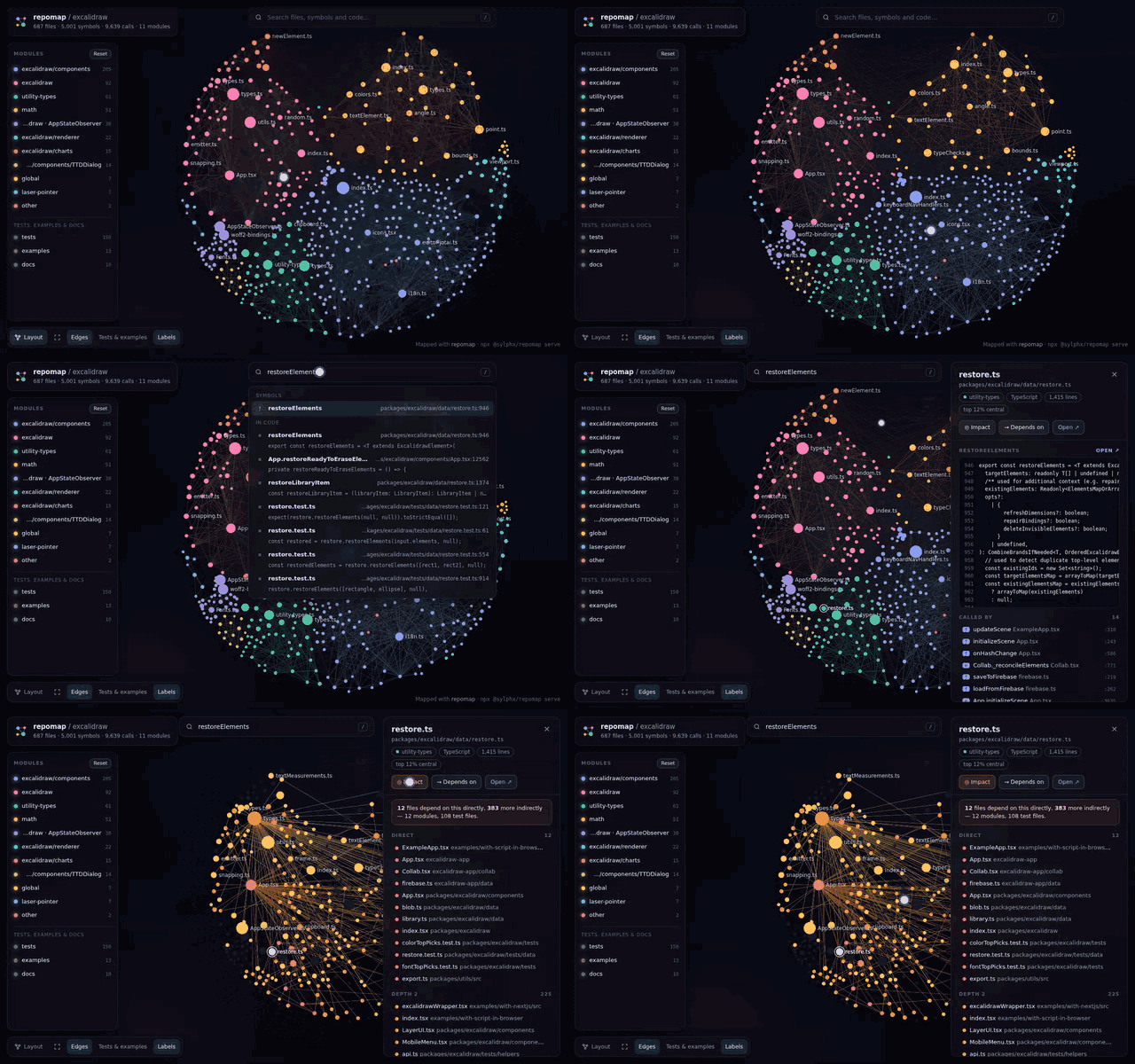
repomap demo: the map of excalidraw, searching restoreElements, its code and callers, then the impact of changing it

The real UI on excalidraw (687 files, indexed in under half a second): search, a symbol's code and callers, then the blast radius of a change. Try it in your browser, no install needed.

Quickstart

Terminal
npx -y @sylphx/repomap setup     # add repomap to Claude Code, Codex, Cursor, VS Code, Claude Desktop, Windsurf, Gemini CLI
npx -y @sylphx/repomap serve     # open the graph UI for the current repo

That's it. Add --claude-hooks to also enrich Claude Code's Grep and Glob. setup detects the clients you have, writes their MCP config, and prints every change it made. Run it again and nothing changes. Then ask your agent: "Use repomap to map this repo."

Manual MCP config
config.json
{
  "mcpServers": {
    "repomap": { "command": "npx", "args": ["-y", "@sylphx/repomap", "mcp"] }
  }
}

Claude Code: claude mcp add repomap -- npx -y @sylphx/repomap mcp Claude Desktop, one click: download repomap-<version>.mcpb from the latest release, open it, and pick your project folder. Claude Code plugin: /plugin marketplace add SylphxAI/repomap, then /plugin install repomap@repomap Codex (~/.codex/config.toml):

toml
[mcp_servers.repomap]
command = "npx"
args = ["-y", "@sylphx/repomap", "mcp"]

Docker (stdio, amd64/arm64):

config.json
{ "mcpServers": { "repomap": { "command": "docker", "args": ["run", "-i", "--rm", "-v", "/path/to/repo:/workspace:ro", "ghcr.io/sylphxai/repomap"] } } }

The server indexes the client's workspace root (or its working directory, or REPOMAP_ROOT). Every tool also takes root.

Why

Agents burn most of their context on grep, ls and reading whole files just to work out where things are. repomap gives them the map up front:

  • Where is it? Hybrid search that matches symbol names, the words inside functions and what the code means, with the lines that matched. Ask "where are failed requests retried" or parseConfig.
  • What is this? One call returns a symbol's code, callers with call-site lines, callees, subtypes and the tests that reach it.
  • How does A reach B? The shortest call path, each hop cited file:line.
  • What breaks if I change this? Direct and indirect callers, importing files, modules touched, tests to run, and a risk level. Point it at your git diff before you commit.
  • What does this repo look like? Modules found from real dependencies (not just folders), the most central files, the most used symbols, and entry points.

All of it comes from a local index: tree-sitter parsing, a resolved import and call graph, PageRank, Louvain communities, BM25 over AST chunks, and a small static code embedding model (33 MB, downloaded once from Hugging Face, then offline). Nothing leaves your machine, and no API is called.

What your agent gets

Six tools, each with an obvious job:

ToolAsk itReturns
map"Give me the lay of the land" / focus: "src/server"Modules, central files, key symbols, entry points; an outline with line numbers when focused
search"where are failed requests retried", "parseConfig"Ranked file:line ranges (functions, methods, classes) by keywords, names and meaning, with the matching lines
contextSessionStore.refresh, src/auth/token.ts, token.ts:42Code, callers (with call sites), callees, subtypes, members, imports, importers, tests
tracefrom: handleRequest, to: db.queryShortest call path, or the call tree above/below a symbol
impacttarget: verifyToken or changed: trueRisk level, callers by depth, importing files, modules, tests to run
dbtable: users, or url_env: DATABASE_URL for a live databaseTables, keys, indexes, and the code (file:line) that queries each table

Answers are compact text that cites file:line, so they cost few tokens. Pass format: "json" for structured output.

text
> impact target=decode

# Impact (LOW risk)
Changing: function decode (src/auth/token.ts:14)
1 direct caller, 3 symbols affected in total across 3 files and 2 modules; 1 file importing the changed files; no tests reach this.

## Direct callers (will break if the contract changes)
- function verifyToken — src/auth/token.ts:8

## Indirect (depth 2)
- method SessionStore.refresh — src/auth/session.ts:5

## Indirect (depth 3)
- function handleRefresh — src/api/router.ts:6

## Importing files
- src/auth/session.ts

The same commands work in your terminal: repomap map, repomap search "…", repomap context X, repomap trace A B, repomap impact --changed, repomap db.

The graph UI
Terminal
npx -y @sylphx/repomap serve            # live, with code preview
npx -y @sylphx/repomap export           # repomap.html: one self-contained file you can publish
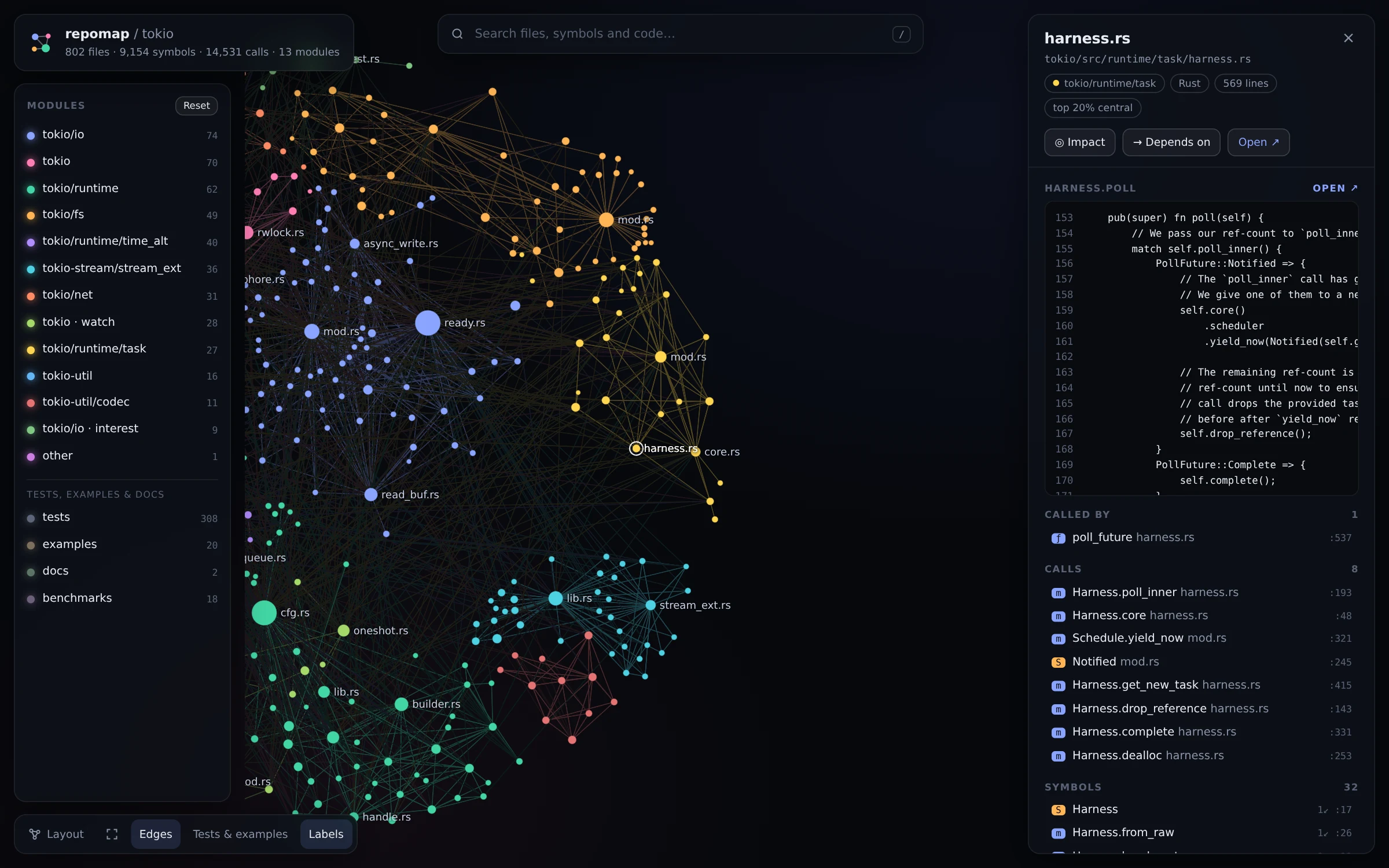
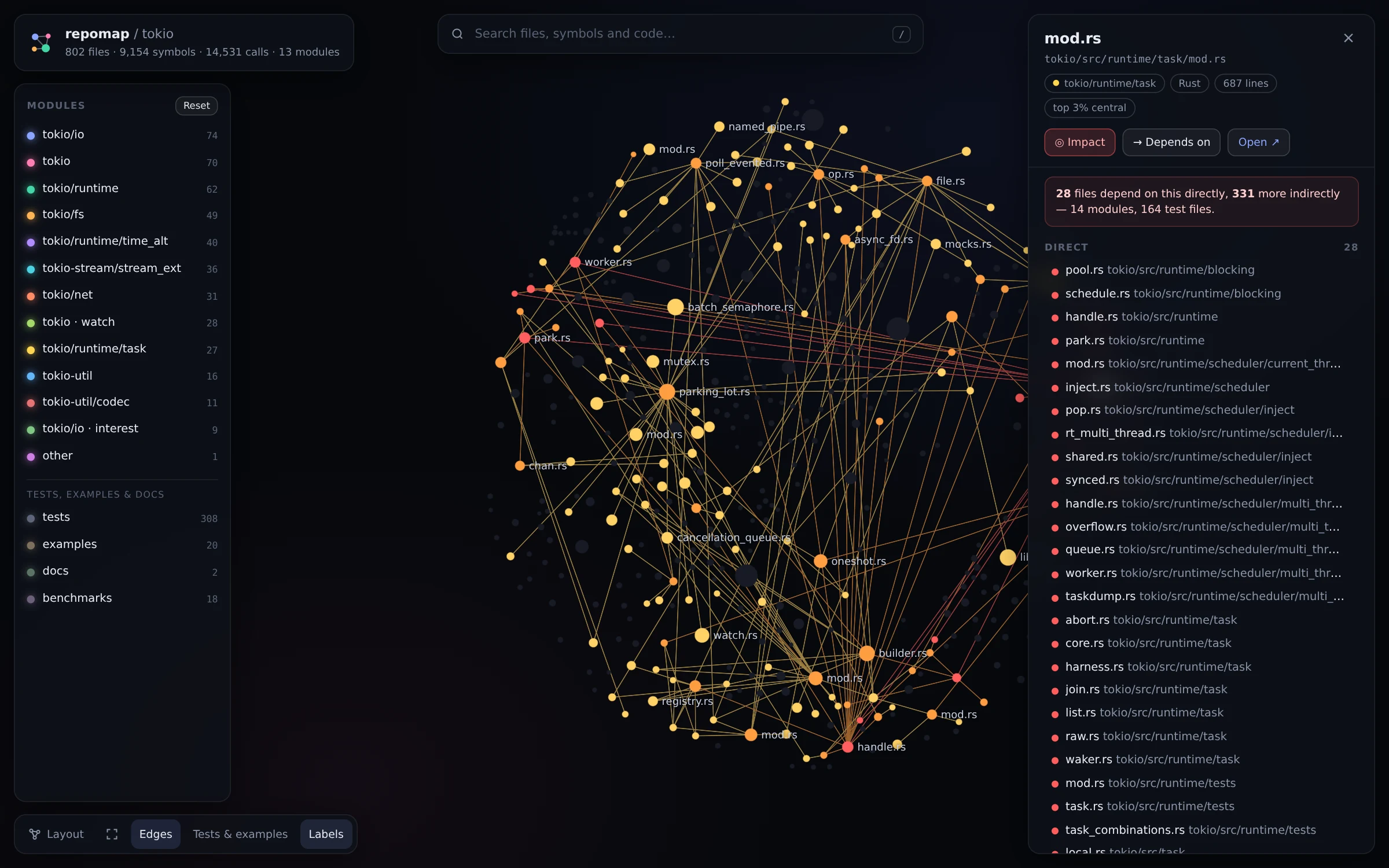
Impact view on tokio: dependents of runtime/task/mod.rs highlighted by depthCode panel on tokio: harness.rs poll() with its callers and callees
Impact. Select a file and press i: everything that depends on it lights up by depth, with a list you can click through.Code. Click a symbol to see its source, callers and callees. Open ↗ jumps to your editor or to GitHub.
  • WebGL rendering (Sigma.js) that stays smooth with tens of thousands of files and edges
  • Modules coloured and clustered by their real dependencies, file size by PageRank; tests, examples and docs are muted and one click away
  • / searches files, symbols and code; d shows dependencies; f fits the view
  • Click a module to focus it, Shift-click to hide it; toggle tests, edges and labels
  • export writes one HTML file with deep links (#path/to/file) and GitHub links pinned to your commit. It's a good fit for a README, a wiki or a design review.

Database map

Terminal
npx -y @sylphx/repomap db                              # from migrations / Prisma / Drizzle / SQLAlchemy / Diesel / Django
npx -y @sylphx/repomap db --url-env DATABASE_URL       # live Postgres, MySQL or SQLite, read-only
npx -y @sylphx/repomap db users                        # one table: columns, indexes, who references it, where it is queried
npx -y @sylphx/repomap db --serve                      # the same graph UI, for tables and foreign keys

repomap reads your schema from the repository: SQL migrations (applied in order, with down migrations skipped), schema.prisma, Drizzle pgTable/mysqlTable/sqliteTable, SQLAlchemy and Flask-SQLAlchemy models, Diesel table!, and Django models.py (fields, ForeignKey/ManyToManyField, Meta, implicit join tables). It can also introspect a live database. Each table is linked to the code that queries it: raw SQL (FROM users), Prisma (prisma.user.findMany), Diesel (users::table), Django (Post.objects…), and ORM models or tables used by files that import them.
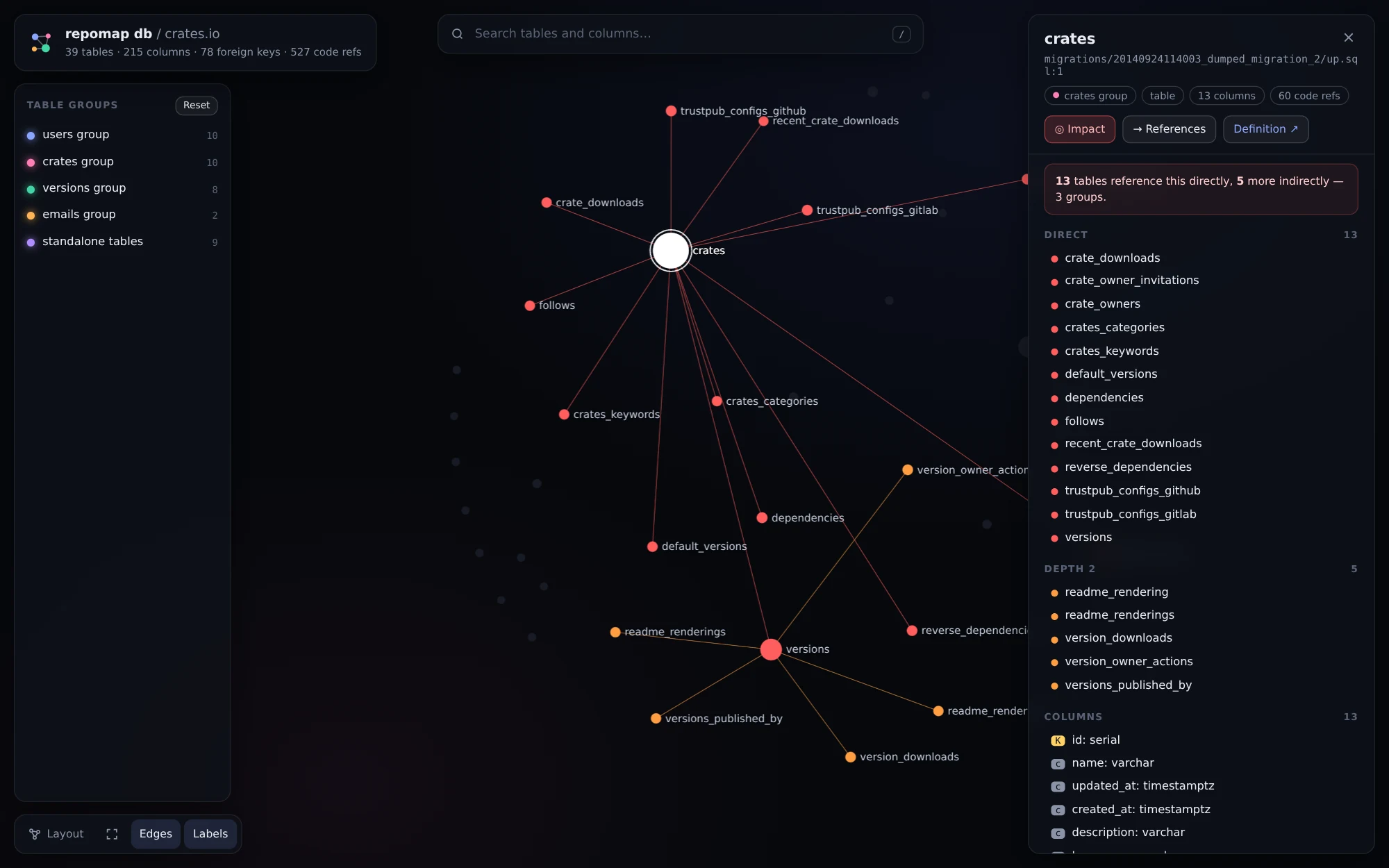
repomap db --serve on crates.io: 39 tables, 78 foreign keys, 527 code references

Live connections are strictly read-only:

  • Postgres runs in a READ ONLY transaction that the server must confirm.
  • MySQL runs in a START TRANSACTION READ ONLY transaction.
  • SQLite is opened read-only with query_only.

Only catalog metadata is read, never table rows. The connection string comes from an argument or an environment variable, and it is never stored or printed. Agents get the same data through the db MCP tool; pass url_env rather than the URL itself.

Agent-readiness score

Terminal
npx -y @sylphx/repomap score

The score rates how well an AI agent can work in the repository, from 0 to 100. It covers eight checks:

  • agent instructions (AGENTS.md / CLAUDE.md and how useful they are)
  • discoverable build and test commands
  • test coverage
  • CI
  • module boundaries
  • file sizes
  • docs
  • types

Each check that falls short comes with a concrete fix, and the score ends with a badge line for your README. For CI, use --min 70; --update-readme README.md refreshes the badge.

Keep the badge fresh with the GitHub Action:

Read the full README →View source on GitHub →

Related MCP Servers

View all in Developer Tools View all alternatives
  • O
    Openapi MCP Server

    Connect any HTTP/REST API server using an Open API spec (v3)

    💻 Developer Tools3 views
    Compare vs Openapi MCP Server →
  • V
    Vibe Hnindex

    Index source code into a local knowledge base, search with keyword + semantic + hybrid modes.

    💻 Developer Tools2 views
    Compare vs Vibe Hnindex →
  • C
    Claude Task Master

    AI-powered task management system for AI-driven development. Features PRD parsing, task expansion, multi-provider support (Claude, OpenAI, Gemini, Perplexity, xAI), and selective tool loading for optimized context usage.

    💻 Developer Tools8 views
    Compare vs Claude Task Master →
  • M
    MCP Server Docker

    Integrate with Docker to manage containers, images, volumes, and networks.

    💻 Developer Tools3 views
    Compare vs MCP Server Docker →

Reviews

No reviews yet — be the first to share how this listing worked for you.

Frequently Asked Questions about Repomap

We don't have a confirmed install command for repomap yet, so we don't publish a generated one — a guessed package name would point at the wrong package or none at all. Follow the project's own README or setup instructions (https://github.com/SylphxAI/repomap) for the current steps.

AllMCPs Directory Badge

Full Badge Customizer

Showcase your server listing on GitHub or your project documentation. Embed this dynamic SVG badge to highlight official listing status and live engagement.

Badge Style:
Live Dynamic SVG PreviewRepomap AllMCPs Directory Badge

Markdown (GitHub README)
[![AllMCPs](https://allmcps.com/api/badge/repomap?style=directory)](https://allmcps.com/mcp/repomap)
HTML Embed
<a href="https://allmcps.com/mcp/repomap"><img src="https://allmcps.com/api/badge/repomap?style=directory" alt="Repomap on AllMCPs" /></a>

Technical Specs & Signals

Category💻Developer Tools
More technical detailsExpand â–¾
Last updatedSep 28, 2026
Views0
Unique ViewsTotal visits recorded for this listing page on AllMCPs.
Installs0
Installs & Copy ActionsTotal times users copied install commands or configuration snippets for this server.
27Quality signal: Emerging · 27/100How this signal is calculated ▾
Server availabilityNot measured

Not scored for repo-hosted servers — we can't reach the running server, only its GitHub page. Hosted MCP endpoints are health-checked live.

Verified ownership8/20
Documentation & tools11/30
Adoption & activity1/15
Community engagement0/10

A guidance signal from public completeness & health data — not a user rating. New listings start lower and rise as they add docs, get verified, and grow adoption. Signals we can't observe for a listing are skipped, not counted against it.

★ Featured
A

AllMCPs Server

The official MCP server for AllMCPs.com - submit and manage tools directly from your AI. The open directory for MCP servers. Connect Claude, Cursor, Windsurf, and AI agents to databases, tools, files, and APIs. Explore 10,000+ servers. AllMCPs is the premier, open directory for discovering, evaluating, and installing Model Context Protocol (MCP) servers to equip AI agents and LLMs with real-world superpowers.

Explore Server →

Own this project?

This directory is pre-filled from public sources. Claim via GitHub README, site badge, or DNS TXT to unlock edit access and the Official badge — proof is checked automatically, then reviewed by our team.

Free dofollow backlink: add your website and place the AllMCPs badge on it — no claim needed. We detect it automatically and keep it verified as long as the badge stays live.

Claim & get free dofollow

Share & Embed

Add our SVG badge (dark/light directory styles) or embeddable widget to your site.

Explore more

More in 💻 Developer Tools →Best MCP servers for Developers →Alternatives to Repomap →Install in Claude DesktopInstall in CursorInstall in VS CodeSetup guides for all 13 MCP clients