An MCP server that fuses LLM contextual intelligence with procedural code reliability.
Quick Install
Automated & IDE SetupCopy the AI prompt to install this server into Claude Code, Cursor, or another agent — or use 1-click editor setup below.
Manual Client & Custom JSON ConfigExpand JSON ▾
Client Config & Setup
Choose your client or environment
Target File:
💡 Paste the JSON block into your client's configuration file under mcpServers, then restart the application.
Documentation Overview
Render Unto Caesar (RUC) (ruc-mcp)
Render Unto Caesar (RUC) plugs into your AI agent and gives it the ability to write and run snippets of code on an as-needed basis — snippets of code that call right back to the AI agent during their execution. It effectively melds LLMs with traditional software, allowing each part of a task to be handled by the architecture that suits it best. The result is inference, judgment, and creativity that nonetheless executes methodically and reliably across long operations, large datasets, and complex processes.
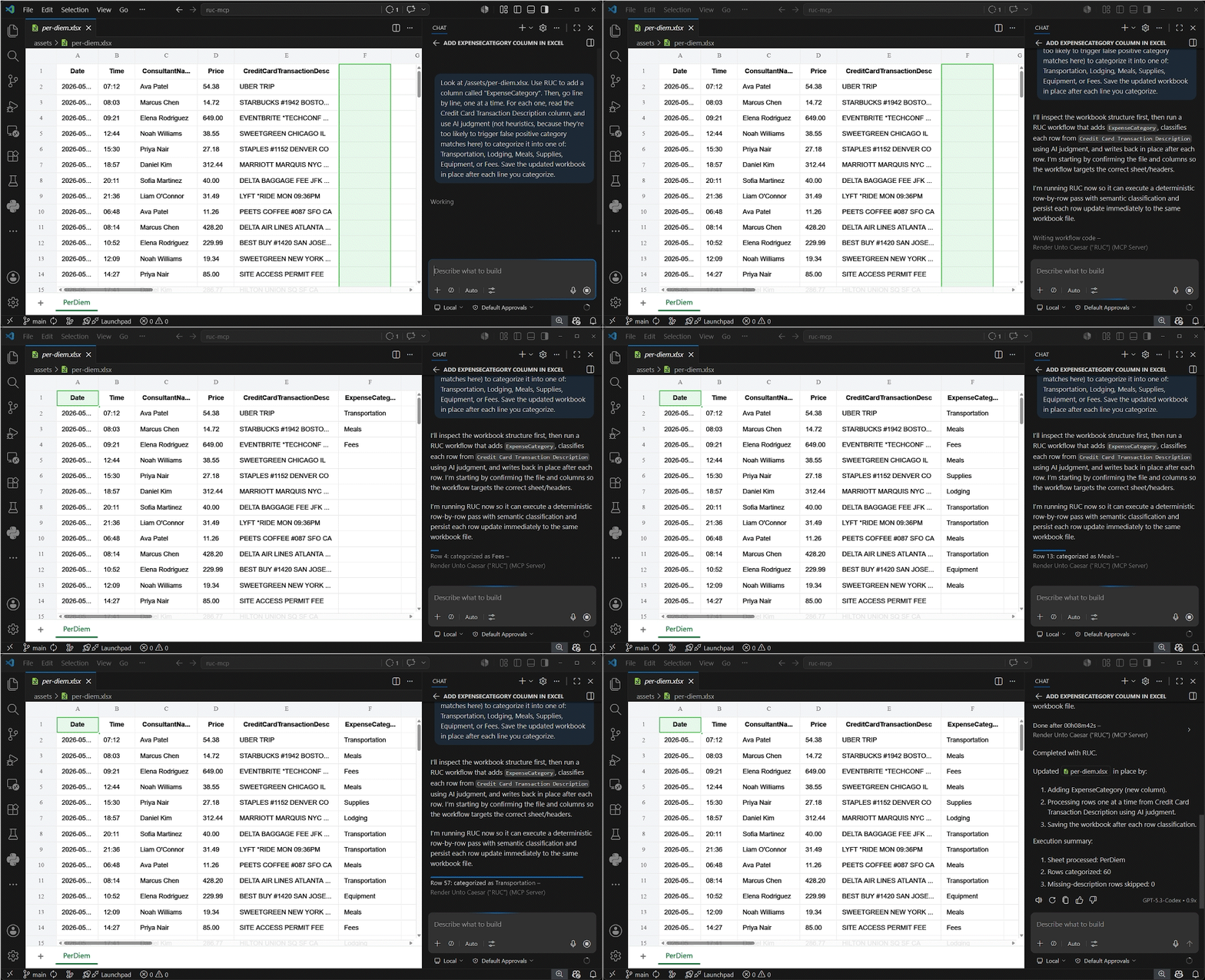
Deterministic execution + LLM judgment in a single integrated workflow
If you've built a machine whose whole purpose is to be less machine-like, but you still ask it to do machine-like things, you're going to have a bad time.
Foundation model developers keep training LLMs to follow user instructions more faithfully. They expend untold gigajoules of energy and eons of CPU/GPU time trying to get neural networks — fundamentally fickle probabilistic beasts by their very nature — to execute steps in the order they're given, and to refrain from getting distracted, prematurely declaring completion, or outright inventing completely new un-asked-for operations.
This is a silly thing to optimize for.
We already have machines that follow instructions exactly, repeatably, and tirelessly. They're called computers.
Neural networks make bad computers. Yes, neural networks run on computers, but that fact alone doesn't magically grant them the ability to work as computers — any more so than the fact that you're made of cells automatically makes you a microbiologist.
Neural nets are not bad computers because they need more reinforcement learning. They are bad computers because they are not computers. They are pattern-completion engines: powerful, flexible, fuzzy, associative, and astonishingly useful — but fundamentally ill-suited to long procedural execution.
This is not even unique to artificial neural nets. Human brains are bad at it too. That's why we have to use a pencil to perform long division. That is why we use checklists, calendars, recipe cards, laminated flowcharts, and sticky notes. It's called “externalized cognition”. It's a superpower that's mostly unique to our species: we're smart enough to know what we're not smart about, and to use tools to patch the holes in our smarts. Externalized cognition exists precisely because neural cognition is not reliable procedure.
RUC is built around that distinction: Let the neural network handle interpretation, judgment, and creativity. Let the computer handle execution.
LLMs make a great interface for requesting tasks, but a poor engine for executing them. They are good at writing verbiage and assessing messy or ambiguous information, but poor at carrying out long, exact procedures. When an operation requires both the fuzziness of LLMs and the methodical rigor of traditional code, Render Unto Caesar (RUC) bridges the gap. RUC separates the work into the parts that need interpretation and the parts that need machinery, and makes them interoperate to give you the best of both worlds.
Modern LLM apps make it natural to ask for complex work in plain English. The problem is that plain-English requests often mix together things LLMs are good at with things they are famously bad at. A user might ask ChatGPT, Claude, or Cursor to review support tickets, impute missing data in a spreadsheet, or brainstorm a series of ads. Those tasks require judgment and creativity, but they also require loops, counts, state, validation, consistency, and auditability — the stuff traditional code is built for.
Most users, even engineers, don’t naturally separate those two layers when they ask for the task. They describe the outcome they want, not the architecture needed to produce it reliably. RUC does that separation for them. It identifies which parts require deterministic execution — iteration, arithmetic, validation, state, and auditability — and which parts require classification, summarization, ambiguity resolution, or freeform writing. It defines the interfaces between those parts, specifying how code-shaped work should pass data into LLM-shaped work, and how LLM-shaped results should flow back into procedural execution. That lets both kinds of work operate in concert: code provides structure, continuity, and rigor, while the LLM handles nuance where rigid rules would break down.
The result is a system that can do LLM-shaped work with the control, structure, and repeatability of procedural software.
Core idea
Render Unto Caesar is built around a simple split:
- Code handles loops, arithmetic, validation, retries, files, progress tracking, aggregation, and state management.
- LLMs handle language comprehension, creative writing, classification, summarization, ambiguity resolution, fuzzy matching, and other semantic decisions.
The important part is not merely that both are available. The important part is that RUC defines the boundary between them, so procedural code and LLM judgment can safely interoperate inside one workflow.
Who this is for
RUC is built for business and engineering professionals who want to describe sequences of operations they want their computer to perform, and who expect the computer to carry out those operations as a computer rather than as some kind of Plinko game.
In practice, that usually means:
- Product leaders and PMs working with large CSV or spreadsheet exports.
- Analysts and operations teams who run repeated cleanup, classification, and normalization tasks.
- Domain owners and data stewards who are accountable for data quality outcomes.
- Engineers and AI power users supporting non-engineering teammates in VS Code.
Example situations in which RUC proves useful
- A PM needs to triage 1,700 support feedback tickets before a roadmap review.
- A financial analyst has the transcripts of hundreds of earnings calls. The analyst needs to populate a spreadsheet detailing which company had the call, what date the call occurred on, who was on it, what key metrics were discussed, and what the values of those metrics were.
- A regional sales manager needs to sort 7,000 free-text customer survey comments into bins based on what features of the product each customer described most prominently.
- A national advertising executive wants to create custom copy for an ad to run on a county-by-county basis for all 3,144 counties in the United States.
Installation guide
The following instructions presume some familiarity with command-line tools. Fortunately, even if you don't have this familiarity yourself, your AI agent does! If you're reading this, and you don't know how to perform some of these steps, tell your agent: "Help me with following the Installation Guide at https://github.com/mightydatainc/ruc-mcp". It'll know what to do.
Prerequisites
You will need Docker installed to run RUC.
RUC is an MCP server that runs inside a Docker container. If these concepts are new, these introductions can help:
- Model Context Protocol (MCP): a communication standard that allows "hosts" (like VS Code, or your Claude Desktop executable) to load third-party tool systems (like RUC) and inform their LLMs (either cloud-based or running locally) about the capabilities that these tools offer them, and to invoke said tools upon the LLM's request.
- Docker: a lightweight virtualization system that allows you to run mini-computers as simulations inside your real computer (more or less). Great for things like security, dependency management, and portability.
Install Docker using the guide for your operating system:
Integrating with your AI agent
⚠️ YOUR AGENTIC AI ENVIRONMENT MUST SUPPORT MCP SAMPLING! ⚠️
"Render Unto Caesar" relies entirely on an MCP capability called "sampling". It will not work without sampling.
Currently, the only popular agentic AI host that supports sampling is VS Code (with GitHub Copilot).
VS Code
Install the VS Code extension.
- Open Extensions in VS Code.
- Search for "Render Unto Caesar".
- Install the extension published by
mightydatainc. This might take a few minutes as it downloads the Docker image. (It's not particularly large, but it can still take a while, presumably due to security checks, registry updates, etc.)
Easy as 1-2-3!
To verify that it was installed correctly, open the Command Palette (Control-Shift-P), type MCP: List Servers, hit Enter, and verify "Render Unto Caesar" appears.
Let your MCP client's AI figure it out
This is always a fallback option. Whatever your MCP client or host might be (as long as it supports sampling!), you can always just tell it to figure out how to launch and connect to this MCP server on its own. It might help to tell the client the following information:
- RUC talks to its client over STDIO.
- Its commandline invocation looks like this:
Development
Prerequisites
Optional: Pull the Docker image from the GitHub Container Repository (GHCR)
You probably won't need to do this yourself, because most of the installation methods do this for you automatically. But I'll provide it here for reference.
Related MCP Servers
Reviews
No reviews yet — be the first to share how this listing worked for you.
Frequently Asked Questions about Render Unto Caesar
AllMCPs Directory Badge
Showcase your server listing on GitHub or your project documentation. Embed this dynamic SVG badge to highlight official listing status and live engagement.
Badge Style:
Live Dynamic SVG Preview
Markdown (GitHub README)
[](https://allmcps.com/mcp/render-unto-caesar)HTML Embed
<a href="https://allmcps.com/mcp/render-unto-caesar"><img src="https://allmcps.com/api/badge/render-unto-caesar?style=directory" alt="Render Unto Caesar on AllMCPs" /></a>Technical Specs & Signals
CategoryDeveloper Tools
29Quality signal: Emerging · 29/100How this signal is calculated ▾
Server availabilityNot measured
Not scored for repo-hosted servers — we can't reach the running server, only its GitHub page. Hosted MCP endpoints are health-checked live.
Verified ownership10/20
Documentation & tools11/30
Adoption & activity1/15
Community engagement0/10
A guidance signal from public completeness & health data — not a user rating. New listings start lower and rise as they add docs, get verified, and grow adoption. Signals we can't observe for a listing are skipped, not counted against it.
Own this project?
This directory is pre-filled from public sources. Claim via GitHub README, site badge, or DNS TXT to unlock edit access and the Official badge — proof is checked automatically, then reviewed by our team.
Free dofollow backlink: add your website and place the AllMCPs badge on it — no claim needed. We detect it automatically and keep it verified as long as the badge stays live.
Claim & get free dofollowShare & Embed
Add our SVG badge (dark/light directory styles) or embeddable widget to your site.