Redline README
The full upstream README, mirrored here for reference. Install config, tool schemas, adoption signals, and an original overview live on the Redline listing page.
redline
Catch prompt regressions before they ship.
Automatic eval suites from the prompt logs you already have.
redline turns real prompt-response logs into local regression tests. It selects representative cases, replays your changed prompt, and shows the behavioral diff before a bad prompt reaches users.
Website · Docs · MCP · MCP Registry · Security · License





Start Here
Install from PyPI:
Run the guided local app with the public proof loaded:
This generates the public demo reports, opens the local product app, and shows the full import -> suite -> eval -> review workflow. The demo catches ten synthetic regressions without API keys, private logs, a cloud account, or an LLM judge.
Prefer terminal output first:
The demo writes JSON, Markdown, and self-contained HTML reports under
.redline/demo.
Ask redline what to do next:
status reads local config, suites, reports, history, and audit evidence, then
prints the next command instead of leaving you to infer the workflow.
Open the guided local product app on existing reports:
The app is a local, copy-command workflow: import logs, generate suites, run evals, review regressions, record history, and export CI/MCP setup without the browser executing shell commands.
On headless CI or remote shells, skip browser opening and use the printed HTML path:
First-run troubleshooting
redline: command not found: runpython -m pip install redline-ai, then confirmpython -m pip show redline-ai.- App did not open: use
--no-open --out .redline/app.htmland open or upload that file from your environment. - Suite not found: run
redline suite logs/baseline.jsonl --out redline-suite.json. - Validation failed: run
redline validate redline-suite.json --strictand fix the first reported error. - GitHub Action cannot find a suite: commit
redline-suite.jsonor point the actionsuiteinput at your prompt manifest.
Full guide: docs/troubleshooting.md.
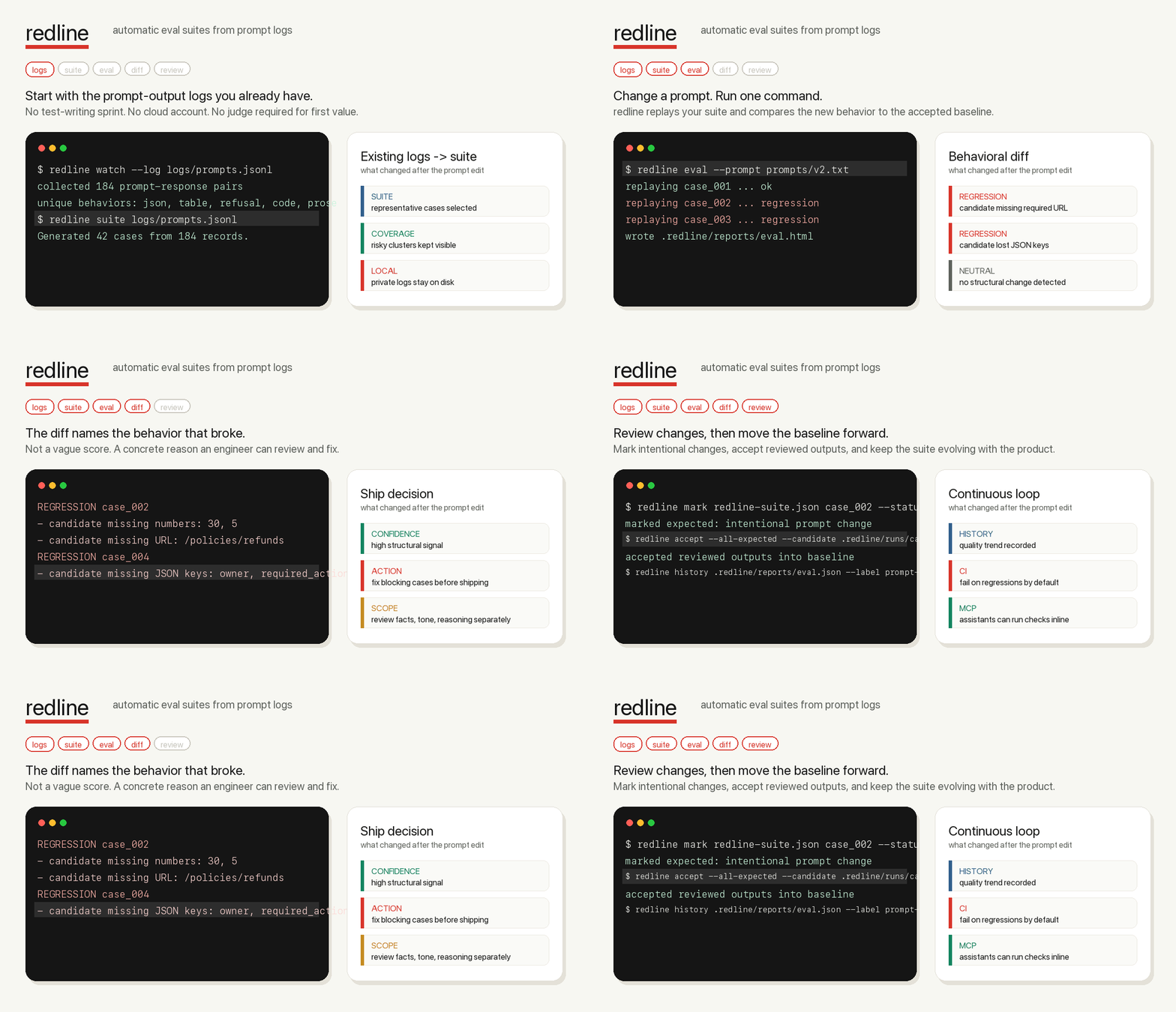
Product Proof
redline has two proof paths: a fast first-run demo and a larger public-data dogfood run.
| Proof | Command or data | Result |
|---|---|---|
| First-run demo | redline demo --public --compact | 10 synthetic regressions caught locally with no API keys. |
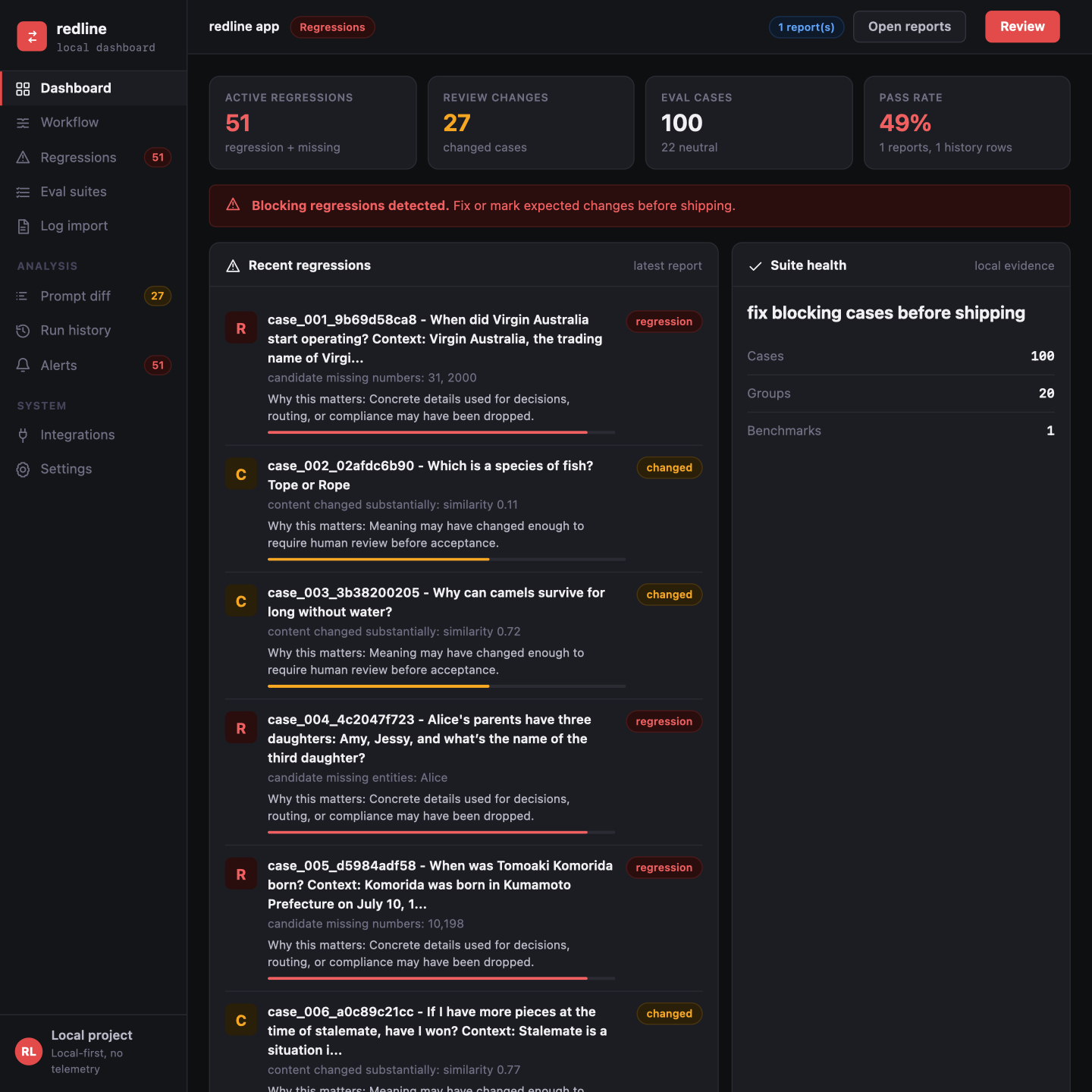
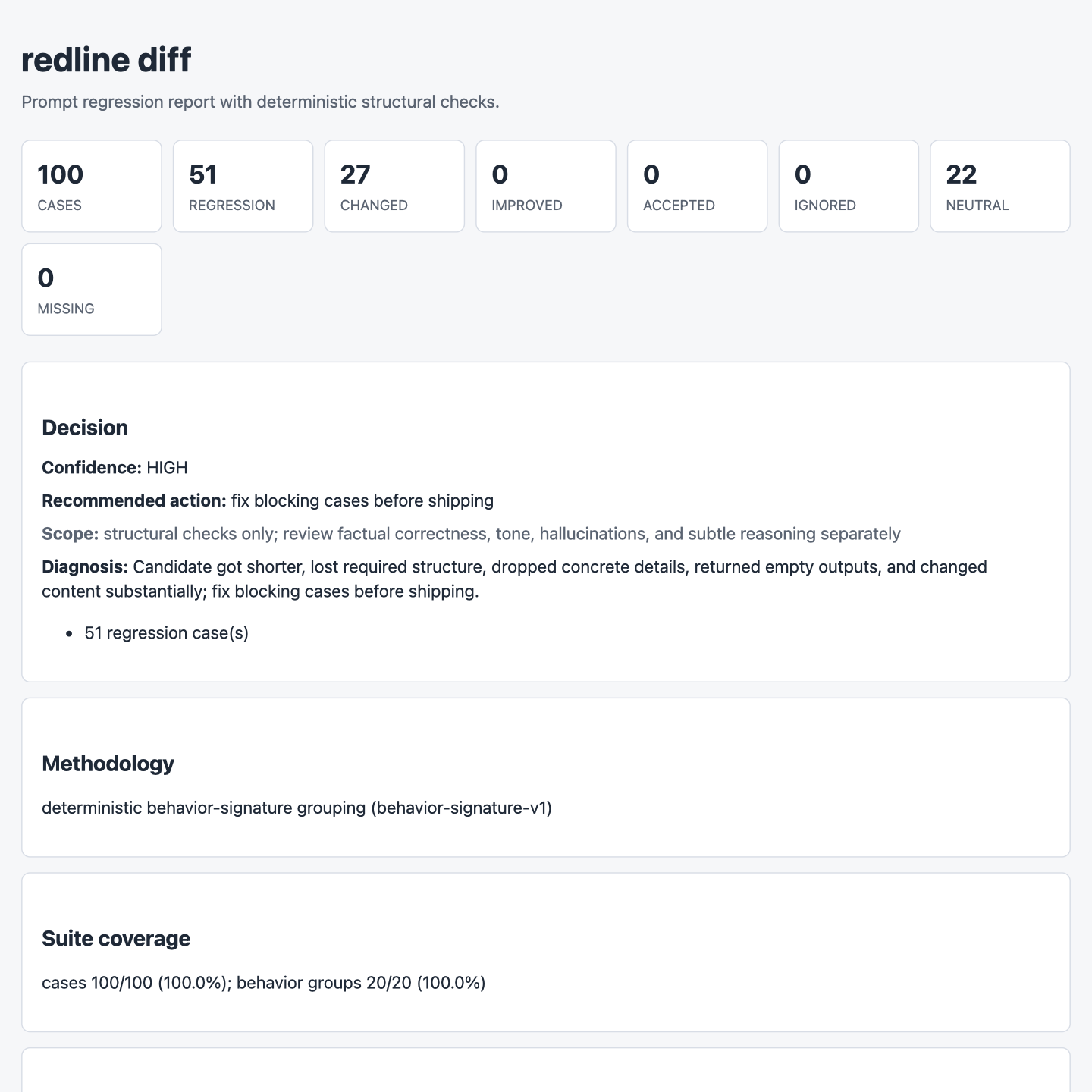
| Internet dogfood | 100 prompt-response rows sampled from Databricks Dolly 15k | 51 regressions, 27 changed cases, 22 neutral controls, and 0 dashboard warnings. |
| Release gate | tests, lint, type check, action smoke, and release build | Package, CI, report, dashboard, and MCP paths are validated before publish. |
These screenshots are local artifacts from the 100-row internet dogfood run.
| Dashboard | HTML report |
|---|---|
 |  |
What Is redline?
redline is an open-source, local-first eval tool for AI teams. It uses logs you already have: prompts, outputs, support tickets, traces, model responses, and production JSONL exports.
Instead of asking you to hand-write evals first, redline generates the first suite from real behavior. You can then run that suite every time a prompt, model, or runner changes.
No cloud account is required. No manual test writing is required. No LLM judge is required for the core regression signal. The package has zero runtime dependencies, which keeps installs fast and the default supply-chain surface small.
How It Works
redline gives you three primitives that cover the prompt-regression loop:
For a first pass on two local logs, use one command:
It generates a temporary suite, writes JSON/Markdown/HTML reports plus a guided
local app under .redline/quick-check, opens the focused HTML report, and
prints the concrete behavioral diff. Use --open-app when you want the guided
review workflow to open instead of only the focused report.
1. Logs
Start with prompt-response data you already have. Import JSONL, convert exports from tools like Langfuse or Helicone, capture OpenAI/Anthropic SDK calls, or add bounded FastAPI/ASGI middleware.
Use --detect when you do not know the field names. Use --preview when the
export is new to you; it shows mapped, redacted sample rows without writing a
baseline file.
Suite generation prints a readiness score and improvement suggestions. That score measures suite health, not model quality or candidate safety.
2. Suite
redline groups behavior into deterministic signatures and selects representative cases first. You can add pinned edge cases and explicit requirements when a scenario must never be missed.
3. Eval
Replay a changed prompt or compare candidate outputs. redline names the behavior that broke: missing JSON keys, URLs, numbers, tables, code blocks, refusals, empty answers, or requirement failures.
Product Promise
In under five minutes, on a real prompt log, redline should catch one regression you did not want to ship.
That promise is intentionally narrow. redline is not a hosted eval platform, a generic score, or a replacement for human judgment. It is the local safety loop between "I changed the prompt" and "this is safe enough to merge."
Real Workflow
Build a suite from baseline logs:
Evaluate a changed prompt file through your configured runner:
Or compare candidate outputs you already generated:
When redline finds a blocking change, it exits non-zero for CI and prints the reason:
What redline Catches
| Signal | Example regression |
|---|---|
| JSON validity and keys | Candidate stops returning valid JSON or drops owner. |
| Tables, lists, and code blocks | Markdown table becomes prose; code fence disappears. |
| Numbers, URLs, and entities | Refund window, ticket ID, policy URL, or owner is missing. |
| Empty outputs and refusals | Candidate newly refuses a safe task or returns nothing. |
| Content drift | Same-shape response changes substantially. |
| Explicit requirements | Pinned cases require or forbid exact strings. |
redline is deterministic and local-first by default. Optional judge commands are
available for ambiguous changed cases, but redline does not call a cloud model
unless you explicitly configure that command.
That is the point. redline is designed to be the fast merge-blocking gate for regressions that break production systems: invalid JSON, missing required fields, lost tables, empty answers, dropped URLs, changed refusal behavior, and explicit requirement failures. LLM judges are useful for semantic review, but they are slower, cost money, and can be flaky in CI. redline keeps the default gate deterministic, reproducible, and cheap, then lets you add judges only where the structural signal is not enough.
Methodology details live in docs/methodology.md.
Suite generation does not run statistical or embedding clustering by default. It groups logs by deterministic behavior signatures, such as prompt intent, response shape, length bucket, and JSON schema. It picks one representative per group first, then adds high-variance edges and evenly spread prompt-diverse samples from large groups when the case budget allows.
Trust Boundary
A green redline run means no configured high-signal structural blockers were found. It does not prove factual correctness, tone, hallucination safety, policy compliance, or subtle reasoning quality.
That boundary is visible in CLI output and reports because over-trusting eval
tools is dangerous. Each reported case includes a confidence and signal
(structural, shallow_semantic, requirement, judge, or human_judgment)
so reviewers can see why redline is making the call. Use requirements or an
optional judge for semantic risks that structural checks cannot prove.
Product Surface
redline is built around the full prompt-regression loop:
redline watch: collect prompt-response observations from logs, Python functions, OpenAI/Anthropic-compatible SDK calls, or ASGI apps, with best-effort common secrets and PII redacted before write by default.redline import: normalize exported team logs into redline JSONL, with the same best-effort redaction enabled by default. Use--no-redactonly for reviewed local-only logs.RedlineMiddleware: capture bounded JSON FastAPI or ASGI request/response pairs locally, with optional skip diagnostics.redline redact --check: scan logs for common secrets and PII, then write a scrubbed copy when needed. Redaction is best-effort pattern matching, not a privacy boundary; review sensitive logs before sharing.redline cluster: inspect deterministic behavior-signature groups before suite generation.redline suite: generate a representative eval suite from baseline logs.redline prompts: scan many prompt files and write or check a versionable prompt-to-suite manifest. Add--check-suitesin CI when every prompt should already have a built and valid suite.redline suite add: pin hand-picked edge cases the algorithm should never miss.redline budget/redline benchmark: estimate suite or prompt-manifest runtime without executing replay commands, write budget artifacts, and optionally fail on a CI time budget. Add--measure-localto time redline's deterministic local diff work on your suite baselines without calling a model.redline eval: replay each suite case through your local app or model runner.redline diff: compare candidate JSONL outputs against the suite baseline.redline markandredline accept: review intentional changes and promote the new baseline.redline require: add deterministic must-include or must-not-include rules.redline audit --verify: inspect the local audit trail and verify the hash chain. Add--expect-last-hashor--expect-entrieswhen you want to prove the local log tail still matches a checkpoint from CI or release evidence. Add--out-checkpoint .redline/audit-checkpoint.jsonto persist that evidence, then--checkpoint .redline/audit-checkpoint.jsonto verify against it later.redline sbom: write CycloneDX SBOM release evidence for security review.redline app: open the guided local product surface for importing logs, generating suites, reviewing regressions, recording history, and wiring CI/MCP.redline status: show project readiness and the next command from local evidence, including the guided app command, first review case, its reason, and why it matters.redline history,redline compare, andredline dashboard: track quality over time and inspect report artifacts locally. The dashboard surfaces feature-level rollups, prompt-level eval rows, benchmark evidence, and a latest-report review queue when reports come from a prompt manifest. It also warns when reports exist without benchmark evidence from the same project.redline summary: inspect suite readiness, or passredline-prompts.jsonto roll up multi-prompt suite coverage, owners, requirements, and missing suites.redline-mcp: let AI coding assistants run checks inside Claude, Codex, Cursor, Kiro, or any MCP client.
For repos with many prompt files, the manifest becomes the eval plan:
Manifest summaries show readiness across every mapped suite, manifest validation checks every mapped suite, manifest benchmarks aggregate runtime budget, and manifest evals print prompt-level rollups before case details. Large repos can see which prompt files or feature folders need attention first.
When mapped suites are valid, the check prints ready commands such as:
Connect Your App
Any command that reads a prompt from stdin and prints a response to stdout can be a redline runner:
Built-in adapters cover provider-neutral stdio, OpenAI, Anthropic, LiteLLM, HTTP APIs, Python chains, JSONL log imports, and OpenAI/Anthropic SDK capture:
Runner details live in docs/runners.md. Log import and SDK
capture adapters are for building suites from real observations, not for
redline eval replay. The JSONL log adapter includes Langfuse, Helicone,
LangSmith, and Braintrust presets for exported observability logs.
AI Assistant Native
redline ships a local Model Context Protocol server:
Use docs/mcp.md to wire redline into an MCP client. The MCP
surface exposes safe capture-readiness, privacy, audit, scale, read,
quick-check, case-inspection, eval, and report tools plus workflow prompts like
setup_redline_project, check_prompt_change, build_suite_from_logs, and
review_candidate_outputs.
It can also list or copy runner adapters and optional judge templates during setup.
The only mutating MCP tool is guarded: redline_mark requires allow_write: true
and a note before it records an intentional case judgment. Baseline promotion
stays CLI-only.
CI And GitHub
Create config plus a GitHub Actions workflow:
Use redline as a composite GitHub Action from another repo:
For multi-prompt repos, point suite at redline-prompts.json. The action
checks every mapped suite with redline prompts --check --check-suites, runs a
manifest-wide benchmark, then runs the manifest eval.
The action writes JSON, full Markdown, concise PR-comment Markdown, HTML, JUnit,
Slack-ready JSON, history, dashboard, and audit checkpoint artifacts under
.redline/, appends benchmark, concise eval, and trend summaries to the GitHub
step summary, and exits with the eval gate status. Set benchmark-max-seconds
when a suite should fail CI if its worst-case runtime budget grows too far.
Reports
Every diff and eval run can write:
- JSON for machines and dashboards
- full Markdown for detailed summaries, including prompt-manifest rollups
- concise PR-comment Markdown for merge-review surfaces
- self-contained HTML for side-by-side inspection, including feature and prompt eval tables
- JUnit XML for CI test reporting
- Slack Block Kit JSON for CI bots or webhook integrations you control
- GitHub annotations for changed or blocking cases
Example:
Optional Judges
Use judges only where structural checks are not enough. redline sends only
ambiguous changed cases to the configured command as JSON on stdin:
Repo examples and installable templates:
- examples/judge_changed.py
- examples/openai_judge.sh
- examples/anthropic_judge.sh
- examples/litellm_judge.sh
- examples/judges/support_rubric.md
- examples/judges/extraction_rubric.md
- examples/judges/safety_rubric.md
Calibration guidance lives in docs/judges.md.
Config
redline init writes redline.json with a $schema reference for editor
autocomplete. Important keys:
| Key | Purpose |
|---|---|
suite | Suite baseline path, default redline-suite.json. |
input_field, output_field | JSONL field paths for prompts and responses. |
max_cases | Maximum representative cases selected for a suite. |
replay | Command used by eval; prompts go to stdin by default. {prompt} is for small legacy argv runners; {prompt_file} passes a temporary rendered-prompt file path. |
workers | Number of replay cases to run concurrently. |
owners | Optional pattern-to-owner rules so regressions show the responsible team. |
approval | Optional local guardrail; require_approver makes accept record an approver. |
fail_on | Statuses that fail diff or eval; use "none" for report-only setup. |
reports | JSON, Markdown, PR-comment Markdown, HTML, JUnit, and Slack-ready JSON output paths. |
logs | Observed prompt-response log path and optional middleware skip diagnostics path. |
audit | Append-only JSONL audit log path for evals, judgments, requirements, and accepted baselines. New entries include operator/approver context plus a local hash chain that redline audit --verify can check; use expected hash/count checkpoints or --out-checkpoint evidence files to detect tail truncation. |
judge | Optional command for ambiguous changed cases. |
Check setup before relying on a suite:
doctor shows whether the suite has explicit requirements or recorded
judgments before you rely on structural checks in CI.
summary reports a suite readiness score, behavior-group/case coverage, owner
coverage, accepted baseline history, approver coverage, and explicit guard
coverage for cases with requirements or recorded judgments so teams can review
suite readiness before CI.
dashboard also shows audit checkpoint evidence when .redline/audit-checkpoint.json
is present.
Dogfood Assets
The public fixture is synthetic, shaped after public instruction/chat dataset patterns, and documented in examples/public_dogfood_sources.md.
For AI-assistant session dogfood, use
docs/ai-session-dogfood-prompts.jsonl
and normalize raw exports with scripts/normalize_ai_session_logs.py.
Reproducible dogfood case studies live in
docs/case-studies.md.
Public dataset candidates for internet dogfood are ranked in
docs/internet-dogfood-sources.md.
From a repo checkout, record the public demo:
Development
Before cutting a release or asking someone else to try a branch:
Project Docs
- docs/release.md: package, tag, PyPI, and MCP Registry release flow
- docs/launch.md: public alpha launch plan
- docs/troubleshooting.md: first-run and CI failure recovery
- docs/import-guides.md: Langfuse, Helicone, OpenAI chat, Datadog, and custom log import recipes
- docs/methodology.md: behavior grouping, case selection, scoring, and trust boundaries
- docs/calibration.md: tiny fixture showing regressions, changed cases, and neutral cases
- docs/commands.md: compact CLI command reference
- docs/real-log-dogfood.md: redaction-first real-log test protocol
- docs/dogfood.md: first-user dogfood protocol
- docs/case-studies.md: reproducible dogfood case studies
- docs/internet-dogfood-sources.md: public prompt-response datasets for dogfood sourcing
- docs/runners.md: runner and log adapter setup
- docs/mcp.md: MCP server setup
- docs/benchmarks.md: performance contract and CI benchmark artifacts
- docs/repository.md: GitHub repository controls
- scripts/README.md: maintainer script index
- CONTRIBUTING.md: contributor validation
- SECURITY.md: privacy and vulnerability reporting
- LICENSE: MIT open source license
Website source for GitHub Pages lives in site/ and deploys from the
committed static assets on main.