Run local prompt regression checks from prompt-response logs in AI coding assistants.
Quick Install
Automated & IDE SetupCopy the AI prompt to install this server into Claude Code, Cursor, or another agent — or use 1-click editor setup below.
Manual Client & Custom JSON ConfigExpand JSON ▾
Client Config & Setup
Choose your client or environment
Target File:
💡 Paste the JSON block into your client's configuration file under mcpServers, then restart the application.
Documentation Overview
redline
Catch prompt regressions before they ship.
Automatic eval suites from the prompt logs you already have.
redline turns real prompt-response logs into local regression tests. It selects representative cases, replays your changed prompt, and shows the behavioral diff before a bad prompt reaches users.
Website · Docs · MCP · MCP Registry · Security · License





Start Here
Install from PyPI:
Run the guided local app with the public proof loaded:
This generates the public demo reports, opens the local product app, and shows the full import -> suite -> eval -> review workflow. The demo catches ten synthetic regressions without API keys, private logs, a cloud account, or an LLM judge.
Prefer terminal output first:
The demo writes JSON, Markdown, and self-contained HTML reports under
.redline/demo.
Ask redline what to do next:
status reads local config, suites, reports, history, and audit evidence, then
prints the next command instead of leaving you to infer the workflow.
Open the guided local product app on existing reports:
The app is a local, copy-command workflow: import logs, generate suites, run evals, review regressions, record history, and export CI/MCP setup without the browser executing shell commands.
On headless CI or remote shells, skip browser opening and use the printed HTML path:
First-run troubleshooting
redline: command not found: runpython -m pip install redline-ai, then confirmpython -m pip show redline-ai.- App did not open: use
--no-open --out .redline/app.htmland open or upload that file from your environment. - Suite not found: run
redline suite logs/baseline.jsonl --out redline-suite.json. - Validation failed: run
redline validate redline-suite.json --strictand fix the first reported error. - GitHub Action cannot find a suite: commit
redline-suite.jsonor point the actionsuiteinput at your prompt manifest.
Full guide: docs/troubleshooting.md.
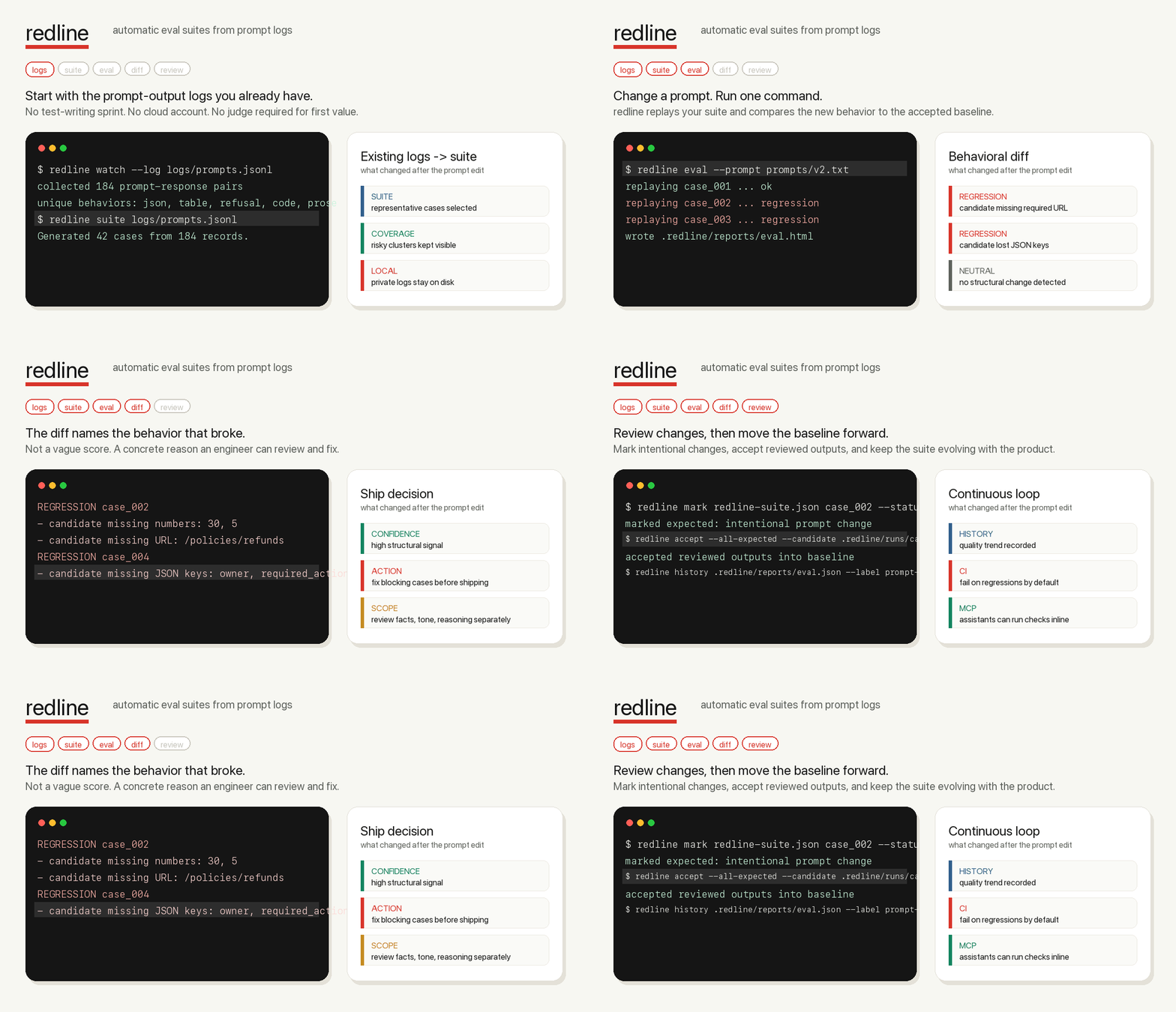
Product Proof
redline has two proof paths: a fast first-run demo and a larger public-data dogfood run.
| Proof | Command or data | Result |
|---|---|---|
| First-run demo | redline demo --public --compact | 10 synthetic regressions caught locally with no API keys. |
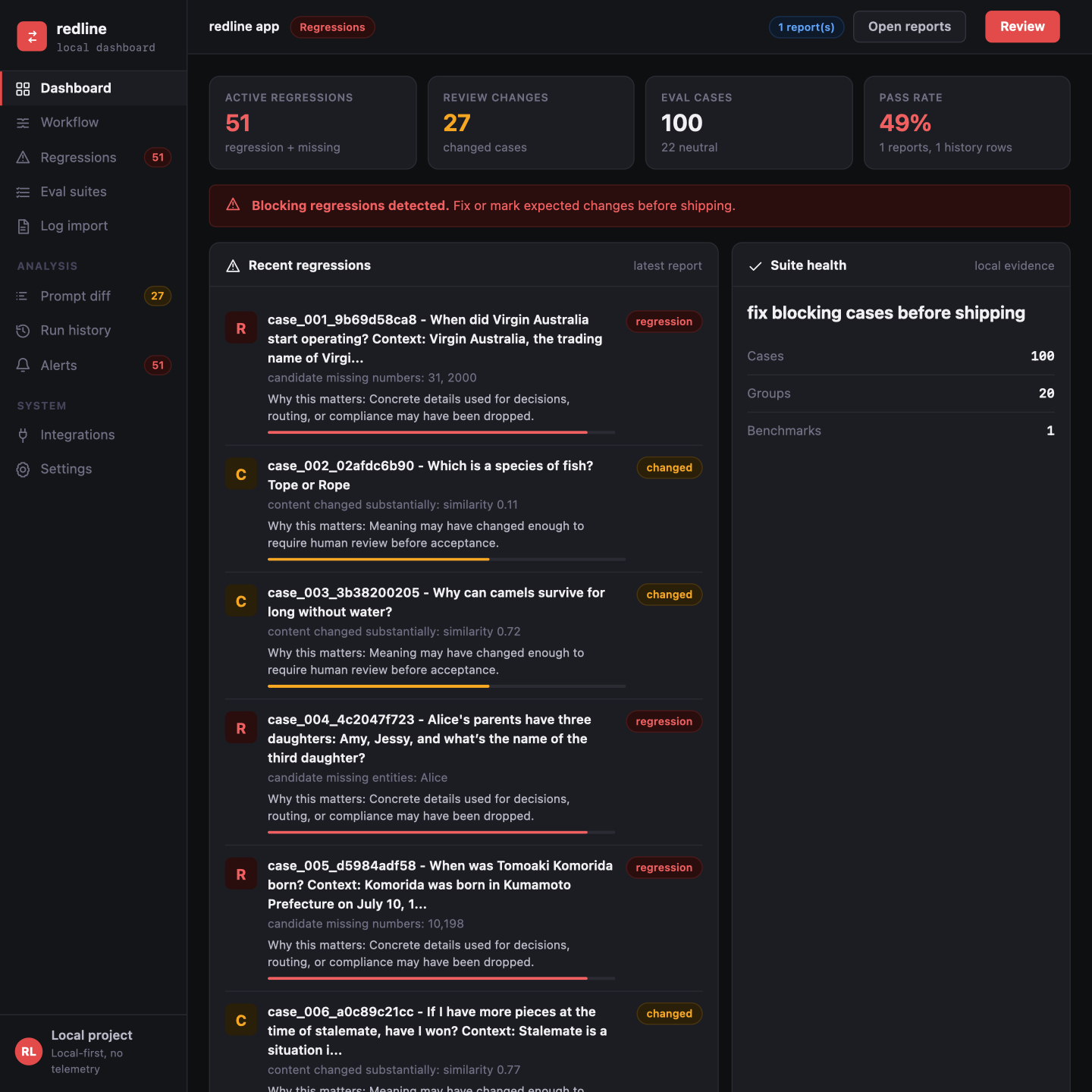
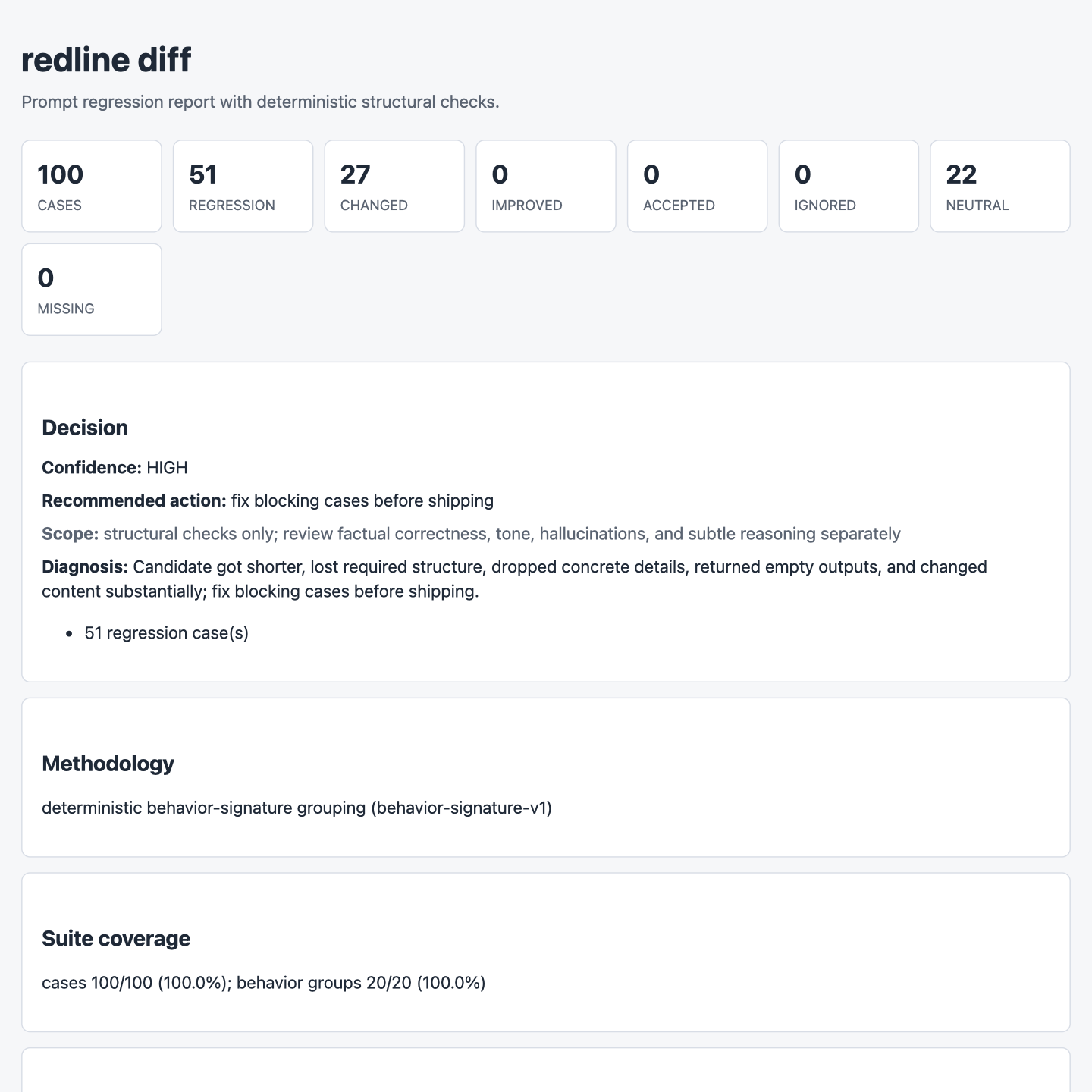
| Internet dogfood | 100 prompt-response rows sampled from Databricks Dolly 15k | 51 regressions, 27 changed cases, 22 neutral controls, and 0 dashboard warnings. |
| Release gate | tests, lint, type check, action smoke, and release build | Package, CI, report, dashboard, and MCP paths are validated before publish. |
These screenshots are local artifacts from the 100-row internet dogfood run.
| Dashboard | HTML report |
|---|---|
 |  |
What Is redline?
redline is an open-source, local-first eval tool for AI teams. It uses logs you already have: prompts, outputs, support tickets, traces, model responses, and production JSONL exports.
Instead of asking you to hand-write evals first, redline generates the first suite from real behavior. You can then run that suite every time a prompt, model, or runner changes.
No cloud account is required. No manual test writing is required. No LLM judge is required for the core regression signal. The package has zero runtime dependencies, which keeps installs fast and the default supply-chain surface small.
How It Works
redline gives you three primitives that cover the prompt-regression loop:
For a first pass on two local logs, use one command:
It generates a temporary suite, writes JSON/Markdown/HTML reports plus a guided
local app under .redline/quick-check, opens the focused HTML report, and
prints the concrete behavioral diff. Use --open-app when you want the guided
review workflow to open instead of only the focused report.
1. Logs
Start with prompt-response data you already have. Import JSONL, convert exports from tools like Langfuse or Helicone, capture OpenAI/Anthropic SDK calls, or add bounded FastAPI/ASGI middleware.
Use --detect when you do not know the field names. Use --preview when the
export is new to you; it shows mapped, redacted sample rows without writing a
baseline file.
Suite generation prints a readiness score and improvement suggestions. That score measures suite health, not model quality or candidate safety.
2. Suite
redline groups behavior into deterministic signatures and selects representative cases first. You can add pinned edge cases and explicit requirements when a scenario must never be missed.
3. Eval
Replay a changed prompt or compare candidate outputs. redline names the behavior that broke: missing JSON keys, URLs, numbers, tables, code blocks, refusals, empty answers, or requirement failures.
Product Promise
In under five minutes, on a real prompt log, redline should catch one regression you did not want to ship.
That promise is intentionally narrow. redline is not a hosted eval platform, a generic score, or a replacement for human judgment. It is the local safety loop between "I changed the prompt" and "this is safe enough to merge."
Real Workflow
Build a suite from baseline logs:
Evaluate a changed prompt file through your configured runner:
Or compare candidate outputs you already generated:
When redline finds a blocking change, it exits non-zero for CI and prints the reason:
What redline Catches
| Signal | Example regression |
|---|---|
| JSON validity and keys | Candidate stops returning valid JSON or drops owner. |
| Tables, lists, and code blocks | Markdown table becomes prose; code fence disappears. |
| Numbers, URLs, and entities | Refund window, ticket ID, policy URL, or owner is missing. |
| Empty outputs and refusals | Candidate newly refuses a safe task or returns nothing. |
| Content drift | Same-shape response changes substantially. |
| Explicit requirements | Pinned cases require or forbid exact strings. |
redline is deterministic and local-first by default. Optional judge commands are
available for ambiguous changed cases, but redline does not call a cloud model
unless you explicitly configure that command.
Related MCP Servers
Reviews
No reviews yet — be the first to share how this listing worked for you.
Frequently Asked Questions about Redline
AllMCPs Directory Badge
Showcase your server listing on GitHub or your project documentation. Embed this dynamic SVG badge to highlight official listing status and live engagement.
Badge Style:
Live Dynamic SVG Preview
Markdown (GitHub README)
[](https://allmcps.com/mcp/redline)HTML Embed
<a href="https://allmcps.com/mcp/redline"><img src="https://allmcps.com/api/badge/redline?style=directory" alt="Redline on AllMCPs" /></a>Technical Specs & Signals
CategoryDeveloper Tools
27Quality signal: Emerging · 27/100How this signal is calculated ▾
Server availabilityNot measured
Not scored for repo-hosted servers — we can't reach the running server, only its GitHub page. Hosted MCP endpoints are health-checked live.
Verified ownership8/20
Documentation & tools11/30
Adoption & activity1/15
Community engagement0/10
A guidance signal from public completeness & health data — not a user rating. New listings start lower and rise as they add docs, get verified, and grow adoption. Signals we can't observe for a listing are skipped, not counted against it.
Own this project?
This directory is pre-filled from public sources. Claim via GitHub README, site badge, or DNS TXT to unlock edit access and the Official badge — proof is checked automatically, then reviewed by our team.
Free dofollow backlink: add your website and place the AllMCPs badge on it — no claim needed. We detect it automatically and keep it verified as long as the badge stays live.
Claim & get free dofollowShare & Embed
Add our SVG badge (dark/light directory styles) or embeddable widget to your site.