mcpdiagnosticssecuritybenchmarkingdeveloper-tools
Diagnoses MCP server connections, audits configuration security, and benchmarks latency across supported development tools.
Quick Install
Automated & IDE SetupCopy the AI prompt to install this server into Claude Code, Cursor, or another agent — or use 1-click editor setup below.
Not yet automatically verified
We haven't yet run this listing's install command through our automated sandbox check. This isn't a red flag — we're steadily working through the catalog.
Manual Client & Custom JSON ConfigExpand JSON ▾
Client Config & Setup
Choose your client or environment
Target File:
💡 Paste the JSON block into your client's configuration file under mcpServers, then restart the application.
Overview
Use cases
Check all discovered MCP server connections
Audit configurations for exposed secrets and risky commands
Benchmark JSON-RPC response latency
Export diagnostic results as JSON for CI or scripts
Diagnose MCP infrastructure through an AI assistant
Key features
Auto-discovers MCP configurations across five supported tools
Tests connections with a JSON-RPC initialize handshake
Audits plaintext secrets, exposed tokens, permissions, and shell commands
Benchmarks server round-trip latency with ratings
Provides doctor, scan, security, bench, and serve commands
Supports JSON output and MCP stdio server mode
Capabilities & Tool Schemas
Inspect callable tools, capabilities, and parameters exposed to AI agents by MCP Doctor.
Extracted Tool Capabilities
Auto-discovers MCP configurations across five supported tools
Tests connections with a JSON-RPC initialize handshake
Audits plaintext secrets, exposed tokens, permissions, and shell commands
Benchmarks server round-trip latency with ratings
Provides doctor, scan, security, bench, and serve commands
Supports JSON output and MCP stdio server mode
Documentation Overview



mcp-doctor
Diagnose, secure, and benchmark your MCP servers.
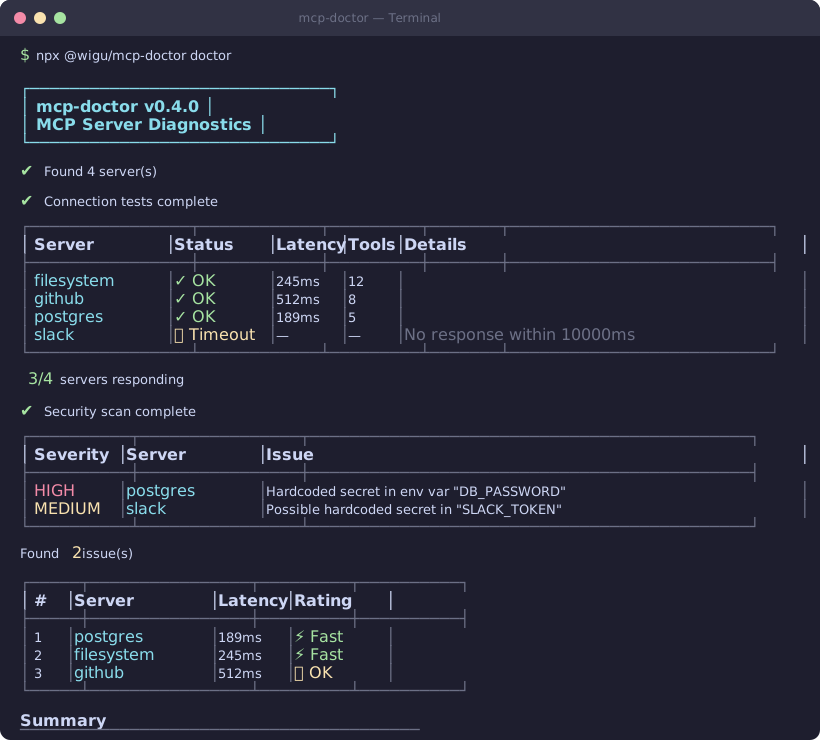
Zero-config CLI that auto-discovers MCP server configs across Claude Code, Cursor, VS Code, Windsurf, and Claude Desktop — then tests connections, flags security issues, and benchmarks latency in seconds.
Why?
MCP servers are becoming the backbone of AI-assisted development. But as you add more servers across more tools, things break silently:
- Servers go down and you don't notice until a tool call fails mid-conversation
- Secrets leak — API keys hardcoded in config files, tokens visible in process args
- Slow servers drag down your entire AI workflow without you realizing it
- Configs drift between tools — what works in Cursor might be broken in Claude Desktop
mcp-doctor gives you a single command to check everything, across every tool, in seconds.
Quick Start
That's it. No config needed — it finds your servers automatically.
Commands
| Command | Description |
|---|---|
doctor | Run all checks at once (scan + security + bench) |
scan | Test all MCP server connections |
security | Audit configs for security issues |
bench | Benchmark server response times |
serve | Run as an MCP server (stdio transport) |
All commands support --json for machine-readable output.
doctor — Full checkup (recommended)
Runs scan, security, and bench in one go and prints a summary.
scan — Test all MCP server connections
Discovers configs and verifies each server responds to a JSON-RPC handshake.
security — Audit configs for security issues
Checks for leaked secrets, overly broad permissions, and risky command patterns.
bench — Benchmark server response times
Measures JSON-RPC round-trip latency for every configured server.
MCP Server Mode
mcp-doctor can also run as an MCP server itself, exposing scan, security, bench, and doctor as tools your AI assistant can call directly.
When invoked without arguments and stdin is piped, it automatically starts in server mode using stdio transport. You can also explicitly run:
This means your AI assistant can diagnose its own MCP infrastructure on demand.
GitHub Action
Use mcp-doctor in CI to catch broken servers and leaked secrets automatically:
The action outputs JSON via ${{ steps.mcp-doctor.outputs.result }} for downstream processing.
JSON Output
All commands support --json for structured output — useful for CI pipelines, dashboards, or scripting:
Supported Tools
| Tool | Config Auto-Detected |
|---|---|
| Claude Code | ✅ |
| Claude Desktop | ✅ |
| Cursor | ✅ |
| VS Code | ✅ |
| Windsurf | ✅ |
mcp-doctor reads each tool's config file from its standard location and merges all discovered servers into a single view.
What It Checks
- Connection health — JSON-RPC
initializehandshake against every server - Security issues — plaintext secrets, tokens in args, dangerous shell commands
- Latency benchmarks — round-trip timing with fast / ok / slow ratings
Install
Requires Node.js 18+.
Contributing
Contributions are welcome! Open an issue or submit a pull request.
- Fork the repo
- Create a feature branch (
git checkout -b my-feature) - Commit your changes
- Open a PR
License
Related MCP Servers
Adoption & maintenance
Factual signals from GitHub, npm, and our automated checks — not a rating.
GitHub stars
3
Stargazers on the source repository.
npm downloads
74
Package downloads in the last 30 days.
Last commit
6mo ago
Most recent push to the default branch.
Directory activity
2 views
Config copies, upvotes, and views on AllMCPs.
Reviews
No reviews yet — be the first to share how this listing worked for you.
Frequently Asked Questions about MCP Doctor
AllMCPs Directory Badge
Showcase your server listing on GitHub or your project documentation. Embed this dynamic SVG badge to highlight official listing status and live engagement.
Badge Style:
Live Dynamic SVG Preview
Markdown (GitHub README)
[](https://allmcps.com/mcp/realwigu-mcp-doctor)HTML Embed
<a href="https://allmcps.com/mcp/realwigu-mcp-doctor"><img src="https://allmcps.com/api/badge/realwigu-mcp-doctor?style=directory" alt="MCP Doctor on AllMCPs" /></a>Technical Specs & Signals
CategoryBrowser Automation
PricingFree
9/10 checks healthy over the last 32d
49Quality signal: Fair · 49/100How this signal is calculated ▾
Server availabilityNot measured
Not scored for repo-hosted servers — we can't reach the running server, only its GitHub page. Hosted MCP endpoints are health-checked live.
Verified ownership10/20
Documentation & tools24/30
Adoption & activity3/15
Community engagement0/10
A guidance signal from public completeness & health data — not a user rating. New listings start lower and rise as they add docs, get verified, and grow adoption. Signals we can't observe for a listing are skipped, not counted against it.
Supply-chain signal
No high-severity advisories surfaced by our automated scan.
Critical 0High 0Medium 0Low 0
Scanned 22d ago via OSV.dev · @wigu/mcp-doctor (npm)
Own this project?
This directory is pre-filled from public sources. Claim via GitHub README, site badge, or DNS TXT to unlock edit access and the Official badge — proof is checked automatically, then reviewed by our team.
Free dofollow backlink: add your website and place the AllMCPs badge on it — no claim needed. We detect it automatically and keep it verified as long as the badge stays live.
Claim & get free dofollowShare & Embed
Add our SVG badge (dark/light directory styles) or embeddable widget to your site.