AllMCPs
BrowseBestCategoriesStackCompareToolsGuidesBlog
Log in Submit MCP

Stay in the loop

Get new MCP servers and top picks in your inbox.

AllMCPs

The open directory for discovering and installing Model Context Protocol servers.

AllMCPs on GitHub (opens in a new tab)
Launched onTiny Startupstinystartups.com
Explore
  • Browse servers
  • Best MCP servers
  • Categories
  • MCP clients
  • Agent prompts
  • Stack Builder
  • Compare servers
  • Random discovery New
  • Submit a server
  • Pricing & Boost Boost
Learn
  • Guides hub
  • What is MCP?
  • Install guide
  • Build an MCP server
  • Deploy an MCP server
  • Security guide
  • Troubleshooting
  • MCP for SEO & AEO
  • Protocol versioning
  • Blog & updates
Tools
  • All developer tools
  • Config generator
  • Config validator
  • Config auditor
  • MCP playground
  • Token calculator
  • OpenAPI β†’ MCP
  • Badge generator
For agents
  • REST API docs
  • Trust & traffic Live
  • Remote MCP server SSE β†— (opens in a new tab)
  • llms.txt β†— (opens in a new tab)
  • Catalog JSON β†— (opens in a new tab)
Company
  • About
  • Advertise Sponsor
  • Contact
  • GitHub β†— (opens in a new tab)
  • Terms
  • Privacy
AllMCPs VerifiedAllMCPs VerifiedFeatured on Nick LaunchesFeatured on Nick LaunchesLaunch Llama NewsletterLaunch Llama NewsletterVerified DR - allmcps.comVerified DR - allmcps.comFeatured on SaaSGrowFeatured on SaaSGrowFeatured on Twelve ToolsFeatured on Twelve ToolsFeatured on Saaspa.geFeatured on Saaspa.geFeatured on Findly.toolsFeatured on Findly.toolsFeatured on Startup FameFeatured on Startup FameFeatured on LaunchKiwiFeatured on LaunchKiwiFeatured on ScrollLaunchFeatured on ScrollLaunchFeatured on DailyPingsFeatured on DailyPingsFazier badgeFazier badgeFeatured on NewTool.siteFeatured on NewTool.siteFeatured on saasfame.comFeatured on saasfame.comDR Checker - Domain RatingDR Checker - Domain RatingListed on Turbo0Listed on Turbo0Launched on LaunchBoard - Product Launch PlatformLaunched on LaunchBoard - Product Launch PlatformList on SimilarlabsList on Similarlabshttps://codetrendy.comhttps://codetrendy.comListed on DevTool.ioFeatured on BuildlistFeatured on BuildlistLaunched on Tiny StartupsFeatured on ShowMeBestAIFeatured on ShowMeBestAIFind us on LaunchZoneFind us on LaunchZoneAllMCPs VerifiedAllMCPs VerifiedFeatured on Nick LaunchesFeatured on Nick LaunchesLaunch Llama NewsletterLaunch Llama NewsletterVerified DR - allmcps.comVerified DR - allmcps.comFeatured on SaaSGrowFeatured on SaaSGrowFeatured on Twelve ToolsFeatured on Twelve ToolsFeatured on Saaspa.geFeatured on Saaspa.geFeatured on Findly.toolsFeatured on Findly.toolsFeatured on Startup FameFeatured on Startup FameFeatured on LaunchKiwiFeatured on LaunchKiwiFeatured on ScrollLaunchFeatured on ScrollLaunchFeatured on DailyPingsFeatured on DailyPingsFazier badgeFazier badgeFeatured on NewTool.siteFeatured on NewTool.siteFeatured on saasfame.comFeatured on saasfame.comDR Checker - Domain RatingDR Checker - Domain RatingListed on Turbo0Listed on Turbo0Launched on LaunchBoard - Product Launch PlatformLaunched on LaunchBoard - Product Launch PlatformList on SimilarlabsList on Similarlabshttps://codetrendy.comhttps://codetrendy.comListed on DevTool.ioFeatured on BuildlistFeatured on BuildlistLaunched on Tiny StartupsFeatured on ShowMeBestAIFeatured on ShowMeBestAIFind us on LaunchZoneFind us on LaunchZone
Β© 2026 Jackalope Digital LLC. All rights reserved.
  1. Home
  2. πŸ’» Developer Tools
  3. Prumo
Prumo logo
Health: ActiveRecent health check succeeded.Last checked 9/7/2026, 6:24:47 PM

Prumo

User RatingsBe the first to rate and review this MCP server! Enrichment pendingWe haven’t run our AI enrichment pass on this listing yet, so the overview, use cases, and FAQ below may be sparse or missing. We work through the catalog over time β€” check back soon.
View Repository2 GitHub StarsTotal stargazers on GitHub for the source repository (2 stars).Visit Website

Checks the context files a coding agent reads against the git index, and reports what drifted.

Quick Install

Automated & IDE Setup

Copy the AI prompt to install this server into Claude Code, Cursor, or another agent β€” or use 1-click editor setup below.

Add to CursorAdd to VS Code
Not yet automatically verified

We haven't yet run this listing's install command through our automated sandbox check. This isn't a red flag β€” we're steadily working through the catalog.

Manual Client & Custom JSON ConfigExpand JSON β–Ύ

Client Config & Setup

Choose your client or environment
Target File:~/Library/Application Support/Claude/claude_desktop_config.json
claude_desktop_config.json
{
  "mcpServers": {
    "prumo": {
      "command": "npx",
      "args": [
        "-y",
        "@tomd4vs/prumo"
      ]
    }
  }
}

πŸ’‘ Paste the JSON block into your client's configuration file under mcpServers, then restart the application.

Install Directory Badge Claim listing AlternativesπŸ’» More in Developer Tools

Documentation Overview

prumo, a context linter for coding agents. Is your documentation still true?

Checks the context files your coding agent reads against the code beside them.

npm version CI MIT license

Leia em portuguΓͺs

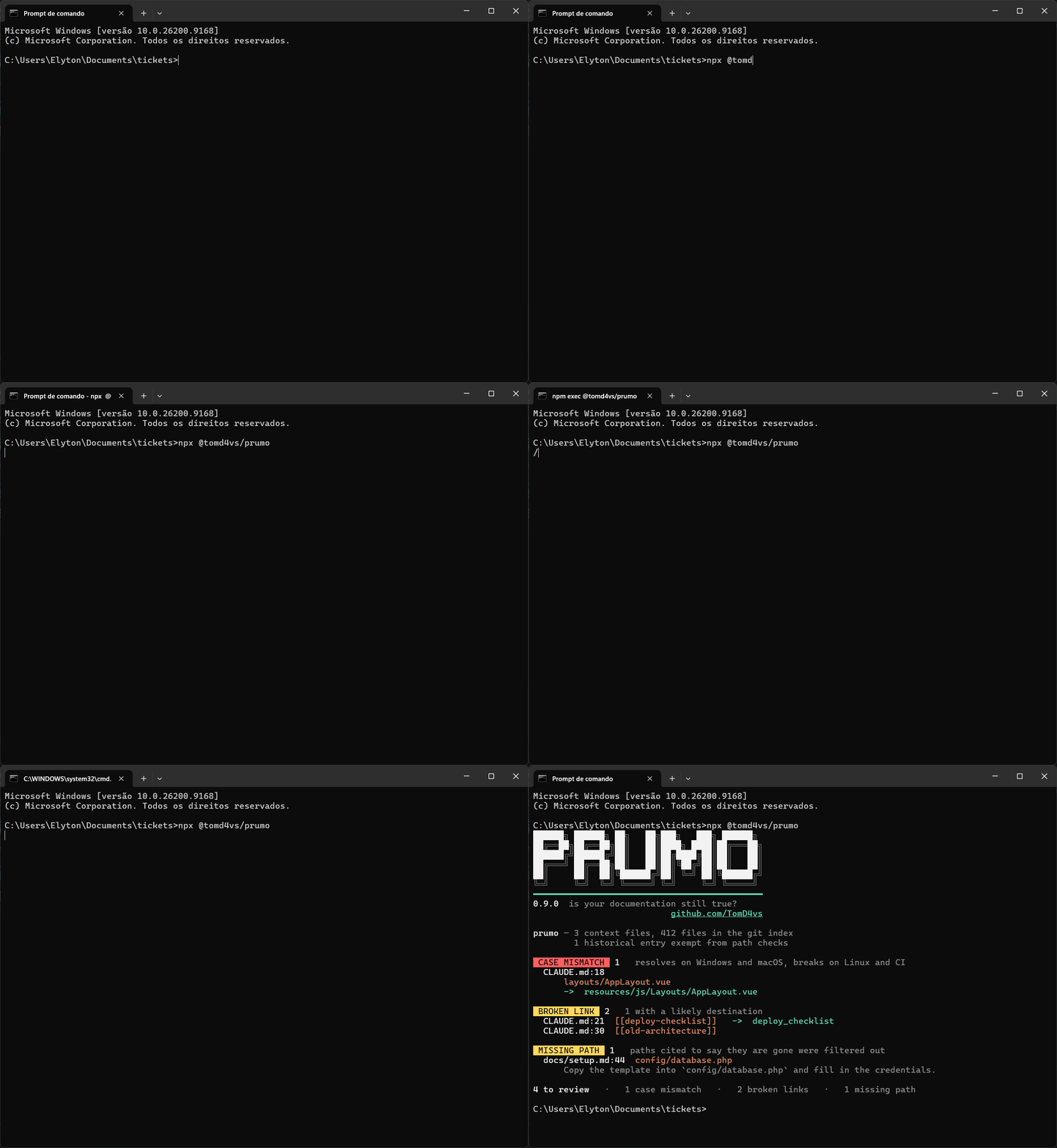
prumo in a terminal: one command, then a case mismatch, two broken links and a missing path, each with its correction

The problem

Three months ago someone wrote this in CLAUDE.md:

markdown
The sidebar logo lives in `layouts/AppLayout.vue`.

The folder has since been renamed to Layouts, with a capital L. Windows and macOS still open that path, so nothing ever complained. Linux and CI don't, and every agent that reads the file gets sent somewhere that doesn't exist.

That line survived six hand-run audits of the same files. prumo found it in four seconds.

Quick start

If you already have Node.js 18+ and git, you are ready. Nothing to install, nothing to configure, no account to create. From a terminal inside any git repository:

Terminal
npx @tomd4vs/prumo

prumo locates your context files on its own: CLAUDE.md, AGENTS.md, .cursor/rules, .github/copilot-instructions.md, installed skills in .claude/skills/ and the rest. Every file and folder it looks for is in the reference.

For frequent use, install it once:

Terminal
npm install -g @tomd4vs/prumo             # available everywhere on your machine
npm install --save-dev @tomd4vs/prumo     # or as a dev dependency of one project

Either way the command is prumo, with zero dependencies. Errors at this step, such as an old Node or a folder that isn't a git repository, are in Troubleshooting.

Reading the result

A clean run:

Code
prumo β€” 1 context file, 401 files tracked by git

nothing to review.

A run with findings, annotated:

Code
prumo β€” 3 context files, 412 files tracked by git             ← what it read
        1 historical entry exempt from path checks            ← what it skipped on purpose

CASE MISMATCH  (1)   wrong letter case: works on Windows and macOS, fails on Linux and CI
  CLAUDE.md:18                                                ← file and line
      layouts/AppLayout.vue                                   ← what the note says
      ->  resources/js/Layouts/AppLayout.vue                  ← what the repository has

BROKEN LINK  (2)   points at a page or heading that is not there; 1 with a likely destination
  CLAUDE.md:21  [[deploy-checklist]]   ->  deploy_checklist   ← the file it probably meant
  CLAUDE.md:30  [[old-architecture]]                          ← no candidate: renamed or deleted

MISSING PATH  (1)   the note cites it, but git tracks no such file or folder
  docs/setup.md:44  config/database.php                       ← file, line, dead path
      Copy the template into `config/database.php`…           ← the sentence, so you can judge

4 to review, --fix corrects 1                                 ← 1 + 2 + 1

Every finding carries a file, a line number and the correction, and a missing path says where git moved it when the history holds a rename. Nothing is guessed and nothing is written. What each finding means, and what to do about it, is in the reference. If it flags a line you know is correct, Silencing a finding covers the two ways to say so.

What it will not do

Three limits, chosen on purpose and explained in Design:

  • It does not judge claims. Whether "this flag disables caching" is still true needs a model, and that is a different tool.
  • It does not edit beyond letter case and the renames git itself recorded. A link suggested from a name is an educated guess, and a missing path with no history may be missing on purpose.
  • It makes no network calls. No telemetry, no account, no model.

Every check was measured on public repositories before it shipped, and the design page publishes the numbers, the ugly ones included.

Using it from an agent

prumo is a plain CLI, so any agent with shell access can run it.

Ask the agent to run it. npx @tomd4vs/prumo works in any git repository, and covers skills installed under .claude/skills/ on its own. For a repository that is itself a skill, name the file: npx @tomd4vs/prumo . SKILL.md. The text output names the file, the line and the correction, which is enough for an agent to act on without parsing. --format json returns the same findings as structured data.

Expose it as a tool. The package also ships prumo-mcp, an MCP server over stdio with four tools: prumo_check, which is read only, prumo_fix, which rewrites letter case and the renames git recorded, and the two reports, prumo_drift and prumo_budget, read only as well. In Claude Code:

Terminal
claude mcp add prumo -- npx -y -p @tomd4vs/prumo prumo-mcp

The configuration for any other MCP client is in Agents.

Add a slash command. A file at .claude/commands/prumo.md turns the check into /prumo:

markdown
Run `npx @tomd4vs/prumo` and fix every finding it reports.

Run it after every edit. A PostToolUse hook runs prumo whenever the agent writes a context file, so the findings land in the transcript and it can fix them in the same turn. The hook, for bash and for PowerShell, is in Agents.

Continuous integration

prumo exits non-zero on findings, so it drops into a pipeline as a single step. The shortest form is the action this repository ships:

yaml
# .github/workflows/docs.yml
name: docs
on: [push, pull_request]
jobs:
  prumo:
    runs-on: ubuntu-latest
    steps:
      - uses: actions/checkout@v4
      - uses: TomD4vs/prumo@v1

It annotates the exact line of the pull request and fails the job when something needs review. npx @tomd4vs/prumo --quiet after actions/setup-node does the same in any pipeline. Use actions/checkout as normal; prumo reads the git index, so a checkout that omits it will not work. Three options cover the rest:

  • --baseline records what a repository with a backlog already has, once; later runs fail only on what is new.
  • --since origin/main checks only the context files a pull request touched.
  • --sarif FILE writes the findings for code scanning, and .pre-commit-hooks.yaml runs the same check before each commit through the pre-commit framework.

The action's inputs, the SARIF upload and the pre-commit block are in the reference.

Two reports

Beyond the checks, two commands measure instead of judging, and exit 0 whatever they find:

bash
prumo drift     # which sections describe code that changed since they were written
prumo budget    # what each context file costs the agent, and what is written twice

drift reads from git blame when each section was last written, counts the commits that touched the files it cites since then, and lists the sections most moved first: a reading order for a review, since a section whose files changed forty times may still be right. budget estimates the tokens each file costs at every session, how much that grew since a commit, and which paragraphs are written in more than one place. Both are on the reference, and both are tools of the MCP server.

Documentation

PageWhat it answers
ReferenceEvery option and exit code, what each finding means, how to silence one, what --fix touches
AgentsEvery integration in full: the MCP server, the PostToolUse hook for bash and PowerShell, the slash command
DesignWhy so few checks: the measurement that removed the symbol checker, and the filters that keep the rest quiet
TroubleshootingError messages, and the questions people ask before adopting it
APICalling it from code, and running the test suite

License

MIT

Read the full README β†’View source on GitHub β†’

Related MCP Servers

View all in Developer Tools View all alternatives
  • PraisonAI logoPraisonAI

    AI Agents Framework with Self Reflection and MCP support

    πŸ’» Developer Tools1 views
    Compare vs PraisonAI β†’
  • Skill of Skills logoSkill of Skills

    Quality-ranked, cross-platform directory of AI coding skills, plugins and MCP servers.

    πŸ’» Developer Tools2 views
    Compare vs Skill of Skills β†’
  • Labelhead Artist Momentum logoLabelhead Artist Momentum

    Trending hip-hop artist momentum scores across four cultural dimensions.

    πŸ’» Developer Tools0 views
    Compare vs Labelhead Artist Momentum β†’
  • Cursor Delegate logoCursor Delegate

    Bridge AI coding hosts to cursor-agent over the Agent Client Protocol.

    πŸ’» Developer Tools0 views
    Compare vs Cursor Delegate β†’

Reviews

No reviews yet β€” be the first to share how this listing worked for you.

Frequently Asked Questions about Prumo

Add the following block to your claude_desktop_config.json under mcpServers: "mcpServers": { "prumo": { "command": "npx", "args": ["-y", "prumo"] } }

AllMCPs Directory Badge

Full Badge Customizer

Showcase your server listing on GitHub or your project documentation. Embed this dynamic SVG badge to highlight official listing status and live engagement.

Badge Style:
Live Dynamic SVG PreviewPrumo AllMCPs Directory Badge

Markdown (GitHub README)
[![AllMCPs](https://allmcps.com/api/badge/prumo?style=directory)](https://allmcps.com/mcp/prumo)
HTML Embed
<a href="https://allmcps.com/mcp/prumo"><img src="https://allmcps.com/api/badge/prumo?style=directory" alt="Prumo on AllMCPs" /></a>

Technical Specs & Signals

CategoryπŸ’»Developer Tools
More technical detailsExpand β–Ύ
TransportSTDIO
RuntimeNode.js
Last updatedSep 7, 2026
Views0
Unique ViewsTotal visits recorded for this listing page on AllMCPs.
Installs0
Installs & Copy ActionsTotal times users copied install commands or configuration snippets for this server.
GitHub stars2
GitHub Star CountTotal stargazers on GitHub representing community popularity (2 stars).
37Quality signal: Fair Β· 37/100How this signal is calculated β–Ύ
Server availabilityNot measured

Not scored for repo-hosted servers β€” we can't reach the running server, only its GitHub page. Hosted MCP endpoints are health-checked live.

Verified ownership10/20
Documentation & tools16/30
Adoption & activity2/15
Community engagement0/10

A guidance signal from public completeness & health data β€” not a user rating. New listings start lower and rise as they add docs, get verified, and grow adoption. Signals we can't observe for a listing are skipped, not counted against it.

β˜… FeaturedMoxie Docs MCP logo

Moxie Docs MCP

MCP & Agent Skills for Automated Documentation, and codebase conventions + context

Explore Server β†’

Own this project?

This directory is pre-filled from public sources. Claim via GitHub README, site badge, or DNS TXT to unlock edit access and the Official badge β€” proof is checked automatically, then reviewed by our team.

Free dofollow backlink: add your website and place the AllMCPs badge on it β€” no claim needed. We detect it automatically and keep it verified as long as the badge stays live.

Claim & get free dofollow

Share & Embed

Add our SVG badge (dark/light directory styles) or embeddable widget to your site.

Explore more

More in πŸ’» Developer Tools β†’Best MCP servers for Developers β†’Alternatives to Prumo β†’Install in Claude DesktopInstall in CursorInstall in VS Code