Primer MCP README
The full upstream README, mirrored here for reference. Install config, tool schemas, adoption signals, and an original overview live on the Primer MCP listing page.
primer-mcp
Beta — the core workflow is stable and tested, but the tool is new. Expect rough edges.
A Jira-lite MCP server that guides planning-first workflows for AI-assisted development — tickets as markdown files, your AI agent as the interface.
Why
Getting real value from AI coding agents takes more than prompting — it takes shaping what they build, engineering the workflow around them, and deploying something that holds up in practice. Left to their own devices, agents jump straight to implementation. Primer-mcp makes them plan first: state why the work matters, record decisions and weigh trade-offs, break it into stories and tasks, then complete and verify each one. The tickets are plain markdown with YAML frontmatter, committed alongside your code — no external service, no database, fully visible in your repo and conveniently browsable with tools like Obsidian.
primer-mcp is designed for solo developers and small projects — one person (and their AI agent) working through a backlog. It doesn't have assignment, notifications, or multi-user coordination, and that's deliberate: it's a lightweight complement to the AI workflow, not a replacement for Jira.
Quick start
Requires Python 3.12+ and uv.
Add to your MCP client config (e.g. Claude Code settings.json, Claude Desktop claude_desktop_config.json):
That's it — your MCP client downloads and runs primer-mcp automatically. You don't need to install anything manually.
Tell your AI agent what you want to build — it handles the rest. The server guides the agent through a planning-first workflow: why the work matters, decisions, stories, tasks, completion. Not sure what to do next? Ask your agent — it reads the current state and knows what comes next.
Manual install (optional)
If you prefer to install primer-mcp as a standalone tool (e.g. for the list-actionable CLI command):
What it looks like
A typical session — you describe the work, the agent handles the planning:
Every ticket is a markdown file in primer/, committed alongside your code. The export_graph tool visualises how they connect:
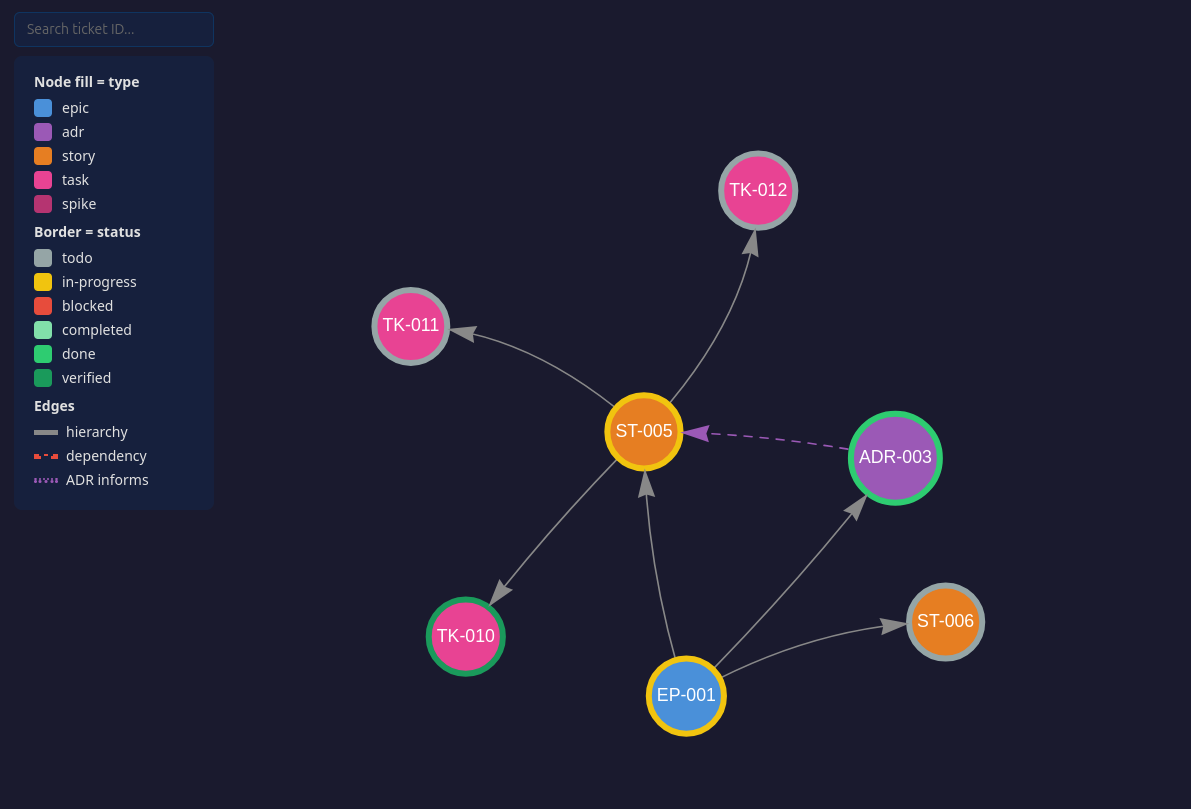
Clone the repo and open assets/demo-graph.html for the interactive version — click any node to see its full ticket.
Since tickets are plain markdown with wikilinks, you can also open primer/ as an Obsidian vault for a live graph that updates as tickets change — no need to re-export.
Tools
Your AI agent calls these tools automatically — you don't need to invoke them directly. You can also ask your agent to call a specific tool if you want more control.
Setup
| Tool | What it does |
|---|---|
init_project | Create the primer/ ticket store and add the workflow section to CLAUDE.md |
Planning
| Tool | What it does |
|---|---|
plan_epic | Create an epic — the top-level container for a body of work |
record_adr | Record an architecture decision: context, decision, rejected alternatives, consequences |
create_story | Create a story under an epic — a deliverable with acceptance criteria |
create_task | Create a task under a story — a concrete unit of work with a testable outcome |
create_spike | Create a spike — a timeboxed investigation to answer a question |
Execution
| Tool | What it does |
|---|---|
start_task | Move a task to in-progress |
complete_task | Mark a task completed with notes on what was done |
verify_task | Verify a completed task with evidence (point at the commit) |
complete_spike | Close a spike with findings |
Query
| Tool | What it does |
|---|---|
list_actionable | List what can be acted on right now, with epic context and recommendations |
get_ticket | Read a ticket by ID with its full body |
list_tickets | List tickets, filterable by type or status |
update_ticket | Amend a ticket's status, dependencies, body sections, or external refs |
Export
| Tool | What it does |
|---|---|
export_graph | Generate a self-contained HTML file visualising the project as an interactive graph |
Prompts
| Prompt | What it does |
|---|---|
plan_story | Walk through a planning conversation before creating a story |
export_jira | Export primer-mcp tickets to Jira via a Jira MCP server |
import_jira | Import a Jira epic and its hierarchy into primer-mcp |
Agent instructions
When your project is initialized (automatically on first use, or via init_project), this section is appended to your agent config file (CLAUDE.md, AGENTS.md) to guide the agent. If you prefer to add it manually:
Graduating to Jira (experimental)
primer-mcp tickets map directly to Jira concepts (Epic, Story, Task, ADR). When a project outgrows local markdown files, use the export_jira prompt with any Jira MCP server to push tickets to Jira. The external_ref field on each ticket tracks the Jira key, so re-exports update existing issues instead of creating duplicates. import_jira goes the other direction. Both prompts are experimental and have not been tested end-to-end.
This repo dogfoods itself
The primer/ directory in this repo is the project's own backlog, created with the tools in src/ and committed deliberately — a tool that tells you to commit your ticket store should commit its own. Browse it on GitHub to see what a real store looks like before installing:
primer/adrs/— design decisions, including rejected alternatives and whyprimer/stories/andprimer/tasks/— what is done, what is next, and verification evidence
It is project management, not part of the package. The wheel ships src/primer_mcp only, and primer/ is excluded from the distribution. Your own primer/ is created automatically when you start planning.
License
MIT