AllMCPs
BrowseBestCategoriesStackCompareToolsGuidesBlog
Log in Submit MCP

Stay in the loop

Get new MCP servers and top picks in your inbox.

AllMCPs

The open directory for discovering and installing Model Context Protocol servers.

AllMCPs on GitHub (opens in a new tab)
Launched onTiny Startupstinystartups.com
Explore
  • Browse servers
  • Best MCP servers
  • Categories
  • MCP clients
  • Agent prompts
  • Stack Builder
  • Compare servers
  • Random discovery New
  • Submit a server
  • Pricing & Boost Boost
Learn
  • Guides hub
  • What is MCP?
  • Install guide
  • Build an MCP server
  • Deploy an MCP server
  • Security guide
  • Troubleshooting
  • MCP for SEO & AEO
  • Protocol versioning
  • Blog & updates
Tools
  • All developer tools
  • Config generator
  • Config validator
  • Config auditor
  • MCP playground
  • Token calculator
  • OpenAPI β†’ MCP
  • Badge generator
For agents
  • REST API docs
  • Trust & traffic Live
  • Remote MCP server SSE β†— (opens in a new tab)
  • llms.txt β†— (opens in a new tab)
  • Catalog JSON β†— (opens in a new tab)
Company
  • About
  • Advertise Sponsor
  • Contact
  • GitHub β†— (opens in a new tab)
  • Terms
  • Privacy
AllMCPs VerifiedAllMCPs VerifiedFeatured on Nick LaunchesFeatured on Nick LaunchesLaunch Llama NewsletterLaunch Llama NewsletterVerified DR - allmcps.comVerified DR - allmcps.comFeatured on SaaSGrowFeatured on SaaSGrowFeatured on Twelve ToolsFeatured on Twelve ToolsFeatured on Saaspa.geFeatured on Saaspa.geFeatured on Findly.toolsFeatured on Findly.toolsFeatured on Startup FameFeatured on Startup FameFeatured on LaunchKiwiFeatured on LaunchKiwiFeatured on ScrollLaunchFeatured on ScrollLaunchFeatured on DailyPingsFeatured on DailyPingsFazier badgeFazier badgeFeatured on NewTool.siteFeatured on NewTool.siteFeatured on saasfame.comFeatured on saasfame.comDR Checker - Domain RatingDR Checker - Domain RatingListed on Turbo0Listed on Turbo0Launched on LaunchBoard - Product Launch PlatformLaunched on LaunchBoard - Product Launch PlatformList on SimilarlabsList on Similarlabshttps://codetrendy.comhttps://codetrendy.comListed on DevTool.ioFeatured on BuildlistFeatured on BuildlistLaunched on Tiny StartupsFeatured on ShowMeBestAIFeatured on ShowMeBestAIFind us on LaunchZoneFind us on LaunchZoneAllMCPs VerifiedAllMCPs VerifiedFeatured on Nick LaunchesFeatured on Nick LaunchesLaunch Llama NewsletterLaunch Llama NewsletterVerified DR - allmcps.comVerified DR - allmcps.comFeatured on SaaSGrowFeatured on SaaSGrowFeatured on Twelve ToolsFeatured on Twelve ToolsFeatured on Saaspa.geFeatured on Saaspa.geFeatured on Findly.toolsFeatured on Findly.toolsFeatured on Startup FameFeatured on Startup FameFeatured on LaunchKiwiFeatured on LaunchKiwiFeatured on ScrollLaunchFeatured on ScrollLaunchFeatured on DailyPingsFeatured on DailyPingsFazier badgeFazier badgeFeatured on NewTool.siteFeatured on NewTool.siteFeatured on saasfame.comFeatured on saasfame.comDR Checker - Domain RatingDR Checker - Domain RatingListed on Turbo0Listed on Turbo0Launched on LaunchBoard - Product Launch PlatformLaunched on LaunchBoard - Product Launch PlatformList on SimilarlabsList on Similarlabshttps://codetrendy.comhttps://codetrendy.comListed on DevTool.ioFeatured on BuildlistFeatured on BuildlistLaunched on Tiny StartupsFeatured on ShowMeBestAIFeatured on ShowMeBestAIFind us on LaunchZoneFind us on LaunchZone
Β© 2026 Jackalope Digital LLC. All rights reserved.
  1. Home
  2. 🏒 Workplace & Productivity
  3. Primer MCP
Primer MCP logo
Health: ActiveRecent health check succeeded.Last checked 9/7/2026, 8:39:59 PM

Primer MCP

User RatingsBe the first to rate and review this MCP server! Enrichment pendingWe haven’t run our AI enrichment pass on this listing yet, so the overview, use cases, and FAQ below may be sparse or missing. We work through the catalog over time β€” check back soon.
View RepositoryVisit Website

A Jira-lite MCP server that guides planning-first workflows for AI-assisted development.

Quick Install

Automated & IDE Setup

Copy the AI prompt to install this server into Claude Code, Cursor, or another agent β€” or use 1-click editor setup below.

Add to CursorAdd to VS Code
Not yet automatically verified

We haven't yet run this listing's install command through our automated sandbox check. This isn't a red flag β€” we're steadily working through the catalog.

Manual Client & Custom JSON ConfigExpand JSON β–Ύ

Client Config & Setup

Choose your client or environment
Target File:~/Library/Application Support/Claude/claude_desktop_config.json
claude_desktop_config.json
{
  "mcpServers": {
    "primer-mcp": {
      "command": "uvx",
      "args": [
        "primer-mcp"
      ]
    }
  }
}

πŸ’‘ Paste the JSON block into your client's configuration file under mcpServers, then restart the application.

Install Directory Badge Claim listing Alternatives🏒 More in Workplace & Productivity

Documentation Overview

primer-mcp

Beta β€” the core workflow is stable and tested, but the tool is new. Expect rough edges.

A Jira-lite MCP server that guides planning-first workflows for AI-assisted development β€” tickets as markdown files, your AI agent as the interface.

Why

Getting real value from AI coding agents takes more than prompting β€” it takes shaping what they build, engineering the workflow around them, and deploying something that holds up in practice. Left to their own devices, agents jump straight to implementation. Primer-mcp makes them plan first: state why the work matters, record decisions and weigh trade-offs, break it into stories and tasks, then complete and verify each one. The tickets are plain markdown with YAML frontmatter, committed alongside your code β€” no external service, no database, fully visible in your repo and conveniently browsable with tools like Obsidian.

primer-mcp is designed for solo developers and small projects β€” one person (and their AI agent) working through a backlog. It doesn't have assignment, notifications, or multi-user coordination, and that's deliberate: it's a lightweight complement to the AI workflow, not a replacement for Jira.

Quick start

Requires Python 3.12+ and uv.

Add to your MCP client config (e.g. Claude Code settings.json, Claude Desktop claude_desktop_config.json):

config.json
{
  "mcpServers": {
    "primer-mcp": {
      "command": "uvx",
      "args": ["primer-mcp"]
    }
  }
}

That's it β€” your MCP client downloads and runs primer-mcp automatically. You don't need to install anything manually.

Tell your AI agent what you want to build β€” it handles the rest. The server guides the agent through a planning-first workflow: why the work matters, decisions, stories, tasks, completion. Not sure what to do next? Ask your agent β€” it reads the current state and knows what comes next.

Manual install (optional)

If you prefer to install primer-mcp as a standalone tool (e.g. for the list-actionable CLI command):

bash
uv tool install primer-mcp

# Update to latest
uv tool upgrade primer-mcp

# Uninstall
uv tool uninstall primer-mcp

What it looks like

A typical session β€” you describe the work, the agent handles the planning:

Code
You:  I want to add user authentication.

Agent: You have EP-001: "Launch the app" β€” auth fits under that.
       Or I can create a separate epic if this is a bigger initiative.

You:  EP-001 is fine.

Agent: Before we build, we should decide on the auth approach.
       A few common options:

         1. JWT with refresh tokens β€” stateless, good for mobile/SPAs
         2. Server-side sessions β€” simple, but needs sticky storage
         3. OAuth2 only β€” delegates to a provider, less to maintain
            ...

You:  Option 1 β€” we need mobile support.

Agent: I'll record that decision so we don't revisit it later.
       β†’ Recorded ADR-003: "Use JWT with refresh tokens"
         Rejected: server-side sessions (no mobile support),
                   OAuth2 only (need local accounts too)

       Breaking this into stories.
       β†’ Created ST-005: "Login and registration endpoints"
       β†’ Created ST-006: "Token refresh and revocation"

       And tasks for the first story:
       β†’ Created TK-010: "Add /register endpoint with validation"
       β†’ Created TK-011: "Add /login endpoint returning JWT pair"
       β†’ Created TK-012: "Write integration tests for auth flow"

You:  Let's start with TK-010.

Agent: β†’ Started TK-010

       [implements the register endpoint]

       Done β€” added POST /register with email/password validation,
       password hashing, and duplicate-email check.
       β†’ Completed TK-010

You:  Looks good, verify it.

Agent: β†’ Verified TK-010 (evidence: "all tests pass β€” a1b2c3d")

       TK-011 is next. Want me to continue?

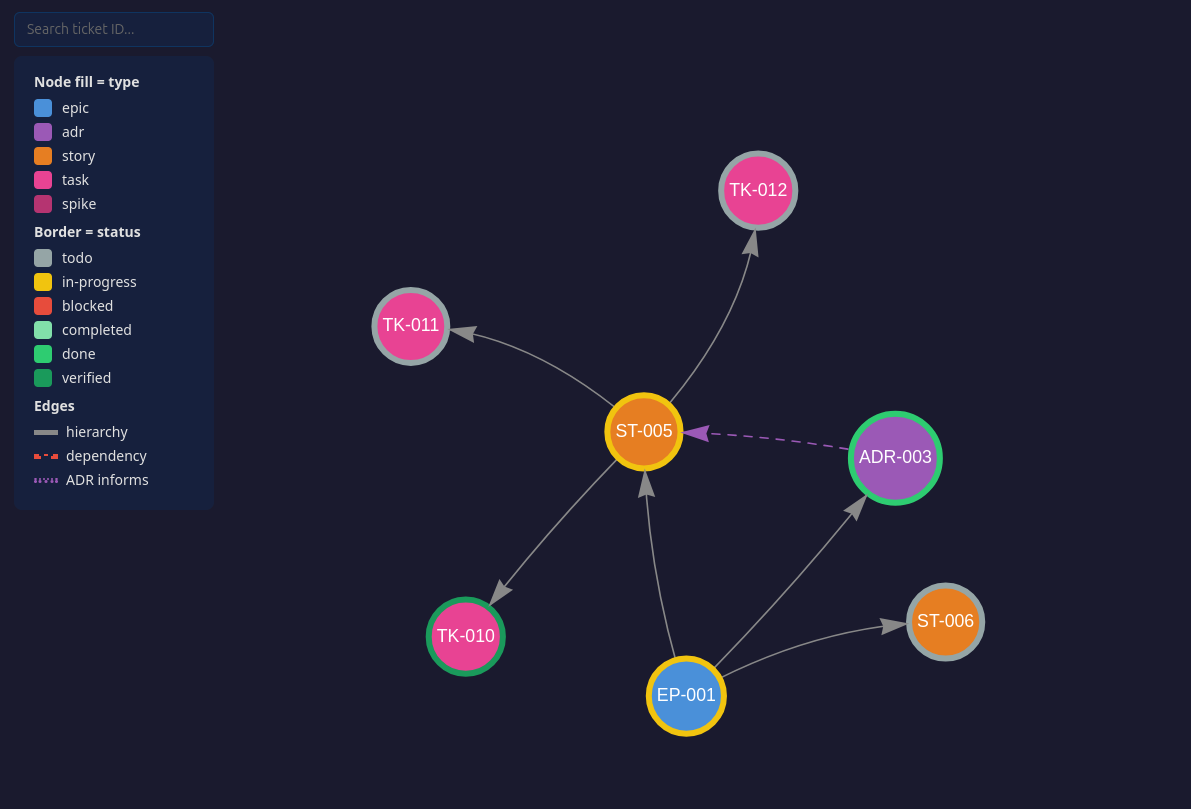
Every ticket is a markdown file in primer/, committed alongside your code. The export_graph tool visualises how they connect:
Demo project graph

Clone the repo and open assets/demo-graph.html for the interactive version β€” click any node to see its full ticket.

Since tickets are plain markdown with wikilinks, you can also open primer/ as an Obsidian vault for a live graph that updates as tickets change β€” no need to re-export.

Tools

Your AI agent calls these tools automatically β€” you don't need to invoke them directly. You can also ask your agent to call a specific tool if you want more control.

Setup

ToolWhat it does
init_projectCreate the primer/ ticket store and add the workflow section to CLAUDE.md

Planning

ToolWhat it does
plan_epicCreate an epic β€” the top-level container for a body of work
record_adrRecord an architecture decision: context, decision, rejected alternatives, consequences
create_storyCreate a story under an epic β€” a deliverable with acceptance criteria
create_taskCreate a task under a story β€” a concrete unit of work with a testable outcome
create_spikeCreate a spike β€” a timeboxed investigation to answer a question

Execution

ToolWhat it does
start_taskMove a task to in-progress
complete_taskMark a task completed with notes on what was done
verify_taskVerify a completed task with evidence (point at the commit)
complete_spikeClose a spike with findings

Query

ToolWhat it does
list_actionableList what can be acted on right now, with epic context and recommendations
get_ticketRead a ticket by ID with its full body
list_ticketsList tickets, filterable by type or status
update_ticketAmend a ticket's status, dependencies, body sections, or external refs

Export

ToolWhat it does
export_graphGenerate a self-contained HTML file visualising the project as an interactive graph

Prompts

PromptWhat it does
plan_storyWalk through a planning conversation before creating a story
export_jiraExport primer-mcp tickets to Jira via a Jira MCP server
import_jiraImport a Jira epic and its hierarchy into primer-mcp

Agent instructions

When your project is initialized (automatically on first use, or via init_project), this section is appended to your agent config file (CLAUDE.md, AGENTS.md) to guide the agent. If you prefer to add it manually:

markdown
## primer-mcp

This project uses primer-mcp for planning-first development.
Tickets are markdown files under `primer/` β€” they are yours to read and edit. 
Prefer the tools for creating and updating them: they allocate IDs, follow the templates
and guide the workflow. Hand-edit where the tools fall short.

- Plan before code. Recommended flow: Epic -> ADR -> Story -> Task,
  suggest rather than enforce β€” skip steps when it makes sense.
- Unsure what to do next? Call `list_actionable`.
- Completion is two-phase: `complete_task` with notes, then `verify_task`
  with evidence (point at the commit, not the output). Both are
  recommended β€” the tools will nudge you if you skip a step.
- After tickets creation or changes, offer to regenerate the project graph with `export_graph`.
- Before committing, check that completion notes on finished tickets
  still reflect the actual work β€” update both the frontmatter
  `completed_notes` and the `## Completion Notes` section if needed.
- Before implementing new work, propose a ticket and parent. Small fixes (1–2
  tasks) go under the standing bug-fix story; larger efforts get their
  own story. The user can decline.

Graduating to Jira (experimental)

primer-mcp tickets map directly to Jira concepts (Epic, Story, Task, ADR). When a project outgrows local markdown files, use the export_jira prompt with any Jira MCP server to push tickets to Jira. The external_ref field on each ticket tracks the Jira key, so re-exports update existing issues instead of creating duplicates. import_jira goes the other direction. Both prompts are experimental and have not been tested end-to-end.

This repo dogfoods itself

The primer/ directory in this repo is the project's own backlog, created with the tools in src/ and committed deliberately β€” a tool that tells you to commit your ticket store should commit its own. Browse it on GitHub to see what a real store looks like before installing:

  • primer/adrs/ β€” design decisions, including rejected alternatives and why
  • primer/stories/ and primer/tasks/ β€” what is done, what is next, and verification evidence

It is project management, not part of the package. The wheel ships src/primer_mcp only, and primer/ is excluded from the distribution. Your own primer/ is created automatically when you start planning.

License

MIT

Read the full README β†’View source on GitHub β†’

Related MCP Servers

View all in Workplace & Productivity View all alternatives
  • SmartCut logoSmartCut

    Cutlist optimization for sheet, linear and roll stock, with grain, kerf, nesting and saw exports.

    🏒 Workplace & Productivity0 views
    Compare vs SmartCut β†’
  • Airtable User MCP logoAirtable User MCP

    Manage Airtable bases: schema, field CRUD, views, formula validation, extensions

    🏒 Workplace & Productivity1 views
    Compare vs Airtable User MCP β†’
  • Jira logoJira

    Jira MCP Pack

    🏒 Workplace & Productivity0 views
    Compare vs Jira β†’
  • Trello MCP Server logoTrello MCP Server

    Trello Model Context Protocol (MCP) Server for AI Agents

    🏒 Workplace & Productivity1 views
    Compare vs Trello MCP Server β†’

Reviews

No reviews yet β€” be the first to share how this listing worked for you.

Frequently Asked Questions about Primer MCP

Add the following block to your claude_desktop_config.json under mcpServers: "mcpServers": { "primer-mcp": { "command": "npx", "args": ["-y", "primer-mcp"] } }

AllMCPs Directory Badge

Full Badge Customizer

Showcase your server listing on GitHub or your project documentation. Embed this dynamic SVG badge to highlight official listing status and live engagement.

Badge Style:
Live Dynamic SVG PreviewPrimer MCP AllMCPs Directory Badge

Markdown (GitHub README)
[![AllMCPs](https://allmcps.com/api/badge/primer-mcp?style=directory)](https://allmcps.com/mcp/primer-mcp)
HTML Embed
<a href="https://allmcps.com/mcp/primer-mcp"><img src="https://allmcps.com/api/badge/primer-mcp?style=directory" alt="Primer MCP on AllMCPs" /></a>

Technical Specs & Signals

Category🏒Workplace & Productivity
More technical detailsExpand β–Ύ
TransportSTDIO
RuntimePython
Last updatedSep 7, 2026
Views0
Unique ViewsTotal visits recorded for this listing page on AllMCPs.
Installs0
Installs & Copy ActionsTotal times users copied install commands or configuration snippets for this server.
GitHub stars0
GitHub Star CountTotal stargazers on GitHub representing community popularity (0 stars).
36Quality signal: Fair Β· 36/100How this signal is calculated β–Ύ
Server availabilityNot measured

Not scored for repo-hosted servers β€” we can't reach the running server, only its GitHub page. Hosted MCP endpoints are health-checked live.

Verified ownership10/20
Documentation & tools16/30
Adoption & activity1/15
Community engagement0/10

A guidance signal from public completeness & health data β€” not a user rating. New listings start lower and rise as they add docs, get verified, and grow adoption. Signals we can't observe for a listing are skipped, not counted against it.

β˜… FeaturedAllMCPs Server logo

AllMCPs Server

The official MCP server for AllMCPs.com - submit and manage tools directly from your AI. The open directory for MCP servers. Connect Claude, Cursor, Windsurf, and AI agents to databases, tools, files, and APIs. Explore 10,000+ servers. AllMCPs is the premier, open directory for discovering, evaluating, and installing Model Context Protocol (MCP) servers to equip AI agents and LLMs with real-world superpowers.

Explore Server β†’

Own this project?

This directory is pre-filled from public sources. Claim via GitHub README, site badge, or DNS TXT to unlock edit access and the Official badge β€” proof is checked automatically, then reviewed by our team.

Free dofollow backlink: add your website and place the AllMCPs badge on it β€” no claim needed. We detect it automatically and keep it verified as long as the badge stays live.

Claim & get free dofollow

Share & Embed

Add our SVG badge (dark/light directory styles) or embeddable widget to your site.

Explore more

More in 🏒 Workplace & Productivity β†’Best MCP servers for Workplace & Productivity β†’Alternatives to Primer MCP β†’Install in Claude DesktopInstall in CursorInstall in VS Code
