Postgram README
The full upstream README, mirrored here for reference. Install config, tool schemas, adoption signals, and an original overview live on the Postgram listing page.
Postgram
A self-hosted productivity and knowledge backend for humans and AI agents.
Website · Quick start · MCP guide · REST API · Demo
Postgram keeps the data you and your agents work from in one inspectable place: notes, documents, tasks, people, projects, interactions, decisions, and agent memory. Humans use the browser UI and CLI; agents use the same corpus over MCP, REST, or the CLI.
It is more than an agent-memory layer. Postgram preserves typed source objects, supports GTD-style task management and Markdown folder sync, combines full-text and vector retrieval with a knowledge graph, and separates short-lived agent working context from durable memory.
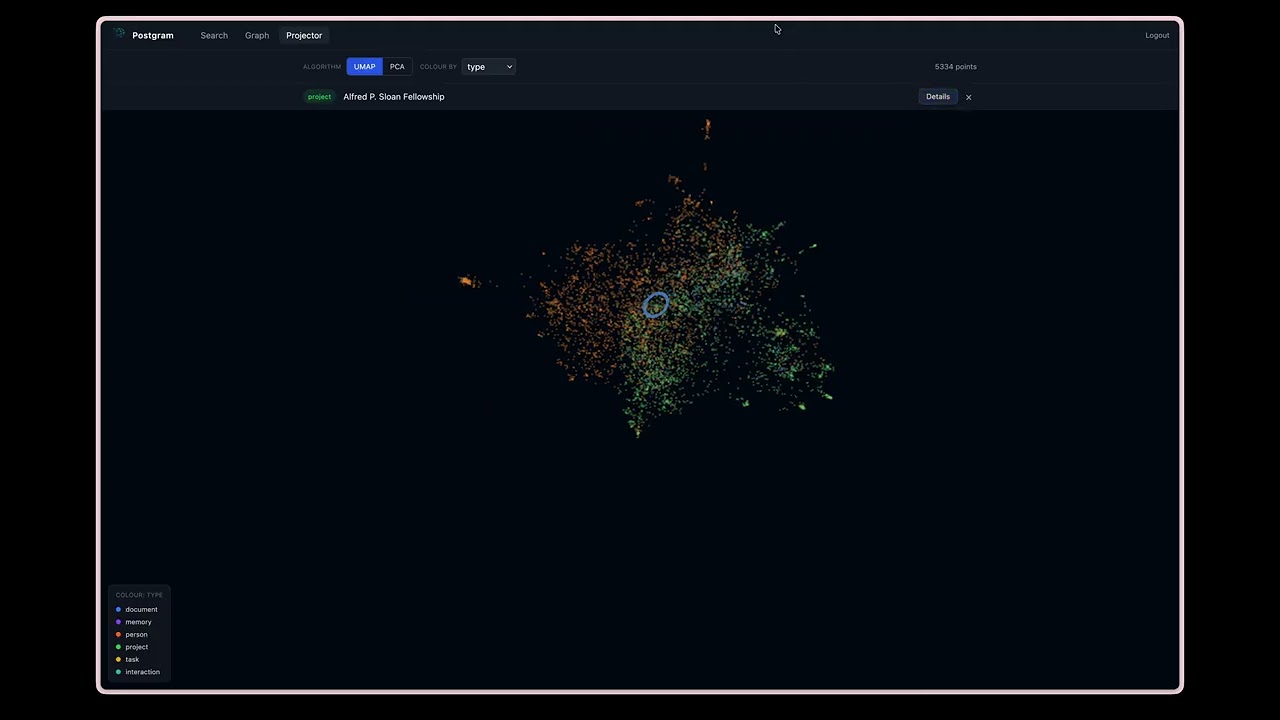
Watch the demo |
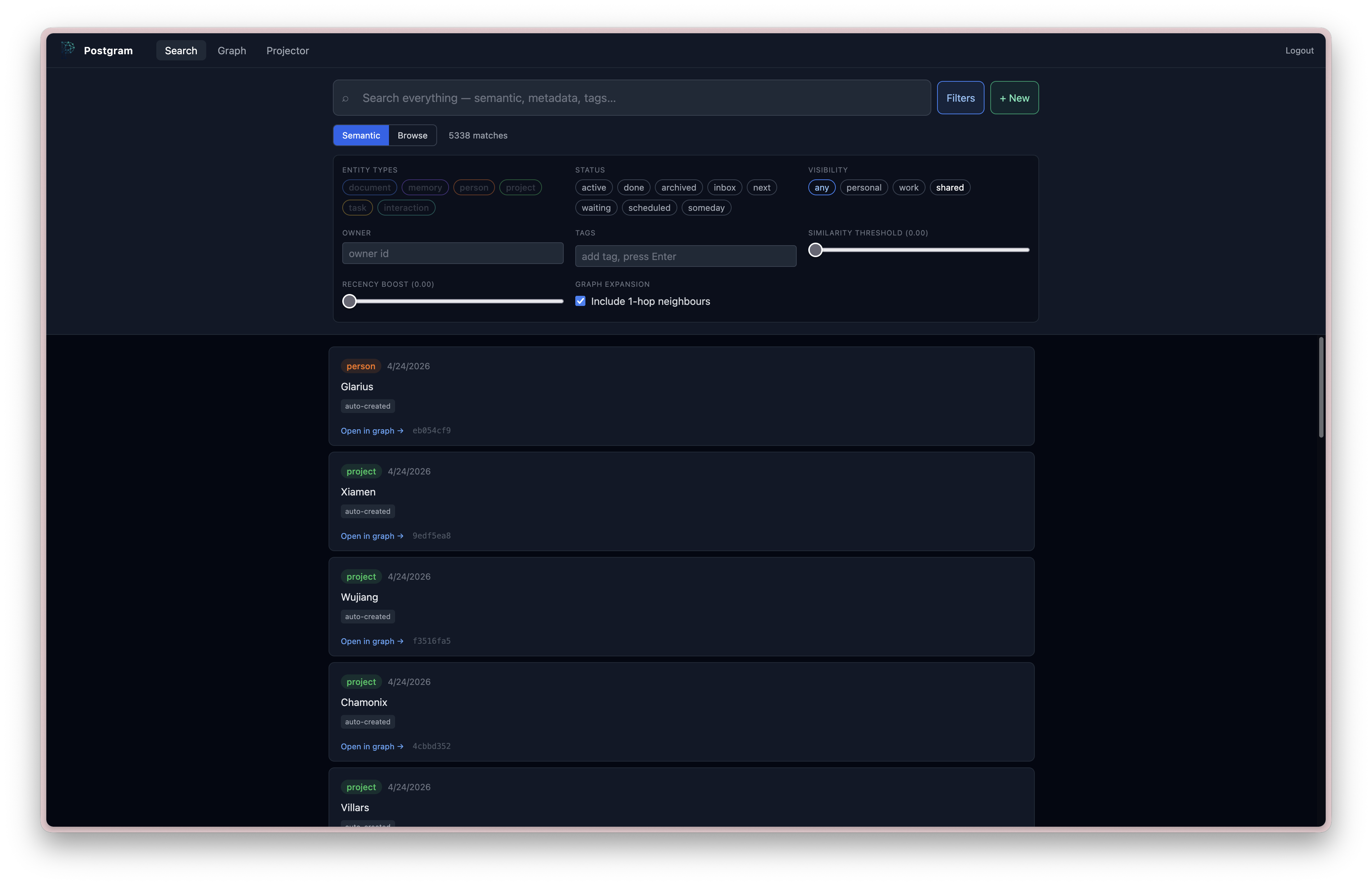
Search across memories, documents, people, projects, and tasks |
Why Postgram
- One private corpus across tools. Give different agents and devices access to the same data without tying it to one editor or hosted memory provider.
- Inspectable source data. Store typed entities instead of opaque chat summaries, then search, edit, link, archive, or delete them yourself.
- Search before graph expansion. Hybrid retrieval finds relevant entities; edge summaries tell an agent when related graph context is worth following.
- Working context is not durable memory. Session context has its own scope and lifecycle; grooming can archive it or distill selected context into durable memory.
- Operator control. Choose where PostgreSQL runs, which embedding and extraction providers are allowed, who receives API keys, and what is kept.
Postgram is built for one person or a small trusted team running a local or single-VM deployment. It is not a hosted service or a multi-tenant SaaS platform. Knowledge extraction is optional, and the provided Docker Compose setup binds the raw API and UI ports to loopback by default.
Quick Start (Docker Compose)
You need Git, Docker, and Docker Compose. Node.js 22+ is needed only for local
development or for installing the pgm CLI; gpg is needed only for encrypted
CLI backups.
-
Clone Postgram:
-
Choose an embedding path before the first start. For the local default, install and start Ollama on the Docker host, then pull Postgram's default embedding model:
For hosted OpenAI embeddings instead, create a
.envfile containing a real key before starting Compose: -
Start the stack:
The first run creates persistent Docker volumes for PostgreSQL and installation secrets. No
.envfile is required for the default Compose path. -
Read the one-time bootstrap token:
The plaintext appears only in the original first-start logs. Capture it before recreating the API container or discarding those logs.
-
Open http://127.0.0.1:3000/admin, paste the token, create the first admin, enroll MFA, and follow the onboarding flow.
-
Confirm the selected provider in the Admin Config tab. If you add or change staged settings, save, validate, and apply them, then restart
mcp-serverwhen Admin marks a restart as required:When Ollama runs on the Docker host, its base URL is
http://host.docker.internal:11434. Optional LLM relationship extraction is disabled by default and can use OpenAI, Anthropic, Ollama, or an OpenAI-compatible endpoint. Changing the embedding provider, model, or dimensions after the first start is migration work and is blocked from a simple config apply. -
Check health, then create an API key in the Admin Overview tab. For the smoke test below, allow
readandwrite, thememoryentity type, andpersonalvisibility:The response should include
"status":"ok"and"postgres":"connected". -
Install the CLI and verify an authenticated write and search. Enrichment is asynchronous, so wait for
pgm queueto report no pending work before the search:
If embeddings are unreachable, Postgram still starts and accepts writes, but enrichment and search will fail until the provider is available. See the full quick start and troubleshooting guide for the longer path.
For access from ChatGPT, Claude, or another remote MCP client, put Postgram behind HTTPS, enable OAuth, and follow the MCP integration guide. Do not publish the loopback development ports directly to the internet.
What It Does
Postgram provides:
- durable storage for typed entities:
memory,person,project,task,interaction,document - hybrid BM25 + vector search with asynchronous enrichment
- knowledge graph with typed directional edges between entities
- LLM-powered relationship extraction (OpenAI, Anthropic, or Ollama)
- document sync from local markdown repos via manifest comparison
- browser interfaces for knowledge work and guarded administration
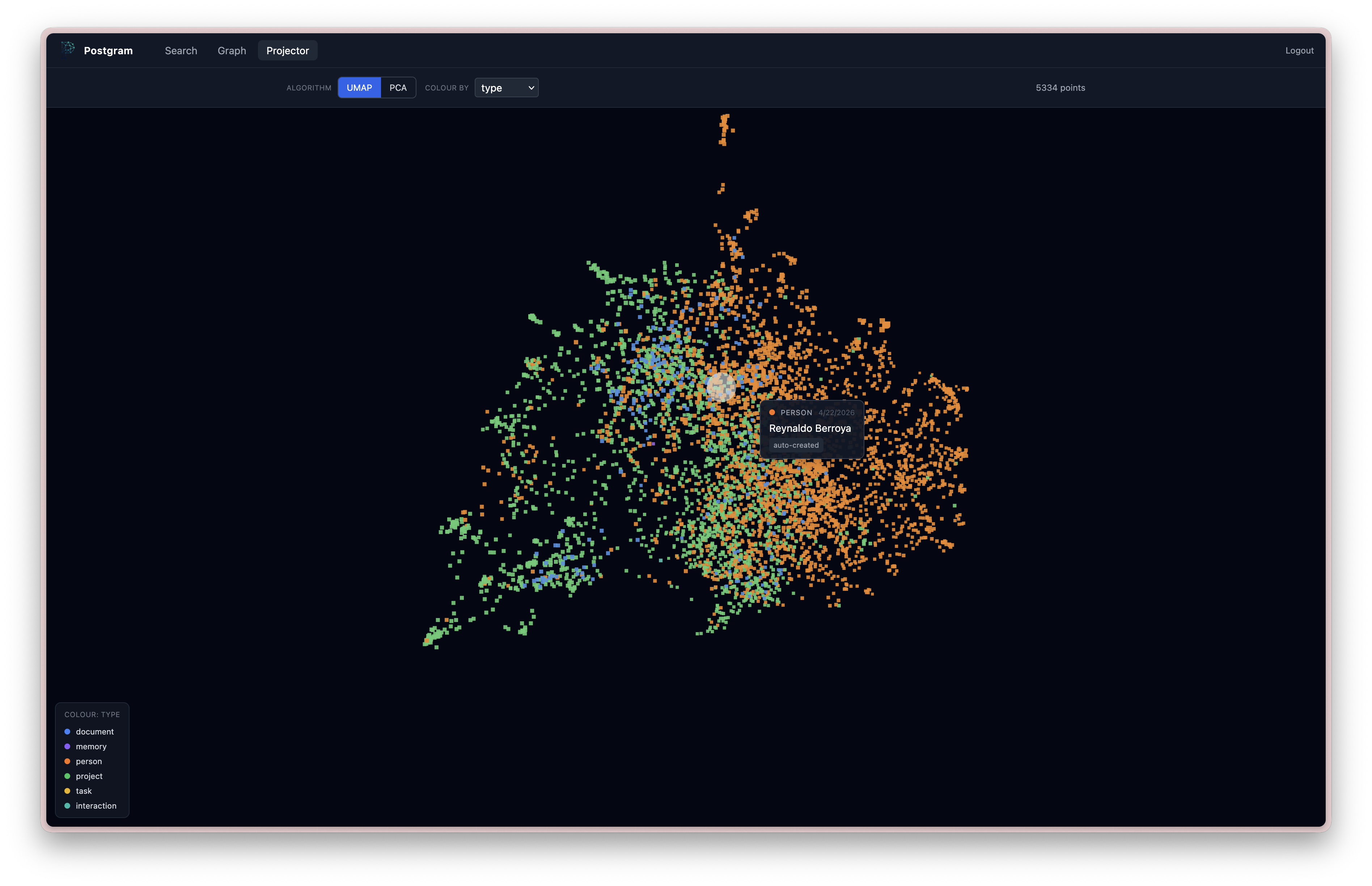
- UMAP and PCA projections of embedded entities
- GTD-style capture, task organization, and Kanban views
- scoped API-key authentication and visibility restrictions
- a REST API for application and automation access
- a Streamable HTTP MCP endpoint for agent-native tool access
- a CLI (
pgm) for humans and agents - a container-local admin CLI (
pgm-admin) - Talon SQLite migration tooling
- encrypted backup support
- audit logging for mutating and privileged operations
How It Works
Postgram is a TypeScript Node.js application built around a service layer.
Main components:
- PostgreSQL +
pgvectorfor persistence and vector search - Hono for the HTTP server
- MCP over Streamable HTTP for agent-facing tool access
- CLI/admin CLIs built with Commander
- background enrichment worker for chunking, embeddings, and LLM extraction
High-level flow:
- a client stores or updates an entity
- the entity is written immediately
- enrichment runs asynchronously: chunking, embedding, and optionally LLM extraction
- chunks and embeddings are produced in the background
- edges are created from extracted relationships (if extraction is enabled)
- search queries use hybrid BM25 + vector scoring, with optional graph expansion
Main Features
1. Typed Knowledge Storage
Store structured knowledge objects with:
type(memory, person, project, task, interaction, document)contenttagsvisibility(personal, work, shared)status- arbitrary JSON metadata
Memory Roles
Postgram supports two roles for memory entities:
durable_memory: long-term memory future agents should trust, such as decisions, preferences, constraints, root causes, and completed-work summaries.session_context: working context for resuming recent conversations. Session context is scoped to the calling client, embedded for semantic recall, and skipped by graph extraction.
Use session context for "where were we in this thread?" Use durable memory for "what should future agents remember as true?"
CLI users can write session context with pgm memory session-context and search
it with pgm search --memory-role session_context.
Operators can groom stale session context with pgm-admin memory groom.
Use --client-id <client-id> for one client or --all-clients to batch over
every session-context scope. --all-clients keeps each client scope separate;
it is operational batching, not cross-client consolidation.
--older-than <duration> defaults to 7d and accepts values like 30m,
4h, 7d, or 0d. --dry-run previews eligible memories without calling
the LLM. Grooming has no default candidate cap; pass --limit <n> when you
want to process a bounded batch.
--mode archive --yes archives eligible working context directly.
--mode promote --yes uses the configured extraction LLM to decide whether
each session-context memory should be promoted; promoted memories are distilled
into new durable_memory entities, the source context is archived, and
provenance is recorded with metadata.promoted_to plus a promoted_to edge.
Authenticated users and agents can self-groom only their own client-scoped session context:
The normal CLI derives scope from PGM_API_KEY; it does not accept
--client-id, --all-clients, or promotion mode. Archive requires --yes.
Optional filters are --topic, --session-id, and repeatable --tag.
MCP clients can use the groom_session_context tool with the same self scope:
MCP mode is dry_run or archive; promotion remains admin-only.
For scheduled maintenance, run grooming from the host that has access to the Postgram container. This cron example assesses eligible session context for all client scopes every three days at 03:17 and appends JSON output to a log. The wrapper detects that cron does not provide a TTY and runs non-interactively:
Use --mode archive --yes instead if you want to archive eligible working
context without LLM-assisted promotion. Run the same command with --dry-run
first to verify the eligible set.
Operators can also review durable memory quality without mutating the durable claim itself:
Durable grooming selects active durable_memory rows, including legacy memory
rows with no metadata.memory_role, and classifies them as keep,
needs_grooming, archive, or superseded. Mark mode writes
metadata.durable_grooming with the outcome, reason, review timestamp, and any
LLM suggestions. It does not rewrite content, change status, archive rows, or
merge duplicates.
To actually clean the marked rows, apply the grooming labels:
Apply mode defaults to auto: needs_grooming memories are rewritten from the
stored suggestion or the configured extraction LLM, while archive and
superseded memories are archived. Rewrites clear stale chunks and re-queue
embedding enrichment. Use --mode rewrite or --mode archive, plus
--status, --topic, --tag, --visibility, or --limit, to narrow the
batch.
2. Async Enrichment
Entities with content are persisted first and enriched later. Each entity
tracks enrichment_status: pending, completed, or failed. Failed
entities are retried up to 3 times with a 5-minute backoff.
3. Hybrid Search
Search blends vector cosine similarity (60%) with BM25 keyword ranking (40%) transparently. Broad searches select candidates through the HNSW index; small filtered sets use exact distance ranking, and HNSW falls back to exact ranking when its candidate scan cannot fill its target. Search requires a reachable embedding provider; if that provider is unavailable, writes still succeed but enrichment and search fail until it recovers. Results include:
- ranked results with blended scores
- similarity scores
- recency-adjusted scores
- matching chunk text
- optional 1-hop graph neighbors (
expand_graphparameter)
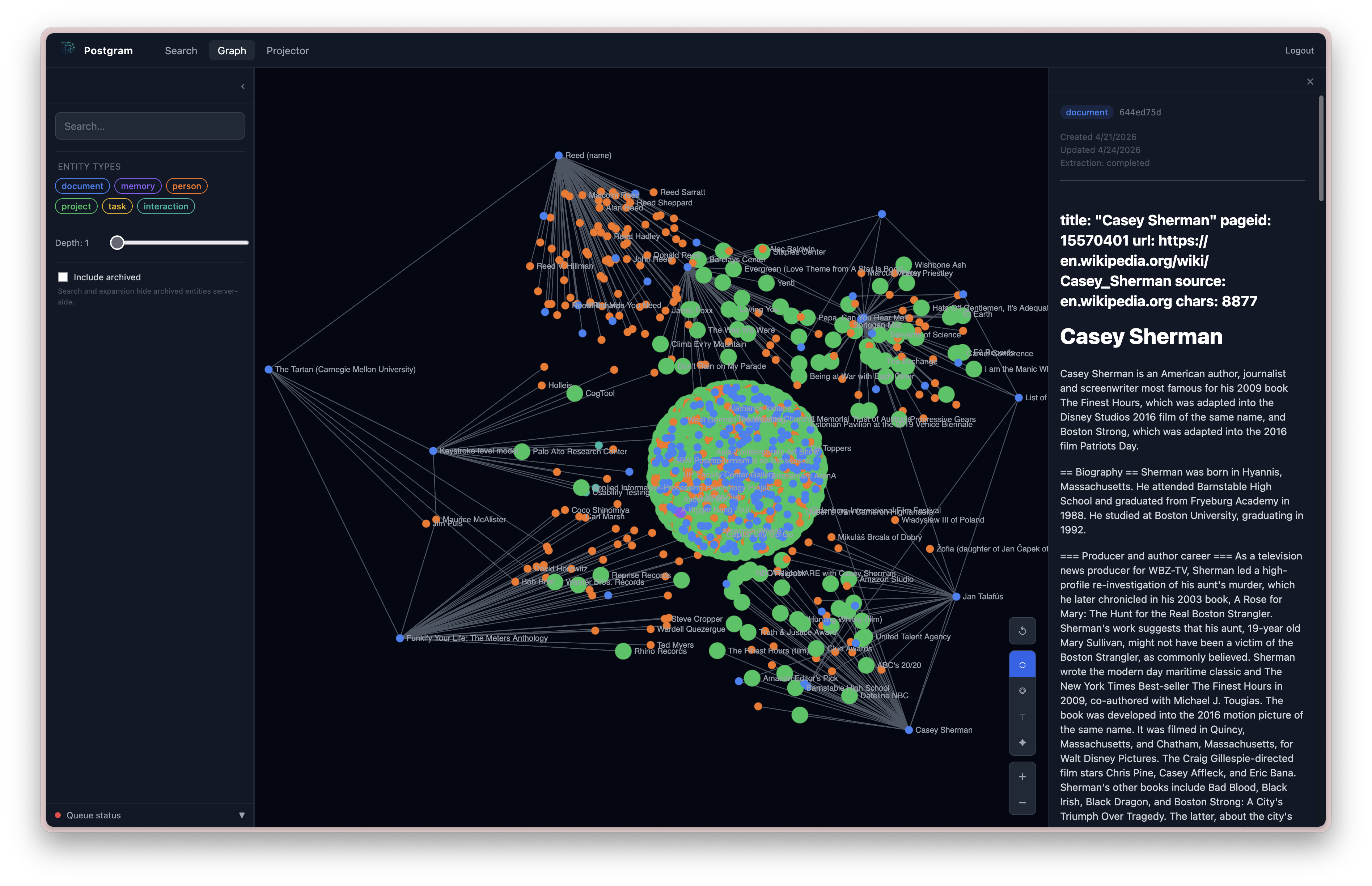
4. Knowledge Graph
Entities can be connected by typed directional edges:
- relation types:
involves,assigned_to,part_of,blocked_by,mentioned_in,related_to, or any custom type - edges have a confidence score (1.0 for manual, LLM-assigned for extracted)
- graph traversal via
expandwith configurable depth (1-3 hops) - duplicate edge prevention via
UNIQUE(source_id, target_id, relation) - edges are created manually via
link/unlinkor automatically by the LLM extraction pipeline
5. LLM Extraction
When enabled, the enrichment worker extracts relationships from entity content using an LLM. Extracted entity names are matched against existing entities and edges are created automatically.
Supported providers:
| Provider | Model default | Env vars required |
|---|---|---|
| OpenAI | gpt-4o-mini | OPENAI_API_KEY |
| Anthropic | claude-haiku-4-5-20251001 | ANTHROPIC_API_KEY |
| Ollama | llama3.2 | OLLAMA_BASE_URL (default: http://localhost:11434) |
These are configuration defaults, not model-quality recommendations. Graph extraction is a constrained structured-output task; validate the resulting edges on your own corpus before running a large backfill, especially with small local models.
6. Document Sync
Sync local directories of markdown files into postgram:
The CLI walks the directory for .md files, computes SHA-256 hashes, and sends
a full manifest to the server. The server diffs against stored state and
creates, updates, or archives document entities. Supports --dry-run and cron
scheduling.
7. Access Control
API keys can be restricted by:
- scopes:
read,write,delete,sync - allowed entity types
- allowed visibility levels
8. Task Management
Tasks are first-class entities with convenience operations for:
- create (with GTD context and due dates)
- list (filtered by status and context)
- update
- complete (with completion timestamp)
9. Multiple Interfaces
The same service layer is exposed through:
- REST API
- Streamable HTTP MCP endpoint
pgmCLIpgm-adminCLI (./bin/pgm-admin)- Browser extensions for Chrome and
Firefox — one-click web clipper
that captures the current page or text selection via the REST API.
Build with
npm run -w @ivotoby/postgram-browser-extension-chrome package(or the Firefox equivalent); install unpacked from the per-package README.
Repository Layout
Requirements
- Docker and Docker Compose for the recommended deployment
- Node.js 22+ for the
pgmCLI or local development - a reachable OpenAI or Ollama embedding provider for enrichment and search
Optional:
- OpenAI API key (for OpenAI embeddings or extraction)
- Anthropic API key (for LLM extraction)
- Ollama (for local embeddings or LLM extraction)
gpg(for encrypted CLI backups)
Docker Setup Details
1. Start Docker Compose
The default Compose path does not require manual .env edits. On first run it
creates a persistent postgram_secrets Docker volume containing:
- the Postgres password used by the app container
ADMIN_MFA_SECRET_KEYfor encrypted admin TOTP seedsADMIN_SETTINGS_ENCRYPTION_KEYfor DB-backed provider secrets
If an existing Docker install already has POSTGRES_PASSWORD in .env, the
first start after this change copies that legacy password into
postgram_secrets/postgres-password instead of generating a different database
password. Keep the old .env value in place for that first upgraded start.
The API binds to 127.0.0.1:3100 and the UI binds to 127.0.0.1:3000 by
default. Use POSTGRAM_API_PORT=<port> or UI_PORT=<port> as shell overrides
when running more than one local stack.
To use an existing Postgres cluster with Compose, set POSTGRES_HOST,
POSTGRES_PORT, POSTGRES_DB, and POSTGRES_USER on mcp-server in a Compose
override and remove the postgres dependency, as in the operator examples. If
that external cluster requires password auth, set POSTGRES_PASSWORD in .env;
if it uses passwordless local auth, leave POSTGRES_PASSWORD= blank. You can
also bypass the split settings entirely by setting DATABASE_URL.
For embeddings, Compose preserves the OpenAI default when OPENAI_API_KEY is
present. If no OpenAI key and no explicit EMBEDDING_PROVIDER are supplied, the
container entrypoint chooses local Ollama embeddings so a clean stack can boot
before provider secrets are configured.
2. Complete first admin setup
On first start, the API container prints a clear one-time bootstrap banner with the token:
If the console has scrolled, read the same one-time bootstrap token from the trusted local operator channel:
Then open http://127.0.0.1:3000/admin, create the first admin user, and
complete MFA enrollment. The bootstrap token is stored hash-only in Postgres,
expires after 24 hours, and is invalidated after the first admin is created.
If you changed the Postgres target, copy the latest bootstrap-token log line;
older lines may belong to a previous database and will be rejected.
After active MFA login, the Admin dashboard opens a guided onboarding flow until it is completed or deliberately skipped. The guide explains the setup path in plain operator language:
- what bootstrap, admin login, and MFA confirmation protect
- how provider settings, embedding dimensions, extraction models, and write-only provider secrets fit together
- when to validate and apply saved provider configuration
- why backup/restore is staged before switch-over
- how maintenance dry-runs, re-extraction, re-embedding, and edge pruning work
Onboarding progress is stored server-side in Postgres. Refreshing the browser,
closing the tab, logging out and back in, or restarting the Docker containers
resumes at the latest saved step as long as the existing pgdata volume is
preserved. The Onboarding tab remains available from the dashboard after skip
or completion.
For local Docker testing, preserve the database volume:
Do not use docker compose down -v when testing onboarding resume behavior.
That command removes named volumes, including the pgdata Postgres volume, and
will reset the server-side onboarding state along with the database.
3. Check health
Expected:
status: "ok"postgres: "connected"
4. Configure providers and create API keys
Use the Admin dashboard in the browser for the supported happy path:
- Onboarding tab: resume, skip, or complete the Docker-first setup guide.
- Config tab: save provider settings and write-only provider secrets.
- Overview tab: create Postgram API keys, inspect health, queue, stats, config/model/job status, and audit rows.
- Maintenance tab: run safe dry-run previews and poll job status before any destructive apply.
- Backup tab: download a gzipped v2 archive containing a data-only PostgreSQL
custom dump plus redacted runtime configuration. Restore is intentionally
staged: the server rejects legacy v1/full-schema archives, accepts only
approved Postgram table-data entries from
pg_restore --list, creates the trusted schema from bundled migrations, and restores the accepted data into a new database name. Health checks run before operator-approved switch-over. If the restored database misbehaves, roll back by restoring the previousPOSTGRES_DBorDATABASE_URLsetting and restartingmcp-server/postgram-ui; the old database is left untouched for this emergency path.
Normal Docker setup and maintenance should not require pgm-admin after
startup/bootstrap. The pgm-admin CLI remains documented below for emergency
recovery, embedding migrations, raw SQL inspection, and advanced operator
jobs.
Docker Secret Backup And Failure Behavior
Back up the postgram_secrets Docker volume separately from database backups.
Database backups contain encrypted provider secrets and encrypted TOTP factors;
they do not contain the installation keys needed to decrypt them.
Losing or replacing ADMIN_MFA_SECRET_KEY prevents existing TOTP factors from
being verified. Losing or replacing ADMIN_SETTINGS_ENCRYPTION_KEY prevents
stored provider secrets from being decrypted. With the wrong settings key,
provider config reads remain redacted, provider apply/runtime secret use fails
closed, and operators must restore the original key or re-save provider
secrets after a deliberate rotation/recovery procedure.
For Docker Compose, missing secret files are generated only on an empty
postgram_secrets volume. Invalid persisted secret files fail container
startup before the server binds. Optional env overrides still work, but keep
those values outside database backups and browser storage.
Environment Variables
Server
| Variable | Required | Default | Description |
|---|---|---|---|
DATABASE_URL | non-Compose | Docker secret file + Postgres env | Full Postgres connection string. Compose constructs it from the generated Postgres password secret when unset. |
POSTGRES_HOST | no | postgres | Compose Postgres host used when DATABASE_URL is unset. Override to host.docker.internal or another hostname for an existing cluster. |
POSTGRES_PORT | no | 5432 | Compose Postgres port used when DATABASE_URL is unset. |
POSTGRES_DB | no | postgram | Compose Postgres database used when DATABASE_URL is unset. |
POSTGRES_USER | no | postgram | Compose Postgres user used when DATABASE_URL is unset. |
POSTGRES_PASSWORD | no | Docker secret file | Compose Postgres password used when DATABASE_URL is unset. For external hosts, an explicit blank value builds a passwordless URL. |
ADMIN_MFA_SECRET_KEY | admin setup | Docker secret file | Stable 32+ character secret used to encrypt admin TOTP seeds. Compose generates and persists it in postgram_secrets when unset. |
OPENAI_API_KEY | conditional | Required when EMBEDDING_PROVIDER=openai OR (EXTRACTION_ENABLED=true AND EXTRACTION_PROVIDER=openai). Optional otherwise. | |
ADMIN_SETTINGS_ENCRYPTION_KEY | when saving admin-managed secrets | Docker secret file | 32-byte base64url installation key used to encrypt DB-backed provider secrets. Compose generates and persists it in postgram_secrets when unset. Keep it outside database backups. |
PORT | no | 3100 | HTTP/MCP server port |
POSTGRAM_API_PORT | no | 3100 | Docker Compose host port for the API/backend. The container listen port stays 3100. |
UI_PORT | no | 3000 | Docker Compose host port for the UI. |
OAUTH_ENABLED | no | false | Enable OAuth authorization-code, PKCE, and Dynamic Client Registration routes for native remote MCP connectors. |
PUBLIC_BASE_URL | conditional | Public HTTPS origin for OAuth metadata and callback URLs. Required when OAUTH_ENABLED=true. Example: https://postgram.example.com. | |
LOG_LEVEL | no | info | pino log level |
ENRICHMENT_POLL_INTERVAL_MS | no | 1000 | Enrichment worker poll interval |
Embeddings
| Variable | Required | Default | Description |
|---|---|---|---|
EMBEDDING_PROVIDER | no | openai (Compose auto-selects) | openai or ollama. Compose keeps OpenAI when OPENAI_API_KEY is present, otherwise chooses Ollama unless explicitly set. |
EMBEDDING_MODEL | no | per-provider | Defaults: text-embedding-3-small (openai, 1536 dims), bge-m3 (ollama, 1024 dims) |
EMBEDDING_DIMENSIONS | no | per-provider | Must match the active embedding_models row. Run ./bin/pgm-admin embeddings migrate --target-dimensions <N> --yes to change. |
EMBEDDING_BASE_URL | when provider=ollama | falls back to OLLAMA_BASE_URL | Embedding host. Independent from LLM-extraction host so embeddings and inference can target different machines. |
EMBEDDING_API_KEY | no | Optional bearer token for EMBEDDING_BASE_URL. | |
EMBEDDING_TIMEOUT_MS | no | 15000 | Hard timeout for a single embedding provider call. Bounds how long one stalled call can delay a request. |
QUERY_EMBEDDING_CACHE_SIZE | no | 512 | In-process query embeddings held in front of the Postgres-backed cache. |
QUERY_EMBEDDING_CACHE_SECRET | no | Keys the query digest with an HMAC. Without it the digest is an unkeyed sha256, which a reader of the database can dictionary-test to confirm whether a guessed query was run. Set it if you treat query text as more sensitive than entity content; it must live outside the database to mean anything. Changing it invalidates existing cache rows. | |
QUERY_EMBEDDING_CACHE_RETENTION_DAYS | no | 30 | Age at which persisted query embeddings are pruned. The hourly prune also retains only the 2,000 newest entries per client. |
When Postgram runs in Docker and Ollama runs directly on the Docker host, use http://host.docker.internal:11434 for EMBEDDING_BASE_URL; localhost inside the container points at the Postgram container, not the host machine.
See specs/002-local-embeddings/quickstart.md for a walkthrough of fresh-install-on-Ollama and migrating from OpenAI.
LLM Extraction
| Variable | Required | Default | Description |
|---|---|---|---|
EXTRACTION_ENABLED | no | false | Enable LLM relationship extraction |
EXTRACTION_MEMORY_MODE | no | embed_only | Controls graph extraction for type=memory: embed_only keeps all memories searchable through embeddings without graph/entity extraction; extract_durable extracts only durable_memory; extract_all extracts both durable and session-context memories. |
EXTRACTION_PROVIDER | no | openai | LLM provider: openai, anthropic, ollama, or openai-compatible |
EXTRACTION_MODEL | no | per-provider | Model name (defaults: gpt-4o-mini for OpenAI, claude-haiku-4-5-20251001 for Anthropic, llama3.2 for Ollama, gpt-4o-mini for OpenAI-compatible) |
EXTRACTION_BASE_URL | when provider=openai-compatible | Base URL for OpenAI-compatible chat-completions APIs, including any /v1 path. Postgram appends /chat/completions. Example: http://host.docker.internal:8000/v1. | |
EXTRACTION_API_KEY | no | Optional bearer token for EXTRACTION_BASE_URL. | |
EXTRACTION_AUTO_CREATE_ENTITIES | no | false | When true, extraction creates stub entities for referenced targets that don't yet exist (e.g. a person named in a document gets a person entity automatically). Tagged auto-created; metadata records the originating document. |
EXTRACTION_AUTO_CREATE_TYPES | no | person,project,interaction | Comma-separated list of entity types eligible for auto-creation. document, task, memory are intentionally excluded from the default to keep those user-authored. |
EXTRACTION_AUTO_CREATE_MIN_CONFIDENCE | no | 0.7 | Minimum per-extraction confidence (0–1) required to auto-create an entity. Raise to cut noise, lower for a denser graph. |
ANTHROPIC_API_KEY | when provider=anthropic | Anthropic API key | |
OLLAMA_BASE_URL | no | http://localhost:11434 | Ollama server URL |
EXTRACTION_REASONING_EFFORT | no | unset | minimal | low | medium | high. Forwarded as reasoning_effort to OpenAI and Ollama for reasoning models (o-series, gpt-5, gpt-oss). When set, overrides the implicit minimal that EXTRACTION_DISABLE_THINKING=true sends to OpenAI. |
LLM_REQUEST_TIMEOUT_MS | no | 120000 | Hard cap per LLM call in milliseconds. Bump this when running slow local models (e.g. gpt-oss:120b-cloud). |
EXTRACTION_SEMANTIC_NEIGHBORS_ENABLED | no | false | Enable semantic neighbor linking (see below). |
EXTRACTION_SEMANTIC_NEIGHBORS_MAX | no | 10 | Maximum number of neighbor edges to create per entity. |
EXTRACTION_SEMANTIC_NEIGHBORS_MIN_SIMILARITY | no | 0.65 | Minimum cosine similarity (0–1) for an entity to qualify as a neighbor. Raise to reduce noise; lower if you're finding too few neighbors. The right value depends on your embedding model's similarity distribution — use ./bin/pgm-admin link-neighbors --all --dry-run to inspect actual scores before tuning. |
Semantic neighbor linking: the LLM extraction pass only finds entities that
are explicitly named in the source content. It misses entities that are
thematically related but not cited by name — a weekly kickoff meeting about the
same initiative, a wiki page covering the same strategy, a decision memo about
the same project. When EXTRACTION_SEMANTIC_NEIGHBORS_ENABLED=true, a second
pass runs after LLM extraction that queries the knowledge store for entities
whose stored chunk embeddings are cosine-similar to the source entity's own
embeddings, and links them with related_to. No extra LLM or embedding API
calls are needed — the source entity's chunks are already stored by the
enrichment step that runs before extraction. Edges created by this pass carry
source = 'semantic-neighbor' so they are distinguishable from LLM-extracted
edges. Entities already linked by the LLM pass are excluded to avoid a weaker
related_to edge shadowing a stronger-typed edge for the same pair.
Backfilling and maintaining neighbor edges: the ./bin/pgm-admin link-neighbors
command runs the semantic neighbor pass directly — no LLM calls, no extraction
queue, just cosine similarity over stored chunks. Use it to backfill an
existing graph or as a recurring maintenance job after new entities are added.
Use --dry-run to inspect actual cosine similarity scores before committing edges — especially useful when tuning --min-similarity for a new embedding model. The output shows each entity and its candidate neighbors with their raw similarity scores.
If you also want to re-run LLM extraction at the same time (e.g. after enabling
EXTRACTION_SEMANTIC_NEIGHBORS_ENABLED=true), use reextract instead — the
worker runs both the LLM pass and the neighbor pass together:
Note: --clean-edges on reextract only removes edges with
source='llm-extraction' — it does not touch semantic-neighbor edges. For a
full clean slate:
Scheduling as a recurring maintenance job: because link-neighbors is
cheap (no LLM calls) and idempotent (edges are upserted, not duplicated), it
works well as a weekly cron job that keeps the neighbor graph fresh as new
entities are added. Example cron entry running every Sunday at 02:00:
Or with Docker Compose:
Auto-created entities: when EXTRACTION_AUTO_CREATE_ENTITIES=true,
entities that didn't exist before a document mentioned them are inserted
with content = the extracted name, tags including auto-created, and
metadata.auto_created_by = 'llm-extraction' plus
metadata.source_entity_id pointing at the document that caused the
creation. They enter the normal embedding queue so they become
searchable, but they are deliberately excluded from the extraction
queue — their only content is a bare name, so asking the LLM "what
does Alice relate to?" with no context would just free-associate new
stubs in a loop. To review or clean them up:
CLI
| Variable | Required | Description |
|---|---|---|
PGM_API_URL | yes | Server URL |
PGM_API_KEY | yes | API key for authentication |
Admin CLI
| Variable | Required | Description |
|---|---|---|
DATABASE_URL | yes | Direct DB connection for admin operations |
Backup
| Variable | Required | Description |
|---|---|---|
DATABASE_URL or PGM_DATABASE_URL | yes | Database connection |
PGM_BACKUP_PASSPHRASE | when using --encrypt | GPG encryption passphrase |
Running The Server
Pre-built Docker image
Pull from GitHub Container Registry:
Images are multi-arch (linux/amd64, linux/arm64). Tags available:
latest— most recent build ofmainmain— same aslatest, explicit branch namesha-<short>— pinned to a specific commit
The docker-compose.yml in this repo builds locally by default; to use the
pre-built image instead, replace build: . with image: ghcr.io/ivo-toby/postgram:latest
for the mcp-server service.
Local development
Production-style local run:
The server exposes:
- REST API at
http://127.0.0.1:3100/api - MCP endpoint at
http://127.0.0.1:3100/mcp - Health endpoint at
http://127.0.0.1:3100/health
Authentication
Create an API key from the Admin dashboard at http://127.0.0.1:3000/admin.
The plaintext key is displayed once in the browser and cannot be recovered
after dismissal or reload.
Export it for CLI use:
REST API Overview
Entity endpoints
POST /api/entities— store entityGET /api/entities/:id— recall entityPATCH /api/entities/:id— update entityDELETE /api/entities/:id— soft-delete entityGET /api/entities— list entities
Search
POST /api/search— hybrid BM25+vector search (supportsexpand_graphandinclude_content)
REST search keeps full entity content by default for backwards compatibility.
Pass include_content: false to return matched chunks without hydrating or
serializing full result and graph-neighbor content. Other REST routes continue
to return their existing full JSON responses. Compact JSON and TOON remain
transport-layer conveniences for MCP and the CLI.
Tasks
POST /api/tasks— create taskGET /api/tasks— list tasksPATCH /api/tasks/:id— update taskPOST /api/tasks/:id/complete— complete task
Document sync
POST /api/sync/diff— diff local manifest against server; returns paths to upload and deletePOST /api/sync/upload— upload a batch of file contentsPOST /api/sync/finalize— archive orphans and restore stale matchesPOST /api/sync— single-shot push (retained for MCP and small syncs)GET /api/sync/status/:repo— get sync status
pgm sync uses the three-phase protocol (diff → batched upload → finalize)
so large repos don't send a single oversized payload. Each upload batch is
capped at ~50 files or ~4 MB, whichever comes first.
Knowledge graph
POST /api/edges— create edgeDELETE /api/edges/:id— delete edgeGET /api/entities/:id/edges— list edges for entityGET /api/entities/:id/graph— expand graph neighborhood
Queue / enrichment
-
GET /api/queue— enrichment + extraction queue status. Pass?include_failures=true(optionally&failure_limit=N, default 20, max 100) to also receive the most recent failed entities with their error messages, e.g.:
All /api/* routes require Authorization: Bearer <api-key>.
MCP Overview
MCP is served over Streamable HTTP at:
Exposed tools:
store,recall,search,update,delete,queuestore_session_context,groom_session_contexttask_create,task_list,task_update,task_completesync_push,sync_statuslink,unlink,expand
The MCP tool behavior is intentionally aligned with the REST surface, but token-heavy outputs default to compact agent-friendly responses:
- write acknowledgements (
store,store_session_context,update, task writes,link) return compact ids/status/version instead of echoing full metadata and timestamps search,task_list, andexpandreturn compact rows/graph payloads by default; compact search contains the matched chunk rather than full result or neighbor content and may includeedges.countandedges.relationsas cheap traversal affordances- pass
full_response: trueto get the full REST-shaped payload, including complete entity content - pass
toon: trueon list-like tools (search,task_list,expand) to receive compact TOON text from the MCP layer
Search is the discovery step: inspect compact IDs, scores, and matched chunks,
then call recall only for the selected entities whose complete content is
needed. Compact edges summaries contain counts and relation labels only. They
do not include neighbor content. Use expand_graph or expand when the user
needs causes, provenance, decisions, dependencies, blockers, ownership,
involvement, discussion participants, connected context, or graph-based
disambiguation. Avoid expansion for direct facts already present in the matched
chunk.
The underlying API remains JSON; compacting and TOON happen only in MCP/CLI handlers.
Native Remote Connectors (ChatGPT and Claude)
Local MCP clients can connect with a static bearer API key. ChatGPT accounts with custom-connector/developer-mode access and Claude's Connectors UI can connect to a public Postgram endpoint through OAuth, without storing a static API-key header in the client settings:
Add ${PUBLIC_BASE_URL}/mcp as the connector URL in ChatGPT or Claude. The
client discovers /.well-known/oauth-protected-resource/mcp, registers through
/oauth/register, opens /oauth/authorize, and receives OAuth tokens from
/oauth/token. The endpoint must be reachable over public HTTPS.
The authorize page asks for an existing Postgram API key once. Tokens issued
from that approval inherit the API key's scopes, client_id, allowed entity
types, and allowed visibility. If the source API key is revoked, OAuth access
and refresh tokens derived from it stop working. Existing Authorization: Bearer <api-key> clients and /mcp?apiKey=... keep working unchanged.
CLI (pgm)
Install from npm
Then configure once:
Run from source (for development)
From the repo root, invoke the TypeScript entrypoint directly — no build step needed, and it picks up local changes immediately:
Entity commands
Task commands
Document sync
Knowledge graph
Backup
Admin CLI (pgm-admin)
The supported Docker happy path uses the browser Admin dashboard for bootstrap,
provider configuration, API-key creation, status inspection, and safe
maintenance dry-runs. pgm-admin remains available for emergency recovery,
embedding migrations, raw SQL inspection, and advanced operator jobs.
The easy CLI path uses the bin/pgm-admin wrapper shipped in the repo. It runs
pgm-admin via docker exec when the container is up, and falls back to
docker compose run --rm when it isn't (useful for first-boot migrations
or when the startup dimension gate is refusing to boot):
For cron or other non-interactive automation, call Docker with -T so it does
not try to allocate a TTY:
Examples:
For an embedding provider, model, or dimension change made in Admin, save,
validate, and apply the target settings before running that migration sequence.
The wrapper refuses --yes while mcp-server is running so the live enrichment
worker cannot process the re-embedding queue with its previous in-memory
provider. The dry-run is safe while the service is running.
Shell alias for daily use (add to ~/.bashrc or ~/.zshrc on your docker
host):
Override with env if your service/container names differ:
Direct equivalent without the wrapper (for reference):
The entrypoint is required for commands executed in an already-running
container. It reconstructs Docker-managed values such as DATABASE_URL, which
are exported for the server process but are not present in a plain
docker compose exec environment.
Main commands:
-
key create,key list,key revoke -
audit— query audit logs -
model list,model set-active -
reembed --all— mark entities for re-embedding (optionally--type <type>; pair with--model <id>to switch the active embedding model in the same transaction) -
reextract --all— resetextraction_status = 'pending'and clear any storedextraction_errorso the worker retries extraction (e.g. after switching to a better LLM). Key flags:--type <type>— scope to a specific entity type--only-failed— only re-queue entities whose extraction previously failed--no-edges-only— only re-queue entities that have no LLM-extracted edges; useful for targeted maintenance without re-processing entities that already linked correctly (combine with--type documentto catch large documents that silently produced no edges)--clean-edges— delete existingsource='llm-extraction'edges for the in-scope entities before re-queuing, giving a clean-slate redo rather than appending alongside old edges--limit <n>— cap how many entities are queued (oldest-first)
User-created edges (
source != 'llm-extraction') are never touched. -
improve-graph— queue entities for re-extraction with an optional per-run model/provider override stored on the row. The worker uses the override instead of the env-configured default, then clears it on success. Existing edges are kept by default (no wipe) — overlapping edges have their confidence overwritten by the new run. Key flags:--all,--type <type>,--id <uuid>— scope what to queue--model <name>— e.g.claude-sonnet-4-6; stored per-row--provider <name>—openai | anthropic | ollama | openai-compatible; stored per-row--no-edges-only— only queue entities with no LLM-extracted edges--clean-edges— wipe existing LLM edges before queueing--limit <n>— cap the queue size
Typical maintenance run targeting gaps without paying for the full graph:
-
prune-edges --below <threshold>— delete edges withconfidencebelow the threshold. Scoped tosource='llm-extraction'by default; pass--source anyto include all, or--source <name>for a specific one. Supports--relation <name>and--dry-runfor a safe preview. -
validate-edges— run an LLM-as-judge quality pass. For eachsource='llm-extraction'edge (configurable via--source), asks the configured extraction LLM whether the relationship is supported by the source content; removes edges it judges invalid or below--min-confidence(default0.4). Trackslast_validated_atin edge metadata and skips edges validated within--skip-validated-days(default7) — run as a maintenance cron without redoing work. Flags:--limit <n>(default 100),--force,--dry-run. RequiresEXTRACTION_ENABLED=trueand the usualEXTRACTION_PROVIDER/EXTRACTION_MODELenv vars; costs ≈ one LLM call per edge. -
sql "<statement>"— execute a raw SQL statement against the database. Accepts a positional argument or reads from stdin for multi-line queries. SELECT results are printed tab-separated (or as JSON with--json); DML commands print the affected row count. -
stats— entity counts, chunk count, DB size -
embeddings migrate— switch embedding dimensions (seespecs/002-local-embeddings/quickstart.md)
Graph Maintenance
The knowledge graph builds up over time as LLM extraction links entities
together. Occasionally edges go missing (e.g. after a provider change, a
max_tokens limit being hit, or a model outage) or need refreshing. The admin
CLI has tools to handle this without re-processing the entire graph.
Finding gaps
Entities that completed extraction but produced no edges are the primary signal of a silent failure:
Targeted re-extraction (no wipe)
Re-queue only the entities with no edges. Existing edges on other entities are untouched:
Full re-extraction pass
When you want to redo everything (e.g. after switching to a better model):
Confidence pruning
Remove low-confidence edges left behind by older or weaker models:
Edge validation
Run an LLM-as-judge pass to remove edges not supported by the source content:
Monitoring queue progress
Talon Migration
Useful flags: --dry-run, --thread <id>, --batch-size <n>, --skip-embeddings
Testing
The search benchmark reports p50/p95 latency for three profiles —
cold_unique_queries (every query pays a provider round trip),
memory_cache_hit, and database_cache_hit (in-process cache empty, so only
the persisted cache can serve it) — along with the number of embedding provider
calls each profile made and an EXPLAIN (ANALYZE, BUFFERS) summary of the
hybrid SQL. It stubs the embedding provider with a fixed delay, so it measures
SQL time and cache hit rate; it says nothing about real provider latency.
Targeted suites:
Current Status
Postgram is actively developed by one maintainer and used daily in a personal deployment. Entity storage, task management, Markdown sync, hybrid search, knowledge-graph traversal, memory lifecycles, OAuth, the user-facing web UI, and the guarded Admin UI are implemented. The project is deliberately optimized for personal and small-team self-hosting rather than multi-tenant scale.
Notes And Limitations
- Postgram is optimized for personal/small-team scale
- Non-Compose deployments default to OpenAI embeddings; Compose selects OpenAI when a key is present and otherwise selects local Ollama. Search requires the selected provider to be reachable.
- LLM extraction is optional and disabled by default
- Backup encryption requires
gpg
Claude Code skill
A portable Claude Code skill for using pgm from your own agent lives in
skill/postgram/SKILL.md. Copy the skill/postgram/
directory into your own project's .claude/skills/ (or your user-level
~/.claude/skills/) and the agent will know when to invoke pgm store,
pgm search, pgm link, etc. It assumes the CLI is on PATH and
PGM_API_URL + PGM_API_KEY are set. The skill file is deliberately not
under .claude/ in this repo so you can decide where to put it.
Optimising your global CLAUDE.md
To get the most out of Postgram across sessions, add Postgram-aware guidance to
your global ~/.claude/CLAUDE.md. A ready-to-use template is provided at
templates/CLAUDE.md — it covers when to search (with
type filters), how to inspect compact edges.count/edges.relations, when to
use expand_graph, when to store, when to link, and general principles. Copy
the relevant sections into your own CLAUDE.md and Claude will proactively use
the MCP tools to persist and recall knowledge without being asked. Its default
retrieval flow is search for compact matched chunks, then recall only the
selected entities that require complete content.
For coding agents that should avoid broad knowledge-work behavior, use
templates/AGENTS.coding.md or templates/CLAUDE.coding.md. It narrows Postgram
usage to session-context memory and durable development memory only.
Releases & CI
The CLI package publishes to npm as
@ivotoby/postgram-cli
on every merge to main, driven by semantic-release
v25 and conventional commits scoped to cli (e.g. feat(cli): ...).
Non-CLI-scoped commits don't bump the CLI version. Workflow:
.github/workflows/release-cli.yml.
Publishing uses an npm Automation token stored as the NPM_TOKEN
repository secret. The --provenance flag is passed at publish time so every
release gets a Sigstore-signed provenance attestation regardless.
First-time setup:
- On npmjs.com: Avatar → Access Tokens → Generate New Token → Automation
- GitHub repo: Settings → Secrets and variables → Actions → New repository secret
→ name
NPM_TOKEN, value: the token from step 1 - Subsequent publishes happen automatically from the workflow.
The server's Docker image publishes to
ghcr.io/ivo-toby/postgram on every merge to main and on semver tag
pushes (multi-arch amd64 + arm64). Workflow:
.github/workflows/docker.yml. Uses the
built-in GITHUB_TOKEN; no extra secret required, but repo packages:write
permission must be enabled.
Official MCP Registry
Postgram is published as io.github.ivo-toby/postgram in the
official MCP Registry. The
registry metadata in server.json describes the public GHCR
image and its Streamable HTTP endpoint.
Registry releases are intentionally manual. After changing server.json, wait
for the docker-publish workflow on main to finish, then run the
publish-mcp-registry workflow. It verifies the official publisher download,
pins the current multi-architecture main image by digest, validates the
metadata, authenticates with GitHub OIDC, and publishes it. Increase the
top-level version in server.json before publishing a metadata update; the
registry treats each published version as immutable.
Licensing
Postgram uses a deliberate multi-license structure:
- The server, Admin CLI, and browser UI are licensed under the GNU Affero General Public License v3.0 only.
- The published
pgmCLI, portable agent integrations underskill/andtemplates/, and browser extensions underpackages/browser-extension-chrome/andpackages/browser-extension-firefox/are licensed under the MIT License. - Documentation prose in
docs/and this README is licensed under Creative Commons Attribution 4.0 International. - The code and documentation licenses do not grant rights to use Postgram names, logos, or other brand identifiers as trademarks. See the trademark policy.
The AGPL permits commercial use. Its network copyleft requires operators of a
modified Postgram service to offer the corresponding source to users who
interact with that modified service over a network. See
LICENSING.md for the exact path boundaries and practical
examples.
Contributions are welcome under the process in
CONTRIBUTING.md. Contributors must accept the
Postgram Contributor License Agreement
before a contribution can be merged.