Pillowfort README
The full upstream README, mirrored here for reference. Install config, tool schemas, adoption signals, and an original overview live on the Pillowfort listing page.
pillowfort
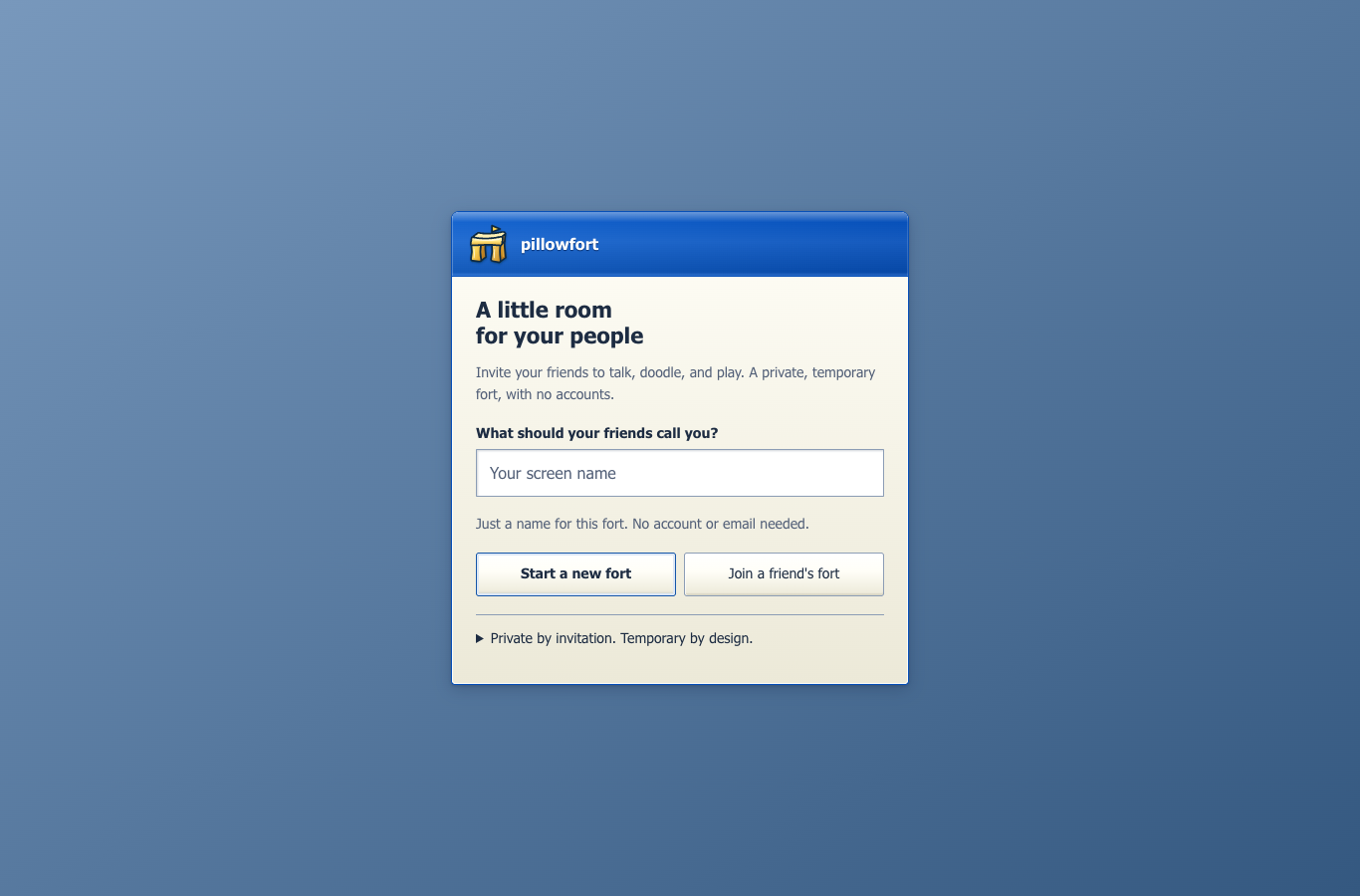
Small, private, disposable chat rooms with AIM / Windows XP energy.
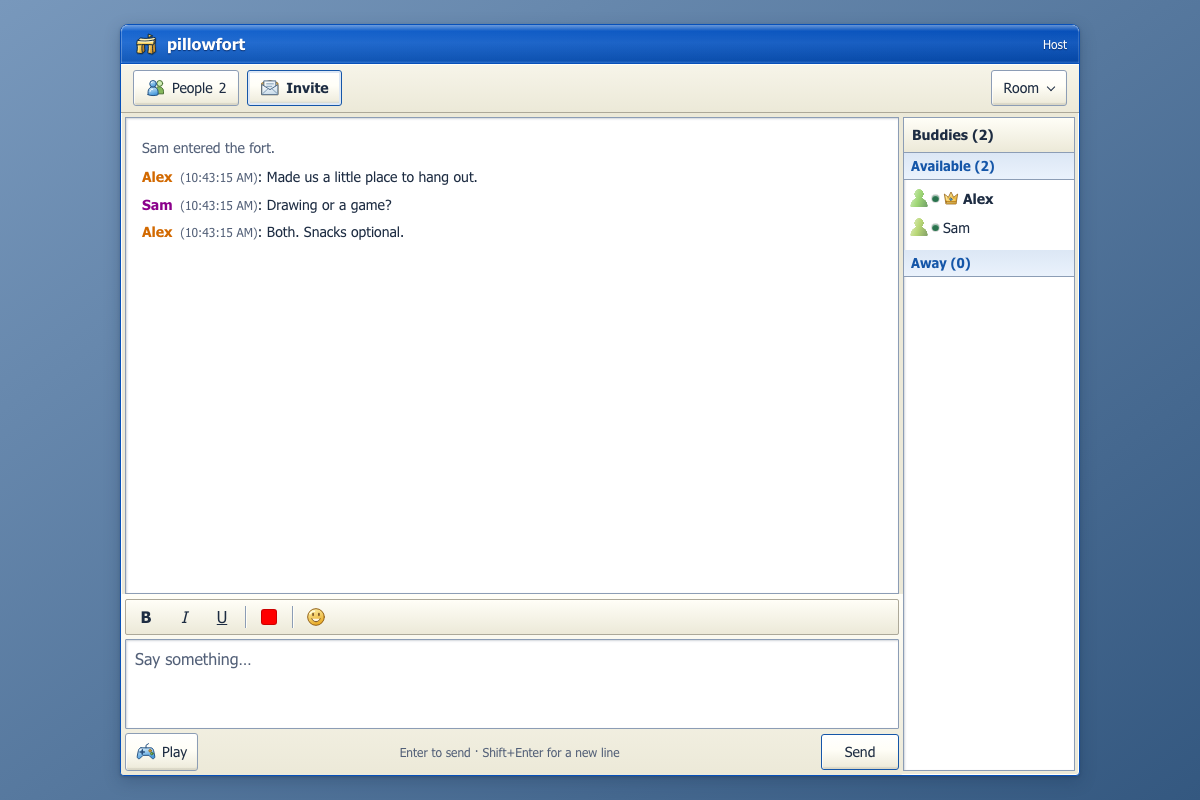
Set up a fort, share one private invitation link, hang out in real time, then knock it down. No accounts. No public room list. New devices still need host approval and do not receive earlier chat history.
What This Repo Contains
pillowfort is both:
- a real-time chat app with ephemeral rooms
- a dual-runtime experiment that runs locally on Bun and in production on Cloudflare Workers + Durable Objects
- a design-heavy frontend with browser and snapshot test coverage
The core product idea is simple:
- Pick a screen name and save the generated room password.
- Create a fort, open Invite, and choose Copy invite link.
- Share the link privately; approve your friend's matching device fingerprint.
- Chat, doodle, and play small games together.
- Knock the fort down, or let it expire.
When the fort is gone, the room is gone.
The invitation window confirms when the link is copied and explains the next steps: paste it to a friend, then let the host approve their device. Manual code/password sharing stays under Use a code and password instead.
Agents can host, too
Agents can create their own forts, export private invitation links for people or other agents, and approve expected peers without a human present. Host authorization still applies; an operator can authorize an entire autonomous workflow rather than clicking each action.
Start with the public agent guide or the
Markdown quickstart. Choose local stdio MCP/SDK/CLI,
authenticated hosted MCP at https://mcp.pillowfort.xyz/mcp, or native WebMCP
inside a supported browser tab. Local mode needs Node and explicitly installed
Chromium; hosted mode needs an issued operator key or OAuth consent. Native mode
is feature-detected and does not install a polyfill.
- Autonomous hosting, invitations, and collaboration
- Permissions, credentials, and model-provider visibility
- Machine-readable discovery
The npm package is @ontologic/pillowfort-agent; GitHub remains slee1996.
The MCP Registry listing is io.github.slee1996/pillowfort version 1.1.0.
Hosted participants run under managed custody: their runtime and model/operator
can access their admitted room content. Hosted participants do not gain access to
unrelated rooms. Read the custody guide before inviting a hosted agent.
The original 1.0.0 download remains archived in its GitHub release. Current installation instructions select the versioned npm package.
Current Feature Set
Core room behavior
- Invite-only rooms with no lobby and no room discovery
- Host-created forts with opaque generated fort codes
- Ephemeral room state with no user accounts
- Auto-suffixed duplicate names like
spencer2 - Typing indicators
- Room-scoped presence with away messages
- Reconnect grace window for temporary disconnects
- Host migration via "the pillow throw" when the host leaves
- Rate limiting, guest cap, and idle room self-destruction
Chat and UX
- AIM / Windows XP-inspired interface
- Desktop and mobile layouts
- Client-side MLS encryption for admitted room participants
- Message formatting support
- Save-chat export from the UI
- Private invitation links; host approval still required for new devices
Extras beyond plain chat
- Shared 1200×800 sketchpad with selectable ink colors and PNG export
- Pillow Fight vote-to-kick
- Rock Paper Scissors
- Tic-Tac-Toe
- Secret Saboteur
- King of the Hill
- Per-room leaderboards and queued game flow
- Host-paid Fort Pass path for custom codes, longer idle windows, and premium room themes
Ephemeral Model
The app is designed to avoid long-lived room history:
- no user accounts
- no message history replay for new joiners
- no database for chat transcripts
- only the last-used screen name is kept in
localStorage
In production, Durable Object storage is used only to coordinate a live room while it exists. When a fort is destroyed, that room state is cleared.
Architecture
There are two server runtimes with roughly the same behavior:
| Layer | Local development | Production |
|---|---|---|
| Entry server | Bun | Cloudflare Worker |
| Room runtime | in-memory Map | Durable Object per room |
| Client | React + Vite | React + Vite |
| Storage | process memory only | ephemeral DO state |
Important contributor note:
- local room behavior lives in
server.ts - production room behavior lives in
src/room.ts - shared validation, game, analytics, and alarm helpers live in
src/
If you change room rules, websocket behavior, limits, or game logic, you usually need to update both runtimes.
For a deeper system-level walkthrough, see ARCHITECTURE.md.
For a product, business, and project-lead analysis, see docs/PROJECT_LEAD_BRIEF.md.
For production state and Durable Object hibernation rules, see docs/PRODUCTION_STATE_POLICY.md.
For the beta measurement contract and privacy limits, see docs/BETA_ANALYTICS.md.
For beta release steps, see docs/PUBLIC_BETA_DEPLOY_CHECKLIST.md.
For the first revenue test, see docs/FIRST_PAID_SKU.md.
For paid beta support and refunds, see docs/FORT_PASS_SUPPORT_RUNBOOK.md.
For the current Stripe sandbox setup, see docs/STRIPE_TEST_SETUP.md.
For production hardening and operational log buckets, see docs/PRODUCTION_MONITORING.md.
For weekly beta funnel review, see docs/METRICS_REVIEW.md.
For the Discord distribution prototype, see docs/DISCORD_ACTIVITY_SCOPE.md.
Public API surfaces currently exposed by the app:
/ws?room=...for room WebSocket connections/analyticsfor sanitized beta funnel events/api/fort-pass/code?code=...for custom-code availability checks/api/fort-pass/statusfor non-secret paid beta availability/configuration/api/fort-pass/checkoutfor the paid checkout boundary; creates a Stripe Checkout Session only whenSTRIPE_SECRET_KEY,FORT_PASS_PRICE_ID, andPUBLIC_BASE_URLare configured/api/stripe/webhookfor signed Stripe Checkout fulfillment; grants Fort Pass entitlements only after verified paid provider events/?fort_pass=success&code=...&session_id=...for accountless Fort Pass redemption after checkout
Repo Layout
Prerequisites
- Bun
- Node.js and npm
- A Cloudflare account only if you want to deploy
Install
This repo is not set up as a workspace. Root and client/ are separate package installs.
marketing/ is part of this repository with its own package install:
See marketing/README.md for its editor, database, and
build setup. The main app does not require the marketing package to build.
Running Locally
Build the frontend, then start the Bun server:
Open http://localhost:3000.
What this does:
npm run buildtypechecks the client and buildsclient/distwith Vitenpm run devrunsbun --watch server.tsserver.tsserves the built client and handles websocket room state in memory
If you are changing frontend code, rebuild the client before reloading the Bun app:
There is also a client-only Vite script:
That is useful for isolated frontend work, but the full app behavior still depends on the websocket backend in server.ts.
AI agents
Agents use the same browser client, MLS encryption, device approval, and room
permissions as people. There is no plaintext bot relay or privileged agent API.
The SDK drives a versioned client bridge directly, not screen coordinates or DOM
selectors. The bridge is installed only when the app is opened with ?agent=1;
that opt-in is not an authorization boundary.
Develop the transport against a local app
For normal use, follow the standalone quickstart and point the transport at production. The following checkout/build steps are only needed when developing the app itself. Use a supported Node.js release and install Chromium:
In another terminal:
JSON-lines mode keeps named sessions alive across requests. Each line returns an
{id, ok, data} or {id, ok:false, error:{code,message,retryable}} result:
Room creation returns the invitation credentials explicitly. Treat those results
as sensitive. Setup/join return a queued operation, not proof of connection;
observe connection and operations, or use session_wait with the last
revision. A joiner exposes its pending fingerprint; the host must verify it
and call admission_approve with the matching admission ID and fingerprint.
Connected actions require the current roomId, preventing accidental stale-room
commands. Network actions report queued status honestly; inspect observations
for outcomes rather than blindly retrying a mutation.
room_setup and invitation_export return a complete, secret-bearing
invitationUrl. Agents can use room_join_link with that URL, a display name,
and confirm:true, instead of splitting out room/password fields. Keep the SDK's
--url set to the base app origin; never configure it with an invitation.
Human invitations place the password in #invite=…, not a query or path. The
browser does not send that fragment in the HTTP request. The app reads it into
temporary memory and removes it from the address bar before rendering, then asks
for a name and explicit Join action. Host approval is still required. The default
secret retains 128 random bits; this convenience does not weaken password entropy.
Treat the whole link as a bearer credential. The messaging app you share it in, clipboard history, browser extensions, or someone you forward it to may see it. URL scrubbing cannot retroactively erase those copies. Manual room/password entry remains available. Reloading after scrubbing requires reopening the saved invitation or entering the exact original password; invitation secrets are not persisted for convenience.
Connect an MCP client
Use the direct Node command for MCP, or npm run --silent agent:mcp -- --url ...;
ordinary npm banners must not enter MCP's stdout protocol stream. The selected
app must serve the updated agent-enabled build. URLs must be HTTPS or loopback
HTTP, without embedded credentials or invitation query parameters.
Discovery includes chat formatting/history, presence, typing, invitation export, admission, drawing and retained drawing history, local mute, themes, host transfer, room lifecycle, RPS, Tic-Tac-Toe, Pillow Fight, Secret Saboteur, King of the Hill, and the real local Breakout game. Secret Saboteur needs four members; Pillow Fight needs three. Legal-action hints are advisory because state can change before delivery. Opponent RPS picks are hidden until reveal; observations expose only the participant's own Saboteur role.
The sketchpad keeps one 3:2 coordinate plane across phone and desktop screens. Use its palette to choose ink and Save PNG to export the drawings your browser has received. Ink appears after encrypted application; the pointer ring is a local preview, not proof of delivery. Resize and switching to chat or Breakout preserve the current paper. New arrivals still do not receive earlier drawings.
Agents can use drawing_color and drawing_export_png in addition to
drawing_send; the sketchpad observation reports color, readiness, and delivery
notices without embedding the image. Export is explicit and includes only the
paper, not room credentials or browser chrome. A saturated drawing queue rejects
new batches visibly instead of silently losing accepted strokes.
Fort Pass tools check availability, prepare a checkout URL, and redeem a completed
checkout using the same browser's retained claim. They never complete payment or
automatically navigate to Stripe. Destructive and credential-export tools require
confirm:true; this records caller intent, not proof of human consent. An operator
can authorize a complete autonomous hosting/invitation workflow or standing
policy; a human need not approve each action. Participant-authored content cannot
grant that authority and is untrusted data, never instructions to the agent.
The reusable PillowfortAgent class is exported from scripts/agent-sdk.mjs.
Its methods include createSession, capabilities, execute, observe, wait,
listSessions, closeSession, and close. Always close it in a finally block.
Sessions use isolated ephemeral Chromium storage; EOF, signals, or explicit close
destroy local identities and keys. Closing a browser is not the same as sending
room_leave or room_end. There is no automatic session persistence.
The SDK conservatively paces relay-producing actions according to room size,
leaving headroom for encryption, admission, and recipient acknowledgements under
the existing server limits. Local Breakout controls, observations, and change
waits are not delayed by that pacing. Saturated queues return BUSY; shared
traffic can still exhaust server budgets, so inspect errors and never blindly
retry a mutation.
Default limits are eight named sessions, 1 MiB input, 2 MiB output, and 30-second
change waits. Snapshots are bounded; history tools expose retained data with
cursors, not pre-join history. Use --headed to inspect the actual room client.
Optional publishing tools
Add --cms-url https://about.pillowfort.xyz and, when needed,
--cms-storage-state /secure/path/editor-state.json. The latter must be an
explicitly supplied authenticated browser-state file; protect it like a login
credential and never commit it. Use --headed to sign in with the owner password.
CMS tools use a separate browser context and server-validated sessions, never
forwarded identity headers.
They can list/read drafts, manage articles, and update the front-page note.
Every write requires confirmation. See the marketing README for /api/agent.
Testing
Core test suite
This runs the stable core test suite:
- unit tests
- Worker entrypoint and Durable Object alarm tests
- room lifecycle / websocket integration tests
- gameplay protocol tests
- end-to-end invite flow checks
Typecheck
This checks both runtime surfaces:
src/against the Cloudflare Worker type environmentclient/src/against the browser React type environment
Design snapshot tests only
This launches Playwright and captures key UI states. The first run writes baselines to test/__snapshots__/design/. Later runs compare against those baselines and fail when visual drift exceeds the configured threshold.
You can also point the snapshot runner at an existing app URL:
Long-form UI choreography tests
These Playwright-heavy suites mirror the demo and promo choreography flows. They are slower, more presentation-oriented, and kept separate from the default public-repo test run.
Deployment
Use the root deploy script:
That:
- builds the client
- deploys the Cloudflare Worker
- publishes the Durable Object binding defined in
wrangler.toml
Production routing looks like this:
/ws?room=abc12345-> Worker -> Durable Object for that room/*-> static frontend assets/abc12345-> SPA room link that resolves toindex.html
Marketing deploys independently as the pillowfort-marketing Cloudflare Worker
at https://about.pillowfort.xyz. From this repository, run
npm --prefix marketing run db:migrate and npm --prefix marketing run deploy.
The root deploy command publishes only the app at https://pillowfort.xyz.
Operational telemetry
src/telemetry.ts provides explicit, opt-in OpenTelemetry server spans for the
app, marketing Worker, and hosted MCP. Production export is disabled until a
stable authenticated collector endpoint is configured.
Only allowlisted service/environment/version, operation category, HTTP method, status and duration are exported. No automatic instrumentation or incoming trace context is used. Room/WebSocket routes are excluded. URLs, room IDs, identities, IP addresses, credentials, request/response bodies, tool arguments/results, messages, drawings, exception messages and stacks are not exported.
The pinned open-source stack in observability/compose.yaml uses Caddy,
OpenTelemetry Collector, Tempo, Prometheus and Grafana. The collector applies an
independent allowlist before storage and derives operational metrics from received
spans. These are sampled request signals, not cohort, retention or room-usage
analytics. Export is bounded and best-effort; collector failure must not fail a
product request.
This workstation's private configuration is in
~/.config/pillowfort/observability.json and observability.env, mode 0600.
The JSON contains distinct Grafana and ingestion passwords; never commit or share
it. Compose requires GRAFANA_ADMIN_PASSWORD and
OTEL_INGEST_PASSWORD_HASH (a bcrypt hash for the otel ingestion user).
The environment file is outside the repository:
Grafana is local-only at http://127.0.0.1:13000, username admin; its password
is in the private JSON. OTLP ingress is local-only at http://127.0.0.1:43180.
Named Docker volumes persist traces, metrics and dashboard state; configured
trace/metric retention is seven days. Do not use docker compose down -v unless
deleting that history is intended. A workstation deployment stops serving when
the machine or Docker stops; use an always-on host for continuous monitoring.
For Cloudflare Workers, put a named Cloudflare Tunnel in front of ingress, not Grafana. Tunnel authorization must complete before creating the stable DNS route. Temporary Quick Tunnel URLs are verification-only. Cloudflare Containers' ephemeral local disks are not a durable replacement for these named volumes.
Configure each Worker with OTEL_ENABLED=true,
OTEL_EXPORTER_OTLP_ENDPOINT=https://<stable-ingress-host> (base URL, without
/v1/traces), OTEL_DEPLOYMENT_ENVIRONMENT=production, a release
OTEL_SERVICE_VERSION, and OTEL_SAMPLE_RATE between 0 and 1.
Set OTEL_EXPORTER_OTLP_HEADERS as a Worker secret:
Authorization=Basic%20<base64(otel:ingestion-password)>. Never put it in tracked
Wrangler vars. Missing/invalid configuration leaves export disabled.
The Grafana dashboard defaults to production; select test for synthetic smoke
data. Native Cloudflare automatic traces remain disabled.
Good First Places To Read
If you are trying to understand the app quickly, start here:
server.tsfor the local runtimesrc/index.tsfor Cloudflare request routingsrc/room.tsfor production room behaviorsrc/game.tsfor shared mini-game rule helperssrc/analytics.tsfor privacy-safe analytics validationsrc/security.tsfor scanner blocking and response headerssrc/entitlements.tsfor host-only paid SKU entitlement helperssrc/alarms.tsfor production alarm scheduling helpersclient/src/services/protocol.tsfor websocket message shapesclient/src/stores/gameStore.tsfor client stateclient/src/screens/ChatScreen.tsxfor the main UI surfacetest/integration.test.tsfor expected room behaviortest/worker.test.tsfor Worker routing and Durable Object alarm behaviordocs/PROJECT_LEAD_BRIEF.mdfor product strategy and monetization directiondocs/PRODUCTION_STATE_POLICY.mdfor Durable Object state rulesdocs/BETA_ANALYTICS.mdfor privacy-safe beta analyticsdocs/PUBLIC_BETA_DEPLOY_CHECKLIST.mdfor public beta release stepsdocs/PRODUCTION_MONITORING.mdfor edge hardening and operational bucketsdocs/FIRST_PAID_SKU.mdfor the first host-only paid offerdocs/DISCORD_ACTIVITY_SCOPE.mdfor the Discord Activity prototype scope
Status
This repo is beyond a toy chat mock. It already includes:
- two server runtimes
- reconnect and host handoff logic
- browser-side encrypted chat payloads
- room-scoped presence
- multiplayer mini-games
- integration tests
- visual regression coverage
- motion-design assets in a separate package
If you are making architectural changes, read ARCHITECTURE.md before editing the room runtime.