AllMCPs
BrowseBestCategoriesStackCompareToolsGuidesBlog
Log in Submit MCP

Stay in the loop

Get new MCP servers and top picks in your inbox.

AllMCPs

The open directory for discovering and installing Model Context Protocol servers.

AllMCPs on GitHub (opens in a new tab)
Launched onTiny Startupstinystartups.com
Explore
  • Browse servers
  • Best MCP servers
  • Categories
  • MCP clients
  • Agent prompts
  • Stack Builder
  • Compare servers
  • Random discovery New
  • Submit a server
  • Pricing & Boost Boost
Learn
  • Guides hub
  • What is MCP?
  • Install guide
  • Build an MCP server
  • Deploy an MCP server
  • Security guide
  • Troubleshooting
  • MCP for SEO & AEO
  • Protocol versioning
  • Transports: stdio vs HTTP
  • State of MCP (stats)
  • Blog & updates
Tools
  • All developer tools
  • Config generator
  • Config validator
  • Config auditor
  • MCP playground
  • Token calculator
  • OpenAPI β†’ MCP
  • Badge generator
For agents
  • REST API docs
  • Trust & traffic Live
  • Remote MCP server SSE β†— (opens in a new tab)
  • llms.txt β†— (opens in a new tab)
  • Catalog JSON β†— (opens in a new tab)
Company
  • About
  • Advertise Sponsor
  • Contact
  • GitHub β†— (opens in a new tab)
  • Terms
  • Privacy
AllMCPs VerifiedAllMCPs VerifiedFeatured on Nick LaunchesFeatured on Nick LaunchesLaunch Llama NewsletterLaunch Llama NewsletterVerified DR - allmcps.comVerified DR - allmcps.comFeatured on SaaSGrowFeatured on SaaSGrowFeatured on Twelve ToolsFeatured on Twelve ToolsFeatured on Saaspa.geFeatured on Saaspa.geFeatured on Findly.toolsFeatured on Findly.toolsFeatured on Startup FameFeatured on Startup FameFeatured on LaunchKiwiFeatured on LaunchKiwiFeatured on ScrollLaunchFeatured on ScrollLaunchFeatured on DailyPingsFeatured on DailyPingsFazier badgeFazier badgeFeatured on NewTool.siteFeatured on NewTool.siteFeatured on saasfame.comFeatured on saasfame.comDR Checker - Domain RatingDR Checker - Domain RatingListed on Turbo0Listed on Turbo0Launched on LaunchBoard - Product Launch PlatformLaunched on LaunchBoard - Product Launch PlatformList on SimilarlabsList on Similarlabshttps://codetrendy.comhttps://codetrendy.comListed on DevTool.ioFeatured on BuildlistFeatured on BuildlistLaunched on Tiny StartupsFeatured on ShowMeBestAIFeatured on ShowMeBestAIFind us on LaunchZoneFind us on LaunchZoneAllMCPs VerifiedAllMCPs VerifiedFeatured on Nick LaunchesFeatured on Nick LaunchesLaunch Llama NewsletterLaunch Llama NewsletterVerified DR - allmcps.comVerified DR - allmcps.comFeatured on SaaSGrowFeatured on SaaSGrowFeatured on Twelve ToolsFeatured on Twelve ToolsFeatured on Saaspa.geFeatured on Saaspa.geFeatured on Findly.toolsFeatured on Findly.toolsFeatured on Startup FameFeatured on Startup FameFeatured on LaunchKiwiFeatured on LaunchKiwiFeatured on ScrollLaunchFeatured on ScrollLaunchFeatured on DailyPingsFeatured on DailyPingsFazier badgeFazier badgeFeatured on NewTool.siteFeatured on NewTool.siteFeatured on saasfame.comFeatured on saasfame.comDR Checker - Domain RatingDR Checker - Domain RatingListed on Turbo0Listed on Turbo0Launched on LaunchBoard - Product Launch PlatformLaunched on LaunchBoard - Product Launch PlatformList on SimilarlabsList on Similarlabshttps://codetrendy.comhttps://codetrendy.comListed on DevTool.ioFeatured on BuildlistFeatured on BuildlistLaunched on Tiny StartupsFeatured on ShowMeBestAIFeatured on ShowMeBestAIFind us on LaunchZoneFind us on LaunchZone
Β© 2026 Jackalope Digital LLC. All rights reserved.
  1. Home
  2. πŸ’» Developer Tools
  3. Pillowfort
P
Health: Not checked yetWe have not completed a health check for this listing yet.No health check has run yet.

Pillowfort

User RatingsBe the first to rate and review this MCP server! Enrichment pendingWe haven’t run our AI enrichment pass on this listing yet, so the overview, use cases, and FAQ below may be sparse or missing. We work through the catalog over time β€” check back soon.
View Repository

Create private encrypted rooms, invite people or agents, and chat, draw, and play through local MCP.

Quick Install

Automated & IDE Setup

Copy the AI prompt to install this server into Claude Code, Cursor, or another agent β€” or use 1-click editor setup below.

One-click editor setup isn’t available for this listing yet β€” we don’t have a confirmed install command, and we’d rather show nothing than point your editor at the wrong package or host. Follow the project’s own setup instructions, linked above.

Manual Client & Custom JSON ConfigExpand JSON β–Ύ
No confirmed setup config for this listing yet. We only publish a config block when the install details come from the project itself β€” its README, its docs, or a verified owner. We haven’t found those for pillowfort, and we’d rather show nothing than a guess you’d paste into your client. Follow the project’s own setup instructions for the current steps.
Install Directory Badge Claim listing AlternativesπŸ’» More in Developer Tools

Documentation Overview

pillowfort

Small, private, disposable chat rooms with AIM / Windows XP energy.

Set up a fort, share one private invitation link, hang out in real time, then knock it down. No accounts. No public room list. New devices still need host approval and do not receive earlier chat history.
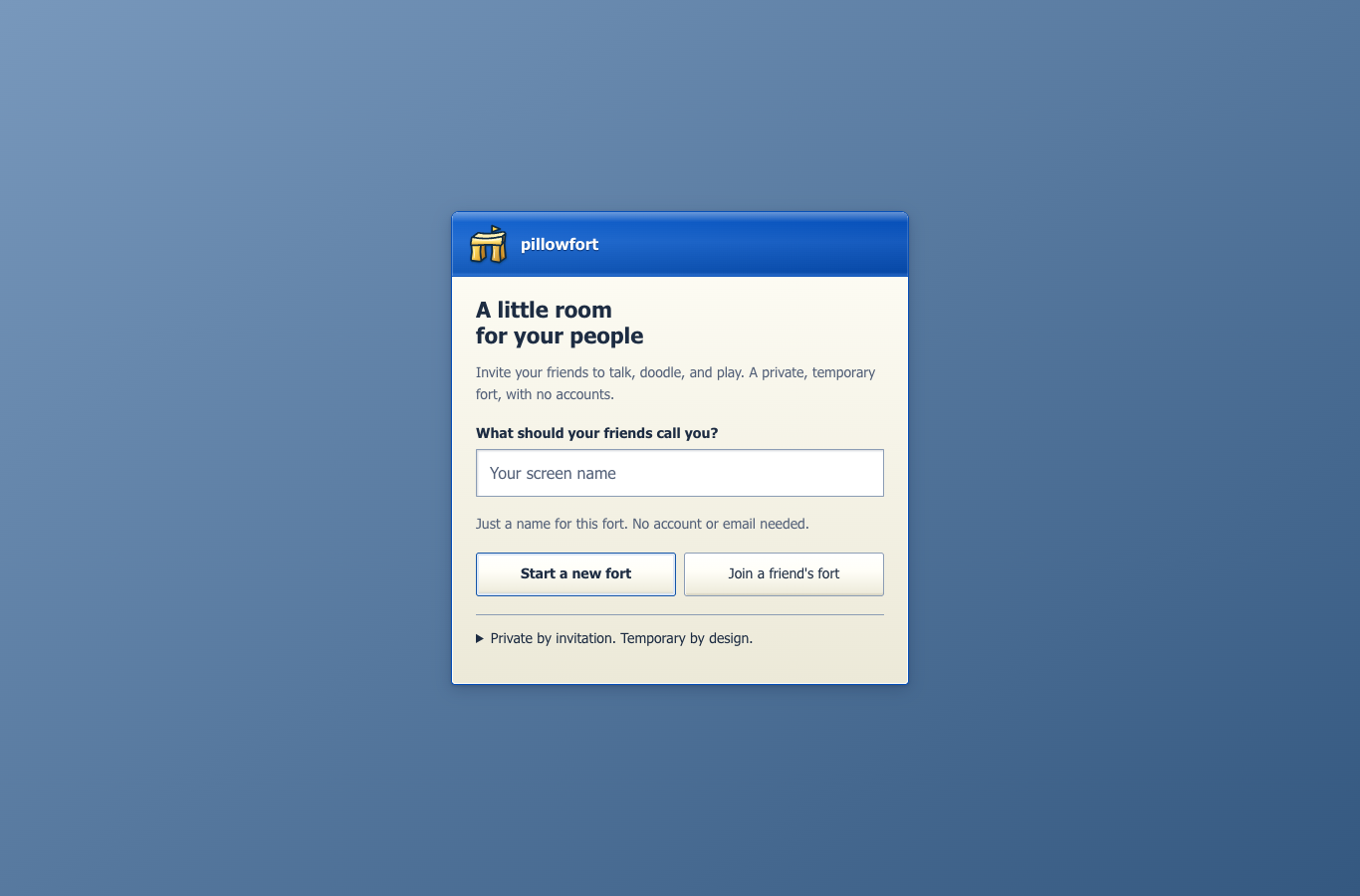
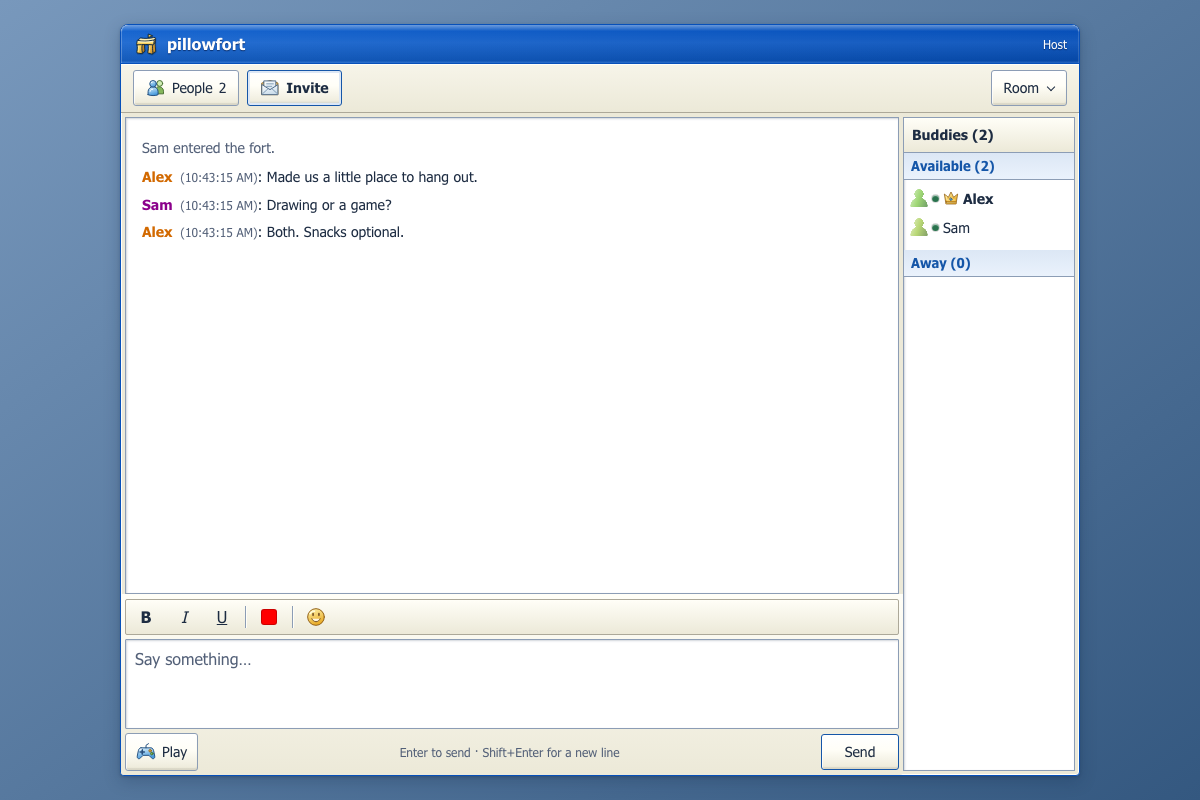
sign on screen chat screen

What This Repo Contains

pillowfort is both:

  • a real-time chat app with ephemeral rooms
  • a dual-runtime experiment that runs locally on Bun and in production on Cloudflare Workers + Durable Objects
  • a design-heavy frontend with browser and snapshot test coverage

The core product idea is simple:

  1. Pick a screen name and save the generated room password.
  2. Create a fort, open Invite, and choose Copy invite link.
  3. Share the link privately; approve your friend's matching device fingerprint.
  4. Chat, doodle, and play small games together.
  5. Knock the fort down, or let it expire.

When the fort is gone, the room is gone.

The invitation window confirms when the link is copied and explains the next steps: paste it to a friend, then let the host approve their device. Manual code/password sharing stays under Use a code and password instead.

Agents can host, too

Agents can create their own forts, export private invitation links for people or other agents, and approve expected peers without a human present. Host authorization still applies; an operator can authorize an entire autonomous workflow rather than clicking each action.

Start with the public agent guide or the Markdown quickstart. Choose local stdio MCP/SDK/CLI, authenticated hosted MCP at https://mcp.pillowfort.xyz/mcp, or native WebMCP inside a supported browser tab. Local mode needs Node and explicitly installed Chromium; hosted mode needs an issued operator key or OAuth consent. Native mode is feature-detected and does not install a polyfill.

  • Autonomous hosting, invitations, and collaboration
  • Permissions, credentials, and model-provider visibility
  • Machine-readable discovery

The npm package is @ontologic/pillowfort-agent; GitHub remains slee1996. The MCP Registry listing is io.github.slee1996/pillowfort version 1.1.0. Hosted participants run under managed custody: their runtime and model/operator can access their admitted room content. Hosted participants do not gain access to unrelated rooms. Read the custody guide before inviting a hosted agent.

The original 1.0.0 download remains archived in its GitHub release. Current installation instructions select the versioned npm package.

Current Feature Set

Core room behavior

  • Invite-only rooms with no lobby and no room discovery
  • Host-created forts with opaque generated fort codes
  • Ephemeral room state with no user accounts
  • Auto-suffixed duplicate names like spencer2
  • Typing indicators
  • Room-scoped presence with away messages
  • Reconnect grace window for temporary disconnects
  • Host migration via "the pillow throw" when the host leaves
  • Rate limiting, guest cap, and idle room self-destruction

Chat and UX

  • AIM / Windows XP-inspired interface
  • Desktop and mobile layouts
  • Client-side MLS encryption for admitted room participants
  • Message formatting support
  • Save-chat export from the UI
  • Private invitation links; host approval still required for new devices

Extras beyond plain chat

  • Shared 1200Γ—800 sketchpad with selectable ink colors and PNG export
  • Pillow Fight vote-to-kick
  • Rock Paper Scissors
  • Tic-Tac-Toe
  • Secret Saboteur
  • King of the Hill
  • Per-room leaderboards and queued game flow
  • Host-paid Fort Pass path for custom codes, longer idle windows, and premium room themes

Ephemeral Model

The app is designed to avoid long-lived room history:

  • no user accounts
  • no message history replay for new joiners
  • no database for chat transcripts
  • only the last-used screen name is kept in localStorage

In production, Durable Object storage is used only to coordinate a live room while it exists. When a fort is destroyed, that room state is cleared.

Architecture

There are two server runtimes with roughly the same behavior:

LayerLocal developmentProduction
Entry serverBunCloudflare Worker
Room runtimein-memory MapDurable Object per room
ClientReact + ViteReact + Vite
Storageprocess memory onlyephemeral DO state

Important contributor note:

  • local room behavior lives in server.ts
  • production room behavior lives in src/room.ts
  • shared validation, game, analytics, and alarm helpers live in src/

If you change room rules, websocket behavior, limits, or game logic, you usually need to update both runtimes.

For a deeper system-level walkthrough, see ARCHITECTURE.md.

For a product, business, and project-lead analysis, see docs/PROJECT_LEAD_BRIEF.md.

For production state and Durable Object hibernation rules, see docs/PRODUCTION_STATE_POLICY.md.

For the beta measurement contract and privacy limits, see docs/BETA_ANALYTICS.md.

For beta release steps, see docs/PUBLIC_BETA_DEPLOY_CHECKLIST.md.

For the first revenue test, see docs/FIRST_PAID_SKU.md.

For paid beta support and refunds, see docs/FORT_PASS_SUPPORT_RUNBOOK.md.

For the current Stripe sandbox setup, see docs/STRIPE_TEST_SETUP.md.

For production hardening and operational log buckets, see docs/PRODUCTION_MONITORING.md.

For weekly beta funnel review, see docs/METRICS_REVIEW.md.

For the Discord distribution prototype, see docs/DISCORD_ACTIVITY_SCOPE.md.

Public API surfaces currently exposed by the app:

  • /ws?room=... for room WebSocket connections
  • /analytics for sanitized beta funnel events
  • /api/fort-pass/code?code=... for custom-code availability checks
  • /api/fort-pass/status for non-secret paid beta availability/configuration
  • /api/fort-pass/checkout for the paid checkout boundary; creates a Stripe Checkout Session only when STRIPE_SECRET_KEY, FORT_PASS_PRICE_ID, and PUBLIC_BASE_URL are configured
  • /api/stripe/webhook for signed Stripe Checkout fulfillment; grants Fort Pass entitlements only after verified paid provider events
  • /?fort_pass=success&code=...&session_id=... for accountless Fort Pass redemption after checkout

Repo Layout

text
pillowfort/
β”œβ”€β”€ client/                React + Vite frontend
β”‚   β”œβ”€β”€ src/
β”‚   β”‚   β”œβ”€β”€ screens/       Home, setup, join, chat, knocked-down screens
β”‚   β”‚   β”œβ”€β”€ components/    XP UI, chat UI, games, overlays, canvas
β”‚   β”‚   β”œβ”€β”€ stores/        Zustand app state
β”‚   β”‚   └── services/      websocket protocol, message handling, chat crypto
β”‚   └── dist/              built assets served by Bun / Cloudflare
β”œβ”€β”€ src/
β”‚   β”œβ”€β”€ index.ts           Cloudflare Worker entrypoint
β”‚   β”œβ”€β”€ room.ts            Durable Object room runtime
β”‚   β”œβ”€β”€ shared.ts          shared limits and sanitizers
β”‚   β”œβ”€β”€ game.ts            shared pure mini-game rules
β”‚   β”œβ”€β”€ analytics.ts       privacy-safe analytics sanitization
β”‚   β”œβ”€β”€ entitlements.ts    host-only paid SKU entitlement helpers
β”‚   β”œβ”€β”€ routes.ts          shared internal and public route constants
β”‚   β”œβ”€β”€ stripe.ts          Stripe checkout and webhook helpers
β”‚   └── alarms.ts          Durable Object alarm schedule helpers
β”œβ”€β”€ server.ts              local Bun server and in-memory room runtime
β”œβ”€β”€ test/                  Bun integration/e2e/visual tests
β”œβ”€β”€ wrangler.toml          Cloudflare config
└── ARCHITECTURE.md        protocol and runtime design notes

Prerequisites

  • Bun
  • Node.js and npm
  • A Cloudflare account only if you want to deploy

Install

This repo is not set up as a workspace. Root and client/ are separate package installs.

bash
# root dependencies
npm install

# client dependencies
cd client
npm install
cd ..

marketing/ is part of this repository with its own package install:

Terminal
npm --prefix marketing ci

See marketing/README.md for its editor, database, and build setup. The main app does not require the marketing package to build.

Running Locally

Build the frontend, then start the Bun server:

Terminal
npm run build
npm run dev

Open http://localhost:3000.

What this does:

  • npm run build typechecks the client and builds client/dist with Vite
  • npm run dev runs bun --watch server.ts
  • server.ts serves the built client and handles websocket room state in memory

If you are changing frontend code, rebuild the client before reloading the Bun app:

Terminal
npm run build

There is also a client-only Vite script:

Terminal
npm run dev:client

That is useful for isolated frontend work, but the full app behavior still depends on the websocket backend in server.ts.

AI agents

Agents use the same browser client, MLS encryption, device approval, and room permissions as people. There is no plaintext bot relay or privileged agent API. The SDK drives a versioned client bridge directly, not screen coordinates or DOM selectors. The bridge is installed only when the app is opened with ?agent=1; that opt-in is not an authorization boundary.

Develop the transport against a local app

Read the full README β†’View source on GitHub β†’

Related MCP Servers

View all in Developer Tools View all alternatives
  • O
    Openapi MCP Server

    Connect any HTTP/REST API server using an Open API spec (v3)

    πŸ’» Developer Tools3 views
    Compare vs Openapi MCP Server β†’
  • M
    MCP Server Docker

    Integrate with Docker to manage containers, images, volumes, and networks.

    πŸ’» Developer Tools3 views
    Compare vs MCP Server Docker β†’
  • D
    Docker MCP

    Docker container management and operations through MCP

    πŸ’» Developer Tools3 views
    Compare vs Docker MCP β†’
  • C
    Claude Task Master

    AI-powered task management system for AI-driven development. Features PRD parsing, task expansion, multi-provider support (Claude, OpenAI, Gemini, Perplexity, xAI), and selective tool loading for optimized context usage.

    πŸ’» Developer Tools8 views
    Compare vs Claude Task Master β†’

Reviews

No reviews yet β€” be the first to share how this listing worked for you.

Frequently Asked Questions about Pillowfort

We don't have a confirmed install command for pillowfort yet, so we don't publish a generated one β€” a guessed package name would point at the wrong package or none at all. Follow the project's own README or setup instructions (https://github.com/slee1996/pillowfort) for the current steps.

AllMCPs Directory Badge

Full Badge Customizer

Showcase your server listing on GitHub or your project documentation. Embed this dynamic SVG badge to highlight official listing status and live engagement.

Badge Style:
Live Dynamic SVG PreviewPillowfort AllMCPs Directory Badge

Markdown (GitHub README)
[![AllMCPs](https://allmcps.com/api/badge/pillowfort?style=directory)](https://allmcps.com/mcp/pillowfort)
HTML Embed
<a href="https://allmcps.com/mcp/pillowfort"><img src="https://allmcps.com/api/badge/pillowfort?style=directory" alt="Pillowfort on AllMCPs" /></a>

Technical Specs & Signals

CategoryπŸ’»Developer Tools
More technical detailsExpand β–Ύ
Last updatedSep 28, 2026
Views0
Unique ViewsTotal visits recorded for this listing page on AllMCPs.
Installs0
Installs & Copy ActionsTotal times users copied install commands or configuration snippets for this server.
28Quality signal: Emerging Β· 28/100How this signal is calculated β–Ύ
Server availabilityNot measured

Not scored for repo-hosted servers β€” we can't reach the running server, only its GitHub page. Hosted MCP endpoints are health-checked live.

Verified ownership8/20
Documentation & tools12/30
Adoption & activity1/15
Community engagement0/10

A guidance signal from public completeness & health data β€” not a user rating. New listings start lower and rise as they add docs, get verified, and grow adoption. Signals we can't observe for a listing are skipped, not counted against it.

β˜… Featured
A

AllMCPs Server

The official MCP server for AllMCPs.com - submit and manage tools directly from your AI. The open directory for MCP servers. Connect Claude, Cursor, Windsurf, and AI agents to databases, tools, files, and APIs. Explore 10,000+ servers. AllMCPs is the premier, open directory for discovering, evaluating, and installing Model Context Protocol (MCP) servers to equip AI agents and LLMs with real-world superpowers.

Explore Server β†’

Own this project?

This directory is pre-filled from public sources. Claim via GitHub README, site badge, or DNS TXT to unlock edit access and the Official badge and attach your website β€” proof is checked automatically, then reviewed by our team.

Free dofollow backlink: add your website and place the AllMCPs badge on it β€” no claim needed. We detect it automatically and keep it verified as long as the badge stays live.

Claim & get free dofollow

Share & Embed

Add our SVG badge (dark/light directory styles) or embeddable widget to your site.

Explore more

More in πŸ’» Developer Tools β†’Best MCP servers for Developers β†’Alternatives to Pillowfort β†’Install in Claude DesktopInstall in CursorInstall in VS CodeSetup guides for all 13 MCP clients
