phpstatic-analysiscode-qualityarchitecturetesting
PHP static analysis MCP server for measuring code quality, architecture, maintainability, dependencies, hotspots, and test coverage.
Quick Install
Automated & IDE SetupCopy the AI prompt to install this server into Claude Code, Cursor, or another agent — or use 1-click editor setup below.
One-click editor setup isn’t available for this listing yet — we don’t have a confirmed install command, and we’d rather show nothing than point your editor at the wrong package or host. Follow the project’s own setup instructions, linked above.
Manual Client & Custom JSON ConfigExpand JSON ▾
No confirmed setup config for this listing yet. We only publish a config block when the install details come from the project itself — its README, its docs, or a verified owner. We haven’t found those for PhpCodeArcheology/PhpCodeArcheology, and we’d rather show nothing than a guess you’d paste into your client. Follow the project’s own setup instructions for the current steps.
Overview
Use cases
Assess overall PHP project health and technical debt
Find complex, coupled, untested, or otherwise problematic code
Prioritize refactoring candidates using metrics and Git hotspots
Trace class dependencies and method change impact
Identify test coverage gaps and map tests to production classes
Key features
60+ metrics for files, classes, methods, and functions
Problem detection with 14 built-in rules
Git churn and hotspot analysis
Dependency graphs and knowledge graph JSON
Test framework detection and Clover coverage analysis
Health scores, refactoring priorities, and impact analysis
Capabilities & Tool Schemas (11)
Inspect callable tools, capabilities, and parameters exposed to AI agents by PhpCodeArcheology.
get_health_scoreOverall code health score, grade, and project statistics
get_problemsCode quality problems, filterable by severity and type
get_metricsDetailed metrics for a specific class, file, or function
get_hotspotsGit hotspots ranked by churn × complexity
get_refactoring_prioritiesRanked refactoring candidates with recommendations
get_dependenciesClass dependency analysis (incoming/outgoing)
Documentation Overview

PhpCodeArcheology



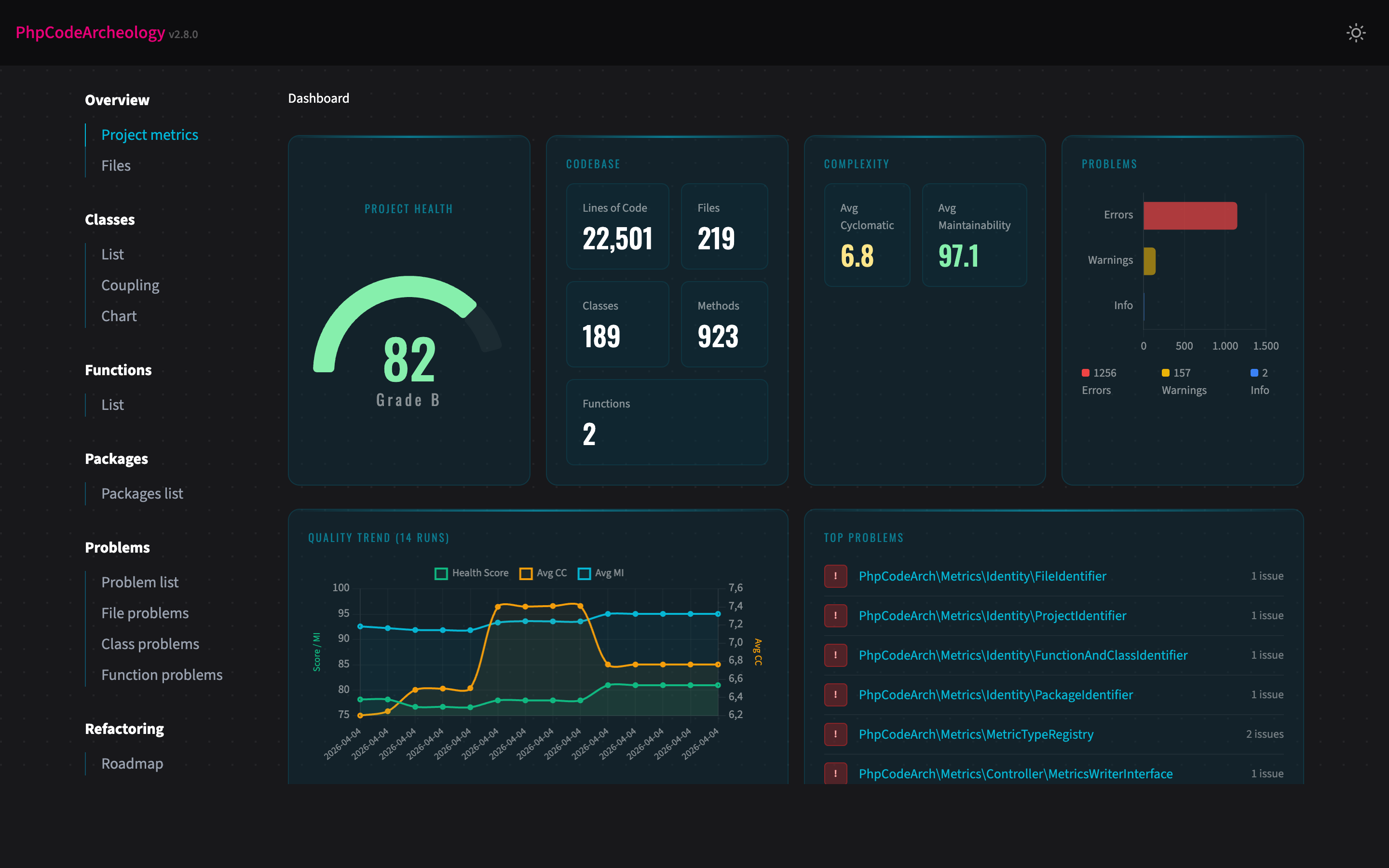
PhpCodeArcheology is a PHP static analysis tool that measures code quality through 60+ metrics including cyclomatic complexity, maintainability index, coupling, and cohesion. It generates comprehensive reports for files, classes, methods, and functions — detecting code smells, identifying hotspots via git churn analysis, and tracking quality trends over time.
Unlike PHPStan or Psalm (which focus on type safety and bug detection), PhpCodeArcheology focuses on architecture and maintainability — giving you the insights you need to understand and improve your codebase structure. Think of it as an alternative to PHPMetrics with deeper git integration, baseline management, and AI-ready output.
Features
- 60+ code quality metrics per file, class, and function — cyclomatic complexity, cognitive complexity, maintainability index, LCOM, Halstead metrics, coupling, instability, and more
- Problem detection with 14 built-in rules — God Class, too complex, dead code, security smells, SOLID violations, deep inheritance, low type coverage, untested complex code
- Test analysis — auto-detects PHPUnit/Pest/Codeception, maps test files to production classes, integrates Clover XML for line-level coverage, highlights untested hotspots
- Git integration — churn analysis, hotspot detection (high churn + high complexity), author tracking
- Source code display — view method source code directly in the HTML report with PHP syntax highlighting and a nesting-depth heatmap that reveals complexity hotspots at a glance (details below)
- Multiple report formats — interactive HTML, Markdown, JSON, SARIF (GitHub Code Scanning), AI summary, Knowledge Graph (JSON)
- Health Score — single 0-100 score with A-F grading for your entire project
- Technical Debt Score — weighted problem score normalised per 100 logical lines of code
- History tracking — trend charts across multiple analysis runs
- Baseline management — track only new problems, ignore existing ones (ideal for legacy projects)
- CI/CD ready — configurable exit codes, SARIF for GitHub Code Scanning, JSON for custom tooling
- Quick mode — fast terminal-only output without report generation
- CLAUDE.md generation — auto-generated project overview for AI coding assistants
- AI integration — native MCP server for AI assistants like Claude Code (details below)
Quick Start
No config file needed — the tool works out of the box. It scans your src directory and creates an HTML report in tmp/report. Open tmp/report/index.html in your browser.
Tip: Add
tmp/reportto your.gitignoreto keep generated reports out of version control.
Table of Contents
- Prerequisites
- Installation
- Using the Composer Plugin
- CLI Options
- Subcommands
- Configuration
- Test Analysis
- Report Types
- Source Code Display
- Knowledge Graph Export
- Key Metrics
- AI Integration (MCP Server)
- Understanding the Health Score
- Memory and Performance
- A Note on Metric Accuracy (v2.7.0)
- Development
- Roadmap
- Contributing
Prerequisites
- PHP 8.2 or higher (works on 8.2, 8.3, 8.4, 8.5)
- Composer
Installation
Global Installation
Make sure ~/.composer/vendor/bin (or ~/.config/composer/vendor/bin) is in your $PATH. Then run from any directory:
Docker
Run against a local project:
This mounts your project into the container and writes the HTML report to ./report/.
PHAR (for legacy codebases)
If your project has dependency conflicts with PhpCodeArcheology's requirements (e.g. an older nikic/php-parser version), download the standalone PHAR from the Releases page. The PHAR ships all dependencies bundled, so it works without touching your project's composer.json.
Use the PHAR when: your project's dependencies collide with PhpCodeArcheology's, you want a CI step without a composer require --dev, or you analyse a legacy codebase where adding dev-deps is risky.
Using the Composer Plugin
PhpCodeArcheology registers itself as a Composer plugin, so you can run the analysis directly via Composer:
When no path is given and no config file exists, it automatically detects your PSR-4 source directories from composer.json. All CLI options are supported:
To create a config file interactively:
CLI Options
| Option | Description |
|---|---|
--report-type=TYPE | Report format: html (default), markdown, json, sarif, ai-summary, graph. Comma-separated for multiple: html,json |
--report-dir=DIR | Output directory (default: tmp/report) |
--quick | Fast analysis with terminal output only, no report generation |
--no-color | Disable coloured terminal output (also respects NO_COLOR env) |
--fail-on=LEVEL | Exit 1 on error or warning (for CI pipelines) |
--generate-claude-md | Generate a CLAUDE.md project overview |
--git-root=DIR | Git repository root (default: current directory) |
--extensions=EXT | File extensions to analyse (comma-separated, default: php) |
--exclude=DIR | Directories to exclude (comma-separated) |
--coverage-file=FILE | Clover XML coverage file from PHPUnit/Pest for line-level coverage data |
--source-code | Include source code with syntax highlighting and nesting heatmap in the HTML report (details below) |
--version | Show version |
Subcommands
init — Create Config File
Interactively creates a php-codearch-config.yaml with sensible defaults. Detects common source directories (src, app, lib) automatically.
compare — Compare Two Reports
Shows a delta view of metrics, problem counts, and lists new/resolved problems. Useful for answering: "Did my refactoring actually help?"
baseline — Track New Problems Only
create saves the current problem set as a baseline. check runs a fresh analysis and reports only problems that are new compared to the baseline. Returns exit code 1 if new errors are found — ideal for CI pipelines on legacy projects.
Configuration
Create a php-codearch-config.yaml in your project root (or use init):
Related MCP Servers
Adoption & maintenance
Factual signals from GitHub, npm, and our automated checks — not a rating.
GitHub stars
90
Stargazers on the source repository.
Last commit
6d ago
Most recent push to the default branch.
Tools exposed
11
Callable tools this server registers over MCP.
Directory activity
2 views
Config copies, upvotes, and views on AllMCPs.
Reviews
No reviews yet — be the first to share how this listing worked for you.
Frequently Asked Questions about PhpCodeArcheology
AllMCPs Directory Badge
Showcase your server listing on GitHub or your project documentation. Embed this dynamic SVG badge to highlight official listing status and live engagement.
Badge Style:
Live Dynamic SVG Preview
Markdown (GitHub README)
[](https://allmcps.com/mcp/phpcodearcheology-phpcodearcheology)HTML Embed
<a href="https://allmcps.com/mcp/phpcodearcheology-phpcodearcheology"><img src="https://allmcps.com/api/badge/phpcodearcheology-phpcodearcheology?style=directory" alt="PhpCodeArcheology on AllMCPs" /></a>