Local-first intent and provenance for Codex, Claude Code, Cursor, Gemini CLI, and MCP agents.
Quick Install
Automated & IDE SetupCopy the AI prompt to install this server into Claude Code, Cursor, or another agent — or use 1-click editor setup below.
Manual Client & Custom JSON ConfigExpand JSON ▾
Client Config & Setup
Choose your client or environment
Target File:
💡 Paste the JSON block into your client's configuration file under mcpServers, then restart the application.
Documentation Overview
Pathmark
Carry intent across agents without turning stale code facts into hidden memory.



What's New — v0.1.15
Pathmark v0.1.15 keeps proactive memory useful without making the conversation noisy:
- relevant memory is still injected automatically before Codex answers;
- raw
recall_memorytool output is now hidden by default, keeping the chat focused on the answer instead of memory plumbing; PATHMARK_CODEX_VISIBLE_RECALL=onrestores the explicit recall trace whenever you want to audit which records were used;- vulnerable transitive
fast-uriandqsversions are replaced by patched releases in the published dependency lock.
See the v0.1.15 release notes or the complete changelog. The npm badge above always shows the currently published version.
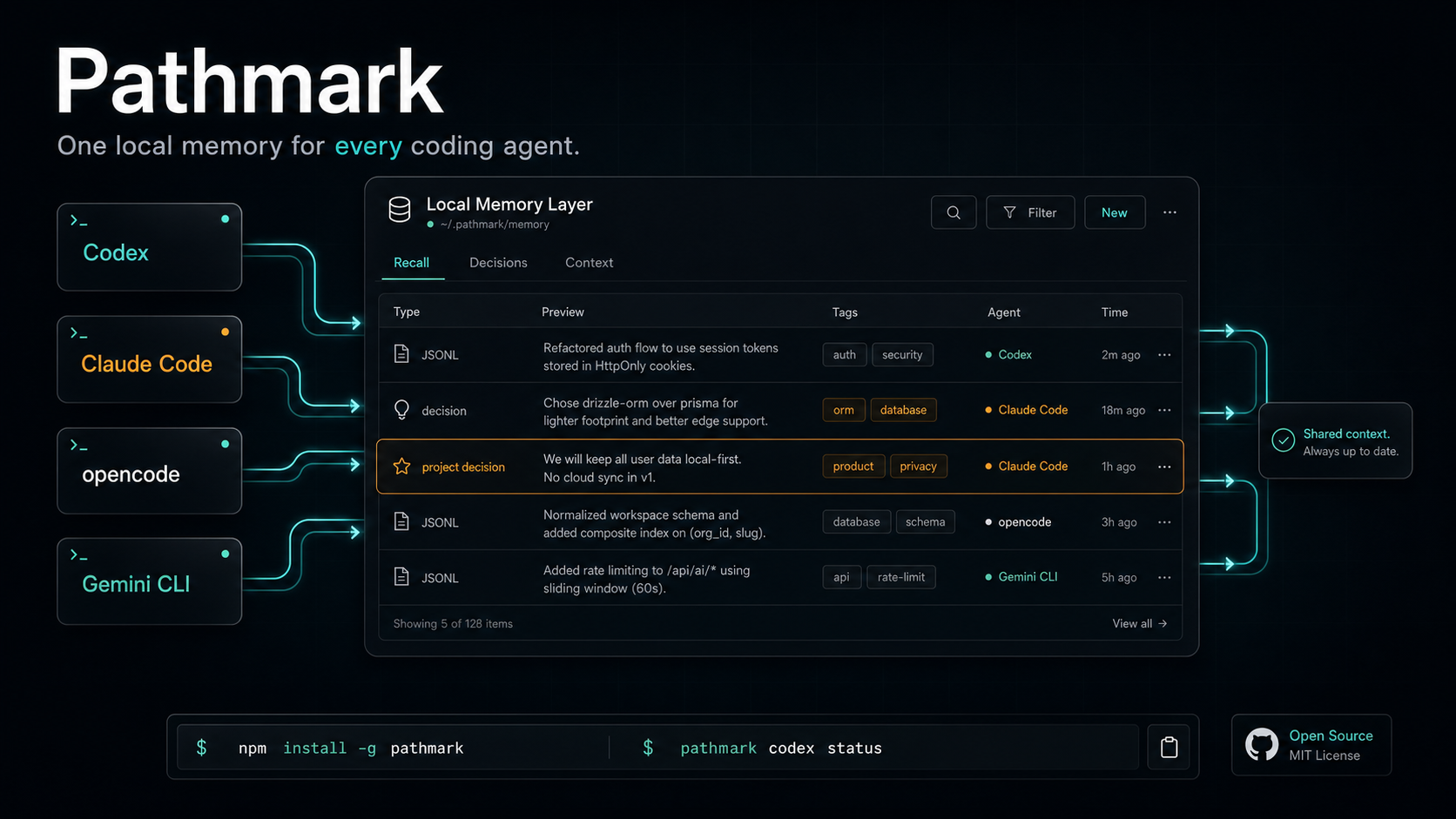
Pathmark gives Codex, Claude Code, opencode, Gemini CLI, Cursor, and any MCP-capable harness one local intent and provenance layer. Save decisions, constraints, preferences, and approved conclusions once. Use them from the next agent without pasting a recap.
Code remembers implementation. Pathmark remembers intent. Repository code, architecture, tests, CI, and intentional agent instructions remain authoritative for how the software works. Raw sessions are searchable evidence, not automatically trusted truth.
Your context stays on disk at ~/.pathmark/memory/memory.jsonl. You do not need an account, hosted database, API key, or vendor backend to start.
OpenAI Build Week 2026
Pathmark is a Developer Tools submission for OpenAI Build Week 2026. The project existed before the challenge, so the submission is deliberately scoped to the meaningful extension built after the submission period opened on July 13, 2026.
During the eligible period, Codex with GPT-5.6 helped audit and extend Pathmark from a working local memory layer into safer long-running developer infrastructure:
- fixed a reproduced multi-process SQLite index race;
- added revision history, superseding, expiration, retention, diagnostics, backup, compaction, and preview-first hard purge;
- added namespace-scoped reads and writes plus default secret redaction;
- added scoped import/export, optional AES-256-GCM portable exports, local hybrid reranking, and portable harness ingestion;
- hardened CI and npm delivery with required CodeQL and dependency review, immutable Action pins, protected tags, OpenSSF analysis, and SLSA provenance.
The primary Codex session for this work is 019f5fc3-d7e6-7b41-8a30-d161c90b98fb. The qualifying release range is v0.1.6 through v0.1.7; the pre-challenge baseline is commit 4c0e87dfdbd2ba4c643abd8b887cc228bdb08b73.
See the Build Week implementation record for the before/after boundary, commit evidence, Codex collaboration details, and a fast judge test.
Why Pathmark
You do not work in one tool. You ask Codex to patch, Claude Code to review, opencode to clean up, and Gemini CLI to challenge the plan. Each tool starts cold unless you carry the context across.
Pathmark gives those tools one place to read and write intent and evidence:
- One local JSONL store across harnesses.
- Standard MCP tools include
remember,search_memory,recall_memory,session_trace,rate_recall,consolidate_memory,audit_memory, and conclusion-firstchat/ask_memory. - Client-side synthesis by default, so your coding agent reads the context and answers.
- Optional Codex CLI, local command, and OpenAI-compatible synthesis modes.
- Plain files you can inspect, back up, delete, or migrate.
Pathmark stays provider-neutral. Codex gets one optional synthesis preset. The core server works with any MCP client that can use local tools.
Pathmark requires Node.js 22.5 or newer.
Cross-Harness Memory
You switch tools during a coding session:
- Codex fixes the failing test.
- Claude Code reviews the patch.
- opencode cleans the diff.
- Gemini CLI challenges the approach.
Pathmark keeps the notes in one store.
Point each harness at the same store:
Install Pathmark in each harness and point them at the same PATHMARK_STORE_DIR. One tool saves raw context with remember or proposes a durable conclusion with create_conclusion; an approved conclusion and raw evidence can then be recovered with recall_memory, search_memory, get_context, or ask_memory.
Pathmark sits below the agents as an intent, evidence, and provenance bus for your coding workflow.
Tools
Pathmark exposes these MCP tools:
| Tool | Purpose |
|---|---|
remember | Save raw searchable evidence. Raw evidence is not treated as durable approved intent. |
create_conclusion | Propose a higher-signal durable conclusion or preference. Approval is required by default before recall. |
search_memory | Search memories and conclusions. |
recall_memory | Transparent recall: returns context plus the exact memory IDs, timestamps, sources, matches, tags, and previews used. Accepts optional tags, exact ids, and compact includeRecords: false output. |
session_trace | Return a bounded chronological audit trail for one session: prompts, exact injected memory IDs, redacted tool inputs/results, and answers. |
rate_recall | Label exact IDs from a chat / ask_memory recall as relevant or irrelevant so audit precision is measured. |
get_context | Return compact context for a task or question. |
list_conclusions | List approved saved conclusions. |
list_pending_conclusions | Review bounded, paginated pending conclusion proposals. |
approve_conclusion | Atomically approve a proposal, optionally correcting text/tags and recording the reviewer. |
reject_conclusion | Retain a rejected proposal in the audit trail while permanently excluding it from recall. |
get_memory_snapshot | Generate a bounded USER/PROJECT/AGENT snapshot from approved canonical conclusions. |
consolidate_memory | Review a bounded unsynthesized evidence batch and optionally stage evidence-backed proposals. Nothing is auto-approved. |
delete_memory | Soft-delete a memory or conclusion by id. |
update_memory | Correct a record while preserving prior versions. |
supersede_memory | Replace an outdated record with a linked current record. |
purge_memory | Preview or apply permanent deletion by id, namespace, tags, source, or date. |
audit_memory | Measure capture-to-recall behavior, unused records, recall age, duplicates, stale raw hits, and whether precision labels exist. |
doctor_memory | Report duplicates, deleted/expired records, conclusions, and index health. |
compact_memory | Preview or apply deduplication, retention, and physical cleanup with an automatic backup. |
backup_memory | Create a point-in-time canonical JSONL backup. |
export_memory | Export a scoped mergeable JSONL bundle, optionally encrypted. |
ask_memory | Return an approved-conclusion answer or scoped raw context, exact provenance, and a recall ID for feedback. |
chat | Chat-compatible alias for ask_memory, including multi-intent conclusion retrieval and explicit abstention. |
get_config | Show local store configuration. |
Quick Start
Then add the MCP server to your client.
Prefer npm for normal installs. To test the current GitHub main branch directly:
Generate a setup snippet for your harness:
See docs/compatibility.md for Codex, Claude Code, opencode, Gemini CLI, OpenClaw, Hermes Agent, Grok CLI, Kimi, GLM, and generic MCP setups.
Codex
Codex users can also enable auto-capture:
When you want the visible "what memory did you use?" entry in Codex, Claude Code, Cursor, opencode, Gemini CLI, Grok-compatible MCP hosts, or any other MCP harness, call the recall_memory tool before answering. Codex session start injects an approved conclusion snapshot. Before non-trivial prompts, Codex recalls approved conclusions first and uses fresh scoped raw evidence only as a bounded fallback. recall_memory remains the portable visible trace across harnesses.
Claude Code
opencode / Gemini CLI
Use the generated snippets:
Claude Desktop
Add this to your Claude Desktop MCP config:
Cursor
Add the same command to Cursor's MCP server settings:
Related MCP Servers
Reviews
No reviews yet — be the first to share how this listing worked for you.
Frequently Asked Questions about Pathmark
AllMCPs Directory Badge
Showcase your server listing on GitHub or your project documentation. Embed this dynamic SVG badge to highlight official listing status and live engagement.
Badge Style:
Live Dynamic SVG Preview
Markdown (GitHub README)
[](https://allmcps.com/mcp/pathmark)HTML Embed
<a href="https://allmcps.com/mcp/pathmark"><img src="https://allmcps.com/api/badge/pathmark?style=directory" alt="Pathmark on AllMCPs" /></a>Technical Specs & Signals
CategoryDeveloper Tools
27Quality signal: Emerging · 27/100How this signal is calculated ▾
Server availabilityNot measured
Not scored for repo-hosted servers — we can't reach the running server, only its GitHub page. Hosted MCP endpoints are health-checked live.
Verified ownership8/20
Documentation & tools11/30
Adoption & activity1/15
Community engagement0/10
A guidance signal from public completeness & health data — not a user rating. New listings start lower and rise as they add docs, get verified, and grow adoption. Signals we can't observe for a listing are skipped, not counted against it.
Own this project?
This directory is pre-filled from public sources. Claim via GitHub README, site badge, or DNS TXT to unlock edit access and the Official badge and attach your website — proof is checked automatically, then reviewed by our team.
Free dofollow backlink: add your website and place the AllMCPs badge on it — no claim needed. We detect it automatically and keep it verified as long as the badge stays live.
Claim & get free dofollowShare & Embed
Add our SVG badge (dark/light directory styles) or embeddable widget to your site.