3d-printingorcaslicermanufacturingslicing
Control a running OrcaSlicer to load models, edit settings, slice plates, and analyze print results.
Quick Install
Automated & IDE SetupCopy the AI prompt to install this server into Claude Code, Cursor, or another agent — or use 1-click editor setup below.
Automated check passed— started and listed 44 tools correctly (7d ago).
Manual Client & Custom JSON ConfigExpand JSON ▾
Client Config & Setup
Choose your client or environment
Target File:
💡 Paste the JSON block into your client's configuration file under mcpServers, then restart the application.
Overview
Use cases
Load and arrange 3D models on a print plate
Tune slicer settings and object-specific overrides
Check profiles for flow, temperature, geometry, and cooling issues
Compare slicing variants by time, filament, and warnings
Analyze feature-level print time and filament usage
Key features
Read and write roughly 800 OrcaSlicer settings
Manage presets, including selection, editing, saving, renaming, and deletion
Load, transform, duplicate, delete, orient, and arrange models
Slice plates, monitor jobs, retrieve G-code, and inspect warnings
Return slice breakdowns by feature role
Render the plate from multiple camera angles
Capabilities & Tool Schemas (44)
Inspect callable tools, capabilities, and parameters exposed to AI agents by Orcaslicer MCP.
get_statusSnapshot of the current OrcaSlicer session: app and project info, the active print/filament/printer presets with which of their keys are modified (dirty), whether the last slice is still valid, and whether a slice is running. Read-only. Call it first to orient before slicing or editing, to see which settings drift from their preset, or to check slice_result_valid before trusting earlier stats.
get_configRead merged config values (optionally filtered to `keys`).
set_configApply config changes to the active project as unsaved overrides, atomically: if any key is invalid the whole batch is rejected and nothing changes. Returns {applied, errors}. Overrides show as modified in get_status, are not written to any preset file, and revert if the preset is reselected; call save_preset to persist them. Each apply invalidates the last slice, so re-slice afterwards. It does not run the physics gate, so for temperature, speed, acceleration, or flow keys run check_profile_physics before trusting the result. To edit a stored preset rather than the live project, use edit_preset.
sliceStart slicing the current plate in the background and return immediately, without waiting for the result. The reply is 'started' (a slice began), 'already_valid' (the plate is unchanged and the last result still holds), or a conflict if a slice is already running. Fire-and-forget: poll get_slice_status for progress and stats, or cancel_slice to stop it. Prefer slice_and_wait when you want the finished stats back in one call.
get_slice_statusState of the current or most recent slice: state (slicing, done, error, or idle), stats (print time and filament use when done), and any warnings or errors. Read-only. Poll this after slice to follow progress and read the result; 'idle' means no slice has run or it was cancelled. For only the pass/fail warnings use get_slice_warnings; for a per-feature time and filament breakdown use get_slice_breakdown.
get_slice_warningsJust the warnings/errors from the last (or current) slice, plus validity - the fast 'did anything go wrong' check and the way to confirm a fix cleared. NOTE: only as complete as the API exposes. On the current fork build this may report valid with an empty warnings list even when the GUI shows a plate-boundary toast - the fork must populate the plater warning list (tracked as the fork batch). Once it does, this reports the real warnings with no change here.
Documentation Overview
OrcaSlicer MCP




Let Claude work alongside you in a real, running OrcaSlicer. It loads models, arranges the plate, tunes settings, slices, and reads the result back as numbers you can question: which feature ate the print time, what a setting actually does, whether a profile breaks your printer's physics. Every change lands in the GUI while you watch, so the slicer stays yours and you get better at it as you go.
This package is an MCP server: it bundles no model and talks to nothing but OrcaSlicer, at an address you configure, localhost by default. The model comes from your MCP client. If that client uses a hosted one, your conversation goes there as any chat does; your models, profiles, and gcode stay on the machine running the slicer. Point the client at a local model and nothing leaves at all.
What it can do
Knowing what the settings mean
An offline settings reference ships with the package, carrying the authoritative label, tooltip, type, range, enum, and default for each key, so describe_setting, search_settings, and compare_settings answer from OrcaSlicer's own source instead of guessing. consult composes curated slicing knowledge and your saved notes by topic, symptom, or goal.
check_profile_physics is a deterministic gate. It overlays proposed changes on the live config, runs flow, temperature, geometry, and cooling math, then returns ok, warnings, or blocked. Accelerations your printer cannot reach and speeds past the flow ceiling get caught before they reach a print.
Settings
Read and write any of roughly 800 OrcaSlicer settings on the live config, for the whole plate or scoped narrower: get_config, set_config, find_config_keys, set_layer_height, set_height_range for a band of layers, and set_object_config for one object's overrides.
Presets
list_presets, select_preset, get_preset_config, edit_preset, save_preset, rename_preset, delete_preset.
Slicing, and reading the result back
slice, slice_and_wait, apply_and_slice, cancel_slice, get_slice_status, get_slice_warnings, get_gcode.
get_slice_breakdown returns per-feature time, filament, and flow. OrcaSlicer shows the same information in the legend beside its preview, sized for a screen; this returns it as numbers an assistant can compare and act on:
It answers which feature is eating the time without slicing repeatedly to find out. A prediction_check rides along and flags any role where the profile's requested speed got throttled at the flow ceiling.
compare_slices slices the current plate under several named variants and returns one comparison, so "what does layer height actually cost me?" is a single question rather than four manual slices. It applies each variant over your original config, restores it when done, and hands back a verdict plus a table with every delta already worked out:
It only crowns a winner when one variant genuinely beats the rest on time, filament, and warnings; when they trade off, it names the fastest, the lightest, and where the warnings landed, and leaves the choice in front of you. Pass detail=True for the per-feature split of each variant.
Models and the plate
load_model (.stl, .obj, .3mf, plus .step and .stp on fork v2.3.2-mcp.3 and later), list_objects with each object's world-space bounding box and an on_plate flag, transform_object, duplicate_object, delete_object, arrange_plate, auto_orient, check_placement, diagnose_plate, get_job_status.
Plate renders
render_plate hands back a PNG, so the assistant can look instead of inferring from coordinates. A rotation reads instantly as a picture and barely at all as three Euler angles. Seven camera angles cover iso, top, front, left, right, rear, and bottom. Use frame="plate" to stand back for the whole bed, or frame="object" to lean in on the part. Requires fork v2.3.2-mcp.4 or later.
view="editor" | view="preview" |
|---|---|
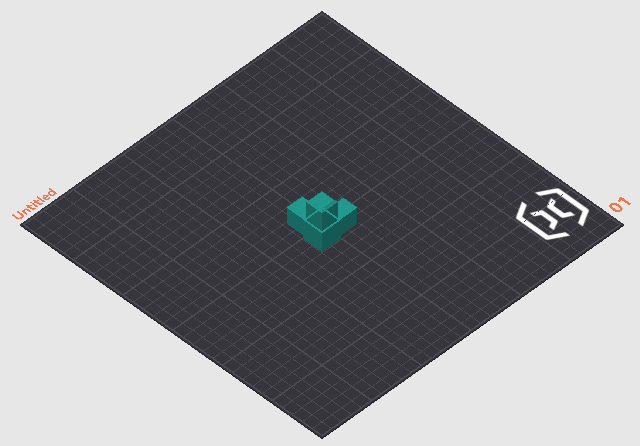 | 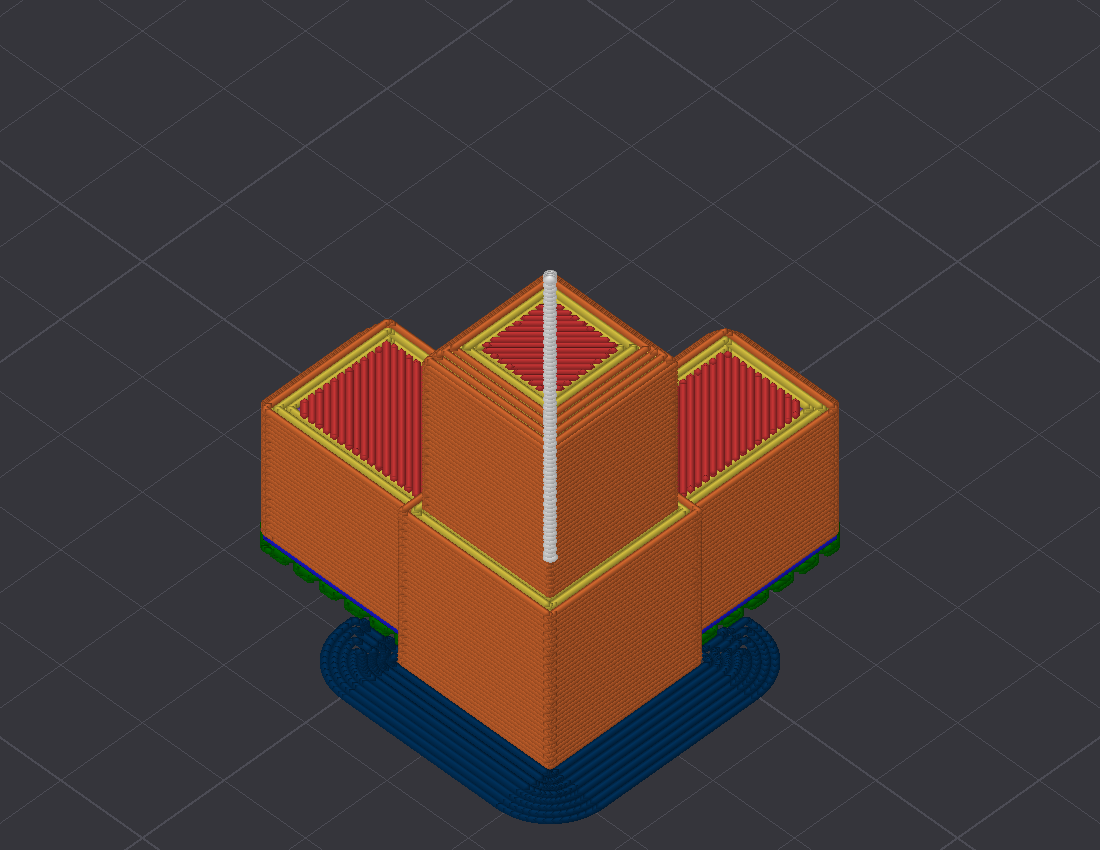 |
| Your models on the bed. Answers orientation, plate contact, and first-layer footprint. | Sliced toolpaths coloured by feature role, so support placement is plain to see. |
describe_plate answers the same questions as numbers and one sentence per object, computed from the sliced G-code: how the part stands (flat, tilted, or on an edge or corner, from first-layer contact against its widest layer), the first-layer footprint as islands, where overhang extrusions concentrate by height band, where support stands and where it touches the part, and which side the seams sit on, checked against seam_position. It exists because an assistant reads a sentence more reliably than a picture. Copies of an object are aggregated; the islands still show each copy's contact patch. On a plate of three tilted connector copies it reads: "Body4.stl (3 copies) stands on an edge or corner: first-layer contact is 5% of its widest layer, in 3 islands of about 50 mm2 each. Overhang extrusions concentrate at Z 0 to 10 mm. Support is present from Z 0.4 to 56.8 mm, standing in 3 places and touching the part in 7 zones. Seams align on the +Y side (91%), matching seam_position=back."
Live state and memory
get_status and watch_events report what the slicer is doing now. remember persists machine, user, and project facts for later sessions, as plain local files in ~/.orcaslicer-mcp/notes/, relocatable with ORCA_MCP_NOTES_DIR.
Learning from real prints
save_gcode saves the last successful slice's G-code and records the model, geometry, and full settings snapshot that produced it. Set PRINT_OUTCOMES_DIR to say exactly where; otherwise it writes into the shared print-outcomes folder (~/projects/_shared/print-outcomes/) if that folder already exists on this machine, and into ~/.orcaslicer-mcp/ (the same folder remember uses) if it does not. recall_prints reads the shared folder before you slice, so the assistant can say how past prints of this model actually went: success, cancelled, or the verdict you gave it, and the settings used.
Recording and recall both depend on a companion service, the klipper-mcp server, whose klipper-mcp-capture process writes the real print result into the same store once your printer finishes the job, and whose start_print tool uploads the file save_gcode saved under the same filename. Without that companion, save_gcode still writes the G-code file (its folder is created on first use even so) but records nothing, and recall_prints returns available: false and does nothing else. Neither tool makes the server contact you on its own; the assistant only sees new outcomes when it calls recall_prints again in a later session.
What you need
Stock OrcaSlicer ships without a control API, so a matching build does that half of the job.
- The OrcaSlicer MCP build. OrcaSlicer 2.3.2 with an embedded local API, token-authenticated and bound to localhost until you say otherwise. Get it from the releases page. If no binary is up for your platform yet, build the
remote-apibranch from source. - This package (
orcaslicer-mcp). The MCP server that connects your AI client to that build.
Updating: take new builds from the releases page, never from inside the app. The in-app updater offers stock OrcaSlicer, which drops the control API. Builds mcp.2 and later turn that updater off for you. On an older build, click Skip this Version if a "new version available" prompt appears.
Quickstart
Install uv first, because it provides the uvx command that runs the server. One line does it: curl -LsSf https://astral.sh/uv/install.sh | sh on macOS and Linux, or irm https://astral.sh/uv/install.ps1 | iex in PowerShell on Windows.
Related MCP Servers
Adoption & maintenance
Factual signals from GitHub, npm, and our automated checks — not a rating.
GitHub stars
55
Stargazers on the source repository.
Last commit
3d ago
Most recent push to the default branch.
Availability
100%
Our rolling endpoint + install checks that succeeded.
Install check
Passed
Our sandbox started it and listed its tools.
Tools exposed
44
Callable tools this server registers over MCP.
Directory activity
2 views
Config copies, upvotes, and views on AllMCPs.
Reviews
No reviews yet — be the first to share how this listing worked for you.
Frequently Asked Questions about Orcaslicer MCP
AllMCPs Directory Badge
Showcase your server listing on GitHub or your project documentation. Embed this dynamic SVG badge to highlight official listing status and live engagement.
Badge Style:
Live Dynamic SVG Preview
Markdown (GitHub README)
[](https://allmcps.com/mcp/orcaslicer-mcp)HTML Embed
<a href="https://allmcps.com/mcp/orcaslicer-mcp"><img src="https://allmcps.com/api/badge/orcaslicer-mcp?style=directory" alt="Orcaslicer MCP on AllMCPs" /></a>Technical Specs & Signals
CategoryIndustrial & IoT
PricingFree
11/12 checks healthy over the last 46d
72Quality signal: Great · 72/100How this signal is calculated ▾
Server availability25/25
Verified ownership10/20
Documentation & tools30/30
Adoption & activity7/15
Community engagement0/10
A guidance signal from public completeness & health data — not a user rating. New listings start lower and rise as they add docs, get verified, and grow adoption. Signals we can't observe for a listing are skipped, not counted against it.
Supply-chain signal
No high-severity advisories surfaced by our automated scan.
Critical 0High 0Medium 0Low 0
Scanned 5d ago via OSV.dev · orcaslicer-mcp (PyPI)
Own this project?
This directory is pre-filled from public sources. Claim via GitHub README, site badge, or DNS TXT to unlock edit access and the Official badge — proof is checked automatically, then reviewed by our team.
Free dofollow backlink: add your website and place the AllMCPs badge on it — no claim needed. We detect it automatically and keep it verified as long as the badge stays live.
Claim & get free dofollowShare & Embed
Add our SVG badge (dark/light directory styles) or embeddable widget to your site.